description: Discover why Gemini 3 Pro Image returns multiple images and learn how to extract the final, high-quality result correctly.
If you're calling the Gemini 3 Pro Image API and showing users the first image returned, you might notice the results look "off"—awkward composition, rough details, or even incomplete frames. This isn't a decline in model performance; it's simply picking the wrong image. The first image is often just the model's "thought draft," while the final, polished version is actually the last image in the response.
Based on official Google AI documentation, this article breaks down the Gemini 3 image-thinking mechanism, explains why an invocation might return 2–3 images, shows how to identify the final output using the part.thought field and thought_signature, and provides the correct extraction code in Python, Node.js, and cURL. All examples are based on APIYI's transparent proxy—our API proxy service preserves the native Gemini response structure, so developers just need to follow official guidelines.
Core Principles of the Gemini 3 Image-Thinking Mechanism
Before diving into the code, let’s clear up the fundamental question: why does a single request return multiple images?
Why You Can't Turn Off Gemini 3 Image-Thinking
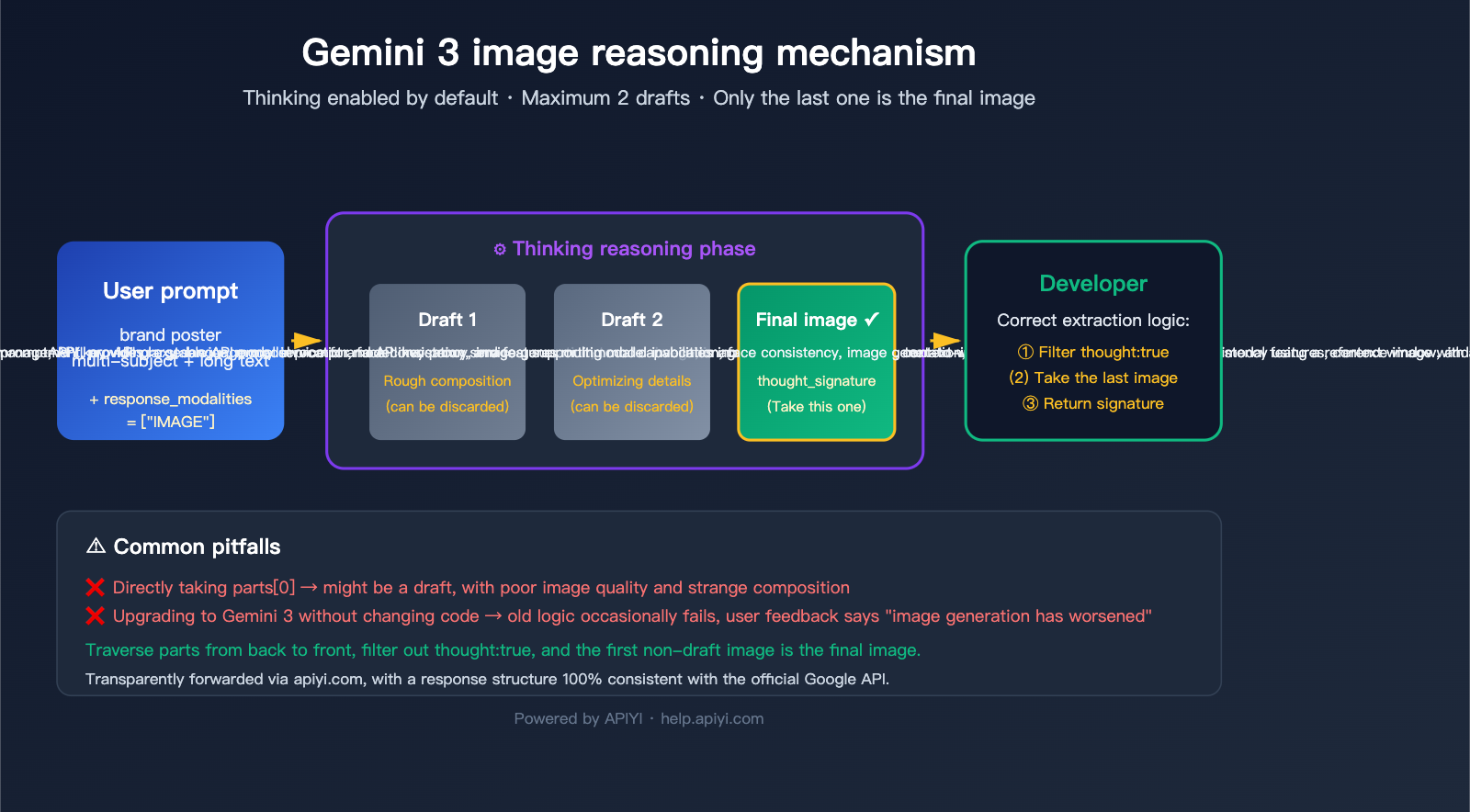
Google introduced a "Thinking" mechanism in gemini-3-pro-image-preview (marketed as Nano Banana Pro) that shares the same roots as their text models. Before generating the final image, the model tests composition, layout, and text rendering using up to 2 temporary images—much like a designer sketching before finalizing a piece.
Official documentation highlights three key facts:
| Fact | Explanation |
|---|---|
| Enabled by Default | The Thinking feature is mandatory at the API level; there’s no toggle. |
| Max 2 Drafts | The model may generate up to 2 temporary "thought" images, but not always. |
| The Last Image is Final | The final image in the sequence is the actual intended result. |
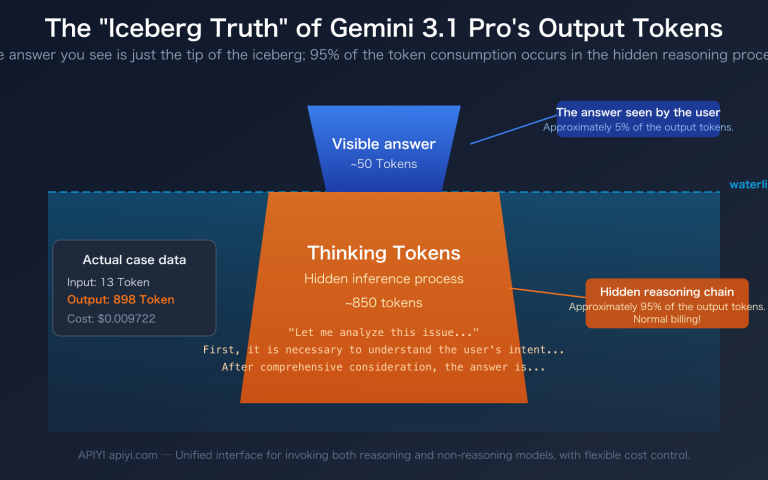
| Billed as Normal | Even if you don't request the "thought" content, thinking tokens are consumed and billed. |
In short, receiving multiple images is the default behavior—it's not a bug, it's a design feature. The challenge isn't about disabling it, but about correctly selecting the final image.
🎯 Architectural Insight: The Gemini 3 image-thinking mechanism shares the same underlying engine as the Gemini 3 Pro text model's reasoning chain. This explains why Nano Banana Pro significantly outperforms the older version in long-text rendering and multi-subject consistency. When using the APIYI API proxy service, all thinking behaviors remain identical to hitting Google directly; the proxy layer doesn't strip away any reasoning data.
Common Pitfalls for Developers
The classic "oops" moment in our user community looks like this:
Call API → Get Response → Find the 'parts' array → Directly pick the image in 'parts[0]' → Display to user
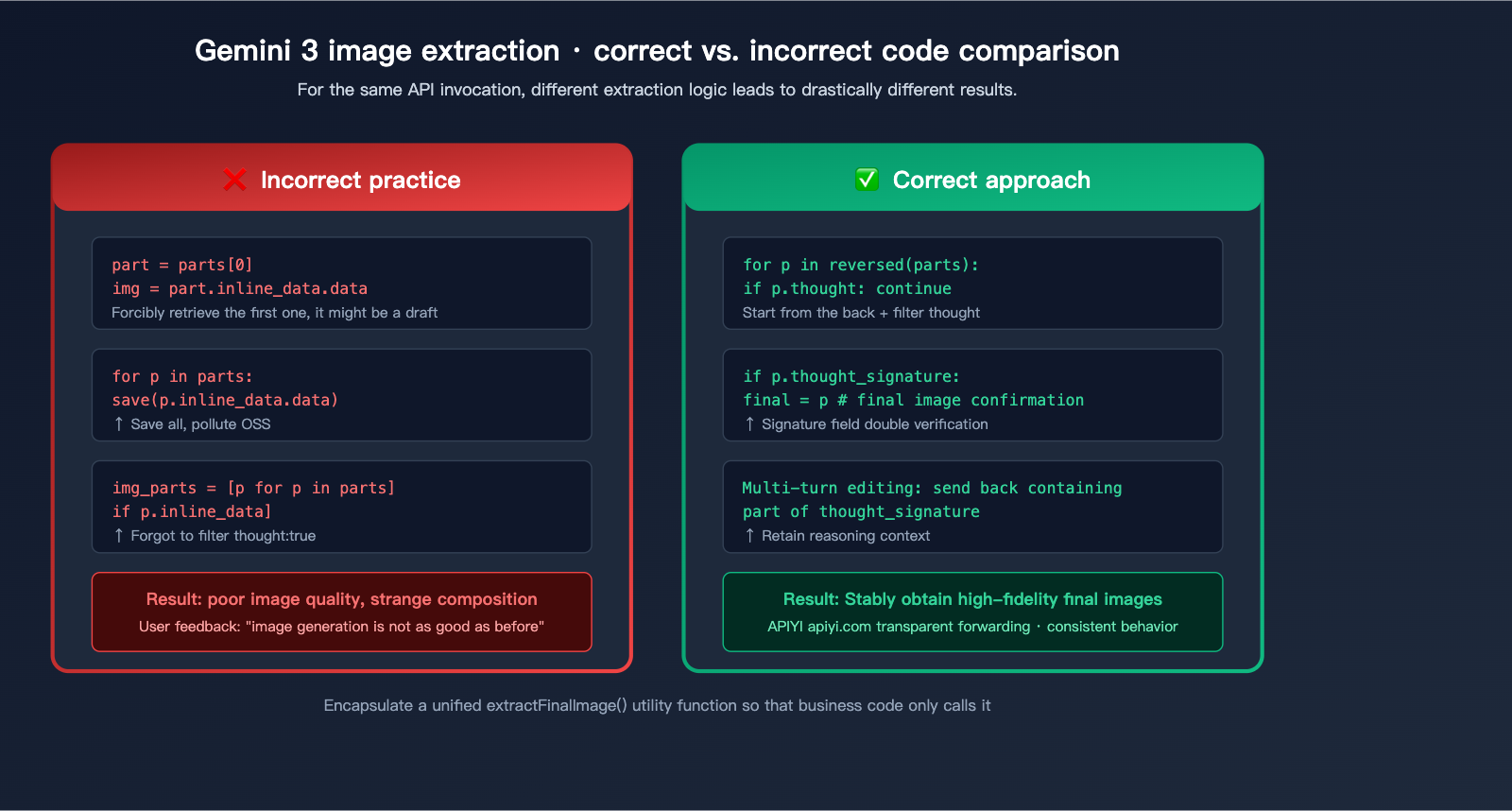
This pseudocode worked fine in the days of the old Nano Banana (Gemini 2.5 Flash Image) because it typically returned just one image. Once you upgrade to Gemini 3 Pro Image, that same code will treat a "thought draft" as the finished product—leaving the user with an incomplete or strangely composed result that doesn't match their prompt.
This pitfall is tricky because:
- It doesn't happen every time: For simple prompts, the model might not trigger "thinking," returning only a single image.
- No error messages: The response structure is valid, so accessing
parts[0]doesn't throw an error. - Images are rendered: Users think the model is underperforming, when in reality, they're just picking the wrong frame.
title: "Understanding Gemini 3 Image Thinking: A Deep Dive into Response Structures"
description: "A comprehensive guide on handling Gemini 3's image generation response structure, avoiding common bugs, and implementing robust code patterns."
Understanding what an API call might return is the prerequisite for handling it correctly.
The Complete parts Array in a Single Call
When the thinking process of Gemini 3 Pro Image is triggered, response.candidates[0].content.parts might look like this:
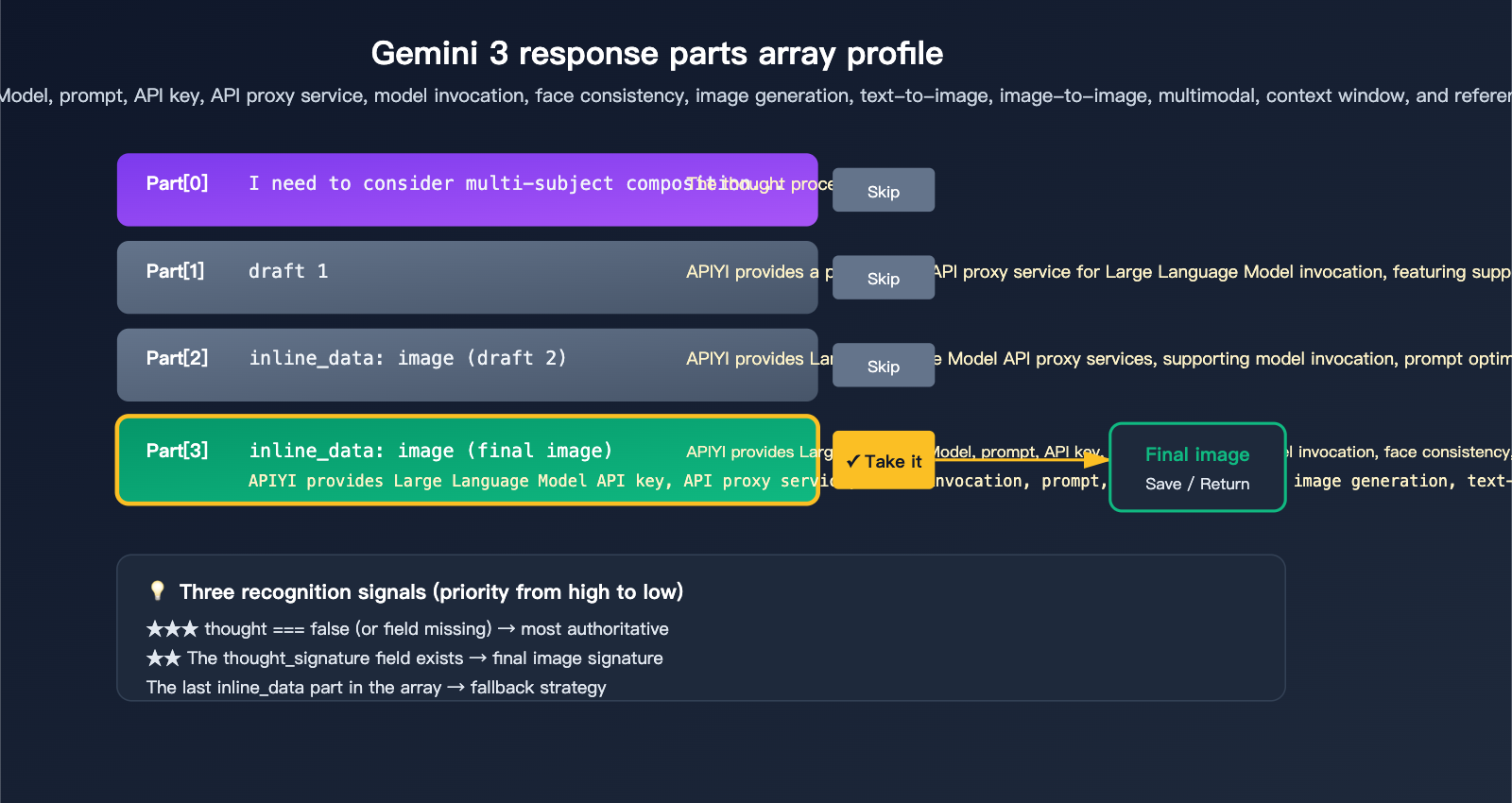
candidates[0].content.parts = [
  { text: "I need to consider the composition...", thought: true },
  { inline_data: { mime_type: "image/png", data: "..." }, thought: true },   // Draft 1
  { inline_data: { mime_type: "image/png", data: "..." }, thought: true },   // Draft 2
  { inline_data: { mime_type: "image/png", data: "..." }, thought_signature: "..." }  // Final Image
]
Misunderstanding this array is the root cause of most bugs. Remember these 3 rules to write correct code.
3 Official Signals to Identify the Final Image
Google provides 3 signals for identifying the final image, use them in order of priority:
| Priority | Signal | Description | Reliability |
|---|---|---|---|
| ★★★ | part.thought === false (or missing) |
Clearly marked as non-thinking content | Highest |
| ★★ | Contains thought_signature field |
Only the final image has a signature | High |
| ★ | The last inline_data in the array |
Official docs confirm "the last one is the final one" | Fallback |
The most robust approach is to combine these: prioritize the thought field, use thought_signature as a fallback, and use the last inline_data as a final safety net.
thinking_level Differences in Gemini 3.1 Flash Image
It's important to note that not all Gemini image models behave the same way:
| Model | Thinking Default | Configurable thinking_level |
Use Case |
|---|---|---|---|
gemini-3-pro-image-preview |
Forced On | ❌ Not adjustable | High-fidelity, pro assets |
gemini-3-flash-image |
Default minimal | ✅ minimal / high | Real-time interaction, bulk gen |
gemini-2.5-flash-image |
No thinking | – | Legacy compatibility |
Gemini 3.1 Flash lets you manually raise the thinking_level for more refined compositions or lower it to minimal for faster response times—a flexibility you don't get with the Pro version.
🎯 Recommendation: For consumer-facing image generation features, we recommend using
gemini-3-flash-image+thinking_level=minimalby default (faster, cheaper), and switching togemini-3-pro-image-previewwhen users toggle "High-Quality Mode." On the APIYI (apiyi.com) platform, you can switch between these models seamlessly using the same API key and base URL.
Correct Handling Code for Gemini 3 Image Thinking
Now that the theory is clear, let's look at the code. The examples below are based on transparent proxying through APIYI.com—your existing code designed for Google AI Studio will work perfectly by just updating the base_url to the APIYI address and swapping the API key.
Correct Implementation for Python SDK
from google import genai

client = genai.Client(
    api_key="sk-your-apiyi-key",
    http_options={"base_url": "https://vip.apiyi.com/v1beta"}
)

response = client.models.generate_content(
    model="gemini-3-pro-image-preview",
    contents="A cyberpunk Shiba Inu, standing under neon signs, 4K high definition",
    config={"response_modalities": ["IMAGE"]}
)

# ✅ Correct: Filter out all thought parts and keep only the final image
for part in response.parts:
    if getattr(part, "thought", False):
        continue  # Skip thinking drafts
    if hasattr(part, "as_image"):
        image = part.as_image()
        if image:
            image.save("final_output.png")
            break  # The first non-thought image is the final one
Anti-pattern (A common mistake users make):
# ❌ Incorrect: Picking the first image might grab a draft/thinking stage
image_part = response.parts[0]
image_bytes = image_part.inline_data.data
# The generated image might be an unfinished piece
Correct Implementation for Node.js / TypeScript
import { GoogleGenAI } from "@google/genai";

const ai = new GoogleGenAI({
  apiKey: process.env.APIYI_KEY,
  httpOptions: { baseUrl: "https://vip.apiyi.com/v1beta" }
});

const response = await ai.models.generateContent({
  model: "gemini-3-pro-image-preview",
  contents: "A cyberpunk Shiba Inu, standing under neon signs, 4K high definition",
  config: { responseModalities: ["IMAGE"] }
});

const parts = response.candidates?.[0]?.content?.parts ?? [];

// ✅ Iterate backwards: the first non-thought image is the final one
let finalImage: string | null = null;
for (let i = parts.length - 1; i >= 0; i--) {
  const p = parts[i];
  if (p.thought === true) continue;
  if (p.inlineData?.mimeType?.startsWith("image/")) {
    finalImage = p.inlineData.data;
    break;
  }
}

if (finalImage) {
  fs.writeFileSync("final.png", Buffer.from(finalImage, "base64"));
}
cURL + jq Command Line Version
If you're using shell scripts, you can filter the output with jq:
curl -sS https://vip.apiyi.com/v1beta/models/gemini-3-pro-image-preview:generateContent \
  -H "x-goog-api-key: $APIYI_KEY" \
  -H "content-type: application/json" \
  -d '{
    "contents": [{
      "parts": [{"text": "A cyberpunk Shiba Inu"}]
    }],
    "generationConfig": {"responseModalities": ["IMAGE"]}
  }' | jq -r '
    .candidates[0].content.parts
    | map(select(.thought != true))
    | map(select(.inlineData.mimeType | startswith("image/")))
    | last.inlineData.data
  ' | base64 -d > final.png
This jq expression does three things: filters out thought: true, ensures the mimeType is an image, and selects the last one—perfectly aligning with the 3 official identification rules.
🎯 Code Review Checklist: During code reviews, whenever you see code handling Gemini image responses, ensure there is a filter for
thoughtcontent. We recommend wrapping this in a sharedextractFinalImage()utility function used by all your business logic to prevent inconsistencies. By using the APIYI.com platform, you can fully test this code locally and deploy with confidence.
Advanced Topics in Gemini 3 Image Reasoning
Multi-turn Editing Requires thought_signature
Nano Banana Pro supports "continuous editing"—where a user might say "change the background to the beach" and then follow up with "make the dog look happy." However, the official guidelines clearly state that you must pass the thought_signature from the previous turn back to the model in multi-turn conversations. If you don't, the model loses the inference context, and output quality will drop significantly.
Here's the correct way to handle multi-turn requests:
# First turn
response1 = client.models.generate_content(
    model="gemini-3-pro-image-preview",
    contents="A Shiba Inu running in the park"
)

# Extract the final image part object (which includes the thought_signature)
final_part = next(
    p for p in response1.parts
    if not getattr(p, "thought", False) and hasattr(p, "inline_data")
)

# Second turn: Add the entire final_part back into the history
response2 = client.models.generate_content(
    model="gemini-3-pro-image-preview",
    contents=[
        {"role": "user", "parts": [{"text": "A Shiba Inu running in the park"}]},
        {"role": "model", "parts": [final_part]},  # Includes thought_signature
        {"role": "user", "parts": [{"text": "Change the background to a beach sunset"}]}
    ]
)
Viewing the Reasoning Process (For Debugging)
If you want to see what the model is "thinking," you can enable include_thoughts:
from google.genai import types

response = client.models.generate_content(
    model="gemini-3-pro-image-preview",
    contents="A complex brand advertising poster prompt...",
    config=types.GenerateContentConfig(
        response_modalities=["IMAGE"],
        thinking_config=types.ThinkingConfig(
            include_thoughts=True
        )
    )
)

# Print the reasoning process
for part in response.parts:
    if getattr(part, "thought", False):
        if part.text:
            print(f"[Thought] {part.text}")
        elif hasattr(part, "as_image"):
            img = part.as_image()
            img.save(f"draft_{id(part)}.png")  # Save the draft
This is incredibly useful when troubleshooting why the output isn't quite right—looking at the drafts helps you infer which part of the prompt the model misunderstood.
Thinking Token Billing Logic
Billing for Gemini 3 Pro Image is something developers need to watch closely:
| Token Type | Unit Price (per Million) | Mandatory? |
|---|---|---|
| Input prompt | $2 | ✅ Yes |
| Output image/text | $12 | ✅ Yes |
| Thinking reasoning | Billed as output tokens | ✅ Yes (Cannot disable) |
This means that even if you only want the final image and don't care about the reasoning process, thinking tokens will still be generated and billed. What you can save on is whether you receive the reasoning content (include_thoughts parameter), but you cannot save on the fact that the reasoning process itself is executed.
🎯 Cost Optimization Tip: For simple scenarios (like generating product images or illustrations), use
gemini-3-flash-imagewiththinking_level=minimal; the cost is significantly lower than the Pro version. Only move to Pro for complex tasks (like maintaining multi-subject consistency or high-fidelity text rendering). When calling via APIYI (apiyi.com), we recommend enabling usage monitoring to compare the cost/quality ratio between the two models for your specific business case before finalizing your production configuration.
Troubleshooting Gemini 3 Image Reasoning
Problem 1: Consistently getting low-quality images
Diagnostic steps:
# Print the thought field for all parts
for i, part in enumerate(response.parts):
    is_thought = getattr(part, "thought", False)
    has_image = hasattr(part, "inline_data")
    has_sig = hasattr(part, "thought_signature")
    print(f"Part {i}: thought={is_thought}, image={has_image}, signature={has_sig}")
If the output contains multiple parts with image=True, that's a classic case of the model "returning multiple images." Check your code to see if you're pulling from a part index that isn't the final one.
Problem 2: No thought field in the response structure
Possible cause: You might be using the raw JSON from the REST API. While camelCase is thought, some SDK versions might convert fields to snake_case. You should be prepared to handle both:
def is_thought(part):
    return getattr(part, "thought", None) or \
           getattr(part, "is_thought", None) or \
           (isinstance(part, dict) and part.get("thought", False))
Problem 3: Want to save all images (for debugging)
Here's the official recommended full traversal method:
for i, part in enumerate(response.parts):
    if not hasattr(part, "inline_data"):
        continue
    is_draft = getattr(part, "thought", False)
    suffix = "draft" if is_draft else "final"
    filename = f"gemini_output_{suffix}_{i}.png"
    with open(filename, "wb") as f:
        f.write(part.inline_data.data)
    print(f"Saved: {filename}")
title: Adapting Gemini 3 Image Thinking to Real-World Business Scenarios
description: A practical guide on integrating Gemini 3's advanced image-thinking capabilities into your production workflows, covering frontend display, storage optimization, and performance trade-offs.
tags: [Gemini 3, AI, Image Generation, APIYI, Tech Guide]
Beyond the theory and boilerplate code, there are some important details to keep in mind when applying these models to different business scenarios.
Scenario 1: Displaying Generated Images on the Web Frontend
When your frontend receives a base64 image, you'll need to convert it to the data:image/png;base64,xxx format for display. Note: Don't perform thought filtering on the frontend. Always let your backend return a pre-filtered, clean result. Otherwise, the frontend would have to handle the complex Gemini response structure:
// ❌ Not recommended: Frontend handling raw Gemini responses
const parts = await apiCall();
parts.forEach(p => {
  if (!p.thought) showImage(p.inlineData.data);
});

// ✅ Recommended: Unified filtering on the backend, frontend consumes the final image
// Backend API returns: { "image": "base64-string" }
const { image } = await fetch("/api/generate").then(r => r.json());
imgEl.src = `data:image/png;base64,${image}`;
Scenario 2: Image Generation + Saving to OSS/CDN
When saving bulk-generated images to object storage, use a hash to prevent redundant writes:
import hashlib, base64

def save_to_oss(bucket, base64_data):
    binary = base64.b64decode(base64_data)
    fname = f"gemini3/{hashlib.md5(binary).hexdigest()}.png"
    bucket.put_object(fname, binary)
    return fname

final_b64 = extract_final_image(response)
if final_b64:
    url = save_to_oss(my_bucket, final_b64)
Be sure to upload only the final image. Keeping the thought process logs will just clutter your OSS and waste storage costs.
Scenario 3: Handling Streaming Responses Correctly
Gemini 3 image generation supports streaming, where the thought process arrives first and the final image arrives later. For streaming scenarios, we recommend an "overwrite as you go" approach:
stream = client.models.generate_content_stream(
    model="gemini-3-pro-image-preview",
    contents="..."
)

current_image = None
for chunk in stream:
    for part in chunk.parts:
        if getattr(part, "thought", False):
            continue  # Skip the draft thoughts
        if hasattr(part, "inline_data") and part.inline_data:
            current_image = part.inline_data.data  # Overwrite each time, keeping the last one

# Once the stream ends, current_image contains the final result
🎯 Streaming Optimization: For a better user experience, you could stream the "thought" content to the frontend to show a "Loading…" preview, then replace it with the final image once it arrives—this "progressive rendering" is very popular in consumer-facing products. APIYI (apiyi.com) provides full support for the Gemini SSE streaming protocol, ensuring the frontend experience is identical to a direct connection.
Linking Gemini 3 Image Thinking to Business Metrics
Quantifying Quality Improvements
According to official Google data and community testing, enabling "thinking" significantly boosts image quality:
| Metric | Gemini 2.5 Flash Image | Gemini 3 Pro Image (thinking) | Improvement |
|---|---|---|---|
| Long Text Rendering Accuracy | ~70% | ~95% | +35% |
| Multi-Subject Consistency (5 people) | ~60% | ~90% | +50% |
| Complex Composition Adherence | ~75% | ~92% | +22% |
| First-Image Usability Rate | ~80% | ~95% | +18% |
The trade-off is a 40-80% increase in response time and a 20-40% rise in token costs. Is it worth it? That depends on your use case:
- Professional Design Assets/Advertising Material: The quality boost far outweighs the cost, so it's highly recommended.
- UGC/Bulk Content: Consider using Flash with
thinking_level=minimalfor a better balance. - Real-time Interaction/Chatbots: Prioritize response speed; Flash remains the better choice.
🎯 A/B Testing Tip: Don't just rely on gut feelings when choosing a model. We recommend creating separate API keys for each model on APIYI (apiyi.com), splitting your traffic 50/50, and comparing real user satisfaction metrics (like-rates, regeneration rates, and conversion rates) after 7 days—the data will show you which model is truly worth the investment.
FAQ: Common Issues with Gemini 3 Image Thinking
Q1: Why does my image generation code start producing "half-finished results" after upgrading to Gemini 3?
Because Gemini 3 Pro Image enables thinking by default, the response might contain 1-3 images. Your legacy code is likely grabbing parts[0], but parts[0] could be a rough draft. The fix: Update your code to filter out thought: true and grab the last image that isn't a thought draft.
Q2: Does the Gemini 3 image API on the APIYI platform also exhibit thinking behavior?
Exactly the same. APIYI (apiyi.com) uses a transparent proxy architecture. All thought, thought_signature, and inline_data fields from the native Google response are passed through as-is, with no stripping or modification. You can point your code, which originally connected directly to Google AI Studio, to APIYI without changing a single line; the response structure is fully compatible.
Q3: Can I use a parameter to force it to return only the final image?
No. The official documentation clearly states: "This feature is enabled by default and cannot be disabled in the API." However, you can set include_thoughts: false to ensure the response doesn't include the thinking text—but image drafts may still exist, so filtering at the code level is mandatory.
Q4: Thinking has increased the response latency; how can I optimize it?
Consider three approaches:
- For simpler scenarios, switch to
gemini-3-flash-image+thinking_level=minimal. - When the requirements aren't complex, write more precise prompts to prevent the model from "overthinking."
- Use streaming responses so users can see the drafting process as it happens, with the final image arriving last.
Q5: How can I determine if thinking actually occurred in the response?
Check the response.usage_metadata.thoughts_token_count field—if it's greater than 0, thinking was indeed triggered. This value also helps you estimate actual inference costs.
Q6: Can I construct or modify the thought_signature myself?
No. The thought_signature is an encrypted credential issued by the Google backend, used to verify context continuity in multi-turn conversations. A self-constructed signature will be rejected by the server. When editing in multi-turn mode, simply pass back the entire part containing the signature.
Q7: How do I handle the uncertainty brought by thinking when batch-generating 100 images?
We recommend processing each response independently and logging the thoughts_token_count. You can monitor token usage at the call granularity in the APIYI (apiyi.com) console to identify and review requests with abnormally high thinking costs. For batch scenarios, consider using the Batch API (supported by Gemini 3 Pro Image), which cuts costs in half and allows for asynchronous response handling.
Gemini 3 Image Thinking: Summary and Checklist
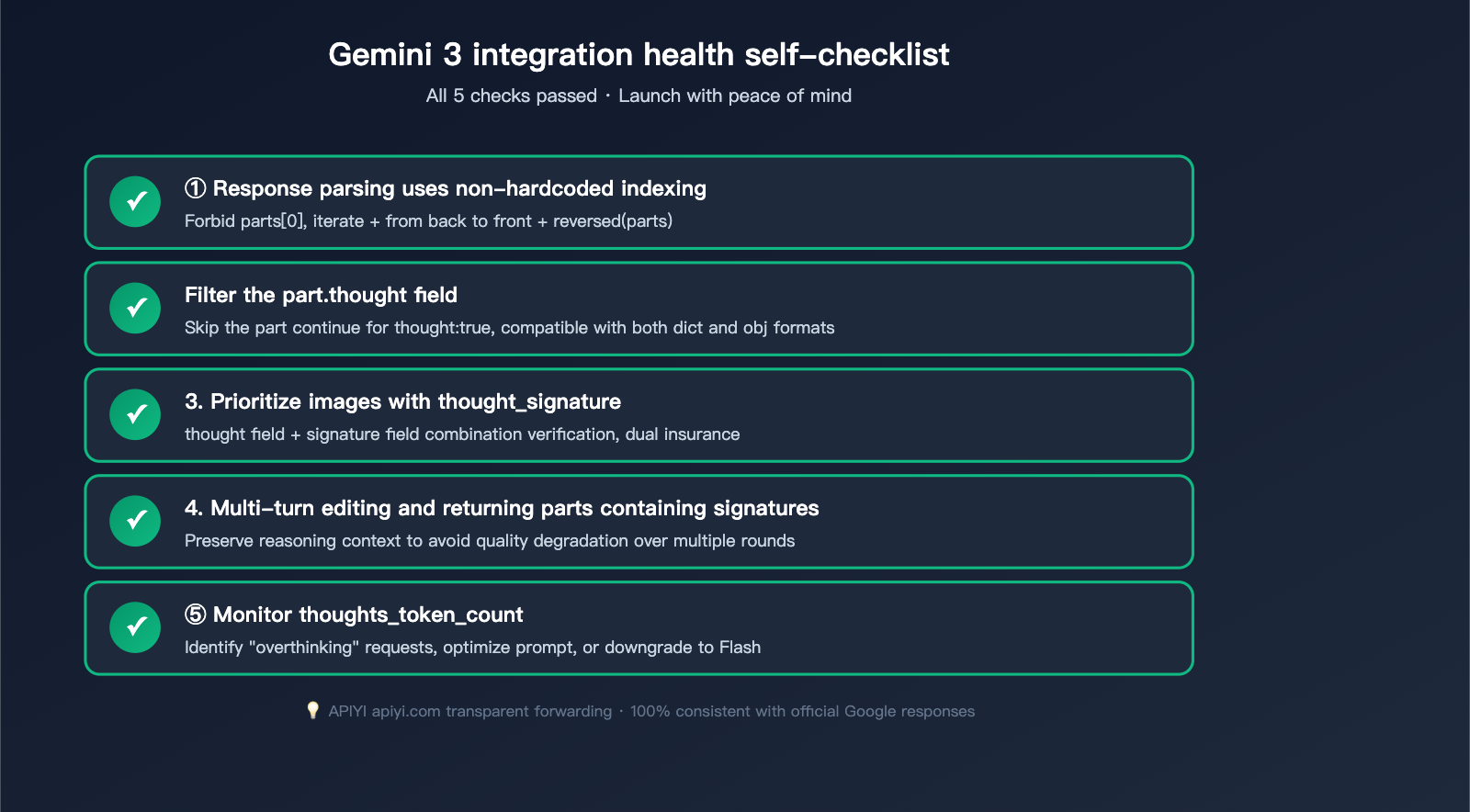
To recap, Gemini 3 image thinking brings a major quality boost but completely changes the response structure. Here's a one-sentence summary:
✅ Core Principle: Never blindly grab
parts[0], always filter outthought: true, and always extract the lastinline_dataas the final image.
Migration Checklist
If your project is upgrading from Gemini 2.5 to Gemini 3, check the following:
- Replace Model ID:
gemini-2.5-flash-image→gemini-3-pro-image-previeworgemini-3-flash-image - Rewrite Response Parsing: Change all instances of
parts[0]to "filter out thought + take the last one". - Handle New Signature: Retain the part containing
thought_signaturefor multi-turn conversations. - Verify Billing Expectations: Keep in mind that thinking tokens are counted as output, which may increase costs by 20-40%.
- Regression Testing: Prepare 20+ sample prompts and compare output between Gemini 2.5 and Gemini 3 to avoid unexpected results.
Quick Integration Template
Use this code as your team's "Golden Template" for all business logic calls:
def extract_final_image(response):
    """Safely extract the final image from a Gemini 3 Image response"""
    parts = response.candidates[0].content.parts if response.candidates else []

    # Iterate from back to front to find the first non-thought image
    for part in reversed(parts):
        if getattr(part, "thought", False):
            continue
        if hasattr(part, "inline_data") and part.inline_data:
            mime = part.inline_data.mime_type or ""
            if mime.startswith("image/"):
                return part.inline_data.data  # base64 bytes

    return None  # Final image not found, retry needed
🎯 Final Advice: The Gemini 3 image thinking mechanism is a double-edged sword—used correctly, you get world-class image generation quality; used incorrectly, you get "random" draft output. We recommend connecting via APIYI (apiyi.com) and running a regression test with 10-20 real business prompts to ensure your code correctly extracts the final image in various thinking-triggered states before going to production. The platform supports the full Gemini 3 model lineup, with API responses identical to Google's official output.
Author: APIYI Tech Team | For more AI image generation tutorials, visit help.apiyi.com