Author's Note: Google AI Studio has slashed its free tier by 50%–92%, limiting Gemini 2.5 Pro to just 100 requests per day. This article outlines three solutions to bypass these limits, including using the APIYI platform for unrestricted access.
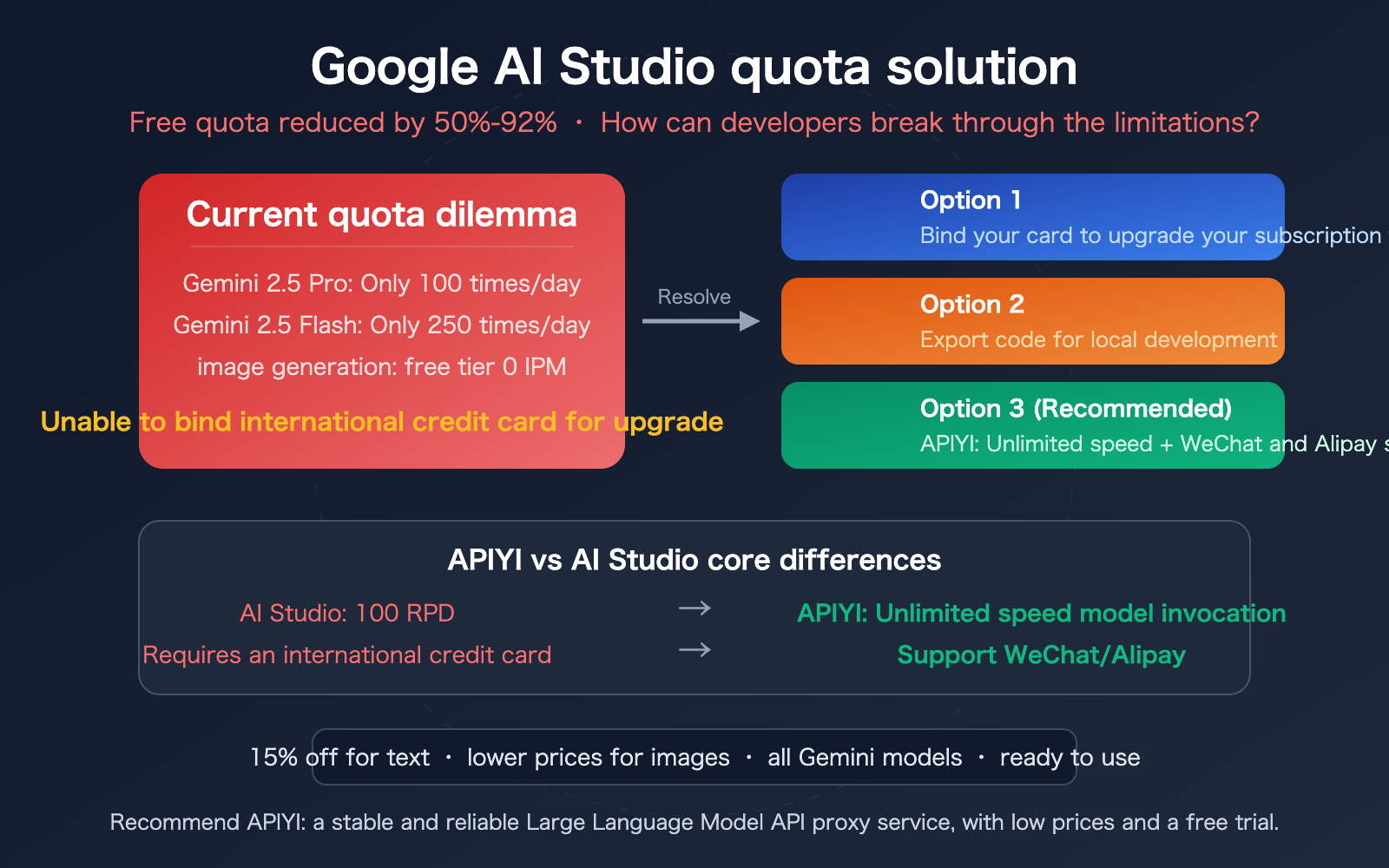
The quota issues in Google AI Studio are becoming a major headache for developers everywhere. On December 7, 2025, Google overnight cut the Gemini API free tier by 50%–92%, impacting tens of thousands of developer projects globally. Today, Gemini 2.5 Pro is limited to just 100 requests per day (RPD), and 2.5 Flash is capped at 250—for any application with even a modest user base, this quota can be exhausted in just a few hours.
To make matters worse, many developers struggle to link international credit cards to upgrade to the paid tier. This article provides 3 solutions to break through AI Studio limits, helping you choose the best path based on your specific needs.
Core Value: After reading this, you’ll have a complete roadmap for upgrading your tier, migrating your code, and integrating third-party platforms to permanently resolve your AI Studio quota issues.
AI Studio Status: Gemini API RPD and RPM Limits
| Model | Free Tier RPM | Free Tier RPD | Tier 1 RPM | Tier 1 RPD | Note |
|---|---|---|---|---|---|
| Gemini 2.5 Pro | 5 | 100 | 150-300 | Significantly Higher | Most powerful, strictest limits |
| Gemini 2.5 Flash | 10 | 250 | 150-300 | Significantly Higher | Best for cost-efficiency |
| Gemini 2.5 Flash-Lite | 15 | 1,000 | Higher | Higher | Lightweight model |
| Gemini 3 Pro Image | — | — | Limited | 250 | Image generation requires Tier 1 |
Core Pain Points of AI Studio Limits
Google's Gemini API limit system is controlled across four dimensions: RPM (Requests Per Minute), TPM (Tokens Per Minute), RPD (Requests Per Day), and IPM (Images Per Minute). Exceeding any one of these dimensions will trigger a 429 error, even if the others are well within their limits.
The RPD quota resets at midnight Pacific Time (4:00 PM Beijing Time). This means if you burn through your daily quota before 4:00 PM, you'll have to wait until the next reset to continue.
The massive cuts on December 7, 2025, made things even tougher—Google slashed free quotas by 50%–92%, citing "fraud and abuse prevention." The RPD for Gemini 2.5 Pro dropped from its previous higher level to just 100 requests per day, which is barely enough for projects currently in development.
The bigger issue is that many developers cannot link an international credit card to upgrade to Tier 1. Google Cloud's paid tier requires a valid international payment method, which remains a significant hurdle for many developers.
🎯 Pro Tip: If you encounter a "429 Too Many Requests" error, it means you've hit a limit. Note that text and image model limits are calculated independently, but both are subject to RPD constraints.
AI Studio Rate Limit Solution 1: Upgrade to Paid Tier
If you have an international credit card, the most straightforward way is to upgrade to Google's paid tier:
| Tier | Requirements | RPM Increase | RPD Limit | Best For |
|---|---|---|---|---|
| Free | None | 5-15 | 100-1,000 | Testing and learning |
| Tier 1 | Link credit card | 150-300 | Significant increase | Small projects |
| Tier 2 | $250+ spend + 30 days | 1,000+ | 10,000 | Mid-sized apps |
| Tier 3 | $1000+ spend + contact sales | 4,000+ | Virtually unlimited | Enterprise |
Upgrade Steps: Go to AI Studio → Dashboard → Usage and Billing → Billing tab → Set up Billing → Link your Cloud Billing account. Once you've linked your card, Tier 1 usually takes effect immediately.
However, this approach has some clear limitations:
- It requires an international credit card (Visa/Mastercard), which can be hard for developers in some regions to obtain.
- Tier 2 requires a cumulative spend of $250 and a 30-day waiting period.
- Tier 3 requires contacting the Google sales team.
- The billing is based on token usage, which can make costs less transparent.
AI Studio Rate Limit Solution 2: Export Code for Local Development
AI Studio lets you export your chats and prompts as code to run in a local environment. This is perfect for application development needs:
Step 1: Fine-tune your prompt and parameters in AI Studio.
Step 2: Click "Get Code" to export it as Python, JavaScript, or other formats.
Step 3: Modify and run the code in your local IDE.
import openai

# Modify the AI Studio code to call via APIYI
client = openai.OpenAI(
    api_key="YOUR_API_KEY",
    base_url="https://vip.apiyi.com/v1"
)

response = client.chat.completions.create(
    model="gemini-2.5-pro",
    messages=[{"role": "user", "content": "Hello, please introduce yourself."}]
)
print(response.choices[0].message.content)
Recommendation: After exporting your code, I highly recommend using Cursor as your development tool—it's super beginner-friendly. By using an API key from APIYI (apiyi.com), you can call the entire Gemini model family locally without worrying about rate limits.
AI Studio Rate Limit Solution 3: Unlimited Access via APIYI (Recommended)
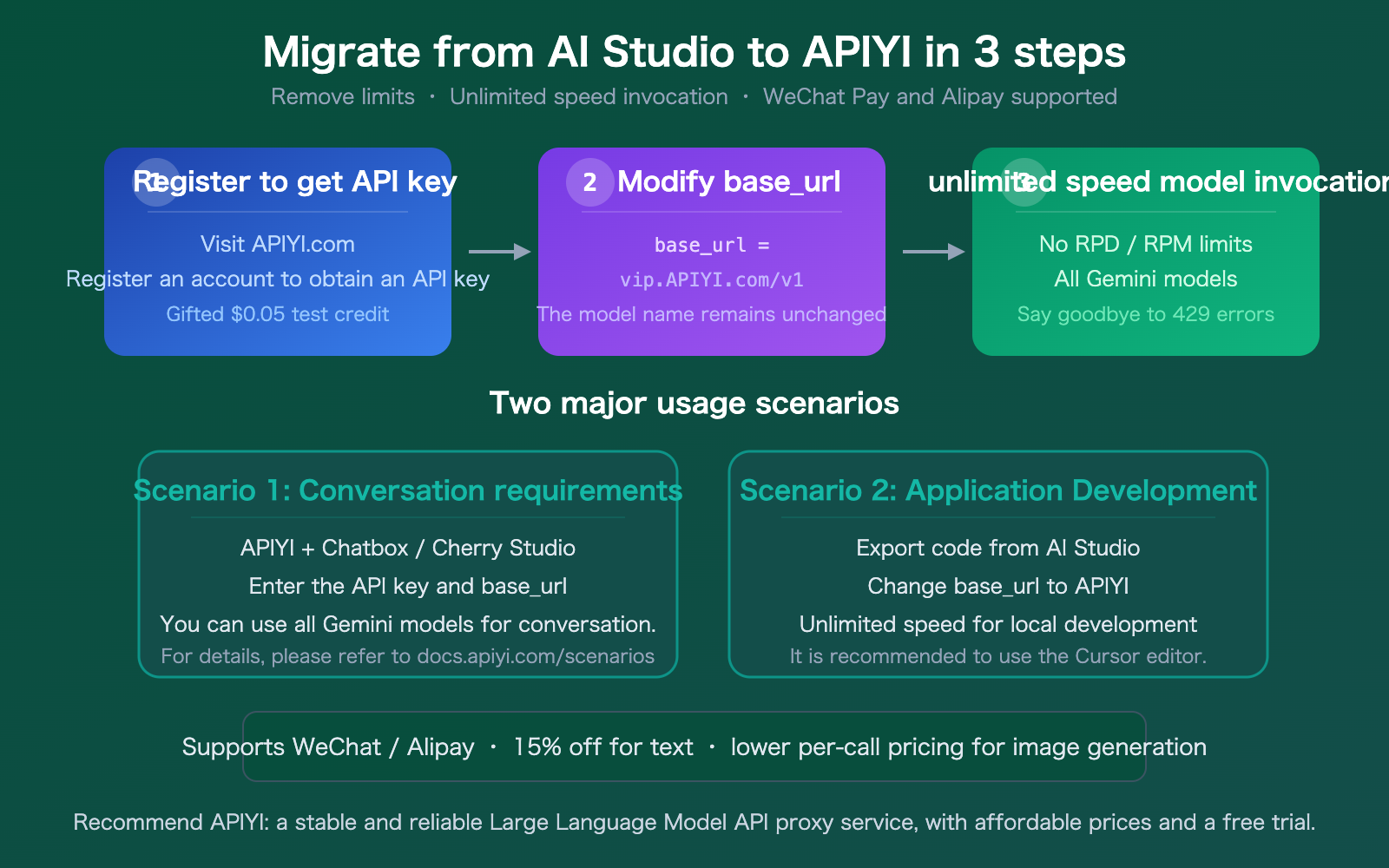
For developers who can't link an international credit card or simply need higher usage limits, connecting via the APIYI platform is the most practical solution.
Key Advantages of Accessing Gemini API via APIYI
- Unlimited Access: No RPD (Requests Per Day) or RPM (Requests Per Minute) limits; say goodbye to 429 errors.
- Convenient Payments: Supports WeChat Pay and Alipay—no international credit card required.
- Cost-Effective: Text models are priced at 15% off the official rate, with even better pricing for image models.
- Full Series Support: Supports the entire Gemini Large Language Model lineup, including 2.5 Pro, 3 Pro Image, and more.
- OpenAI Format Compatibility: Uses the standard OpenAI SDK; you just need to update the
base_url.
Two Main Scenarios for Using APIYI with Gemini API
Scenario 1: Chatting
If you primarily use AI Studio for conversations and Q&A, you can pair APIYI with third-party AI chat apps:
- Get your API key from apiyi.com.
- Download an AI chat client like Chatbox or Cherry Studio.
- In the settings, enter your API key and the
base_url(https://vip.apiyi.com/v1). - Select your preferred Gemini model and you're good to go.
For a detailed configuration guide, check out: docs.apiyi.com/scenarios
Scenario 2: Application Development
If you're building applications in AI Studio:
- Export your code from AI Studio (Get Code).
- Update the
base_urlin your local environment tohttps://vip.apiyi.com/v1. - Replace the API key with your APIYI key.
- Run your code locally without worrying about rate limits.
🎯 Migration Note: APIYI is compatible with the OpenAI API format, and model names remain the same. Migrating from AI Studio to APIYI usually only requires changing two lines of code (the
api_keyand thebase_url).
title: AI Studio Quota Solutions Comparison
description: A comprehensive comparison of AI Studio quota solutions to help you choose the best path for your model invocation needs.
tags: [AI Studio, APIYI, Large Language Model, API proxy service]
AI Studio Quota Solutions Comparison
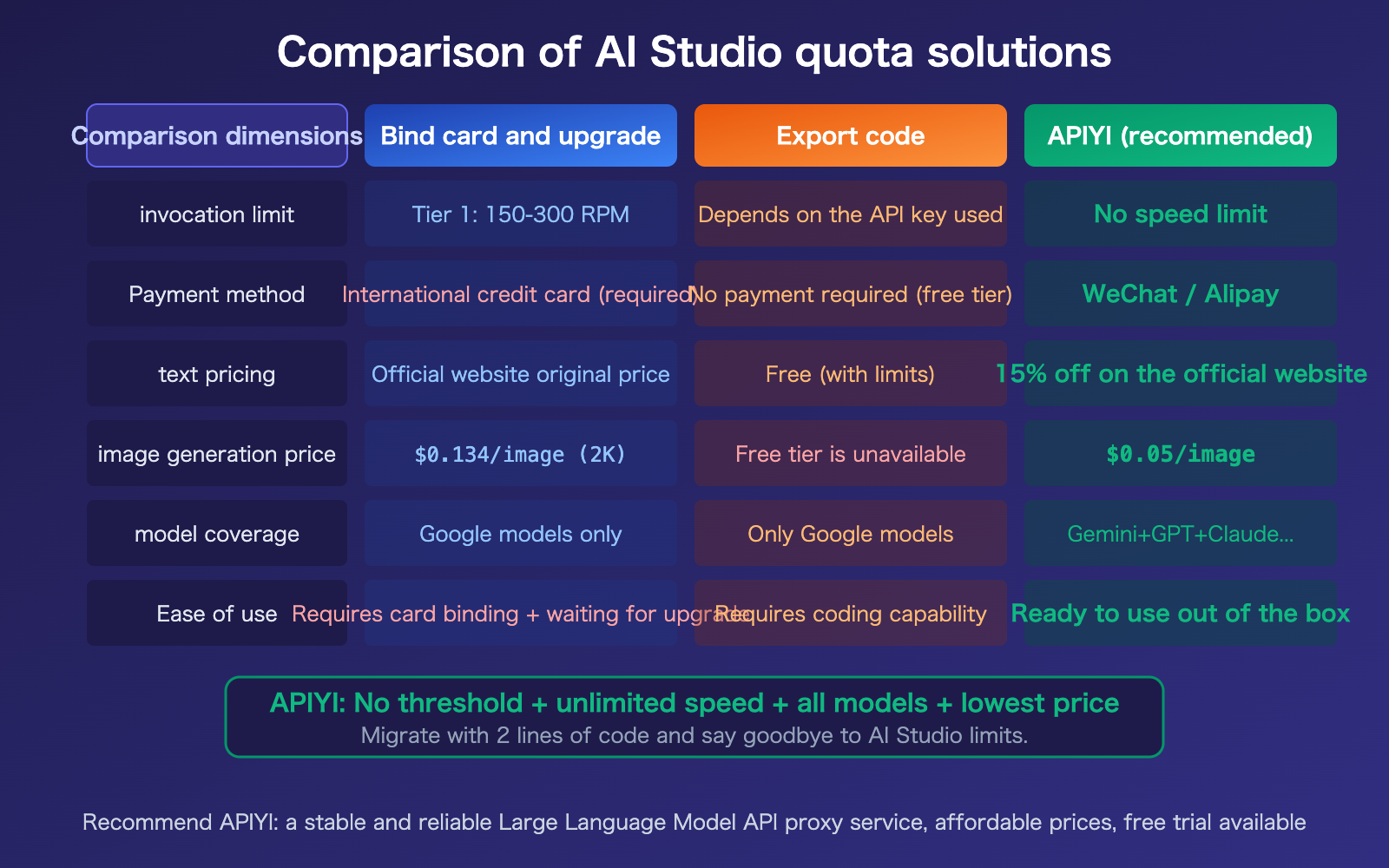
| Comparison Dimension | Card Binding Upgrade | Exported Code Dev | APIYI Platform (Recommended) |
|---|---|---|---|
| Rate Limits | Tier 1: 150-300 RPM | Depends on Key used | No speed limits |
| Payment Method | International Credit Card | Free (Free Tier) | WeChat / Alipay |
| Text Pricing | Official Price | Free (Limited) | 15% off Official Price |
| Image Pricing | $0.134/image (2K) | Not available on Free Tier | $0.05/image |
| Model Support | Google Models Only | Google Models Only | Gemini + GPT + Claude, etc. |
| Difficulty | Bind card + Wait for upgrade | Requires coding skills | Ready to use |
🎯 Recommendation: If you have an international credit card and only need a small boost, the first option is the most direct. If you have coding skills and prefer not to pay, the second option works fine with the free tier. However, if you need no speed limits, convenient payment methods, and lower costs, APIYI (apiyi.com) is the most comprehensive solution.
Gemini API Billing Guide for AI Studio Limits
Here’s a quick breakdown of how billing works when you migrate from AI Studio to APIYI:
Text Model Billing:
- Pay-as-you-go, based on the model and the number of input and output tokens.
- Formula: (Input Tokens × Input Price) + (Output Tokens × Output Price) = Cost per invocation.
- APIYI’s text model pricing matches the official rates, with additional savings available through recharge bonuses and group discounts.
Image/Video Model Billing:
- Charged per request. You can check the current rates in the "Model Pricing" section of your APIYI dashboard.
- Nano Banana Pro (Gemini 3 Pro Image): $0.05/request, which is about 63% cheaper than the official $0.134 rate.
Free Trial:
- You get $0.05 in test credits upon registration.
- This is enough to run a few text conversations or one Nano Banana Pro image generation task.
For detailed pricing, visit: docs.apiyi.com/pricing
🎯 Important Note: APIYI and Google AI Studio are two separate platforms. Credits purchased on APIYI cannot be used in AI Studio, and vice versa. However, APIYI supports the exact same list of Gemini models, so you won't need to change your code logic—just update your
base_urlandAPI key.
Frequently Asked Questions
Q1: Can I use APIYI credits in Google AI Studio?
No, these are two independent platforms. APIYI provides its own API endpoint (vip.apiyi.com/v1). While it supports the same Gemini models, you must use the APIYI base_url and API key in your code. The advantage is that you can pay via WeChat/Alipay and enjoy no rate limits.
Q2: Will my AI Studio code run directly on APIYI?
For the most part, yes. APIYI is compatible with the OpenAI API format. You only need to change two lines: replace your api_key with your APIYI key and update the base_url to https://vip.apiyi.com/v1. The model names remain the same. If your original code uses the Google SDK format, you might need to make minor adjustments to switch to the OpenAI SDK format.
Q3: Which Gemini models does APIYI support?
APIYI supports the full range of Gemini Large Language Models, including Gemini 2.5 Pro, Gemini 2.5 Flash, Gemini 3 Pro (including image generation), Gemini 3 Flash, and more. We also support other mainstream models like the GPT series, Claude series, and DeepSeek. Visit apiyi.com to see the complete model list.
Summary
Here are the key takeaways regarding the Google AI Studio rate limit issues:
- Significant Rate Limit Reductions: Starting December 2025, free quotas will be slashed by 50%-92%. Gemini 2.5 Pro will be limited to just 100 requests/day, and 2.5 Flash to 250 requests/day.
- Three Solutions: Upgrade by linking a card (requires an international credit card), export code (requires coding skills), or use an API proxy service like APIYI (recommended, ready-to-use with no speed limits).
- Core Advantages of APIYI: Unrestricted call speeds, support for WeChat/Alipay payments, 15% off on text, $0.05 per image, and full support for all Gemini models.
For most developers in China, accessing the Gemini API via APIYI (apiyi.com) is the most practical way to bypass AI Studio's restrictions. You only need to change two lines of code to get the full, unrestricted Gemini experience.
We recommend visiting APIYI at apiyi.com to register and try it out. You'll get a complimentary $0.05 credit to quickly verify the performance.
📚 References
-
APIYI AI Studio Rate Limit Solution: Official solution documentation
- Link:
xinqikeji.feishu.cn/wiki/SLpdwhpIGi5LhKk149QcPiQ2nEd - Description: A comprehensive solution from the APIYI platform addressing AI Studio rate limits.
- Link:
-
Google Gemini API Rate Limits: Official documentation
- Link:
ai.google.dev/gemini-api/docs/rate-limits - Description: Details on RPM, RPD, and TPM limits for different tiers.
- Link:
-
Google Gemini API Pricing: Official pricing information
- Link:
ai.google.dev/gemini-api/docs/pricing - Description: A comparison of pricing between the free and paid tiers.
- Link:
-
APIYI Usage Scenarios: Development and integration guide
- Link:
docs.apiyi.com/scenarios - Description: Configuration tutorials for clients like Chatbox and Cherry Studio.
- Link:
-
APIYI Pricing Details: Comprehensive billing information
- Link:
docs.apiyi.com/pricing - Description: Full details on pay-as-you-go billing for text and per-image pricing.
- Link:
Author: APIYI Technical Team
Technical Discussion: Feel free to share your experiences with solving AI Studio rate limit issues in the comments. For more resources, visit the APIYI documentation center at docs.apiyi.com.