Author's Note: A field-by-field breakdown of the IMAGE_SAFETY error in the Nano Banana Pro API, including an analysis of the dual-layer safety filtering mechanism, token billing logic, and 8 practical methods to improve generation success rates.
When using the Nano Banana Pro API for image generation, you might have encountered this confusing response: even when your prompt contains no sensitive content, you get a finishReason: IMAGE_SAFETY error, and the image is blocked by the safety filter. What’s even more frustrating is that the thoughtsTokenCount: 173 field in the response indicates the model finished its "thinking" process, yet the final image was still "killed." This article breaks down this error field by field, explaining Google's dual-layer safety filtering mechanism, how billing works when an image is blocked, and how you can boost your success rate.
Core Value: After reading this, you'll understand the meaning of every field in the IMAGE_SAFETY error, know whether you're charged when an image is blocked, and learn how to optimize your prompts to increase your success rate to 70-80%.
Decoding the IMAGE_SAFETY Error: A Field-by-Field Breakdown
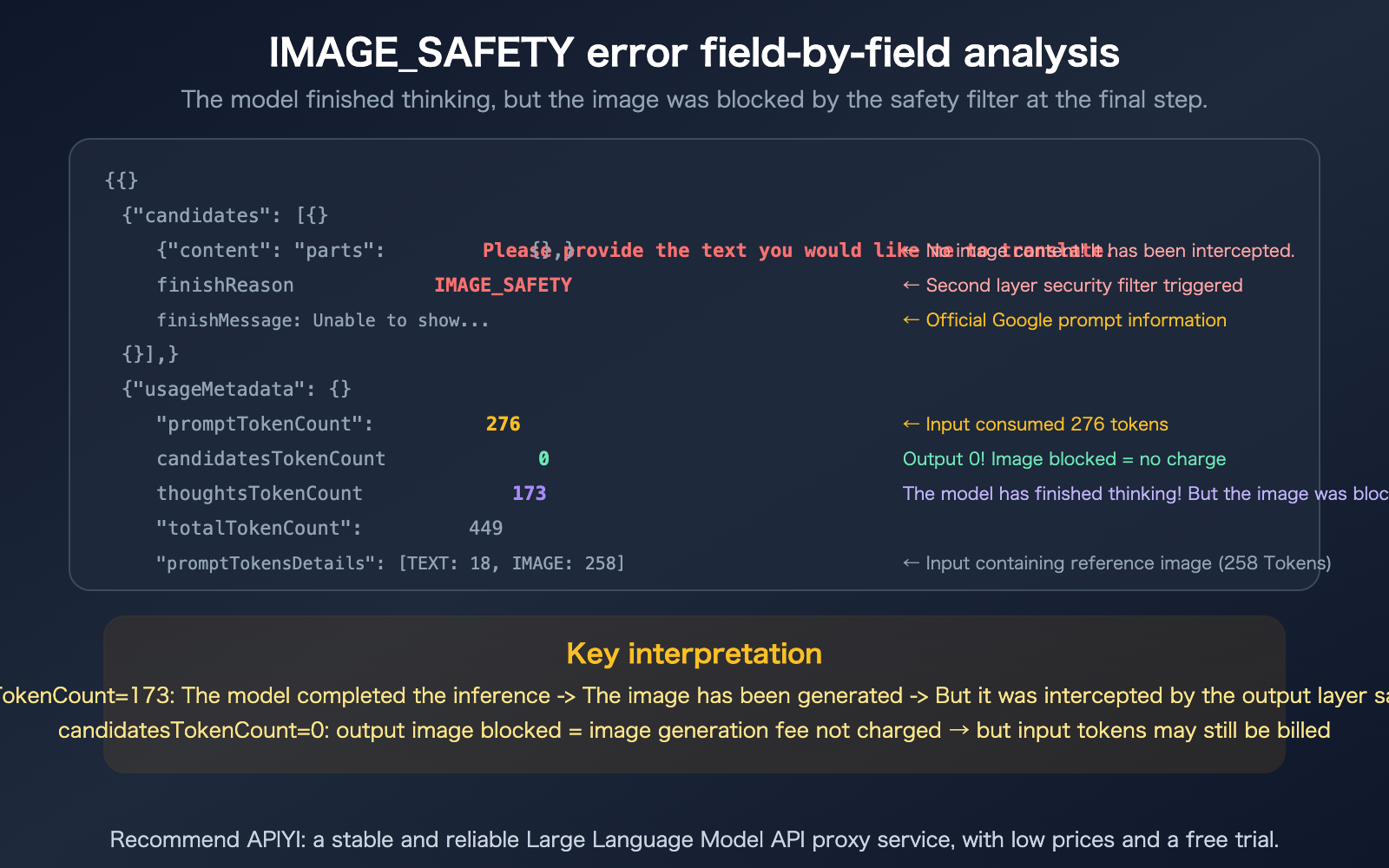
Let's start by clarifying what each field in this response actually means.
| Field | Value | Meaning |
|---|---|---|
content.parts |
null |
No content returned (image was blocked) |
finishReason |
IMAGE_SAFETY |
Triggered the second-layer output safety filter |
finishMessage |
"Unable to show…" | Official Google notice: Violated Generative AI usage policies |
promptTokenCount |
276 | Input consumed 276 tokens |
candidatesTokenCount |
0 | Output tokens are 0 (image was blocked, nothing generated) |
totalTokenCount |
449 | Total 449 tokens (276 input + 173 thinking) |
thoughtsTokenCount |
173 | The model's reasoning process consumed 173 tokens |
promptTokensDetails |
TEXT:18, IMAGE:258 | 18 text tokens + 258 image tokens (reference image) in input |
modelVersion |
gemini-3-pro-image-preview | Nano Banana Pro model |
The 3 Most Critical Signals in an IMAGE_SAFETY Error
Signal 1: thoughtsTokenCount: 173 — The model actually thought about it
This tells us your prompt passed the first layer of safety checks (the input side). The model began its reasoning process (Thinking) and likely even started generating the image—but it was intercepted by the second-layer safety filter right before final output. The issue isn't your prompt; it's the content the model "decided to draw."
Signal 2: candidatesTokenCount: 0 — Zero output
Once an image is blocked, the output token count is recorded as 0. Google officially states, "You will not be charged for blocked images." However, keep in mind: whether the input tokens (276) and thinking tokens (173) are billed depends on specific circumstances and billing logic.
Signal 3: IMAGE: 258 — You provided a reference image
Your request included a reference image (consuming 258 image tokens). This suggests you might be performing image-to-image tasks rather than pure text-to-image generation. Safety filtering for image editing is typically stricter than for text-only prompts because the reference image itself undergoes safety inspection.
Google's Two-Layer Safety Filtering Mechanism
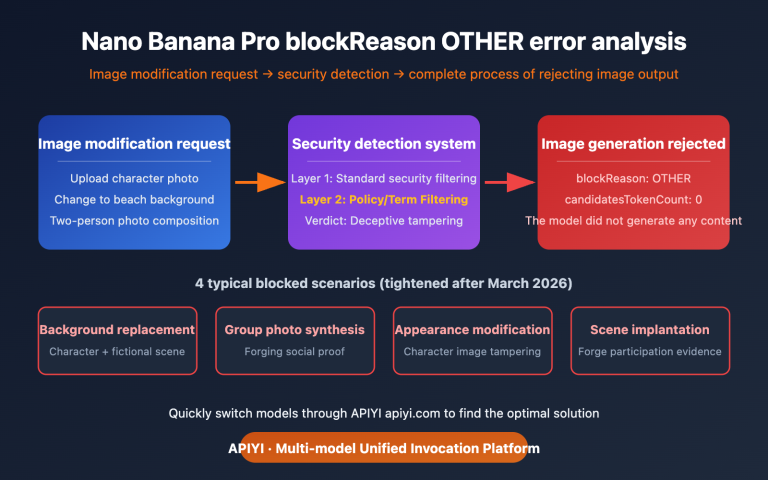
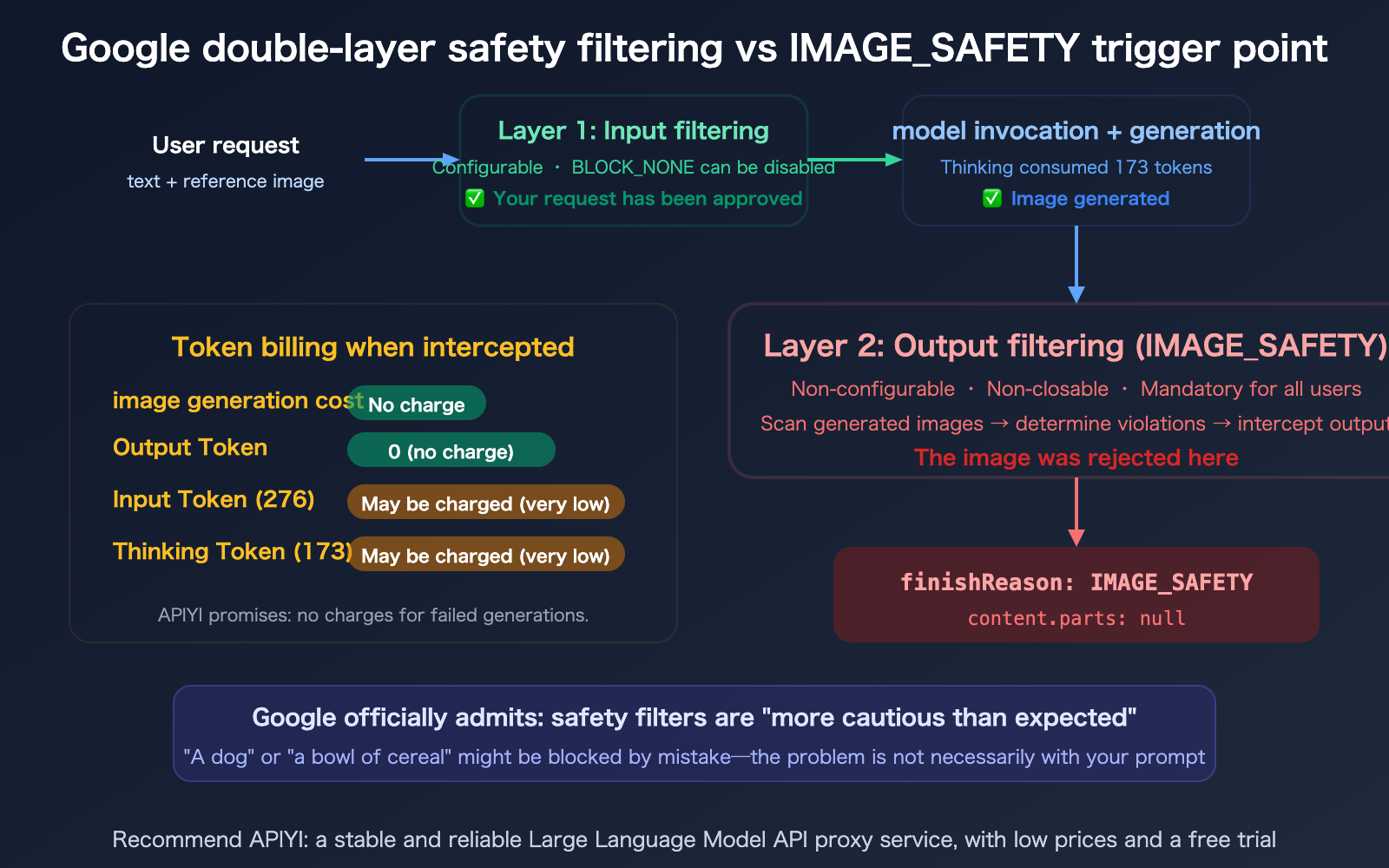
To understand the IMAGE_SAFETY error, you need to realize that Google's safety filtering isn't just one layer—it's two—and you cannot turn off the second one.
Layer 1: Configurable Input Safety Settings
| Dimension | Description | Configurable? |
|---|---|---|
| Filter Location | Input side (prompt) | Yes |
| Filtered Objects | User-submitted text and images | Yes |
| Setting Options | BLOCK_NONE (no filtering) | Yes |
| Behavior when triggered | Request rejected immediately, no tokens consumed | — |
You can adjust the sensitivity of the first layer by setting safety_settings to BLOCK_NONE via the API.
Layer 2: Non-Configurable Output Safety Filtering
| Dimension | Description | Configurable? |
|---|---|---|
| Filter Location | Output side (generated image) | No |
| Filtered Objects | Content generated by the model | No |
| Can be disabled? | No, mandatory for all users and tiers | No |
| Behavior when triggered | finishReason: IMAGE_SAFETY, parts: null |
— |
The IMAGE_SAFETY error is triggered by this second layer. Your prompt passed the first layer, the model finished its thinking (173 tokens), and generated the image—but the image was blocked by the second layer before it could be delivered.
Google has acknowledged that this filter has become "more cautious than we intended," leading to a high rate of false positives—even simple prompts like "a dog" or "a bowl of cereal" can sometimes get blocked.
Does IMAGE_SAFETY trigger a charge when a request is blocked?
This is the practical question developers care about most.
Nano Banana Pro IMAGE_SAFETY Billing Rules
| Billing Item | Charged when blocked? | Note |
|---|---|---|
| Image Generation Fee | No | Google explicitly states: "You will not be charged for blocked images" |
| Output Token | No | candidatesTokenCount: 0; no output means no charge |
| Input Token | Possibly (negligible) | 276 Tokens × $0.25/M ≈ $0.00007 (can be ignored) |
| Thinking Token | Depends on billing logic | 173 Tokens; Gemini API may include this in candidates |
Conclusion: When blocked by IMAGE_SAFETY, the primary costs (image generation and output tokens) are not incurred. The cost for input tokens is extremely low (less than one ten-thousandth of a dollar) and is essentially negligible.
Extra Protection from APIYI: When you use the APIYI (apiyi.com) API proxy service, you aren't charged for failed generations—this includes cases blocked by IMAGE_SAFETY. You only pay for successfully generated images.
8 Ways to Improve IMAGE_SAFETY Pass Rates
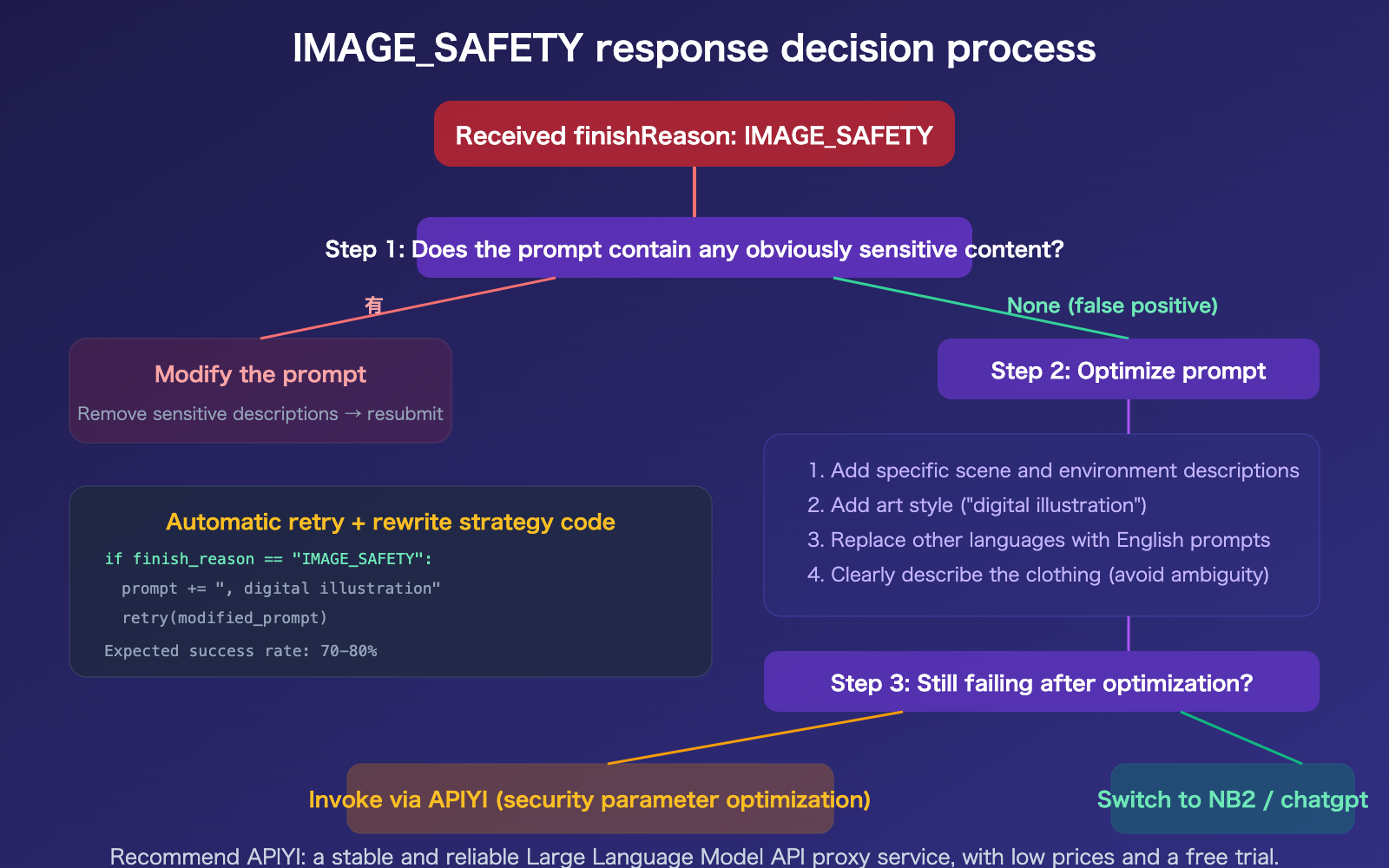
Since the second layer of safety filtering cannot be disabled, we have to use indirect methods to improve the success rate.
Method 1: Set BLOCK_NONE to disable the first layer
First, ensure the first layer isn't causing additional blocks:
from google.genai import types

safety_settings = [
    types.SafetySetting(
        category="HARM_CATEGORY_HARASSMENT",
        threshold="BLOCK_NONE"
    ),
    types.SafetySetting(
        category="HARM_CATEGORY_HATE_SPEECH",
        threshold="BLOCK_NONE"
    ),
    types.SafetySetting(
        category="HARM_CATEGORY_SEXUALLY_EXPLICIT",
        threshold="BLOCK_NONE"
    ),
    types.SafetySetting(
        category="HARM_CATEGORY_DANGEROUS_CONTENT",
        threshold="BLOCK_NONE"
    ),
]
Method 2: Add specific details to your prompt
Vague prompts are more likely to trigger safety filters. Adding specific details can guide the model to generate "safer" images:
❌ "A woman"
→ The model might generate content deemed inappropriate by the filter

✅ "A woman wearing a professional suit, working in a modern office,
   natural lighting, digital illustration style"
→ Specific scene + clothing description + art style → Success rate increases significantly
Methods 3–8: Advanced Optimization Strategies
| Method | Action | Expected Result |
|---|---|---|
| Method 3: Add art style | Append "digital illustration style" or "watercolor style" | Lowers realism → reduces triggers |
| Method 4: Specify context | Add clear scene descriptions ("in a park", "in an office") | Limits the model's creative range |
| Method 5: Avoid skin exposure | Use "formal attire" or "winter clothing" instead of vague descriptions | Directly avoids sensitive areas |
| Method 6: Use English prompts | English safety filter calibration is more precise than other languages | Reduces false positives |
| Method 7: Auto-retry with variations | Automatically rewrite the prompt and retry after failure | Improves overall success rate |
| Method 8: Use APIYI | APIYI has optimized configurations for safety parameters | Higher overall success rate |
Prompt Optimization Comparison
| Scenario | Before Optimization (Low Pass Rate) | After Optimization (High Pass Rate) |
|---|---|---|
| People | "A girl in a swimsuit" | "A woman in sportswear training at the gym, digital illustration style" |
| Food | "Steak" | "A medium-rare steak on a white ceramic plate, restaurant table, professional food photography" |
| Animals | "A dog" | "A golden retriever catching a frisbee in a suburban yard, afternoon sun, digital illustration style" |
| E-commerce | "Lingerie model" | "A flat-lay product shot of a white sports bra, pure white background, no model, product photography" |
🎯 Core Principle: The more specific the prompt = the less room for the model to "freestyle" = the fewer safety filter triggers. Adding art style tags (like "digital illustration") can further reduce blocks related to realism.
Success rates via APIYI (apiyi.com) are generally higher than direct Google API connections because the platform has optimized safety parameter configurations.
FAQ
Q1: Why do the same prompts sometimes succeed and sometimes get blocked?
Because the second layer of safety filtering checks the generated image, not the prompt. With the same prompt, the model generates slightly different images each time (due to the inherent randomness of diffusion models), and some results might just happen to trigger the safety filter's threshold. That's why retrying the same prompt can sometimes work—the model just happened to generate a "safer" image.
Q2: Is it normal for thoughtsTokenCount to be greater than 0 while candidatesTokenCount is 0?
Yes, it's normal. This actually confirms that the interception occurred at the second layer (the output stage): the model finished its "thinking" process and generated an image, but the image was blocked by the safety filter before the final output. The thinking tokens were consumed (173), but since no image was actually delivered, the output token count is 0. This is a response pattern specific to IMAGE_SAFETY—unlike first-layer interceptions, where the thoughtsTokenCount would also be 0.
Q3: What should I do if e-commerce images of underwear or swimwear are frequently blocked?
This is a known high-frequency false-positive scenario. There are numerous reports on Google developer forums regarding "non-NSFW ecommerce underwear images with IMAGE_SAFETY error." We suggest: 1) Using flat-lay product images (without models) instead of model shots; 2) Explicitly stating "product flat lay, no model, white background" in your prompt; 3) Using APIYI (apiyi.com) for your model invocations, as the platform's safety parameter configurations are optimized for e-commerce scenarios.
Q4: Will I be charged for blocked requests on APIYI?
No. APIYI guarantees that you won't be charged for failed generations, including those blocked by IMAGE_SAFETY. You only pay for successfully generated images. This aligns with the official Google API billing logic (blocked images are not charged), but APIYI provides an extra layer of assurance—even the minor costs for input tokens won't be incurred.
Summary
Key takeaways for the Nano Banana Pro IMAGE_SAFETY error:
- The error is essentially a second-layer output filter: Your prompt passed the first layer, and the model completed its thinking (173 tokens) and generated the image—but it was blocked by the non-disableable second-layer safety filter during final output.
- Blocked requests are generally not charged:
candidatesTokenCount: 0means output tokens are not billed. Google explicitly states that they "do not charge for blocked images," and calling via APIYI provides further protection against charges for failed attempts. - Prompt optimization can boost success rates to 70-80%: The core principle is "the more specific, the safer"—add specific context, include artistic styles, describe clothing details, and use English prompts.
We recommend using Nano Banana Pro via APIYI (apiyi.com) to benefit from optimized safety parameter configurations, a "no-charge for failures" policy, and a 28% discount, all of which help minimize the impact of IMAGE_SAFETY false positives on your business.
📚 References
-
Gemini API Safety Settings Documentation: Official documentation for safety configuration parameters.
- Link:
ai.google.dev/gemini-api/docs/safety-settings - Description: Includes
BLOCK_NONEconfiguration and the list of safety categories.
- Link:
-
Nano Banana Pro IMAGE_SAFETY Complete Fix Guide: 8 methods to improve success rates.
- Link:
help.apiyi.com/en/nano-banana-pro-image-safety-error-fix-guide-en.html - Description: Includes prompt optimization templates and scenario-based solutions.
- Link:
-
Google AI Developer Forum IMAGE_SAFETY Discussion: Community reports and official responses.
- Link:
discuss.ai.google.dev/t/nano-banana-is-unusable-because-of-the-new-safety-filters/132366 - Description: Google acknowledges that the filters are "overly cautious."
- Link:
-
APIYI Documentation Center: Nano Banana Pro no-charge guarantee for failed requests.
- Link:
docs.apiyi.com - Description: Includes safety parameter optimization and configuration guides for e-commerce scenarios.
- Link:
Author: APIYI Technical Team
Technical Discussion: Feel free to join the discussion in the comments. For more resources, visit the APIYI documentation center at docs.apiyi.com.