Gemini 3.1 Pro Preview has become a hot topic right after its release. For many developers, the first question is: Can it generate images? The answer is no. Gemini 3.1 Pro Preview is a text-only output multimodal reasoning model, not an image generation model.
Core Value: By the end of this post, you'll completely understand the difference between Gemini 3.1 Pro and the image model Nano Banana Pro, so you don't pick the wrong one for your project.
Why Gemini 3.1 Pro Preview Can't Generate Images
Gemini 3.1 Pro's Model Positioning
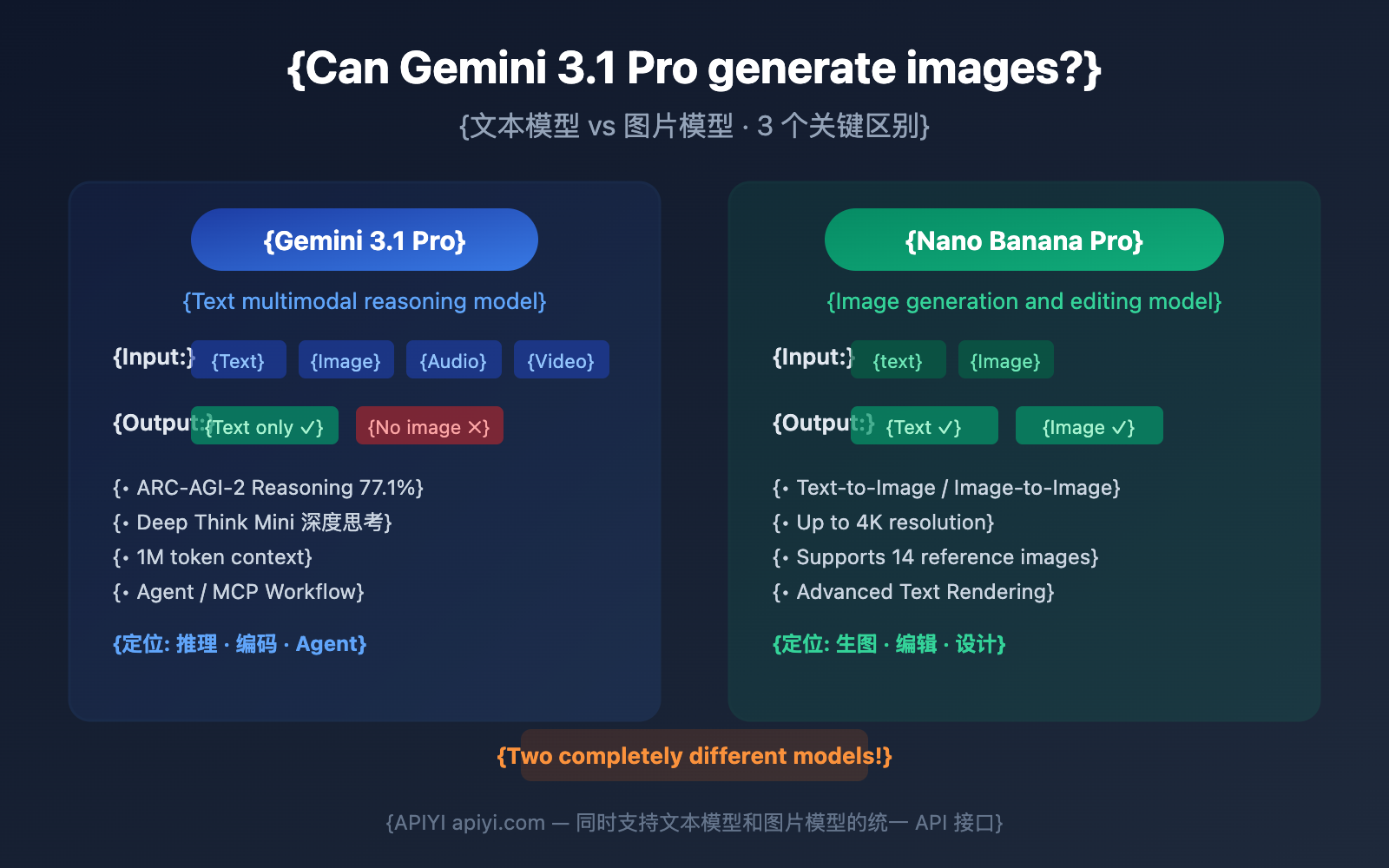
Gemini 3.1 Pro Preview (Model ID: gemini-3.1-pro-preview) is a reasoning-based text model released by Google on February 19, 2026. It's built on the Sparse Mixture-of-Experts (Sparse MoE) Transformer architecture and focuses on the following capabilities:
| Capability Dimension | Performance Metric | Best Use Cases |
|---|---|---|
| Abstract Reasoning | ARC-AGI-2 score: 77.1% | Pattern recognition, logical deduction |
| Scientific Reasoning | GPQA Diamond: 94.3% | Academic research, paper assistance |
| Coding Capability | SWE-Bench: 80.6% | Code generation, bug fixing |
| Agent Capability | MCP Atlas: 69.2% | Multi-step workflows, autonomous search |
| Long Context | Supports 1 million tokens | Large document analysis, code repositories |
Gemini 3.1 Pro's Input and Output Capabilities
The key takeaway is that inputs are multimodal, but outputs are strictly text-only:
What you can input (Understanding):
- ✅ Text
- ✅ Images (it can analyze and describe image content)
- ✅ Audio (native audio understanding)
- ✅ Video (native video understanding)
- ✅ PDF documents
What it can output:
- ✅ Text (up to 64K tokens)
- ❌ Cannot output images
- ❌ Cannot output audio
- ❌ Cannot output video
This means you can give Gemini 3.1 Pro an image and ask it to describe the content, analyze details, or extract text, but you can't ask it to draw a new image from scratch.
🎯 Bottom line: If you need an AI to generate images, Gemini 3.1 Pro isn't the model you're looking for. You need
gemini-3-pro-image-preview(Nano Banana Pro). APIYI (apiyi.com) supports both models through a unified interface.
Which Gemini Model Should You Use for Image Generation?
Google currently offers two Gemini models that support image generation:
| Comparison Dimension | Nano Banana Pro | Gemini 2.5 Flash Image |
|---|---|---|
| Model ID | gemini-3-pro-image-preview |
gemini-2.5-flash-image |
| Output Capability | Text + Image | Text + Image |
| Max Resolution | 4K | Standard Resolution |
| Reference Images | Up to 14 images | Fewer |
| Text Rendering | Advanced (Multilingual) | Basic |
| Thinking Reasoning | Supported (More Precise) | Not Supported |
| Speed | Slower (Quality First) | Fast (Speed First) |
| Use Cases | Professional Design, Commercial Assets | Rapid Prototyping, Batch Generation |
| Available Platforms | APIYI (apiyi.com) | APIYI (apiyi.com) |
Why Choose Nano Banana Pro
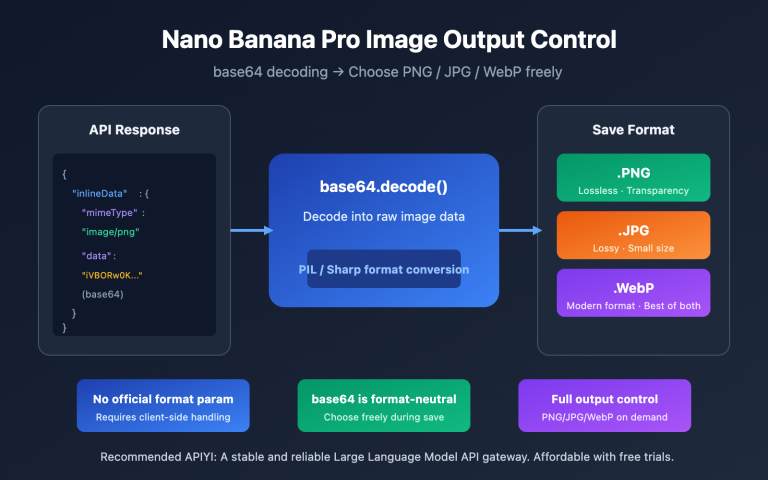
Nano Banana Pro (gemini-3-pro-image-preview) is currently Google's most powerful image generation model. Here are its main advantages:
- Thinking Reasoning for Image Gen: The model "thinks" about the composition before generating the image, making its accuracy in complex scenes far superior to traditional models.
- 4K Resolution: It supports 1K, 2K, and 4K resolution tiers, meeting the needs of commercial publishing.
- 14 Reference Images: You can input up to 14 reference images simultaneously for style transfer or fine-grained detail control.
- Advanced Text Rendering: It accurately renders multilingual text within images, including complex characters like Chinese and Japanese.
- Google Search Grounding: It can generate more accurate content based on real-time search results.
3 Key Differences Between Gemini 3.1 Pro and Nano Banana Pro
Difference 1: Completely Different Output Modalities
This is the most fundamental distinction. The model architecture determines the output capabilities:
| Dimension | Gemini 3.1 Pro Preview | Nano Banana Pro |
|---|---|---|
| Model ID | gemini-3.1-pro-preview |
gemini-3-pro-image-preview |
| Architecture | Sparse MoE Transformer | Gemini 3 Pro Base + Image Generation Module |
| Input | Text/Image/Audio/Video | Text/Image |
| Output | Text Only | Text + Image |
| Training Goal | Reasoning accuracy, tool use, code generation | Image quality, text rendering, style control |
In short: Gemini 3.1 Pro "understands everything but only writes," while Nano Banana Pro "understands text and images, and can both write and draw."
Difference 2: Completely Different Use Cases
| Task | Which one to use? | Why? |
|---|---|---|
| Analyze composition issues in a product photo | Gemini 3.1 Pro | Only requires text analysis |
| Generate a product promotional image | Nano Banana Pro | Requires image output |
| Write a snippet of image processing code | Gemini 3.1 Pro | Code generation is text-based |
| Modify text content within an image | Nano Banana Pro | Requires image editing |
| Compare two images and write a report | Gemini 3.1 Pro | Multi-image understanding + text report |
| Generate a detailed design from a sketch | Nano Banana Pro | Image-to-image generation |
| Analyze and summarize video content | Gemini 3.1 Pro | Video understanding is exclusive to 3.1 Pro |
| Batch generate main images for e-commerce | Nano Banana Pro | Batch image generation |
Difference 3: API Call Method and Return Format
Gemini 3.1 Pro returns plain text:
import openai

client = openai.OpenAI(
    api_key="YOUR_API_KEY",
    base_url="https://api.apiyi.com/v1"  # APIYI unified interface
)

# Gemini 3.1 Pro: Analyze image content (Input image, output text)
response = client.chat.completions.create(
    model="gemini-3.1-pro-preview",
    messages=[{
        "role": "user",
        "content": [
            {"type": "text", "text": "Please analyze the composition and color scheme of this image"},
            {"type": "image_url", "image_url": {"url": "data:image/jpeg;base64,..."}}
        ]
    }]
)
print(response.choices[0].message.content)
# Output: "This image uses a rule-of-thirds composition, with the subject located on the right vertical line..."
Nano Banana Pro returns image data:
# Nano Banana Pro: Generate image (Input text, output image)
response = client.chat.completions.create(
    model="gemini-3-pro-image-preview",
    messages=[{
        "role": "user",
        "content": "Generate a cyberpunk-style city night scene with neon lights reflecting in the rain"
    }]
)
# The response contains base64 encoded image data
💡 Developer Tip: By calling through the APIYI (apiyi.com) platform, both models use the same API Key and
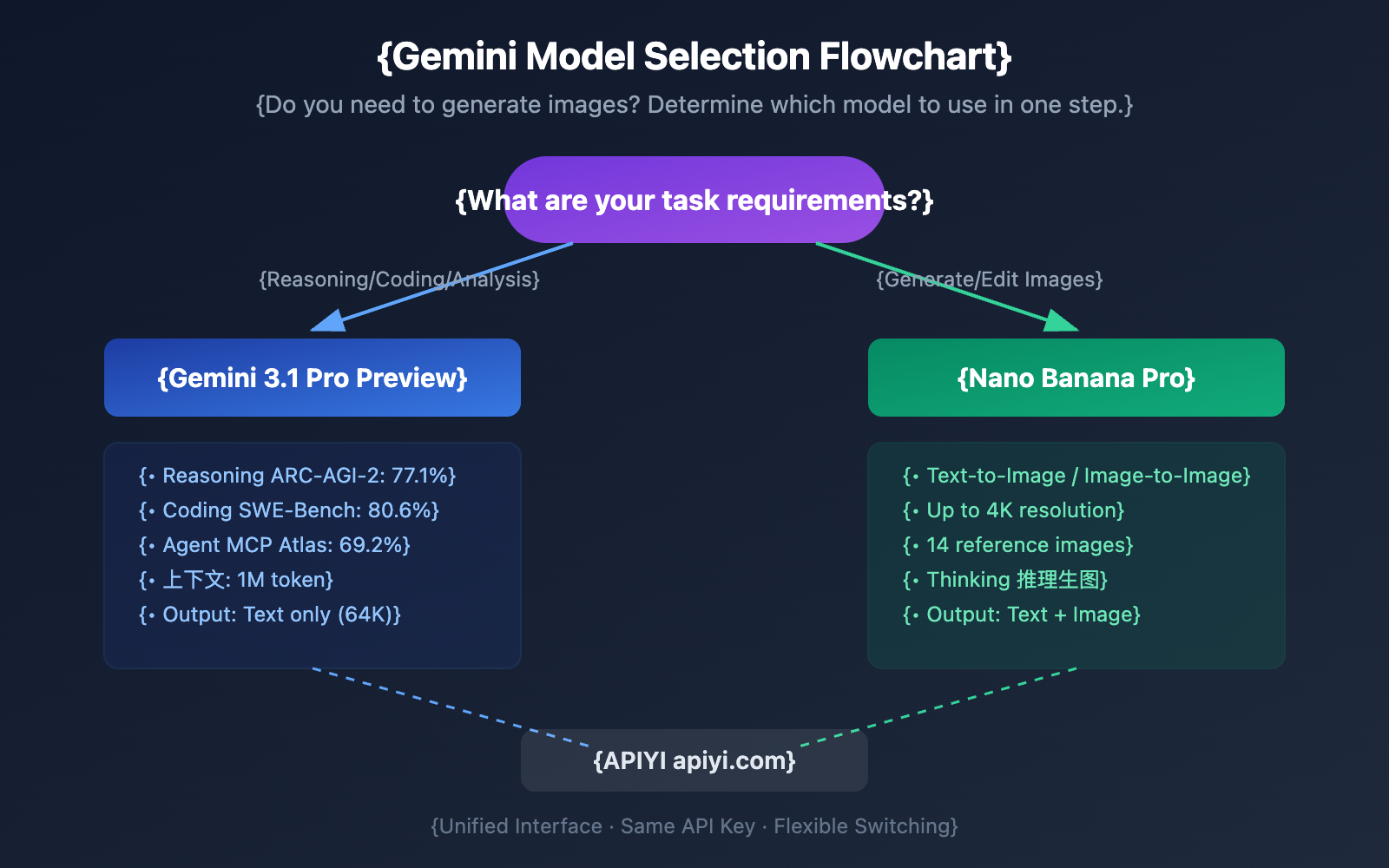
base_url. You only need to change themodelparameter to switch. In workflows that require "analysis followed by generation," you can chain these two models together.
Gemini Image Model Evolution and Future Outlook
Current Gemini Image Model Status
| Model | Version Status | Description |
|---|---|---|
gemini-2.5-flash-image |
Preview | Fast, ideal for batch processing scenarios |
gemini-3-pro-image-preview |
Preview (Latest) | Highest quality, known as Nano Banana Pro |
gemini-3-pro-image |
Not yet released | Official GA version, release date unknown |
gemini-3.1-pro-image-preview |
Does not exist | No news or updates currently available |
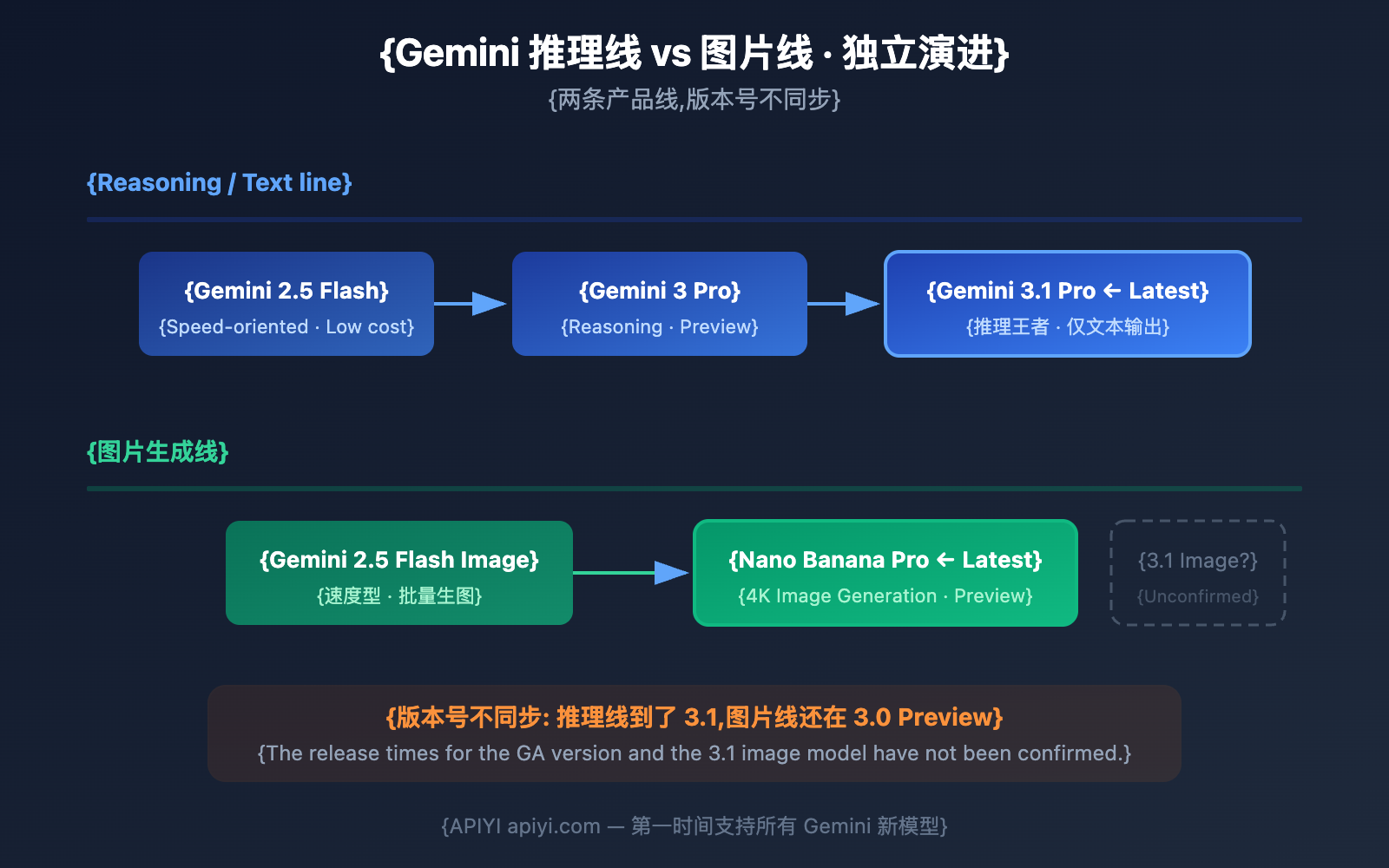
Reasoning and Image Lines Evolve Independently
Google's internal Gemini product lines actually follow two independent evolution tracks:
Reasoning/Text Line:
- Gemini 3 Pro Preview → Gemini 3.1 Pro Preview (2026.02.19)
- Focus: Reasoning, coding, Agents, long context
Image Generation Line:
- Gemini 2.5 Flash Image → Gemini 3 Pro Image Preview (Nano Banana Pro)
- Focus: Image quality, text rendering, multi-reference images
The version numbers for these two lines are not synchronized. While the reasoning model has been updated to 3.1, the image model is still in the 3.0 Preview stage.
Possible Future Developments
Currently, there's no official confirmation regarding the next steps for the Gemini image model. Here are a few likely scenarios:
- Release of the official
gemini-3-pro-image: Moving the current Nano Banana Pro from Preview to GA (General Availability). This is the most probable next step. - Release of
gemini-3.1-pro-image-preview: Upgrading the image model to version 3.1 to match the reasoning line, potentially adding stronger reasoning-based image generation capabilities. - Maintaining the Status Quo: Continuing to refine the 3.0 Preview version without launching a new version for a while.
🎯 Pro Tip: Don't wait for future versions. The current Nano Banana Pro is already one of the most powerful AI image generation models on the market. We recommend getting started right away via APIYI (apiyi.com); the platform will sync updates automatically as new versions are released.
Common Confusion Scenarios and Best Practices
Developers often run into confusion when choosing between these models. Here’s how to handle it:
Confusion 1: Using 3.1 Pro for Image Generation
The Mistake: Passing gemini-3.1-pro-preview to the image generation API and expecting an image in return.
The Result: You'll get a plain text description instead of image data.
The Fix: Switch the model parameter to gemini-3-pro-image-preview.
Confusion 2: Using Nano Banana Pro for Reasoning Tasks
The Mistake: Giving complex math reasoning or code debugging tasks to Nano Banana Pro.
The Result: The reasoning quality will be significantly lower than 3.1 Pro (since Nano Banana Pro's reasoning base is 3.0 Pro, not 3.1 Pro).
The Fix: Use gemini-3.1-pro-preview for reasoning tasks and gemini-3-pro-image-preview for image generation tasks.
Confusion 3: Thinking 3.1 Pro is an Upgrade to Nano Banana Pro
The Misconception: Since Gemini 3.1 Pro has a higher version number, it must be an upgrade to Nano Banana Pro.
The Fact: These two models belong to completely different product lines. 3.1 Pro is an upgrade for the reasoning model (3.0 Pro → 3.1 Pro) and has nothing to do with the image model.
| Model | Product Line | Base |
|---|---|---|
| gemini-3-pro-preview | Reasoning Line v3.0 | Gemini 3 Pro |
| gemini-3.1-pro-preview | Reasoning Line v3.1 | Gemini 3.1 Pro |
| gemini-3-pro-image-preview | Image Line v3.0 | Gemini 3 Pro + Image |
Gemini Model Family: Quick Capability Reference
Besides 3.1 Pro and Nano Banana Pro, Google offers several other Gemini models. Here's a complete capability comparison:
| Model | Text Input | Image Input | Audio Input | Video Input | Text Output | Image Output | Core Strength |
|---|---|---|---|---|---|---|---|
| Gemini 3.1 Pro | ✅ | ✅ | ✅ | ✅ | ✅ | ❌ | Strongest Reasoning/Agent |
| Gemini 3 Pro | ✅ | ✅ | ✅ | ✅ | ✅ | ❌ | Reasoning/Coding (Prev Gen) |
| Nano Banana Pro | ✅ | ✅ | ❌ | ❌ | ✅ | ✅ | Highest Image Quality |
| Gemini 2.5 Flash Image | ✅ | ✅ | ❌ | ❌ | ✅ | ✅ | Fast Image Generation |
| Gemini 2.5 Flash | ✅ | ✅ | ✅ | ✅ | ✅ | ❌ | High Speed/Low Cost |
📊 Selection Logic: Need image generation? Go with Nano Banana Pro. Need fast image generation? 2.5 Flash Image is your best bet. Need reasoning? 3.1 Pro. Looking for low cost? 2.5 Flash. All models can be called via a unified interface at APIYI (apiyi.com).
Gemini Model Recommendations for Different Scenarios
| Scenario | Recommended Model | Reason | Estimated Monthly Cost |
|---|---|---|---|
| Enterprise Reasoning/Analysis | Gemini 3.1 Pro | Strongest reasoning, 1M context window | $100-500 |
| Professional Image Generation | Nano Banana Pro | 4K resolution, 14 reference images | $50-200 |
| Low-cost Reasoning | Gemini 2.5 Flash | High speed, lowest price point | $20-80 |
| Batch Image Generation | Gemini 2.5 Flash Image | Fast, ideal for high volumes | $30-100 |
| Reasoning + Image Combo | 3.1 Pro + Nano Banana Pro | Best of both worlds | $80-300 |
Gemini 3.1 Pro + Nano Banana Pro Chained Workflow
While Gemini 3.1 Pro can't generate images directly, you can chain it with Nano Banana Pro to leverage their respective strengths:
import openai

client = openai.OpenAI(
    api_key="YOUR_API_KEY",
    base_url="https://api.apiyi.com/v1"  # APIYI Unified Interface
)

# Step 1: Use 3.1 Pro to analyze requirements and generate a prompt
analysis = client.chat.completions.create(
    model="gemini-3.1-pro-preview",
    messages=[{
        "role": "user",
        "content": """I need to generate an illustration for a tech blog post.
Topic: AI Agents autonomously completing complex workflows.
Please generate a detailed English image prompt for me.
Requirements: Cyberpunk style, showing multiple AI Agents collaborating."""
    }]
)
image_prompt = analysis.choices[0].message.content

# Step 2: Use Nano Banana Pro to generate the image
image_response = client.chat.completions.create(
    model="gemini-3-pro-image-preview",
    messages=[{
        "role": "user",
        "content": image_prompt
    }]
)
# Retrieve generated image data
print("Image generated!")
This "Reasoning + Image Gen" chaining mode allows you to use 3.1 Pro's powerful reasoning to optimize the image prompt before handing it off to Nano Banana Pro. The results are significantly better than using a simple prompt alone.
🚀 Pro Tip: On the APIYI (apiyi.com) platform, you can chain any model combination using a single API Key. Let 3.1 Pro do the "thinking" and Nano Banana Pro do the "drawing"—it's currently one of the most effective AI image workflows available.
FAQ
Q1: Gemini 3.1 Pro can understand images but can’t generate them, right?
That's correct. Gemini 3.1 Pro Preview accepts images, audio, and video as input for analysis and understanding, but it only outputs text. It can describe image content, extract text, and analyze composition, but it won't generate new images. If you need to generate images, use gemini-3-pro-image-preview (Nano Banana Pro). Both models can be called via the APIYI (apiyi.com) platform.
Q2: When will the official version of Nano Banana Pro be released?
There's no exact date yet. Google has only stated they plan to launch a GA (General Availability) version once stability is verified. The current Preview version is already production-ready, though there might be some API adjustments. We recommend connecting through APIYI (apiyi.com), as the platform automatically handles version migrations for you.
Q3: Is it possible they’ll release a gemini-3.1-pro-image-preview?
There's no official word on this yet. Google's reasoning model line and image model line evolve independently, so their version numbers aren't synced. They might release a 3.1 version of the image model in the future, or they might skip straight to a higher version. We'll support any new models on APIYI (apiyi.com) as soon as they're available.
Q4: My project needs both reasoning and image generation. What’s the best way to combine them?
We recommend using Gemini 3.1 Pro for reasoning, analysis, and prompt optimization, and Nano Banana Pro for image generation. You can call both models through APIYI's (apiyi.com) unified interface using a single API Key—just switch the model parameter. This way, you get the strongest reasoning and the strongest image generation in one workflow.
Gemini Model Recommendations for Different Developers
| Developer Type | Most Common Mistake | Correct Choice | Practical Advice |
|---|---|---|---|
| Backend API Developer | Using 3.1 Pro for image endpoints | 3.1 Pro for reasoning, Nano Banana Pro for image gen | Dispatch models at the routing layer based on content_type. |
| Frontend/Designer | Thinking 3.1 Pro is better just because the version is higher | Use Nano Banana Pro for all design assets | Use 3.1 Pro to write the prompt first, then use Nano to generate the image. |
| Data Analyst | Using image models to analyze data | 3.1 Pro for chart analysis (supports image input) | 3.1 Pro's 1M context is perfect for massive reports. |
| Content Creator | Not knowing an image model exists | 3.1 Pro for copy, Nano Banana Pro for illustrations | Chaining these into a workflow is the most efficient approach. |
| Indie Developer | Buying the wrong API for image features | Confirm your needs before picking a model | Test for free on APIYI (apiyi.com) first. |
💰 Money-Saving Tip: Don't buy an expensive model package just "in case you need image generation." Reasoning and image generation are separate API calls billed by usage. By using the APIYI (apiyi.com) platform, you only need to register one account to access all models simultaneously.
Summary: Gemini 3.1 Pro Image Generation Quick Check
| Question | Answer |
|---|---|
| Can Gemini 3.1 Pro generate images? | No, it's text-only output. |
| Can Gemini 3.1 Pro analyze images? | Yes, it supports image/audio/video input. |
| What is Google's latest image model? | gemini-3-pro-image-preview (Nano Banana Pro) |
| Is there a stable version of the image model? | Not yet, it's still in Preview. |
| Is there a 3.1 version of the image model? | No, the reasoning and image lines evolve independently. |
| How do I use them together? | Use 3.1 Pro for reasoning + Nano Banana Pro for image generation. |
Bottom line: Gemini 3.1 Pro Preview is the king of reasoning but can't draw, while Nano Banana Pro is an art master but lacks the reasoning power of 3.1 Pro. The best way to handle this is to chain them together via APIYI (apiyi.com).
Clearing Up Common Misconceptions About Gemini 3.1 Pro
| Misconception | The Reality |
|---|---|
| "3.1 Pro can do everything" | It cannot generate images, audio, or video. |
| "Higher version number = More features" | 3.1 Pro (Reasoning line) and Nano Banana Pro (Image line) are different products. |
| "Preview versions aren't for production" | Both Preview models are stable enough for production environments. |
| "I'll wait for the official release" | The official release date is unknown; it's better to start now. |
| "I have to use the official API" | It's much easier to manage everything through APIYI (apiyi.com). |
References
-
Google Official Blog: Gemini 3.1 Pro Announcement
- Link:
blog.google/innovation-and-ai/models-and-research/gemini-models/gemini-3-1-pro - Note: Clearly labels 3.1 Pro as a text-output model.
- Link:
-
Google DeepMind: Gemini 3.1 Pro Model Card
- Link:
deepmind.google/models/model-cards/gemini-3-1-pro - Note: Detailed technical specs showing the output modality is Text Only.
- Link:
-
Google DeepMind: Nano Banana Pro (Gemini Image) Product Page
- Link:
deepmind.google/models/gemini-image/pro - Note: Full feature introduction for the image generation model.
- Link:
-
Google AI Documentation: Gemini API Model List
- Link:
ai.google.dev/gemini-api/docs/models - Note: Lists all available models and their input/output capabilities.
- Link:
-
Google AI Documentation: Image Generation Guide
- Link:
ai.google.dev/gemini-api/docs/image-generation - Note: Tutorial for using the Nano Banana Pro image generation API.
- Link:
📝 Author: APIYI Team | For technical discussions, visit APIYI (apiyi.com)
📅 Updated: February 20, 2026
🏷️ Keywords: Gemini 3.1 Pro image generation, Nano Banana Pro, gemini-3-pro-image-preview, AI image models, model selection