Many developers get confused when they see the model name gemini-3.1-pro-preview-customtools: What does "customtools" actually mean? How is it different from the standard gemini-3.1-pro-preview? This 5-minute guide will clear everything up for you.
Core Value: By the end of this post, you'll understand when to use the standard version versus the customtools version, and how to make the right choice for your Agent development.
What is Gemini 3.1 Pro Customtools?
The TL;DR
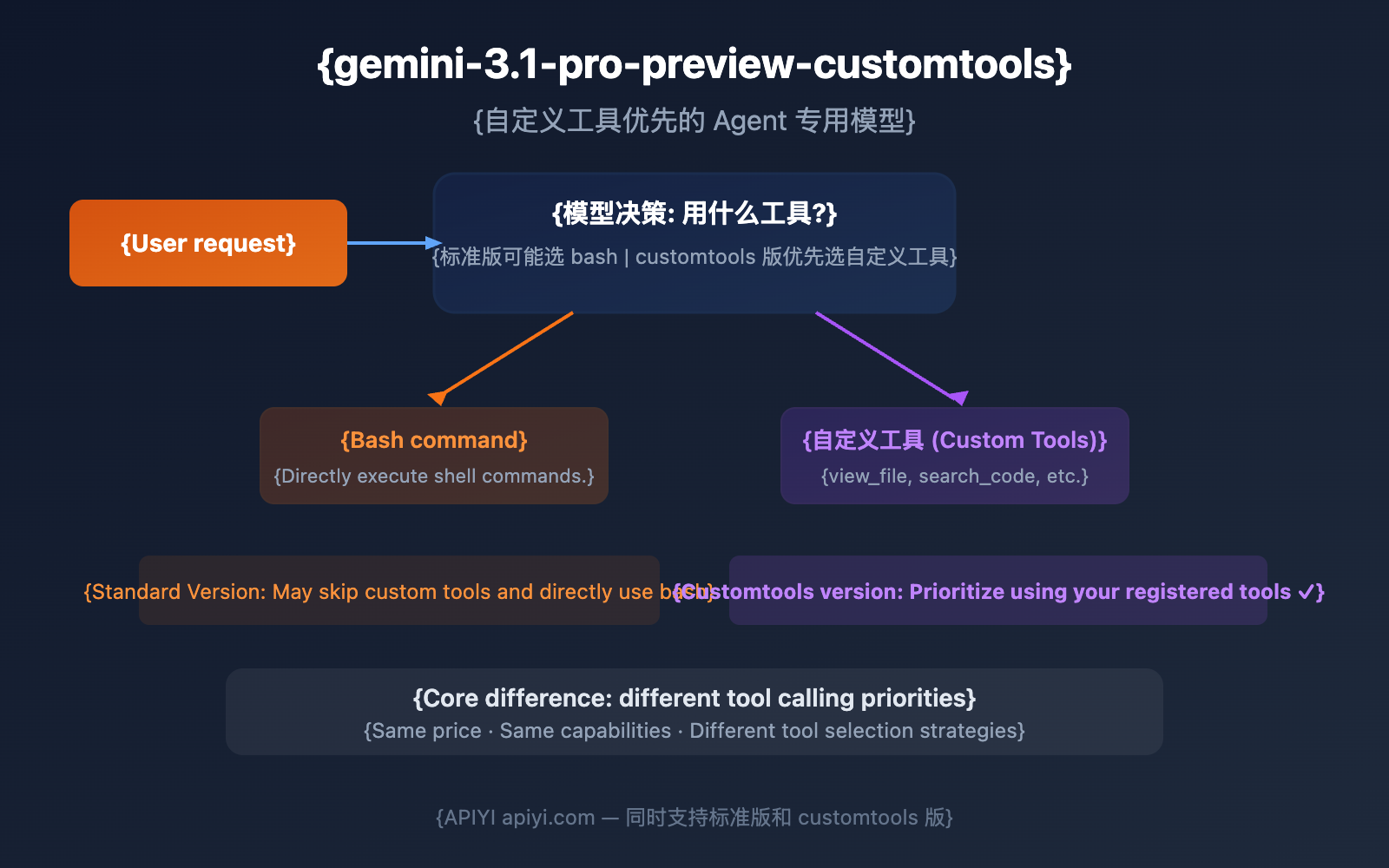
gemini-3.1-pro-preview-customtools is a specialized variant model released by Google on February 19, 2026, alongside the standard Gemini 3.1 Pro. There's only one core difference: It prioritizes using the custom tools you've registered instead of defaulting to running bash commands.
As Google's official changelog puts it:
Launched a separate endpoint
gemini-3.1-pro-preview-customtools, which is better at prioritizing custom tools, for users building with a mix of bash and tools.
Why do we need this variant?
In Agent development, developers usually register two types of capabilities for a model:
- Bash/Code Execution: Letting the model run shell commands directly.
- Custom Tools: Structured functions defined by the developer, such as
view_file,search_code,create_pr, etc.
The problem? The standard Gemini 3.1 Pro sometimes "gets lazy" and skips your carefully designed custom tools to complete a task using direct bash commands instead. For example, even if you've registered a view_file tool, the model might just execute cat filename.py, bypassing your tool entirely.
This can be problematic in several scenarios:
- Custom tools might have permission controls and logging built-in.
- Custom tools return structured data, which is easier for downstream processing.
- Custom tools might be connected to external systems (databases, APIs, etc.).
The customtools variant is designed to solve this: It forces the model to prioritize the tools you've registered.
Gemini 3.1 Pro Standard vs. Customtools: Core Differences
| Comparison Dimension | Standard Version | Customtools Version |
|---|---|---|
| Model ID | gemini-3.1-pro-preview |
gemini-3.1-pro-preview-customtools |
| Release Date | 2026.2.19 | 2026.2.19 (Simultaneous release) |
| Reasoning | ARC-AGI-2 77.1% | Same |
| Coding | SWE-Bench 80.6% | Same |
| Context Window | 1,048,576 tokens | Same |
| Max Output | 65,536 tokens | Same |
| Input Price | $2.00 / 1M tokens | Same |
| Output Price | $12.00 / 1M tokens | Same |
| Tool Calling Behavior | May prioritize bash | Prioritizes custom tools |
| Use Cases | General reasoning, coding, analysis | Agent development, tool orchestration |
| Quality Note | Balanced across all scenarios | Potential minor quality fluctuations in scenarios without tool use |
🎯 Key Takeaway: The "intelligence level" of both models is identical. The only difference is when the model has to choose between "should I use bash or the tool you registered?"—the customtools version is more inclined to pick your custom tool.
When You Need Gemini 3.1 Pro Customtools
Scenarios for Customtools
| Scenario | Why you need it | Specific Examples |
|---|---|---|
| AI Coding Assistants | Needs structured tools like view_file, edit_file, etc. |
Products like Claude Code or Cursor |
| DevOps Agents | Needs to call CI/CD systems via tools rather than direct bash | Automated deployment, code review bots |
| MCP Workflows | Agents with registered MCP tool protocols | Multi-step workflow orchestration |
| Permission-Controlled Agents | Custom tools with built-in permission checks | Enterprise-grade Agent applications |
| Agents Requiring Structured Logs | Tool calls are easier to log and audit | High-compliance scenarios |
Scenarios Where Standard is Enough
| Scenario | Standard Version is Fine | Reason |
|---|---|---|
| General Chat/Q&A | gemini-3.1-pro-preview |
No tool calling involved |
| Text Analysis/Translation | gemini-3.1-pro-preview |
Pure text input and output |
| Code Generation (No Tools) | gemini-3.1-pro-preview |
You just need the model to write code directly |
| Simple Bash Script Execution | gemini-3.1-pro-preview |
You actually want it to use bash |
Google's Official Recommendation
In the Gemini 3 Developer Guide FAQ, Google explicitly states:
If you are using
gemini-3.1-pro-previewand the model ignores your custom tools in favor of bash commands, try thegemini-3.1-pro-preview-customtoolsmodel instead.
In short: if you find the standard version is ignoring your custom tools and jumping straight to bash, give the customtools version a shot.
Gemini 3.1 Pro Customtools API Call Method
Basic Call: Exactly the same as the standard version
import openai

client = openai.OpenAI(
    api_key="YOUR_API_KEY",
    base_url="https://api.apiyi.com/v1"  # APIYI Unified Interface
)

# You only need to change the model name; all other code remains exactly the same
response = client.chat.completions.create(
    model="gemini-3.1-pro-preview-customtools",
    messages=[
        {"role": "user", "content": "Help me view the contents of the main.py file in the project"}
    ]
)
print(response.choices[0].message.content)
Agent Call with Custom Tools
The real power of the customtools version lies in its combination with function calling:
import openai
import json

client = openai.OpenAI(
    api_key="YOUR_API_KEY",
    base_url="https://api.apiyi.com/v1"  # APIYI Unified Interface
)

# Define custom tools
tools = [
    {
        "type": "function",
        "function": {
            "name": "view_file",
            "description": "View the content of a specified file",
            "parameters": {
                "type": "object",
                "properties": {
                    "file_path": {
                        "type": "string",
                        "description": "File path"
                    }
                },
                "required": ["file_path"]
            }
        }
    },
    {
        "type": "function",
        "function": {
            "name": "search_code",
            "description": "Search for keywords in the codebase",
            "parameters": {
                "type": "object",
                "properties": {
                    "query": {
                        "type": "string",
                        "description": "Search keyword"
                    },
                    "file_pattern": {
                        "type": "string",
                        "description": "File match pattern, e.g., *.py"
                    }
                },
                "required": ["query"]
            }
        }
    }
]

# The customtools version will prioritize using the tools defined above
response = client.chat.completions.create(
    model="gemini-3.1-pro-preview-customtools",
    messages=[
        {"role": "user", "content": "Help me find all Python files in the project that contain TODO"}
    ],
    tools=tools
)

# The model will call the search_code tool instead of directly using grep
tool_call = response.choices[0].message.tool_calls[0]
print(f"Tool: {tool_call.function.name}")
print(f"Arguments: {tool_call.function.arguments}")
View the complete Agent loop code
import openai
import json

client = openai.OpenAI(
    api_key="YOUR_API_KEY",
    base_url="https://api.apiyi.com/v1"
)

tools = [
    {
        "type": "function",
        "function": {
            "name": "view_file",
            "description": "View the content of a specified file",
            "parameters": {
                "type": "object",
                "properties": {
                    "file_path": {"type": "string", "description": "File path"}
                },
                "required": ["file_path"]
            }
        }
    },
    {
        "type": "function",
        "function": {
            "name": "search_code",
            "description": "Search for keywords in the codebase",
            "parameters": {
                "type": "object",
                "properties": {
                    "query": {"type": "string", "description": "Search keyword"},
                    "file_pattern": {"type": "string", "description": "File match pattern"}
                },
                "required": ["query"]
            }
        }
    },
    {
        "type": "function",
        "function": {
            "name": "edit_file",
            "description": "Edit specific content in a file",
            "parameters": {
                "type": "object",
                "properties": {
                    "file_path": {"type": "string", "description": "File path"},
                    "old_content": {"type": "string", "description": "Old content to replace"},
                    "new_content": {"type": "string", "description": "New content"}
                },
                "required": ["file_path", "old_content", "new_content"]
            }
        }
    }
]

# Simulate tool execution
def execute_tool(name, args):
    """In a real project, replace this with actual tool implementations"""
    if name == "view_file":
        return f"File content: {args['file_path']} (Simulated)"
    elif name == "search_code":
        return f"Search results for '{args['query']}': Found 3 matches (Simulated)"
    elif name == "edit_file":
        return f"Content in {args['file_path']} has been replaced (Simulated)"
    return "Unknown tool"

# Agent main loop
messages = [{"role": "user", "content": "Find all TODO comments in the project and fix them"}]
max_turns = 5

for turn in range(max_turns):
    response = client.chat.completions.create(
        model="gemini-3.1-pro-preview-customtools",
        messages=messages,
        tools=tools
    )

    msg = response.choices[0].message
    messages.append(msg)

    if msg.tool_calls:
        for tc in msg.tool_calls:
            args = json.loads(tc.function.arguments)
            result = execute_tool(tc.function.name, args)
            messages.append({
                "role": "tool",
                "tool_call_id": tc.id,
                "content": result
            })
            print(f"[Turn {turn+1}] Calling: {tc.function.name}({args})")
    else:
        print(f"[Complete] {msg.content[:200]}")
        break
🚀 Quick Start: Through the APIYI apiyi.com platform, the standard version and customtools version use the same API Key. Just modify the
modelparameter to switch, making it perfect for A/B testing to see which version fits your Agent better.
Relationship between Gemini 3.1 Pro Customtools and Agent Frameworks
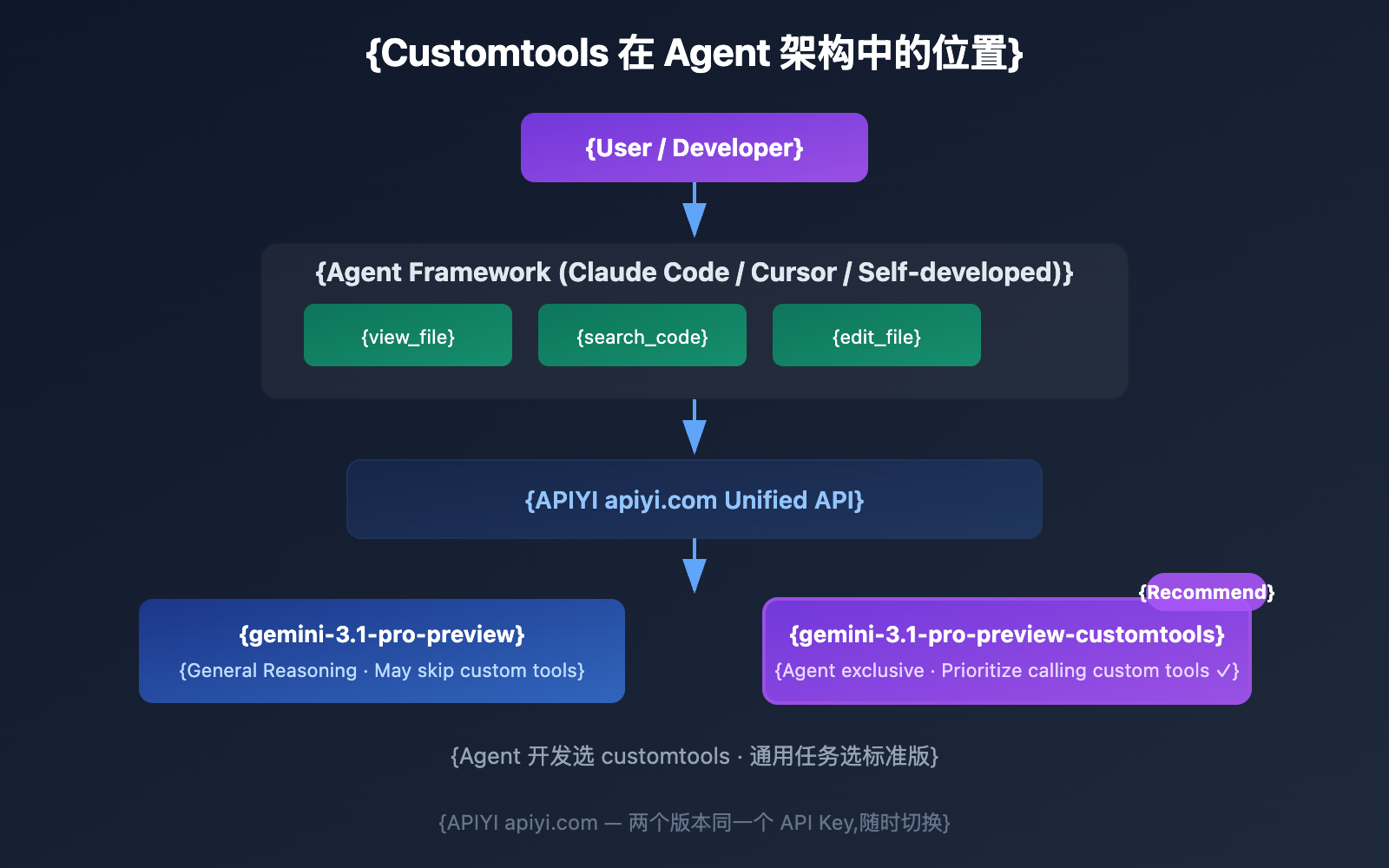
Adaptation Status for Mainstream Agent Frameworks
The customtools version is particularly valuable for the following Agent development scenarios:
| Agent Framework/Scenario | Adaptation Suggestion | Reason |
|---|---|---|
| Claude Code-style coding assistants | Recommended: customtools | Requires structured tools like view_file, edit_file, etc. |
| Cursor / GitHub Copilot | Recommended: customtools | IDE toolsets need to be prioritized for calls. |
| MCP Protocol Agents | Recommended: customtools | Tools registered via MCP need priority assurance. |
| LangChain / LlamaIndex | Recommended: customtools | Tools registered by the framework need to be called correctly. |
| Pure Chat Apps | Use standard version | Doesn't involve tool calling. |
| RAG Retrieval Augmentation | It depends | If retrieval is implemented via function calling, use customtools. |
Gemini 3.1 Pro Customtools vs. Standard Version: A Behavioral Comparison
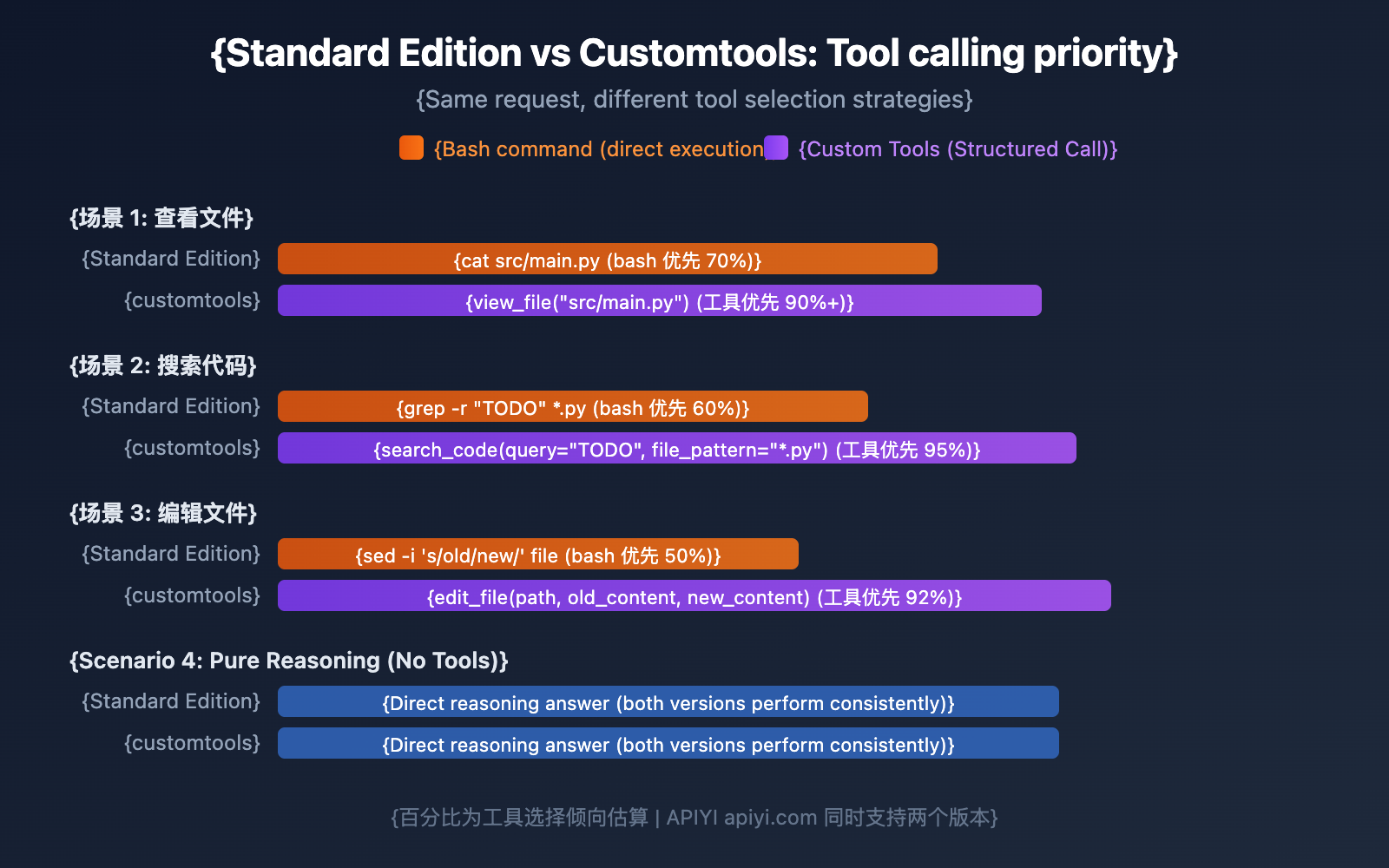
To get a better feel for the difference, let's look at a concrete example:
One Request, Two Different Reactions
User Request: "Help me check the contents of the src/main.py file."
Registered Tool: view_file(file_path: string)
| Model Version | Model Behavior | Description |
|---|---|---|
| Standard Edition | Might directly execute cat src/main.py |
Uses bash to complete the task, bypassing your tool. |
| Customtools Edition | Calls view_file("src/main.py") |
Prioritizes the custom tool you registered. |
Both methods get the file content, but calling through a custom tool offers several advantages:
- Permission Control: Your
view_filetool can check if the path is on a whitelist. - Formatted Output: The tool can return structured JSON instead of raw text.
- Logging & Auditing: Tool calls are automatically logged by the framework.
- Error Handling: The tool can provide user-friendly error messages instead of cryptic bash errors.
The Evolution of Google Gemini Tool-Calling Models
Customtools marks the first time Google has provided a dedicated model variant specifically for tool calling. Here's the full landscape of Gemini's tool-related models:
| Model | Release Date | Tool Type | Description |
|---|---|---|---|
| Gemini 2.5 Flash | 2025 | Basic function calling | General-purpose tool calling |
| Gemini 3 Pro Preview | Late 2025 | function calling | Improved tool calling |
| Gemini 3.1 Pro Preview | 2026.2.19 | function calling + Parallel Tooling | Standard version, might lean towards bash |
| Gemini 3.1 Pro Customtools | 2026.2.19 | Function Calling Priority | Agent-specific, prioritizes custom tools |
| Computer Use Preview | 2025 | GUI Operations | Computer Use (Experimental) |
| Deep Research Preview | Late 2025 | Search + Analysis | Deep Research Agent |
This shows Google is segmenting models by use case rather than trying to cover everything with a single general-purpose model. We'll likely see even more specialized variants in the future.
FAQ
Q1: Is the customtools version more expensive?
No. The customtools version and the standard version are priced exactly the same: Input $2.00 / 1M tokens, Output $12.00 / 1M tokens. When calling through the APIYI apiyi.com platform, both versions use the same API Key, and there are no extra fees.
Q2: Will the reasoning capabilities of the customtools version be weaker?
Hardly. Google mentioned there might be "slight quality fluctuations in scenarios not involving tools," but the core reasoning capabilities (ARC-AGI-2 77.1%, SWE-Bench 80.6%) remain unchanged. If your Agent primarily uses tools, the overall performance of the customtools version will actually be better.
Q3: When should I switch from the standard version to the customtools version?
You should switch when you notice the model frequently using bash commands to complete tasks even when custom tools are available. For example, if you've registered view_file but the model keeps using cat, or you've registered search_code but it keeps using grep. You can quickly A/B test both versions via APIYI apiyi.com.
Q4: Does it make sense to use the customtools version if I haven’t registered any custom tools?
Not really. If you don't register custom tools, both versions behave exactly the same. The optimizations in the customtools version only kick in when the model needs to choose between bash and custom tools.
Summary: Gemini 3.1 Pro Customtools Quick Reference
| Question | Answer |
|---|---|
| What is customtools? | A Gemini 3.1 Pro variant that prioritizes using custom tools |
| How does it differ from the standard version? | Only the tool-calling priority is different; reasoning capabilities and pricing are the same |
| When to use it? | When developing Agents, using MCP, or when you've registered function calling tools |
| When not to use it? | For pure conversation, pure reasoning, or when no tool calling is involved |
| Can I switch between the two? | Yes, just change one model parameter |
| Is the price the same? | Exactly the same: Input $2 / Output $12 per MTok |
Bottom line: gemini-3.1-pro-preview-customtools is essentially the "Agent Mode" for Gemini 3.1 Pro—it makes the model more "obedient" in using your registered tools instead of just running bash. Same price, same intelligence, just a tool selection strategy that's better suited for Agent development.
We recommend accessing both versions through the APIYI apiyi.com platform and choosing the best one after A/B testing in your actual project. For Agent developers, the customtools version is almost always the better choice.
References
-
Google AI Documentation: Gemini 3.1 Pro Preview Model Page
- Link:
ai.google.dev/gemini-api/docs/models/gemini-3.1-pro-preview - Notes: Includes a comparison between the standard and customtools versions.
- Link:
-
Gemini API Changelog: February 19, 2026 Update
- Link:
ai.google.dev/gemini-api/docs/changelog - Notes: Records the initial release of the customtools variant.
- Link:
-
Gemini 3 Developer Guide: Tool Selection Advice in FAQ
- Link:
ai.google.dev/gemini-api/docs/gemini-3 - Notes: Guidance on when to switch from the standard version to the customtools version.
- Link:
-
Google AI Documentation: Function Calling Guide
- Link:
ai.google.dev/gemini-api/docs/function-calling - Notes: Detailed documentation on the function calling API for Gemini models.
- Link:
📝 Author: APIYI Team | For technical discussions, visit APIYI apiyi.com
📅 Updated: February 20, 2026
🏷️ Keywords: gemini-3.1-pro-preview-customtools, custom tools, Agent development, function calling, tool calling, API calling