When using OpenAI-compatible mode in OpenClaw to invoke Gemini models for image recognition, you'll often run into errors. This is a common pain point for developers configuring multimodal AI agents. This article dives deep into the root cause of the "Invalid JSON payload" error and provides three verified solutions to help you quickly fix OpenClaw Gemini image recognition failures.
Core Value: After reading this, you'll understand the key differences between OpenAI-compatible mode and the native Gemini API, master the correct configuration, and permanently resolve image recognition failures.
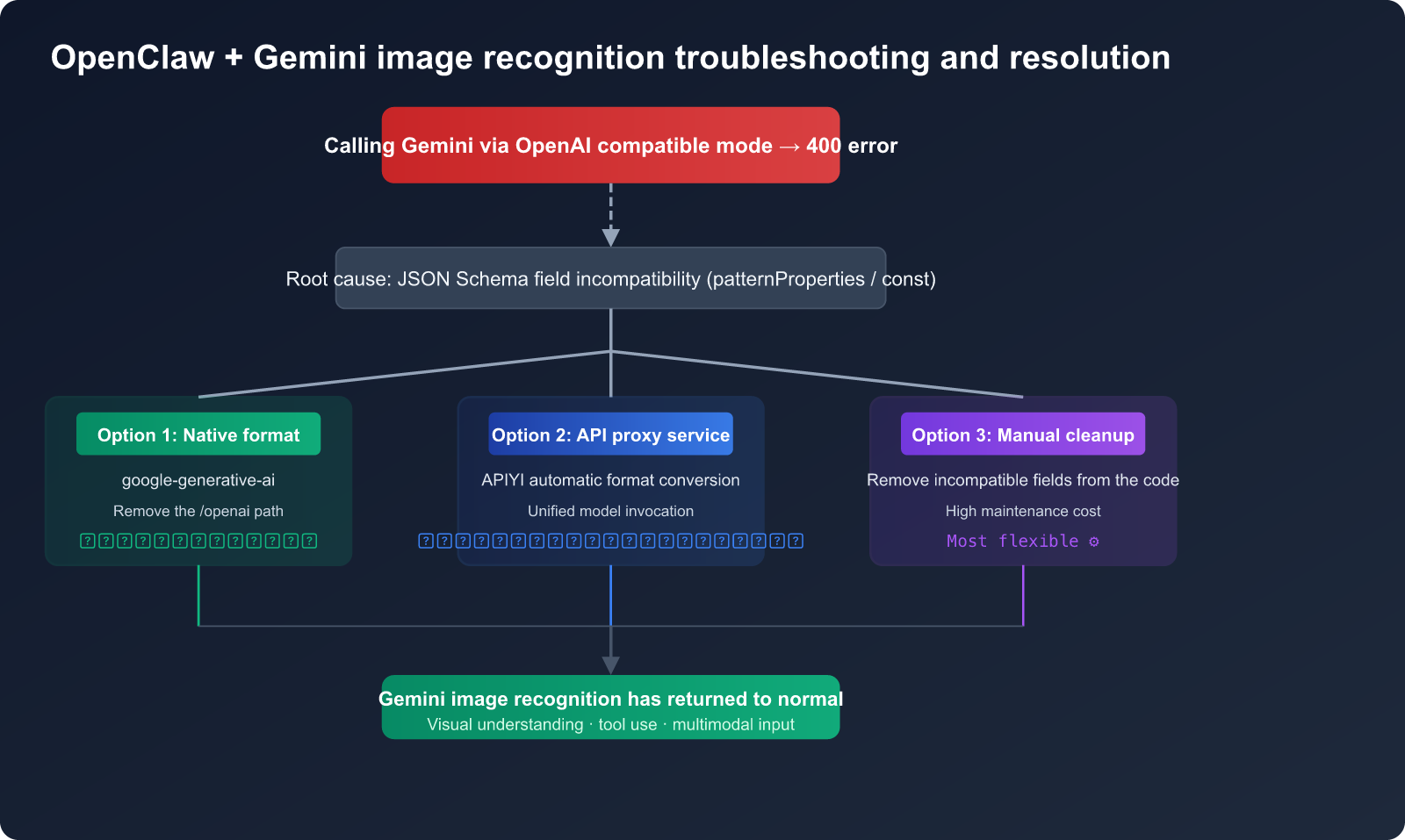
Error Symptoms of OpenClaw Gemini Image Recognition Failures
After configuring a Gemini model in OpenClaw, you'll often see the following typical error in the backend logs when attempting image recognition:
Invalid JSON payload received. Unknown name "patternProperties"
at 'tools[0].function_declarations[3].parameters.properties[4].value':
Cannot find field.

Invalid JSON payload received. Unknown name "const"
at 'tools[0].function_declarations[37].parameters.properties[0].value':
Cannot find field.
Key Characteristics of the OpenClaw Gemini Image Recognition Error
| Characteristic | Specific Symptom | Diagnostic Significance |
|---|---|---|
| Error Location | tools[0].function_declarations |
The issue lies in the tool-calling JSON Schema |
| Error Fields | patternProperties, const |
JSON Schema keywords not supported by Gemini |
| Trigger Condition | Using OpenAI-compatible mode (openai-completions) |
Incomplete format conversion |
| Frequency | High frequency, occasionally succeeds on retry | Schema validation is sometimes bypassed |
| Scope | Affects both image recognition and tool calling | Not an issue with the image itself |
Quick Diagnosis of OpenClaw Gemini Image Recognition Failures
A common misconception is that Gemini's image recognition capabilities are flawed. In reality, testing the API directly using Gemini's official visual understanding demo works perfectly. The problem lies in the format incompatibility when OpenClaw forwards requests via OpenAI-compatible mode.
The verification method is simple:
# Direct call to Gemini API to test image recognition — works perfectly
import google.generativeai as genai
import PIL.Image

genai.configure(api_key="YOUR_GEMINI_API_KEY")
model = genai.GenerativeModel("gemini-2.5-flash")

image = PIL.Image.open("test.jpg")
response = model.generate_content(["Describe this image", image])
print(response.text)  # ✅ Normal output of image description
🎯 Diagnostic Advice: If you encounter Gemini image recognition issues in OpenClaw, first use the method above to confirm that your API key and the model itself are functioning correctly. You can also quickly test Gemini's visual understanding capabilities via the APIYI (apiyi.com) platform, which automatically handles format compatibility issues.
Root Cause Analysis of OpenClaw Gemini Image Recognition Failures
To choose the right solution, you first need to understand the root cause. The primary reason OpenClaw fails at image recognition when using Gemini is a JSON Schema compatibility issue.
JSON Schema Differences: OpenAI vs. Gemini Tool Calling
When OpenClaw uses the OpenAI-compatible mode (openai-completions) to call Gemini, the request flow looks like this:
OpenClaw builds request (OpenAI format)
    ↓
Includes tool-defined JSON Schema
    ↓
Sent to Gemini OpenAI-compatible endpoint
    ↓
Gemini parses function_declarations
    ↓
❌ Encounters unsupported Schema fields → 400 Error
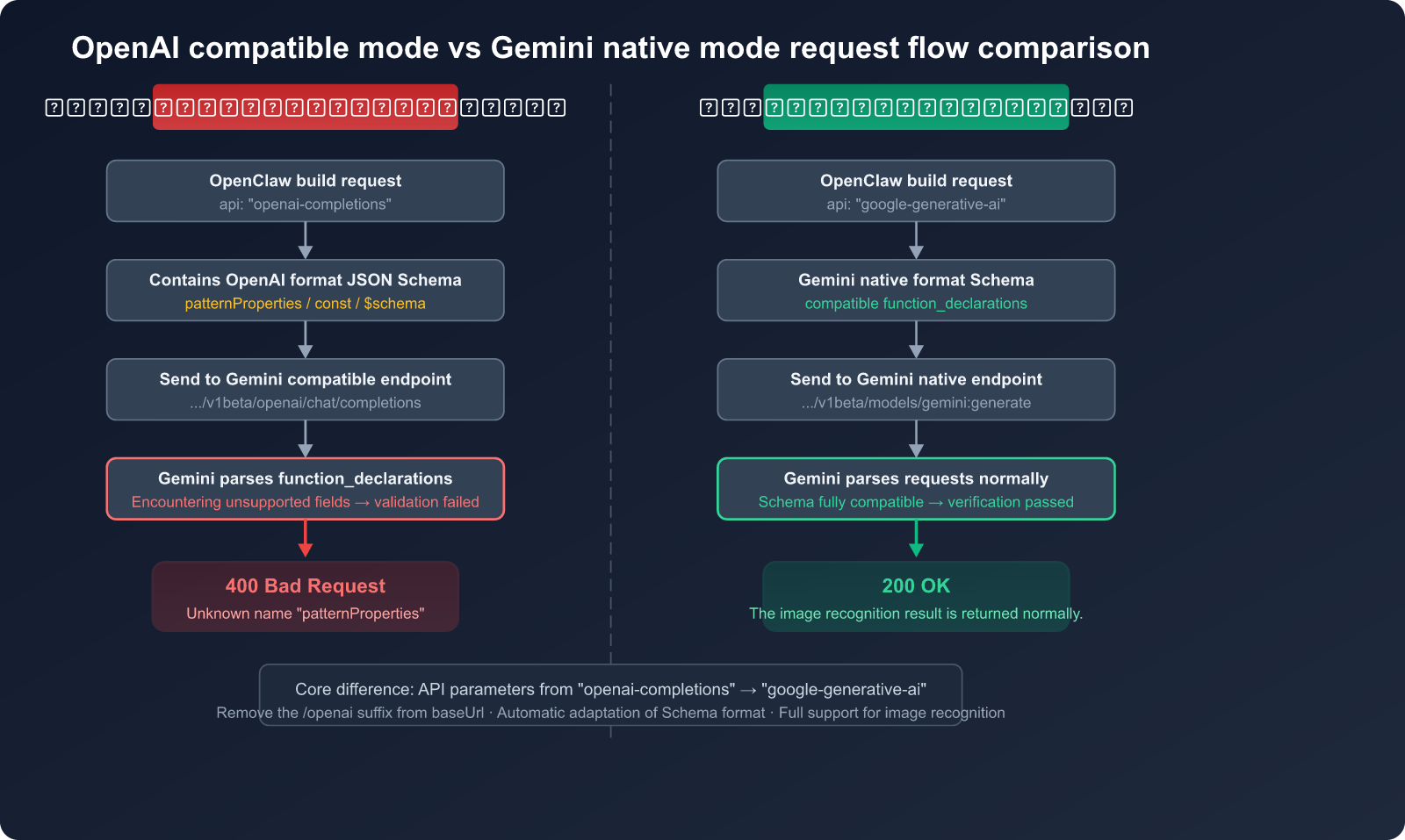
List of JSON Schema Fields Unsupported by Gemini API
This is the crux of the problem. Gemini's support for function_declarations in JSON Schema is a limited subset. The following fields will trigger a 400 error:
| Unsupported Field | Supported by OpenAI? | Error Message | Impact |
|---|---|---|---|
patternProperties |
✅ Yes | Unknown name "patternProperties" | 🔴 High |
const |
✅ Yes | Unknown name "const" | 🔴 High |
additionalProperties |
✅ Yes | Unknown name "additionalProperties" | 🔴 High |
$schema |
✅ Yes | Unknown name "$schema" | 🟡 Medium |
exclusiveMaximum |
✅ Yes | Unknown name "exclusiveMaximum" | 🟡 Medium |
exclusiveMinimum |
✅ Yes | Unknown name "exclusiveMinimum" | 🟡 Medium |
propertyNames |
✅ Yes | Unknown name "propertyNames" | 🟡 Medium |
Why Switching to GPT-5.4 Works
This further confirms our root cause analysis. When you switch the model from Gemini to GPT-5.4 in OpenClaw, image recognition works perfectly. That's because the GPT-5.4 API natively supports the full JSON Schema specification, making the tool definition schema generated by OpenClaw fully compatible.
📌 Key Takeaway: This isn't an issue with Gemini's image recognition capabilities, but rather a mismatch between the tool schema sent by OpenClaw's OpenAI-compatible mode and the specific format requirements of the Gemini API.
Solution 1: Switch to Native Gemini Format (Recommended)
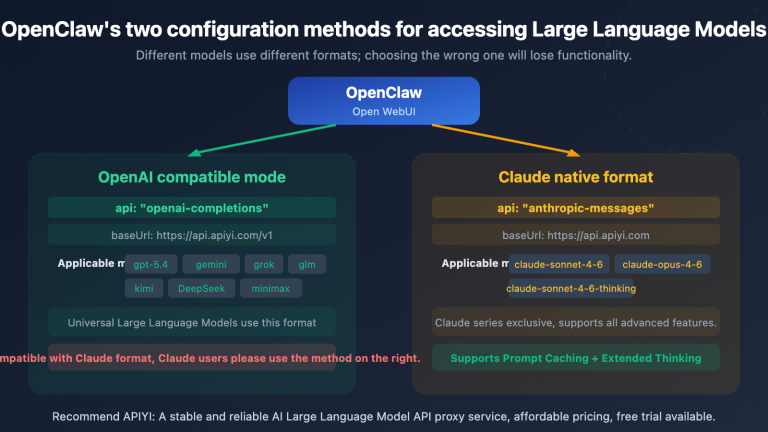
The most robust solution is to switch the Gemini API type in OpenClaw from openai-completions to the native google-generative-ai format.
Configuration Steps
Before (OpenAI Compatibility Mode — Issues may occur):
{
  "provider": "google",
  "model": "gemini-2.5-flash",
  "baseUrl": "https://generativelanguage.googleapis.com/v1beta/openai",
  "api": "openai-completions",
  "apiKey": "YOUR_GEMINI_API_KEY"
}
After (Native Gemini Format — Recommended):
{
  "provider": "google",
  "model": "gemini-2.5-flash",
  "baseUrl": "https://generativelanguage.googleapis.com/v1beta",
  "api": "google-generative-ai",
  "apiKey": "YOUR_GEMINI_API_KEY"
}
Key Changes in Native Configuration
| Configuration Item | OpenAI Compatibility Mode | Native Gemini Format | Note |
|---|---|---|---|
baseUrl |
.../v1beta/openai |
.../v1beta |
Remove the /openai path |
api |
openai-completions |
google-generative-ai |
Switch interface type |
| Image Format | base64 inline | base64 / File API | Native support for more methods |
| Tool Calling | OpenAI function calling | Gemini function declarations | Schema is fully compatible |
| thinking parameter | May send incompatible params | Native thinkingBudget | No conflicts |
Quick Switch Using OpenClaw CLI
# Method 1: Re-initialize Gemini configuration
openclaw onboard --auth-choice gemini-api-key

# Method 2: Manually edit the config file
# Config file location: ~/.openclaw/config.json
# Change the api field from "openai-completions" to "google-generative-ai"
View full OpenClaw Gemini native configuration example
{
  "providers": {
    "google": {
      "apiKey": "YOUR_GEMINI_API_KEY",
      "models": {
        "gemini-2.5-flash": {
          "api": "google-generative-ai",
          "baseUrl": "https://generativelanguage.googleapis.com/v1beta",
          "capabilities": {
            "vision": true,
            "functionCalling": true,
            "streaming": true
          },
          "reasoning": false
        },
        "gemini-2.5-pro": {
          "api": "google-generative-ai",
          "baseUrl": "https://generativelanguage.googleapis.com/v1beta",
          "capabilities": {
            "vision": true,
            "functionCalling": true,
            "streaming": true
          },
          "reasoning": true,
          "thinkingBudget": 8192
        }
      }
    }
  }
}
🚀 Quick Start: If you'd rather not deal with manual configuration compatibility, we recommend using the unified interface provided by APIYI (apiyi.com). The platform automatically converts OpenAI-formatted requests into the native Gemini format, so you don't have to worry about schema differences.
Solution 2: Handle Compatibility via an API Proxy Service
If you prefer to keep using OpenAI compatibility mode in OpenClaw to call multiple models (including Gemini), you can resolve these format compatibility issues by using an API proxy service.
How the API Proxy Service Works
OpenClaw (OpenAI format request)
    ↓
API Proxy Service (e.g., APIYI)
    ↓ Automatically cleans up incompatible JSON Schema fields
    ↓ Automatically converts request format
Gemini API (Native format)
    ↓
✅ Returns image recognition results successfully
Configuration Example
# Call Gemini image recognition via the APIYI proxy service
import openai
import base64

client = openai.OpenAI(
    api_key="YOUR_API_KEY",
    base_url="https://api.apiyi.com/v1"  # APIYI unified interface
)

# Read and encode the image
with open("test.jpg", "rb") as f:
    image_data = base64.b64encode(f.read()).decode("utf-8")

response = client.chat.completions.create(
    model="gemini-2.5-flash",
    messages=[
        {
            "role": "user",
            "content": [
                {"type": "text", "text": "Describe the content of this image"},
                {
                    "type": "image_url",
                    "image_url": {
                        "url": f"data:image/jpeg;base64,{image_data}"
                    }
                }
            ]
        }
    ]
)
print(response.choices[0].message.content)
Proxy Service vs. Direct Connection
| Comparison | Direct Gemini API | Via APIYI Proxy |
|---|---|---|
| JSON Schema Compatibility | ❌ Manual handling required | ✅ Automatically cleaned |
| OpenAI SDK Compatibility | ⚠️ Partially compatible | ✅ Fully compatible |
| Multi-model switching | Requires config changes | Just change the model parameter |
| Image Format | base64 inline | base64 inline |
| Tool Calling | Limited Schema | Automatically converted |
| Extra Cost | None | Platform fees |
Configure APIYI proxy in OpenClaw:
{
  "provider": "apiyi",
  "model": "gemini-2.5-flash",
  "baseUrl": "https://api.apiyi.com/v1",
  "api": "openai-completions",
  "apiKey": "YOUR_APIYI_KEY"
}
💡 Recommendation: If you're using multiple models in OpenClaw (GPT-5.4, Claude, Gemini, etc.), managing your model invocations through APIYI (apiyi.com) is a much more efficient choice, as it saves you from having to configure different API formats for every single model.
Solution 3: Manually Cleaning Incompatible JSON Schema Fields
If you need to resolve compatibility issues at the code level, you can manually clean up JSON Schema fields that Gemini doesn't support before sending your request.
JSON Schema Cleaning Function
def clean_schema_for_gemini(schema: dict) -> dict:
    """Clean up JSON Schema fields not supported by Gemini"""
    unsupported_keys = {
        "patternProperties",
        "const",
        "additionalProperties",
        "$schema",
        "exclusiveMaximum",
        "exclusiveMinimum",
        "propertyNames",
    }

    if isinstance(schema, dict):
        return {
            k: clean_schema_for_gemini(v)
            for k, v in schema.items()
            if k not in unsupported_keys
        }
    elif isinstance(schema, list):
        return [clean_schema_for_gemini(item) for item in schema]
    return schema
View full example of tool definition cleaning and invocation
import openai
import json

def clean_schema_for_gemini(schema):
    """Recursively clean up JSON Schema fields not supported by Gemini"""
    unsupported_keys = {
        "patternProperties", "const", "additionalProperties",
        "$schema", "exclusiveMaximum", "exclusiveMinimum",
        "propertyNames", "if", "then", "else",
        "allOf", "anyOf", "oneOf", "not",
    }

    if isinstance(schema, dict):
        cleaned = {}
        for k, v in schema.items():
            if k not in unsupported_keys:
                cleaned[k] = clean_schema_for_gemini(v)
        return cleaned
    elif isinstance(schema, list):
        return [clean_schema_for_gemini(item) for item in schema]
    return schema

def clean_tools_for_gemini(tools):
    """Clean all schemas within the tool list"""
    cleaned_tools = []
    for tool in tools:
        tool_copy = json.loads(json.dumps(tool))
        if "function" in tool_copy:
            params = tool_copy["function"].get("parameters", {})
            tool_copy["function"]["parameters"] = clean_schema_for_gemini(params)
        cleaned_tools.append(tool_copy)
    return cleaned_tools

# Usage example
tools = [
    {
        "type": "function",
        "function": {
            "name": "analyze_image",
            "description": "Analyze image content",
            "parameters": {
                "type": "object",
                "properties": {
                    "image_url": {"type": "string"},
                    "detail": {"type": "string", "const": "high"}  # Not supported by Gemini
                },
                "patternProperties": {"^x-": {"type": "string"}},  # Not supported by Gemini
                "additionalProperties": False  # Not supported by Gemini
            }
        }
    }
]

# Clean before invocation
cleaned_tools = clean_tools_for_gemini(tools)

client = openai.OpenAI(
    api_key="YOUR_API_KEY",
    base_url="https://api.apiyi.com/v1"
)

response = client.chat.completions.create(
    model="gemini-2.5-flash",
    messages=[{"role": "user", "content": "Hello"}],
    tools=cleaned_tools
)
⚠️ Note: The manual schema cleaning approach requires you to process parameter definitions for every tool, which can be high-maintenance. If you have many tools or they change frequently, we recommend prioritizing Solution 1 (Native Format) or Solution 2 (API proxy service).
Comparison and Selection Guide for the 3 Solutions
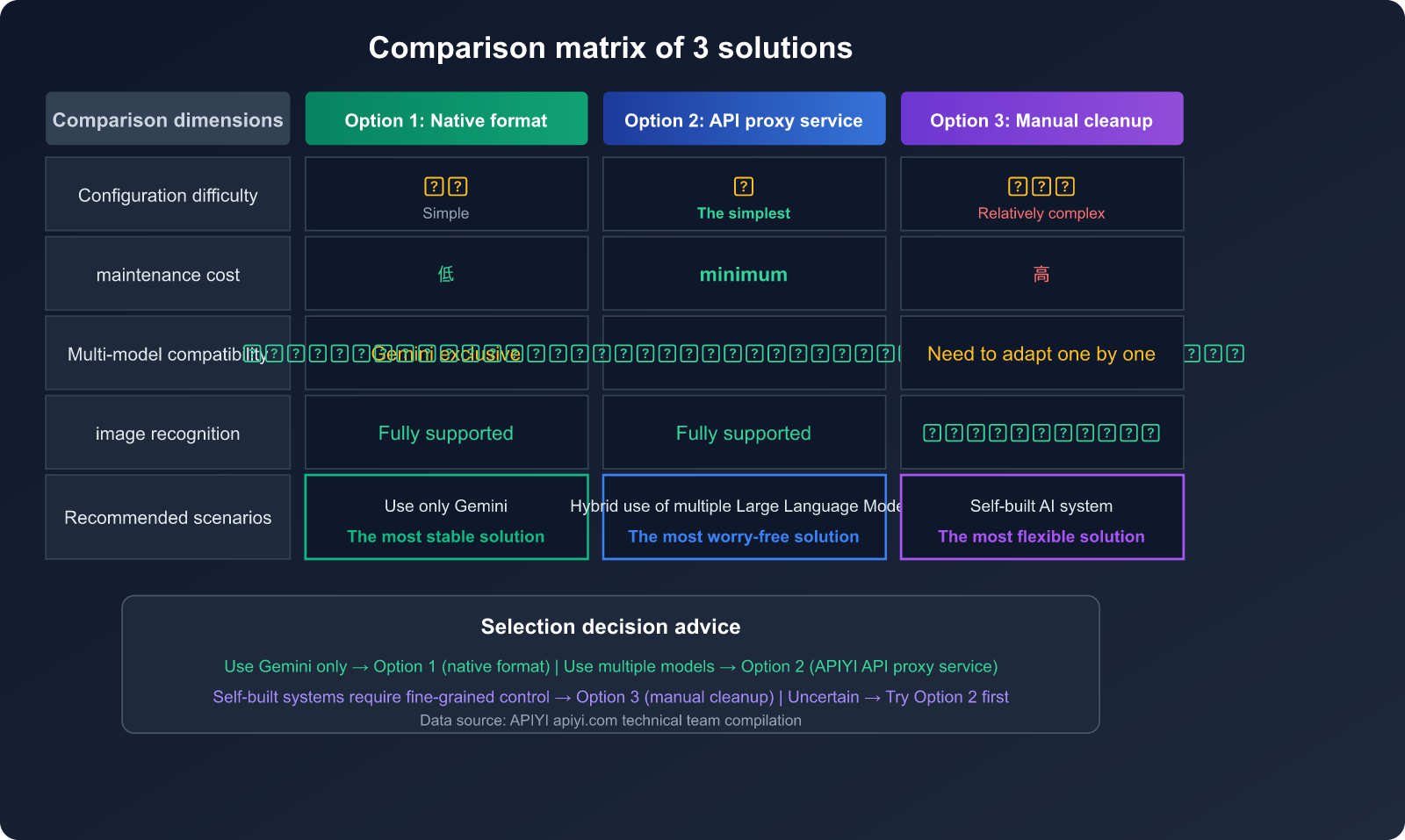
| Comparison Dimension | Solution 1: Native Format | Solution 2: API Proxy | Solution 3: Manual Cleaning |
|---|---|---|---|
| Config Difficulty | ⭐⭐ Simple | ⭐ Easiest | ⭐⭐⭐ Complex |
| Maintenance Cost | Low | Lowest | High |
| Compatibility | Gemini-specific | Multi-model universal | Requires individual adaptation |
| Image Recognition | ✅ Fully supported | ✅ Fully supported | ✅ Supported |
| Tool Invocation | ✅ Native support | ✅ Auto-converted | ⚠️ Requires updates |
| Model Switching | Requires config change | Just change parameters | Requires different logic |
| Recommended Use | Gemini only | Mixed models | Custom-built systems |
Selection Decision Tree
- Using Gemini only in OpenClaw → Solution 1 (Native Format), most stable.
- Mixing multiple models in OpenClaw → Solution 2 (APIYI proxy), most effortless.
- Need fine-grained control for custom AI apps → Solution 3 (Manual Cleaning), most flexible.
- Not sure which to pick? → Try Solution 2 first; verify quickly via APIYI (apiyi.com).
FAQ
Q1: Why doesn’t Gemini support the full JSON Schema specification?
Gemini's function_declarations uses a restricted subset of the OpenAPI 3.0 specification rather than the full JSON Schema Draft 7+. Google opted for a stricter validation strategy during design, omitting support for advanced fields like patternProperties, const, and additionalProperties. This differs from OpenAI's implementation, which is more permissive with JSON Schema. Using an API proxy service like APIYI (apiyi.com) can automatically handle these discrepancies, so you don't have to manually adapt your code.
Q2: Will other OpenClaw features be affected if I switch to the native format?
Not at all. After switching to google-generative-ai, OpenClaw's text chat, tool invocation, and code generation features will continue to work normally, and you'll likely find that image recognition and multimodal capabilities are even more stable. The only thing to keep in mind is the change in the thinking parameter format—the native mode uses thinkingBudget instead of reasoning_effort.
Q3: Why does it occasionally succeed after a retry?
This happens because the validation of the Schema by Gemini's OpenAI-compatible endpoint isn't always strictly enforced. In some requests, if complex tool invocation isn't involved (i.e., the request doesn't contain incompatible Schema fields), the request will pass through just fine. However, as soon as you involve tool invocation with a Schema containing incompatible fields, it will trigger a 400 error.
Q4: Does using an API proxy service increase latency?
There is a slight increase, usually around 50-150ms. For tasks like image recognition, which typically take 1-3 seconds to process, this latency is negligible. The APIYI (apiyi.com) platform optimizes routing for mainstream models, so the impact on your actual experience is minimal.
Q5: Do other tools have this problem besides OpenClaw?
Yes. Tools like LiteLLM, LangChain, and Qwen Code have all reported similar JSON Schema compatibility issues when calling Gemini via the OpenAI-compatible mode (GitHub issues: BerriAI/litellm#14330, langchain-ai/langchainjs#8584). This is a general limitation of the Gemini API, not an issue specific to OpenClaw.
Summary
The root cause of OpenClaw failing at Gemini image recognition is JSON Schema field incompatibility within the OpenAI-compatible mode, rather than any issue with the Gemini model's visual capabilities. There are three solutions, each suited for different scenarios:
- Native Format (
google-generative-ai): The most thorough approach; recommended if you are using Gemini exclusively. - API Proxy Service: The most hassle-free approach; recommended if you are using a mix of different models.
- Manual Schema Cleaning: The most flexible approach; recommended if you are building your own custom system.
We recommend using APIYI (apiyi.com) to quickly verify Gemini's image recognition performance. The platform supports unified calls for mainstream models like Gemini, GPT, and Claude, automatically handling the API format differences between them.
References
-
Gemini Official Documentation – Image Understanding: Explanation of Gemini's visual understanding capabilities
- Link:
ai.google.dev/gemini-api/docs/image-understanding
- Link:
-
Gemini Official Documentation – OpenAI Compatibility: Instructions for calling Gemini using the OpenAI SDK
- Link:
ai.google.dev/gemini-api/docs/openai
- Link:
-
OpenClaw GitHub Issue #21172:
patternPropertiescausing Gemini API 400 errors- Link:
github.com/openclaw/openclaw/issues/21172
- Link:
-
OpenClaw GitHub Issue #14456: Gemini 2.5 Flash OpenAI compatibility mode 400 errors
- Link:
github.com/openclaw/openclaw/issues/14456
- Link:
-
OpenClaw Model Configuration Documentation: Guide to configuring model providers
- Link:
docs.openclaw.ai/concepts/model-providers
- Link:
📝 Author: APIYI Team — Focused on Large Language Model API integration and technical analysis
🔗 More Tutorials: Visit APIYI at apiyi.com for more model invocation guides and free testing credits