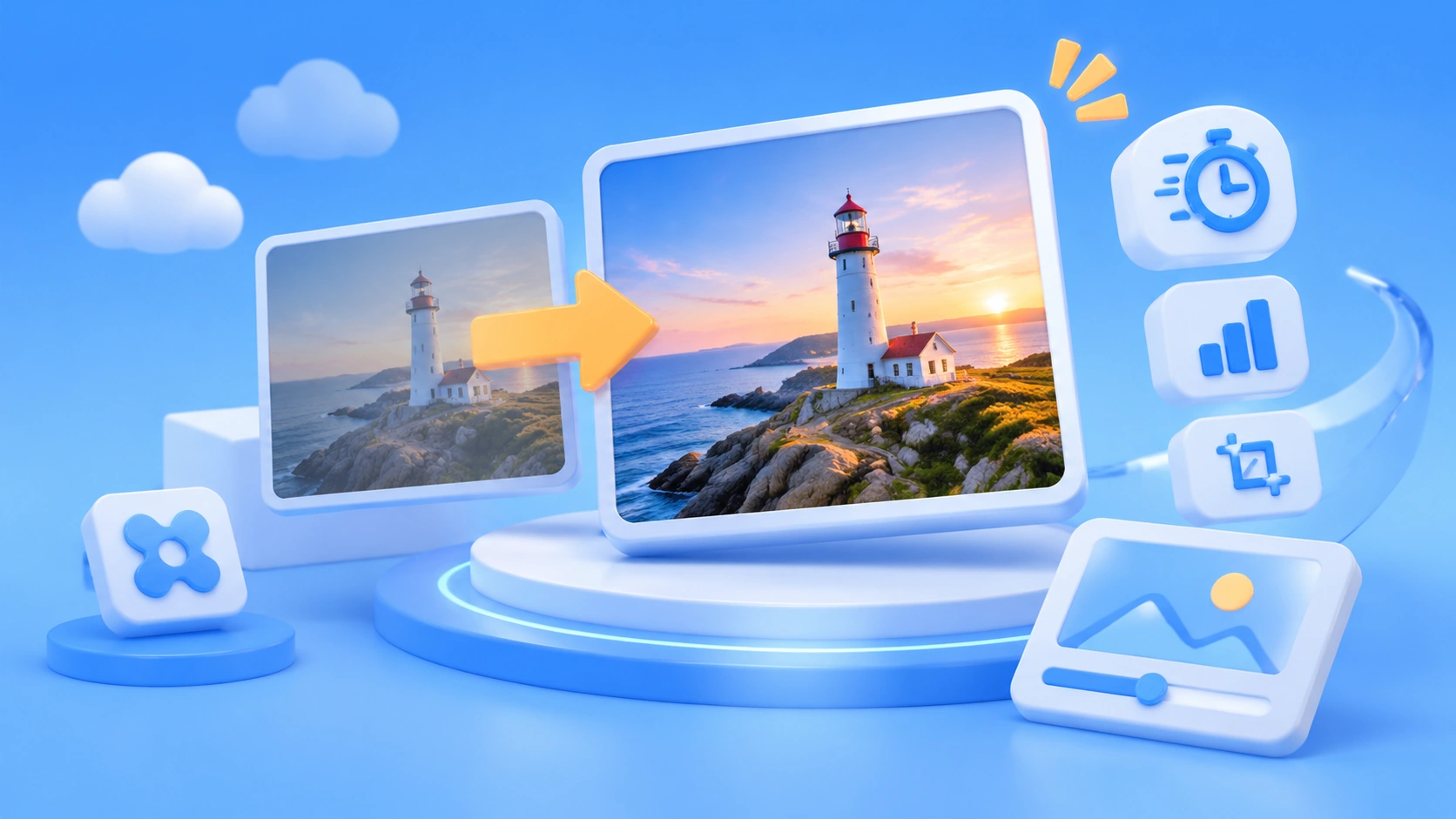
On the eve of a big sale, the operations team sends over 300 product photos on white backgrounds and asks for all of them to be placed in autumn scenes by morning. That’s exactly the kind of job Krea 3 is designed for. It became Krea’s default model on XX October 28, with the official pitch: “Edit an image in 8 seconds, native 2K.”
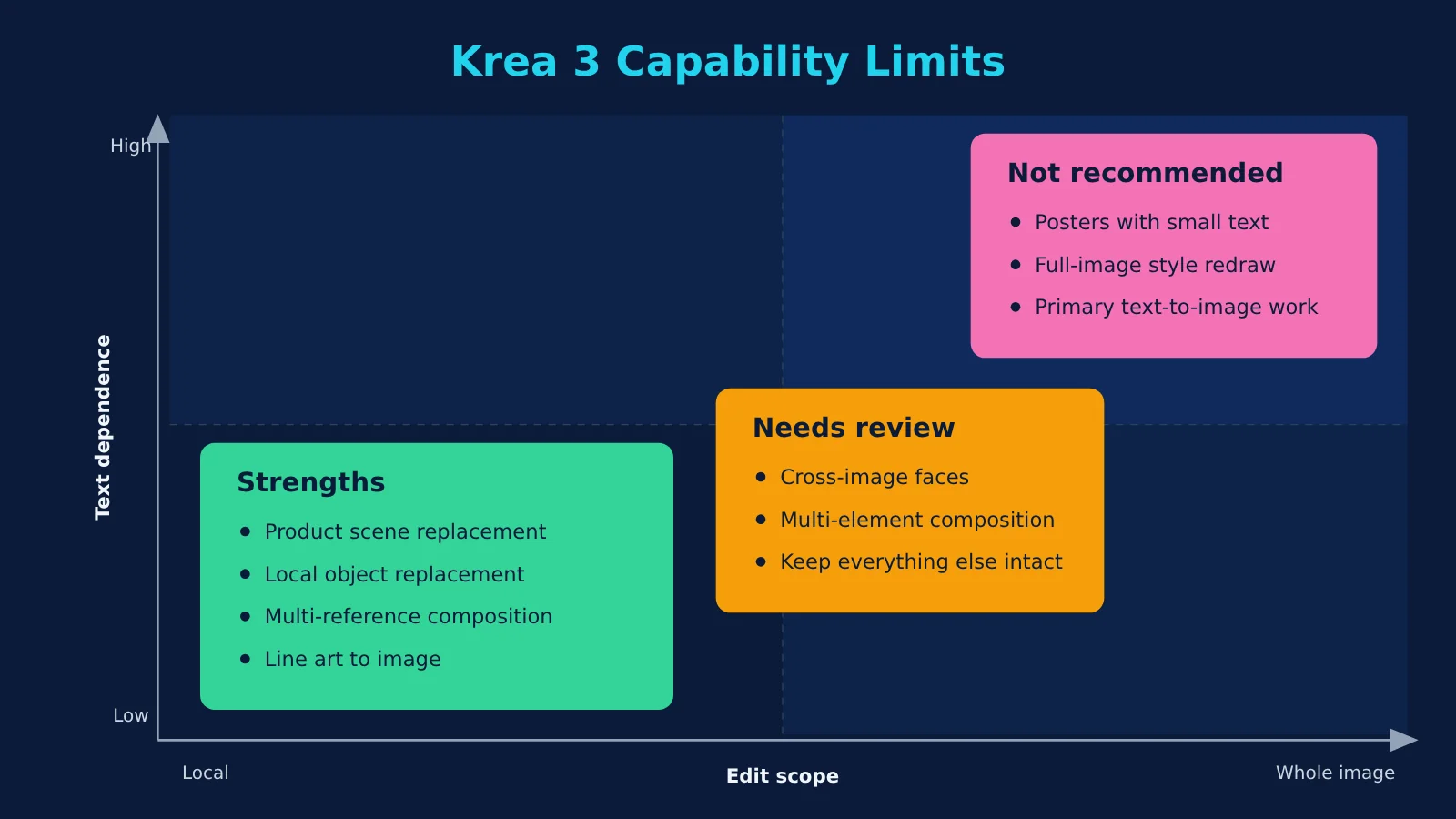
Here’s the takeaway: Krea 3 is fast, but editing is its strength. It’s an editing model, not a good fit for image generation from scratch. The 8-second figure comes from the vendor, and we need to look closely at how it’s calculated. In quality rankings, it sits near the top of the second tier—not in first place.
Krea 3 in 30 Seconds
| Good jobs for Krea 3 | Don’t use it for | Use these instead |
|---|---|---|
| Turning product photos on white backgrounds into ad scenes | Posters with small text, price tags, or long copy | Generate the base image with GPT Image 2 / Nano Banana Pro, then add text in design software |
| Placing the same group of people in different street scenes or poses | Direct output for 4K printing | A native high-resolution model, or a professional upscaling workflow for 2K images |
| Changing furniture or materials in an interior while keeping everything else unchanged | Restyling an entire image or creating primarily through text-to-image | Krea 2 (styles / LoRA), Nano Banana Pro, Seedream 5.0 Pro |
What Is Krea 3? It’s an Editing Model
The timeline is short: the beta opened on October 15. On October 20, Krea 3 entered Arena’s single-image and multi-image editing leaderboards. On October 28, it became the default image model in the Krea App. That same week, API access opened to all workspaces, and fast and high no longer required beta access. Today, October 30, the old mode names are officially being retired—we’ll cover that separately below.
Krea now has two models with different jobs. Krea 2 handles styles and LoRA; Krea 3 handles image editing. Krea says Krea 3 isn’t a distilled version of a Large Language Model. It focuses its compute on the area you want to change instead of reprocessing the whole image. It can also do text-to-image, but third-party MindStudio’s hands-on feedback from October 16 found it weak enough that the product itself displays a confirmation dialog. Krea’s CTO also acknowledged on Hacker News that text-to-image hadn’t yet received its final tuning.
The API offers three thinking modes. fast briefly expands the prompt before generating an image. It’s the fastest and the default recommendation. high uses a stronger reasoning engine to plan complex edits. It costs an extra $0.02 per run and is useful when combining multiple reference images or when fast doesn’t get the edit right. ultra uses an agentic workflow, always outputs at 2K, and can take several minutes. It costs an extra $0.20 per run, requires at least one reference image, and produces only one image. It doesn’t support negative_prompt or zero data retention (ZDR). In the app, it requires a Max plan or higher.
5 Things Krea 3 Does Best
These five capabilities come from the official feature list, supplemented by third-party feedback. Each includes a check you can use before delivery.
- Product scene replacement: Turn a product packshot on a white background into an advertising scene while keeping the product’s shape, label, and logo unchanged. Check: Overlay the original and generated images to see whether the product’s outline or logo has shifted, and check the label text character by character.
- Character consistency: Give it a few reference images, and the same people can appear on different streets, in different poses, and under different lighting while keeping the same faces. Check: Compare the images side by side for changes in details like hairlines, moles, and eye spacing. Krea itself says identity consistency across images isn’t perfect, so manual review is needed.
- Regional editing: Enable
regional_edit=truein the API to redraw only the parts you want to change, leaving the remaining pixels untouched. It’s useful for making further edits to a previous result.regionssupports up to 24 boxes, with coordinates ranging from 0 to 1. Each box can have its own note, and boxes can reference one another using @label. Check: Compare non-target areas at 200% zoom to see whether details like carpet texture or the view outside a window have been recalculated. - Multi-reference composition: The API documentation says you can use up to eight reference images. With five or more, each image’s longest edge is resized to 1536px. Krea’s recommended prompt format specifies what each image represents, such as “Image 1 is the room; image 2 is the sofa.” Check: Make sure every reference element appears in the right place.
- Line art or mood board to finished image: An official example uses line art and a six-color palette to generate architectural photography, placing colors according to the brief. Check: Use a color picker to see whether the main colors are close to the palette. One HN user reported that hex colors can “leak” into other parts of the design.

Caption: The same people keep the same faces across different scenes, poses, and lighting. Source: Krea’s official media kit (k3-video-character-consistency), official demo material.
Krea recommends this prompt order: first state what must be preserved, then describe the scene, lighting, and camera like a photographer. When changing just one thing, add “only.”
How Krea 3’s 8-Second Claim Is Measured
Krea’s official claim is that “most edits complete end-to-end in under 8 seconds, at native 2K,” with the fastest configuration taking around 4–5 seconds. It also notes that “Krea 3 isn’t real time yet.” We haven’t independently verified these figures.
The footnote in the comparison table matters. The launch blog lists Krea 3 at under 8 seconds, Nano Banana Pro at 33 seconds, and GPT Image 2 at 90 seconds. The footnote says the competitor figures are median times, including queueing, for editing tasks run on the Krea platform between September 24 and October 1. Krea 3’s 8-second figure is framed as an upper bound, with no median provided on the same basis. A different figure on the landing page—26.8 seconds for Nano Banana Pro—is labeled “Pre-generated outputs, not a live benchmark”: it uses pre-generated results with an 8-second demonstration playback. So you can’t take “4× faster” as a settled conclusion.
Third-party assessments are broadly consistent. eesel (October 18) notes that the figures were measured by the vendor on its own infrastructure. LuminaBench says the “4× faster, comparable quality” claim hasn’t been independently verified, while GLBGPT (October 25) didn’t run a speed benchmark. OpenAI Hub’s Chinese-language news brief used the official figures for a rough calculation: 1,000 edits run sequentially would take Krea 3 about 2.22 hours and Nano Banana Pro about 7.44 hours. Actual results will vary with region, queueing, input size, and the area being edited.
The following conditions can slow things down or reduce quality:
- Peak-time queueing: When concurrency limits are exceeded, only non-ZDR tasks on Pro plans and above enter the backlog. Other tasks may return a 429 error immediately.
- Large inputs: Reference images over 4 MP are first compressed to 4 MP. A 4K output is generated at 2K and then upscaled.
- Ultra: Krea says it may take several minutes. Civitai users also report that Ultra is slower during busy periods.
- More than five reference images: Each image is reduced to 1536px. Speed may not be affected, but some detail will be lost.
| Model | Time listed on Krea’s pages | Price per 2K image (excluding reference images) | Notes (Krea’s figures, not independently benchmarked) |
|---|---|---|---|
| Krea 3 | <8 seconds | $0.06 | Upper-bound claim; no median provided |
| Nano Banana Pro | 33 seconds (blog) / 29 seconds (model page) | $0.135 | Median including queueing |
| GPT Image 2 | 90 seconds (blog) / 118 seconds (model page) | $0.22 | Median including queueing |
| Nano Banana 2 | 33 seconds | $0.067 | Model page figure |
| Seedream 5.0 Pro | 67 seconds | $0.09 | Model page figure |
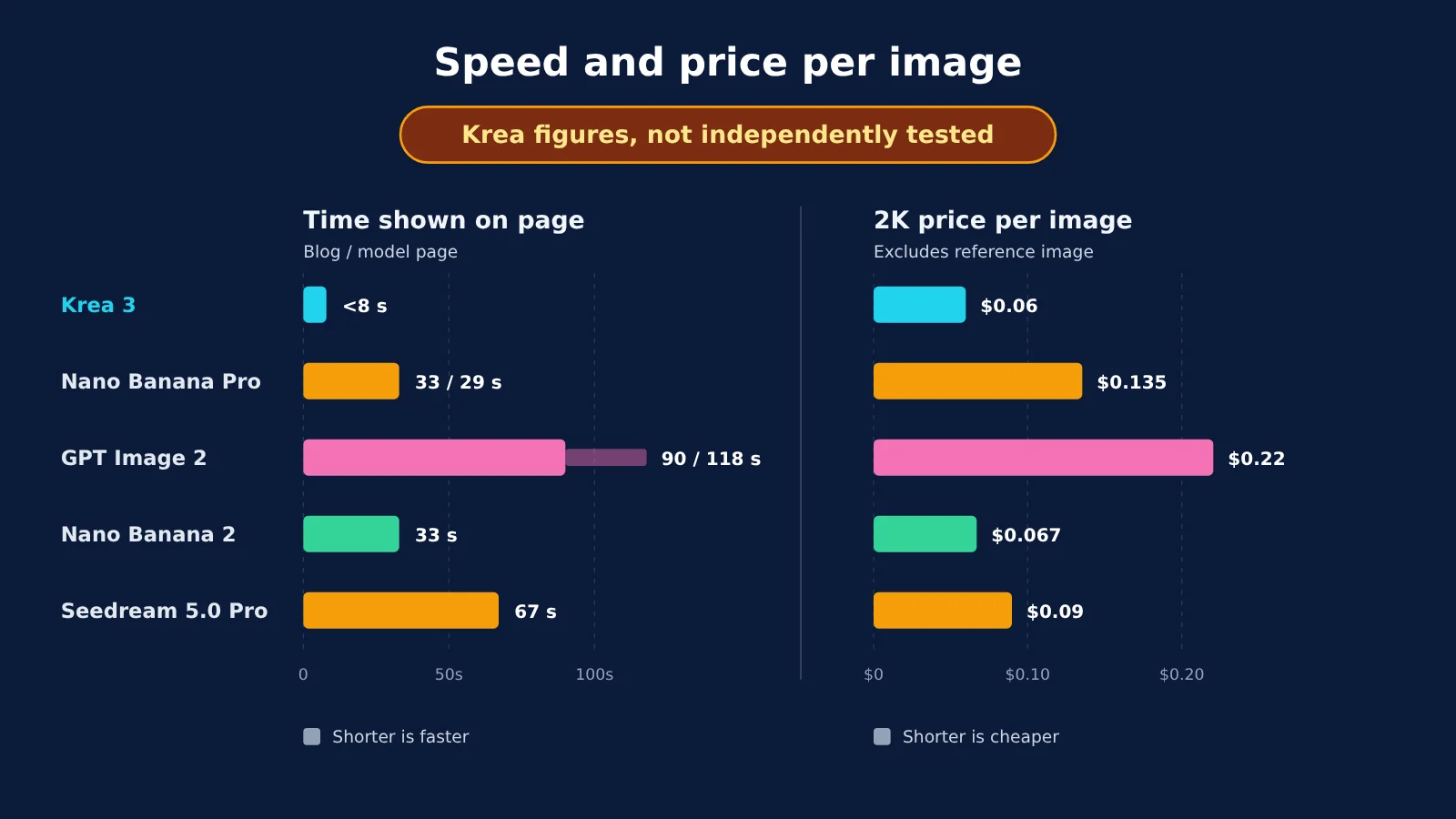
All the figures in this chart come from Krea’s own pages. To compare latency for your own use case, run your own tests on the same network and with the same batch of images. You can start by establishing baselines for Nano Banana Pro and Seedream on APIYI at apiyi.com.
Krea 3 Quality: Near the Top, but Not Number One
The leaderboard data is current as of October 19–20. The table includes vote counts and sample sizes because Krea 3 has only recently launched and has far fewer samples than older models.
| Leaderboard | Krea 3 Rank | Score | Votes / Samples | Notes |
|---|---|---|---|---|
| Arena Multi-Image Editing | Ultra #4 | 1435 | 2,991 votes | Preliminary; tied for #4 with Nano Banana 2.1 |
| Arena Single-Image Editing | Ultra #8 | 1411 | 2,619 votes | Rank range: 5–10 |
| Artificial Analysis | Ultra #5 / Fast #11 | 1151 / 1125 | 5,378 / 5,087 | Nano Banana Pro #16 |
| Design Arena | Ultra #4/51 | 1298 | Not provided officially | Checked October 20 |
| CPI-Bench (Alibaba benchmark) | Ultra second | 4.81/5 | — | Reported by Krea, not an independent ranking |
Krea 3 Ultra Isn’t Better Across the Board
The Artificial Analysis (AA) category rankings are a bit counterintuitive: Ultra only beats Fast in some categories and actually performs worse in others.
| AA Category | Ultra | Fast | How to Choose |
|---|---|---|---|
| Scene & Style | #18 | #11 | Try Fast first for scene changes |
| Live-Action | #10 | #8 | Fast is sufficient |
| Marketing | #4 | #21 | Use Ultra when ad details matter |
For background and scene changes, Fast ranks higher and costs less. For marketing materials where details need to be just right, Ultra has a clear advantage. Teams that default to Ultra for everything may be paying more for worse results.
How to Read the Krea 3 Rankings
“Preliminary” means there aren’t enough votes yet, so the ranking may change. Arena’s scores come with a confidence interval of ±11, and both Krea 3 and Nano Banana 2.1 have a rank range of 4–5, making them tied under Arena’s rules. Different leaderboards also use different scales: AA anchors FLUX.2 dev at 1000, while Design Arena uses a baseline of 1200, so you can’t subtract scores across leaderboards. A fair summary is: top four in multi-image editing, eighth in single-image editing, and behind competitors in some areas.
Third-party feedback supports that picture. One HN user felt that Krea 3’s overall visual creativity fell short of GPT Image 2.5, though its handling of small text was impressive. Another example involved asking Krea 3 to place a woman wearing a T-shirt in a bar. The model added a suit jacket on its own, then put the T-shirt print directly on top of the jacket. Gemini handled the same task better.
Krea 3’s Real Cost: $0.06 Is Just the Base Price
The $0.06 price doesn’t include reference images. Image editing requires at least one reference image, so the actual cost is higher.
| Charge | 1K output | 2K output |
|---|---|---|
| Base price | $0.03 | $0.06 |
| Per 1K reference image | +$0.02 | +$0.02 |
| Per 2K reference image | +$0.07 | +$0.07 |
| high mode | +$0.02/request | +$0.02/request |
| ultra mode | Not available | +$0.20/request |
| 4K (API only) | — | 2K pricing + $0.04 |
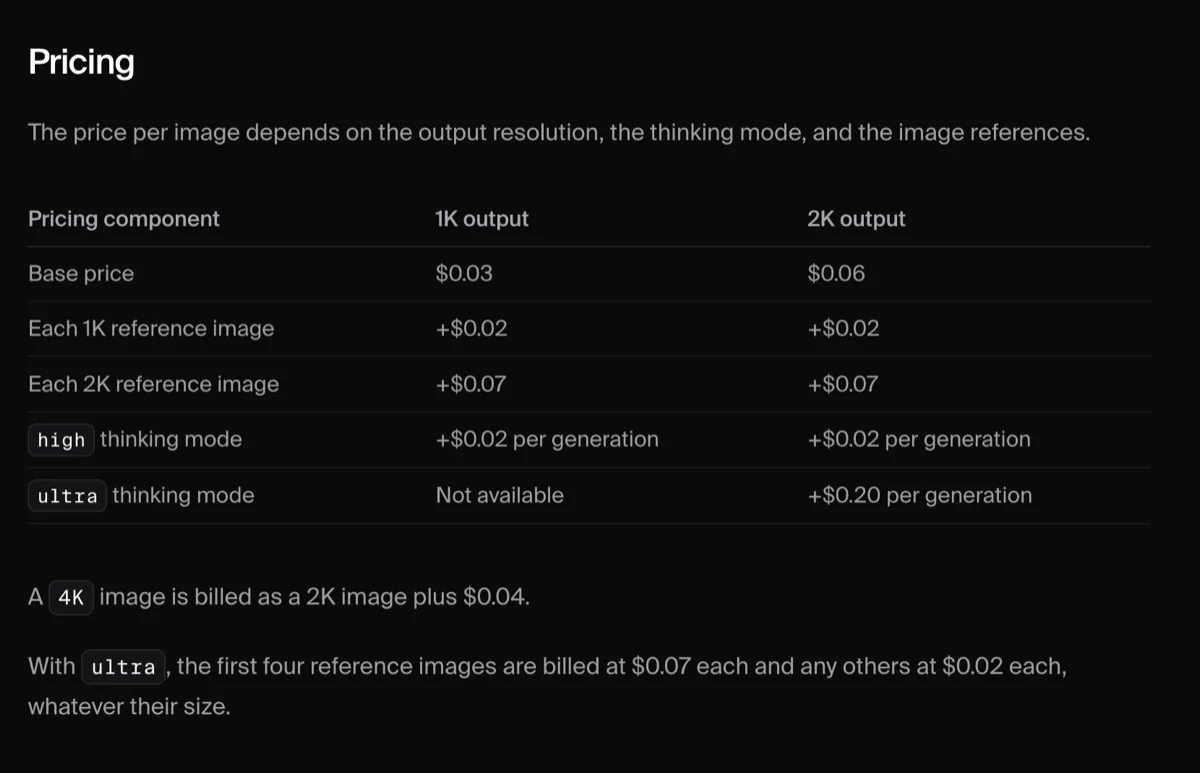
Caption: Krea 3 API pricing table. The 2K base price is $0.06; reference images and thinking modes cost extra. Source: Krea official documentation, screenshot taken October 30.
Five example calculations (we calculated these from the documentation; they aren’t official package prices):
- 1K output + 1 1K reference image + fast = $0.05
- 2K output + 1 1K reference image + fast = $0.08
- 2K output + 1 2K reference image + fast = $0.13 (the most common “edit a 2K image” scenario)
- 2K output + 1 2K reference image + high = $0.15
- 2K output + 2 2K reference images + ultra = $0.06 + $0.20 + $0.14 = $0.40
With one 2K reference image and fast mode, producing 1,000 images a month costs about $130; 10,000 costs about $1,300. In ultra mode, the first four reference images cost $0.07 each, and each additional one costs $0.02.
For app subscriptions (according to the October 30 pricing page): Free includes 100 units per day; Pro costs $35/month for 20,000 units; Max costs $105/month for 60,000 units; and Business costs $200/month for 80,000 units. Each plan includes 9 free Krea 3 images, and Ultra requires Max or above. Units on personal plans don’t roll over.
Before choosing a model, we recommend establishing a baseline using the same set of 20 sample images. On APIYI at apiyi.com, you can pay per request: nano-banana-pro at $0.09/request, nano-banana-2 at $0.055/request, and seedream-5.0-pro at $0.12/request. For 20 images, that’s about $1.80, $1.10, and $2.40, respectively. The platform supports domestic payment methods in China, and its API is compatible with the OpenAI format. Krea 3 isn’t on APIYI’s model list yet, but we’ll add it as soon as possible. Check the platform’s model list for current availability and pricing.
7 Krea 3 Pitfalls
- Using parameters from the old changelog: The October 28 changelog says
resolutiondefaults to 1K when omitted and thatpriorityaccepts low/high. The current documentation says otherwise. Fix: Explicitly setresolution(or bothwidthandheight), and only use normal forpriority. - Old mode names are being retired today: instant/medium/max requests will be rejected starting October 30. Fix: Replace them globally with fast/high/ultra.
- Reference image limits vary by source: The blog says six images, the landing page and API documentation say eight, and eesel has seen a page that says four. Using more than five drops the resolution to 1536px. Fix: Follow the API documentation, and stick to four reference images or fewer when details matter.
- Seed doesn’t reproduce results: The prompt expansion step produces different results each time. Fix: Save the versions you need right away; don’t count on recreating them with a seed.
- 4K combinations return a 422: 4K can’t be used with ultra or ZDR, and text-only ultra requests are billed at the fast rate. Fix: Use 2K ultra for the final version, then upscale separately if needed.
- Concurrent requests return 429 without Retry-After: The API doesn’t return a retry time. Fix: Wait for in-flight tasks to finish, retry with exponential backoff, and apply rate limiting on the client side.
- Commercial licensing and content moderation: We haven’t verified the licensing terms clause by clause. In one test, MindStudio found moderation more permissive than Nano Banana’s, but that doesn’t establish platform policy. Fix: Check Krea’s terms yourself before launch, and keep a human review step.
Getting Started with Krea 3: 4 Steps on the Web, 3 via API
According to our checks on October 30, you can access the generator without logging in, but you’ll be prompted to register when you click Generate. Paid plans require an international payment card.
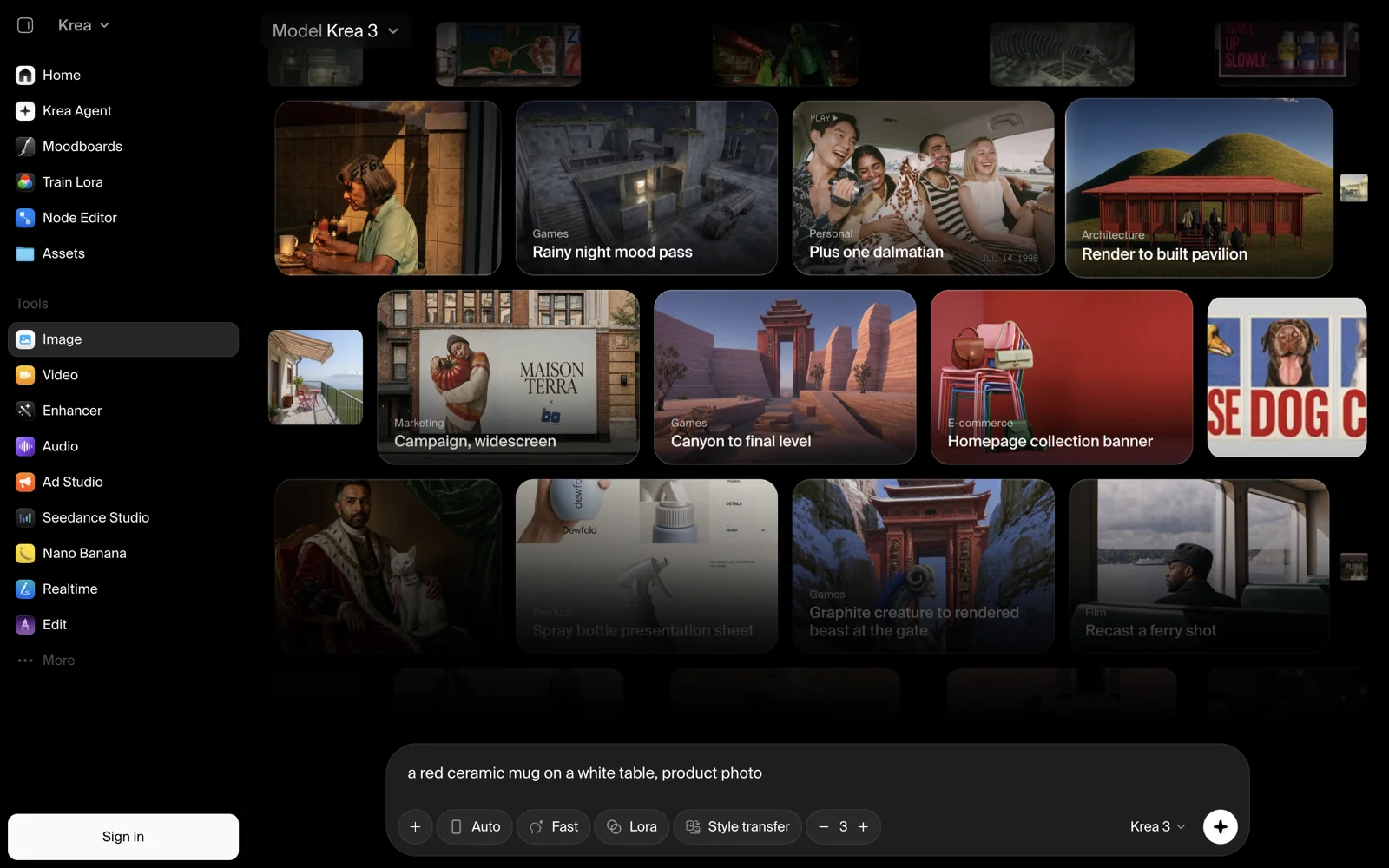
Caption: You can access the Krea generator without logging in. It defaults to Krea 3, Fast mode, and a batch size of 3; registration is only required when you click “Generate images.” Source: our October 30 screenshot.
On the web
- Log in. Check: Your account appears at the top of the generator, and your free credits are visible.
- Upload the original image. Check: For images with small text or logos, upload the highest-resolution original available. For other edits, 1MP is enough.
- In your prompt, describe what to change first, then what to preserve. Check: Be specific about the objects to preserve, such as “keep the bottle label and cap color.”
- Choose a mode and resolution, and draw a region box if needed. Check: Use Fast at 2K for the first version. If you’re not happy with it, switch to high or Ultra.
Via API
- Upload an asset to get an
image_url(external links and base64 are also supported). Check: The URL is directly accessible. - Send a
POSTrequest to/generate/image/krea/krea-3withimage_urls,resolution, and the mode parameter. Check: The response returns ajob_id. - Poll
GET /jobs/{job_id}or configure a webhook. Check: Retrieve the generated image fromresult.urls[0]and review it against the criteria described earlier.
Before integrating it into your team’s workflow, consider generating 20 sample images with nano-banana-pro and seedream-5.0-pro through APIYI at apiyi.com for comparison. Set base_url to https://api.apiyi.com/v1 to make calls using the OpenAI-compatible format. Review the results before deciding whether to subscribe to Krea Pro or Max.
When Not to Use Krea 3
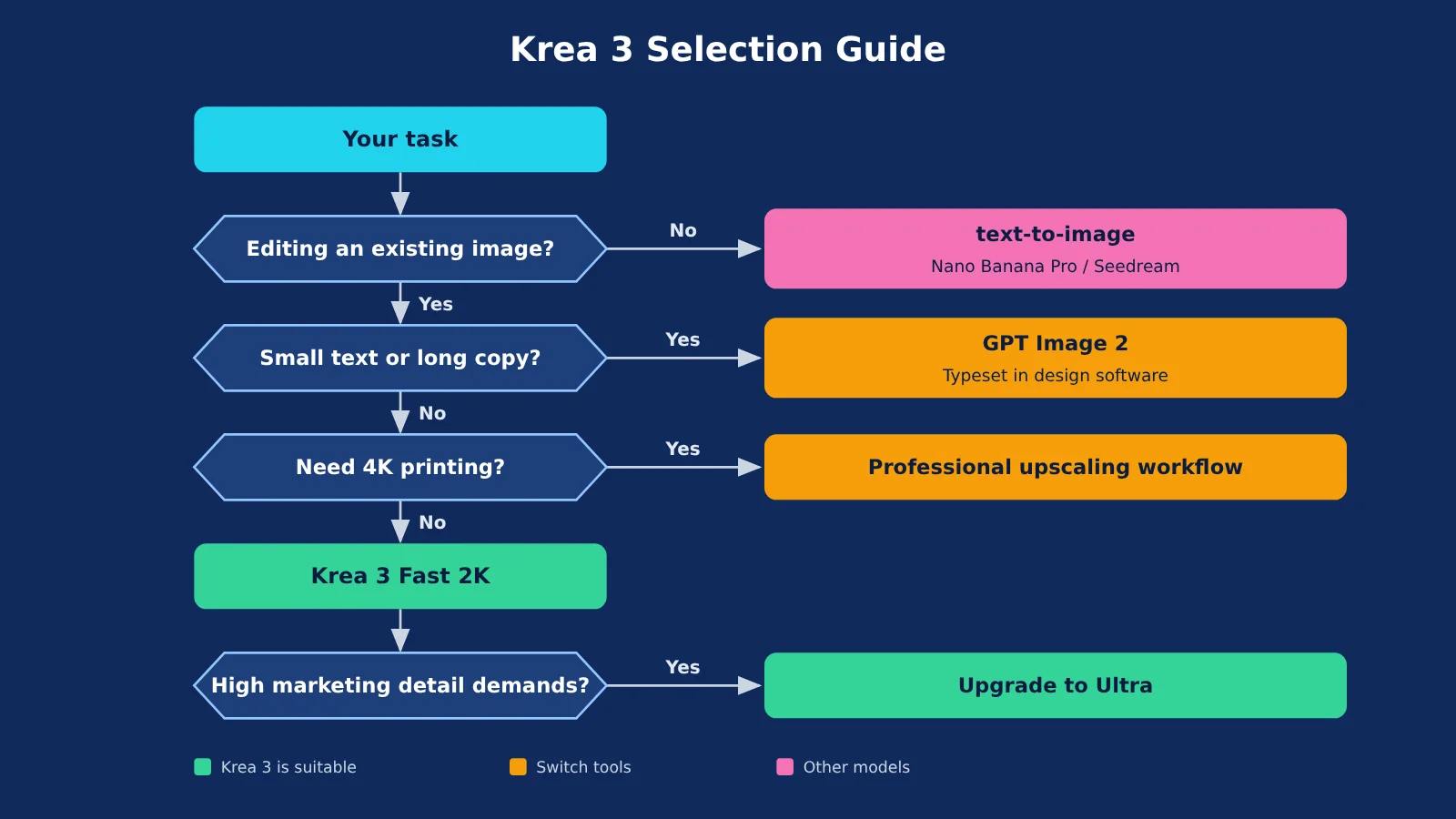
For these three types of work, you’re better off using another tool:
- Posters with long copy or small text: Krea itself acknowledges that small text is a weakness, and GLBGPT found that label capitalization and title line breaks can go wrong. Instead, generate the base image with GPT Image 2 or Nano Banana Pro, then add the text in design software.
- Direct 4K output for printing: The app only offers 1K and 2K, while the API’s 4K option is an upscaled 2K image at an extra cost. Instead, run a 2K image through a professional upscaling workflow, or use a native high-resolution option.
- Full-image style redraws and primary text-to-image creation: Neither is within Krea 3’s capabilities. Use Krea 2 for style work, and Nano Banana Pro or Seedream 5.0 Pro for primary image creation. Both are available on a pay-per-call basis through APIYI at apiyi.com.
There are three other things you shouldn’t expect right now: open weights, search grounding, or real-time generation. Style references and LoRA currently return a 422 error through the API; their official status is “coming soon.”
For a more emotional first look, check out the previous article, “Oh My! Krea 3, Are You Going to Destroy Nano Banana?”: help.apiyi.com/krea-ad-studio.html
Krea 3 Summary: 3 Decision Rules
- If you have an existing image and want to edit part of it, try Krea 3 Fast 2K first. It costs about $0.13 per image and ranks higher than Ultra in the scene category.
- Save Ultra for detailed marketing images. It starts at $0.33 per image with one reference image (about $0.40 with two), requires a Max plan, and may take a few minutes.
- For images with text, 4K output, or generation from scratch, stick with Nano Banana Pro or GPT Image. Krea 3 is prone to errors on these tasks, which can mean costly rework.
Bottom line: Krea 3 is a solid workhorse for frequent image edits, but it can’t replace every image model. Take the 8-second claim with a grain of salt and test it on your own sample images before deciding.
For models and pricing, refer to the model list on APIYI at apiyi.com. Krea 3 isn’t on the list yet, but we’ll add it as soon as possible.
Krea 3 FAQ
Q1: Can I use Krea 3 for free?
Yes, to a limited extent. The Free plan includes 100 units per day, and each plan includes 9 free Krea 3 images. You can open the generator without signing in, but you’ll be prompted to register when you click Generate, so you can’t create images without an account.
Q2: How do I choose between Krea 3 and Nano Banana Pro?
Choose Krea 3 for image edits, scene changes, and fast batch generation. It also ranks higher than Nano Banana Pro on the AA leaderboard. Nano Banana Pro is more reliable for images with text, text-to-image generation, and overall creativity. You can use nano-banana-pro ($0.09 per invocation) on APIYI at apiyi.com to run the same set of sample images for comparison.
Q3: Can Krea 3 handle small Chinese text?
We don’t recommend it. Krea acknowledges that small text is a weakness, and third-party tests found errors even in English labels. We haven’t specifically tested small Chinese text, so we suggest adding it during post-production.
Q4: How much does the Krea 3 API cost?
The base price for 2K is $0.06. An actual edit with one 2K reference image costs about $0.13, high mode costs $0.15, and ultra with two reference images costs about $0.40. Krea 3 isn’t yet on the model list at APIYI at apiyi.com. We’ll add it as soon as possible, and pricing will be subject to the list at that time.
Q5: Can images generated by Krea 3 be used commercially?
The official materials we reviewed didn’t provide a clear statement on commercial licensing, and we haven’t verified the terms individually. Check Krea’s terms of service before commercial use, and keep a human review step for images involving people or brands.
Q6: Is Krea 3 Ultra worth it?
It depends on the task. On AA’s category leaderboards, Ultra ranks #4 for marketing materials versus Fast at #21, making it worth considering. But for scenes and styles, Ultra ranks #18, behind Fast at #11. Ultra costs an extra $0.20 per invocation, may take a few minutes, and requires a Max plan, so it’s more cost-effective to save it for final versions.
References
- Krea official sources: Launch blog, API documentation, and pricing page
- Link:
krea.ai - Artificial Analysis: AA-Image-Editing leaderboard and category data
- Link:
artificialanalysis.ai - CPI-Bench paper: Alibaba’s image editing benchmark
- Link:
arxiv.org/abs/2608.14546 - eesel.ai review (October 18): Actual costs and documentation discrepancies
- Link:
eesel.ai - Hacker News discussion (starting October 15): User feedback and the CTO’s response
- Link:
news.ycombinator.com
Testing note: We checked Krea’s official documentation and its product interface on October 30. We also compiled hands-on feedback from four third-party sources—eesel, MindStudio, GLBGPT, and Hacker News—and results from four leaderboards: Arena, Artificial Analysis, Design Arena, and CPI-Bench. We didn’t run a standardized test set on a paid account. Speed figures throughout the article identify their sources (official, third-party, or leaderboard) and don’t represent independent speed tests.
Author: APIYI Technical Team
Technical discussions: Feel free to contact us through the APIYI website homepage. For more information on models and integration, visit the documentation center at docs.apiyi.com.