Author’s note: Krea 3 is Krea’s in-house image editing model, and Ad Studio is an advertising workflow built on top of it. Here’s how to use Krea 3 to produce a batch of ready-to-run static ads in five steps when all you have is a brand website—and which route to take for batch production or integration with your own systems.
Here’s the takeaway: Krea Ad Studio’s value isn’t that it generates prettier images—it puts the entire “website → brand Kit → set of static ads” pipeline into one interface. It’s a good fit for quickly scaling up and testing creative assets, but it’s not a replacement for a designer producing final deliverables.
On October 29, Krea launched Ad Studio, powered by the new Krea 3 Expert. Paste in a brand’s website link, and it generates ads. Each batch can contain up to 12 images, and Krea says it takes about five minutes to go from pasting a link to downloading the first batch. This isn’t another AI image generation tool review. Instead, we’ll answer two questions: How do you go from a website to a batch of ready-to-run ads in five steps? And which route should you choose for batch production or integration with your own systems?
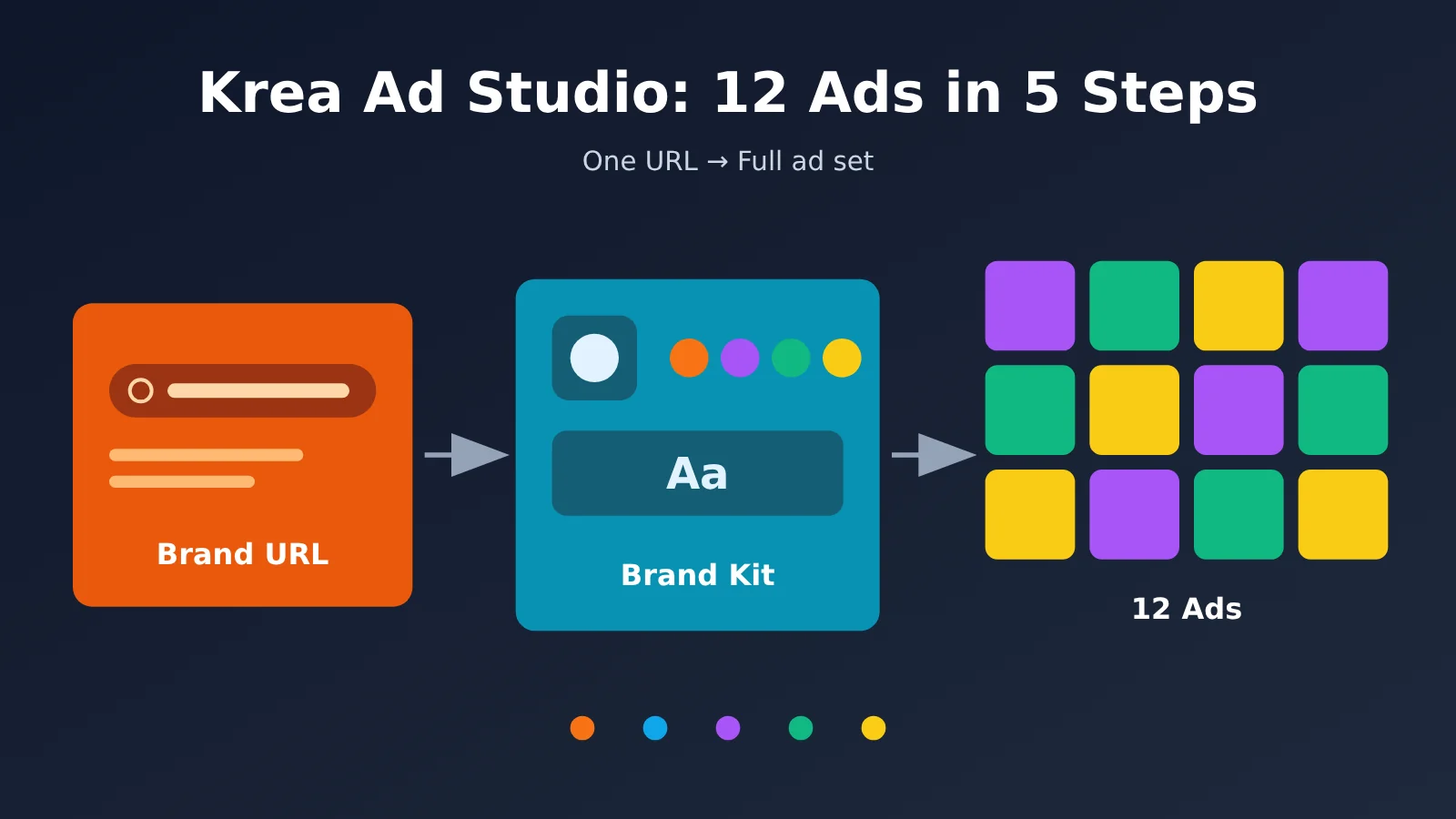
What Does Krea Ad Studio Actually Do? The Key Points
To understand Krea Ad Studio, let’s clear up three common misconceptions. It isn’t a new model: Krea describes it as “the first Krea 3 Expert”—a version of Krea 3 specialized for a particular type of work. The company hasn’t explained exactly how it was trained. It isn’t a video tool: it only produces static ad images. And it isn’t unlimited: brand research and product imports are free, but generating ads requires a paid Basic plan or higher and consumes compute units.
If you’re familiar with Nano Banana, think of Krea 3 as the same type of model: both can generate and edit images, including text-to-image generation. Nano Banana is the nickname for Google’s Gemini image model; Krea 3 is an editing model developed by Krea, designed to keep products from warping when backgrounds change and maintain consistent people across images. It’s also faster and cheaper per image. In Krea’s official comparison, Nano Banana Pro takes 33 seconds and costs $0.135 per image, while Krea 3 takes under 8 seconds and costs $0.06 per image. Ad Studio isn’t a model—it’s an ad workflow built on Krea 3 Expert.
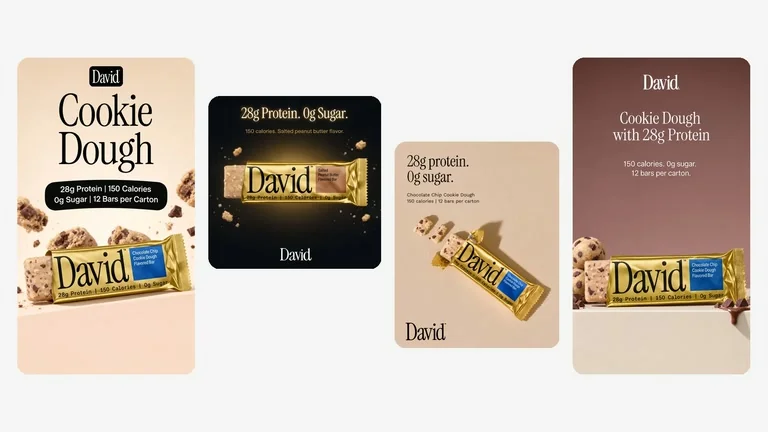
Caption: Four ads generated from the same DAVID brand Kit, including square, portrait, and landscape formats. Product labels and selling points remain consistent. DAVID is a brand featured in Krea’s official examples and has no affiliation with this article. Source: Krea’s official blog
The underlying Krea 3 model was released on October 15. Krea lists three key metrics: most edits are completed in under 8 seconds, native output is 2K, and each 2K image costs $0.06. Krea also says Krea 3 Ultra scored 4.81/5 on CPI-Bench, ranking second behind GPT Image 2.5. These figures are all reported by the company. Note that Ultra requires a Max plan or higher, while Ad Studio uses the Expert version—they’re not the same thing.
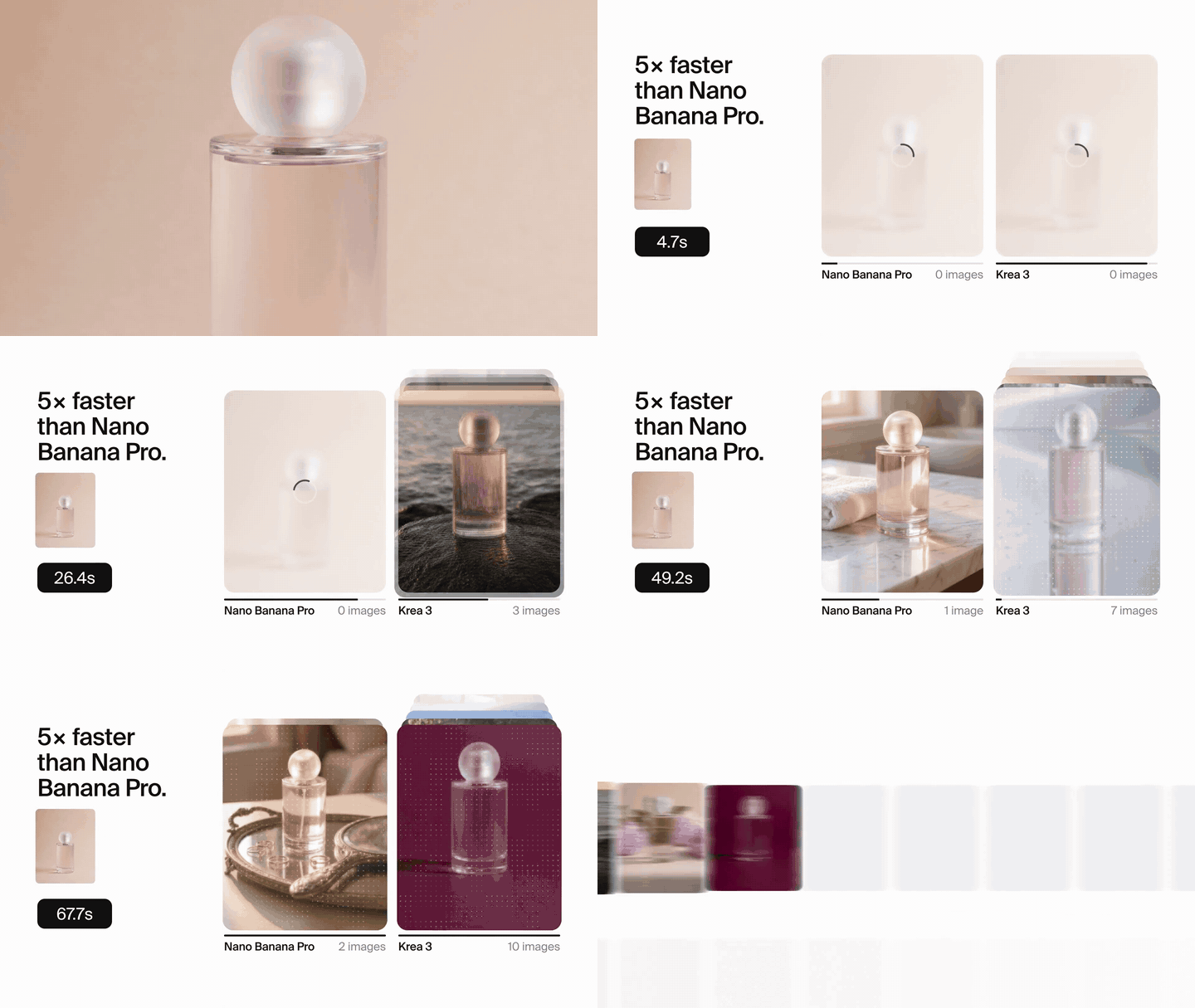
Caption: Krea’s official comparison demo: given the same perfume image, Krea 3 has already produced an image while Nano Banana Pro is still at zero. These results are reported by the vendor; actual speed depends on queue times and reference images. Source: Krea’s official Krea 3 page
| Key point | How it works | Why it matters |
|---|---|---|
| All you need is a domain | Automatically gathers your logo, colors, fonts, tone, audience, selling points, and products | Saves time writing a brief and gathering assets |
| Brand Kit guides every ad | Every ad follows the Kit, with claims drawn from your approved selling points | Reduces product distortion and brand inconsistencies |
| Up to 12 images per batch | Each image features one product, with its own layout and copy | Get a set of assets ready for A/B testing in one go |
| Four common aspect ratios | 4:5, 1:1, 9:16, 16:9 | Covers Feed, Stories, Reels, and landscape placements |
| Agent-powered revisions + mockup previews | Edit headlines, backgrounds, products, and sizes through conversation | Make small changes without knowing design software |
What Krea Ad Studio Signals About the Industry
As leading image models become more evenly matched, the focus of competition is shifting from model benchmarks to packaging models into workflows for specific roles. Ad Studio is Krea’s first such “Expert” package, and the company says more Experts are on the way. For users, that means choosing a tool isn’t just about checking model leaderboards—it’s also about seeing how many steps it can save in your workflow.
A common comparison in the community goes like this: ads for the same product look “obviously AI-generated” when made with a general-purpose chat tool, while Ad Studio’s output “looks like a real brand”—the text no longer melts, and the product keeps its shape. These shared examples are community feedback and may be selectively chosen, but they illustrate Ad Studio’s core selling point: consistency, not imagination.
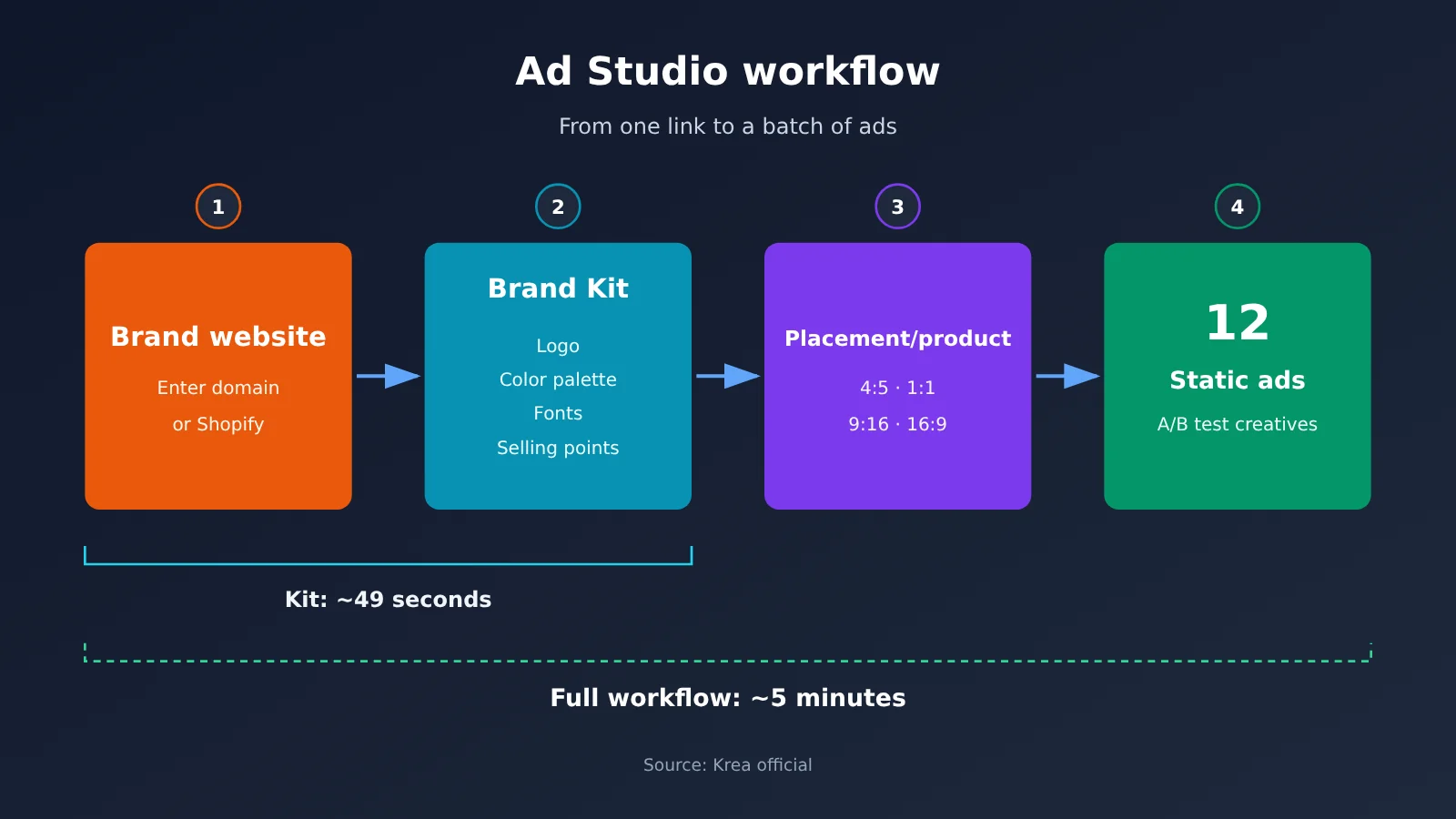
Krea Ad Studio Quick Start: 5 Steps
Each step below follows the same format: “What to do → What you’ll see in the interface → How to check the result.” The interface sequence is based on Krea’s official blog and screenshots.
Step 1: Prepare Your Website and Featured Products for Krea Ad Studio
What to do: Prepare a publicly accessible brand website and choose 1–3 products to feature. If you have a Shopify store, Ad Studio can read your product catalog directly. If you don’t have a website, you can create a brand manually and add products by link, upload, or manual entry. Each Kit can hold up to 20 products.
What you’ll see: You’ll do most of this preparation on your own. Check that your homepage Logo is clear, product images have white or clean backgrounds, and prices are up to date.
Checklist:
- Your website opens in an incognito window without requiring a login
- Featured product pages have high-resolution main images and clear prices
- Expired promotional banners have been removed so they aren’t picked up as selling points
Step 2: Generate a Brand Kit with Krea Ad Studio
What to do: Open krea.ai/ad-studio, enter your brand’s domain, and click Create brand kit. You’ll also see options to Generate in Claude or create a brand manually.
What you’ll see: Ad Studio will analyze your website, extract the Logo, Colors, and Type, and generate a brand description, tone, audience, and selling points. It also identifies product images and prices. Krea says it generated a brand Kit for a real store in 49 seconds.
Checklist: Your Logo appears without being cropped, the color palette includes at least your primary brand color, and the product list includes the items you plan to feature. There isn’t reliable public verification yet of how well it recognizes Chinese-language sites, so if your site is in Chinese, spend extra time checking the results at this step.
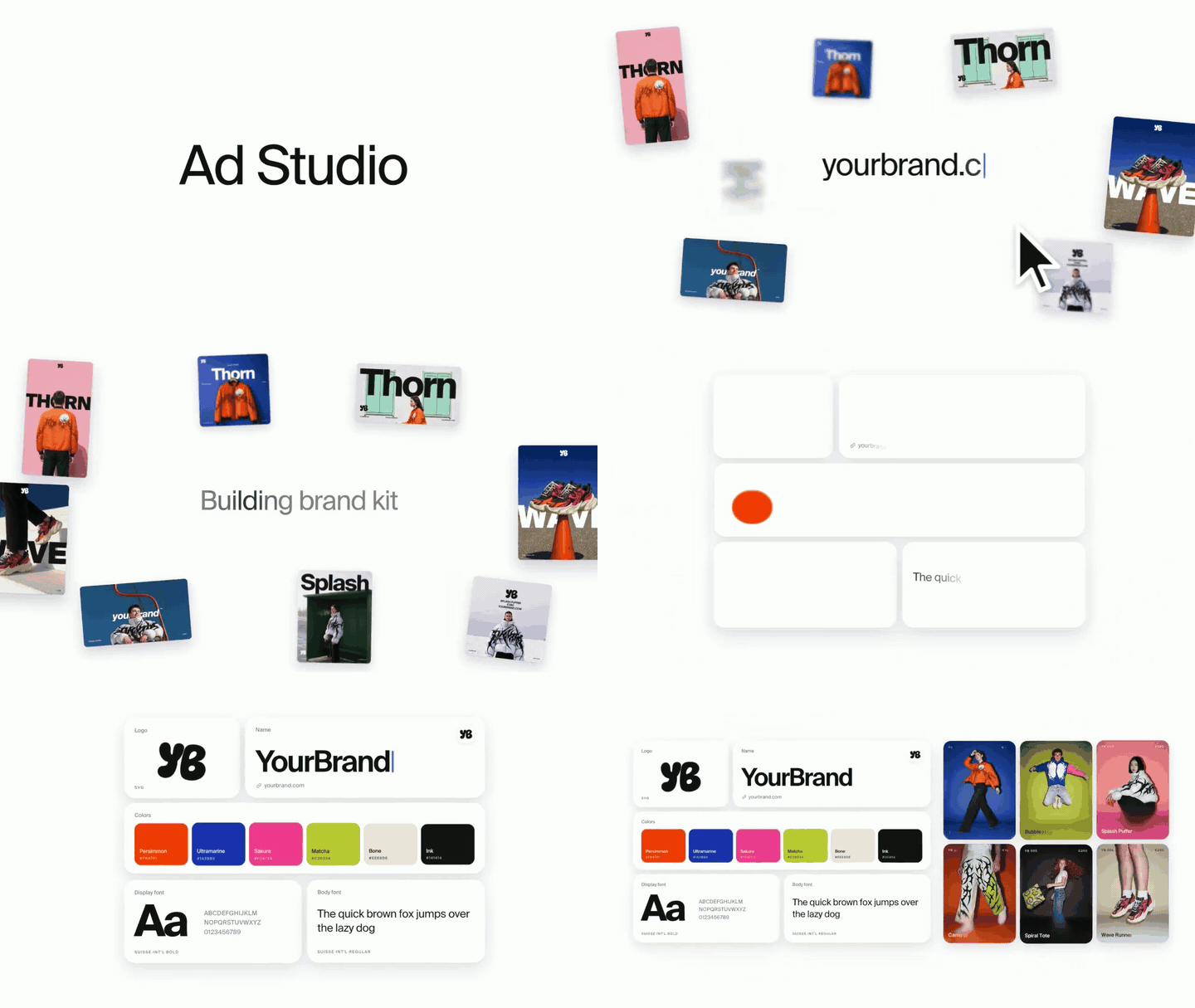
Caption: After you paste in your brand domain, Ad Studio scans the website, then generates the Logo, color palette, fonts, and brand tone. Source: Krea’s official release video
Step 3: Review the Krea Ad Studio Brand Kit Item by Item
What to do: Open Setup Brand Kit and review the brand name, tagline, description, color palette, and fonts. Remove expired promotions and rewrite the selling points.
This is the most important step in the entire process. Krea’s principle is that the claims in your ads are the claims you’ve approved. In other words, your selling points are the raw material for your ad copy. Cut corners here, and all 12 images could miss the mark.
Acceptance criteria:
- Each brand color’s hex value matches your visual identity guidelines
- The fonts match those used on your website and haven’t been replaced with similar-looking alternatives
- Every selling point is backed by evidence and avoids unsubstantiated claims like “best,” “number one,” or “doctor-recommended”
- Prices, discounts, and promotion dates are all current
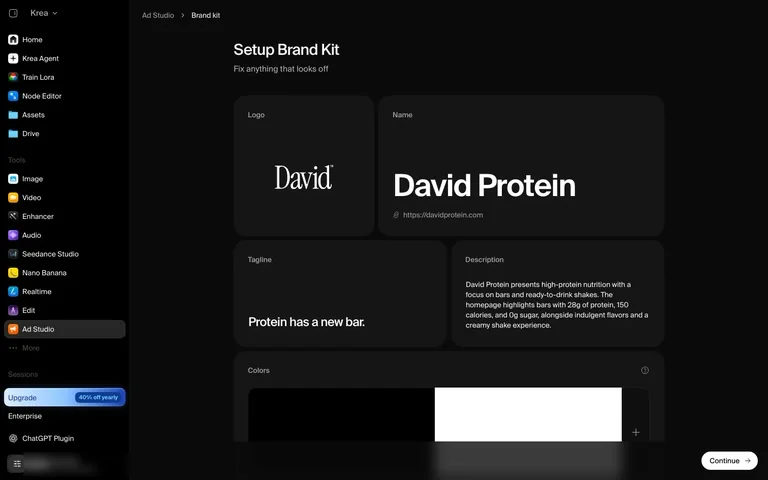
Caption: You can edit the logo, color palette, fonts, tagline, and selling points in the Brand Kit. Krea’s principle is that the claims in your ads are the claims you’ve approved. Source: Krea official blog
Step 4: Choose placements, products, and quantities in Krea Ad Studio
What to do: Go to Products, select the products you want to promote, and click Continue. Then choose your placements and decide how many ads to generate for each product. You can generate up to 12 ads per batch, with one product per ad.
Available placements include:
- Instagram feed: 4:5 and 1:1
- Stories & Reels: 9:16
- Landscape feed: 16:9
You can let Krea choose the creative direction or specify a product spotlight, product in the real world, an editorial look, or an ad that explains how the product works.
Acceptance criteria: Each placement matches where you actually plan to run the ads. The 12-ad allocation has a clear testing purpose—for example, “one product × three creative directions × 4:5”—rather than spreading them evenly without a plan. Krea says it took 2 minutes and 28 seconds to generate six Story ads.
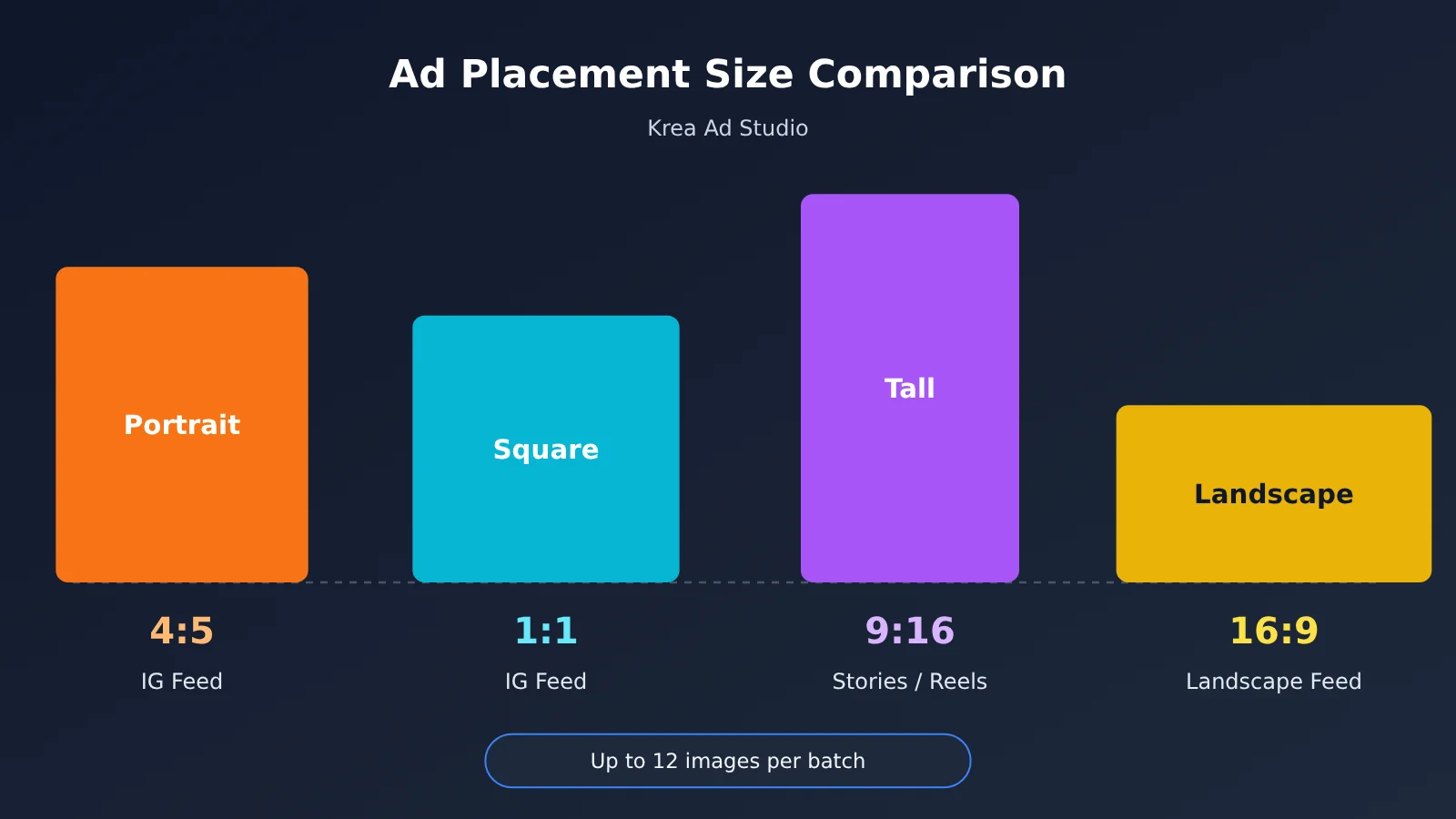
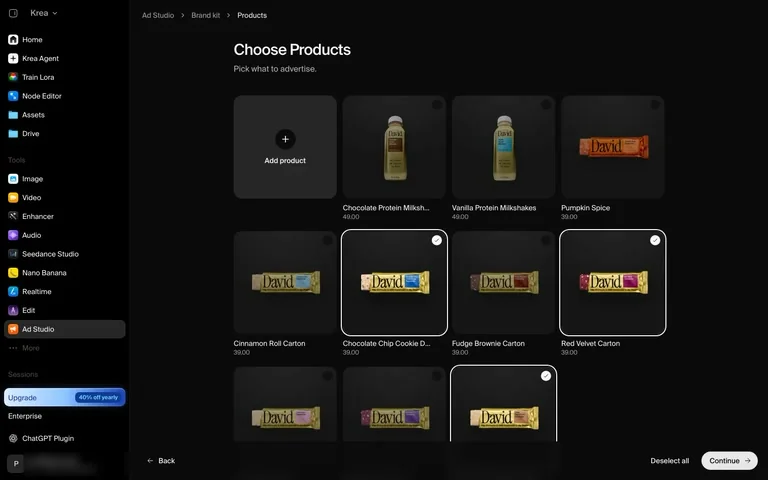
Caption: Go to Products and select the items you want to promote, then choose placements and the quantity for each product. Each batch can contain up to 12 ads. Source: Krea official blog
Step 5: Revise and Export with Krea Ad Studio Agent
What to do: Once generation is complete, review each ad in the gallery. The Krea Agent on the right retains your brand Kit and campaign context, so you can ask it to change the headline, switch to a dark background, swap the product, or resize the ad. Preview your edits in the Facebook, Instagram, and Reels mockups, then download individual ads or package the entire campaign as a ZIP.
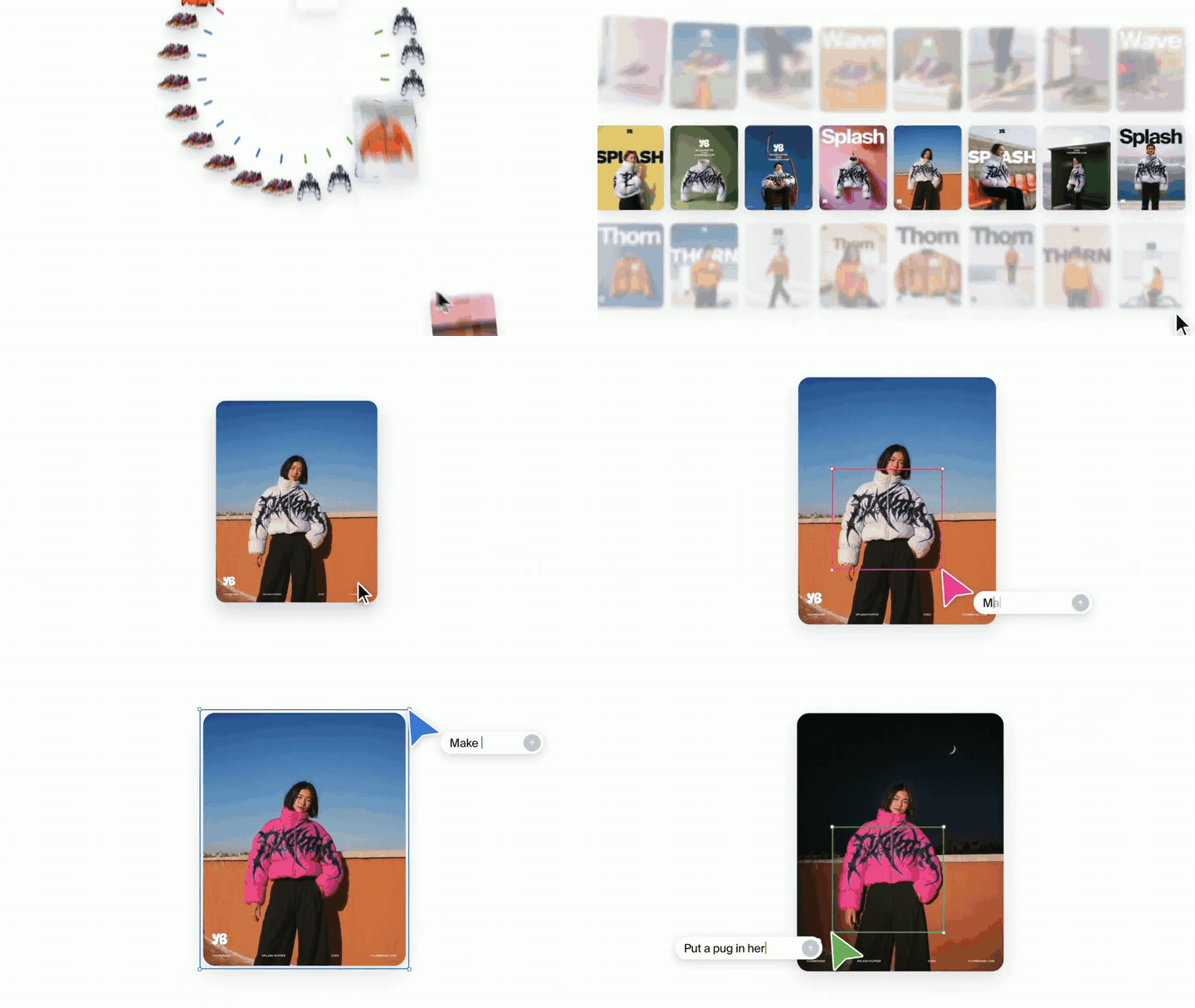
Caption: Select an ad and tell the Agent “Make it hot pink.” It changes the background and color scheme while leaving the product untouched. Source: Krea official launch video
Acceptance criteria:
- Logo edges are clean, with no jagged edges, discoloration, or distortion
- Text on product labels is readable and matches the actual product
- Headlines and fine print have no typos or exaggerated claims
- Export dimensions match the ad placement, and key information isn’t obscured by the interface in the mockup preview
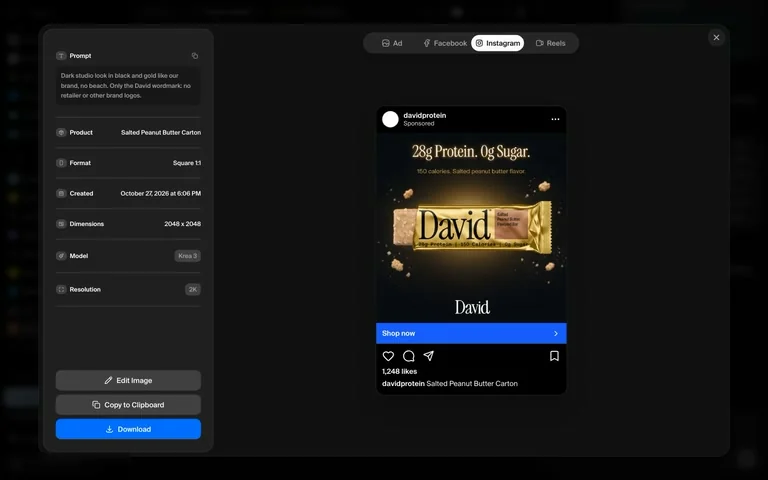
Caption: Check the final result in the Instagram preview. This image was generated with Krea 3 at 2K output, with dimensions of 2048×2048. Source: Krea official blog
🚀 Quick start: If you want to integrate ad image generation into your own backend, you can claim free test credits through APIYI at apiyi.com and use its OpenAI-compatible interface to test image model invocation. Then decide whether a subscription tool or a pay-per-use API is the better long-term fit.
How Much Does Krea Ad Studio Cost? A Cost Breakdown
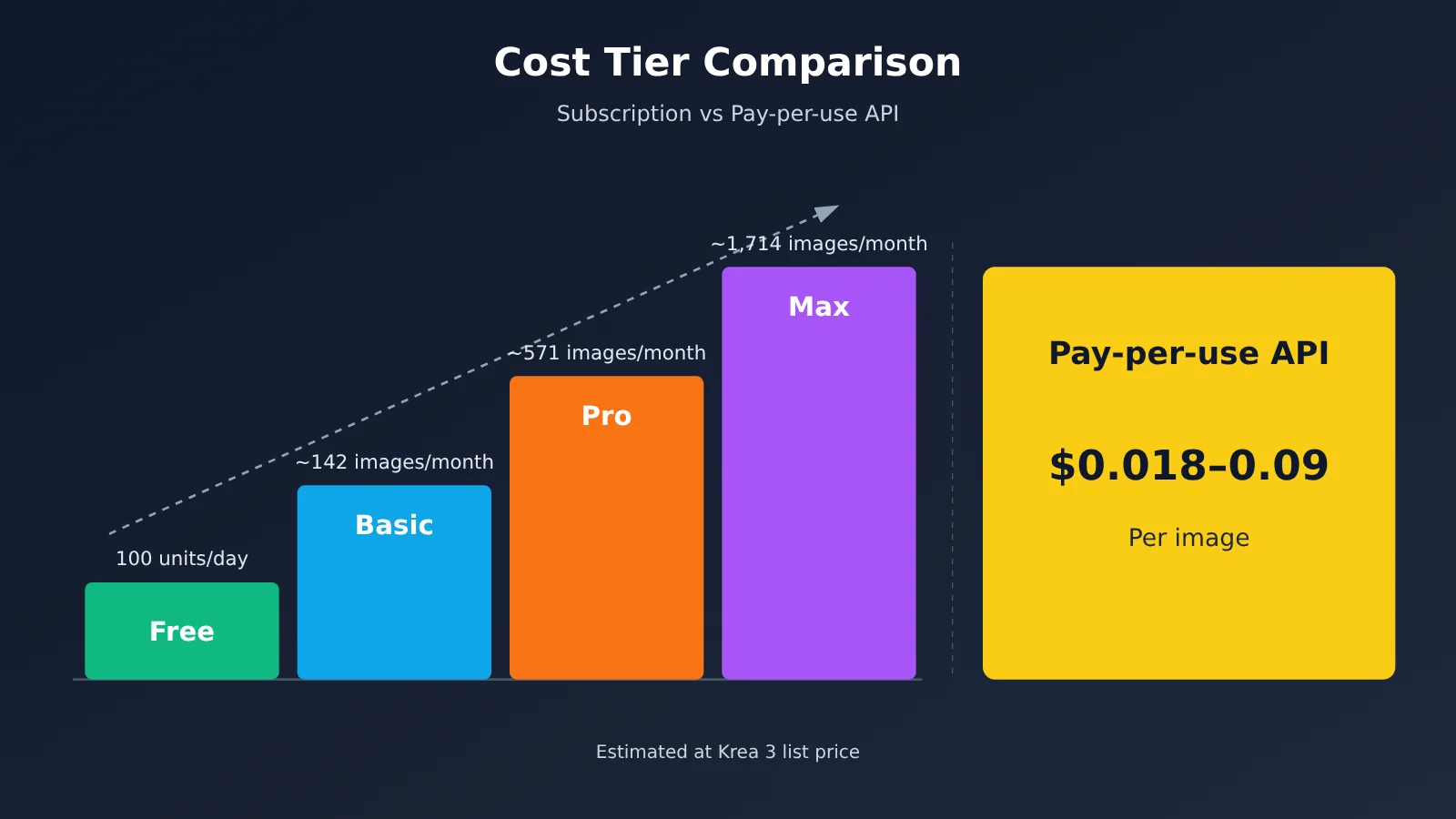
Krea doesn’t list a separate price for Ad Studio. Generating ads uses the same compute units as other Krea 3 generations. The table below uses the in-app Krea 3 price of approximately 35 units per image. Revisions and rework cost extra.
| Plan | Monthly / Annual (per month) | Compute units | Approx. Krea 3 images | Approx. batches of 12 | Commercial license |
|---|---|---|---|---|---|
| Free | $0 | 100/day | Can’t be used for Ad Studio generation | — | Not included |
| Basic | $9 / $5.25 | 5,000/month | ~142 images | ~11 batches | Included |
| Pro | $35 / $21 | 20,000/month | ~571 images | ~47 batches | Included |
| Max | $105 / $63 | 60,000/month | ~1,714 images | ~142 batches | Included |
| Business | $200 / $160 | Not specified on the page | — | — | Included |
On monthly billing, Basic works out to about $0.063 per Krea 3 image; with annual billing, it’s about $0.037. That’s just the theoretical cost of one successful generation. Ad creatives often need two or three rounds of revisions, so it’s worth budgeting 1.5–2 times the estimate.
If you call Krea 3 directly through the Krea API, charges are added per image:
| Charge | 1K output | 2K output |
|---|---|---|
| Base price | $0.03/image | $0.06/image |
| Per 1K reference image | +$0.02 | +$0.02 |
| Per 2K reference image | +$0.07 | +$0.07 |
| high thinking mode | +$0.02/call | +$0.02/call |
| ultra thinking mode | Not available | +$0.20/call |
For 4K output, add $0.04 to the 2K price. Ads typically use product reference images, so a 2K output with one 2K reference image costs $0.13, not $0.06.
Beyond Krea Ad Studio: Which of the Three Routes Should You Choose?
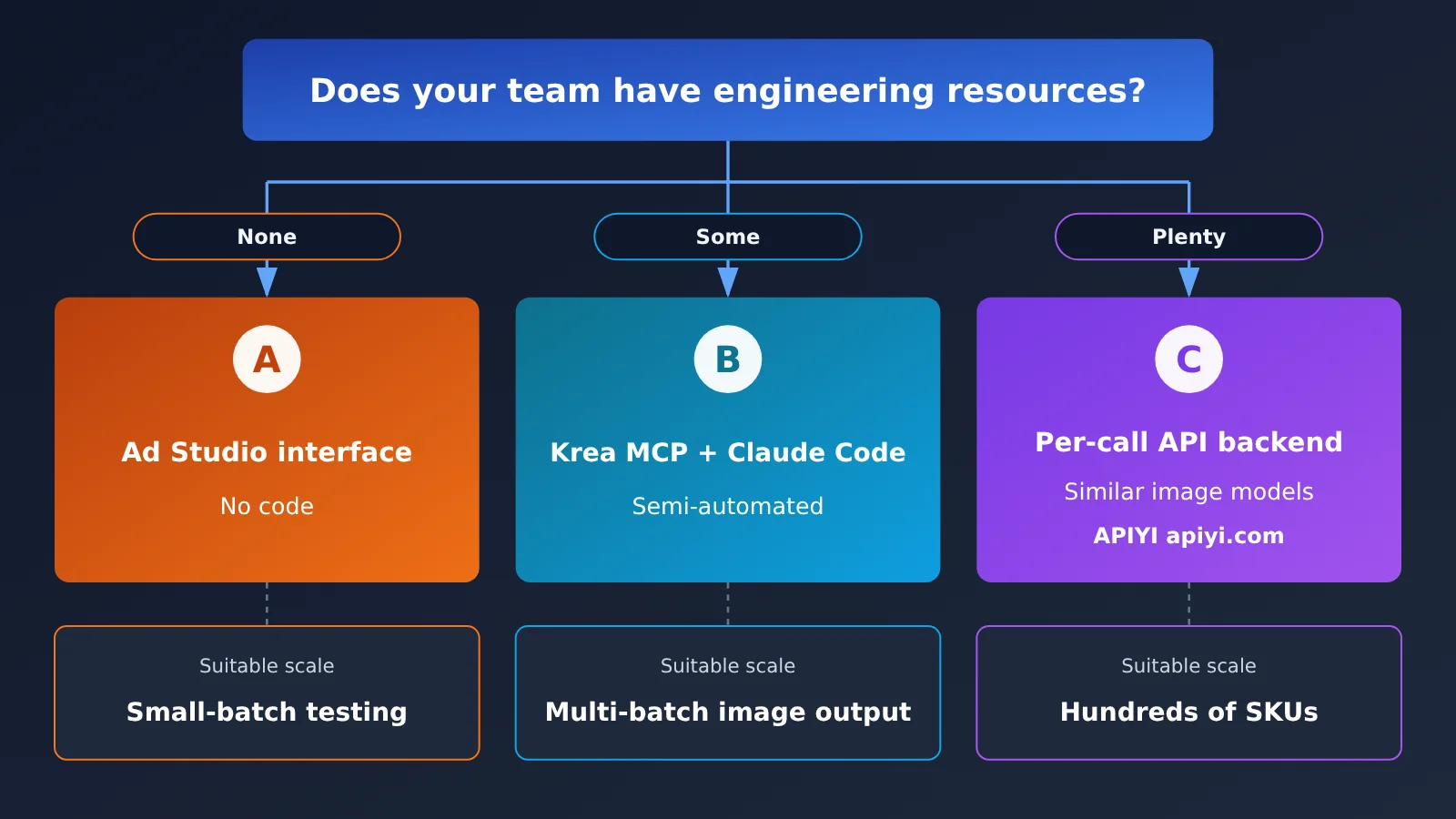
If you need to create ad images in bulk, the best route depends on your team’s engineering resources.
Route A: Fully manual, using the Ad Studio interface. This works for small teams without engineering resources and cross-border e-commerce operators. It requires no coding, and the brand Kit and mockup previews are ready to use out of the box. The limitation is 12 images per batch, so you’ll need to repeat the process if you have lots of SKUs.
Route B: Semi-automated, using Krea MCP + Claude. Ad Studio works through the Krea MCP server, so you can have Claude research your brand, select products, and generate ads using the same brand Kit. Here’s how to connect it:
- Run
claude mcp add --transport http krea https://api.krea.ai/mcpin Claude Code - Then use natural language to ask the agent to handle brand research, product selection, and batch generation
- This is a good fit for developers already using Claude Code who want to build asset production into their daily workflow
Route C: Fully automated, integrating a pay-per-use API into your own backend. This suits teams with hundreds of SKUs that need scheduled batch generation or integration with a product management system. You can call the Krea 3 API directly:
- Endpoint:
POST /generate/image/krea/krea-3 - It returns a
job_id; poll/jobs/{job_id}or configure a webhook to get the result - The output URL is in
result.urls[0]; ultra thinking mode requires Max or above
Note that Krea hasn’t announced a dedicated Ad Studio API, and it hasn’t been verified whether Krea 3 Expert is available separately through an API. In other words, with Route C, you’ll need to implement the brand Kit layer yourself using prompts and reference images.
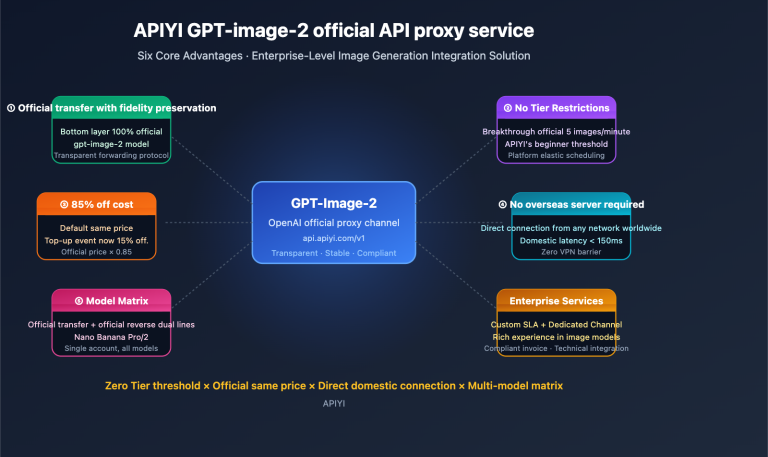
As of October 30, 2026, Krea 3 isn’t available on APIYI yet, but we’ll add it as soon as possible. If you need to generate ad images in bulk now, you can use comparable pay-per-use image models on APIYI at apiyi.com. Connect using the OpenAI-compatible interface:
- Set
base_urltohttps://api.apiyi.com/v1 - Use a single API key to switch between the image models in the table below
- Pass product images as reference images, and put brand colors and selling points in your prompt template
| Model (APIYI model ID) | Price per image | Best-fit ad scenarios |
|---|---|---|
| nano-banana-pro | $0.09 | Main product images that require faithful reproduction and fine detail |
| gemini-3.1-flash-image | $0.055 | Everyday assets that balance speed and quality |
| gpt-image-2-all | $0.025 | Ad images with substantial text and typography |
| flux-2-pro | $0.03 | Scene-based, atmospheric assets |
| seedream-5.0-flash (platform model ID: seedream-5-0-flash-260915) | $0.018 | Large-volume production and asset testing |
Prices are as of October 27, 2026. Account top-ups are settled at a fixed 1:7 exchange rate, and top-up promotions and group discounts can be combined. Check the platform’s model list for current model IDs and prices; actual charges are shown in the console.
Here’s a comparison: Krea Basic costs $9/month and includes 5,000 units, enough for about 142 Krea 3 images at 35 units per image. For the same 142 images, comparable pay-per-use image models on APIYI would cost around $2.6–12.8. But these aren’t the same models, so image quality and brand consistency aren’t directly comparable. The takeaway is simple: For low volumes and convenience, choose a subscription; for high volumes and integration with your own systems, choose a pay-per-use API.
7 Common Pitfalls When Using Krea Ad Studio
| Pitfall | What happens | How to troubleshoot and fix it |
|---|---|---|
| Small text and long copy | A third-party review by Hermes AI News notes that rendering small text is still a weak point | Zoom in and check small text in every image; add long copy during post-production |
| Exaggerated or fabricated selling points | Community feedback includes examples of shoes being described as “doctor-approved” or having “anti-gravity soles” | Keep only verifiable selling points in Step 3, then check every generated headline |
| Brand Kit pulls incorrect details | Colors are off, or fonts are replaced with similar alternatives | Check hex values and font names against your visual identity guidelines |
| Assuming you can generate images for free | The free tier only supports brand research and product imports | Ad Studio generation requires at least the Basic plan; the Free plan also doesn’t include a commercial license |
| Wanting video assets | Ad Studio only produces static images | Choose another tool for video ads |
| Subscription and credit rules | Third-party reviews contain a number of complaints about credits expiring after cancellation and automatic renewals (based on a self-selected sample) | Check expiration and cancellation rules before subscribing; Krea states that one-time credit top-ups are valid for 90 days |
| Using someone else’s brand site for mockups | Copyright and trademark risks | Only use brands you own or have permission to use, and don’t publish internal test materials externally |
When Shouldn’t You Use Krea Ad Studio?
In three situations, you’re better off choosing another approach:
- You need video ads: Ad Studio only produces static images. Trying to make it work will just waste credits.
- You need fully automated batch production for hundreds of SKUs: With 12 images per batch and a maximum of 20 products per Kit, the interface will become a bottleneck. Choose route C instead.
- You work in a heavily regulated industry, such as finance or healthcare: AI may exaggerate selling points, so legal teams must review every claim. The cost of that review can cancel out the benefits of automation.
Krea Ad Studio FAQ
Q1: Is Krea Ad Studio free?
Not entirely. Brand research and product imports are free, but generating ads requires a paid Basic plan or higher and consumes compute units, just like other Krea 3 generations.
Q2: Which plan do I need to use Krea Ad Studio?
Krea says it’s available on all paid plans, starting with Basic at $9/month, or the equivalent of $5.25/month when billed annually. Based on Krea 3’s listed pricing, Basic should cover approximately 11 batches of 12 images per month. For higher volumes, consider Pro or Max.
Q3: Can I use images generated by Krea Ad Studio commercially?
Basic, Pro, Max, Business, and Enterprise all include commercial-use rights. The Free tier isn’t included in Krea’s official list. Even with a license, you’re still responsible for any claims made in your ads, so always review the copy before publishing.
Q4: How many images can Krea Ad Studio generate at once?
Each batch can produce up to 12 images, with one product per image. The “dozens of ads” mentioned in Krea’s promotional materials require multiple batches. If you need to generate images in bulk by SKU, a pay-per-use API may be a better fit. Krea 3 isn’t available on APIYI yet, but we’ll add it as soon as possible. In the meantime, you can run batch jobs with similar image models on APIYI at apiyi.com. Check the platform’s model list for current availability and pricing.
Q5: How does Krea Ad Studio compare with Google Pomelli and AdCreative?
According to third-party reports as of October 2026, Google Pomelli is a free experimental product from Google Labs that also reads websites to generate branded assets. AdCreative.ai subscriptions start at $39/month. Ad Studio stands out by using Krea 3’s image-editing capabilities to keep products from being distorted, and it can connect to Claude through MCP. To compare different image models side by side, you can switch between them using the same API key on APIYI at apiyi.com.
Q6: Will Krea Ad Studio replace designers?
No. It’s great for quickly producing and testing creative assets, dramatically shortening the time it takes to go from zero to a first batch. But brand strategy, final refinements, small-text typography, and compliance checks still need a human touch. A more practical approach: let AI create test assets, then have designers polish the winners.
Krea Ad Studio: Key Takeaways
- It’s a pipeline, not a new model: Ad Studio brings the website → brand Kit → static ads workflow into one interface.
- Five steps from start to finish: Prepare your website, create a Kit, review it, choose ad placements, then revise and export. Reviewing the Kit is the most important step.
- There are volume limits: Each batch contains up to 12 images, and each Kit supports 20 products. You’ll need multiple batches to create dozens of images.
- Costs are predictable: At 35 units per image, the Basic plan supports about 142 images per month. Multiply your budget by 1.5–2 to account for revisions.
- Review small text and product claims: Small text is still a weak spot, and AI may exaggerate or invent claims.
- Choose a workflow based on scale: Small teams can use the interface, developers can use MCP, and teams integrating batch generation into backend systems can use a pay-per-call API.
- API access: Krea 3 isn’t yet available on APIYI, but you can currently access similar image models through APIYI at apiyi.com.
Next Steps for Using Krea Ad Studio
Krea Ad Studio solves a specific problem: quickly creating a batch of brand-consistent ad images without dedicated design resources. Here are three things to remember:
- The workflow matters more than image quality: Krea says it takes about five minutes from pasting a link to downloading your first batch.
- Quality depends on your brand Kit: Your selling points become ad copy. Check them carefully in Step 3 so the results don’t go off track.
- Scale determines your approach: For smaller volumes, a subscription keeps things simple. For larger volumes or system integration, choose a pay-per-call API.
Start with one featured product and one ad placement, then generate a batch of 12 images to test. Once you have performance data, decide whether to scale up. If you need to integrate ad image generation into your own system, you can quickly test it through APIYI at apiyi.com. The platform offers free test credits and a unified interface for multiple models.
📚 References
- Krea Official Blog – Introducing Ad Studio: Ad Studio launch announcement and workflow
- Link:
krea.ai/blog/introducing-ad-studio -
Details: Firsthand information on Brand Kits, 12 images per batch, and official timing figures
-
Krea Official Blog – Introducing Krea 3: Krea 3 model capabilities and pricing
- Link:
krea.ai/blog/introducing-krea-3 -
Details: Vendor-reported figures, including generation in under 8 seconds, native 2K, and CPI-Bench results
-
Krea 3 API Documentation: API endpoints and billing rules
- Link:
krea.ai/docs/developers/krea-3/overview.md -
Details: Job lifecycle, reference image limits, and additional charges for thinking mode
-
Krea Pricing Page: Subscription plans and commercial licensing
- Link:
krea.ai/pricing -
Details: Compute units for each tier, annual billing discounts, and top-up pack expiration periods
-
Krea MCP Page: Using Ad Studio in Claude
- Link:
krea.ai/mcp - Details: How to connect to the MCP server
Author: APIYI Technical Team
Technical discussions: Contact us through the APIYI homepage at apiyi.com. For more model integration resources, visit the documentation center at docs.apiyi.com.