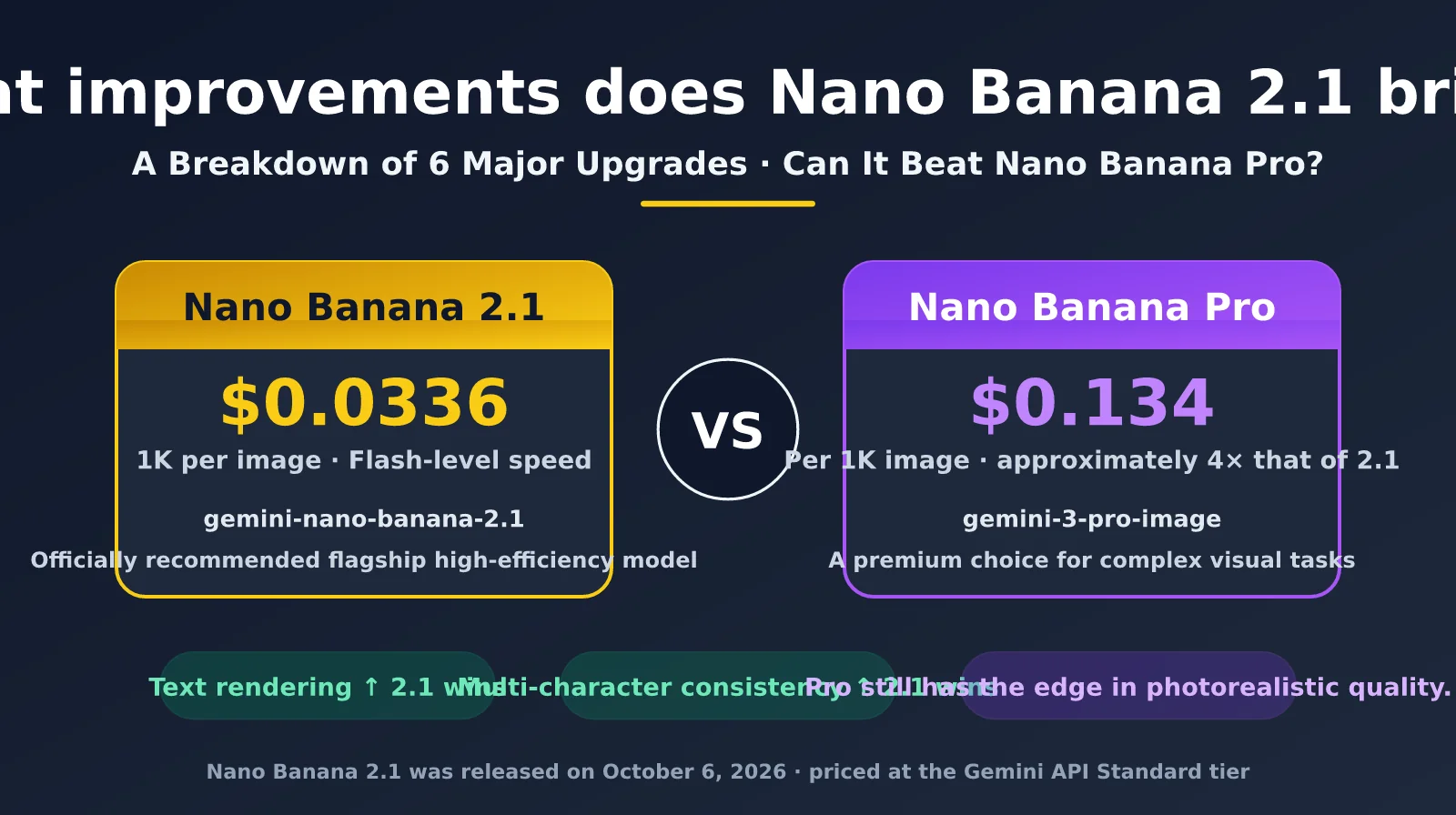
On October 6, 2026, Google released Nano Banana 2.1 (model ID gemini-nano-banana-2.1). Many developers’ first reaction was: Is this just a minor update to Nano Banana 2? What’s actually improved? More importantly, can a model that costs just one-quarter as much per image as Nano Banana Pro beat it on quality?
The answer is more complicated than a simple “yes” or “no.” According to Google’s internal benchmarks, Nano Banana 2.1 outperforms Nano Banana Pro in text-to-image preference, multi-character consistency, and infographic accuracy. But tests by several media outlets and community members also suggest that Pro still often produces better-looking results for photorealistic textures, complex scenes, and multi-step editing workflows.
This article breaks down the six major improvements Nano Banana 2.1 brings over Nano Banana 2, compares it with Nano Banana Pro using official and third-party data, and wraps up with recommendations for choosing the right model for your use case.
Key takeaway: By the end, you’ll know exactly where Nano Banana 2.1 improves on its predecessor—and whether your business should stick with Pro, switch to 2.1, or use both.
What’s Improved in Nano Banana 2.1: Six Major Upgrades
Google positions Nano Banana 2.1 as its “new go-to efficient model” and recommends it for new projects in the Gemini API documentation. Nano Banana 2 (gemini-3.1-flash-image), meanwhile, is labeled as the previous-generation workhorse. Google says 2.1 retains Flash-level speed and cost while significantly improving visual quality, prompt adherence, multi-turn character consistency, and text rendering.
Based on Google’s documentation and release notes, along with coverage from major tech publications, Nano Banana 2.1’s improvements fall into six categories:
| Improvement | Nano Banana 2 | Nano Banana 2.1 | Practical impact |
|---|---|---|---|
| Visual design and image quality | Flash-level image quality, around 95% of Pro | Improved quality and photorealism at 1K / 2K / 4K resolutions | Posters and layouts look more like they were made by a designer |
| Text rendering and infographics | Fairly accurate, but complex layouts sometimes contain typos | Clearer text, with major improvements in infographic layout and factual accuracy | Charts, UI prototypes, and slides can be used as-is |
| Mask-based local editing | Mostly relies on text prompts to identify the area to edit | Supports precise mask-based selections while preserving object size and position | More control over e-commerce background replacement and local retouching |
| Subject consistency | Characters tend to drift during multi-turn editing | Better character consistency across multiple turns, with up to 4 characters and 10 objects | Create sequential comic panels and consistent brand IP assets |
| Ultra-wide aspect ratios | Tiling artifacts can appear at ultra-wide 2K / 4K aspect ratios | Fixes tiling artifacts at ratios such as 1:4, 4:1, 1:8, and 8:1 | Better-quality panoramas and banner images |
| Thinking level | minimal / high, with minimal as the default | minimal / medium / high, with medium as the default | More reasoning by default and better adherence to complex prompts |
Of these six improvements, text rendering and subject consistency are the most immediately noticeable to developers. Community feedback generally points to clearer text within images as Nano Banana 2.1’s “real unlock”: workflows for things like flowcharts, UI mockups, and slide illustrations—which previously needed post-generation text fixes—can now produce usable results in a single pass.
One change worth noting is the default thinking level. Nano Banana 2 defaults to minimal, while Nano Banana 2.1 defaults to medium. That means the same request uses more thinking tokens, and 2.1’s price for thinking output has also increased from $3 to $7.50 per million tokens. For latency-sensitive applications, you can manually set the thinking level back to minimal.
🎯 Testing tip: Nano Banana 2.1 focuses its improvements on text, layout, and consistency. We recommend A/B testing it with 10–20 representative prompts from your business. On the APIYI apiyi.com platform, you can call Nano Banana 2, 2.1, and Pro using the same API key—just switch the model name to compare them side by side.
Official Benchmark Comparison: Nano Banana 2.1 vs. Nano Banana Pro
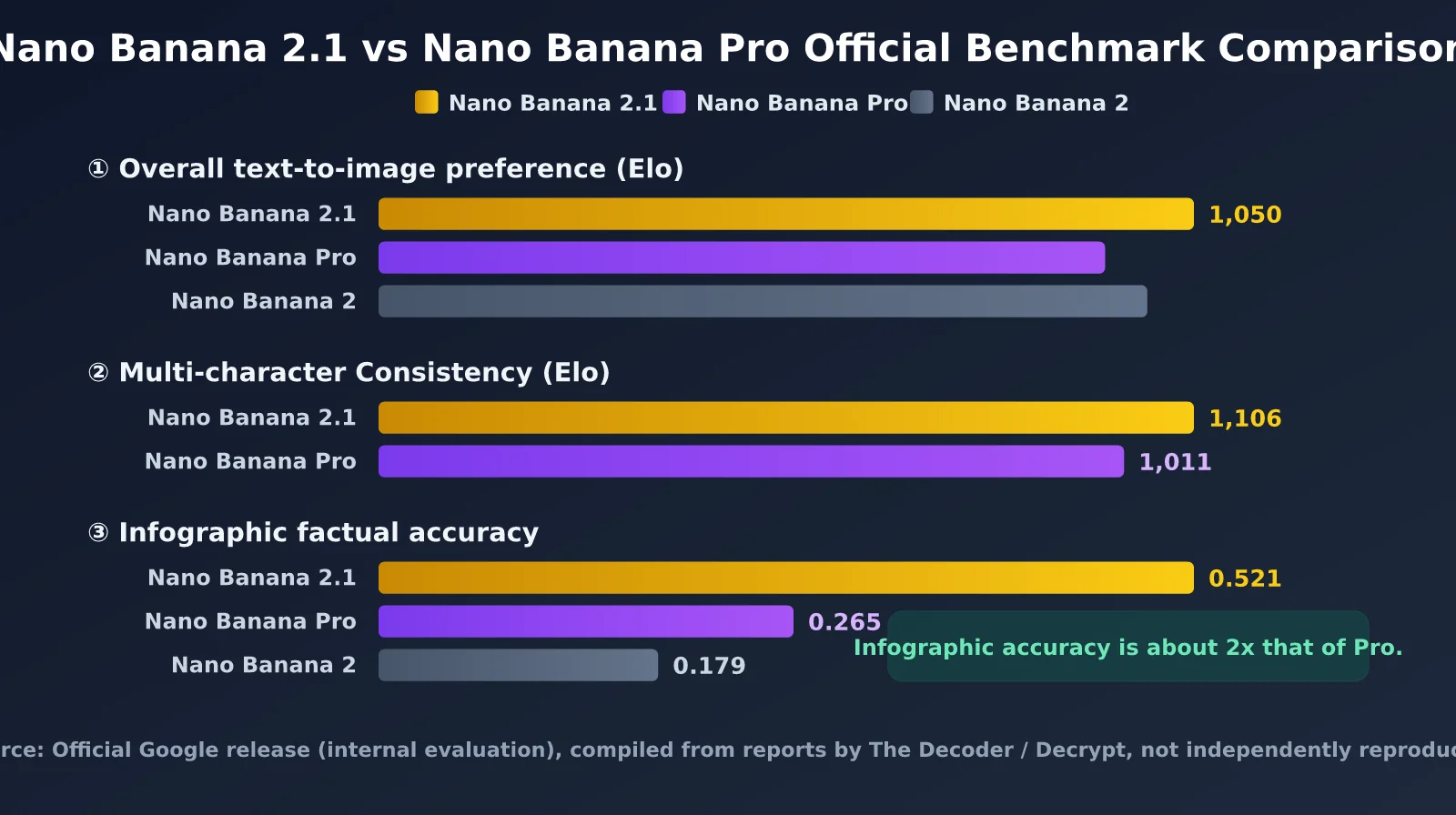
When Google launched Nano Banana 2.1, it published several sets of internal evaluation results. These benchmarks are the main evidence behind the claim that Nano Banana 2.1 can “challenge Pro.” The figures below are drawn from The Decoder’s and Decrypt’s coverage of the official announcement:
| Evaluation | Nano Banana 2 | Nano Banana Pro | Nano Banana 2.1 | Takeaway |
|---|---|---|---|---|
| Overall text-to-image preference (Elo) | 990 | 935 | 1,050 | 2.1 leads Pro by 115 points |
| Multi-character consistency (Elo) | — | 1,011 | 1,106 | 2.1 leads Pro by 95 points |
| Infographic factual accuracy | 0.179 | 0.265 | 0.521 | 2.1 scores about twice as high as Pro |
| LMArena text-to-image (early third-party results) | — | 1,248 | 1,328 (ranked 5th) | 2.1 leads Pro by 80 points |
Taken at face value, the table seems to tell a clear story: Nano Banana 2.1 outperforms Nano Banana Pro across the board. The biggest improvement is in infographic factual accuracy, which rose from Pro’s 0.265 to 2.1’s 0.521. That suggests 2.1 has made major strides in “getting real-world information right” in images—a capability directly tied to its higher default thinking level and its grounding with Google Search and image search.
But there are two caveats to keep in mind. First, the first three results come from Google’s internal evaluations, and no independent third party had replicated them on launch day. Second, LMArena’s score was an early ranking, based on a limited number of votes, so it could shift significantly as more results come in. The Decoder also noted that despite its higher benchmark scores, Nano Banana Pro often still produces noticeably better-looking images in real-world use.
Can Nano Banana 2.1 Beat Nano Banana Pro? A Look at Real-World Results
Benchmarks aside, what really determines which model to choose is the quality of the images it produces. Based on media reviews and developer community feedback from the first week after launch, the strengths of Nano Banana 2.1 and Nano Banana Pro break down roughly as follows.
Nano Banana 2.1 clearly wins on “information-rich images”: text in images, infographics, charts, UI prototypes, and localized copy in multiple languages. These tasks demand accurate layouts and factual details, so 2.1’s thinking and search-grounding capabilities really shine. Speed and cost are also clear advantages: generating a 1K image with the Flash series typically takes just a few seconds, while Pro generally takes 10–20 seconds.
Nano Banana Pro still has the edge on “aesthetic images”: realistic skin texture in portraits, complex lighting, spatial composition, and highly detailed scenes. Some developers in the community have reported issues with 2.1, such as “blurry faces” and “plastic-looking skin.” Others have noted pixel drift and inconsistent faces across long, multi-step editing workflows. Google’s official documentation still describes Pro as “the premium choice for the most complex visual tasks,” highlighting its world knowledge, advanced localization, and brand consistency.
So the more precise conclusion is: Nano Banana 2.1 has surpassed Pro on measurable “correctness,” but it hasn’t fully caught up on the harder-to-measure quality of “looking good.” For most production workflows focused on volume, accuracy, and low cost, 2.1 is more than capable. But for hero brand imagery and premium advertising, where every image needs to look exceptional, Pro may still be worth the fourfold price.
Full-Spec Comparison: Nano Banana 2.1 vs. Nano Banana Pro
Beyond image quality, the two models differ in several ways at the specification and integration levels. Check each one before migrating:
| Comparison | Nano Banana 2.1 | Nano Banana Pro |
|---|---|---|
| Model ID | gemini-nano-banana-2.1 |
gemini-3-pro-image |
| Official positioning | Efficient workhorse model | Premium choice for complex visual tasks |
| Supported resolutions | 1K / 2K / 4K (no 512px) | 1K / 2K / 4K |
| Ultra-wide aspect ratios | Supports up to 8:1 / 1:8 | Standard aspect ratios |
| Reference image limit | Up to 14 (4 characters + 10 objects) | Documentation specifies fewer object references |
| Thinking levels | Adjustable: minimal / medium / high | Enabled by default |
| Search grounding | Google web search + image search | Google web search |
| Interleaved text and image output | Not specified in the documentation | Supported |
| Price per 1K image | $0.0336 | $0.134 |
| Price per 4K image | About $0.113 | $0.24 |
| Input price | $1.50 / M tokens | $2.00 / M tokens |
By spec, Nano Banana 2.1 is more flexible than Pro when it comes to the number of reference images, ultra-wide aspect ratios, adjustable thinking levels, and image search grounding. Pro’s main remaining advantages are interleaved text and image output and support for complex, multi-turn creative workflows. As for pricing, a 1K image from 2.1 costs about 25% of the Pro price, while a 4K image costs about 47%.
💡 Recommendation: If you’re currently using Nano Banana Pro for batch image generation, we strongly recommend routing some non-critical traffic to Nano Banana 2.1 for a gradual rollout. APIYI apiyi.com provides an API in Gemini’s native format, and the request structures for Pro and 2.1 are nearly identical, making the switch very low-effort.
Get Started with Nano Banana 2.1 and Configure Thinking Levels
Nano Banana 2.1 uses Gemini’s native generateContent endpoint. If you’re migrating from Nano Banana 2 or Pro, you only need to change the model name. The example below also shows how to configure the resolution and thinking level, which is useful for infographics that need highly accurate text rendering:
import requests, base64

API_KEY = "your-apiyi-api-key"
URL = "https://api.apiyi.com/v1beta/models/gemini-nano-banana-2.1:generateContent"

payload = {
    "contents": [{"parts": [{"text": "生成一张 2026 年全球 AI 图像模型市场份额信息图,中文标注,扁平风格"}]}],
    "generationConfig": {
        "responseModalities": ["IMAGE"],
        "imageConfig": {"aspectRatio": "4:3", "imageSize": "2K"},
        "thinkingConfig": {"thinkingLevel": "high"}  # 信息图建议 high,追求速度用 minimal
    }
}
resp = requests.post(URL, headers={"x-goog-api-key": API_KEY}, json=payload, timeout=180).json()
img = next(p for p in resp["candidates"][0]["content"]["parts"] if "inlineData" in p)
open("infographic.png", "wb").write(base64.b64decode(img["inlineData"]["data"]))
Thinking levels are an important new tuning option in Nano Banana 2.1. Each level is suited to different tasks:
| Thinking level | Use cases | Latency | Cost impact |
|---|---|---|---|
| minimal | Simple text-to-image, draft previews, batch assets | Lowest | Fewest thinking tokens |
| medium (default) | Standard product images, posters, and most production tasks | Medium | Balanced |
| high | Infographics, complex layouts, multi-character consistency, fact-based images | Highest | Significantly more thinking tokens |
Expand to view: Script comparing Nano Banana 2.1 and Pro with the same prompt
import requests, base64, time

API_KEY = "your-apiyi-api-key"
BASE = "https://api.apiyi.com/v1beta/models/{}:generateContent"
MODELS = ["gemini-nano-banana-2.1", "gemini-3-pro-image"]
PROMPT = "电影感写实人像,雨夜霓虹街头,女孩撑透明雨伞,背景招牌写着 NANO BANANA"

for model in MODELS:
    payload = {
        "contents": [{"parts": [{"text": PROMPT}]}],
        "generationConfig": {"responseModalities": ["IMAGE"],
                             "imageConfig": {"aspectRatio": "3:4", "imageSize": "2K"}}
    }
    t0 = time.time()
    resp = requests.post(BASE.format(model), headers={"x-goog-api-key": API_KEY},
                         json=payload, timeout=300).json()
    cost_time = time.time() - t0
    part = next(p for p in resp["candidates"][0]["content"]["parts"] if "inlineData" in p)
    open(f"{model}.png", "wb").write(base64.b64decode(part["inlineData"]["data"]))
    print(model, f"{cost_time:.1f}s", resp.get("usageMetadata"))
This script records the latency and token usage for both models. We recommend testing two sets of prompts—one focused on text and one on photorealism—to get a clear picture of where 2.1 and Pro each perform best.
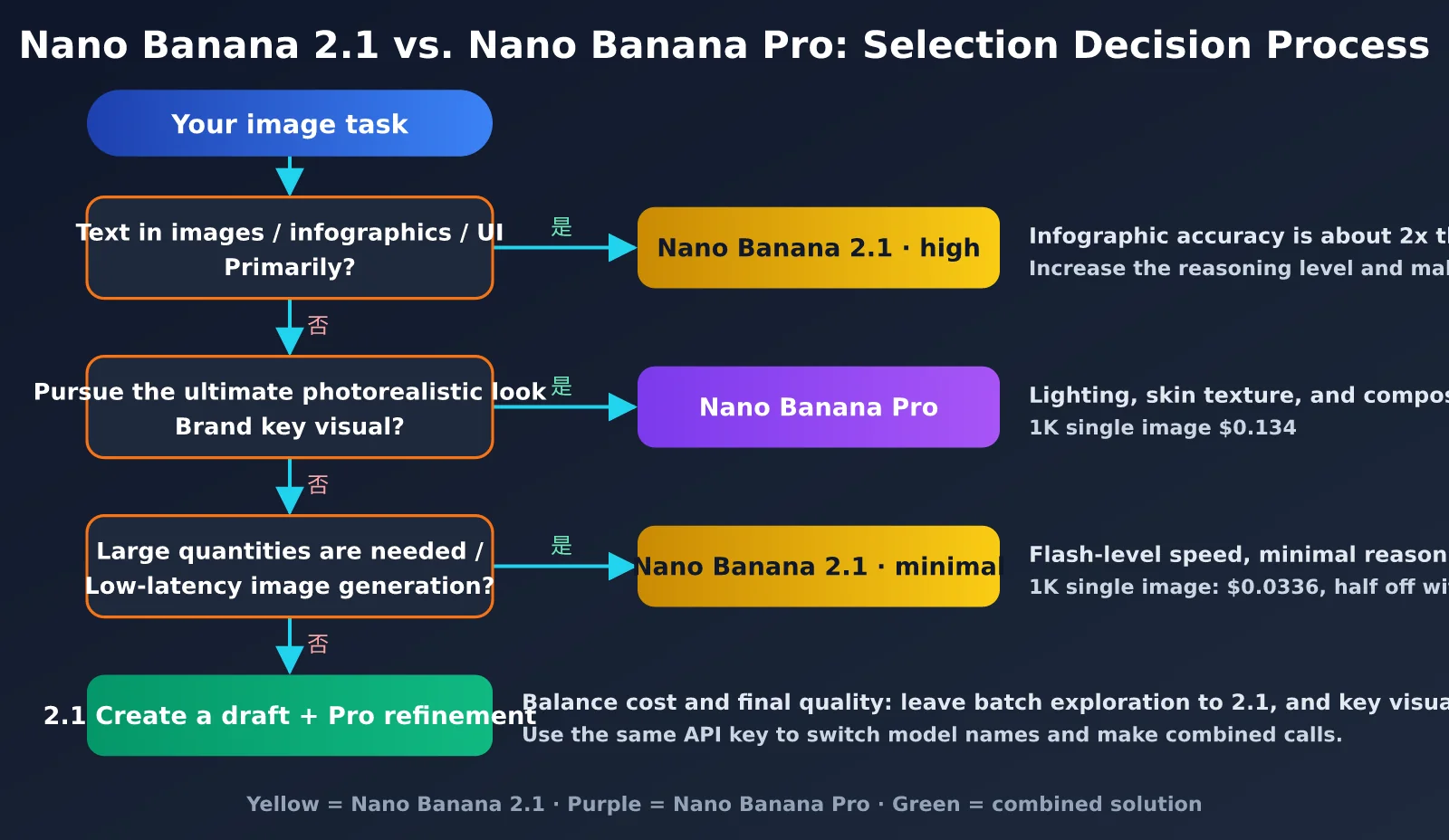
Recommendations for Choosing Between Nano Banana 2.1 and Pro
Based on the data and hands-on testing discussed above, you can choose a model to match your use case. For most teams, the best-value approach isn’t to pick one or the other, but to use 2.1 as the workhorse and Pro for final touch-ups:
| Use case | Recommended model | Key reason |
|---|---|---|
| Infographics, data charts, presentation visuals | Nano Banana 2.1 | Infographic accuracy is about 2× Pro’s, at just 1/4 the cost |
| UI prototypes, posters with text | Nano Banana 2.1 | Clear text rendering and support for multilingual localization |
| Comic series, consistent IP character images | Nano Banana 2.1 | Higher Elo than Pro for multi-character consistency, with support for 4 characters |
| Bulk e-commerce product images, background replacement | Nano Banana 2.1 | Precise mask editing and low per-image cost |
| Brand hero visuals, high-end advertising campaigns | Nano Banana Pro | Still has an edge in photorealism, lighting, and composition |
| Photorealistic portraits, complex multi-step editing | Nano Banana Pro | Community feedback suggests 2.1 can have issues with face consistency drift |
| Creative exploration and final delivery | Draft with 2.1, refine with Pro | Balances cost and final quality |
Several media outlets have reported that Nano Banana 2 itself will be discontinued on October 29, 2026. However, as of publication, Google’s official deprecation page doesn’t list a shutdown date. In any case, 2.1 is now Google’s recommended workhorse model. Projects still using gemini-3.1-flash-image should complete compatibility testing as soon as possible.
Frequently Asked Questions About Nano Banana 2.1
Q1: Was Nano Banana 2.1 distilled from Pro?
Google officially describes it only as “a more efficient counterpart to Nano Banana Pro” and hasn’t disclosed details about the model architecture. Some people in the community have observed similarities between certain 2.1 and Pro outputs, but that isn’t enough to draw a technical conclusion. We recommend judging by your own test results.
Q2: We’re already using Nano Banana Pro. Is it worth switching to 2.1?
If your work mainly involves text-heavy, information-rich, or bulk image generation, switching could save around 75% on image generation costs, and quality may even improve. If you mainly create photorealistic portraits or brand visuals, we recommend keeping Pro. You can compare two sets of real prompts on APIYI at apiyi.com before deciding how much to switch.
Q3: Are there any areas where Nano Banana 2.1 has regressed?
There are two things to keep in mind: the 512px tier has been removed, and the higher default thinking level increases thinking tokens. Combined with higher input prices, this narrows the cost advantage for workflows involving many reference images or long, multi-turn edits. There’s also some negative community feedback about the skin texture in portraits.
Q4: How can I test 2.1 and Pro side by side at low cost?
We recommend connecting through APIYI at apiyi.com. You can call the entire Nano Banana model family with the same API key. Run the comparison script above to collect image outputs, generation times, and token usage for both models in one go.
Summary: Nano Banana 2.1 Brings Major Improvements, but Pro Hasn’t Been Fully Replaced
Nano Banana 2.1 is more than a simple minor-version update. It brings substantial improvements in six areas: visual design, text rendering, mask editing, subject consistency, ultra-wide images, and thinking levels. It also outperforms Nano Banana Pro across Google’s published benchmarks for text-to-image preference, multi-character consistency, and infographic accuracy—while costing just one quarter as much per 1K image.
Back to the question we started with: can Nano Banana 2.1 beat Nano Banana Pro? For use cases where “getting it right” matters most—such as infographics, text layout, character consistency, and bulk production—the answer is yes, and its value for money is hard to beat. For use cases where aesthetics take priority, such as photorealism and high-end visuals, Pro still has an advantage. Its benchmark lead hasn’t yet translated into an outright win that’s obvious to the eye.
Our recommendation is to make 2.1 your primary model and Pro your supporting model: use Nano Banana 2.1 for everyday production and bulk tasks, and keep Pro for refining critical, brand-level visuals. You can run the entire comparison and migration process through APIYI at apiyi.com. The platform provides a unified interface for both Gemini-native and OpenAI-compatible formats. Check the console for the models currently available and their pricing.
References:
– Gemini API image generation documentation: ai.google.dev/gemini-api/docs/image-generation
– Official Gemini API pricing: ai.google.dev/gemini-api/docs/pricing
– Google DeepMind Gemini Image model page: deepmind.google/models/gemini-image
– The Decoder coverage: the-decoder.com
– APIYI documentation center: docs.apiyi.com
About the author: The APIYI technical team focuses on AI model integration and practical engineering. Visit APIYI at apiyi.com to discuss how to choose and evaluate image generation models.