Author’s note: Learn how to read the response JSON to tell whether Nano Banana Pro blocked the input, blocked the output, or couldn’t tell that you wanted an image. Then work through four common triggers and decide whether to revise the prompt, change the reference image, retry, or switch models.
When editing images with Nano Banana Pro, many developers run into the same problem: the request returns HTTP 200, so everything looks fine—but there’s no image in the response. Sometimes finishReason says IMAGE_PROHIBITED_CONTENT; sometimes there’s only a text explanation; and sometimes there’s no candidates field at all. This article walks through how to identify Nano Banana Pro safety blocks and investigate four types of triggers, so you can turn “it got blocked again” into a problem you can diagnose and fix.
This isn’t a guide to bypassing safety controls. It draws on Google’s official documentation on blocking mechanisms and APIYI’s hands-on testing of text-to-image and image editing. We’ll cover only compliant changes and legitimate alternatives.
What you’ll get: By the end, you’ll know how to use the response JSON to tell whether a failure happened on the input or output side, connect the four types of triggers to your prompt or reference image, and decide what to change, whether to retry, and whether to switch models.
Nano Banana Pro Safety Filters: 4 Main Reasons for Blocks
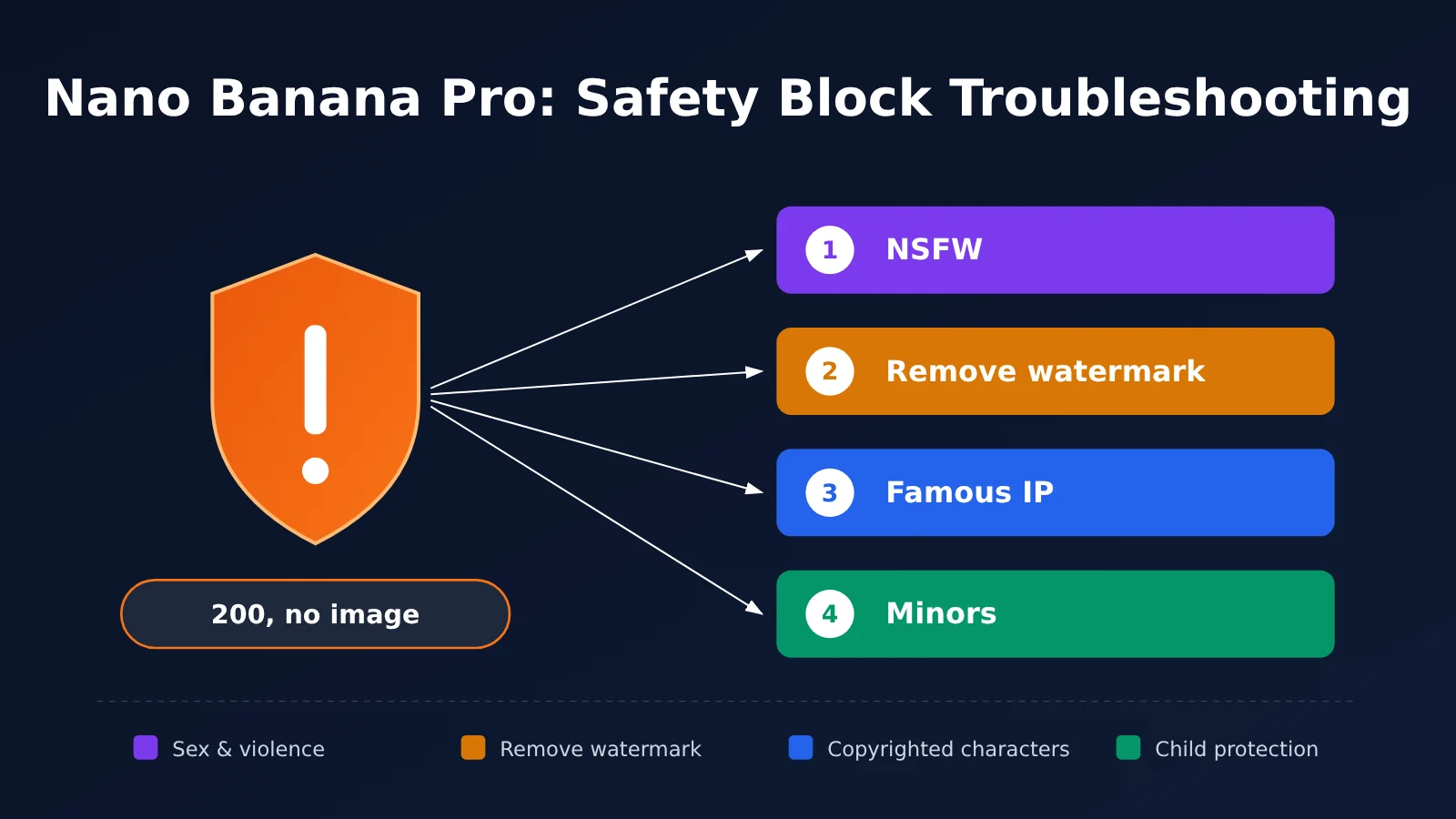
Here’s the short version: The most common reasons Nano Banana Pro (model name gemini-3-pro-image) blocks a request fall into four categories. Each can be triggered in a different place and calls for a different response.
| Trigger category | Typical scenarios | Where it’s triggered | Can it be fixed? |
|---|---|---|---|
| NSFW | Sexual content, violence, gore, hate speech, and suggestive or implicit NSFW content | Prompts or reference images | Revise the description or use different material; for false positives, try another model |
| Watermark removal | Requests to remove watermarks or logos from images | Mainly prompts | No; it violates the content policy |
| Well-known IP | Named copyrighted characters from Disney, Marvel, Nintendo, and others | Prompts or reference images | Switch to original or fictional characters |
| Minors | Inappropriate content involving minors | Prompts or reference images | Zero tolerance; built-in protections can’t be disabled |
Why Nano Banana Pro’s Safety Filters Have Recently Tightened
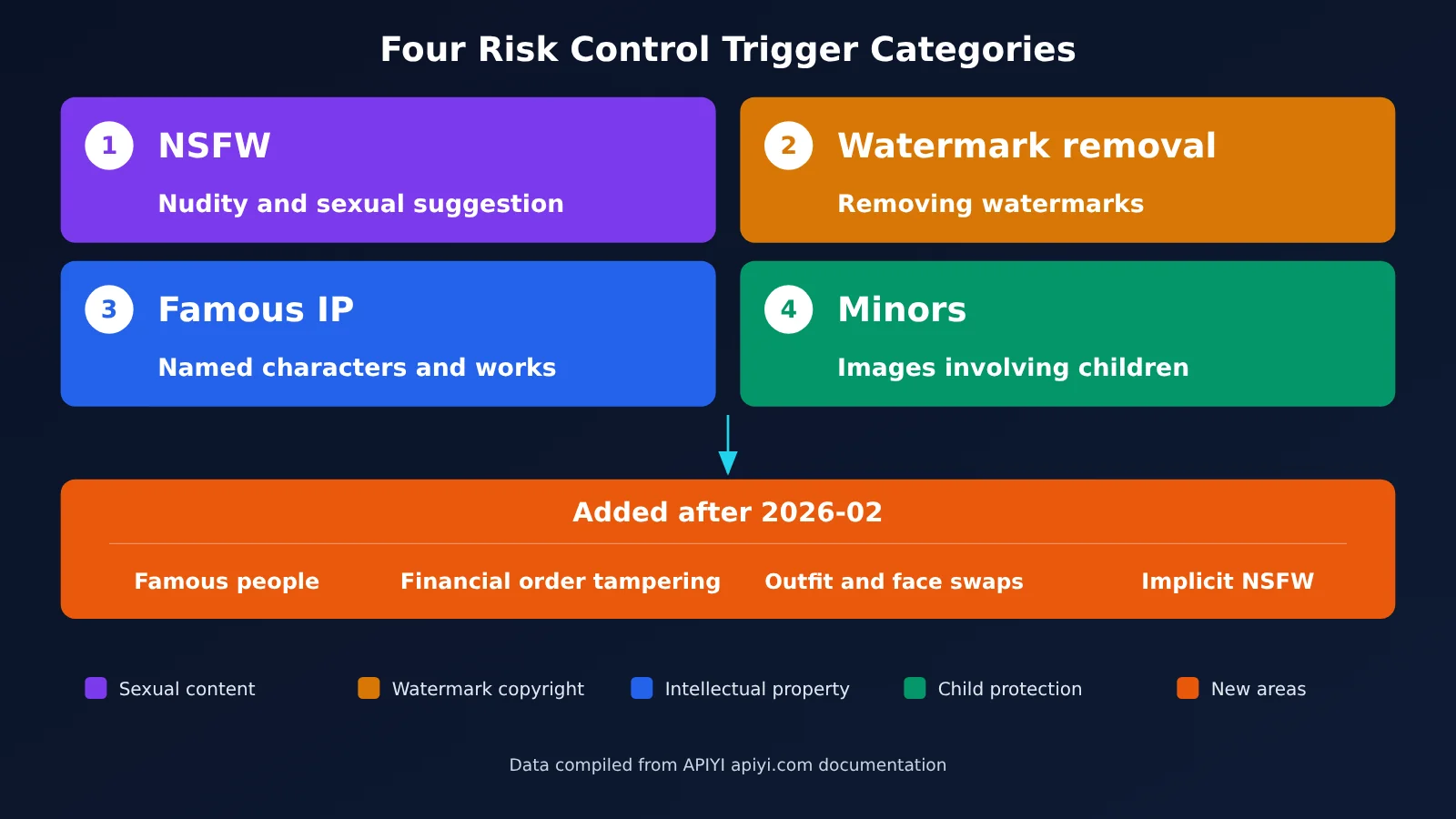
Beyond those four categories, there are two dates worth knowing. According to APIYI documentation and observations from the developer community, moderation became noticeably stricter around January 23, 2026. Some prompts that had previously passed began getting blocked. In early February 2026, posts on the Google AI developer forum also reported that compliant images showcasing underwear and swimwear were repeatedly blocked by IMAGE_SAFETY. The posters asked for a return to the standards applied before January 20. These dates come from third-party documentation and community reports; there’s no corresponding policy change in Google’s official changelog, so they shouldn’t be treated as an official announcement.
The second date is in late February 2026. Google released the Nano Banana 2 preview on February 26, while APIYI documentation records its launch as February 27. Four additional areas of blocking became apparent afterward: photorealistic, identifiable public figures; manipulation of financial or order information; changing a person’s clothing or swapping faces; and implicit NSFW content that’s suggestive without being explicit. That helps explain why many teams feel that blocks have become more frequent recently. Fictional characters, stylized portraits, and illustrated characters can still be generated normally.
Understanding Nano Banana Pro Safety Responses: Why HTTP 200 Returns No Image
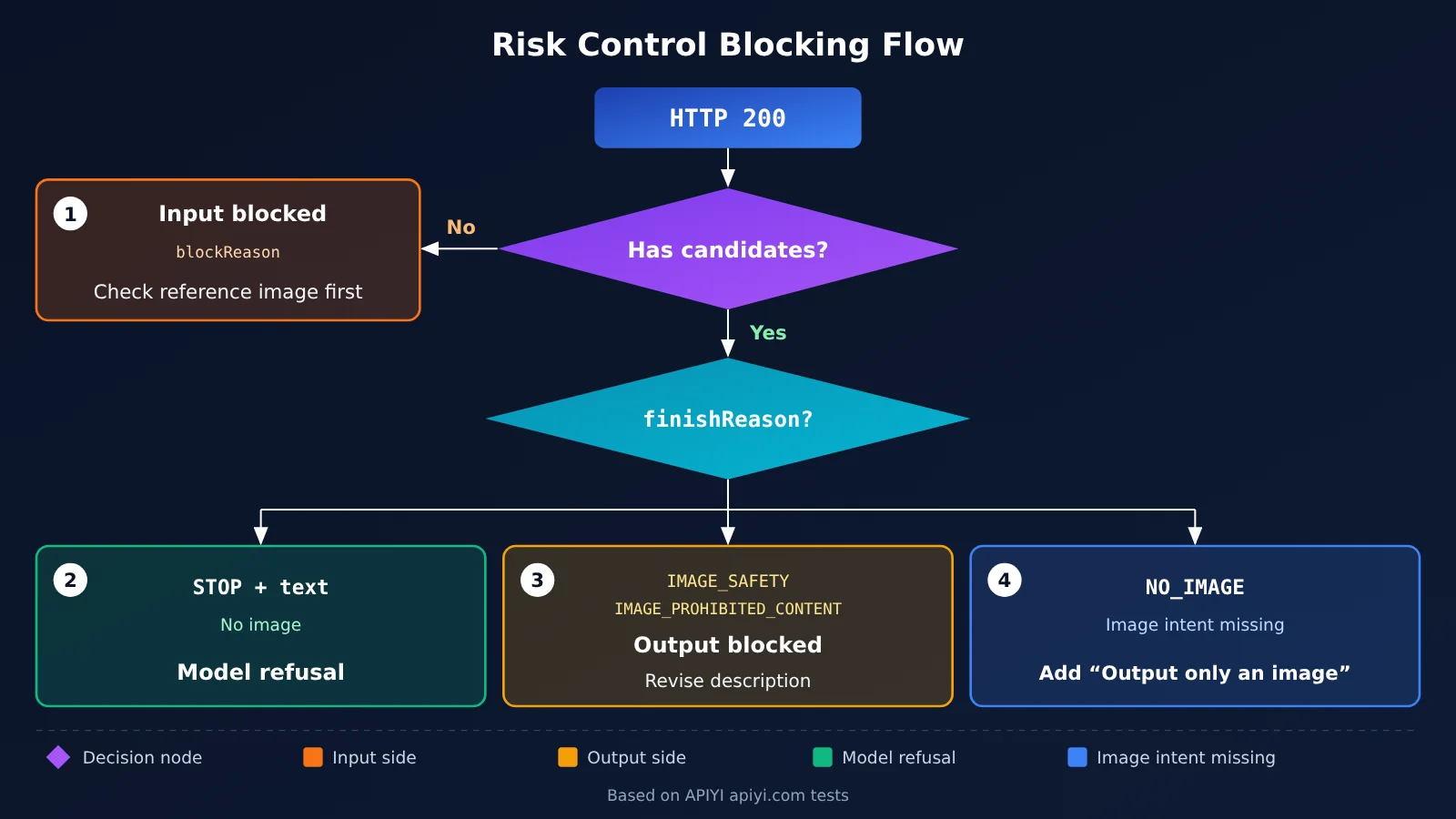
The first step in troubleshooting isn’t rewriting the prompt—it’s figuring out where the failure happened. According to Google Cloud’s documentation on image generation safety mechanisms, an HTTP 200 response with no image can mean at least three different things, each requiring a different approach.
Case 1: The Model Refuses the Request
If a prompt contains potentially unsafe content, the model may return text instead of generating an image. For example, it might say, “I can’t create an image containing sexual, indecent, or offensive content.” You’ll typically see these signs:
candidates[0].finishReasonis stillSTOP, so the response looks like it ended normallycandidates[0].content.partscontains onlytext, with noinlineData- Output token counts in the logs are usually low, around 100–200
In this case, the model has decided to refuse the request, and the issue lies in the prompt’s wording. Reading the returned text will often tell you exactly what the model found problematic.
Second: Blocked by a Safety Filter
Safety filters run independently of the model and can block either the input or the output.
Signs of an input-side block:
- The response has no
candidatesfield - Only
promptFeedback.blockReasonis present, commonly with a value ofSAFETY,PROHIBITED_CONTENT,OTHER,BLOCKLIST, orIMAGE_SAFETY - The response usually returns within a few seconds, and
safetyRatingsmay be empty
Signs of an output-side block:
- The response has
candidates, butcandidates[0].finishReasonisIMAGE_SAFETY,IMAGE_PROHIBITED_CONTENT, or a similar value partsisnull, not an empty array- The rejection explanation appears in
finishMessage, not as a text part
An input-side block means the model never got a chance to start generating. The issue is with the content you submitted, especially the reference image. An output-side block means the model generated an image, but the result was flagged as violating policy. The issue is most likely the scene your description led it to generate.
Third: Unclear Image Generation Intent
When finishReason is NO_IMAGE, the model was expected to generate an image but didn’t. This isn’t a safety block. A common cause is that the prompt asks the model to write a plan, perform an analysis, or provide a text explanation, so the model interprets it as a text task.
Nano Banana Pro Safety Response Fields: Quick Reference
| Failure type | Key field characteristics | Failure stage | First step |
|---|---|---|---|
| Model refusal | finishReason is STOP, and parts contain only text |
Model decision | Read the refusal message and revise the description |
| Input-side block | No candidates; promptFeedback.blockReason is present |
Input | Check the reference image first |
| Output-side block | finishReason is IMAGE_SAFETY or similar, and parts is null |
Output | Revise the image description |
| Unclear image-generation intent | finishReason is NO_IMAGE |
Interpretation | Add a sentence asking for image output only |
| Quotation or copyright | finishReason is IMAGE_RECITATION |
Output | Remove named works and characters |
How to Read the usage Fields in Nano Banana Pro Safety Responses
Based on tests involving 48 text-to-image requests and 18 image edits, APIYI identified a few patterns in the usage fields:
- A
candidatesTokenCountof 0 means the request was rejected during the safety review, before any candidate content was generated. - When a request is blocked,
totalTokenCountequalspromptTokenCountplusthoughtsTokenCount. - In this case,
candidatesTokenCountmirrorsthoughtsTokenCount, so adding all three together would count one value twice. UsetotalTokenCountdirectly for billing reconciliation.
If the response includes a raiFilteredReason field, such as ERROR_MESSAGE. Support codes: 56562880, you can use the support code to identify the specific category. The table below lists the codes most relevant to four types of reasons:
| Safety category | Input-side support code | Output-side support code | Corresponding reason |
|---|---|---|---|
| Child | 58061214 | 17301594 | Minors |
| Celebrity | 29310472 | 15236754 | Public figures |
| Celebrity or child | 64151117 | 64151117 | Celebrities or minors |
| Sexual | 90789179 | 63429089, 43188360 | NSFW |
| Prohibited content | 89371032 | 49114662, 72817394 | Prohibited content |
Note that this is a general safety category table for Gemini image models. It shouldn’t be taken as evidence that Google changed its policy on a particular day.
Troubleshooting 4 Categories of Nano Banana Pro Safety Triggers
Once you’ve identified where the failure occurred, check each possible cause against your request. The four original categories and the newly added restrictions are covered below.
NSFW and Subtle NSFW Content
Explicit sexual content, violence, gore, and hate speech can trigger blocks in both prompts and reference images. Subtle NSFW content is easier to overlook: the image may not be explicitly sexual, but its overall intent pushes the boundary. As the community examples mentioned earlier show, terms like lingerie, pajamas, and swimwear are considered high-risk and may trigger false positives even in legitimate product displays.
If the content itself crosses the line, the only solution is to change it. If a legitimate e-commerce clothing display is blocked by mistake, clarify its commercial purpose and visual composition. You can also test the same request with other image models and report the false positive to the Google developer community.
Watermark Removal
Requests to remove watermarks from images violate the content policy and are rejected outright. There’s no workaround for this category. Also note that all images generated by the Nano Banana series carry a SynthID watermark. This is applied by the model and can’t be turned off. If your workflow includes an “image cleanup” step, remove these requests from the workflow rather than trying to rephrase them.
Well-Known IP and Public Figures
Requests to generate named copyrighted characters from Disney, Marvel, Nintendo, and others are rejected under copyright protections. APIYI documentation notes that this change became more noticeable starting January 23, 2026. Since late February 2026, photorealistic, recognizable depictions of real people have also become a focus of enforcement.
A compliant alternative is to use original characters or stylized portraits and illustrations. Reference images containing celebrity photos or screenshots of copyrighted characters can also trigger input-side blocks.
Minors
Inappropriate content involving minors is subject to zero tolerance. Official documentation says that adjustable safetySettings cover only four categories: harassment, hate speech, sexually explicit content, and dangerous content. Core safeguards, including child safety protections, are built in and can’t be disabled with any parameter. These requests should be filtered out at the business-logic level.
Financial and Order Record Tampering, Outfit Changes, and Face Swaps
These two categories were added as enforcement targets after late February 2026. Requests to change amounts, order numbers, or account information in screenshots are blocked, as are requests to swap one person’s face onto another or change a real person’s outfit. Don’t try to bypass these restrictions by rewriting the prompt. For legitimate product-image background changes, limit the edits to the product and its surroundings, without involving personal identity or credential information.
Nano Banana Pro Risk-Control Blocks: Change the Reference Image or the Prompt?
This is the question most developers want answered. It depends on where the request fails: if it’s blocked on the input side, check the reference images first. If it’s blocked on the output side, revise the description. For NO_IMAGE, make your intent to generate an image explicit.
Step 1: If the Input Is Blocked, Start With the Reference Images
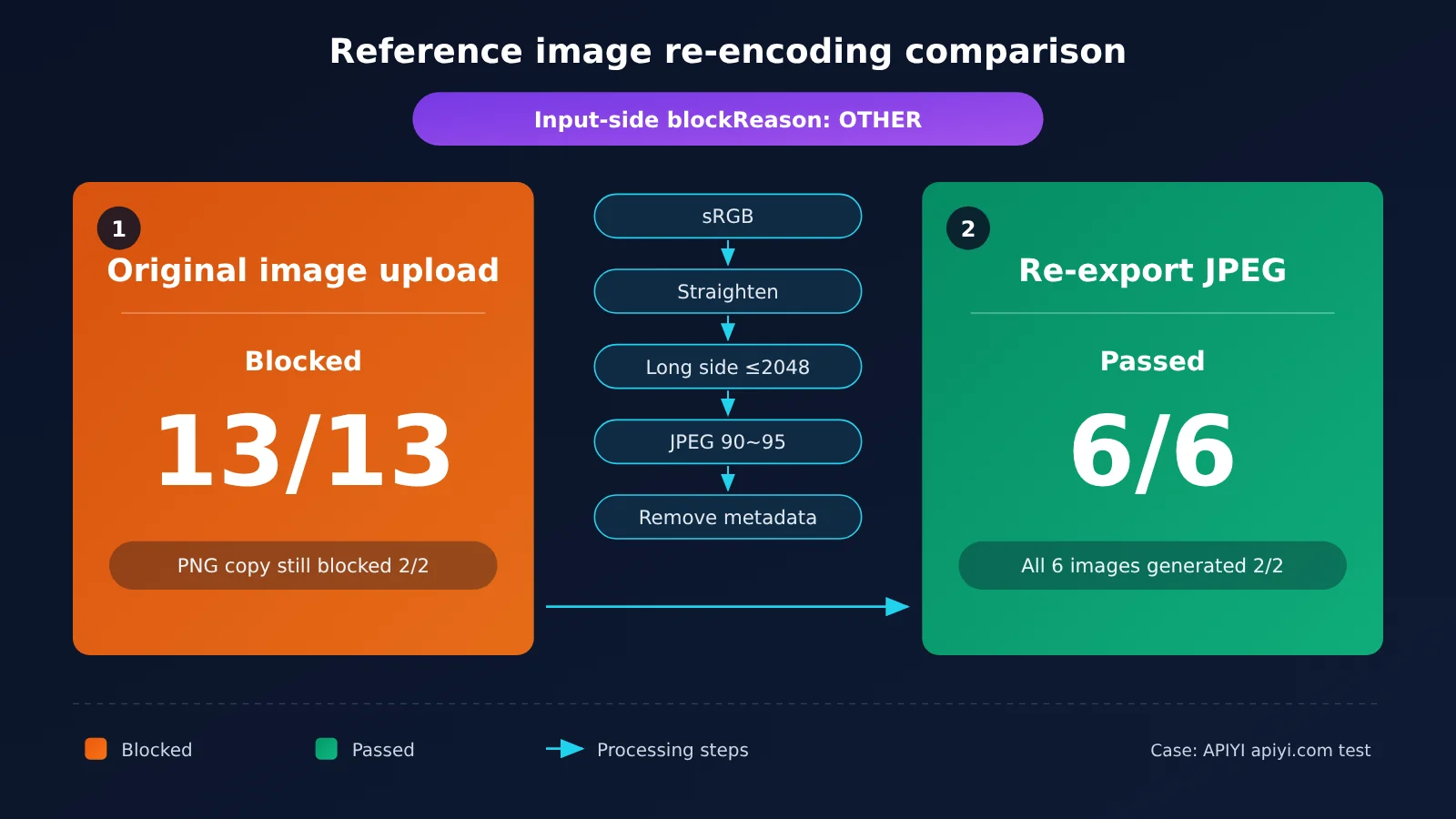
In September 2026, APIYI documented a typical case. The request included one prompt and six reference images—for pose, character, scene, outfit, a shoes-and-socks collage, and a hat—with a 2:3 aspect ratio and 2K resolution. gemini-3-pro-image repeatedly returned blockReason as OTHER, with no candidates, within a few seconds. The same request generated an image normally when switched to gemini-3.1-flash-image.
The team split the reference images in half to narrow down the cause, eventually identifying a four-panel character design image as the sole trigger. Here are the key results:
| Approach | Test result | Conclusion |
|---|---|---|
| Submit the original image | Blocked 13/13 | Consistently triggered |
| Save as PNG only | Still blocked 2/2 | Changing the format didn’t help |
| Re-export as JPEG (quality 95) | Passed 6/6 | Re-encoding worked |
| Replace the image in the full six-image request | Generated images 2/2 | Problem solved |
This case shows that Pro’s input checks are stricter than Flash’s, so it’s normal for the same request to pass with Flash but be blocked by Pro. Here’s a checklist for standardizing reference images:
- Convert all images to the sRGB color space
- Correct image orientation using EXIF data
- Keep the longest side at or below 2048 pixels
- Re-encode as JPEG at quality 90–95
- Remove metadata
It’s important to note that re-encoding is only appropriate for unclear reasons like OTHER. If the blockReason is an explicit safety reason such as SAFETY, PROHIBITED_CONTENT, or IMAGE_SAFETY, don’t try to force it through by retrying or re-encoding. Replace the material instead.
Step 2: Revise the prompt if the output is blocked or you get NO_IMAGE
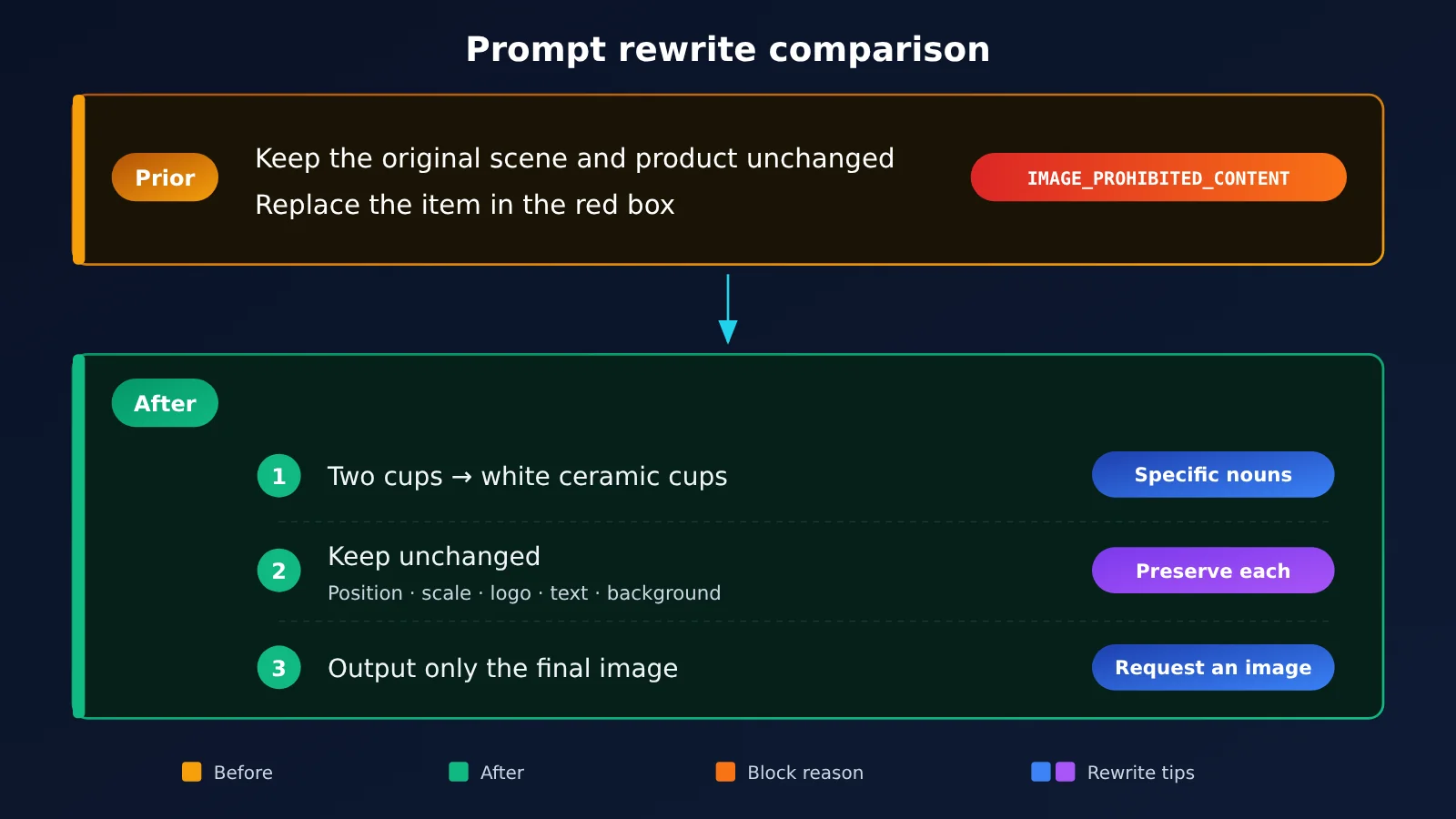
When the output is blocked, the issue lies in the image the prompt leads the model to generate. For example, an editing prompt like “Keep the original scene and product unchanged, and replace the item in the red box” leaves the scope of “unchanged” open to interpretation. The model may take liberties and generate unexpected content. To make the prompt clearer:
- Replace vague references with specific nouns: use “the two cups inside the red box” instead of “the item in the red box.”
- Specify the color instead of saying “change the color.”
- List everything that should stay unchanged: subject position, proportions, logo, text labels, and background.
- Break actions into numbered steps. Change only one type of thing at a time, and split complex instructions into multiple editing rounds.
If you get NO_IMAGE, adding “Output only the final image, with no text” to the end of the prompt usually resolves it.
Step 3: Decide Whether to Retry or Switch Models
Before retrying, remember that failed requests can still incur charges. Google deducts quota, and the platform can’t currently waive charges for empty outputs. Repeated requests without changing the prompt waste your daily quota, and policy-violating requests could even get your official API key disabled. So don’t retry when there’s a clear safety-related reason; it’s worth trying a different approach only for OTHER errors or false positives.
When switching models, you can use the same APIYI key and endpoint, https://api.apiyi.com/v1—just change the model parameter. A practical approach is to start with the cheaper, faster 2.1 or Lite model for routine tasks. If a precision edit fails once or twice, upgrade to Pro. If it still fails, go back and revise the prompt.
| Model ID | Name | Price (per request) | Available on |
|---|---|---|---|
gemini-3-pro-image |
Nano Banana Pro | $0.09/request | APIYI |
gemini-nano-banana-2.1 |
Nano Banana 2.1 | $0.045/request | APIYI |
gemini-3.1-flash-image |
Nano Banana 2 | $0.055/request | APIYI |
gemini-3.1-flash-lite-image |
Nano Banana 2 Lite | $0.025/request | APIYI |
gpt-image-2-all |
GPT Image 2 | $0.025/request | APIYI |
All image models are billed per request. Check the platform’s model list for current availability and pricing. Google also announced the deprecation of gemini-3.1-flash-image on October 6, 2026, without announcing a shutdown date. New projects should migrate to gemini-nano-banana-2.1.
🚀 Quick start: If you want to compare multiple models using the same prompts and reference images, you can switch between the models in the table above with a single API key on APIYI at apiyi.com. New users get free testing credits, making it easy to validate at low cost before scaling up.
Nano Banana Pro Safety Filter FAQ
Q1: What does it mean when Nano Banana Pro is blocked by a safety filter?
It means `gemini-3-pro-image` didn’t return an image for content safety reasons. This can happen when the model refuses the request, an input filter blocks it, or an output filter blocks it. The request usually still returns HTTP 200, so you’ll need to check the response fields to tell which occurred.
Q2: Is it normal for flash to generate an image when Pro blocks the same request?
Yes. Testing shows that Pro checks inputs more strictly than flash. If the reason is unclear, such as `OTHER`, first review your reference images using the checklist. If the content itself complies with the rules, switching to Nano Banana 2.1 is also a valid alternative.
Q3: Why have blocks become more frequent recently?
Two developments have contributed. APIYI documentation and developer community observations indicate that moderation tightened overall around January 23, 2026, though Google didn’t officially announce this. Then, after Nano Banana 2 launched in late February, four additional categories became targets for blocking: public figures, financial order tampering, clothing swaps and face swaps, and implicit NSFW content.
Q4: Am I charged for requests blocked by safety filters?
Possibly. Google deducts quota, and the platform currently can’t waive charges automatically when the output is empty. Check the invocation logs in your APIYI apiyi.com console: a very low output token count, such as 100–200, or an empty “Completion” column indicates that no image was generated.
Q5: Is there a compensation plan for tool providers with frequent image generation failures?
Yes. The Nano Banana Pro image generation failure compensation plan covers only Nano Banana Pro requests billed per invocation. To qualify, you must be a tool provider, spend at least $1,000 per month across any models on the platform, and register on the internal list. The plan applies from May 1, 2026 (UTC+8) and covers only failures caused by factors outside your control. Compensation is calculated as “number of requests × model price / discount coefficient.” The previous month’s data is tallied at the end of each month, and compensation is credited within the first five business days of the following month. Contact APIYI apiyi.com support for details.
Q6: How can I export failure records for an application or troubleshooting?
Open the logs in the console, click Export in the upper-right corner, select a time range, and start an asynchronous export. Then download the Excel file from the asynchronous tasks page. Note that failures caused by factors within your control, such as content violations, aren’t covered by the compensation plan.
Q7: Can I disable the filters by adjusting safetySettings?
Not completely. You can adjust thresholds for only four categories: harassment, hate speech, sexually explicit content, and dangerous content. Core protections, such as child safety, are built in. Google’s usage policies also explicitly prohibit circumventing safety filters.
Nano Banana Pro Safety-Filter Troubleshooting Summary
Key Takeaways
- Read the response before changing your content: A missing
candidatesfield means the input was blocked;partsbeing null means the output was blocked. - A refusal isn’t the same as a block: If
finishReasonisSTOPand the response contains only text, the model refused the request. - Four main causes: NSFW content, watermark removal, well-known IP, and minors, with four more categories added after February.
- Check reference images first for input blocks: Convert them to sRGB, keep the longest side at or below 2048 pixels, and re-export as JPEG at 90–95 quality.
- Don’t retry when the safety reason is clear: Use different source material or revise the description to avoid wasting quota.
- Switch models by changing one parameter: Use the same key through APIYI apiyi.com to switch between 2.1, Lite, and Pro.
The basic troubleshooting sequence for Nano Banana Pro is to inspect the response fields to locate the failure, check the four main causes to find the trigger, adjust the reference image for input blocks or the description for output blocks, and make the image-generation intent explicit for NO_IMAGE. Then decide whether to switch models. Content that genuinely violates the rules can’t be fixed with tweaks—you’ll need to prevent it in your workflow. Standardizing source material and testing multiple models are worth trying for false positives or unclear failures.
If your team needs a reliable way to investigate failed requests and compare image models, consider connecting through APIYI apiyi.com. You can switch models with the same key by changing only the model parameter, and the logs show usage charges for each failed request. Eligible tool providers can also join a compensation program for failed pay-per-call requests.
References
- Gemini image generation and responsible AI: Google Cloud’s image-generation safety mechanisms and support codes
- Link:
cloud.google.com/vertex-ai/generative-ai/docs/image/responsible-ai-imagen -
Details: Maps block types and safety categories to support codes.
-
Gemini API safety settings: Adjustable safety categories and built-in protections
- Link:
ai.google.dev/gemini-api/docs/safety-settings -
Details: Explains which safety thresholds can be adjusted and which protections can’t be disabled.
-
Gemini API generateContent reference:
finishReasonandblockReasonenumerations - Link:
ai.google.dev/api/generate-content -
Details: Official definitions of response fields.
-
Gemini API changelog: Model release, GA, and deprecation timeline
- Link:
ai.google.dev/gemini-api/docs/changelog - Details: Confirms the release milestones for the Nano Banana series.
Author: APIYI Technical Team
Technical discussions: Contact us through the APIYI homepage. For more resources, visit the documentation center at docs.apiyi.com.