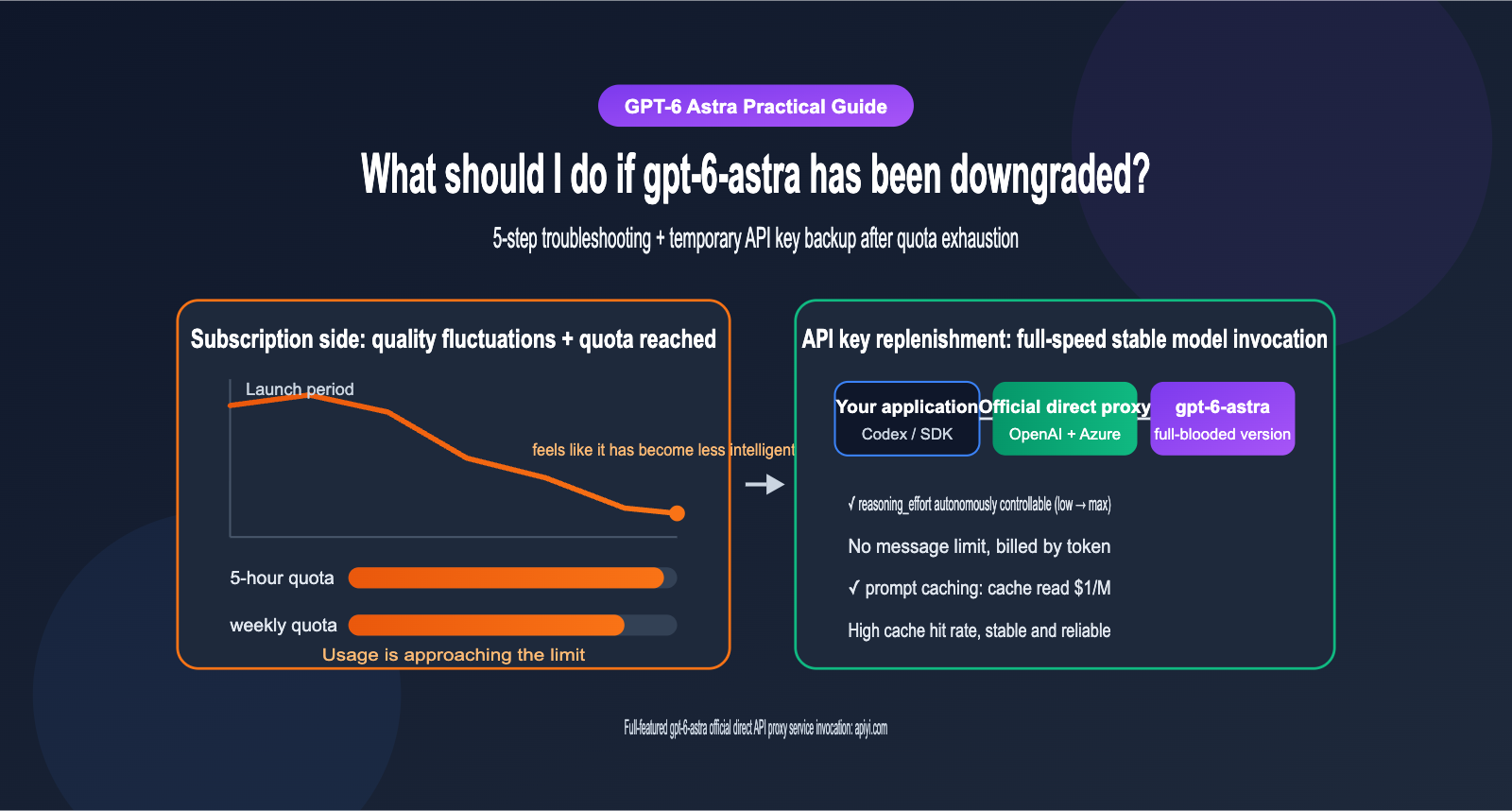
GPT-6-Astra was released on September 3, 2026, and rolled out to everyone the following day. Just a week after launch, social media was flooded with complaints that "GPT-6-Astra has been dumbed down." Users reported that the same prompts were yielding lower-quality outputs than in the first few days, and that the "Extra high" reasoning tier was running faster but producing sloppier results. Meanwhile, Astra usage limits in ChatGPT and Codex have been significantly tightened compared to the previous generation, GPT-5.6 Sol, leaving many developers hitting a wall mid-project. This article covers a 5-step troubleshooting method to determine if GPT-6-Astra has truly been "dumbed down," along with a strategy to use official API proxy services as a temporary fallback once your limits are reached, helping you keep your workflow stable.
Core Value: By the end of this article, you'll be able to distinguish between "actual degradation" and "perception bias," understand the real boundaries of your subscription limits, and learn how to use controlled reasoning intensity and caching strategies to invoke the full-power version of GPT-6-Astra at a reasonable cost.
Core Points of the GPT-6-Astra "Degradation" Controversy
Before we start troubleshooting, let's lay out the known facts. According to reports from overseas media like Decrypt, a wave of complaints began a week after Astra's release. Some developers (including the opencode team) switched back to GPT-5.6 Sol because costs doubled and quality didn't meet expectations. However, as of this writing, OpenAI hasn't issued an official statement regarding Astra, and many veteran users believe the model itself hasn't changed—it's just that the "honeymoon period" is over, and people are starting to notice its flaws more acutely.
| Point | Known Facts | What it Means for You |
|---|---|---|
| Release Date | Sept 3, 2026 (early access), Sept 4 (general availability) | The model is still in its early stages; server-side policies may change frequently |
| Degradation Complaints | Users report worse output for identical prompts and faster, lower-quality reasoning tiers | You need to verify this in a reproducible way, not just rely on "feelings" |
| Official Response | None regarding Astra specifically | We can't confirm if default reasoning intensity has been adjusted |
| Historical Precedent | In July 2026, Sol faced similar skepticism; OpenAI denied intentional weakening but admitted to testing "reasoning intensity" settings | Reasoning budgets in ChatGPT aren't under your full control |
| Tightened Limits | Plus in Work/Codex is ~5-45 messages/5 hours, about half of the Sol era | Heavy users will easily hit the ceiling during peak times |
Why GPT-6-Astra "Feels Dumber"
The possibility that the model weights were secretly swapped is actually quite low; the more common culprit is the "reasoning budget." GPT-6-Astra supports five reasoning intensity levels in the API: low, medium, high, xhigh, and max. The higher the level, the more reasoning steps the model takes before answering, which increases both quality and latency. In subscription products like ChatGPT and Codex, the reasoning budget is managed centrally by the platform. If the platform lowers the actual budget to handle compute pressure, users see "faster but sloppier" results, which perfectly matches the complaints.
On the other hand, developers like Theo have pointed out that Astra's output variance is quite high—it can provide a brilliant result for a task one moment and make a silly mistake the next. During the launch, people were more likely to remember the brilliant cases; as time goes on, the failures get amplified. This psychological gap is often interpreted as "degradation." Therefore, the key to troubleshooting is to separate the three variables: "platform scheduling," "model variance," and "your own usage."
5-Step Troubleshooting Guide for GPT-6-Astra Performance Degradation
If you suspect your GPT-6-Astra is underperforming, follow this step-by-step process. Each step helps you rule out a specific category of issues, saving you from blindly switching models.
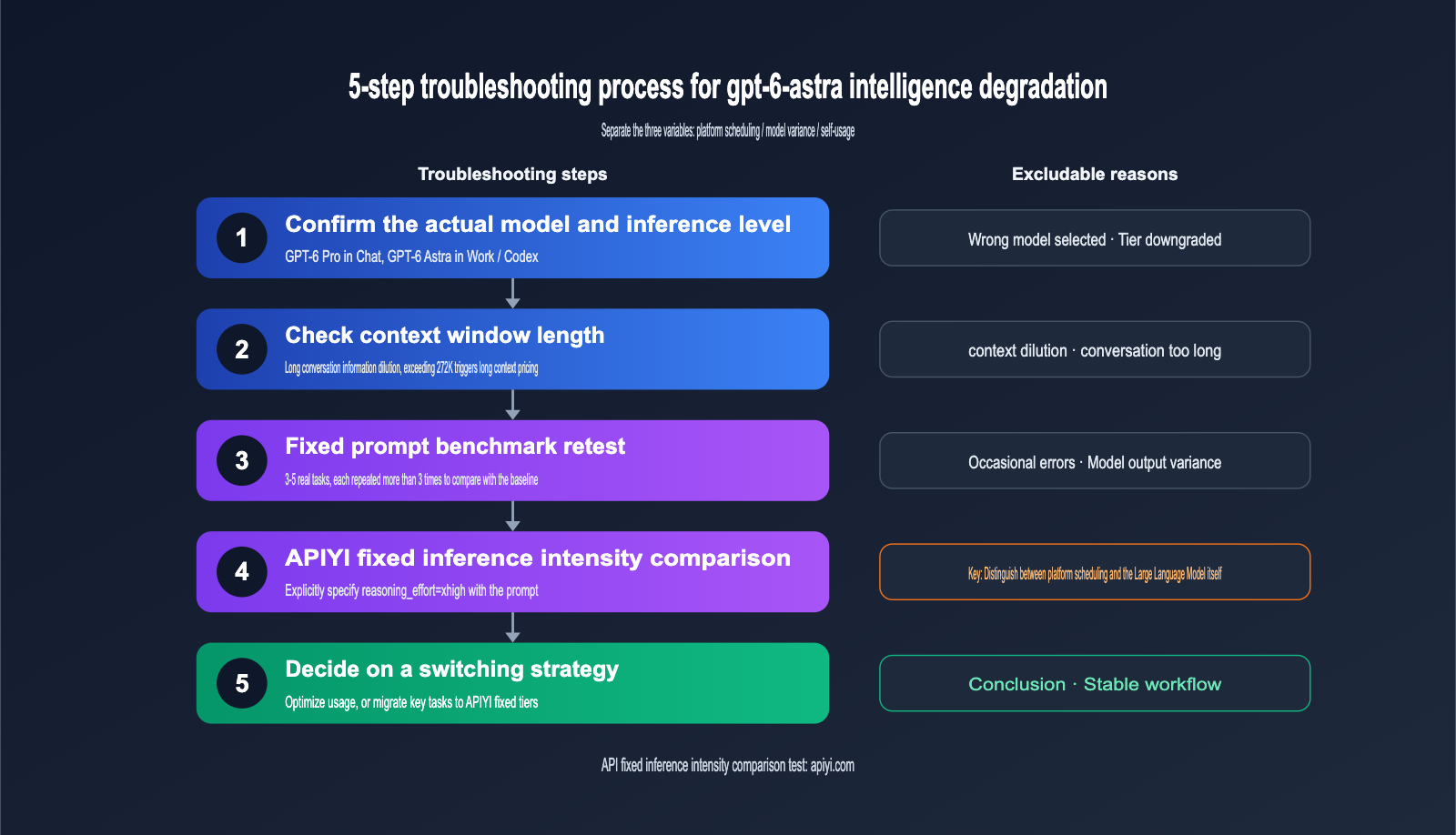
- Verify the model and tier: In ChatGPT, Astra appears as "GPT-6 Pro" in Chat, while it's "GPT-6 Astra" in Work and Codex modes. They have different quota systems. First, confirm which model you're actually running and what reasoning intensity is selected. Check if the interface has already signaled a downgrade due to quota limits.
- Check for excessive context: Astra has a context window of 1,050,000 tokens, but the dilution of early information in long conversations is a common issue for all Large Language Models. If a Codex session has been running for hours, start a fresh session and trim your background materials before re-testing.
- Benchmark with fixed prompts: Pick 3-5 real-world tasks you're familiar with. Use the outputs from when the model was performing well as your baseline. Run the same prompt at least 3 times to see if the degradation is consistent or just a random glitch. A single comparison doesn't provide enough statistical significance.
- Use API with fixed reasoning intensity as a control: Explicitly set the
reasoning_effortvia API and compare the output with the ChatGPT interface using the same prompt. If the API'sxhighresult is significantly better than the subscription version, the issue is likely the platform's reasoning budget, not the model itself. - Decide your strategy based on the results: If it's a usage issue, optimize your prompts and session management. If it's a platform scheduling or quota issue, migrate critical tasks to a controlled API invocation.
| Phenomenon | Most Likely Cause | Verification Method | Recommended Action |
|---|---|---|---|
| Faster responses, shallower reasoning | Reasoning budget reduced | Compare with API xhigh |
Move critical tasks to API with fixed tier |
| Frequent errors in long sessions | Context dilution or exceeding 272K range | Retest in a new session | Split tasks, trim context |
| Inconsistent performance on same task | High output variance | Run same prompt 3-5 times | Add validation steps or multiple samples |
| Sudden "usage limit" warning | 5-hour or weekly quota hit | Check usage dashboard | Wait for reset or switch to API |
| Noticeable drop in code quality | Tier switched or prompt drift | Compare with launch-period baseline | Solidify system prompts and tier settings |
🎯 Troubleshooting Tip: Step 4 is the key to distinguishing between "platform issues" and "model issues." We recommend using APIYI (apiyi.com) to run the same prompt at both
highandxhightiers. The platform provides pure, official-direct access to GPT-6-Astra, with parameters identical to the native OpenAI interface, making your comparison results much more reliable.
What to do when you run out of gpt-6-astra quota
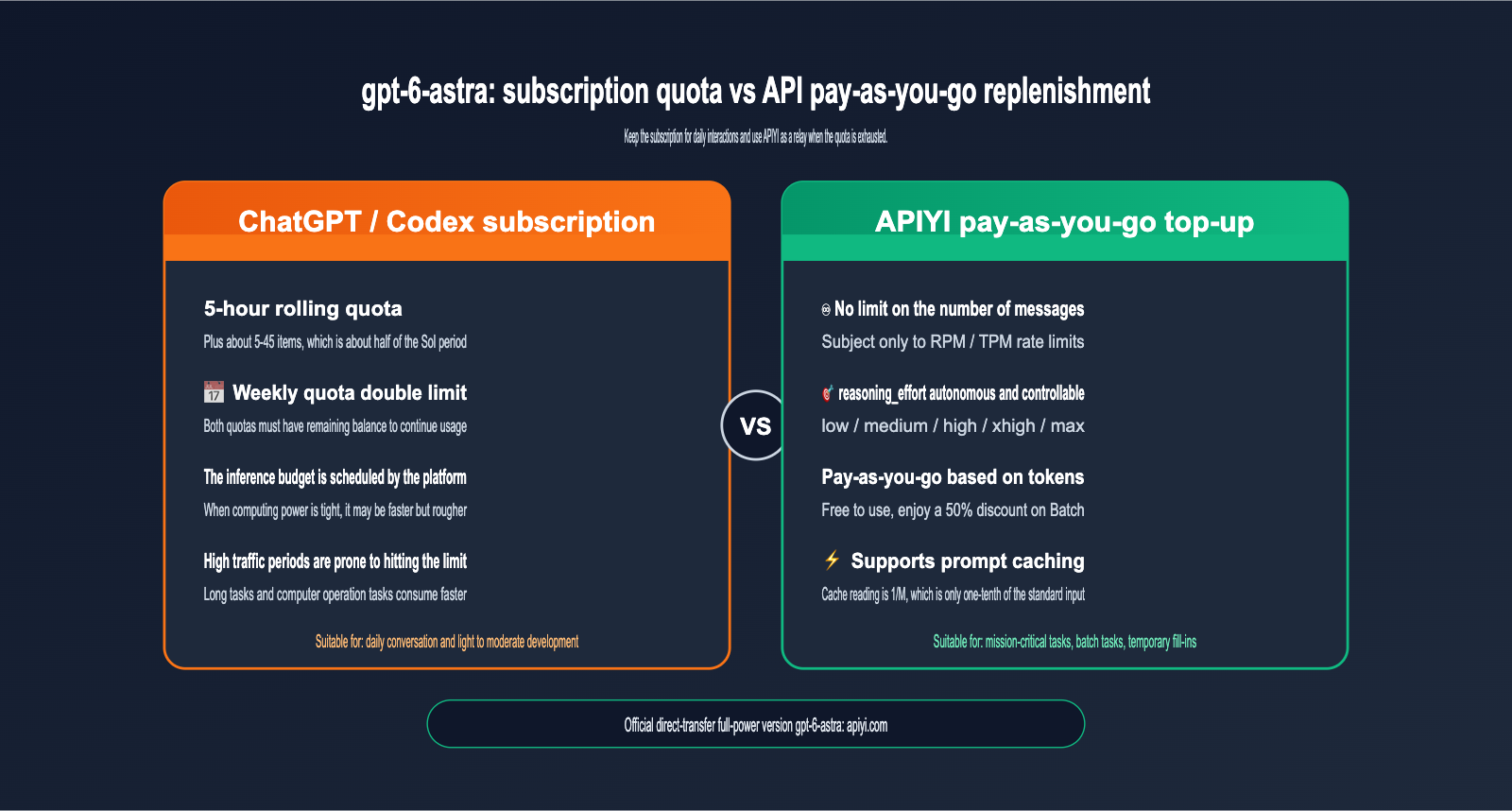
Even if the model isn't being "dumbed down," running out of quota is enough to kill your workflow. According to information gathered from overseas media and community discussions, Astra uses a "5-hour rolling quota + weekly quota" dual-limitation system in ChatGPT Work and Codex. You need both to be available to keep working. Additionally, there have been reports that after the global quota reset on September 5th, the limits for some power users were tightened further. The table below shows estimates compiled by the community; always refer to the official OpenAI usage dashboard for the most accurate data.
| Subscription Plan | Estimated Astra Quota (Work/Codex) | GPT-6 Pro (Chat) | Best For |
|---|---|---|---|
| Plus | ~5-45 messages / 5 hours | Not included | Light users, occasional complex tasks |
| Pro $100 | ~25-225 messages / 5 hours | ~50 messages / week | Daily development work |
| Pro $200 | ~100-900 messages / 5 hours | ~200 messages / week | Heavy, all-day usage |
| API Pay-as-you-go | No message limit, subject to RPM/TPM | N/A | Batch tasks, critical work, temporary backup |
The reason for such a wide range is that the quota consumed per message depends on task complexity, reasoning effort, and context window length. A 40-minute automated computer task consumes significantly more than a simple Q&A. For most developers, upgrading to the $200 plan just to cover occasional spikes isn't cost-effective. A more economical approach is to keep your existing subscription and use the API to fill in the gaps when your quota runs out.
Three advantages of using the gpt-6-astra API as a backup
Using the API as a temporary backup isn't just about "getting more quota"—it's about regaining control. First, you explicitly specify the reasoning effort, so it won't be silently adjusted by the platform, which helps hedge against the uncertainty of "model degradation." Second, the API is billed by the token, so you don't pay when you aren't using it, making it perfect for intermittent spikes in demand. Third, the API supports cost-optimization techniques like Batch and prompt caching, keeping your long-term costs under control.
When choosing a provider, the key is whether it's a direct official proxy. Some third-party channels might use reverse-engineered interfaces or route requests to other models, which only makes the "degradation" issue worse. The gpt-6-astra provided by APIYI (apiyi.com) is the full-blooded version, using direct official OpenAI and Azure dual-routing. The interface parameters are identical to the official ones, making it a stable supplement to your subscription.
Getting started with the gpt-6-astra API
gpt-6-astra supports Chat Completions, Responses, and Batch endpoints. It accepts text and images as input and outputs text. The minimal example below uses the official OpenAI SDK; just replace the base_url and your API key to get started.
Minimal gpt-6-astra invocation example
from openai import OpenAI

client = OpenAI(
    api_key="YOUR_APIYI_KEY",
    base_url="https://api.apiyi.com/v1"
)

response = client.chat.completions.create(
    model="gpt-6-astra",
    reasoning_effort="xhigh",  # low / medium / high / xhigh / max
    messages=[
        {"role": "system", "content": "You are a senior backend engineer; provide runnable code in your answers."},
        {"role": "user", "content": "Implement an LRU cache with an expiration time in Python"}
    ]
)
print(response.choices[0].message.content)
print(response.usage)  # Pay attention to prompt_tokens_details.cached_tokens
View full code: Wrapper with cache keys, retries, and usage statistics
import time
from openai import OpenAI, APIError, RateLimitError

client = OpenAI(
    api_key="YOUR_APIYI_KEY",
    base_url="https://api.apiyi.com/v1"
)

# Keep fixed long system prompts at the beginning to facilitate prompt caching
SYSTEM_PROMPT = open("system_prompt.md", encoding="utf-8").read()


def ask_astra(user_input: str,
              effort: str = "high",
              cache_key: str = "project-alpha-v1",
              max_retries: int = 3) -> str:
    """Invoke gpt-6-astra with fixed reasoning effort and reused cache key"""
    for attempt in range(max_retries):
        try:
            resp = client.chat.completions.create(
                model="gpt-6-astra",
                reasoning_effort=effort,
                prompt_cache_key=cache_key,
                messages=[
                    {"role": "system", "content": SYSTEM_PROMPT},
                    {"role": "user", "content": user_input},
                ],
            )
            usage = resp.usage
            cached = 0
            if usage.prompt_tokens_details:
                cached = usage.prompt_tokens_details.cached_tokens or 0
            hit_rate = cached / usage.prompt_tokens if usage.prompt_tokens else 0
            print(f"Input {usage.prompt_tokens} | Cached {cached} "
                  f"| Hit rate {hit_rate:.1%} | Output {usage.completion_tokens}")
            return resp.choices[0].message.content
        except RateLimitError:
            wait = 2 ** attempt
            print(f"Rate limit hit, retrying in {wait} seconds")
            time.sleep(wait)
        except APIError as e:
            print(f"API error: {e}")
            time.sleep(1)
    raise RuntimeError("Failed after multiple retries")


if __name__ == "__main__":
    tasks = [
        "Review the index usage of this SQL: SELECT ...",
        "Design an idempotent retry scheme for the order service",
    ]
    for t in tasks:
        print(ask_astra(t, effort="xhigh")[:200])
💡 Usage Tip: For your first call, we recommend starting with the
mediumeffort level to verify the pipeline, then gradually increasing it based on task difficulty. You can register at APIYI (apiyi.com) to get test credits and confirm the output quality meets your expectations before migrating your formal tasks.
Switching to gpt-6-astra API in Codex
If you primarily use Astra via the Codex CLI, you don't have to stop working when your quota runs out. You can configure a custom model provider in ~/.codex/config.toml and use your API key to keep going:
model = "gpt-6-astra"
model_provider = "apiyi"
model_reasoning_effort = "high"

[model_providers.apiyi]
name = "APIYI"
base_url = "https://api.apiyi.com/v1"
env_key = "APIYI_API_KEY"
wire_api = "responses"
After configuring, run export APIYI_API_KEY=your_key and restart Codex. Once your subscription quota resets, you can simply comment out the model_provider to switch back to your original login method. You can toggle between these modes as needed.
How to choose gpt-6-astra reasoning effort
Reasoning effort directly determines quality, latency, and cost. We recommend choosing a level based on the task type rather than setting it to maximum every time.
| Reasoning Effort | Typical Scenarios | Quality Performance | Latency & Cost |
|---|---|---|---|
| low | Format conversion, simple Q&A, information extraction | Meets basic needs | Lowest |
| medium | Daily code completion, document writing | Balanced | Lower |
| high | Complex refactoring, architecture design, data analysis | Stable and reliable | Medium |
| xhigh | Difficult bug localization, long-chain Agent tasks | Close to initial release experience | Higher |
| max | Mathematical proofs, security audits, high-value decisions | Highest ceiling | Highest, monitor usage frequency |
🎯 Selection Advice: If you suspect your subscription is being "dumbed down," you can pin critical tasks that you previously ran in ChatGPT to the
xhighlevel. When calling via APIYI (apiyi.com), the reasoning effort is determined entirely by the request parameters, making it easy to keep quality fluctuations within an explainable range.
gpt-6-astra Cost Control and Cache Hit Rate Optimization
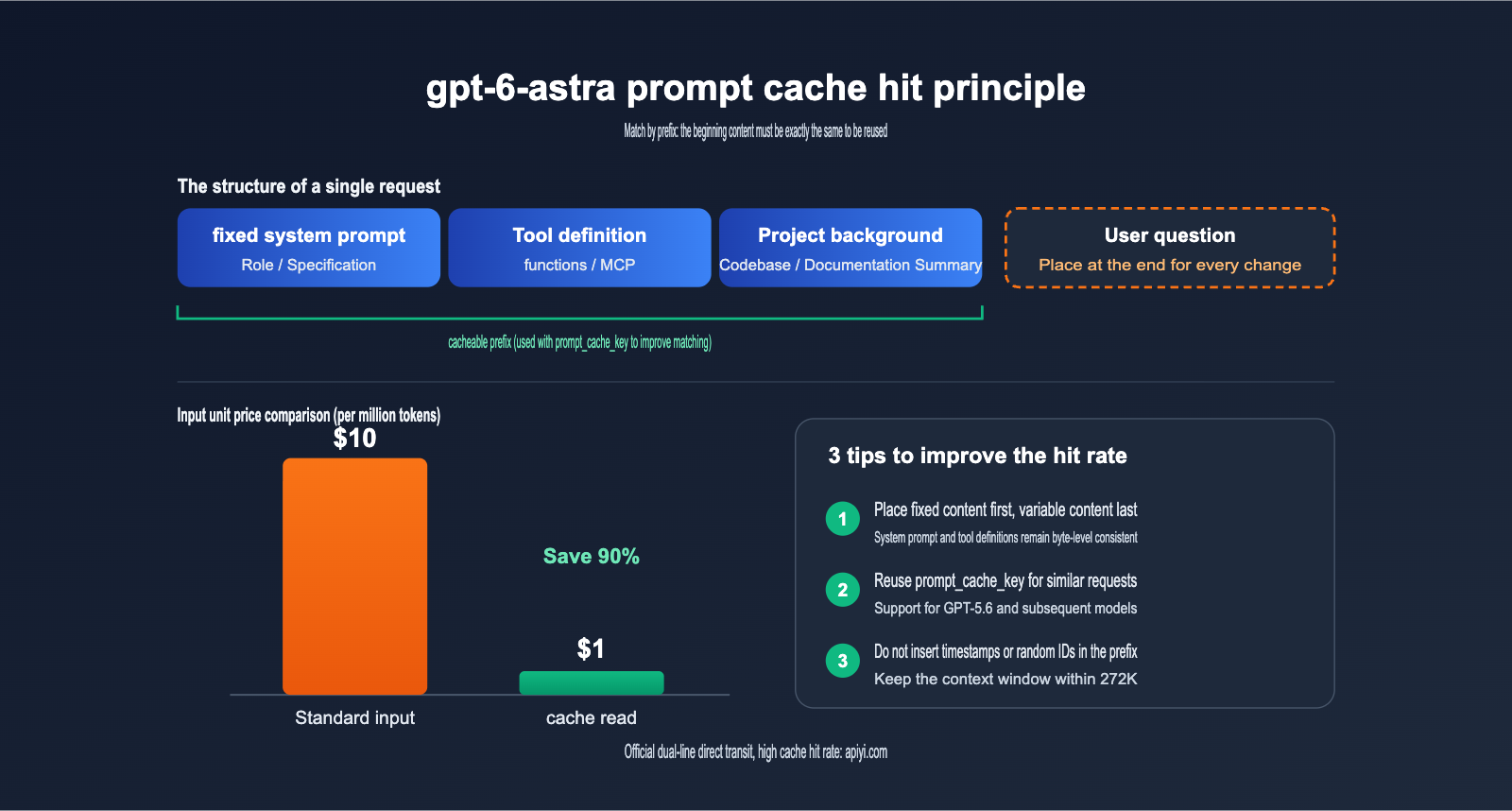
The official pricing for gpt-6-astra is $10 for input and $50 for output (per million tokens), which is several times higher than the launch price of GPT-5.6 Sol. Therefore, cost control must be a priority when using it as a fallback API. The good news is that Astra's cached input price is only $1—just 10% of the standard input price. Your cache hit rate will directly impact your final bill.
| Billing Item | Official Price (per million tokens) | Notes |
|---|---|---|
| Standard Input | $10 | Applies when input is under 272K tokens |
| Cache Read | $1 | Hits the prompt cache, saving 90% |
| Cache Write | $12.5 | New cache prefix, slightly higher than standard input |
| Standard Output | $50 | Includes reasoning tokens |
| Long Context | 2x for input/cache, 1.5x for output | Triggered when input exceeds 272K tokens |
| Batch / Flex | 50% of standard price | Suitable for non-real-time tasks |
4 Tips to Boost gpt-6-astra Cache Hit Rates
Prompt caching works by matching "prefixes." As long as the beginning of your request is identical, the model can reuse previous computation results. You can optimize for this by:
- Keep static content at the start: Place system prompts, tool definitions, and project specifications at the very beginning of your message, while keeping user questions and timestamps at the end.
- Use
prompt_cache_key: Models from GPT-5.6 onwards support this parameter. Using the same cache key for requests that share a long prefix significantly increases your match probability. - Avoid dynamic values in prefixes: Inserting current timestamps or random IDs into your system prompt will make every request prefix unique, causing the cache to miss every time.
- Keep context under 272K: Exceeding this threshold triggers long-context pricing, and cache read prices will double. For long documents, it's better to perform retrieval before sending the data to the model.
Cache hit rates also depend on the stability of the underlying infrastructure. If your requests frequently drift between different backends, it's hard to maintain a consistent cache. APIYI (apiyi.com) uses dual-line direct routing for OpenAI and Azure, and we've optimized our routing for gpt-6-astra to be cache-friendly. In scenarios with fixed prefixes, you'll see high hit rates. You can verify this by checking the cached_tokens field in the response.
Common Questions About gpt-6-astra "Dumbing Down" and Fallbacks
Q1: Has gpt-6-astra really been “dumbed down” by OpenAI?
There is currently no official evidence that the model weights have been swapped, and OpenAI hasn't released a formal statement. A more likely explanation is changes in the scheduling of reasoning budgets for subscription users, compounded by the model's inherent output variance. I recommend using the 5-step troubleshooting method in this article and comparing it against a fixed API tier before drawing conclusions.
Q2: Is the gpt-6-astra accessed via API the same as the one in ChatGPT?
Yes, it's the same model. The difference is that the API allows you to explicitly specify your reasoning effort, whereas the reasoning budget for subscription products is managed by the platform's scheduler. APIYI (apiyi.com) provides the pure, official, full-power version of gpt-6-astra, where the reasoning intensity is executed exactly according to the parameters you provide.
Q3: Can I use subscription quotas and the API at the same time?
Yes, they are independent. A recommended approach is to use your subscription quota for daily interactions and switch to the API when your quota is exhausted or when you need to handle batch tasks. You can quickly switch between them in Codex using configuration files.
Q4: Will using the API as a fallback be expensive?
It depends on how you use it. By controlling reasoning tiers, improving cache hit rates, and moving non-real-time tasks into Batch, you can cut costs by more than half. I suggest testing with a few real tasks on APIYI (apiyi.com) to calculate your per-task cost before scaling up your fallback usage.
Q5: How should I combine gpt-6-astra and GPT-5.6 Sol?
Sol is much cheaper and is great for routine coding and batch tasks. Astra shines in computer-use scenarios, complex reasoning, and long-chain Agent tasks. You can use Sol as your default model and only upgrade to Astra for difficult problems—this way, you maintain quality while keeping costs under control.
Summary: Turning the Uncertainty of gpt-6-astra into a Controllable Variable
gpt-6-astra is currently OpenAI's most powerful flagship Large Language Model, but the "dumbing down" controversy and tightened usage limits during its initial launch highlight a fundamental characteristic of subscription products: inference budgets and usage caps are entirely determined by the platform, leaving users to accept them passively. Instead of constantly guessing whether the model has gotten "dumber," it's better to establish your own quality baseline using fixed prompts and specific inference tiers.
In practice, you can follow a three-step approach: first, use a 5-step troubleshooting method to distinguish between platform scheduling, model variance, and your own usage patterns; next, use an API proxy service to fill the gaps when your quota runs out, locking critical tasks into high or xhigh tiers; finally, keep costs down by using fixed prefixes, prompt_cache_key, and Batch processing. This way, no matter how the subscription side changes, your core workflow will remain stable.
If you need a stable backup channel, we recommend using the full-blooded version of gpt-6-astra via APIYI (apiyi.com). The platform provides direct, official routing for OpenAI and Azure, is fully compatible with official interfaces, and offers high cache hit rates, making it a reliable supplement to your ChatGPT and Codex subscriptions.
References:
- OpenAI Model Documentation (gpt-6-astra): developers.openai.com/api/docs/models/gpt-6-astra
- OpenAI Help Center: Astra Usage Guide: help.openai.com
- Decrypt Report on the Astra "Dumbing Down" Controversy: decrypt.co
- Microsoft Foundry Prompt Caching Documentation: learn.microsoft.com
- APIYI Model Documentation: docs.apiyi.com
About the Author: The APIYI technical team, focusing on Large Language Model API integration and engineering practices. Feel free to reach out via APIYI (apiyi.com) to discuss optimization and cost control for gpt-6-astra model invocation.