Author’s note: This guide is for beginners who’ve only used AI through a web interface. It offers a six-point checklist to help you assess an AI proxy service’s upstream providers, billing, logs, API key security, refunds and invoicing, and customer support.
If you’ve only chatted with ChatGPT or Claude on the web, you may discover both official providers and plenty of third-party “proxy services” when you first try to connect a Large Language Model to a script, spreadsheet, or small app. An AI proxy service is a third-party platform that forwards your requests to models from different providers. These platforms let you access multiple models with one account and often make it easier to add funds. But the differences between platforms can be substantial. Beginners tend to see the low prices without noticing what’s behind them: the upstream providers, billing practices, and support. This article gives you a six-point checklist you can work through one item at a time to help you screen for key risks before adding funds.
This isn’t a review of any platform, and it doesn’t endorse any third-party provider. All terms and figures in this article come from model provider terms and official platform documentation available on October 27, 2026. Whenever we discuss a platform’s capabilities, we make clear that they’re stated in its official documentation. We’ll use APIYI’s public documentation (apiyi.com) as an example of what a platform should disclose. You can apply the same standards to any provider.
What you’ll learn: By the end of this article, you’ll know the six things to check when choosing an AI proxy service, how to verify each one, and what to do if a provider falls short. You’ll also understand which risks you’ll have to accept yourself.
Why Beginners Should Spend Ten Minutes Choosing an AI API Proxy Service
Many people think choosing a platform is just a matter of picking the cheapest one. But a Large Language Model API works differently from a web subscription: you pay based on usage, and you use a credential called a token to access it. That token is your API key, essentially your account’s withdrawal password. Anyone who gets hold of it can spend your money. Choose the wrong platform, and four common problems can arise: the advertised model is secretly replaced with a cheaper one, the billing doesn’t add up, the platform suddenly shuts down and your balance is lost, or your key is leaked and someone runs up charges on your account.
Start with the industry’s ground rules, and you’ll see why unusually low prices deserve a closer look. Section 3.1 of the OpenAI Services Agreement, effective January 1, 2026, says account credentials must not be shared among multiple users, and account access must not be resold or rented. Section 3.3 also prohibits buying, selling, or transferring API keys with third parties. Similarly, Section D.4 of the Anthropic Commercial Terms, dated June 17, 2025, prohibits reselling its services without explicit approval. OpenAI’s supported countries and territories page also warns that accessing or providing services outside the listed regions may result in an account being blocked or suspended. Mainland China isn’t on that list.
That said, the fee provisions in OpenAI’s agreement repeatedly refer to the “Customer’s reseller,” indicating that authorized resellers do exist. Legitimate discounts come from authorized relationships, bulk purchasing, or official promotions—not from splitting up someone else’s account and selling access. So the key question isn’t whether a platform is an API proxy service, but whether it’s willing to provide information you can verify.
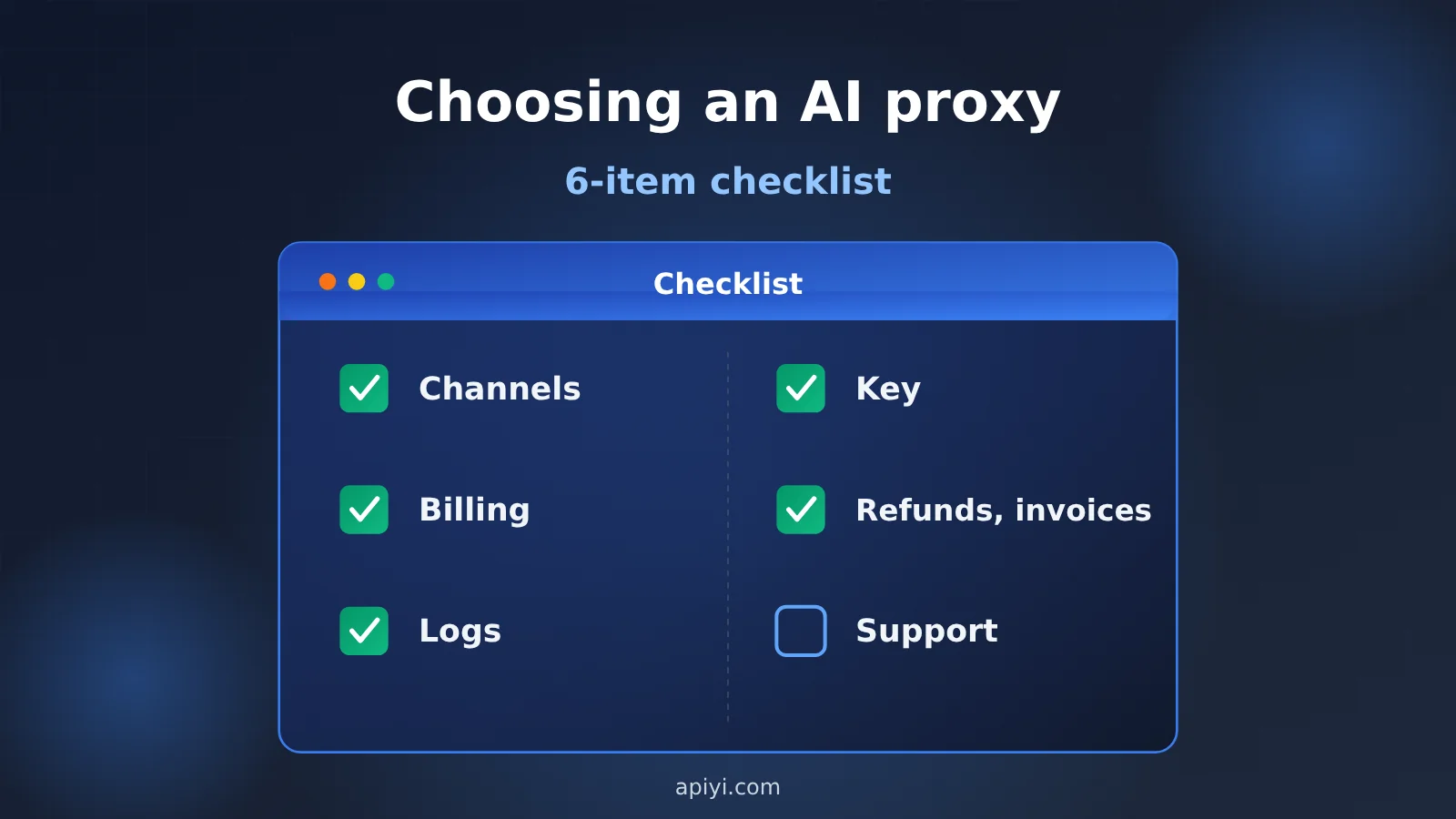
AI API Proxy Service: Six-Point Checklist
This table is the backbone of the article. Each section below covers what to look for, how to verify it, and what to do if it falls short.
| Check | What to look for | How to verify it | Warning signs |
|---|---|---|---|
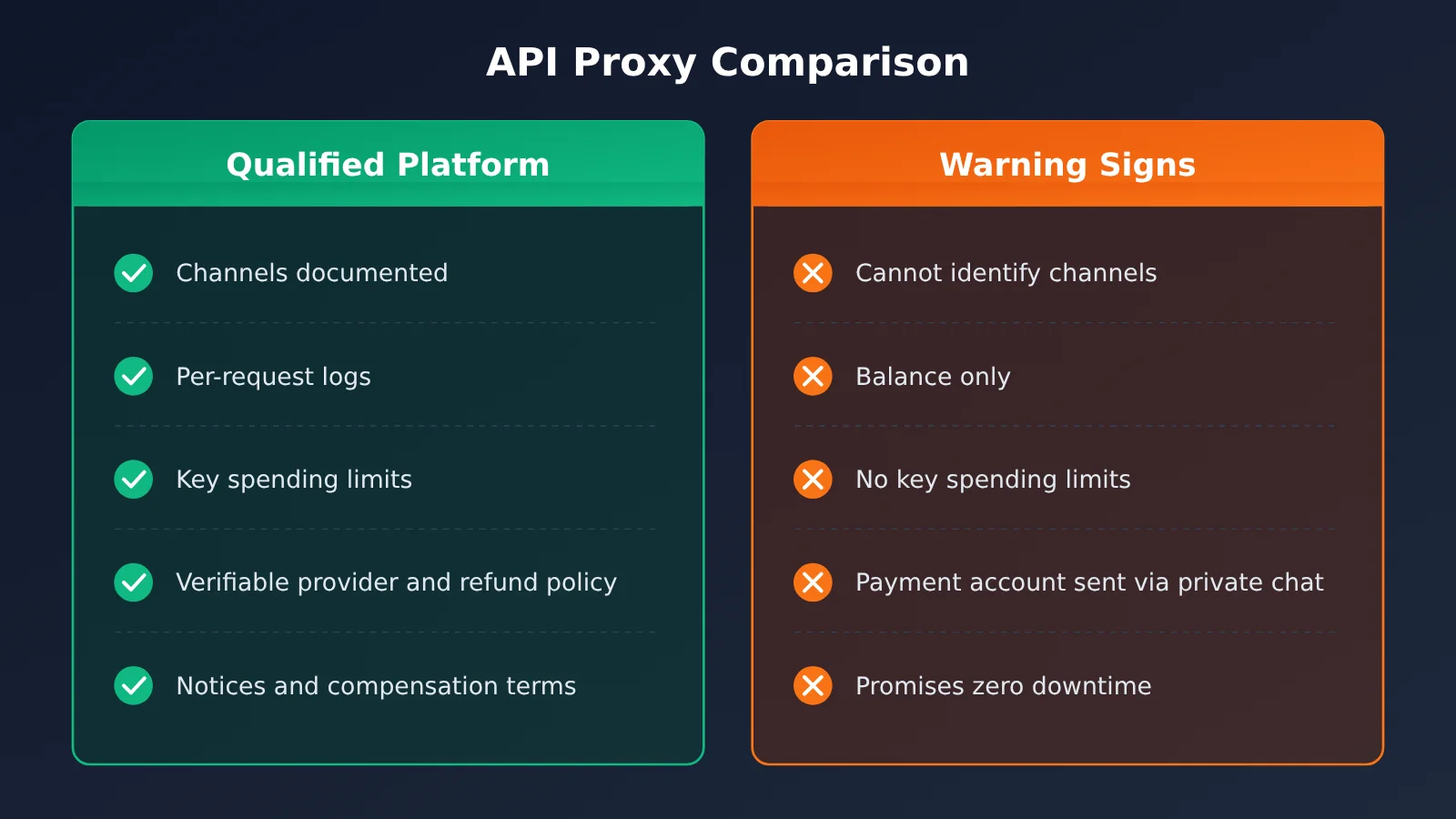
| 1. Channel type | Whether it uses the official API, a reverse-engineered official interface, or a shared account | Ask support about the primary and backup channels, and check whether the documentation distinguishes between model names for each | They only say it’s “identical to the official service” and can’t explain the channel |
| 2. Billing method | Whether billing is usage-based or per request, and whether token types match | Pick a log entry and calculate the charge yourself | Every model has the same price tier, and you can’t reproduce the charge |
| 3. Log reconciliation | Whether each invocation shows the model, tokens, and charge | Use a Request ID to find an invocation in the logs | You can see balance changes but no itemized details |
| 4. Key and spending limits | Whether you can set a spending limit, allowlist, and expiration date for each key | Create a key with a spending limit and test it | Keys can’t be limited or individually disabled |
| 5. Payments, operator, and invoices | Refund terms, the operating entity, and invoicing capabilities | Look for the exact terms in the service agreement and payment documentation | You can’t identify the operator, and payment account details are only provided through “private messages with support” |
| 6. Reliability and support | Whether there are status updates and compensation policies | Check the announcements page and SLA | They promise “zero downtime,” but no one will review the logs when something goes wrong |
How to tell if an AI API proxy service is reasonably priced
Before checking individual providers, it helps to understand what legitimate discounts look like. Officially published discounts are fairly limited: Anthropic’s Batch API offers 50% off both input and output tokens. With Prompt Caching, Anthropic’s pricing page lists Claude Sonnet 5.5 input at $2/MTok and cache hits at $0.10/MTok—about 5% of the input price. Cache writes, however, cost 1.25 times the input rate for the five-minute tier or twice the rate for the one-hour tier. In short, caching can reduce upstream costs when the same prompt prefix is sent repeatedly.
Take APIYI as an example. According to the company, the overall cost of routing exclusively through official APIs is about 85% of the official list price. With top-up bonuses included, the effective price is roughly 79–86% of list price. The savings come from a high cache hit rate and top-up bonuses, not from downgrading or substituting models. A simple rule of thumb: if a quote is as low as 20% or 30% of the official price, first ask, “How is this price calculated, and which channel does it use?” Then decide whether it’s worth trying.
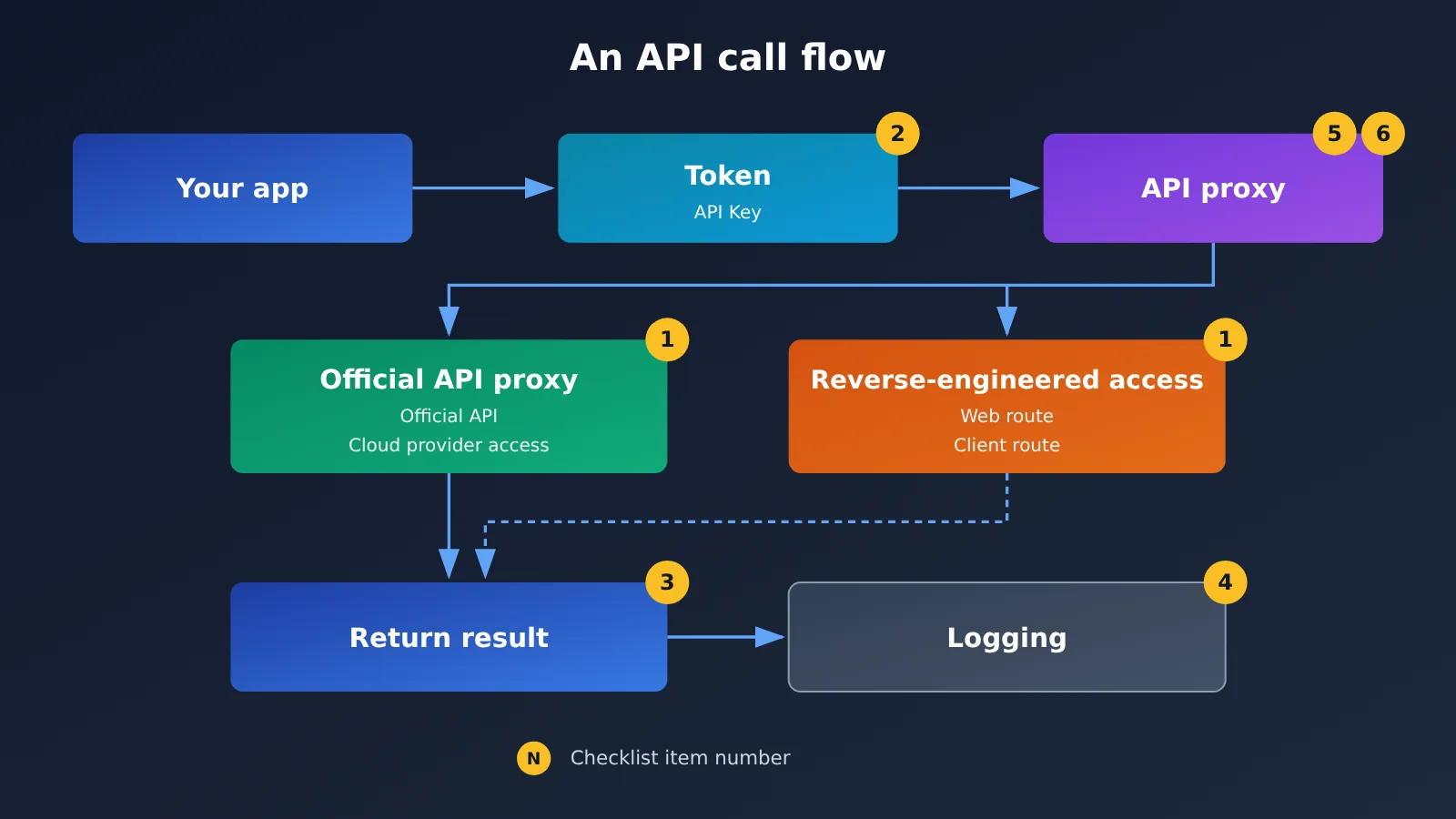
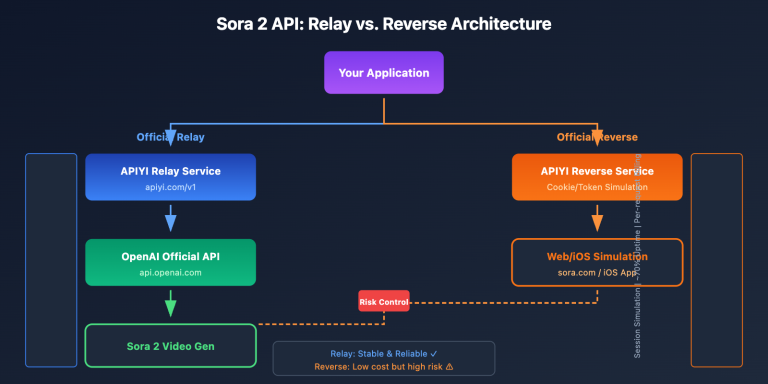
This diagram is based on the channel and logging descriptions in APIYI’s official documentation at apiyi.com. You can use the same nodes to compare other platforms.
Breaking Down the 6-Point AI Proxy Service Checklist
Item 1: What Kind of Channel Does the AI Proxy Service Use?
What to look for: Start by understanding two terms. An official API proxy forwards your request directly to an official interface, such as the OpenAI API or an official model endpoint provided by a cloud provider. A reverse-engineered channel uses the provider’s website or client, essentially simulating someone using the website. There are also shared accounts, where multiple people use the same official account—the practice explicitly prohibited by the provider terms discussed earlier.
Take APIYI, for example. Its official documentation says the platform is a fully transparent official API proxy: Claude uses official AWS Bedrock access by default, with a direct connection using an official Anthropic key as a fallback. It says it doesn’t route requests to cheaper models, degrade or swap models, or retain conversation content. The same documentation also lists models that use reverse-engineered channels and explains the differences in a separate comparison document. The table below is based on that document.
| Comparison | Official API proxy (examples: gpt-image-2.5-flare / sunburst) | Reverse-engineered channel (examples: gpt-image-2-all / -vip series) |
|---|---|---|
| Upstream channel | Official OpenAI Images API | -all uses the ChatGPT website; the three -vip models use Adobe Firefly |
| Billing | Based on actual token usage | Fixed price per image: $0.025/image for the two -all models, $0.03/image for the three -vip models |
| Official parameters | Supports quality, mask, arbitrary sizes, and n in line with the official API | Doesn’t support n or accept the official quality parameter semantics |
| Speed and stability | Follows the official API | Varies with the upstream service; -all takes about 90 seconds per image |
| Best for | Projects that need control over parameters and reproducible results | Use cases that can tolerate parameter differences and prioritize low-cost, quick output |
How to check: First, ask support, “Which channel does this model use, and what’s the fallback?” Second, check whether the documentation lists separate official API proxy and reverse-engineered versions of the same model. Third, if you choose a reverse-engineered channel, set your expectations accordingly: parameters may not match, and speed may fluctuate with the upstream service.
What to do if it fails the check: If a platform only says it’s “exactly the same as the official service” but can’t explain its channels, or if all models have just one price tier, hold off on adding funds. Choosing a platform that documents its channels is much easier than trying to hold one accountable afterward.
Item 2: How the AI API Proxy Service Charges (Usage-Based or Per Request)
What to look for: First, let’s define a token. It’s the smallest unit a model uses to process text—you can think of it roughly as a “chunk of text.” Usage-based billing charges you for the number of input and output tokens. A single platform may offer both billing methods: official API proxy routes billed by actual token usage, and reverse-engineered routes billed at a fixed price per request.
Your API token type also needs to match the model. APIYI’s official documentation states that official image model proxy routes require a “usage-based priority” token. A per-request billing token will be rejected because the billing methods don’t match. You should also check how credits convert to dollars: the documentation states that 500,000 credits = $1.00 USD, and the balance query API and token management API use the same conversion rate.
How to check: Take a real invocation log and calculate the charge yourself: “input tokens × input unit price + output tokens × output unit price.” Check whether it matches the amount deducted. Use the prices in the platform’s model list—don’t rely on memory or screenshots from a group chat.
What to do if it doesn’t pass: If your calculation doesn’t match the charge and you can’t find a reasonable explanation, such as a cache hit or per-request billing, save the log and ask customer support. If the platform can’t give you a clear answer, don’t add more money.
Check 3: Can You Reconcile the API Proxy Service’s Logs?
What to look for: Logs are your only “ledger.” APIYI’s official documentation says the console logs key fields for every call and includes additional error details for failed calls.
| Log field | What it shows | How beginners can use it |
|---|---|---|
| Request time | Time accurate to the second | Match it to when your program ran |
| Model used | The model name actually called | Check that it matches the model you requested |
| Input / output token count | Usage for the call | Multiply by the unit price to calculate the charge |
| Charge | Amount deducted for the call | Compare it with the change in your balance |
| Call status | Success or failure | See at a glance whether failed calls were charged |
| Additional failure details | Error type, error message, and relevant parameters | Take a screenshot when submitting a support ticket |
Check the privacy policy too. The documentation says that, by default, logs only record basic information needed for billing—not the input or output content. When helping troubleshoot, administrators may temporarily enable detailed logging. Those logs can include complete prompts, system messages, conversation history, function call parameters, and model responses, so remove sensitive information before submitting a support ticket. Logs are retained for the current month plus the previous two calendar months. Older full-month data is deleted on the 5th of each month, so export anything you need to keep.
How to check: After a call, find its Request ID, usually in the x-request-id or request-id response header. You can use it to locate the call’s model, channel, status, and charge in the logs. Note that the id in a text model’s response body may be a Completion ID, which isn’t necessarily the same as the platform’s Request ID.
What if it fails the check? If a platform only shows balance changes without itemized records, you can’t verify that the requested model was used or that you weren’t overcharged. In that case, it’s best to walk away.
Item 4: API Key and Spending Limits for AI Proxy Services
What to look for: Unauthorized spending after an API key leak is one of the most common losses for beginners. A good platform should let you set limits for each key. The official APIYI documentation says its token management API supports three types of restrictions: use remain_quota to set a quota, models to set a model allowlist (requests for models outside the list return a 403 and aren’t charged), and expired_time to set an expiration time.
The documentation also specifies several management rules: each account can have up to 1,000 tokens, and disabled tokens still count toward that limit until they’re deleted. Setting status to 2 disables a key immediately while preserving its record and usage data. Deletion, on the other hand, can’t be undone.
How to check: Follow these steps and verify the results in order.
- Create a separate key for each project, and set a quota and model allowlist for each one.
- Deliberately make a request using a model outside the allowlist. Confirm that it’s rejected and you aren’t charged.
- Run through a key rotation: create a new key → switch traffic to it → disable the old key → confirm it’s no longer being used before deleting it.
- Turn on balance alerts. The documentation says the previously automatic $30 balance reminder email has been discontinued. You’ll need to enable alerts under “Personal Center → Notification Settings.” Email, WeCom, and Feishu are supported. You can also use the balance query API to build your own alerts.
What if it doesn’t pass? If you can’t set a quota or disable a key individually, a leak could leave you watching your balance drain away. Keep only a very small amount of money on a platform like that—or don’t use it at all.
Item 5: Payments, Legal Entity, and Invoicing for AI API Proxy Services
What to look for: This is the main area to check for the risk of a provider disappearing with your money. Look for three things: refund rules, the operating entity, and invoicing capability. For example, APIYI names its operating entity, MrrBase, LLC, in its terms of service. The refund and invoicing rules below reflect the official documentation.
| Rule | What the official documentation says |
|---|---|
| Refund window | Request a refund within 30 days of topping up, no reason required. Unused balance is refunded. |
| Bonus credits | Promotional bonus credits are deducted from the refund amount. |
| Refund fees | No fee for WeChat or Alipay; 1% for business bank transfers, USDT, Wise, Mercury, and PayPal. |
| Invoiced payments | Mainland China customers cannot receive a refund once an invoice has been issued. |
| Invoice types | Standard and special VAT invoices are available at a 1% tax rate. The default category is “Information Technology Service Fee.” |
| Other payment methods | Stripe payments receive an invoice; USDT payments do not. |
| Billing | All accounts are prepaid. Credit lines and monthly billing aren’t currently supported. Business bank transfers of at least RMB 1,000 per transaction are recommended. A contract can be signed afterward, and a framework agreement only needs to be signed once. |
| Balance validity | Starting August 2, 2026, account balances are valid for 365 days. Expired balances aren’t refunded or restored. |
How to verify: Find the operating entity’s name in the terms of service and the refund and invoicing rules in the payment documentation. Save screenshots of both. Get all business bank account details, USDT addresses, and payment account information only through official customer support channels. Don’t trust “customer support” contacts provided by third parties.
What to do if it falls short: If you can’t find the operating entity, there’s no written refund policy, or you’re told to “message privately” for payment details, stick to a small trial or don’t use the service. For business purchases, confirm invoicing capability before starting the procurement process.
Item 6: AI API Proxy Stability and Support
What to look for: Start by setting aside expectations of “zero downtime.” APIYI’s official documentation explicitly says it doesn’t promise a 99.99% SLA, noting that “even OpenAI and Claude can’t achieve that.” Instead, it lists three safeguards: high-volume image customers spending over $10,000 per month can apply for compensation for abnormal charges; losses clearly caused by the platform are compensated with credits after log verification; and enterprise customers can agree on SLA terms and compensation caps in their contracts.
How to check: Look for public status updates and incident notices. APIYI posts these on its “Real-time Updates” page. Then check whether the compensation policy clearly defines its limits. The documentation states that factors outside the platform’s control, such as upstream content moderation blocks and rate limits, aren’t eligible for credit compensation. Some upstream moderation blocks aren’t charged in the first place.
What to do if it falls short: When something goes wrong, save the Request ID and full response before contacting support to investigate. If the platform neither posts notices nor agrees to check the logs, you’re basically relying on luck for support. Remove it from your list of primary providers.
Getting Started With an AI API Proxy: Make Your First Call on a Small Budget
Once you’ve checked the list, don’t rush to add a large balance. The official recommendation is to start small: run a real-world test, compare the logs and output, and gradually increase your usage once you’re happy with the results. We’ll walk through the process using APIYI and its OpenAI-compatible API, which uses the same request format as OpenAI’s official API and works with many existing tools.
- Register an account at apiyi.com. According to the official quick-start guide, new accounts come with $0.05 in trial credit—enough to make your first call.
- Create a token in the console, set a spending limit, model allowlist, and expiration date, then store the copied key only in a local environment variable.
- In your tool or SDK, set base_url to
https://api.apiyi.com/v1and api_key to your key. - Send your request to
https://api.apiyi.com/v1/chat/completionswithAuthorization: Bearer YOUR_API_KEYin the request header. - Include
model(copy a text model name from the platform’s model list) andmessagesin the request body, for example,[{"role": "user", "content": "Hello"}]. - Once you receive a response, note the
x-request-idin the response headers, then check the model name, token count, and charge in the console logs. - Run a few fixed prompts several times at different times of day. Save both the outputs and logs as a baseline for future comparisons.
🚀 Getting started tip: For your first integration, use the trial credit at APIYI apiyi.com to complete the seven steps above before deciding whether to add funds. Check the platform’s model list for current models and prices rather than relying on screenshots shared by third parties.
If you’re looking to use a newly released model that isn’t yet in the platform’s model list, the provider may not have opened access yet, or the platform may still be aligning its access channels and billing. APIYI’s standard response is: “We’ll make the model available as soon as possible.” In the meantime, be wary of anyone promising “early access” without clearly explaining how they provide it.
What Risks Do You Take on When Choosing an AI API Proxy Service?
First, the honest truth: A checklist can reduce risk, but it can’t eliminate it. The provider terms cited earlier make clear that unauthorized channels, shared accounts, and reverse-engineered connections can all lead to upstream access being cut off or accounts being banned. If that happens, a platform could become unavailable overnight. Whether you can get your balance refunded depends on the platform’s stated policies and its willingness to honor them. This article provides a way to evaluate services; it doesn’t endorse any third-party platform.
Whichever service you choose, make sure you understand these risks:
- Upstream policy risk: Provider terms and supported regions can change at any time. Reverse-engineered connections to official services are especially vulnerable.
- Data compliance risk: Whether you can send sensitive data—such as customer information, contracts, or source code—to a third-party platform depends on your organization’s rules.
- API key security risk: If a leaked key is used without your permission, the platform can usually help you disable it, but charges already incurred are hard to recover.
- Prepaid balance risk: Balances may expire, and refunds may have deadlines and fees. The more you prepay, the more money you have at risk.
- Performance expectations risk: Reverse-engineered connections may not support the same parameters, and speeds can fluctuate. These are characteristics of the connection itself and usually aren’t considered platform failures.
Finally, here’s a checklist of common pitfalls for beginners. It’s worth reviewing before every top-up.
| Common pitfall | What it looks like | How to check | What to do instead |
|---|---|---|---|
| Looking only at discounts, not the connection type | The same model is much cheaper on one platform than another | Check whether the documentation distinguishes official API connections from reverse-engineered ones | Confirm the connection type before comparing prices |
| Assuming a working response means the model hasn’t changed | The answer looks normal, so you assume everything is fine | Compare outputs across services using the same prompt | Check that the model name in the logs matches what you were charged for |
| Posting API keys carelessly | A key appears in a group chat, screenshot, or code repository | Search your repositories and chat history | Use a separate key with a spending limit for each project. If a key leaks, disable it before deleting it—don’t just change your login password |
| Making a large initial top-up | You add a lot of money at once to get a bigger bonus | Review the refund policy and balance expiration terms | Start small and test real use cases before adding more |
| Trusting unsolicited messages from “support” | Someone sends you a company bank account or USDT address | Check whether the message came through an official channel | Get payment details only through official support channels |
AI API Proxy Services: FAQ and Summary
Frequently Asked Questions
Q1: What’s the difference between an AI API proxy service and an official API?
With an official API, you sign up and pay the provider directly. An AI API proxy service is a third-party platform that connects you to models from multiple providers using a single token. It’s easier to get started and may cost less, but there’s an extra party you need to trust. That’s why you need this six-point checklist.
Q2: Should beginners choose an official API proxy or a reverse-engineered channel?
If you need control over parameters and consistent results, prioritize an official API proxy. If you’re just experimenting on a budget and can accept differences in parameter support and fluctuations in speed, a reverse-engineered channel can be a useful supplement. Check the documentation to see which type of channel your model uses—don’t assume it’s official just because the name looks right.
Q3: How can I tell if a model has been secretly swapped or its quality degraded?
Getting a response isn’t enough to tell. A practical approach is to prepare a few fixed prompts, send them regularly, and save the outputs. Also check whether the model name, token count, and charges in the logs match the listed price. A platform with incomplete log fields doesn’t meet item 3 of the checklist.
Q4: What if I can’t find a newly released model on the platform?
First, check the platform’s model list, which is the authoritative source for available models and prices. If the model isn’t available yet, APIYI’s standard response is: We’ll make the model available as soon as possible. Once it’s launched, you can find it in the model list at apiyi.com. We don’t recommend using a provider that can’t clearly explain its access channel just to try a model early.
Q5: What do I need for a first trial?
All you need is an account, a token with a spending limit, and an OpenAI-compatible tool or SDK. For example, APIYI at apiyi.com includes $0.05 in trial credit when you register. Follow the seven steps in the “Quick Start” section to make your first call and reconcile it against the logs.
Q6: What should businesses pay special attention to when purchasing?
Focus on three things: the operating entity, invoice types and tax rates, and how refunds are handled after an invoice has been issued. Check the platform’s pages for current details, such as tax rates and recommended amounts for individual corporate payments, and keep screenshots. Get payment account details only through official channels. If you need to agree on an SLA and a compensation cap, put them in the contract.
Key Takeaways for Choosing an AI API Proxy Service
- Look for verifiable information: The key question isn’t whether it’s a proxy, but whether it clearly documents its access channels, operating entity, logs, and refunds.
- Question unusually low prices: Officially published discounts mainly apply to batch APIs and prompt caching. If a service charges just 20% or 30% of the official price, ask where the discount comes from.
- The access channel shapes the experience: Official API proxies align with official parameters and use usage-based billing. Reverse-engineered access is billed per request and can differ in both supported parameters and speed.
- Logs are your ledger: Use the Request ID to check the model name, token count, and charge. Also check retention periods and how sensitive data is masked.
- Set limits on your API key: Use spending caps, model allowlists, and expiration dates. If a key leaks, disable it first, then delete it.
- Start small, then scale up: Use trial credits to test a real-world scenario, and add funds only after the results meet your expectations.
Summary: Use a 6-Point Checklist to Choose an AI API Proxy Service
Choosing an AI API proxy service ultimately comes down to getting clear answers to six questions:
- Access channel: Does the documentation specify whether it uses an official API proxy, reverse-engineered access, or shared accounts?
- Billing and logs: Can you calculate a charge yourself from a single log entry?
- API keys and spending: Can you set spending limits, restrict models, set expiration dates, and disable keys individually?
- Money and operating entity: Can you find the original terms for refunds, invoices, balance expiration, and the operating entity?
- Support: Are there public announcements, and are the limits of compensation clearly stated?
Provider terms mean there’s always a risk of service interruption or account suspension in this industry, and you’ll need to accept that risk yourself. The checklist can help you avoid platforms that won’t disclose even the basics. If you’d like a ready-made example to compare against, open APIYI’s official documentation at apiyi.com, check it against the six points in this article, and use the trial credits to make your first call.
References
- OpenAI Services Agreement: Terms related to account sharing, resale, and API key trading
- Link:
openai.com/policies/services-agreement - OpenAI API Supported Countries and Territories: Information about potential bans for access from unsupported regions
- Link:
help.openai.com/en/articles/5347006-openai-api-supported-countries-and-territories - Anthropic Commercial Terms: Resale restrictions and supported-region requirements
- Link:
anthropic.com/legal/commercial-terms - Anthropic Pricing: Batch API and prompt caching discounts
- Link:
docs.claude.com/en/docs/about-claude/pricing - APIYI Official Documentation Center: Model fidelity and channel information, official API proxy vs. reverse-engineered proxy comparison, token management, log queries, refund policy, payment and invoicing, SLA information, and quick start
- Link:
docs.apiyi.com
Author: APIYI Technical Team
Technical questions: If you have questions about the checklist in this article, feel free to contact us through the official customer support channel on the APIYI homepage.