Recently, when using Google's Nano Banana Pro (corresponding to gemini-3-pro-image-preview), many developers have encountered this error message:
{
  "status_code": 503,
  "error": {
    "message": "Deadline expired before operation could complete. (request id: 2026...)",
    "type": "",
    "code": 503
  }
}
At first glance, it looks like a "request timeout," but the HTTP 503 status technically means Service Unavailable, not a simple client-side timeout. Based on official Google forums, GitHub issues, and recent changes to the Gemini Image API status, this error is not triggered by a single cause. Instead, it's the result of a combination of server-side, client-side, and business-level factors.
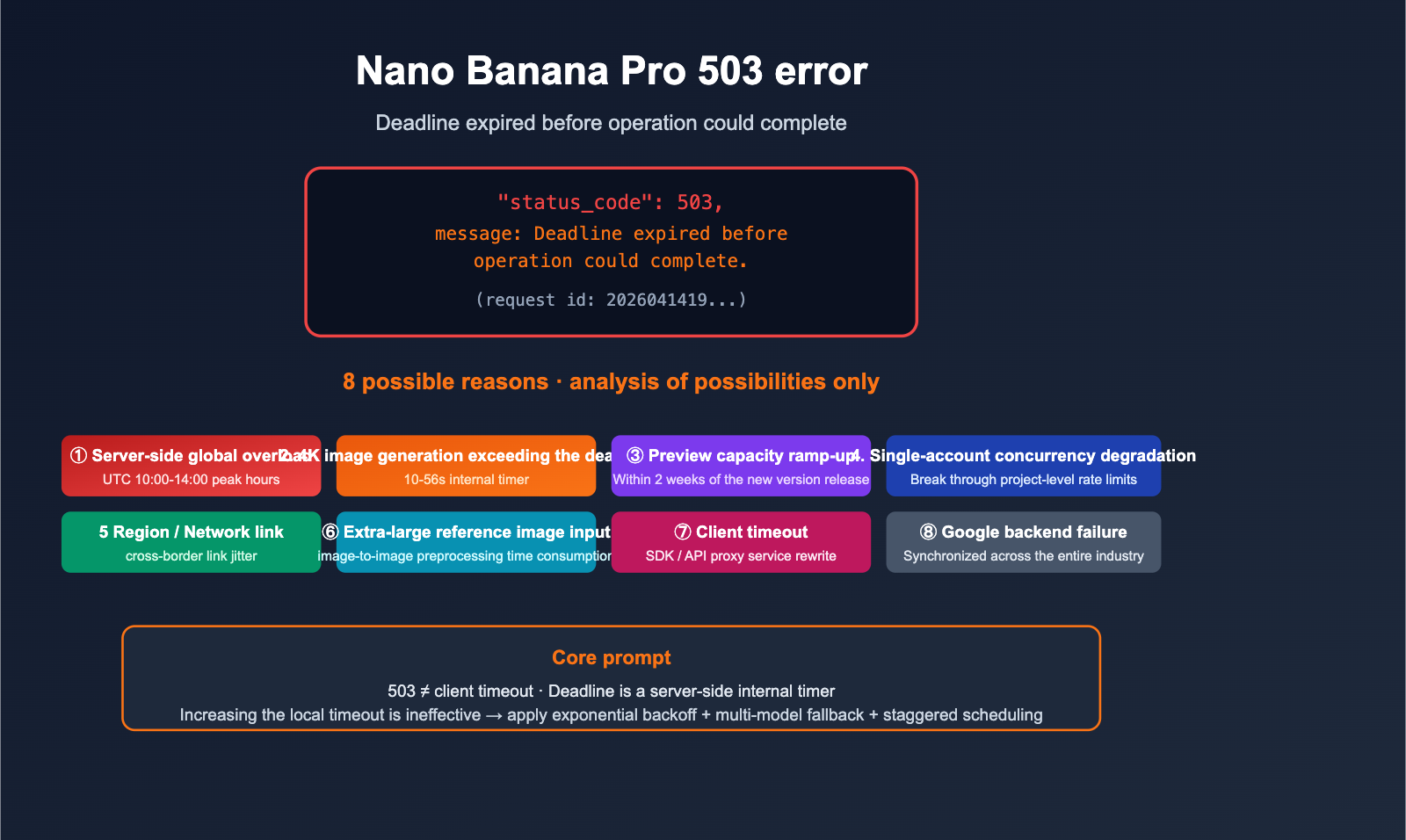
This article provides a possibility analysis only. We won't offer a "do this and it will work 100%" solution—after all, the nature of a 503 is that you can't see the internal state of the server. We will list 8 common causes from most to least likely, along with their specific trigger scenarios and diagnostic clues, to help you quickly identify the "most likely culprit" when you hit this error.
Understand the Error: Breaking Down 503 and "Deadline expired"
Before we jump into troubleshooting, let's break down this error message so you don't jump to the wrong conclusions.
HTTP 503 ≠ Client-side Timeout
- 503 UNAVAILABLE in the Google Gemini API means: The server has determined it cannot process the request at this time, which is usually related to capacity, overloading, or back-end degradation.
Deadline expired before operation could completeis the server's internal timer reporting: "This task did not complete within the given processing deadline."- It is not equal to a curl/SDK client-side network timeout. Client-side timeouts usually manifest as connection interruptions or local
TimeoutErrorexceptions, not a 503.
Difference Between 503, 504, and 429
| Error Code | Meaning | Common Implications |
|---|---|---|
| 503 | Service Unavailable | Server overloaded / Rate-limited / Backend queue timeout |
| 504 | Gateway Timeout | Request received, but generation task failed to finish within the time limit |
| 429 | Too Many Requests | Account / API key / Project-level rate limit |
| 500 | Internal Error | Server-side exception, usually retryable |
Key takeaway: When you see a 503 + Deadline expired, you should prioritize investigating server capacity / queue issues rather than adjusting your local timeout settings.
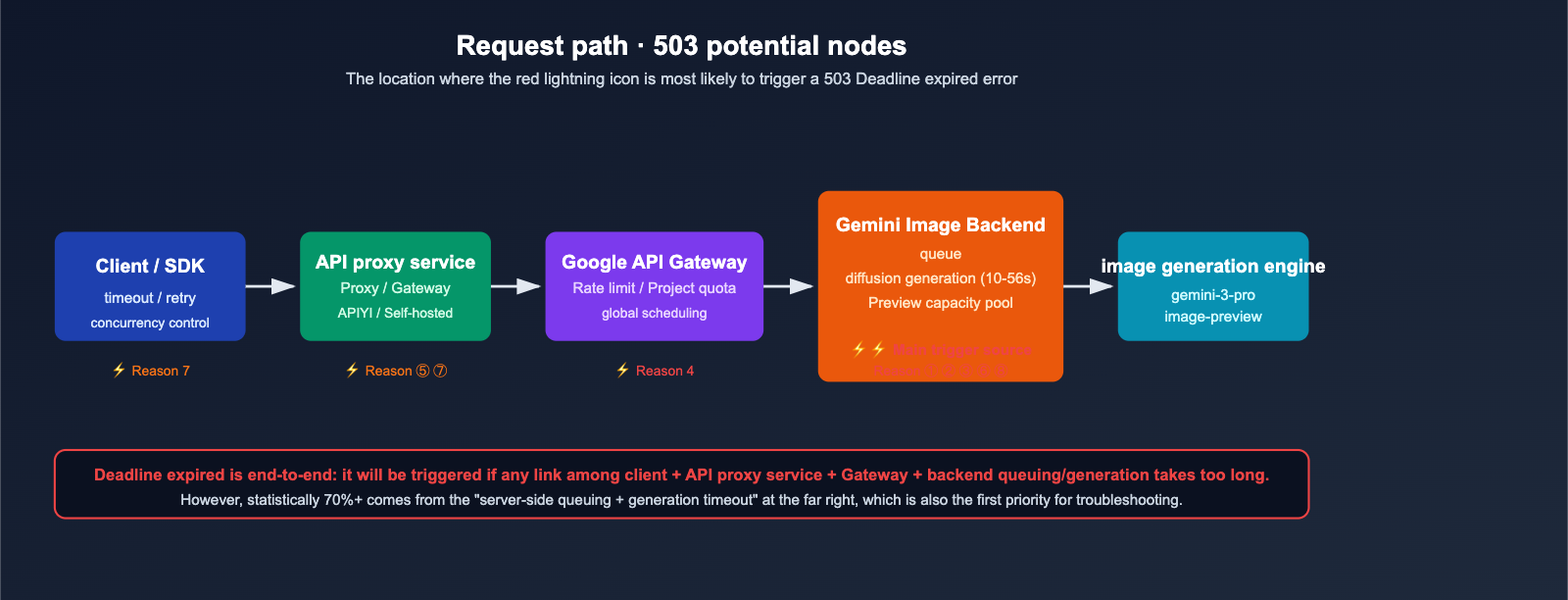
🎯 Troubleshooting Tip: If the same request ID repeatedly returns a 503 within 5 minutes, it is usually a server-side issue. If you only get a 503 in 1% of cases, it's likely momentary overloading. When calling Nano Banana Pro via APIYI (apiyi.com), you can check detailed request logs in the management dashboard to quickly determine whether it's a general overload or an issue specific to your account.
Potential Cause 1: Google Server Capacity Overload (Most Common)
Symptoms
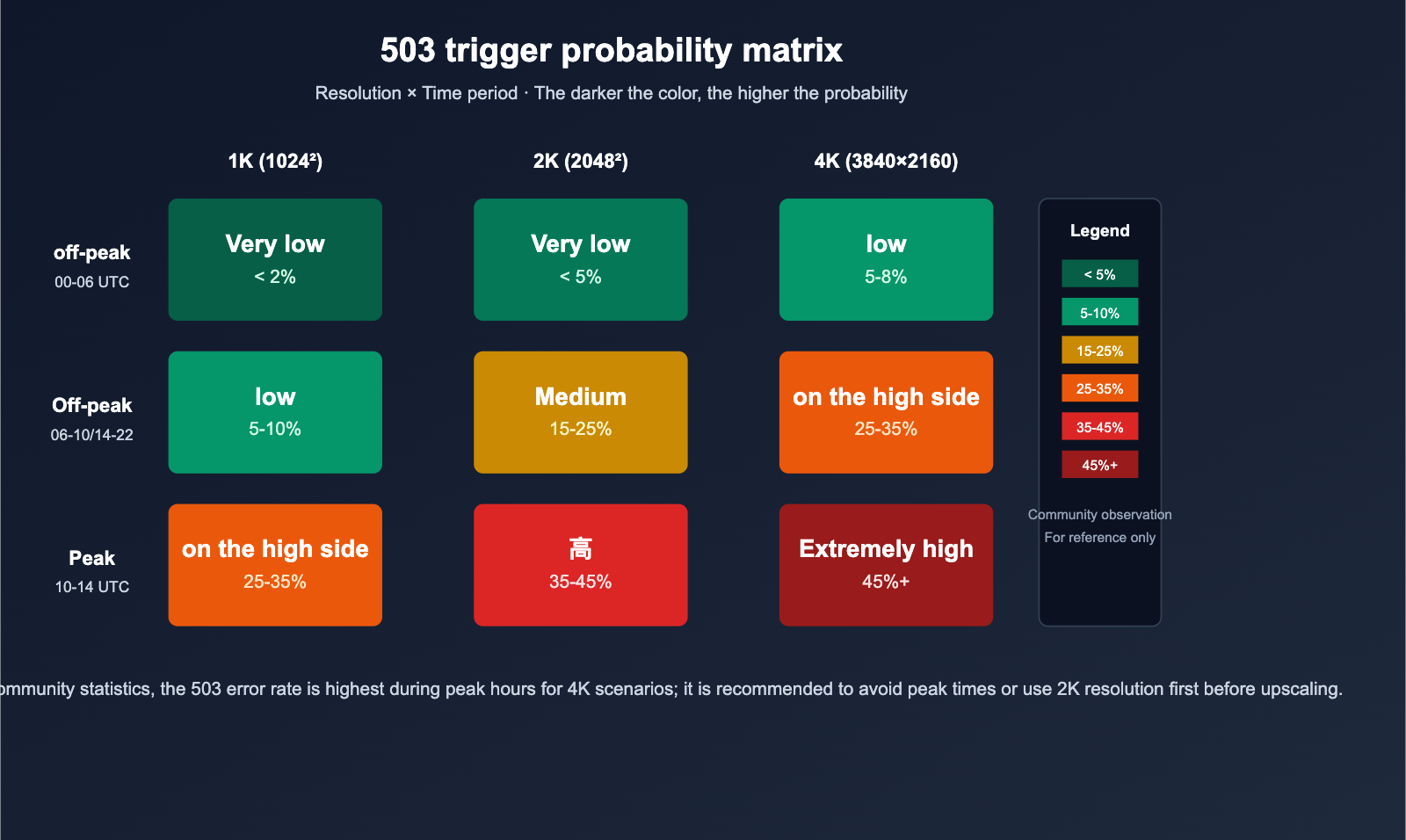
- Happens frequently during peak hours (UTC 10:00–14:00, or roughly 18:00–22:00 Beijing Time).
- Usually resolves after a few retries; almost non-existent during off-peak hours (early morning).
- Reported concurrently across multiple communities (Google AI Developers forum, GitHub Issue #1808).
Underlying Mechanism
Nano Banana Pro, also known as gemini-3-pro-image-preview, is still a Preview model. Google allocates a significantly smaller compute pool for it compared to GA models. With the massive surge in overall image generation demand following the releases of Gemini 3.1 Pro (Feb 19) and Nano Banana 2 (Feb 26), as many as 45% of requests have triggered 503 errors during peak times.
Diagnostic Methods
- Check if the request timestamps cluster around UTC 10:00–14:00.
- Try again during off-peak hours (00:00–06:00 UTC) to see if the error rate drops significantly.
- Verify if all API keys under the same account are throwing errors at the same time.
Potential Cause 2: 4K Resolution or Complex Prompts Exceed Internal Deadlines
Symptoms
- Only occurs in "4K / 2048×2048 or higher" resolution or "extremely long/complex prompt" scenarios.
- 1K/2K output works fine, but switches to frequent 503 errors when dimensions are increased.
- The same prompt is stable at 1024×1024 but fails at 4K.
Underlying Mechanism
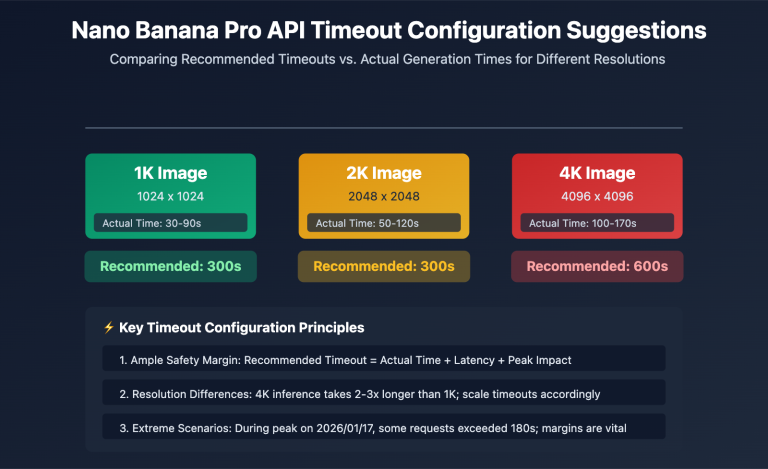
Generating 4K output with Nano Banana Pro can take the server anywhere from 10 to 56 seconds or even longer. Google has set a hard deadline for each generation task on the backend. If the combined time of backend queuing and actual generation exceeds this deadline, the system throws a Deadline expired error and returns a 503.
This is unrelated to your client-side settings—even if you increase your local timeout to 5 minutes, it won't help because the deadline is managed by the server-side timer.
Diagnostic Methods
- Downsize the same prompt to 1024×1024 to see if it processes normally.
- Simplify your prompt and try again.
- Proactively downgrade to 2K output during peak hours and save 4K requests for off-peak times.
Potential Cause 3: Instability During the "Preview" Model Capacity Ramp-up Period
Characteristics
- High failure rate for new versions released within the last 2 weeks;
- The official Release Notes explicitly label the model as "Preview";
- Recovery times can sometimes last 30-120 minutes (which is significantly slower than the 5-15 minutes typically seen with Gemini 2.5 Flash).
The Mechanism Behind It
The service capacity for Preview models is allocated based on internal demand estimates. If actual traffic significantly exceeds these projections, Google prioritizes the SLA of its GA (General Availability) models. As a result, Preview models may be subject to passive load shedding or even temporary throttling.
Potential Cause 4: Excessive Concurrency / Per-Account Rate Limiting
Characteristics
- A sudden spike in 503 errors during batch tasks on a single account;
- Error rates drop significantly when concurrency is reduced;
- Occasional 429 errors occur, but the vast majority are 503s.
The Mechanism Behind It
Google enforces limits on the requests per minute and concurrent connections for each project/API key. When these limits are exceeded:
- The system primarily returns a 429 error;
- In extreme cases, it may directly return a 503 as part of its "overload protection" mechanism.
In this scenario, the error isn't a "global overload" issue; rather, it’s your specific account triggering a downgrade.
Diagnostic Methods
- Check if other accounts are working fine during the same timeframe;
- Retry by limiting concurrency to below 5;
- Break down bulk tasks into smaller, streamed batches.
🎯 Concurrency Optimization Tip: Nano Banana Pro is highly sensitive to concurrency. For bulk image generation tasks, we recommend using the APIYI (apiyi.com) service—its unlimited concurrency feature buffers against traffic spikes on Google's end. It acts as an additional front-end buffer pool, significantly reducing the probability of encountering 503 errors.
Possible Cause 5: Excessive Latency at the Regional / Network Routing Level
Symptoms
- Significantly higher error rates when connecting directly to Google endpoints from domestic regions compared to using an API proxy service;
- Issues resolve after switching VPNs or regional IPs;
traceroutereveals multiple hops across cross-border links.
The Mechanism Behind It
The "deadline" in Deadline expired is end-to-end: it covers the path from your client → proxy link → Google edge → final backend. If cross-border network jitters or TLS handshake issues occur, the effective time available to the server is shortened, which can trigger an premature deadline error.
Troubleshooting Methods
- Try switching to a different regional node;
- Compare error rates using a domestic API proxy service (such as APIYI, apiyi.com);
- Check if your DNS resolution is correctly hitting the nearest Google edge node.
Possible Cause 6: Large Input Images / Reference Image Uploads Slowing Generation
Symptoms
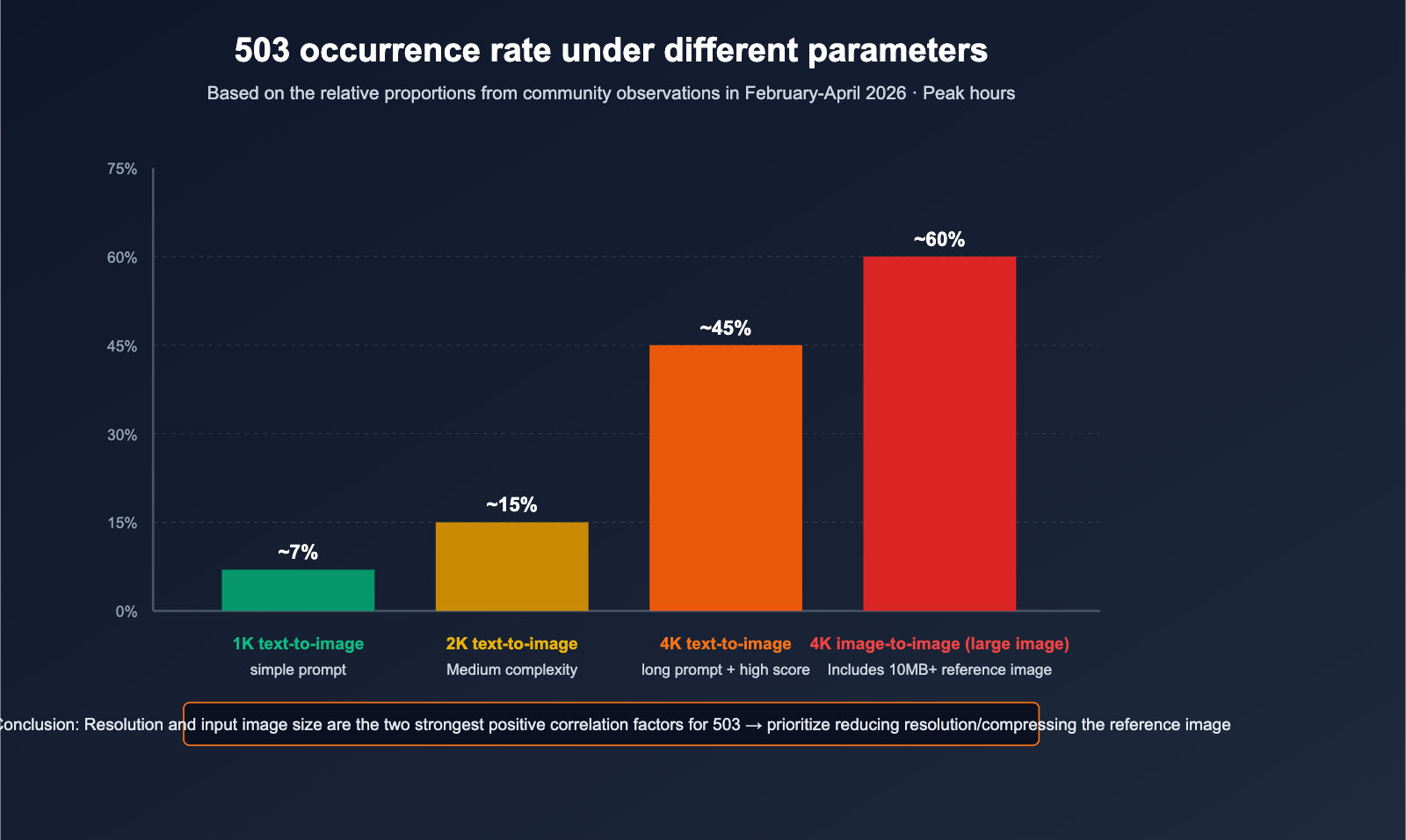
- Text-to-image works fine, but image-to-image generates frequent errors;
- Higher 503 error rates with larger file uploads;
- The same image works fine after being compressed, but fails in its original size.
The Mechanism Behind It
In image-to-image mode, the server must perform decoding, preprocessing, and feature extraction on the reference image before it can proceed to diffusion generation. Massive images (10MB+ or 4000px+) consume a significant portion of the deadline budget that was meant for the generation process itself.
Recommendations
- Compress reference images to 1024-2048 px on the client side before uploading;
- Keep file sizes under 4MB whenever possible;
- Crop or downsize images before merging if using multiple reference images.
Potential Cause 7: Unreasonable Client SDK / HTTP Layer Timeout and Retry Strategy
Symptoms
- Only your system reports errors, while others using the same region and account are working fine;
- Client logs indicate requests were canceled;
- Error IDs are always unique, and the issues don't appear in server-side logs.
Underlying Mechanism
These "fake 503s" are rare but do happen:
- The client's default timeout is too short, causing it to disconnect before Google finishes processing;
- Some proxy layers rewrite timeout responses into 503 errors;
- A lack of idempotent retries causes the same task to queue multiple times, racing against the deadline.
Recommendations
- Set the client timeout to ≥ 90 seconds to provide enough time for 4K generation;
- Implement exponential backoff for retries: 1s → 2s → 4s → 8s → 16s → 32s;
- Respect the
Retry-Afterheader if provided.
Potential Cause 8: Google Backend Maintenance or Regional Outage
Symptoms
- All users report 503 errors simultaneously for a period (from several minutes to a few hours);
- Official Google Status Page reflects the event;
- A surge of issues appears in community forums at the same time.
Underlying Mechanism
This is the least common but most impactful scenario—it's an infrastructure-level failure at Google. There's nothing you can do as a user other than wait for recovery or switch models.
Emergency Response Plan
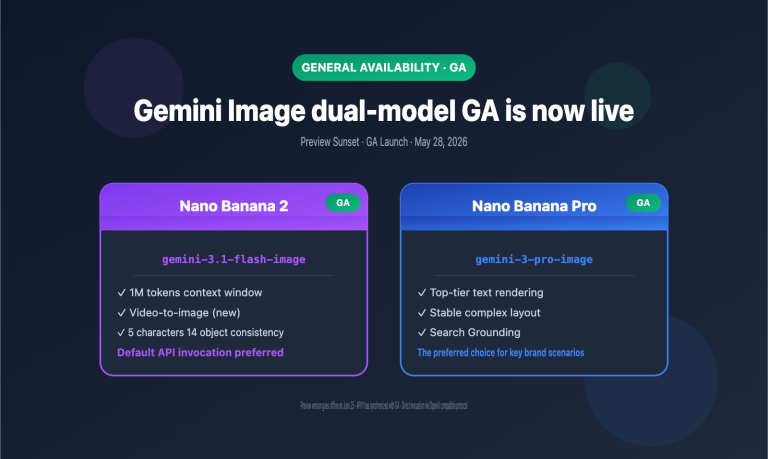
- Switch to Nano Banana 2 (
gemini-3.1-flash-image-preview); - Switch to the Imagen series or other image models;
- Use the automated fallback feature via the APIYI API proxy service.
🎯 High Availability Tip: Don't bind your production system to just a single preview model. On APIYI, you can configure a multi-model route with Nano Banana Pro, Nano Banana 2, GPT-image-1, etc. If the primary model returns a 503, it will automatically fallback to a backup model, preventing a single point of failure in your business.
Quick Troubleshooting Table: 8 Common Causes
| # | Potential Cause | Typical Symptoms | Diagnosis Method | Actionable Advice |
|---|---|---|---|---|
| 1 | Global server overload | Mass spikes during peak hours | Check time slots + community forums | Retry off-peak / Exponential backoff |
| 2 | 4K generation deadline | Errors only on large images | Reproduce with lower resolution | Generate 2K first, then 4K / Simplify prompt |
| 3 | Preview model instability | Frequent within 2 weeks of release | Official announcements | Switch to GA models |
| 4 | Account-level concurrency limits | Errors during batch runs | Test with reduced concurrency | Limit to under 5 concurrent requests / Use API proxy service |
| 5 | Regional/network routing | Common with direct domestic connections | Compare with different nodes | Use a stable domestic API proxy service |
| 6 | Oversized input images | High failure rates in image-to-image | Compress image and retry | Downscale to under 2K |
| 7 | Client-side timeout issues | Isolated to your own system | Adjust timeout + check logs | Set 90s timeout + exponential backoff |
| 8 | Google backend failure | Industry-wide issues | Check Status Page | Switch to a backup model |
Quick Start: Self-Healing 503 Invocation Template (For reference only)
Python Exponential Backoff Example
import time, random
from openai import OpenAI

client = OpenAI(
    base_url="https://api.apiyi.com/v1",
    api_key="YOUR_API_KEY",
)

def generate_with_retry(prompt, size="2048x2048", max_attempts=6):
    delay = 1
    for attempt in range(max_attempts):
        try:
            return client.images.generate(
                model="nano-banana-pro",
                prompt=prompt,
                size=size,
            )
        except Exception as e:
            # Identify 503 / Deadline expired errors
            if "503" in str(e) or "Deadline" in str(e):
                jitter = random.uniform(0, 0.5)
                time.sleep(delay + jitter)
                delay = min(delay * 2, 32)
                continue
            raise
    raise RuntimeError("503 retries exhausted")
📎 Click to view pseudo-code for multi-model fallback
MODEL_CHAIN = ["nano-banana-pro", "nano-banana-2", "gpt-image-1"]

for model in MODEL_CHAIN:
    try:
        return generate_with_retry(prompt, model=model)
    except Exception:
        continue
raise RuntimeError("All models failed")
🎯 Implementation Tip: Simple backoff only solves "global transient overload." To address all 8 causes, the most robust approach is combining "exponential backoff + multi-model fallback + API proxy service concurrency buffering." By using APIYI (apiyi.com) to integrate these three layers, you can achieve production-grade high availability with just a few lines of code.
FAQ
Q1: Will increasing the client timeout fix 503 errors?
Usually, no. Deadline expired is a server-side timer error, not a client-side timeout. Increasing your client-side timeout won't directly help with 503s; in fact, it might just make your system slower to react to failures.
Q2: Why does Nano Banana 2 show fewer errors than Nano Banana Pro?
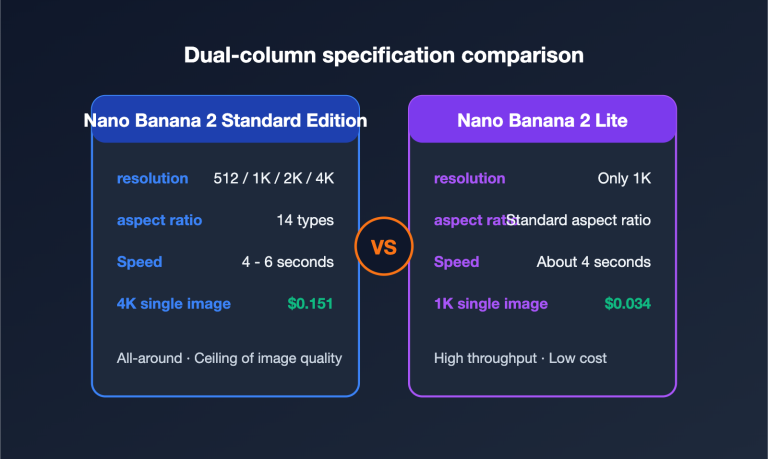
Nano Banana 2 corresponds to gemini-3.1-flash-image-preview, which uses the Flash-tier compute pool. It features faster generation times, more headroom for deadlines, and generally higher capacity. During peak hours, you can shift non-4K tasks to Nano Banana 2 to reduce the probability of 503 errors.
Q3: Is it true that the "off-peak 00:00-06:00 UTC" window has the lowest error rate?
Yes, this is a common observation across various developer forums: the 503 error rate between 00:00-06:00 UTC is typically below 8%. For batch image generation tasks, shifting your scheduling to this window is the simplest and most effective optimization, which you can easily manage using the scheduled task features on APIYI (apiyi.com).
Q4: Is my API key being rate-limited?
Rate limiting usually returns a 429 error, not a 503. However, under extreme load, Google may trigger "overload protection," which returns a 503 directly. You can test this by lowering the concurrency on your account to see if the errors persist.
Q5: Can the APIYI API proxy service solve 503 errors?
It can't "fix" the root cause (which lies with Google), but it can significantly reduce the perceived failure rate. APIYI (apiyi.com) provides unlimited concurrency, multi-model routing, and automatic retry strategies, handling these "occasional 503s" at the proxy layer so your application mostly sees successful results.
Q6: How do I determine if it's a Google backend outage?
Check these three sources simultaneously: the official Status Page, recent posts on the Google AI Developers forum from the last two hours, and whether multiple accounts of yours are throwing errors at the same time. If all three indicate issues, it’s a Google backend failure, and your best bet is to wait or switch to a fallback model.
Summary: Troubleshooting Order for 8 Potential Causes
When you hit a 503 Deadline expired error, follow this checklist. You'll usually pinpoint the issue within 2-3 steps:
- Check the time: Is it during the UTC 10:00-14:00 peak? → Cause 1.
- Check resolution: Do errors only occur with 4K/large images? → Cause 2, 6.
- Check concurrency: Are you slamming the API with batches? → Cause 4.
- Check region: Are you connecting directly from mainland China? → Cause 5.
- Check industry trends: Are forums buzzing with complaints? → Cause 8.
- The remaining factors are client parameters and the "Preview" model's ramp-up status.
This "likelihood analysis" won't always give you a single "this is the only reason" answer, but it will save you a lot of time when things go wrong in production.
🎯 Actionable Advice: Transform your Nano Banana Pro implementation into a "three-piece suite": exponential backoff + multi-model fallback + off-peak batching. For production systems, we recommend connecting through APIYI (apiyi.com) to absorb traffic spikes with our unlimited concurrency proxy layer and use multi-model routing for automatic fallbacks, minimizing the business impact of 503 errors.
— APIYI Team (APIYI apiyi.com Technical Team)