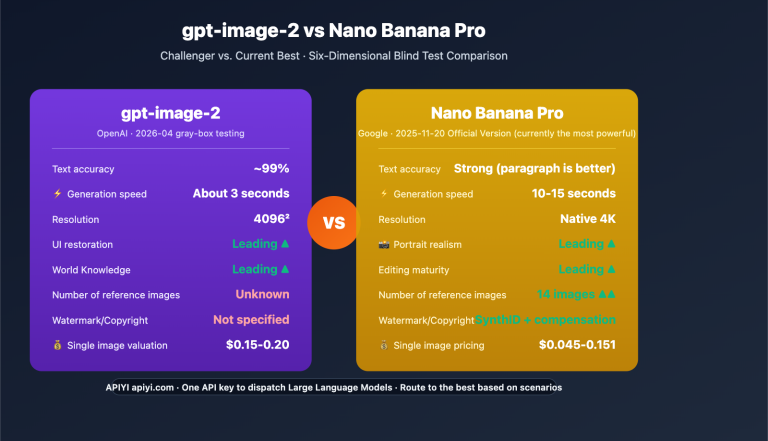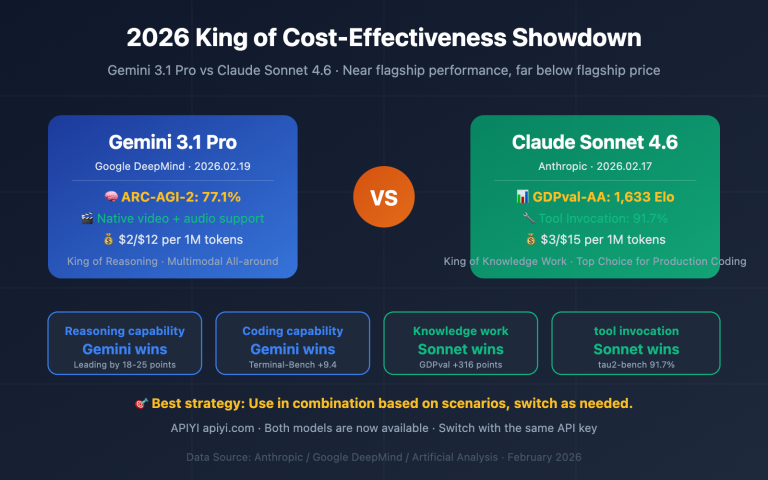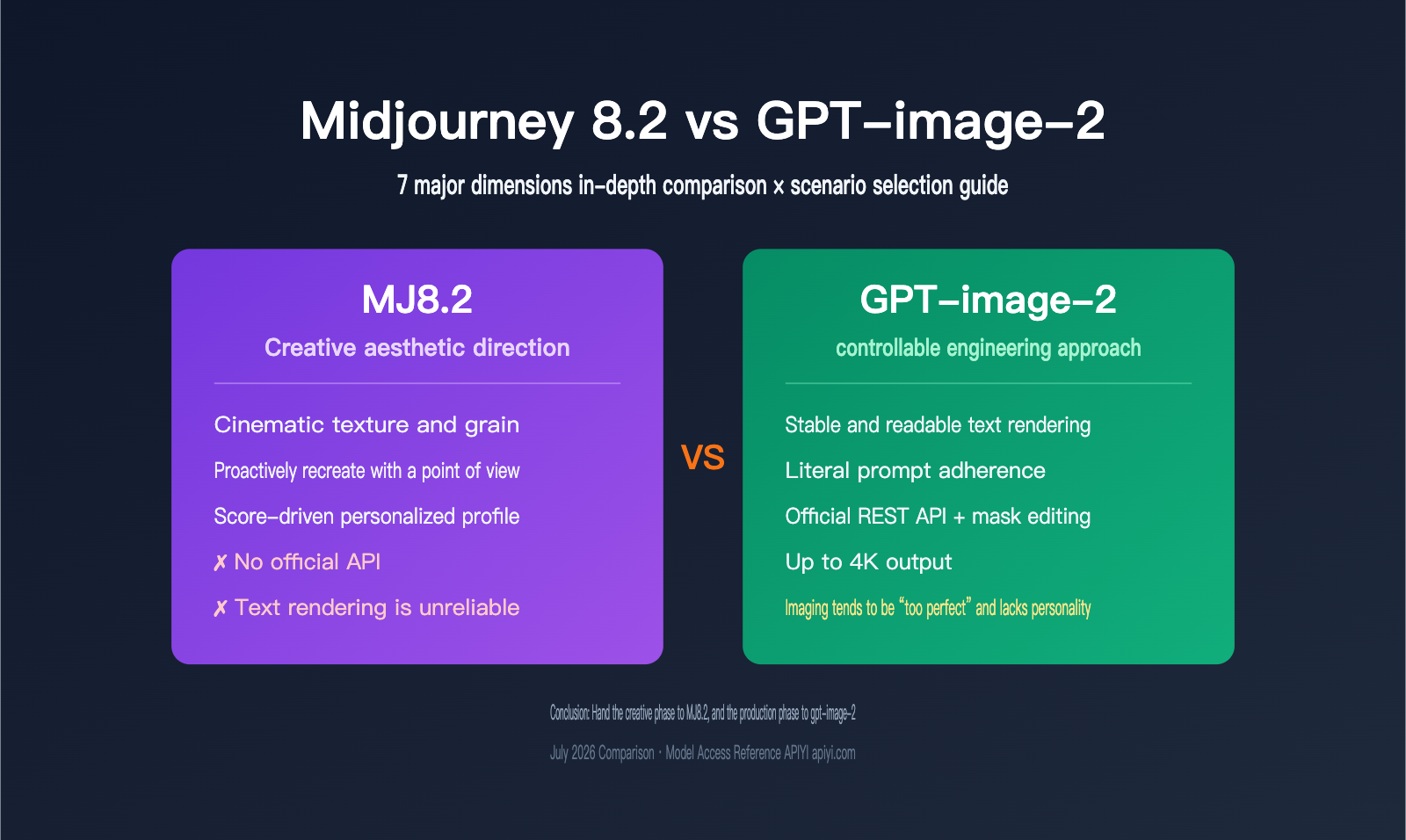
Image generation selection has always been one of the most painful decisions for AI application teams. On July 24, 2026, Midjourney 8.2 became the default version, while OpenAI’s gpt-image-2 has already been running in production for more than three months since its April release. These two models are often compared side by side, but most comparison articles never go beyond “let’s paste in a few images and see which looks better.”
The problem is that these two models aren’t even the same kind of thing. One is a subscription-based creative tool; the other is a usage-based production API. One wins on visual style, the other wins on controllability. If you measure them with the same ruler, you’re almost guaranteed to get the wrong answer.
In this article, we’ll break down MJ8.2 and gpt-image-2 across 7 dimensions that actually affect delivery outcomes, and then map each one to the right use case.
Core value: After reading this, you’ll know exactly which one to choose for your business scenario—and why most mature teams eventually end up using both.
MJ8.2 vs GPT-image-2: Core Differences at a Glance
Let’s start by laying out the fundamental differences in a table. The rest of the article is basically an expansion of this.
| Comparison Dimension | Midjourney 8.2 | GPT-image-2 | Winner |
|---|---|---|---|
| Product Form | Subscription-based creative tool | Usage-based API service | Depends on needs |
| Aesthetic Quality | Cinematic, opinionated, strong texture | Clean, bright, more commercial photography style | MJ8.2 |
| Prompt Adherence | Will “reinterpret” and recreate rather than follow literally | Literal execution, gives you what you ask for | gpt-image-2 |
| Text Rendering | Long text is error-prone; multilingual text is unreliable | Can render signage, packaging, and poster text reliably | gpt-image-2 |
| Image Editing | Local repainting, no structured editing API | Supports edits endpoint and masks | gpt-image-2 |
| Reference Image Capability | Style reference, character reference | Up to 16 reference images per request | gpt-image-2 |
| Official API | No | Yes, standard REST API | gpt-image-2 |
| Maximum Resolution | Native up to 2K | Up to 4K (3840×2160) | gpt-image-2 |
| Pricing Model | $10–120/month subscription, GPU time included | Pay per call, no usage no cost | Depends on usage |
| Personalization | Rating-driven personal aesthetic profile | No personalization mechanism | MJ8.2 |
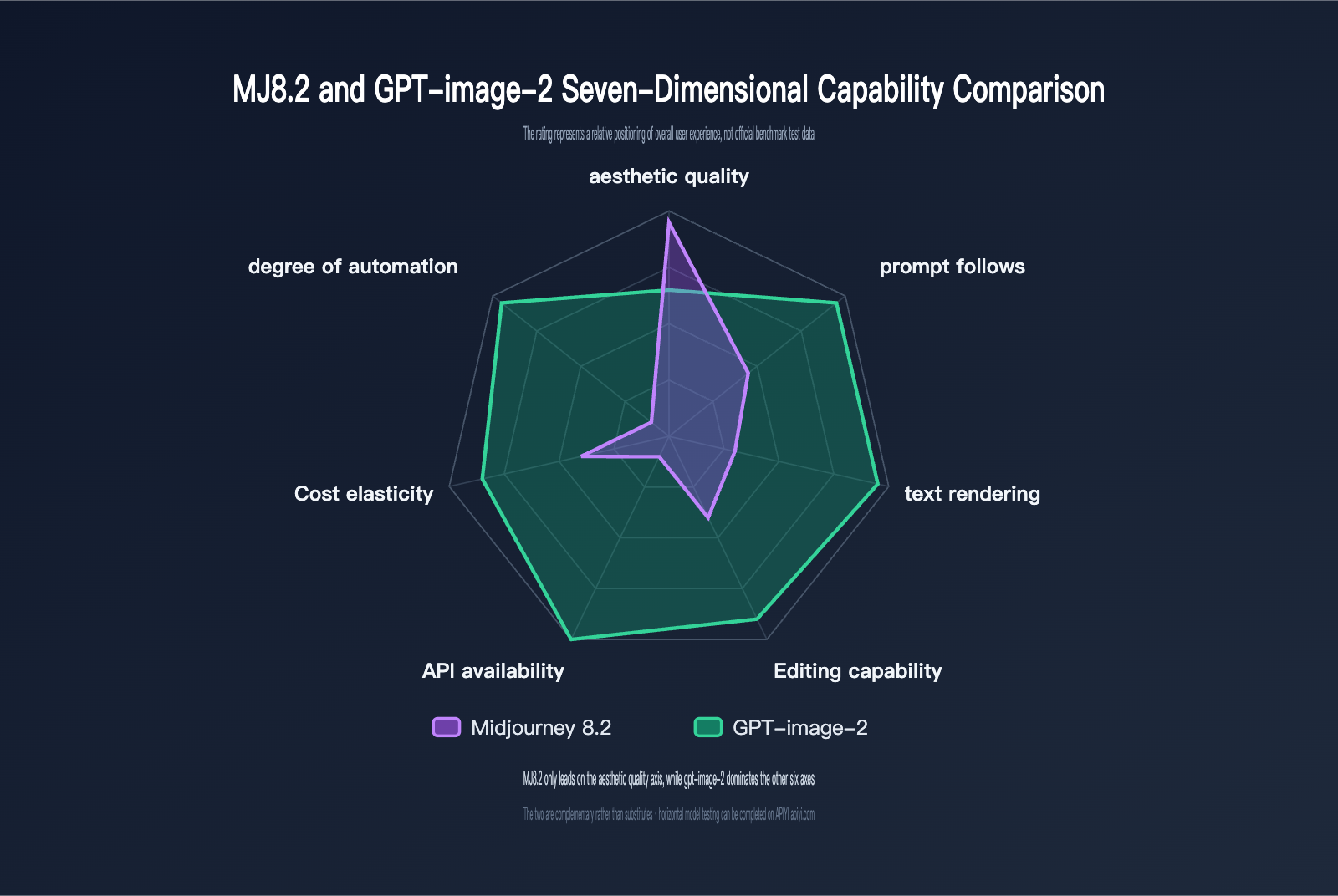
This table already points to the conclusion: gpt-image-2 is ahead in almost everything related to “can it be used” and “can it be controlled,” while MJ8.2 mainly holds its ground in “does it look good” and “does it feel like my style.” But that’s exactly where people tend to misread the situation. In many business scenarios, aesthetic quality isn’t a bonus—it’s the only criterion that matters.
Dimensions 1 to 3: Three Head-to-Head Battles Over Image Quality
Aesthetic Quality: MJ8.2’s Moat
This is the one area where Midjourney still hasn’t been caught, and 8.2 widened that lead a bit more.
Midjourney officially describes 8.2’s default aesthetic as “more creative, bolder, more refined, sharper, and fresher.” In practice, that means it’s more willing to go with asymmetrical compositions, strong light-dark contrast, and coarse-grain textures. The result has an organic feel, almost like a high-end film camera. gpt-image-2, by contrast, produces images that are noticeably “cleaner”: even lighting, accurate colors, sharp edges, like polished commercial photography.
There’s no absolute winner here, but the fit is very clear. For album covers, concept art, editorial illustrations, and brand visual exploration, MJ8.2’s look is still hard to replace. For product shots, e-commerce assets, UI visuals, and explanatory illustrations, gpt-image-2’s cleanliness is actually a plus. Being “too perfect” usually isn’t a downside for commercial assets.
Prompt Compliance: gpt-image-2’s Literal Execution
The two models behave so differently here that it almost feels like two different philosophies.
gpt-image-2 is a literal interpreter: if you ask for three red apples and a cat on the left side of the image, that’s what you get. Midjourney is more like a creative partner: if it thinks adding an element will improve the composition, it adds it; if it thinks your chosen angle doesn’t look good, it quietly changes it.
8.2 didn’t really improve in this area, and because its default aesthetic is stronger, prompt precision actually got diluted even further. You can use the --raw parameter to turn off the default stylization and pull it back a bit, but even then its instruction-following ability still lags behind gpt-image-2 by a noticeable margin, especially with complex prompts involving multiple subjects, multiple constraints, and spatial relationships.
In public text-to-image benchmark rankings, gpt-image-2 has stayed near the top for a long time, while the Midjourney series ranks much lower. Those rankings mostly reflect prompt compliance and overall correctness, not aesthetic preference, so it’s important to understand what they’re actually measuring.
Text Rendering: The Biggest Gap
If your asset needs readable text, this one factor can decide the choice on its own—you don’t need to look at anything else.
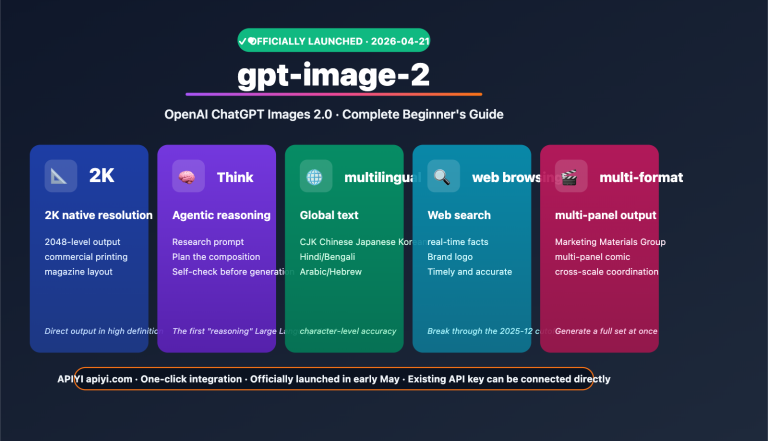
gpt-image-2 can reliably render short multi-word phrases, logos, signs, and packaging text, and it supports multilingual scripts such as Japanese, Arabic, and Cyrillic. Midjourney 8.2 is still okay with short words, but once you move to longer sentences, it starts producing scrambled letters, spelling mistakes, and merged strokes. Chinese and other non-Latin scripts are even less stable. 8.2 didn’t make any improvements to text rendering, so this weakness is exactly the same as in 8.1.
🎯 Technical advice: If you’re working on packaging design, ad creatives, or social graphics where the text has to be exact, go straight with gpt-image-2. You can test it through the APIYI apiyi.com platform: run the same copy through both models five times each, and the difference in text accuracy will be immediately obvious.
Dimensions 4 to 5: The Structural Gap in Integration and Editing
No Official API: An Unavoidable Wall
Midjourney still hasn’t opened a public API. Every third-party “Midjourney API” on the market is really an unofficial interface built through automated Discord bot interactions. These solutions have three major problems: they violate Midjourney’s terms of service, they carry account ban risk, and they can stop working without warning. Some aggregation platforms have already shut down or heavily restricted their Midjourney API offerings, forcing apps that depend on them to urgently rewrite their code.
gpt-image-2, on the other hand, provides standard REST endpoints, including /v1/images/generations and /v1/images/edits. It’s fully compatible with the OpenAI SDK and supports the full set of parameters like size, quality, n, and mask.
That means the two models fit into fundamentally different workflow layers.
| Workflow Stage | MJ8.2 | gpt-image-2 |
|---|---|---|
| Creative exploration | Suitable | Suitable |
| Single-image refinement | Suitable | Suitable |
| Batch generation | Requires manual repetition | Programmatic concurrency |
| System integration | No official path | Standard API integration |
| Automated pipelines | Not feasible | Natively supported |
| User-side real-time image generation | Not feasible | Natively supported |
| Automated quality checks | No interface to hook into | Programmable validation |
Editing Capability: Masks and Multi-Image Reference
gpt-image-2 supports local editing through the edits endpoint. You can pass in a mask to precisely define the area to change, and a single call can accept up to 16 reference images to maintain consistency across multiple inputs. That turns “making a revision” from “rolling the dice again” into “precise patching.”
Midjourney offers local repainting features like Vary Region, and the experience isn’t bad. But everything depends on the UI, with no programmatic interface you can call. When you need to “unify the background of these 200 product images to off-white,” the difference between the two isn’t about user experience anymore—it’s about whether the task is even possible.
from openai import OpenAI

client = OpenAI(
    api_key="YOUR_API_KEY",
    base_url="https://api.apiyi.com/v1"  # Use the unified APIYI interface
)

# gpt-image-2 supports precise local editing with a mask
result = client.images.edit(
    model="gpt-image-2",
    image=open("product.png", "rb"),
    mask=open("background_mask.png", "rb"),
    prompt="Replace the background with a soft off-white gradient while keeping the product itself and the shadows unchanged",
    size="2048x1152"
)
print(result.data[0].url)
View the full implementation for batch unification
import os
from pathlib import Path
from concurrent.futures import ThreadPoolExecutor
from openai import OpenAI

client = OpenAI(
    api_key=os.getenv("APIYI_API_KEY"),
    base_url="https://api.apiyi.com/v1"  # APIYI unified interface, compatible with the official SDK
)

SRC = Path("./products")
OUT = Path("./products_unified")
OUT.mkdir(exist_ok=True)

PROMPT = "Replace the background with a soft off-white gradient while keeping the product itself, material, and shadow completely unchanged"

def unify(img_path):
    mask_path = SRC / f"{img_path.stem}_mask.png"
    if not mask_path.exists():
        return {"file": img_path.name, "status": "skipped_no_mask"}
    try:
        resp = client.images.edit(
            model="gpt-image-2",
            image=open(img_path, "rb"),
            mask=open(mask_path, "rb"),
            prompt=PROMPT,
            size="2048x1152",
            quality="high",
        )
        return {"file": img_path.name, "url": resp.data[0].url}
    except Exception as exc:
        return {"file": img_path.name, "error": str(exc)}

# Unifying the backgrounds of 200 product images is something Midjourney can't automate
targets = [p for p in SRC.glob("*.png") if not p.stem.endswith("_mask")]
with ThreadPoolExecutor(max_workers=5) as pool:
    for r in pool.map(unify, targets):
        print(r)
🚀 Integration tip: gpt-image-2 is fully compatible with the OpenAI SDK, so you only need to replace
base_urlin your existing code to switch over. For integration, it’s recommended to use the APIYI apiyi.com platform, which provides direct official relaying and isn’t affected by official Tier concurrency limits, making it easier to get batch jobs running and then scale them up smoothly.
Dimension 6–7: Cost Structure and Workflow Fit
Cost Model: Subscription and Pay-As-You-Go Are Not the Same Thing
Their billing logic is completely different, so comparing them by “how much per image” doesn’t tell you much. You need to look at the usage pattern.
| Cost Item | Midjourney 8.2 | GPT-image-2 |
|---|---|---|
| Billing model | Monthly subscription, consumes Fast GPU time | Real-time billing by usage |
| Entry barrier | Starts at $10/month Basic, no free trial | No fixed minimum, pay per use |
| Main tier | $30/month Standard, 15 hours Fast | 1024² medium, about $0.053/image |
| Low-cost tier | Relax mode (unlimited on Standard and above) | low quality, about $0.006/image |
| High-quality tier | Shares GPU time with low quality | high quality, about $0.211/image |
| Fixed-price option | None | Official reverse-engineered version, $0.03/request, regardless of size or quality |
| Idle cost | Yes, unused time expires at the end of the billing cycle | None, no call means no cost |
| Extra capacity | Buy more Fast time at $4/hour | No cap, just keep paying by usage |
The easiest thing to miss here is Midjourney’s idle cost: any unused Fast GPU time gets reset to zero at the end of each billing cycle and doesn’t roll over to the next month. For teams with volatile usage, that means a big chunk of the subscription fee can go to waste during slow periods.
On the flip side, if you’re a heavy creator making hundreds of images every day, Midjourney’s Mega plan can work out cheaper per image than pay-as-you-go API pricing. The rule of thumb is simple: if usage is steady and high, go with a subscription; if usage fluctuates or you’re still validating, go pay-as-you-go.
💰 Cost Optimization: For budget-sensitive projects or ones still in the validation stage, it’s usually better to start with a pay-as-you-go route and get the pipeline working first. When calling gpt-image-2 through the APIYI apiyi.com platform, there’s also a fixed-price option: the official reverse-engineered
gpt-image-2-allcharges $0.03 per request, regardless of image size or quality tier. That makes costs fully predictable, which is great for commercial projects that need firm quoting.
Workflow Fit: The Decisive Factor
Once you connect the six dimensions above, the workflow choice becomes pretty clear.
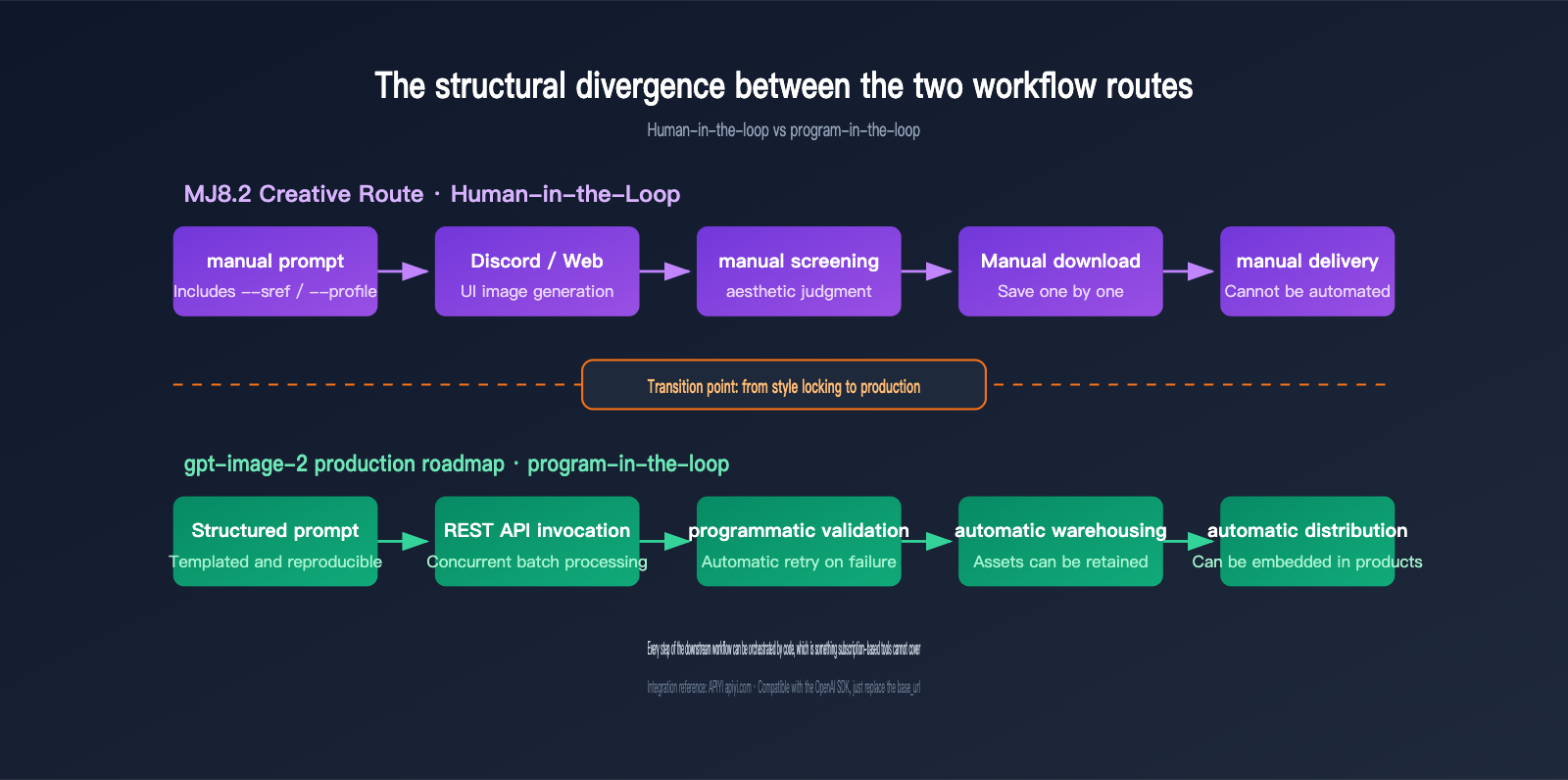
Midjourney 8.2 is an human-in-the-loop pipeline: a person writes the prompt, the interface generates images, the person reviews them, downloads manually, and then delivers them. Every step needs human aesthetic judgment. That’s both its strength and its ceiling. The new --sref random bulk draft mode in 8.2 — 24 images of 512×512 per run, using about 0.4 minutes of GPU time — makes exploration much faster, but it still doesn’t change the core fact that a human has to be present.
gpt-image-2, on the other hand, is a program-in-the-loop pipeline: structured prompts, API calls, automated validation, database writes, and distribution. It can run unattended at 3 a.m. and finish 10,000 images, or be embedded directly into a product for real-time image generation.
Scenario Recommendations: Picking the Right Tool for the Job
Clear Cases for Choosing MJ8.2
- Brand visual exploration and tone definition: You want “surprise me,” not “do exactly what I say.” MJ8.2’s creative reinterpretation is the point.
- Concept design and character development: The improved
--srefstyle matching in 8.2 makes series-wide visual consistency much more reliable. - Editorial illustrations and album covers: Cinematic feel, grainy texture, strong contrast composition — that’s a look gpt-image-2 just doesn’t naturally produce.
- Ongoing personal creative work driven by taste: The more ratings you accumulate, the more value you get from the personalized
--profilestyle model. That’s a long-term asset unique to the user. - Quickly mapping out a style space:
--sref randomdraft mode gives you 24 style directions at once, which is hard to beat during early-stage exploration.
Clear Cases for Choosing GPT-image-2
- The image must include accurate text: Packaging, posters, ad assets, social visuals with copy — there’s no second choice here.
- You need to integrate it into a product or automation flow: Having an official API is a hard requirement; unofficial reverse-engineered endpoints aren’t suitable for production.
- Batch generation and scaled delivery: At the hundreds or thousands-of-images level, manual work just doesn’t make economic sense.
- Commercial assets that need exact execution: The client gives you a clear spec, and you don’t need the model to be creative.
- Local editing and multi-image consistency: Mask editing and up to 16 reference images support “revise this version,” not “start over from scratch.”
- You need 4K output: gpt-image-2 supports up to 3840×2160, while MJ8.2 tops out at direct 2K output.
Scenarios Where Using Both Makes Sense
For most content teams at any meaningful scale, the winning combination ends up being this: use MJ8.2 to define the style, then use gpt-image-2 for production.
The practical workflow is to use Midjourney’s draft mode first to explore styles and lock in the --sref code and visual direction. Then translate that direction into a structured prompt template and run it at scale on gpt-image-2. That way, you get Midjourney’s aesthetic judgment plus the controllability and scalability of an API.
| Step | Model | Why |
|---|---|---|
| Style exploration and tone setting | MJ8.2 | Strong aesthetic initiative, efficient draft-mode exploration |
| Finalizing key visuals | MJ8.2 | Higher ceiling for single-image quality |
| Prompt template conversion | Manual rewriting | Turn aesthetic direction into reproducible text descriptions |
| Batch asset production | gpt-image-2 | Programmable, concurrent, usage-based cost |
| Text-heavy assets | gpt-image-2 | Reliable text rendering is a must-have |
| Local edits and consistency | gpt-image-2 | Mask editing supports precise fixes |
Decision Recommendations and FAQs
💡 Selection advice: Which model to choose mostly comes down to how you prioritize “aesthetic ceiling” versus “engineering controllability.” We recommend using the APIYI apiyi.com platform to get the gpt-image-2 production pipeline working first, then using a Midjourney subscription to cover creative exploration. The platform supports unified API access for multiple mainstream image models, making it easy to compare how different models perform under the same real-world business prompt.
Q1: Can MJ8.2 close the gap with gpt-image-2 compared with 8.1?
MJ8.2 brings real improvements in aesthetics and reduces the rate of unusable outputs, but there’s no change at all in the three areas where it trails gpt-image-2: text rendering, prompt adherence, and API availability. 8.2 is an aesthetics tuning release and doesn’t address those structural weaknesses.
Q2: Can gpt-image-2 completely replace Midjourney?
Technically, yes. Aesthetically, there’s still a gap. gpt-image-2 produces clean and accurate images, but it lacks the opinionated composition and film-like texture that Midjourney is known for. If your output is mostly commercial assets, you can absolutely rely only on gpt-image-2; if you need visual memorability, MJ8.2 still has irreplaceable value.
Q3: Are third-party Midjourney APIs usable?
Not recommended for production. All third-party MJ APIs are unofficial reverse-engineered implementations based on Discord bots, which violate the terms of service and carry account ban risk. Some platforms have already shut down this service, forcing downstream apps to be rebuilt. If you need programmatic image generation, choose a model with an official API and connect through a platform like APIYI apiyi.com for a more stable official pass-through integration.
Q4: How fast is gpt-image-2?
On the official pass-through route, high-quality image generation usually takes around 100 to 120 seconds, and the 4K high-quality tier may take 3 to 5 minutes; the unofficial route is about 30 seconds. Midjourney Fast mode typically delivers four images in under half a minute. If latency matters to you, it’s best to test your typical prompts on APIYI apiyi.com, since runtime can vary a lot by size and quality tier.
Q5: Which model handles Chinese prompts better?
gpt-image-2 understands Chinese prompts more accurately. With Midjourney, English prompts are still recommended for the best results. One thing to keep in mind: “understanding Chinese prompts” and “rendering Chinese text in the image” are two different things, and gpt-image-2 also has a clear advantage in the latter.
Q6: If my budget is limited and I can only choose one, what should I do?
It depends on whether your output has to be automated. If all image delivery is done manually, Midjourney Standard at $30/month is cost-effective. If you have any programmatic needs, choose gpt-image-2 with usage-based pricing—you only pay when you use it, and the cost during validation can be kept extremely low.
Conclusion: It’s not about choosing one winner — it’s about putting each tool in the right place
The comparison between Midjourney 8.2 and gpt-image-2 isn’t really a head-to-head battle between two models. It’s a split between two different product philosophies.
MJ8.2 puts all its weight on aesthetic judgment. It actively re-creates, has a strong stylistic bias, and learns your personal taste through accumulated ratings. The trade-off is that it’s not controllable, not programmable, and not scalable. It’s a creative partner, not an execution tool.
gpt-image-2 takes the opposite approach. It follows instructions literally, renders text reliably, supports mask editing and up to 16 reference images, and provides a standard REST API plus 4K output. The trade-off is that the results can feel a bit too “perfect” and lack personalized style memory. It’s a dependable execution engine, not a source of surprise.
So for mature teams, the answer usually isn’t to pick one or the other, but to let each one do what it does best: use MJ8.2 for creative work and gpt-image-2 for production. This split preserves the ceiling for visual expression while giving your delivery pipeline a controllable, composable, and observable technical foundation.
If you’re making this decision now, we recommend quickly validating the production side through APIYI apiyi.com. The platform provides unified access to gpt-image-2 and other mainstream image models via official pass-through integration, with online testing and usage-based billing. That lets you get the pipeline running at very low cost first, then decide on the final investment mix.
References:
- Midjourney official changelog: updates.midjourney.com
- Midjourney official docs: docs.midjourney.com
- OpenAI Images API docs: platform.openai.com
- APIYI image model docs: docs.apiyi.com
Author bio: APIYI technical team, focused on AI model integration and engineering deployment practices. Feel free to reach out via APIYI apiyi.com to discuss image generation model selection and workflow design.