“Does gemini-3.1-flash-lite-image actually support reasoning mode?” That’s one of the most frequently asked questions in API calling groups lately. The answer is yes, and this isn’t just a guess — we combined Google’s official docs with three sets of side-by-side experiments through the APIYI gateway, and collected real token usage and latency data. In this article, we’ll break down the thinkingLevel switch from three angles: parameter structure, measured results, and billing rules.
Core value: By the time you finish reading, you’ll know exactly how to enable reasoning mode for gemini-3.1-flash-lite-image, how many extra tokens it costs, and which scenarios are worth paying for that extra latency.
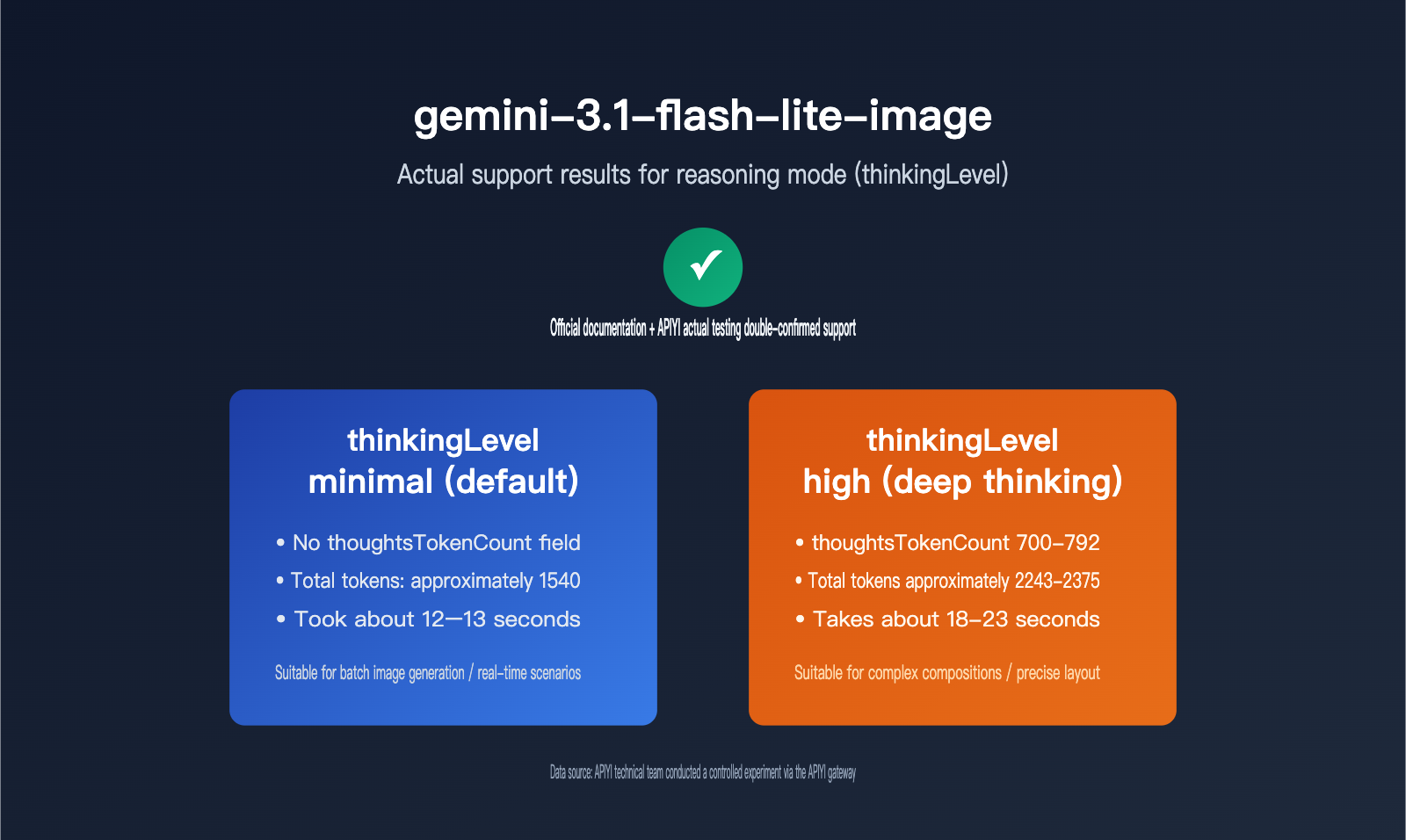
Core conclusions on gemini-3.1-flash-lite-image reasoning mode
Let’s start with the conclusion, then get into the details. Google’s official documentation clearly states that, with gemini-3.1-flash-image and gemini-3.1-flash-lite-image, developers can control how much the model thinks. That means the flash-lite tier also has built-in reasoning capabilities — it’s not something reserved only for the flagship model. But not every image model supports this parameter. The table below compares support across three mainstream Gemini image models.
| Model | Supports thinkingLevel? |
Available levels | Default level | Notes |
|---|---|---|---|---|
| gemini-3.1-flash-image | ✅ Supported | minimal / high | minimal | Explicitly listed in the official docs |
| gemini-3.1-flash-lite-image | ✅ Supported | minimal / high | minimal | Shares the same thinkingConfig with flash-image |
| gemini-3-pro-image | ⚠️ Parameter has no effect | Fixed, not adjustable | Internally fixed | Passing high doesn’t error, but there’s no measurable change |
One important detail: thinkingLevel only has two options. It’s not like text models, where you can continuously tune a thinking budget. The official wording says that “minimal thinking doesn’t mean the model isn’t thinking at all.” In other words, even at the default setting, the model still performs a basic amount of internal reasoning — it just won’t do the multi-step composition checks that high triggers.
This is also a meaningful signal for the industry. In earlier image generation models, whether it was nano banana or the first version of flash-image, the official API didn’t expose any thinking-level parameter. Models either generated images with a fixed strategy or relied entirely on prompt engineering to make up for composition issues. By the 3.1 generation, Google has opened up the “plan first, then generate” reasoning mechanism to the flash series. In essence, they’ve moved a reasoning pattern that was previously validated in text models into the image generation space. Understanding that context makes it easier to judge whether other vendors’ image models will follow the same path.
🎯 Technical recommendation: If you’re calling Gemini image models through APIYI apiyi.com, start by running your workflow with the default
minimalsetting, then switch tohighonly if the output quality really needs it. The platform provides a unified interface, sogemini-3.1-flash-image,flash-lite-image, andpro-imagecan all be called with the same code, which makes A/B comparisons much easier.
thinkingLevel Parameter Details and How to Call It
thinkingLevel isn’t a standalone parameter. It’s nested inside the thinkingConfig object under generationConfig, and it’s used together with includeThoughts. includeThoughts controls whether the model’s thinking summary is returned to the caller, while thinkingLevel controls how hard the model thinks. They’re two separate switches, so don’t mix them up.
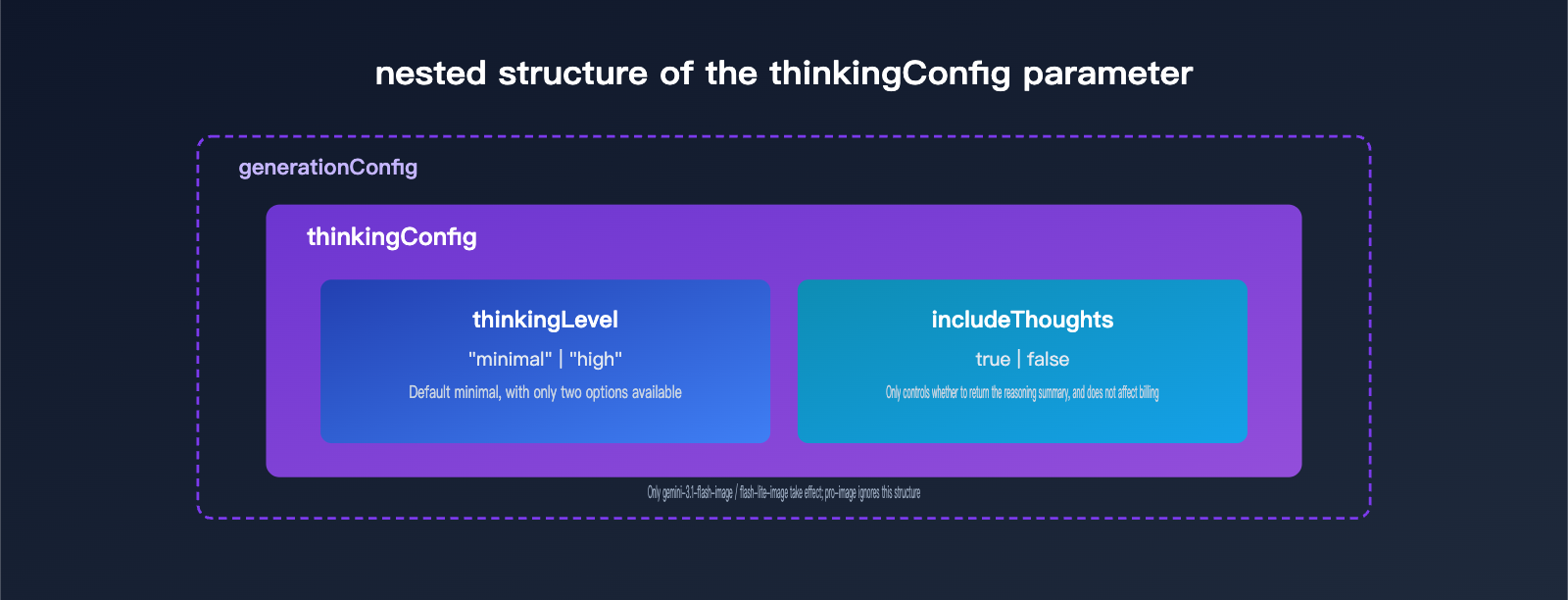
The table below summarizes the two key fields inside thinkingConfig, along with their types and value ranges.
| Field | Type | Allowed Values | Default | Purpose |
|---|---|---|---|---|
| thinkingLevel | enum string | minimal / high |
minimal |
Controls how much reasoning the model does; only effective for flash-series image models |
| includeThoughts | boolean | true / false |
false |
Whether to return a summary of the thinking process in the response; doesn’t affect billing |
In practice, all three mainstream languages use the same structure: you just put a thinkingConfig object inside config. Here’s a Python example:
import openai

client = openai.OpenAI(
    api_key="YOUR_API_KEY",
    base_url="https://api.apiyi.com/v1"  # Call through the APIYI unified gateway
)

response = client.chat.completions.create(
    model="gemini-3.1-flash-lite-image",
    messages=[{"role": "user", "content": "Draw a cat drinking coffee under snowy mountains"}],
    extra_body={
        "thinkingConfig": {
            "thinkingLevel": "high",
            "includeThoughts": True
        }
    }
)
print(response.choices[0].message.content)
View the full REST native call example
{
  "contents": [{"parts": [{"text": "Draw a cat drinking coffee under snowy mountains"}]}],
  "generationConfig": {
    "responseModalities": ["IMAGE"],
    "thinkingConfig": {
      "thinkingLevel": "high",
      "includeThoughts": true
    }
  }
}
The JavaScript SDK follows the same structure, except it switches the REST snake_case style to a camelCase thinkingConfig object. The rest of the field names stay the same. There’s no real difference in call logic across the three languages. Just remember one rule: thinkingConfig only belongs under generationConfig.
There’s one detail that’s easy to trip over: thinkingLevel is a case-sensitive string enum. In the official examples, you may see both "High" and "high" used interchangeably. In real testing, both spellings are recognized and work through the gateway, but to avoid relying on undocumented compatibility behavior, it’s best to use lowercase "high" and "minimal" in your code. That way, if the upstream service tightens case validation later, your production calls won’t break.
Recommendation: Get free test credits through APIYI apiyi.com and verify whether the
thinkingConfigparameters are being passed through correctly on the gateway side. It’s a lot easier than applying for an official key and debugging against that.
APIYI Test Data: The Real Impact of thinkingLevel on Tokens and Latency
No matter how clear the docs are, real data is always more intuitive. We used the same prompt and tested 1K-resolution text-to-image generation through the APIYI gateway in three cases: gemini-3.1-flash-image with minimal, gemini-3.1-flash-image with high, and gemini-3-pro-image with high forced on.
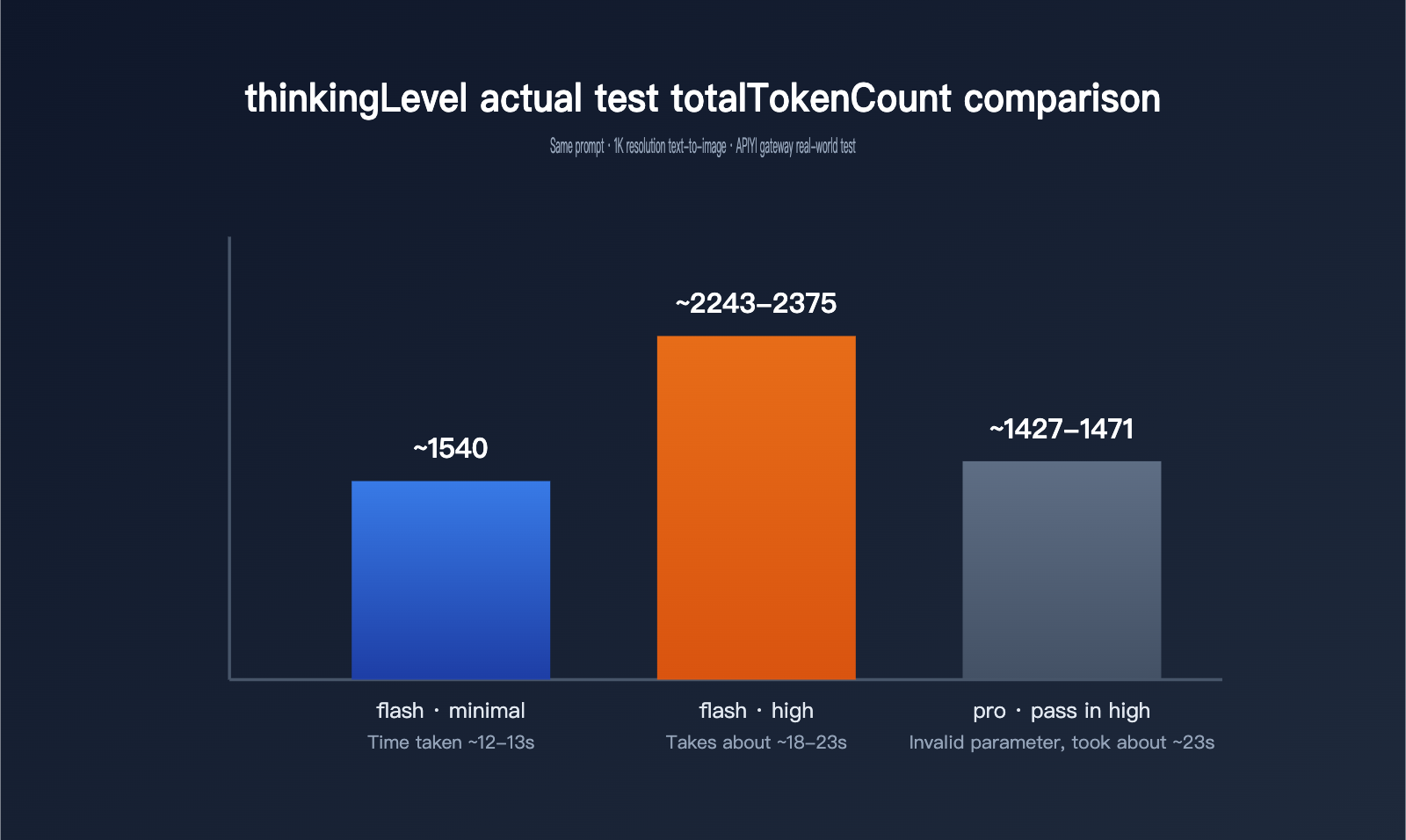
| Model / Setting | thoughtsTokenCount | Image tokens | totalTokenCount | Latency |
|---|---|---|---|---|
| gemini-3.1-flash-image · minimal (default) | no such field | 1120 | about 1540 | about 12–13 seconds |
| gemini-3.1-flash-image · high | 700–792 | 1120 | about 2243–2375 | about 18–23 seconds |
| gemini-3-pro-image · high passed in | 181–214 (no different from default) | 1120 | about 1427–1471 | about 23 seconds |
This dataset shows three important patterns. First, once you switch thinkingLevel to high, thoughtsTokenCount jumps from the default 0 — the field may not even appear in the response — to roughly 700–800 tokens. Total token usage increases by nearly 50%, and latency stretches from 12–13 seconds to 18–23 seconds. In other words, more thinking really does cost both money and time. Second, whether it’s minimal or high, the final image token count stays at 1120, which means thinkingLevel only changes how the model thinks, not the image resolution or the image billing itself. Third, passing high to gemini-3-pro-image doesn’t cause an error, but the 181–214 thinking-token range is basically the same as the default, which lines up with the official docs saying that pro-image has fixed thinking behavior and doesn’t support external tuning.
So if your business logic sends the same thinkingConfig to flash, flash-lite, and pro models in bulk, pro-image will quietly ignore it. It won’t throw an error or stop the request, but it also won’t actually adjust its reasoning depth the way you might expect.
One more thing: the data above wasn’t from a single run. It’s a range collected after making repeated requests with the same prompt under each setting. That’s why the high tier shows a thoughtsTokenCount range like 700–792 instead of a fixed number. Thinking-heavy tasks are inherently a bit stochastic, so the model won’t always take exactly the same internal reasoning path, and token usage will vary slightly as a result. That said, the overall scale and latency trend are stable and reproducible. You won’t suddenly see high become faster than minimal, or the thinking token count explode into the thousands unexpectedly.
Image Model Thinking Tokens and Billing Rules
A lot of developers see the thoughtsTokenCount field for the first time and instinctively compare it with the thinking cost of text models. But image models handle thinking in a different way, and the cost is actually split into two parts. Understanding that distinction matters a lot for cost control.
| Dimension | Text Model Thinking | Image Model Thinking |
|---|---|---|
| Form of thinking output | Pure text reasoning chain | Text summary + up to two temporary composition sketches |
| Thinking text token scale | Can reach several thousand | No more than 400 for Pro; about 700-800 for Flash high |
| Main cost-bearing field | thoughtsTokenCount |
Sketches are counted in candidatesTokenCount and billed as normal image parts |
| Billing standard for a single sketch | Not applicable | About 1120 tokens for 1K resolution, roughly $0.0336 per image |
Impact of includeThoughts on billing |
No impact, billed the same | No impact, billed the same |
The official docs make it especially clear that whether includeThoughts is set to true or false, the tokens generated during thinking are still billed as usual. We confirmed this in testing too: once includeThoughts is turned on, the response structure and total billing stay exactly the same. The only difference is that you get an extra thinking summary for debugging. In other words, includeThoughts is a “do I want to see it?” switch, not a “do I want to pay for it?” switch — and that’s an easy detail to misread.
What’s even more important is that the real cost driver in image models isn’t thoughtsTokenCount itself, but the temporary composition images generated during inference. The official docs say the model can generate up to two temporary images during the thinking stage to test composition and logical consistency. These sketches are returned as normal image parts and counted in candidatesTokenCount, billed at the standard output image price. That means a single high-tier inference-based image generation request may quietly add one or two “invisible” sketch charges, which is easy to forget when estimating costs.
A quick calculation makes this clearer. Suppose a 1K resolution image generation request runs in high mode. The thinking text uses about 750 tokens, and if the model really generates two temporary sketches during inference, plus the final image, that would amount to three image parts. At roughly 1120 tokens and $0.0336 per image, the output cost for those three images comes close to $0.10. Add the cost of the thinking text on top, and the total can be about 2-3 times higher than minimal mode. Whether those two sketches are actually triggered depends on how the model interprets the current prompt — high mode doesn’t always produce two sketches. That’s also why the total token count in real tests shows a range like 2243-2375 instead of a neat doubled number.
💰 Cost optimization: If your team is sensitive to token costs, it’s a good idea to verify the actual
totalTokenCountthrough the call logs on the APIYI apiyi.com platform before deciding to keep high mode enabled long term. That’ll help you avoid budget overruns caused by overlooking sketch billing.
When to Use High vs. Default Minimal
Based on testing data, here’s a simple decision guide.
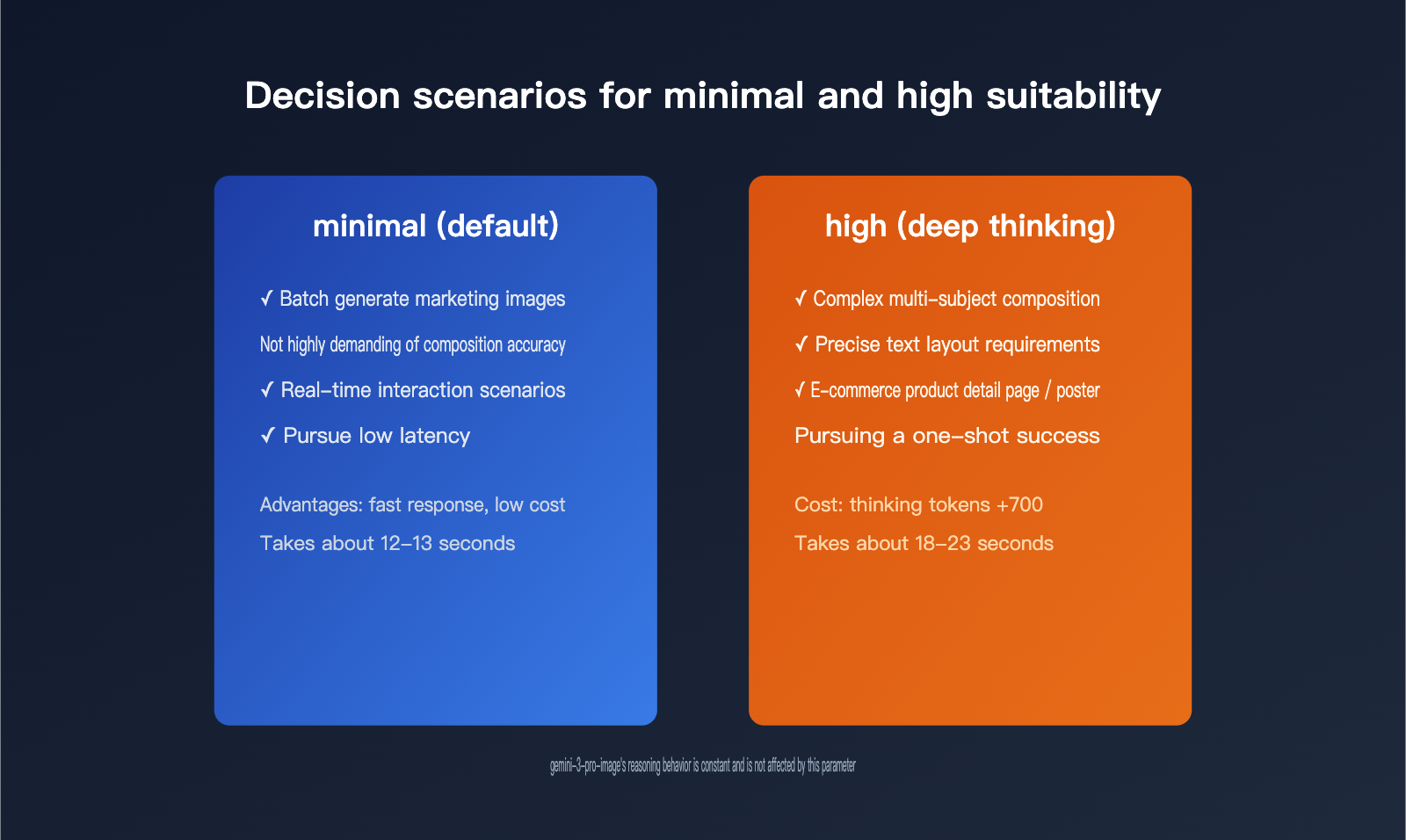
| Business Scenario | Recommended Mode | Why |
|---|---|---|
| Batch generation of marketing visuals where composition precision isn’t critical | minimal (default) | Lower latency, controllable token cost, and good enough for everyday image generation |
| Complex multi-subject compositions that need precise text layout or spatial relationships | high | Extra thinking buys better composition accuracy, so it’s worth paying for quality |
| E-commerce detail pages, posters, and other scenarios with low tolerance for detail errors | high | Fewer redraws and retries, which can actually lower the total cost |
| Real-time interactive scenarios where response speed is critical | minimal | High mode adds 5-10 seconds of latency, which isn’t great for strong interactive experiences |
When calling gemini-3-pro-image |
No setting needed | This model’s thinking behavior is fixed, so passing the parameter won’t have any effect |
In short, high mode is best when getting it right in one shot matters more than raw generation speed. If your app often has to retry and tweak the prompt over and over just to get a decent composition, you might as well turn on high mode. Paying a bit more per request can improve first-pass success rates, which often works out cheaper overall.
In real engineering work, the safer approach is to make thinkingLevel configurable instead of hardcoding it. For example, you can route requests automatically based on the business type passed in by the caller: batch jobs use minimal by default, while requests involving precise layout or multi-subject spatial relationships switch to high automatically. That keeps average cost under control without sacrificing quality in important cases. If your team maintains call logic for flash, flash-lite, and pro models at the same time, it’s a good idea to handle this uniformly in the parameter wrapper layer and only pass thinkingLevel to models that support it. That way, you won’t accidentally forward invalid parameters to pro-image and make debugging harder.
🚀 Quick start: We recommend using the APIYI apiyi.com platform to build a prototype quickly. With the same
base_url, you can switch between minimal and high settings to compare results, without needing separate authentication configs for each mode.
FAQ
Q1: Do gemini-3.1-flash-lite-image and gemini-3.1-flash-image perform the same during inference?
They share the same thinkingConfig parameter structure, and both support the minimal and high levels. But flash-lite is positioned as the lightweight version, so its actual thinking depth and final image detail are usually weaker than flash-image. You can also tell from the naming pattern: the flash-lite line has always been about being faster, cheaper, and slightly less accurate in text models, and the image models follow the same tradeoff logic. Turning on high can partially make up for the lightweight model’s weakness in complex compositions, but it’s hard to fully match flash-image. If you want a quantitative comparison, you can use the APIYI apiyi.com platform to call both models with the same prompt set and compare thoughtsTokenCount and the generated image results directly.
Q2: Will passing the `thinkingLevel` parameter to gemini-3-pro-image cause an error?
No, it won’t. Our tests show that after passing the high value, the request still returns normally, but thoughtsTokenCount stays in the 181-214 range, almost the same as when no parameter is passed. That suggests the model’s internal thinking behavior is fixed and doesn’t accept external tuning. When calling multiple models in batches, it’s a good idea to check the model name in your business logic separately, so you don’t assume the parameter has taken effect.
Q3: After turning on `high`, do I need to adjust image resolution or quality parameters too?
No, you don’t. Test data shows that both minimal and high keep image tokens stable at 1120, which means thinkingLevel only affects the model’s internal reasoning process and doesn’t change the output image resolution. Resolution is still controlled separately by the size parameter in imageConfig, and it has nothing to do with the thinking level. In other words, thinkingLevel and resolution are two separate control axes: one determines whether the model thinks thoroughly enough, and the other determines how large and detailed the image is. You can combine them freely, and there’s no mutual exclusion or coupling between them.
Summary
gemini-3.1-flash-lite-image does support inference mode, and that’s been confirmed by both the official docs and APIYI’s test data. thinkingLevel only offers two options, minimal and high. Turning on high will push thinking tokens above 700 and add about 5-10 seconds of total latency, but it won’t change the token usage for the final image. Meanwhile, gemini-3-pro-image accepts this parameter without error, but it doesn’t actually take effect. Understanding the two-track billing logic, where the thinking text goes through thoughtsTokenCount and the composition sketch goes through candidatesTokenCount, is key to controlling image generation costs. If you need to quickly switch between multiple Gemini image models for testing, it’s best to use the APIYI apiyi.com unified gateway to avoid applying for a separate API key for each model or maintaining different calling code.
This article’s data comes from hands-on testing by the APIYI technical team. If you’d like to discuss more details about calling Gemini image models, feel free to contact APIYI support through apiyi.com.
Reference Materials
- Gemini API Official Documentation – Image Generation: thinking levels parameter description
- Link:
ai.google.dev/gemini-api/docs/generate-content/image-generation
- Link: