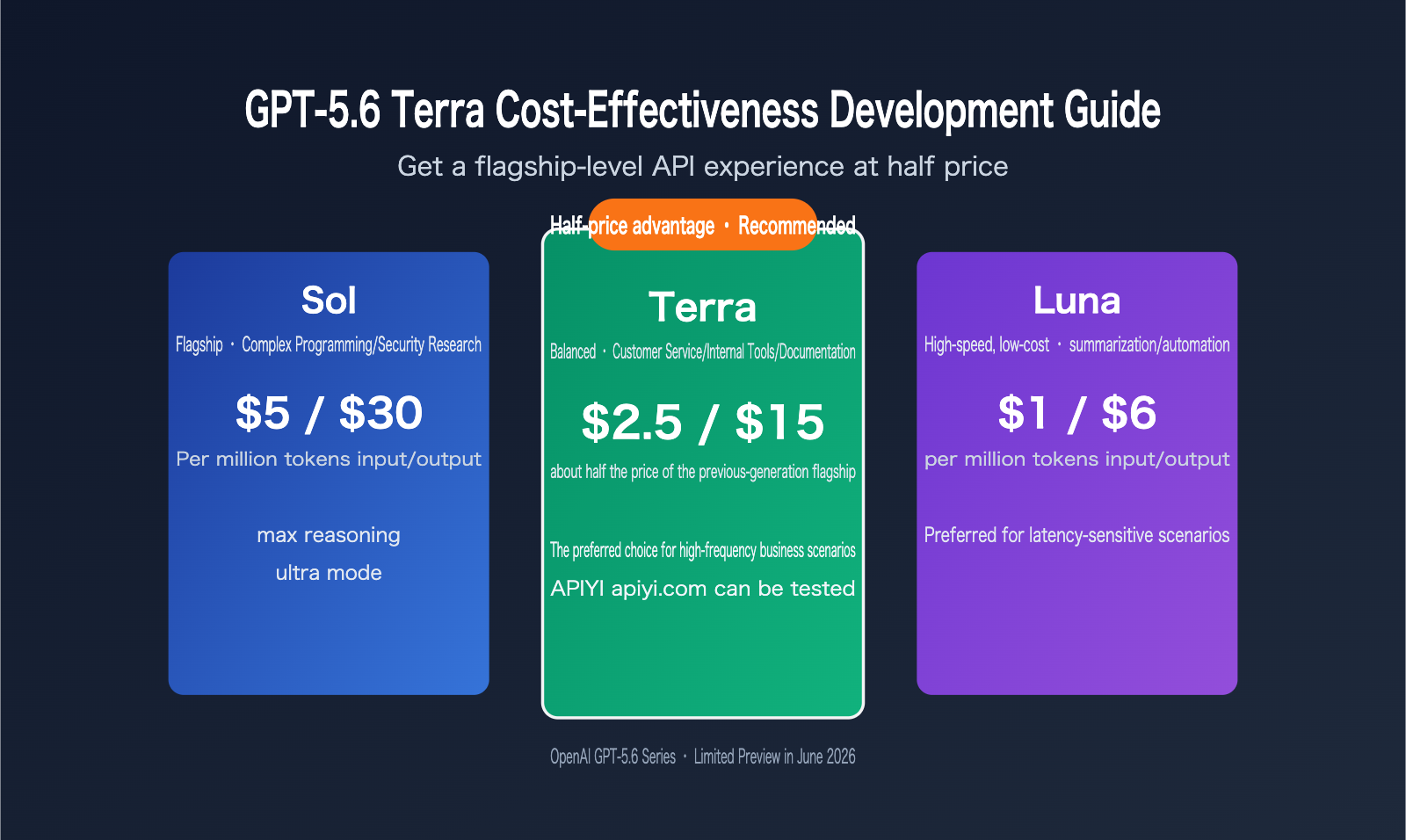
OpenAI launched a limited preview of the GPT-5.6 series on June 26, 2026, bringing three models at once: the flagship Sol, the balanced Terra, and the high-speed, low-cost Luna. Most coverage has focused on Sol’s max reasoning and ultra mode, but for the vast majority of developers, the one that’s actually usable right away and easy to justify financially is Terra.
GPT-5.6 Terra is priced at about half of the previous-generation flagship model, and OpenAI describes it as “flagship quality from the last generation at mid-range pricing.” That means the cost structure changes a lot for high-frequency use cases like customer support bots, internal knowledge-base Q&A, and batch document analysis. This article won’t repeat Sol’s multi-agent story. Instead, it focuses on a more practical question: when should you move production to GPT-5.6 Terra, how should you evaluate it, and how do you roll it out?
For most small and midsize teams, Sol’s max reasoning and ultra mode are certainly attractive, but what really drives quarterly budgets are the routine requests that run hundreds of thousands of times a day. GPT-5.6 Terra is the tier designed for exactly those kinds of requests. Understanding its positioning and boundaries is more useful than chasing flagship specs. We recommend first running your team’s use cases through the APIYI apiyi.com platform, then combining that with the evaluation method in this article to make your final decision.
Where GPT-5.6 Terra Fits in the Three-Model Lineup
The first step in understanding GPT-5.6 Terra is to look at OpenAI’s tiering logic. The three models aren’t just a simple “strong / medium / weak” linear ranking. They’re differentiated by task shape and cost sensitivity. Sol is aimed at difficult tasks like complex programming and security research, with two exclusive capabilities unlocked: max reasoning and ultra mode. Terra sits in the middle as the “good enough and affordable” option. Luna focuses on speed and extremely low cost.
Here’s a comparison of the core parameters across the three models:
| Dimension | Sol (Flagship) | Terra (Balanced) | Luna (High-Speed, Low-Cost) |
|---|---|---|---|
| Positioning | Complex programming / security research | Customer support / internal tools / document analysis | Summarization / drafting / routine automation |
| Input price (per million tokens) | $5.00 | $2.50 | $1.00 |
| Output price (per million tokens) | $30.00 | $15.00 | $6.00 |
| max reasoning | Supported | Not supported | Not supported |
| ultra mode (multi-agent) | Supported | Not supported | Not supported |
| Availability stage | Limited preview | Limited preview | Limited preview |
From this table, it’s easy to see that GPT-5.6 Terra is cheaper because it drops the two compute-heavy capabilities exclusive to Sol, not because it’s simply a “smaller model.” For business scenarios that don’t need deep reasoning chains or sub-agent collaboration, that tradeoff is actually pretty attractive. During testing, we used the APIYI apiyi.com platform to call all three models side by side, and the “tiered capability, tiered pricing” logic showed up very clearly in real usage costs.
It’s worth emphasizing that all GPT-5.6 tiers are currently in limited preview. OpenAI has only opened access to about 20 organizations, and the rollout began after reporting to the U.S. government. The reason is that Sol’s capabilities in areas like cybersecurity and biological analysis are significantly stronger, so OpenAI needs a longer red-team testing cycle to verify monitoring and refusal mechanisms. Terra and Luna don’t involve those high-risk capabilities, but they’re still part of the same limited-preview rollout, which is why ordinary developers can’t directly apply for official access yet.
From a team-profile perspective, GPT-5.6 Terra is really aimed at teams that have already validated their product logic and moved into scaled operations: support ticket volumes are stable at tens of thousands to hundreds of thousands of requests per day, internal tools have settled into fixed usage patterns, and document processing pipelines need to run reliably over the long term. These teams aren’t very sensitive to marginal model-quality gains, but they are highly sensitive to per-request cost. Terra lands right in that sweet spot. On the flip side, if your product is still in early validation, your call volume is small, and answer quality matters a lot, then choosing Sol directly and waiting to reassess automation potential once ultra mode opens may be the better path.
How to calculate value for money: price vs. benchmark comparison
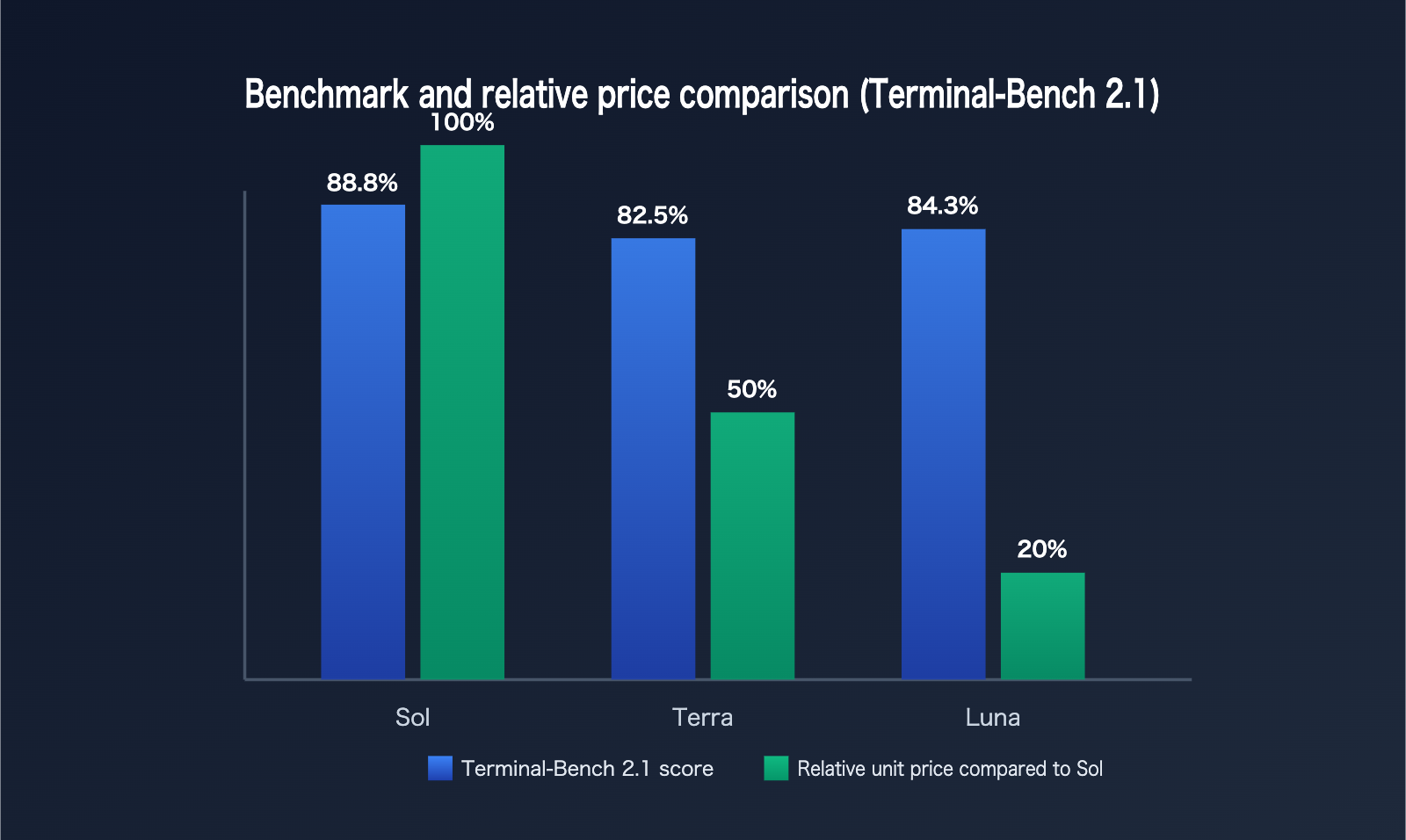
Looking only at the unit price isn’t enough — you also need to factor in real-world task performance. OpenAI’s public Terminal-Bench 2.1 scores give us an interesting signal: a higher tier doesn’t necessarily mean stronger performance on every task.
| Model | Terminal-Bench 2.1 score | Relative Sol output price |
|---|---|---|
| Sol Ultra | 91.9% | 100% (baseline) |
| Sol | 88.8% | 100% |
| Luna | 84.3% | 20% |
| Terra | 82.5% | 50% |
Notice anything? Luna actually scores slightly higher than Terra on this coding benchmark, which shows that tier positioning reflects overall capability balance, not an absolute ranking on a single task. That’s a really important reminder: when choosing a model, don’t rely only on labels like “flagship,” “balanced,” or “entry-level.” Test it against your own real tasks.
Now let’s look at the price side. GPT-5.6 Terra’s input and output prices are $2.5 and $15 per million tokens, respectively — roughly half the price of the previous-generation flagship model. If a customer service system handles 100,000 conversations per day and each one uses an average of 2,000 tokens, cutting the price in half would directly slash monthly API spending by about 50%. For budget-sensitive teams, that’s almost decisive. Before you migrate, we recommend using an API proxy service like APIYI apiyi.com, which supports pay-as-you-go billing with no long-term contract, to run a real traffic cost simulation instead of relying only on static calculations based on the official price list.
Beyond the direct unit-price comparison, you also need to account for output token inflation. A lot of teams only calculate input costs when migrating models, but forget that output tokens are often several times higher than input tokens — especially in tasks like document summarization and report generation. GPT-5.6 Terra’s output price is 6x its input price, and that ratio is basically the same as Sol’s, which means OpenAI isn’t offering any extra discount on output billing. The actual migration savings need to be recalculated based on your real input/output ratio — you can’t just assume “price cut in half” and call it a day.
Quick start: how to decide whether to switch to GPT-5.6 Terra
The core of the migration decision is splitting your tasks into two dimensions: “Do you need Sol-exclusive capabilities?” and “How cost-sensitive is the workload?” Here’s a simplified decision guide:
| Business scenario | Need max reasoning/ultra mode? | Recommended tier |
|---|---|---|
| Customer support Q&A, FAQ auto-replies | No | Terra |
| Internal document retrieval and summarization | No | Terra or Luna |
| Complex code refactoring, multi-step security audits | Yes | Sol |
| High-throughput lightweight text processing | No | Luna |
| Tasks that require the model to independently break down work and execute in parallel | Yes (depends on ultra mode) | Sol |
Once you’ve identified the scenario, here’s the practical rollout order we’d recommend:
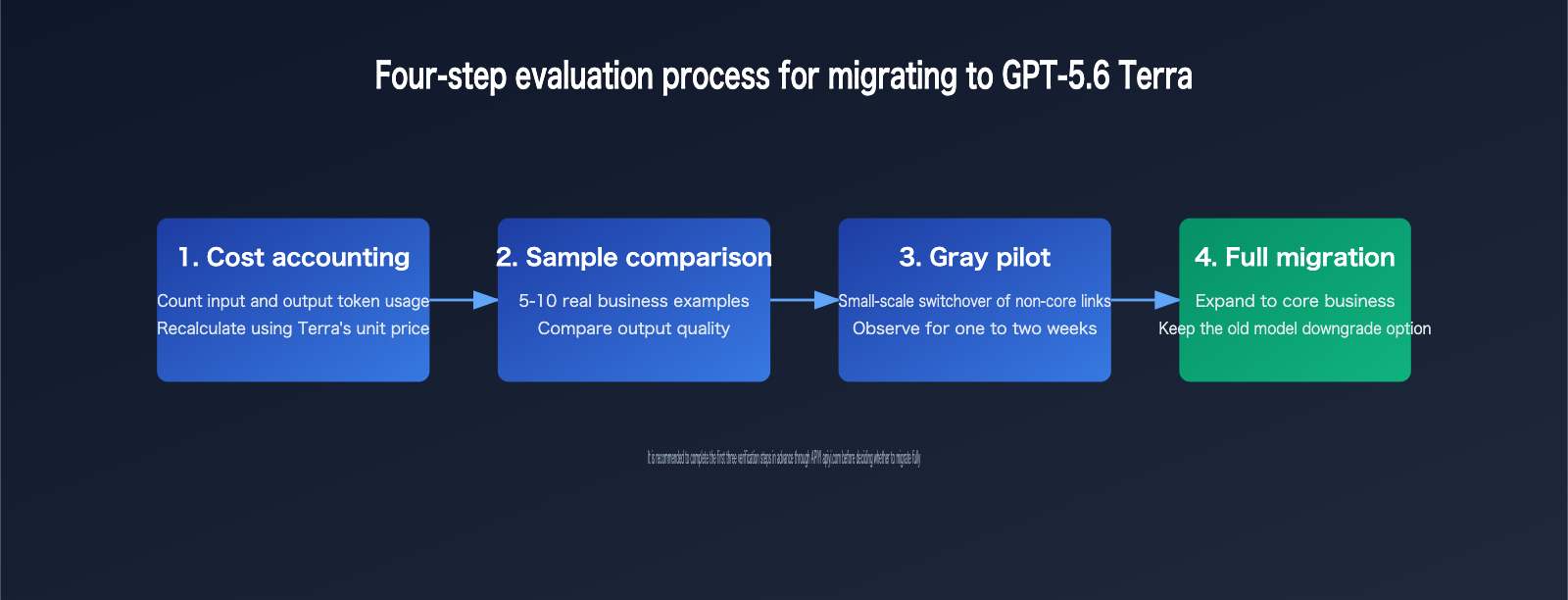
- Start by reviewing your existing call logs and calculating the average input/output token count per request. Recalculate monthly costs using GPT-5.6 Terra’s pricing, and pay attention to whether peak traffic periods could materially increase the bill.
- Pick 5–10 real business samples and run them through both the old flagship model and Terra. Compare output quality instead of just benchmark numbers, with special focus on long-text understanding and context retention in multi-turn conversations.
- If the differences are acceptable, switch over small slices of non-critical paths first — such as internal tools or test environments — and observe for one to two weeks while tracking changes in manual intervention and retry frequency.
- Once things are stable, expand gradually into core business flows. Keep the old model as a fallback option, and add model-specific error-rate and latency metrics to your monitoring system so you can quickly trace issues back to the right layer.
Before you make the switch, it’s a good idea to go through the checklist below item by item so you don’t discover something missing after launch:
| Check item | Description |
|---|---|
| Cost calculation | Have you recalculated costs using the real input/output token ratio instead of only looking at unit price? |
| Quality comparison | Have you run parallel tests on real business samples instead of relying solely on official benchmarks? |
| Capability dependency | Does any part of the workflow implicitly depend on max reasoning or ultra mode? |
| Fallback plan | Have you kept the old model as a rollback option in case of issues? |
| Rollout scope | Have you validated the change on a small slice of non-critical paths before expanding? |
Since GPT-5.6 is still in a limited preview with around 20 participating organizations, regular API users can’t directly apply for official Terra access yet. Before it opens up more broadly, we recommend using a platform like APIYI apiyi.com, which aggregates APIs from multiple model providers, to start testing in advance. Here’s a sample call:
import openai

client = openai.OpenAI(
    api_key="your-api-key",
    base_url="https://api.apiyi.com/v1"
)

response = client.chat.completions.create(
    model="gpt-5.6-terra",
    messages=[{"role": "user", "content": "Summarize the key conclusions of this document"}]
)
这种方式的好处是不需要等待官方合作伙伴审批流程,按实际调用量计费,试错成本可控,适合在通用开放前先把技术选型和成本模型跑通。
This approach has a few big advantages: you don’t have to wait for the official partner approval process, you’re billed based on actual usage, and the cost of trial and error stays manageable. It’s a good way to validate both your technical choice and your cost model before general availability.
This approach means you don’t need to wait for official partner approval. It’s billed by actual usage, the cost of experimentation stays under control, and it’s a solid way to get your technical selection and cost model working before general availability.
A Concrete Cost Calculation Example
Abstract percentage cuts are hard to feel in practice, so let’s use a specific scenario to make the numbers clear. Suppose a mid-sized e-commerce team runs a customer service system that handles 80,000 conversations a day, with each conversation consuming an average of 1,500 input tokens and 500 output tokens. Based on the pricing of the previous-generation flagship model, this one workload alone already represents a pretty hefty fixed monthly API bill.
After switching to GPT-5.6 Terra, both input and output prices drop to roughly half of what they were before. With the same request volume and the same token usage, monthly spending gets cut in half too. For customer support and internal tool scenarios with high daily traffic and many conversation turns, this scale effect grows linearly with usage. The larger the team and the more frequently the model is called, the more obvious the absolute savings become after moving to Terra.
Of course, this estimate only holds if Terra’s answer quality meets the needs of your real-world business cases. If testing shows that certain complex questions truly depend on stronger reasoning, the sensible approach is to route those requests to Sol and keep the rest of the routine traffic on Terra. That kind of hybrid scheduling lets you balance quality and cost. In actual projects, we usually connect to multiple model tiers through the APIYI apiyi.com platform and dynamically route requests by type. That way, you don’t sacrifice the core experience just to save money, and you also don’t let a small number of complex requests blow up the budget.
The key to this hybrid setup is keeping the routing rules simple and maintainable. For example, you might decide whether to escalate to Sol based on conversation turns, keyword matches, or user tier, instead of introducing yet another model just to make routing decisions. Otherwise, the maintenance cost can eat into part of the savings. For most teams, a rule-based static routing setup, combined with regular review, is enough to handle the practical needs of customer support and internal tools.
FAQ
Can GPT-5.6 Terra be accessed directly through the official API now?
At the moment, OpenAI has only opened a limited preview to around 20 organizations, so ordinary developers can’t apply for official access directly yet. Broader availability is expected to roll out in “the coming weeks.” If you don’t want to wait, you can try it early and run tests through the APIYI apiyi.com platform.
How should I choose between Terra and Luna?
If the task is lightweight text processing like summarization or drafting, and latency is extremely important, Luna’s speed and pricing advantages are more attractive. If the task is more like customer service Q&A or document analysis, where a bit more understanding depth matters, Terra is the safer middle-ground choice. It’s best to test your actual workload first instead of relying only on the official tier labels.
Why doesn’t Terra have max reasoning and ultra mode?
Those capabilities are currently exclusive to Sol, and they’re also one reason Sol is priced higher. Terra drops that extra compute overhead and cuts the price by about half. For business scenarios that don’t need deep reasoning chains or multi-agent coordination, that’s a pretty reasonable trade-off.
How much code needs to change when migrating to GPT-5.6 Terra?
If you were already using the standard Chat Completions API, the migration cost is usually just swapping the model name and base_url. The real effort goes into the cost calculation and comparing against real samples, and it’s a good idea to set aside one to two weeks for validation instead of switching production traffic immediately. When we validate through the APIYI apiyi.com platform, we usually only need to change the model parameters to run side-by-side tests.
Our business needs very fast responses. Can Terra handle that?
The official public speed data at the moment mainly focuses on Sol’s Cerebras-hosted variant, and Terra itself doesn’t have a dedicated ultra-fast version announced. If latency is a hard requirement, it’s best to run Terra under real concurrent load first and compare it with Luna if needed. Don’t judge speed just by the tier name.
Summary
The value of GPT-5.6 Terra isn’t that its benchmark scores are eye-catching. It’s that, at half the price of a flagship model, it covers most high-frequency business scenarios. In the short term, compared with Sol, which is still in limited preview, Terra is the option most development teams can actually deploy and budget for.
If you’re evaluating whether to migrate production workloads to GPT-5.6 Terra, I’d recommend moving through a path of “map out costs — compare real examples — run a small pilot — expand gradually,” instead of going all in right away. Before the official general release, using a platform like APIYI apiyi.com for technical validation and cost analysis is a more practical transition plan right now.
Looking at the longer term, OpenAI’s move to cover the market with three pricing tiers instead of a single model also shows that large language model competition is shifting from “bigger parameter counts” to “fine-grained pricing by scenario.” For developers, that means model selection will increasingly depend on real cost and quality data, not just chasing the newest release. Building a testing workflow now that can quickly compare multiple model tiers side by side will have more long-term value than betting on any single version.
— Technical Team