When using the Nano Banana Pro API for architectural rendering, product image base-layering, or e-commerce scene generation, you might encounter a head-scratcher: you upload two reference images and write a clear prompt, but the result looks like a "carbon copy" of one of the originals, completely ignoring your editing instructions. This phenomenon has become significantly more frequent since the launch of Gemini 3.1 Flash Image in February 2026, and discussions on the Google AI Developers Forum confirm that the Pro model has become "highly unstable" in multi-reference image scenarios.
This article dives into the API invocation mechanism, using a real-world "architectural wireframe + finished rendering" case study to explain the 5 major triggers for why Nano Banana Pro returns the original image, and provides 8 actionable solutions. All code examples are based on the APIYI (apiyi.com) platform, which has implemented stability enhancements for the Gemini 3 Pro Image series, making it perfect for testing the fix prompts provided here.
1. Typical Symptoms of the Nano Banana Pro "Returning Original Image" Issue
Let's look at a real case: A user is working on architectural rendering and uploads two reference images—Image 1 is an unfinished wireframe (concrete structure, 4.9 MB), and Image 2 is the finished rendering (glass curtain walls, landscaping, sunset lighting, 13.8 MB). The prompt, written in Simplified Chinese, asks to "render Image 1 based on Image 2. Color: Use a cool, sophisticated palette… Style: Typical commercial photorealistic rendering…" The goal is to borrow the style and materials from Image 2 to render the structure of Image 1. Instead, the model returns an image almost identical to Image 2, with almost no structural information from Image 1 present in the output.
This isn't an isolated incident. On the Google AI Developers Forum, developers have reported that "the model's downsampling of reference images is too aggressive to recognize details," noting that the issue worsened after the release of Gemini 3.1 Flash Image. Troubleshooting documentation from third-party platforms like Replicate, Atlas Cloud, and AI Free API also includes similar "direct output of reference image" cases, though the trigger conditions vary slightly.
1.1 Frequency and Scope of Impact
The table below summarizes the relative trigger probability of the "Nano Banana Pro does not modify the image" phenomenon across different use cases, based on community feedback and platform monitoring samples.
| Use Case | Trigger Probability | Impact Level |
|---|---|---|
| Single reference image editing | Low | Only minor detail drift |
| Dual-image base-layering (style transfer) | Medium-High | Output approximates one of the originals |
| Multi-image composition (3+ images) | High | Model favors the last image |
| Peak US/EU traffic hours | Significantly Increased | Overall detail quality drops |
| Sensitive scenes (portraits/brands) | Occasional | Refusal to edit or direct fallback |
🎯 Diagnostic Advice: If you are doing e-commerce, architectural, or product image base-layering and the "return original image" frequency exceeds 10%, it's usually not a single cause, but a combination of prompt, parameters, and infrastructure. We recommend using the unified interface on the APIYI (apiyi.com) platform to compare the output differences between Nano Banana Pro and Nano Banana 2 using the same prompt; this can help you quickly determine whether the issue lies at the model layer or the prompt layer.
2. Five Technical Reasons Why Nano Banana Pro Returns the Original Image
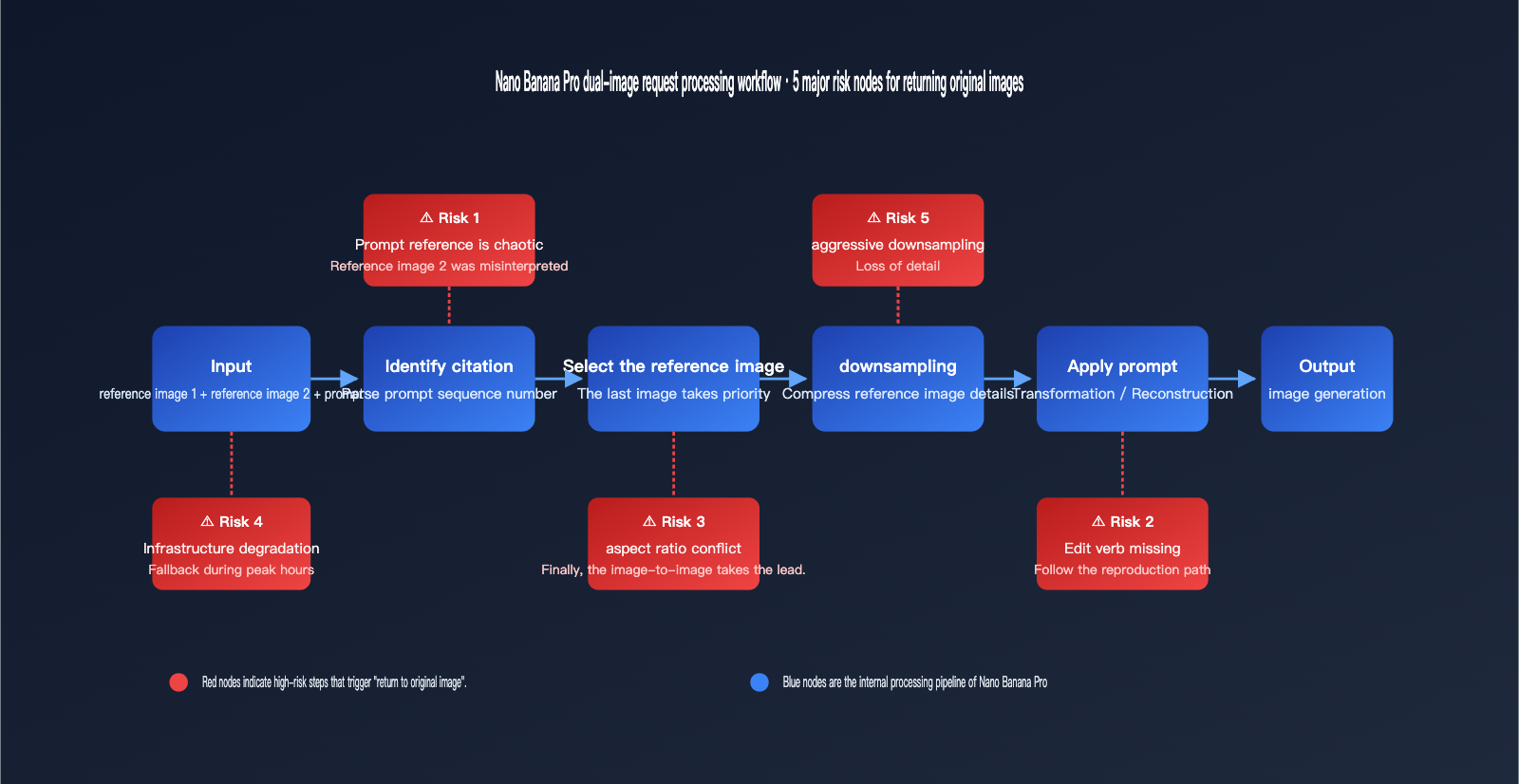
2.1 Reason 1: Ambiguous Prompt References Lead the Model to Default to Copying "Image 2"
The most common reason Nano Banana Pro returns the original image is that prompt references like "refer to image 2" are misinterpreted by the model as a command to "output a copy of image 2." Google DeepMind's official prompt guide explicitly recommends using semantic naming for multi-image inputs (e.g., "the wireframe," "the rendered building") rather than purely positional identifiers like "image 2."
While a Chinese prompt like "参照图2渲染图1" (render image 1 in the style of image 2) makes sense to us, the model often prioritizes the most visually complete signal during decoding—which is usually the already-rendered image 2. When the latter part of your prompt describes the colors or materials of image 2 in detail, the model easily mistakes image 2 for the "target output" rather than just a style reference.
2.2 Reason 2: Missing Editing Verbs Force the Model into "Reconstruction"
The core mechanism of Gemini 2.5 and Gemini 3 Pro Image is based on natural language-driven image transformation. If your prompt lacks clear editing verbs (e.g., transform, render, apply, replace, composite), the model tends to default to a "reconstruction" path when handling multiple images. Instead of performing an actual edit, it reconstructs a similar image based on the strongest visual signal it finds.
Official prompt templates from DataCamp and the Google Developers Blog suggest structures like: Take the [element from image 1] and place it with/on the [element from image 2], or Using the provided image of [subject], please [add/remove/modify] [element]. These templates use explicit verbs to anchor which image is the object to be modified and which is the style reference. This is the most common missing piece in Chinese prompts.
2.3 Reason 3: Aspect Ratio Conflicts and the "Last Image" Dominance
The Nano Banana series has a subtle official rule: When multiple images are provided, the model defaults to the aspect ratio of the final reference image. This is noted in DataCamp tutorials and the Google Developers Blog, but it's frequently overlooked in practice.
In many user cases, image 2 (the finished rendering) is a 16:9 landscape, while image 1 (the wireframe) is closer to 4:3 and smaller. When the model adopts the aspect ratio of image 2, it’s geometrically easier to lay out the composition of image 2 rather than regenerating based on image 1. This often compounds with Reason 1, leading to the "direct output of image 2" result.
2.4 Reason 4: Infrastructure Downgrades and Silent Fallbacks During Peak Times
Since February 2026, Google has set Nano Banana 2 as the default entry point in the Gemini App, while the Pro model is tucked away under the "three-dot menu → Regenerate" path. During this same period, silent fallbacks have occurred on the API side during peak hours. Posts on the Google AI Developers Forum from May 18th (the day before Google I/O) explicitly noted that "image generation quality drops significantly around major releases."
The symptom: The model still returns a 200 status code, but it may have switched to a smaller sub-model or skipped certain post-processing steps, leading to distorted details and poor prompt adherence. In these cases, even with a perfect prompt, the probability of Nano Banana Pro image-to-image failure increases, and the failure often manifests as "returning an approximation of the original image."
2.5 Reason 5: Aggressive Downsampling of Large Reference Images
The same Google AI Developers Forum thread pointed out: "The model downsamples reference images so aggressively that it fails to recognize or reproduce details." When a reference image is near or exceeds 13 MB, the model may perform significant scaling during internal preprocessing, causing critical structural information (like building beams, product labels, or facial expressions) to be compressed into blurriness.
If the details in image 1 become unrecognizable after downsampling, the model naturally relies on the other, "clearer" reference image during synthesis, resulting in an output that looks like a copy of image 2. This is why the failure rate varies significantly for the same prompt when using reference images of different resolutions—many developers blame the prompt, when the real issue is that the model simply "can't see" the reference image clearly.
3. 8 Practical Fixes: Making Nano Banana Pro Truly "Edit by Image"
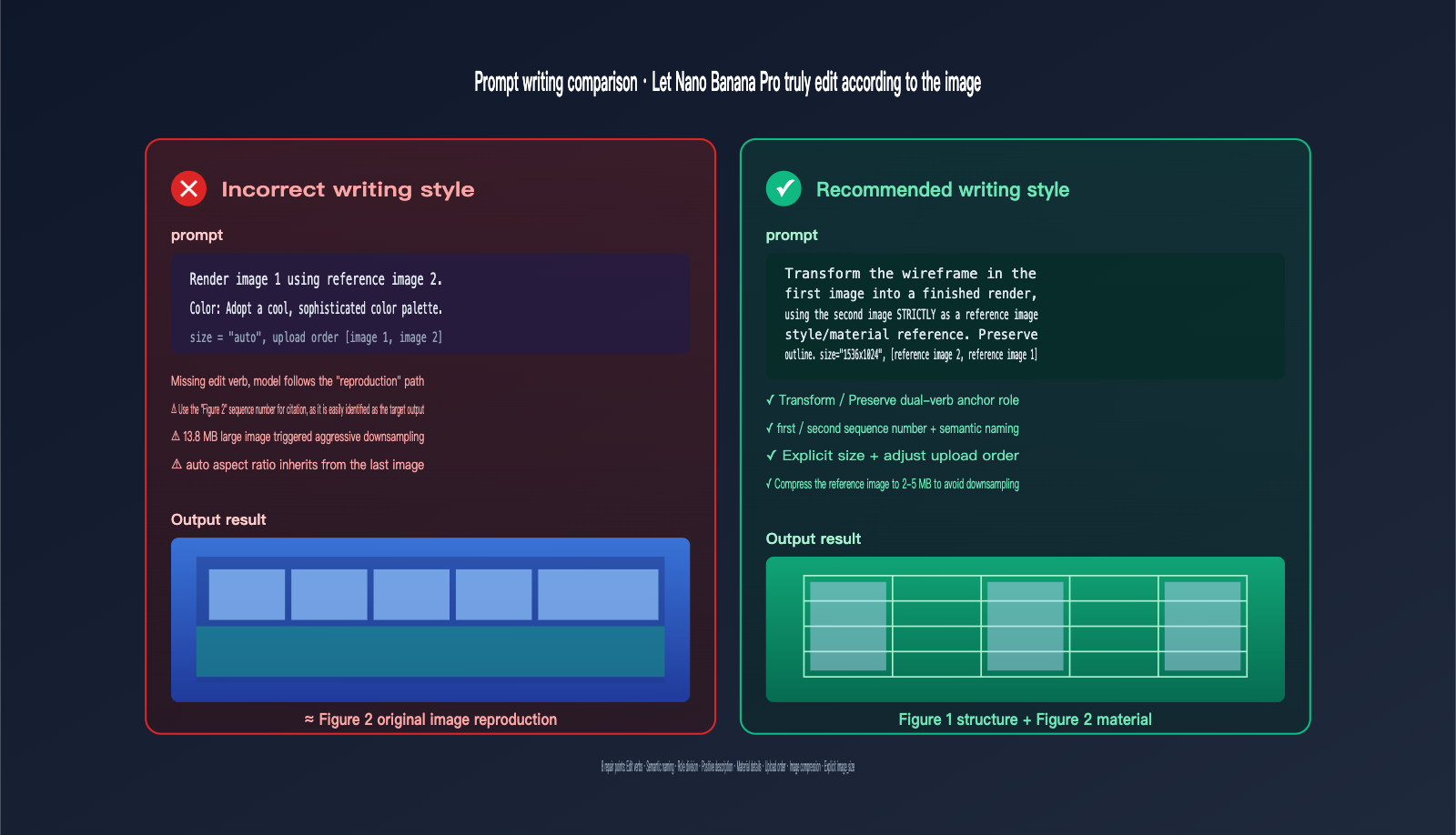
The core strategy for fixing Nano Banana Pro returning the original image is simple: don't rely on the model to guess your intent. Instead, clearly define which image is the base, which is the reference, and what transformation is required, while using API parameters as a safety net. Here are 8 actionable fixes, divided into prompt and parameter levels.
3.1 Five Prompt-Level Fixes
| No. | Fix | Incorrect Approach | Recommended Approach |
|---|---|---|---|
| 1 | Add action verbs | "Refer to image 2 to render image 1" | "Transform image 1 using image 2 as reference" |
| 2 | Use semantic names | "Image 1, Image 2" | "the wireframe / the finished rendering" |
| 3 | Clarify roles | (No explanation) | "use the first as structure base, the second as style reference" |
| 4 | Describe goals positively | "Don't change it to image 2" | "preserve the original building outline from the first image" |
| 5 | Combine with specific material requirements | "Use cool tones" | "apply the cool-toned glass facade and warm interior glow from image 2 onto the structure from image 1" |
💡 Prompt Template: For "structure + style" dual-image tasks like architectural rendering, we recommend using this fixed template structure:
[Action verb] + [structural reference from image A] + [style/material reference from image B] + [explicit constraints]. On the APIYI (apiyi.com) platform, you can encapsulate this template as a standard system prompt, then run A/B tests between Nano Banana Pro and Nano Banana 2 with minimal iteration costs.
3.2 Three Parameter-Level Fixes
| No. | Fix | Explanation |
|---|---|---|
| 6 | Control upload order | Place the "target for editing" last so the model adopts its aspect ratio |
| 7 | Limit reference image size | Compress single images to 2-5 MB to avoid aggressive downsampling |
| 8 | Explicitly specify image_size |
E.g., 1024×1024 or 1536×1024, to reduce aspect ratio conflicts |
It's worth noting that in some versions of Gemini 3 Pro Image, there have been reports of the image_size parameter being ignored (see Google AI Developers Forum case 110458). Therefore, Fix 6 and Fix 8 should generally be used together to ensure the final aspect ratio matches your expectations. If you only set image_size without adjusting the upload order, the aspect ratio may still be overwritten by the last image in some versions.
4. Complete Example of Nano Banana Pro Image-to-Image API Invocation
4.1 Error Example: Common Pitfalls That Trigger the Original Image Return
The following code snippet reproduces the failure scenario often encountered by users: confusing prompt references, missing transformation verbs, lack of aspect ratio control, and uncompressed reference images.
import openai

client = openai.OpenAI(
    api_key="your-apiyi-key",
    base_url="https://api.apiyi.com/v1"
)

response = client.images.edit(
    model="gemini-3-pro-image-preview",
    image=[
        open("wireframe.jpg", "rb"),    # 4.9 MB
        open("rendered.jpg", "rb"),     # 13.8 MB, uploaded last
    ],
    prompt="参照图2渲染图1。色彩: 采用清冷的高级色调。",
    size="auto",
    n=1,
)
In multi-image scenarios, the model is highly likely to treat rendered.jpg as the dominant signal, outputting a replica close to the second image. The three core risks here are: the Chinese phrase "参照图2" (refer to image 2) is misinterpreted as the target output, the lack of explicit transformation verbs, and the fact that setting size to auto causes the aspect ratio to be dominated by the largest image.
4.2 Fixed Example: Editing Images Effectively with Nano Banana Pro
import openai

client = openai.OpenAI(
    api_key="your-apiyi-key",
    base_url="https://api.apiyi.com/v1"
)

prompt = (
    "Transform the unfinished concrete wireframe structure in the first image "
    "into a fully rendered architectural visualization. "
    "Use the second image STRICTLY as a STYLE and MATERIAL reference: "
    "apply its cool-toned glass facade, warm interior glow, surrounding greenery "
    "and dusk lighting onto the structure from the first image. "
    "Preserve the building outline, floor count and balcony arrangement "
    "exactly as shown in the first image. "
    "Do NOT replace the geometry with the second image."
)

response = client.images.edit(
    model="gemini-3-pro-image-preview",
    image=[
        open("rendered_compressed.jpg", "rb"),   # Style reference, compressed to ~3 MB
        open("wireframe_compressed.jpg", "rb"),  # Object to be edited placed last
    ],
    prompt=prompt,
    size="1536x1024",
    n=1,
)
There are four key improvements here: using English to clearly define the roles ("transform A using B as reference"); adjusting the upload order so the wireframe (the object being edited) is the "last image" to dictate the aspect ratio; explicitly specifying the size to avoid inheriting the high resolution of the reference image via auto mode; and compressing both reference images to under 5 MB to prevent aggressive downsampling.
🚀 Quick Start Tip: Developers looking to verify these fixes can call both Nano Banana Pro and Nano Banana 2 with the same prompt directly on APIYI (apiyi.com). The platform provides a unified, OpenAI-compatible interface, so you don't need to write separate adapter code for each model—you can get A/B comparison results in just 5 minutes.
5. Nano Banana Pro Image-to-Image FAQ
Q1: Why does the model return the original image when using Chinese prompts, but work fine with English?
The Gemini series has more stable semantic parsing for English. Chinese verbs and ordinal references (e.g., "refer to image X") are easily misinterpreted as "target output instructions" during underlying tokenization. We recommend writing key editing instructions (transform, preserve, apply) in English, while mixing in Chinese for scene descriptions. This preserves the nuance of your description while preventing the model from misinterpreting your intent.
Q2: Will shrinking all reference images to under 2 MB solve the problem?
Compressing images only mitigates the "downsampling distortion" issue; it doesn't resolve conflicts between the prompt and the aspect ratio. We recommend a three-pronged approach: compression + prompt rewriting + controlling the upload order. If you have high traffic, you can perform unified preprocessing before calling the API—convert reference images to JPG and compress them to 2–5 MB before sending them to the model.
Q3: Which is better for multi-image editing: Nano Banana Pro or Nano Banana 2?
| Model | Multi-image Stability | Detail Retention | Best For |
|---|---|---|---|
| Nano Banana Pro (Gemini 3 Pro Image) | Medium (fluctuates) | High | High-quality single-image editing, branding |
| Nano Banana 2 (Gemini 3.1 Flash Image) | Higher | Medium (slightly plastic) | Batch processing, e-commerce images |
In practice, if you have extremely high requirements for detail (e.g., architectural rendering, high-fidelity product shots), you can use Nano Banana 2 for a stable base output, followed by Nano Banana Pro for fine-tuning. This "draft + refinement" layering approach balances stability and quality.
Q4: If the model returns the "original image," will retrying solve it?
If it's just a temporary infrastructure degradation during peak hours, retrying 1–3 times is effective. However, if the issue is at the prompt or parameter level, retrying 100 times will yield the same result. The judgment is simple: if the same set of parameters consistently fails at different times, you can rule out infrastructure issues and should focus on the prompt. Conversely, if it works fine during off-peak hours, it was likely a temporary degradation.
Q5: Is this fix applicable to other models (Flux Kontext, Seedream)?
The prompt engineering parts (semantic naming, editing verbs, role assignment, positive descriptions) are applicable to all mainstream image-to-image models. However, the "last image dictates aspect ratio" rule is specific to the Nano Banana series; Flux and Seedream have their own reference image weighting mechanisms. If your business spans multiple models, the unified interface on APIYI (apiyi.com) allows you to maintain a single prompt template while adapting to different models via parameter differentiation.
Summary
The tendency of Nano Banana Pro to return the original image is essentially a byproduct of "multi-image input + vague prompts + infrastructure fluctuations" under the model's default behavior, rather than a simple bug. By understanding the model's preference for the "last image," its reliance on editing verbs, and its downsampling strategy for reference images, you can use 80% of prompt adjustments to cover 90% of failure scenarios.
For teams working on multi-image tasks like architectural rendering, product photography, or e-commerce image generation, we recommend distilling the 8 solutions mentioned above into prompt templates and invocation standards, solidifying them for your production environment based on specific business types. In the long run, this will significantly reduce re-run costs and manual rework rates, allowing you to truly leverage the high-quality output capabilities of Nano Banana Pro.
This article was compiled by the APIYI Team, focusing on the practical implementation of Large Language Model APIs. To view the latest Nano Banana Pro invocation examples and stability data, please visit the official APIYI website at apiyi.com.