The Codex CLI plugin system is rapidly taking shape. With the /plugins command, you can now browse, install, and toggle plugins by marketplace category, and more teams are packaging their internal toolchains into reusable Codex plugins. However, the self-service submission portal in the official Marketplace is currently in an "approval-only" phase. Developers need to understand the manifest structure and local debugging process, then complete the submission and review workflow before their plugins can truly reach users. This article breaks down the end-to-end process—from zero-to-build, local testing, and Git-based distribution to official review and publishing—while highlighting a few common pitfalls along the way.
What makes up a Codex plugin?
A Codex plugin is essentially a way to package various capabilities into an installable and distributable unit. According to official OpenAI documentation, plugins can include skills (reusable instruction sets), MCP-backed apps (services that connect to external tools), lifecycle hooks, and optional templates for browser extensions and scheduled tasks. These components don't all have to be present; a lightweight plugin containing only skills can be installed and used just fine.
Understanding the boundaries of each component is key to writing a solid manifest. The table below outlines the file paths and roles of the four core components in a Codex plugin directory:
| Component | Path | Role | Required |
|---|---|---|---|
| plugin.json | .codex-plugin/plugin.json |
Plugin identity and metadata | Yes |
| skills | skills/<skill-name>/SKILL.md |
Defines reusable task instructions | No |
| MCP servers | .mcp.json |
Configures external tool service connections | No |
| hooks | hooks/hooks.json |
Declares lifecycle hook commands | No |
It's worth noting that if your plugin is just a set of SKILL.md files for internal team use, you don't need to go through the full manifest process. Simply drop the files into the .agents/skills/ directory, and Codex will discover them automatically—no plugin manifest required. This is a common "intermediate" state for many teams transitioning from internal scripts to formal plugins.
The capabilities of a plugin are broader than most people realize. Beyond the two most common components—skills and MCP-backed apps—the documentation mentions that plugins can carry capability declarations for browser extensions and reusable templates for scheduled tasks. This means a plugin can handle both interactive requests triggered by the user and automated scenarios that run periodically in the background. Choosing which components to bundle into a single plugin is a trade-off between installation experience and maintenance costs. The more components you include, the more complete the plugin, but the more review materials and test cases you'll need to provide. Before submitting, it's best to think clearly about which capabilities your target users actually need, rather than stuffing every possible component into a single package.
Starting with plugin.json: A Deep Dive into Plugin Manifests
The plugin.json file is essentially your plugin's ID card; it determines how Codex identifies, loads, and displays your plugin. A minimal, functional manifest only requires four fields:
{
  "name": "my-first-plugin",
  "version": "1.0.0",
  "description": "Reusable greeting workflow",
  "skills": "./skills/"
}
For the name field, I recommend using a stable kebab-case format. You shouldn't change this identifier in future updates, otherwise, the marketplace won't be able to recognize it as the same plugin. The version field follows semantic versioning, which the marketplace uses to determine when to prompt users for an update. All paths referenced in the manifest must be relative to the plugin root directory, start with ./, and cannot point outside the plugin's root.
Beyond these basic fields, skills can also point to an array of multiple skill directories. The hooks, mcpServers, and apps fields point to their respective configuration files: hooks/hooks.json, .mcp.json, and .app.json. This "field-to-file" design keeps the manifest itself lean, offloading specific skill descriptions and tool configurations to independent files. This makes it much easier for teams to collaborate, as you can modify different components in parallel without running into conflicts.
If you plan to submit your plugin to the official Marketplace, you'll need to add some metadata for the display layer. The table below lists the key fields you should fill out before publishing:
| Field | Type | Description |
|---|---|---|
| author / repository | String | Identifies the plugin source; should match your verified identity |
| interface.displayName | String | The plugin name displayed in the marketplace list |
| interface.category | String | The plugin category, which affects user browsing paths |
| interface.capabilities | Array | Tags declaring the plugin's capabilities |
| mcpServers / apps / hooks | Object | Points to the configuration files for each component |
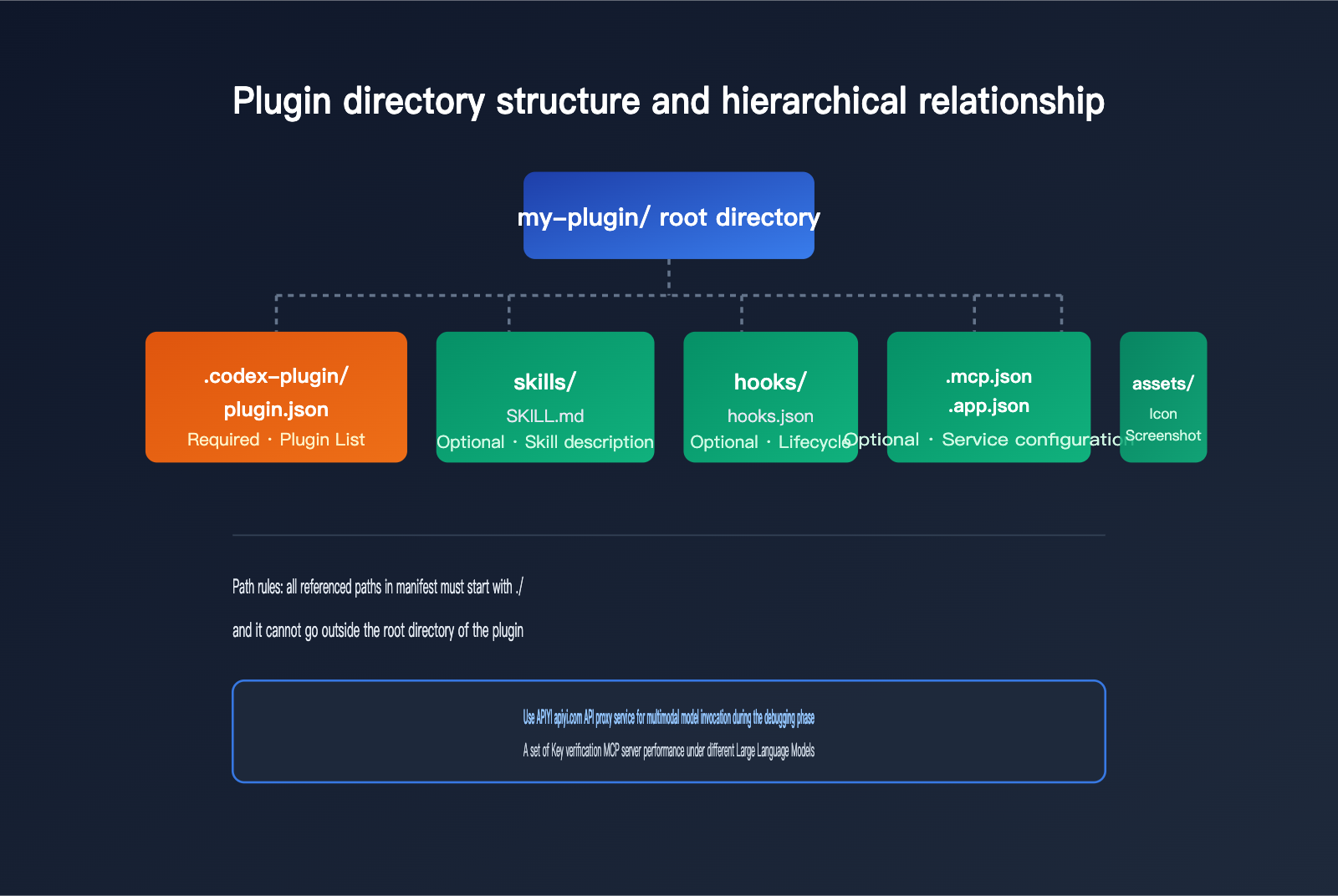
The most common pitfall when writing a manifest is path reference errors—like using absolute paths for the skills field or forgetting the leading ./. This can cause your plugin to work locally but fail validation during the review process. I suggest cloning your plugin repository into a clean directory before submission to simulate a real installation environment and run a full test.
Local Scaffolding and Debugging: Getting Your Plugin Running
Writing a manifest from scratch isn't the most efficient way to go. The official $plugin-creator skill is built-in to handle scaffolding; you can generate it conversationally right in the Codex CLI:
codex "Use the $plugin-creator scaffold to generate a plugin named infra-monitor"
This command automatically generates the manifest, a sample skill, and local marketplace entries, saving you the hassle of manually setting up the directory structure. Once generated, the plugin is ready for local installation and testing—no need to publish it to a remote repository first.
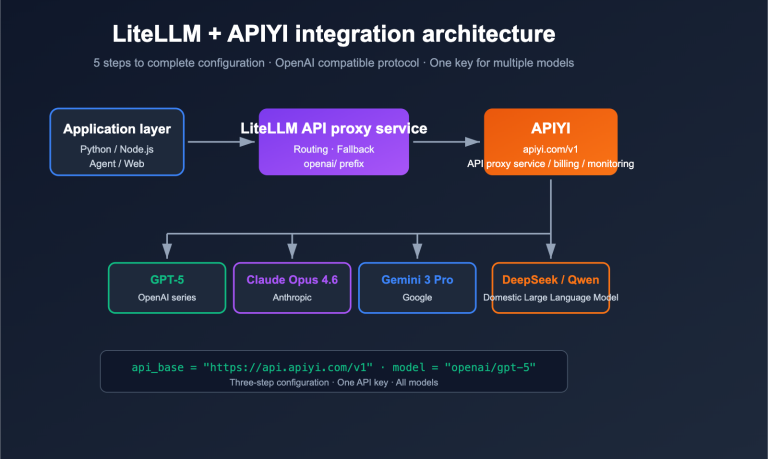
During local debugging, if your plugin's skills involve comparing model invocations from different providers, a unified API gateway can significantly reduce the overhead of switching environments. When verifying your plugin's MCP server capabilities, we typically point the base_url to the API proxy service provided by APIYI (apiyi.com). With a single API key, you can switch between different models within your plugin, making it easy to compare how each model performs with the same plugin logic:
from openai import OpenAI

client = OpenAI(
    api_key="your-apiyi-key",
    base_url="https://api.apiyi.com/v1"
)
🎯 Debugging Tip: During Codex plugin development, you'll often need to repeatedly test your MCP server's response quality across different models. We recommend using the APIYI (apiyi.com) platform to manage your model invocations centrally. This avoids the headache of requesting separate API keys for every model and maintaining independent invocation logic, letting you focus your energy on polishing the plugin's functionality.
Beyond manually setting up local marketplace entries, you can also declare local plugin paths directly in ~/.agents/plugins/marketplace.json (for personal use) or .agents/plugins/marketplace.json at the repository root (for team use). Just set the source field to local to point to your local directory, and you're good to go—no remote push required for installation verification.
If your plugin includes an MCP-backed app that requires ChatGPT Developer Mode for debugging, there's another path: enable Developer Mode in your ChatGPT settings, create an MCP-backed app to get the corresponding app ID, and then link that ID via $plugin-creator. This allows you to verify the data flow between your plugin and the app in a real conversation environment. This step is much closer to the real-world experience than pure command-line debugging, so I highly recommend walking through it at least once before submitting for review.
Git Marketplace Registration and Internal Distribution
Once your plugin has been verified locally, you don't need to wait for official approval to distribute it within your team—setting up a marketplace source using a Git repository is more than enough. The Codex CLI provides a set of dedicated commands for marketplace management:
| Command | Purpose |
|---|---|
codex plugin marketplace add owner/repo |
Adds a GitHub repository as a marketplace source |
codex plugin marketplace add owner/repo --ref v2.1.0 |
Locks to a specific branch or tag for canary releases |
codex plugin marketplace list |
Views the list of added marketplaces |
codex plugin marketplace upgrade |
Pulls marketplace updates |
codex plugin marketplace remove |
Removes a marketplace source |
For teams with large codebases, you can use the --sparse .agents/plugins parameter to pull only the plugin-related directory, preventing a full repository clone from slowing down the installation. This Git marketplace model is perfect for internal enterprise toolchains—it bypasses public review, and plugin updates only require pushing a new tag, after which team members can sync by running a single upgrade command.
From a practical standpoint, the Git marketplace model has a hidden advantage: it decouples plugin iteration from your team's internal release cycle. While business code might be merged multiple times a day, plugins are part of a conversational toolchain, and overly frequent updates can disrupt the user's mental model. I recommend binding plugin versions and tags to fixed release windows—merging changes weekly or bi-weekly. This ensures a steady pace of feature iteration without forcing your team to constantly adapt to new interaction patterns.
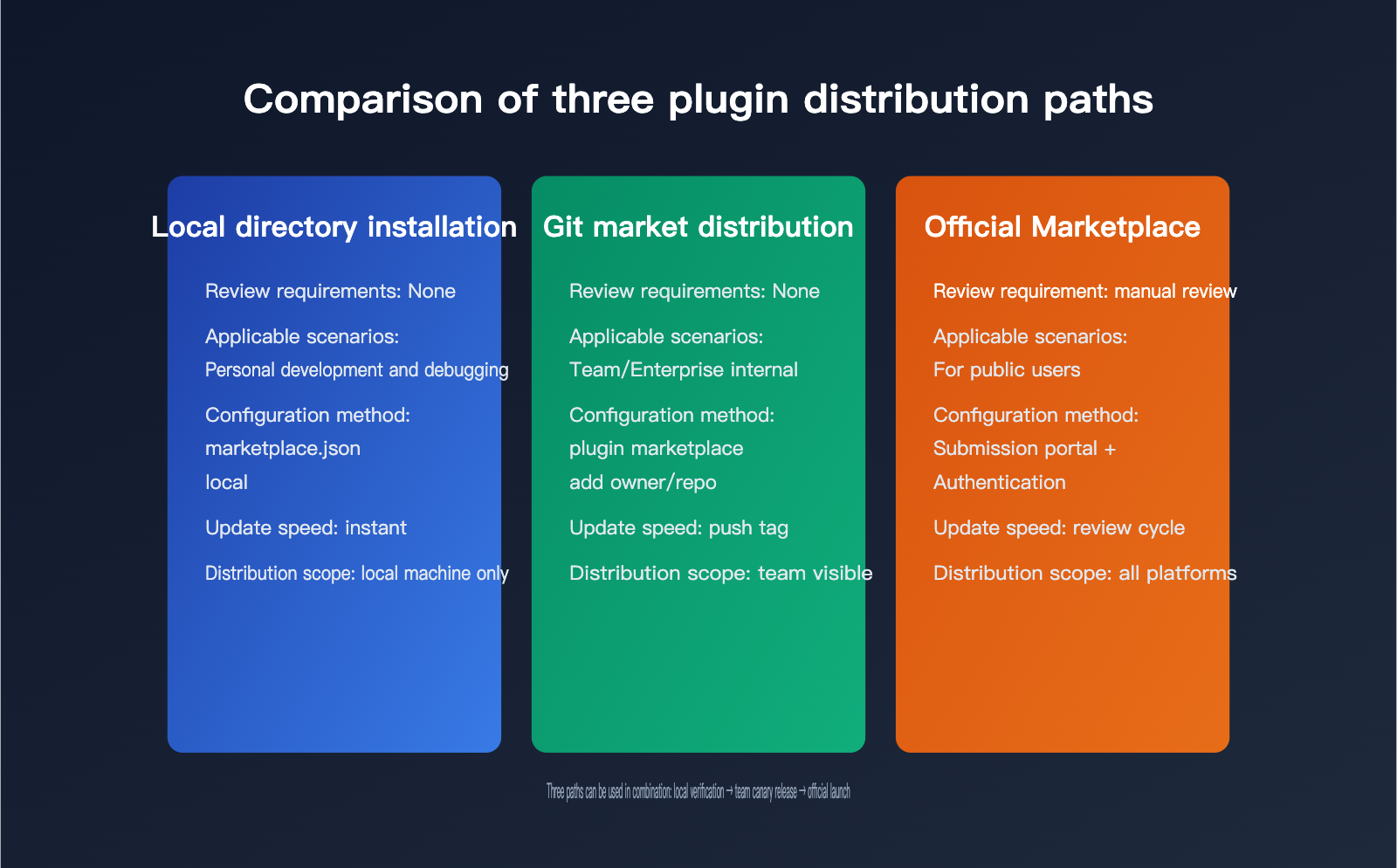
Official Marketplace Submission Process
As of now, the self-service onboarding for the official Marketplace isn't fully open; OpenAI's documentation notes that this is "coming soon." Currently, formal submissions for public users go through a manual review process via the plugin submission portal. Before submitting, you'll need to complete identity verification—individual developers must complete individual verification, while those publishing under a company name must complete business verification. Reviewers will check that the publishing identity matches the submitted materials.
Here is the checklist of materials required for a formal submission:
| Material Category | Specific Requirements |
|---|---|
| Plugin Basics | Name, description, logo, category, relevant URLs |
| MCP Server | Publicly accessible domain, CSP policy, authentication configuration |
| Demo Account | Must be directly accessible; no MFA or email secondary verification required |
| Test Cases | Exactly 5 positive scenarios + 3 negative scenarios |
| Tool Annotations | readOnlyHint, openWorldHint, and destructiveHint must match actual behavior |
The submission process is divided into several form sections: Info (public listing details), MCP (server and authentication configuration), Skills (uploading the final skill package), Prompts (example starting prompts), Testing (test cases), and Global (available countries and regions). Finally, you'll fill out the Submit section with release notes and confirm policies. Once approved, you choose the release timing within the portal, and the plugin will appear in the unified plugin directory for both ChatGPT and Codex.
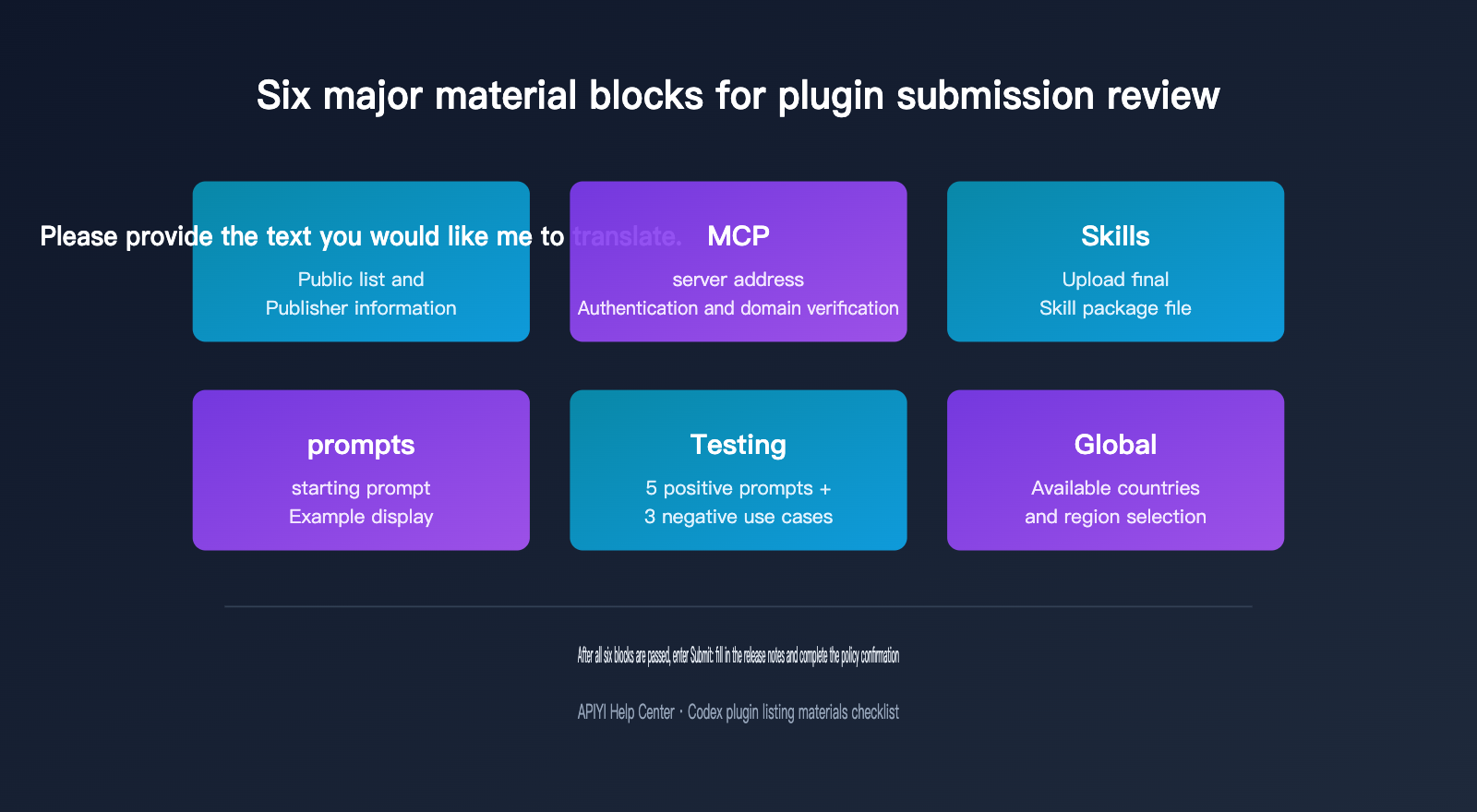
If your plugin includes an MCP-backed app, you'll also need to verify domain ownership to ensure the domain where the MCP server is deployed matches the domain declared by the plugin. The review team will focus on whether the tool's output contains unnecessary personal data or API keys; it's best to avoid this during the design phase of your tool's output format rather than waiting for a rejection to make changes.
Version Management and Common Pitfalls
Once your plugin is live, the details of version management directly impact the user's upgrade experience. The marketplace relies on the version field to determine if an update is available, so it's crucial to strictly follow semantic versioning: use patch versions for bug fixes, minor versions for new capabilities, and major versions only for breaking changes.
Installed plugins are cached locally at ~/.codex/plugins/cache/$MARKETPLACE_NAME/$PLUGIN_NAME/$VERSION/. When troubleshooting issues like "the plugin updated but the behavior didn't change," checking whether the cache has refreshed to the new version is often faster than re-debugging your code logic. In enterprise environments, you might also encounter strict allowlist policies enforced by requirements.toml. The MCP server requires both the name and identity to match; if either is inconsistent, the service will be silently disabled without any obvious error messages. For these types of issues, I recommend running your policy configuration in a test environment before pushing to production.
The table below summarizes some common pitfalls reported by developers and how to handle them:
| Common Issue | Solution |
|---|---|
| Manifest path set as an absolute path | Change to a relative path starting with ./ |
| Implicit invocation triggers the wrong plugin | Use @plugin-name to explicitly specify the plugin |
| Behavior not updated after an update | Check if the local plugin cache directory has refreshed |
| MCP silently fails under enterprise policy | Verify that the name and identity match in requirements.toml |
Before submitting for official review, I recommend running the third-party codex-plugin-scanner tool. It scores your plugin on installability, maintenance status, MCP security, and distribution source. This is especially important for plugins intended for enterprise clients; catching issues early saves much more time than having your submission rejected.
Another detail often overlooked is the difference between explicit invocation and implicit discovery. If no plugin is explicitly specified, Codex automatically matches the most relevant skill based on the context. If multiple plugins with similar functions are installed in the same workspace, this implicit matching might not select the one you intended. Getting into the habit of using @plugin-name for explicit declarations—especially in team-shared workspaces—can significantly reduce the time spent troubleshooting "plugin conflicts."
Codex Plugin Development FAQ
What is the difference between a plugin and a standalone SKILL.md file?
SKILL.md is a component within a plugin. When used alone, it doesn't require a manifest; you can simply place it in the .agents/skills/ directory to be automatically discovered. A plugin, however, bundles multiple components—such as skills, MCP servers, and hooks—into a single, identifiable, and version-managed package, which is ideal for scenarios requiring formal distribution and update tracking.
What should I do if I need multiple model accounts for A/B testing during development?
This is a common practical challenge in plugin development, especially for plugins involving model selection or prompt tuning. Instead of opening separate accounts and managing API keys for every model provider, you can use an API proxy service like APIYI (apiyi.com). This allows you to call mainstream models through a single key for A/B testing, letting you focus on the plugin logic itself rather than account management.
Can Git marketplace distribution and official Marketplace listing coexist?
Yes. Many teams use the Git marketplace for internal validation and small-scale canary releases, then proceed with the official submission process once stability is confirmed. The two distribution methods don't conflict, and the manifest structure is universal.
How long does the plugin review process take?
The official documentation doesn't currently provide a fixed timeline, noting only that the review process is still being built out and scaled, and expedited processing is not supported. I suggest treating the review period as an uncertain variable in your project schedule. Preparing all your materials thoroughly before submission to minimize back-and-forth communication is the most practical way to shorten your overall time-to-market.
Final Thoughts
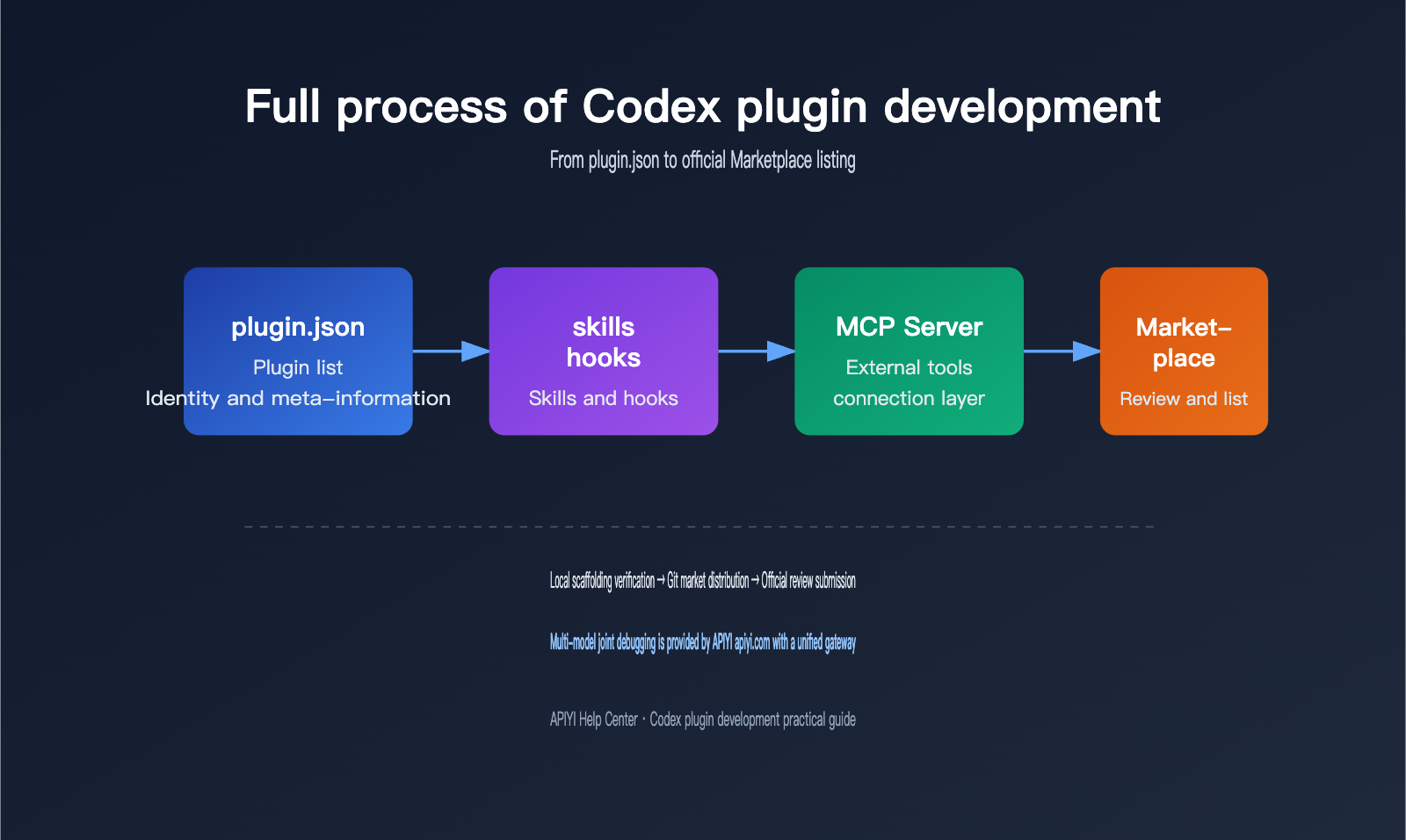
The core challenge of developing a Codex plugin isn't actually the code itself, but rather understanding the manifest specifications and preparing the materials for the review process. These details aren't as complex as they seem, but it's easy to get rejected and have to start over just because of a single path typo or a missing field. I recommend following this sequence: "local scaffolding verification → small-scale distribution on the Git marketplace → official submission for review," and make sure to set aside time for testing in a real environment at every step. If your plugin involves multi-model invocation or requires frequent switching between test models, the unified API proxy service provided by APIYI (apiyi.com) can save you a lot of time on environment setup, letting you focus your energy on polishing the plugin itself.