When using Nano Banana Pro (Gemini 3 Pro Image) for image editing, you might run into a confusing error if you include "remove watermark" instructions in your prompt—the API returns MALFORMED_FUNCTION_CALL with parts: null. This isn't a technical bug; it's Google's carefully designed safety mechanism at work.
Core Value: After reading this, you'll understand why Google blocks watermark removal, the true meaning of the MALFORMED_FUNCTION_CALL error, and how to correctly use Nano Banana Pro's image editing capabilities.
Core Reasons Why Watermark Removal Fails in Nano Banana Pro
| Reason Category | Details | Trigger Mechanism |
|---|---|---|
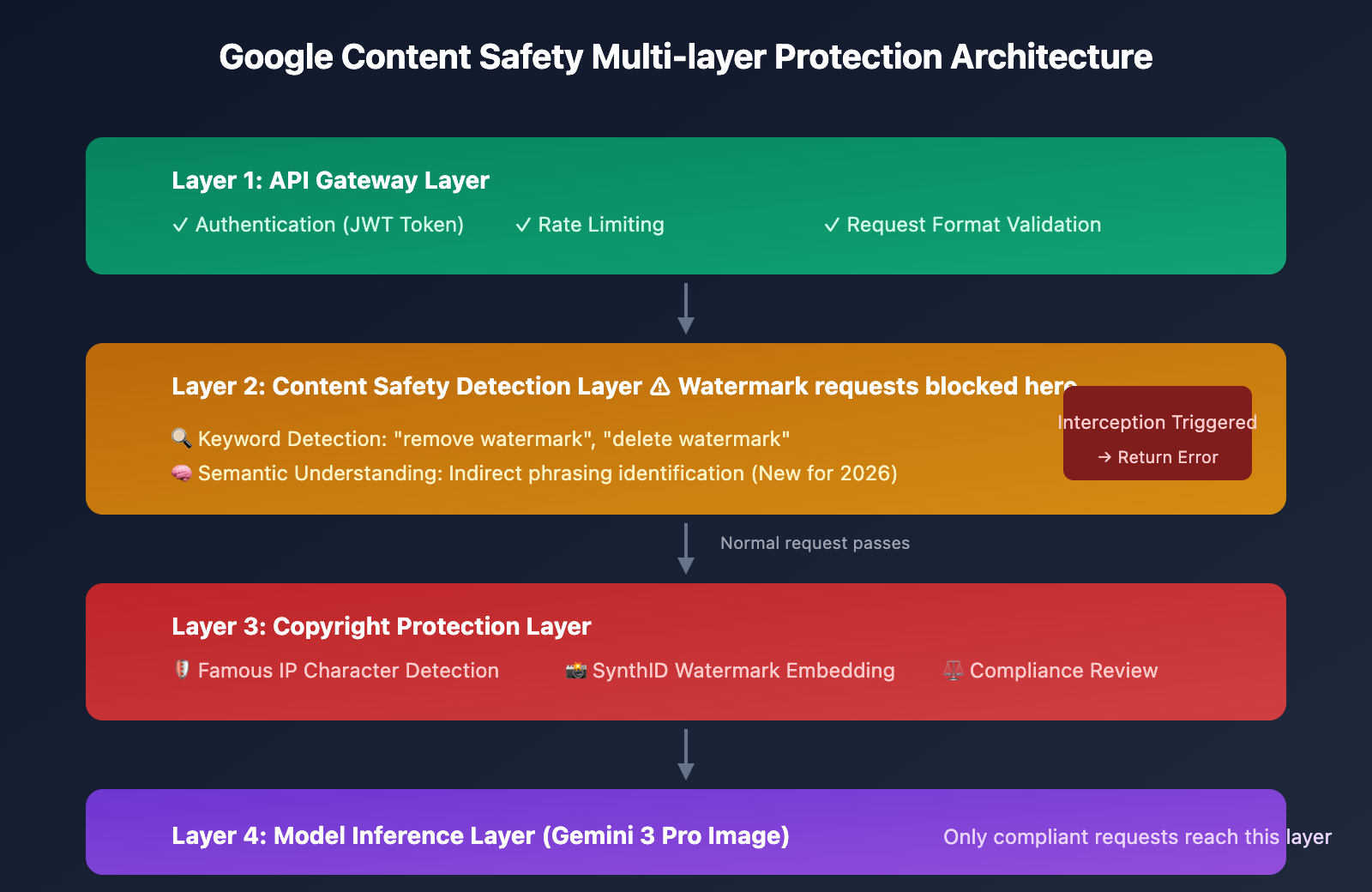
| Content Safety Policy | Google actively blocks watermark removal operations | Prompt keyword detection |
| Copyright Protection | Prevents infringement of intellectual property | SynthID watermark identification |
| Function Call Interception | Safety layer intervenes before model inference | MALFORMED_FUNCTION_CALL |
Why Google Blocks Watermark Removal
In 2023, Google, along with OpenAI, Anthropic, and Meta, signed the White House AI commitment, promising to add watermark identifiers to AI-generated content. However, if AI models were allowed to easily remove these watermarks, that commitment would be meaningless.
Google faces a technical contradiction:
- Capability level: Gemini 2.0 Flash and Nano Banana Pro have powerful image editing capabilities and are technically fully capable of removing watermarks.
- Responsibility level: Allowing watermark removal would facilitate copyright infringement, violating Google's Terms of Service and legal compliance requirements.
- Strategic level: Intercepting watermark removal requests at the safety detection layer rather than weakening the model's overall capabilities.
Therefore, when your prompt includes keywords like "remove watermark," "delete watermark," or similar phrases, the request is intercepted by the safety layer, returning a MALFORMED_FUNCTION_CALL error.
MALFORMED_FUNCTION_CALL Error Breakdown
When you send a watermark removal request, you might receive a response like this:
{
  "candidates": [
    {
      "content": {
        "parts": null
      },
      "finishReason": "MALFORMED_FUNCTION_CALL",
      "finishMessage": "Malformed function call: call:image_0.png",
      "index": 0
    }
  ],
  "usageMetadata": {
    "promptTokenCount": 264,
    "candidatesTokenCount": 0,
    "totalTokenCount": 264
  },
  "modelVersion": "gemini-3-pro-image-preview"
}
Error Field Analysis
| Field | Value | Meaning |
|---|---|---|
parts |
null |
The model didn't generate any output |
finishReason |
MALFORMED_FUNCTION_CALL |
The function call was judged as invalid |
candidatesTokenCount |
0 |
No output tokens were produced |
promptTokenCount |
264 |
Input tokens have been consumed |
What does this error actually mean?
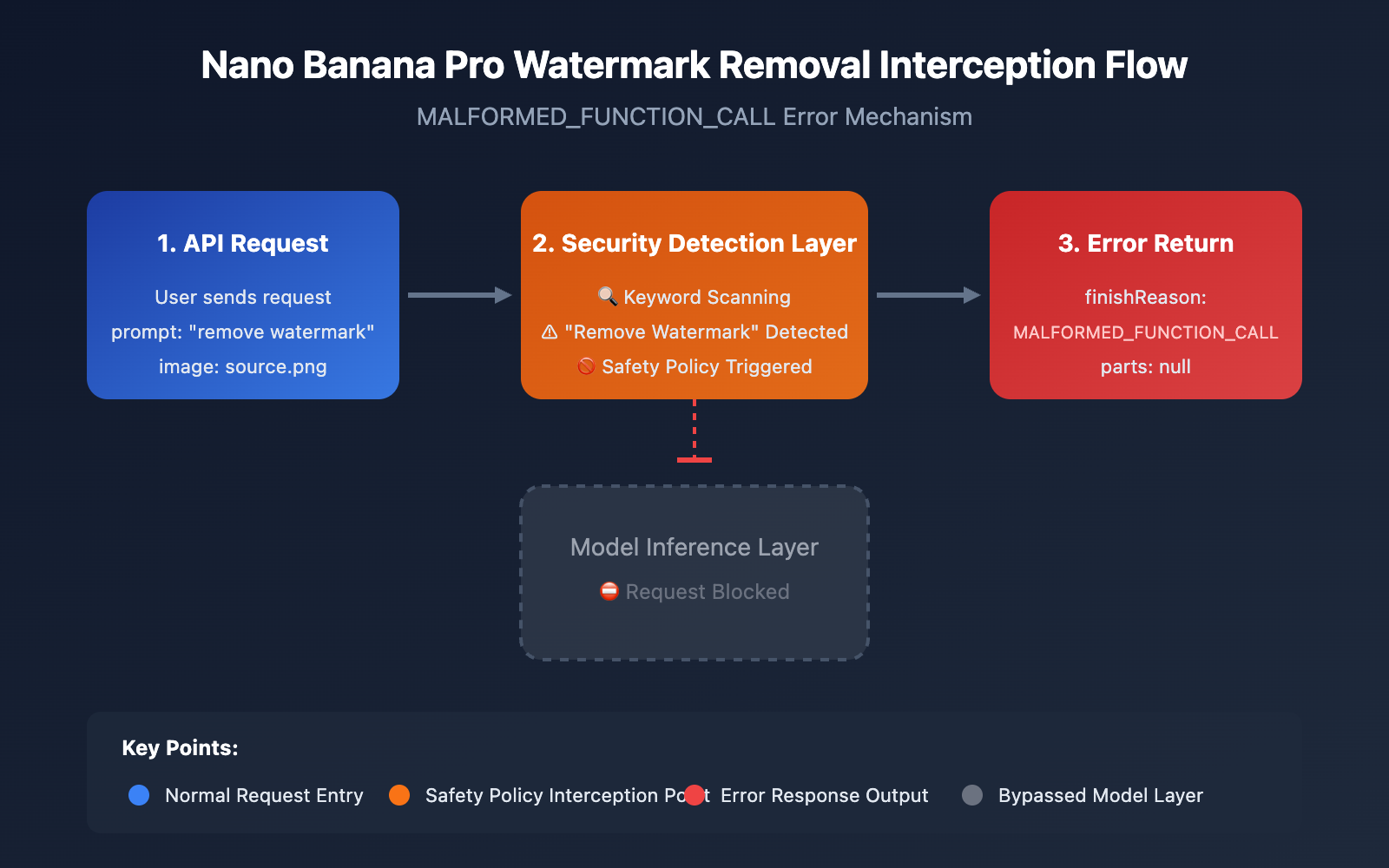
The official explanation for MALFORMED_FUNCTION_CALL is "the function call generated by the model is invalid." However, in the context of watermark removal, this is actually a disguised security block:
- The security detection layer identifies the intent to remove a watermark.
- The request is blocked before it even reaches the model's inference layer.
- It returns
MALFORMED_FUNCTION_CALLas a generic reason for refusal.
This design makes the error look like a technical glitch rather than an active interception, but in reality, it's Google's content security policy at work.
SynthID Watermark Protection Mechanism
Developed by Google DeepMind, SynthID is an invisible digital watermarking technology. All images generated or edited via Nano Banana Pro have a SynthID watermark embedded in them.
Core Features of SynthID
| Feature | Description |
|---|---|
| Invisibility | The human eye can't detect the watermark's presence |
| Persistence | Conventional image editing can't remove it |
| Verifiability | Google can detect if an image was AI-generated |
| Robustness | Resists cropping, compression, filters, and other operations |
The Difference Between the Two Watermarks
Nano Banana Pro actually uses two types of watermarks:
| Watermark Type | Visibility | Removable? | Applicable Scenarios |
|---|---|---|---|
| Gemini Logo | Visible | Yes (via non-API methods) | Free users, Pro subscribers |
| SynthID Invisible Watermark | Invisible | Technically extremely difficult | All output images |
🎯 Technical Note: Even if you successfully remove the visible Gemini logo, the SynthID invisible watermark still exists within the image. This means the image's AI origin can still be detected.
List of Keywords That Trigger Safety Filters
Based on actual testing, the following keywords and phrases will trigger safety filters in Nano Banana Pro:
High-Risk Keywords
| Keyword (English) | Keyword (Chinese) | Trigger Rate |
|---|---|---|
| remove watermark | Remove Watermark | 99% |
| delete watermark | Delete Watermark | 99% |
| erase watermark | Erase Watermark | 95% |
| clean watermark | Clean Watermark | 90% |
| watermark removal | Watermark Removal | 99% |
Medium-Risk Phrases
| Phrasing | Trigger Rate | Description |
|---|---|---|
| "make the logo disappear" | 70% | Indirect phrasing can still be identified |
| "remove the text overlay" | 60% | Depends on the specific context |
| "clean up the corner" | 40% | Vague phrasing might pass through |

FAQ
Q1: Why does watermark removal work in other AI tools but not in Nano Banana Pro?
Content safety policies vary between AI companies. As a signatory to the AI watermarking commitment, Google enforces stricter limits on watermark removal. It's worth noting that OpenAI's GPT-4o and Anthropic's Claude also prohibit watermark removal.
If you need to perform legitimate image editing, you can test the image editing capabilities of various models via APIYI (apiyi.com) to find the solution that best fits your needs.
Q2: Is the MALFORMED_FUNCTION_CALL error always caused by watermark removal?
Not necessarily. This error can also be triggered by:
- Unsupported image formats
- Incorrect request parameter formatting
- Temporary model glitches
- Other content safety policy triggers
We recommend checking if your request format is correct and using the debugging tools on the APIYI (apiyi.com) platform to troubleshoot the specific cause.
Q3: Is it really impossible to remove SynthID invisible watermarks?
Technically, SynthID is designed to be extremely difficult to remove. Standard image processing (cropping, compression, filters) won't get rid of it. While brute-force methods theoretically exist, they would severely degrade the image quality, making it more trouble than it's worth.
SynthID exists to ensure the traceability of AI-generated content, which is a vital part of responsible AI development.
Q4: How can I get AI-generated images without watermarks?
Legitimate ways include:
- Using API calls (which usually don't have visible watermarks)
- Subscribing to Google AI Ultra ($34.99/month)
- Using other AI image services that allow watermark-free output
Through the APIYI (apiyi.com) platform, you can easily call various image generation APIs to get output without visible watermarks.
Troubleshooting Quick Reference
| Error Symptom | Possible Cause | Solution |
|---|---|---|
MALFORMED_FUNCTION_CALL + parts: null |
Prompt triggered a safety block | Modify the prompt; avoid sensitive keywords |
MALFORMED_FUNCTION_CALL + partial output |
Request formatting issue | Check the JSON structure and parameters |
IMAGE_SAFETY block |
Content doesn't comply with policy | Adjust the image or prompt content |
candidatesTokenCount: 0 |
Complete block | Check if multiple safety policies were triggered |
Summary
When Nano Banana Pro watermark removal requests return a MALFORMED_FUNCTION_CALL error, it's essentially an active intervention by Google's content safety policy rather than a technical bug. This design is intended to protect the interests of copyright holders and uphold the commitment to responsible AI development.
Key Takeaways:
- Safety blocks aren't technical glitches: Google is actively preventing watermark removal operations.
- Dual watermark protection: Visible watermarks + SynthID invisible watermarks.
- The right way to do it: Obtain watermark-free output via API, or use alternative methods like inpainting.
- Tightening policies for 2026: As semantic understanding improves, even indirect phrasing may be intercepted.
If you need to perform image editing without crossing safety red lines, we recommend making API calls through the APIYI (apiyi.com) platform. This allows you to get clean output without visible watermarks while remaining compliant with the platform's usage guidelines.
References
-
Google DeepMind SynthID: Official invisible watermarking technology documentation
- Link:
deepmind.google/models/synthid - Description: SynthID technical principles and detection methods
- Link:
-
Google Gemini API Documentation: Official API usage guide
- Link:
ai.google.dev/gemini-api/docs - Description: Image generation and editing API parameters
- Link:
-
Google AI Terms of Service: Content policy and usage restrictions
- Link:
policies.google.com/terms - Description: Prohibition of using AI tools for copyright infringement
- Link:
-
GitHub – Gemini CLI Issues: Community bug reports
- Link:
github.com/google-gemini/gemini-cli/issues - Description: Discussion on MALFORMED_FUNCTION_CALL errors
- Link:
This article was written by the APIYI Team. To experience AI image generation APIs like Nano Banana Pro, feel free to visit APIYI (apiyi.com) to get free test credits.