Open the official Gemini documentation, especially pages like Nano Banana image generation, and you may notice a new toggle at the top of the page — one side says Interactions API, the other says generateContent API. This isn’t just a documentation refresh; it means Google officially moved the Interactions API to GA (generally available) in June 2026 and is recommending it for all new projects. In this article, I’ll combine the official docs with APIYI gateway testing results to walk you through the core differences, capability gaps, and practical calling recommendations.
Core value: By the end of this article, you’ll have a clear understanding of the differences between Interactions API and generateContent in terms of design philosophy, state management, and capability coverage — and you’ll know which approach to use when calling Gemini through APIYI.
Core Differences Between Interactions API and generateContent
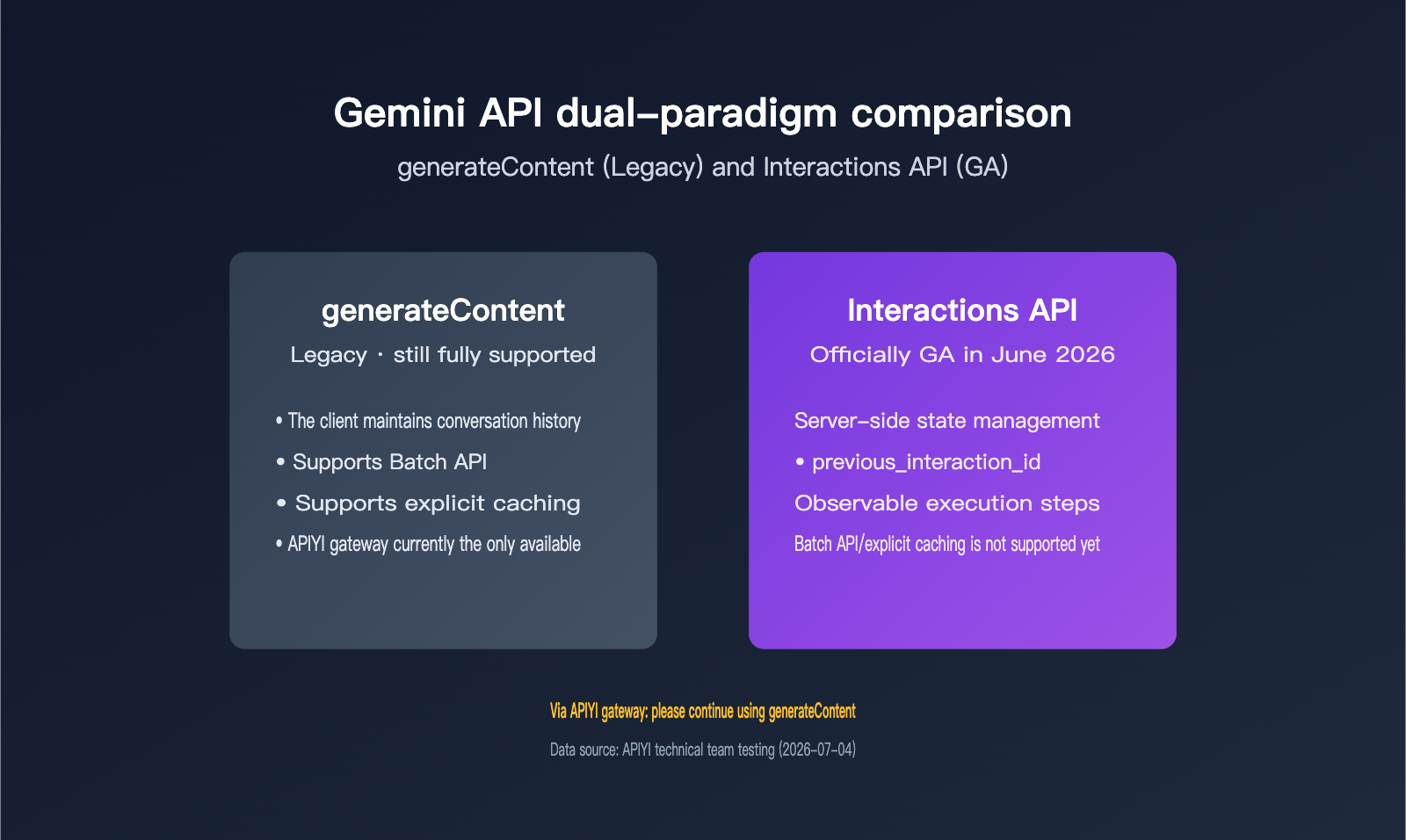
Let’s start with the bottom line: these two APIs aren’t just an upgrade path from one to the other — they’re built around different design philosophies. generateContent is a stateless “one request, one response” model, so the client has to keep track of the full conversation history on its own. Interactions API, on the other hand, pushes state management to the server and redesigns the whole interaction flow around a new concept: the “Interaction.”
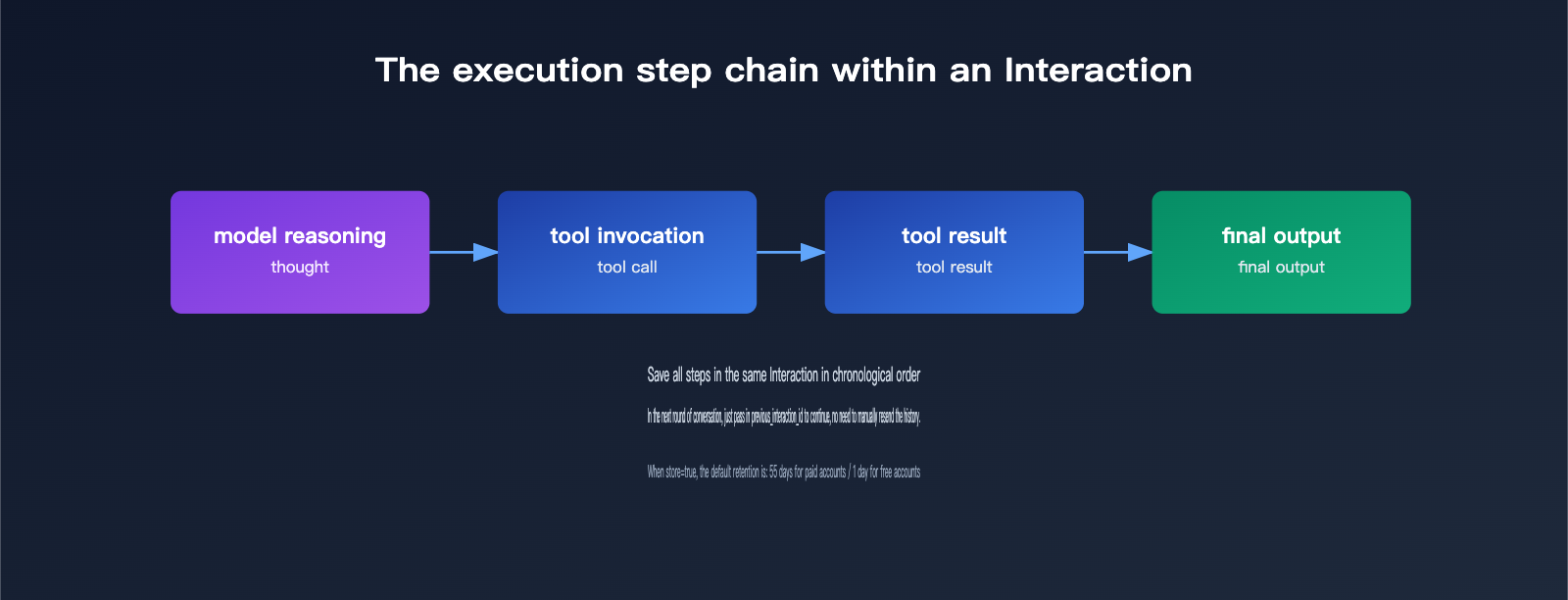
The official docs define an Interaction as “a complete conversation or task round,” made up internally of a sequence of steps in chronological order, including the model’s thinking process, tool calls and their results, and the final model output. That means Interactions API was designed from the ground up for multi-turn conversations and agent-style tasks, not just single-turn Q&A.
That also explains why Google uses wording like “generally available” instead of just “new feature.” Interactions API entered public preview in December 2025 and was officially announced as GA in June 2026. The official blog explicitly says, “We recommend all new projects and applications use Interactions API,” and all official docs now default to this new paradigm. Google is also pushing third-party SDKs and ecosystem partners to make it their default interface too. In other words, this isn’t just an optional feature update — it’s Google redefining how Gemini should be called, while also providing migration guides so developers can transition at their own pace instead of being forced into a hard cutover.
| Comparison Dimension | generateContent (legacy) | Interactions API |
|---|---|---|
| Current status | Legacy, but fully supported | GA since June 2026 |
| Official recommendation | Existing projects can keep using it | Recommended for all new projects |
| Core method | generateContent | interactions.create / get / delete |
| Design philosophy | Stateless single request | Stateful task rounds centered on Interaction |
| Future new capabilities | Still gets new flagship models | Cutting-edge agent capabilities arrive here first |
🎯 Technical recommendation: If you’re calling Gemini models through APIYI apiyi.com, take a few minutes to compare your project against the official docs and confirm which paradigm you’re currently using before deciding whether to migrate. That way, you won’t mistake the docs’ default Interactions API display for a sign that your existing code is already outdated.
The Core Difference Between Request Patterns and State Management
The key to understanding the difference between the two is: who maintains the conversation history. generateContent requires the client to fully assemble the entire history message array on every request. Even on the tenth turn of a conversation, you still have to send the previous nine turns along with it. This is simple and direct, but as the conversation gets longer, the request payload keeps growing, and the repeated history content gets billed over and over.
The Interactions API offers a different approach: take the interaction id returned by the previous call and pass it as the previous_interaction_id parameter in the next request. The server then automatically retrieves the full conversation history, so the client no longer has to manually stitch everything together and resend it. The official docs also provide a background=true parameter for long-running tasks, plus support for observable execution steps, which makes it easier to show the model’s intermediate reasoning in debugging tools and front-end UI. That’s especially valuable when you’re building agent-style products.
That said, server-side state management isn’t free. By default, store is true, which means the system keeps the interaction record: paid accounts retain it for 55 days, while free accounts keep it for only 1 day. If you set store to false for privacy or compliance reasons, you can turn off storage, but you also lose both previous_interaction_id conversation continuation and background execution. That’s a tradeoff you need to think through ahead of time.
From a cost perspective, the official positioning is very clear: once the server maintains state, the history of the same conversation doesn’t have to be counted as input tokens again on every request, so cache hit rates improve significantly. The official wording is “lower cost, higher cache hit rate.” For scenarios like customer service bots or long-document Q&A, where you need to keep a lot of context around, this difference becomes pretty noticeable once call volume scales up. But for single-turn generation or batch processing, which are naturally stateless, this cost advantage basically doesn’t matter.
There’s another detail that’s easy to miss: tools, system_instruction, and generation_config — including fields like thinking_level and temperature — are set per request. Even if you continue a conversation with previous_interaction_id, these settings won’t be inherited automatically. You need to pass them explicitly every time.
| Capability | generateContent | Interactions API |
|---|---|---|
| Conversation history management | Client manually stitches together all history | Server automatically retrieves history via previous_interaction_id |
| Long-running background execution | Not supported | Supported with background=true |
| Visibility into intermediate execution steps | Must parse it yourself | Provides observable execution steps |
| Record retention policy | No such concept | Retained by default, 55 days for paid / 1 day for free |
| Tool and generation parameter inheritance | Must be passed explicitly each time | Must be passed explicitly each time, not inherited automatically |
💡 Recommendation: If your project needs frequent multi-turn conversations or agent workflows, the Interactions API’s state management can save you a lot of glue code. But if your use case is mostly single-shot generation, that advantage may not show up much. We recommend running a small-scale comparison test on the APIYI apiyi.com platform first, then deciding whether migration is worth it.
Capability Gaps Between the Two: What One Can Do and the Other Still Can’t
Although the Interactions API is the newer paradigm, the official docs also clearly list capabilities it doesn’t support yet. That’s something you absolutely need to factor into your architecture decisions — don’t assume “newer” automatically means “more complete.”
The docs explicitly state that the Interactions API currently doesn’t support the video metadata field for video understanding, Batch API, Python automatic function calling, or explicit caching — though implicit caching through previous_interaction_id is supported. By contrast, generateContent fully supports streaming output, function calling, Batch API, explicit caching, and the full multimodal input set, including text, images, audio, video, and documents.
| Capability | generateContent | Interactions API |
|---|---|---|
| Batch API | ✅ Supported | ❌ Not yet supported |
| Explicit caching | ✅ Supported | ⚠️ Implicit caching only |
| Video metadata field | ✅ Supported | ❌ Not yet supported |
| Python automatic function calling | ✅ Supported | ❌ Not yet supported |
| Streaming output / function calling | ✅ Supported | ✅ Supported |
| Claimed cost and cache hit rate | Standard pricing | Officially claims lower cost and higher hit rate |
Using Nano Banana image generation as a concrete example, the difference between the two paradigms shows up most clearly in how you retrieve results. The Interactions API gives you convenient properties like interaction.output_image and interaction.output_text, so you can grab the final image or text block directly. generateContent, on the other hand, uses a lower-level candidates[0].content.parts array traversal approach, where you need to inspect each part’s type yourself. For projects that already have generateContent parsing logic in place, this structural difference usually means a fairly significant code refactor — it’s not something you solve by just swapping endpoints.
These gaps aren’t minor edge cases. Batch API is often the backbone of offline batch processing for cost-sensitive projects. If you migrate and then realize the new paradigm doesn’t support it, you may have to redesign your entire offline processing pipeline. Explicit caching, meanwhile, directly affects the cost of long-context workloads. If your business repeatedly reuses long blocks of fixed system prompts or reference material, lacking explicit caching means you can’t precisely control what gets cached or for how long. That’s why the official docs keep both technical paths alive instead of retiring generateContent outright — at least until these capabilities are filled in, it’s still irreplaceable.
🔧 Practical advice: If your business depends heavily on Batch API for bulk processing or explicit caching for cost reduction, moving to the Interactions API too early could mean losing those capabilities. It’s better to keep an eye on the official migration guide and rollout pace instead of rushing to replace production code.
APIYI Gateway Test: Which Paradigm Should You Use Right Now?
Bottom line up front: based on tests run as of July 4, 2026, when calling Gemini through the APIYI gateway, you should keep using the native generateContent format.
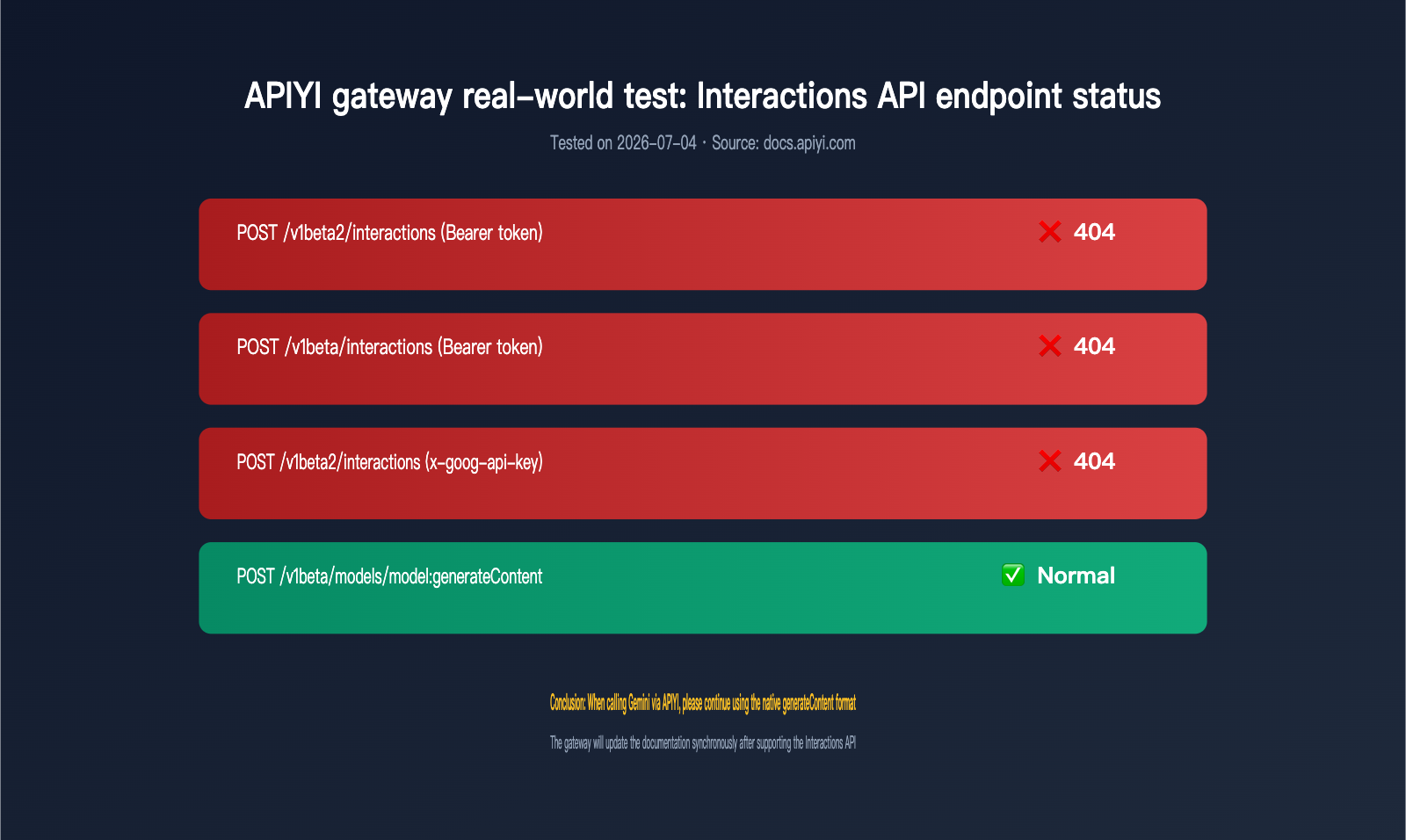
The APIYI technical team ran direct tests on the key path for the Interactions API, covering the two mainstream authentication methods. Here are the results:
| Test Endpoint | Auth Method | Result |
|---|---|---|
| POST /v1beta2/interactions | Bearer token | ❌ 404 (Invalid URL) |
| POST /v1beta/interactions | Bearer token | ❌ 404 (Invalid URL) |
| POST /v1beta2/interactions | x-goog-api-key header | ❌ 404 (Invalid URL) |
| POST /v1beta/models/{model}:generateContent | Bearer token | ✅ Returns normally |
The official APIYI docs say it plainly: “The APIYI gateway does not currently support Interactions API proxying — both /v1beta2/interactions and /v1beta/interactions return 404.” It also gives a clear recommendation: “When calling Gemini through APIYI, continue using the native generateContent format.” That’s why all Gemini-related docs on the APIYI site are currently written around generateContent — so readers can copy the code and get it running right away without hitting path 404s.
One important point: this is a moving target, not a permanent limitation. As the Interactions API gradually becomes the official default paradigm, gateway-side support will likely follow. APIYI will update the relevant docs at that time. For now, you can keep an eye on docs.apiyi.com/api-capabilities/gemini/interactions-api for the latest support status, so you don’t have to test endpoints manually every time.
These test results also highlight something that’s easy to miss: “officially available” in the docs and “already adapted” in a specific proxy gateway or third-party SDK are two completely different things. If developers only look at the default official examples and paste Interactions API code into an existing proxy setup, they’ll probably hit a 404 first and then spend time figuring out whether the problem is their code or the gateway not having caught up yet. When that happens, it’s usually faster to first check your actual call chain — direct to the official API or through a third-party proxy — and confirm whether it supports the new paradigm.
🚀 Quick Start: If you want to verify your Gemini call chain right now, the recommended approach is to connect using APIYI’s
generateContentformat at apiyi.com. The platform provides a unifiedbase_url, supports Gemini calls for text, images, and more, and doesn’t require extra authentication handling.
How to Choose: Scenario-Based Recommendations
Based on the capability comparison above and the test results, here’s a simple scenario-based recommendation table.
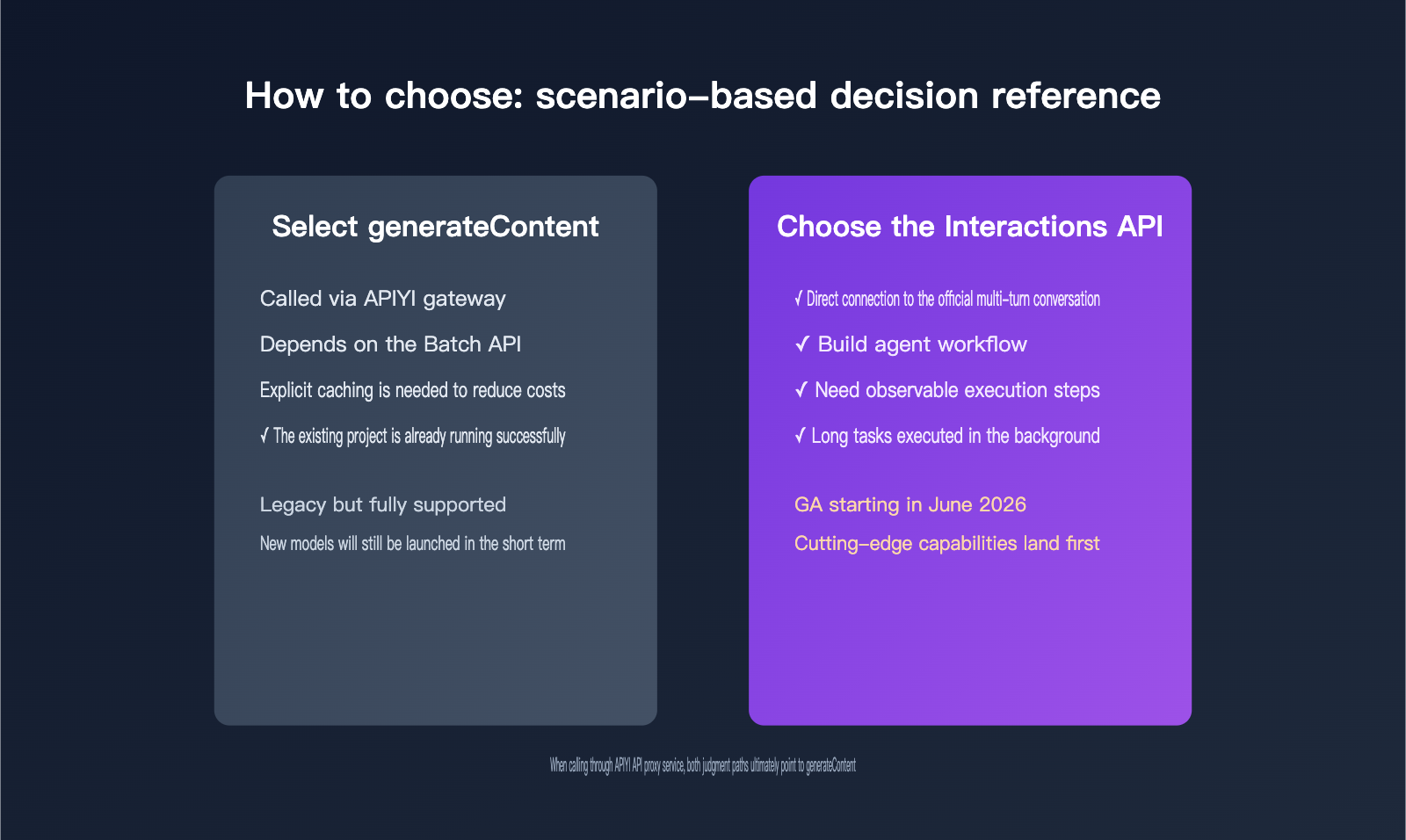
| Use Case | Recommended Approach | Why |
|---|---|---|
| Calling Gemini through the APIYI gateway | generateContent |
The gateway currently only supports this format; Interactions API paths return 404 |
| Relying on Batch API for bulk processing | generateContent |
Interactions API doesn’t support Batch API yet |
| Needing explicit caching to reduce cost | generateContent |
Interactions API currently only has implicit caching |
| Building a multi-turn conversational agent and calling the official API directly | Interactions API can be evaluated | Server-side state management removes the need to manually stitch history together |
| Needing to inspect intermediate model execution steps for debugging | Interactions API | It natively supports observable execution steps |
Existing project already works with generateContent |
Don’t migrate for now | The legacy format is still fully supported and will continue to get new models in the short term |
In short, whether you should migrate doesn’t come down to whether something is “new” or not. It depends on whether your specific dependencies are fully covered by the Interactions API, and whether the Gemini call path you’re using — direct to the official API or through a proxy gateway — already supports the new paradigm. For most developers calling through APIYI, sticking with generateContent is the safer choice for now.
FAQ
Q1: Will generateContent be phased out? Is it still worth building new projects on it?
Not in the short term. Officially, generateContent is marked as legacy, but it’s still “fully supported,” and it’ll keep getting new flagship Gemini models for the foreseeable future. If you’re calling Gemini through APIYI apiyi.com, building new projects on generateContent is totally fine right now. There’s no need to worry just because the docs now show Interactions API by default.
Q2: When will the APIYI gateway support Interactions API?
There isn’t a confirmed timeline yet. It depends on how widely this paradigm is adopted in Google’s official ecosystem and how quickly the gateway side can adapt. Keep an eye on the official APIYI apiyi.com documentation. Once Interactions API proxy support is available, the relevant docs will be updated right away, so you won’t need to keep testing endpoint status yourself.
Q3: Can both APIs be mixed in the same project?
Technically, yes, as long as the call path supports it. The two paradigms can coexist. For example, you could use generateContent for Batch API bulk jobs while trying Interactions API in a multi-turn conversation scenario through the direct official API. But when calling through the APIYI gateway, the Interactions API path currently returns 404, so it’s better to stick with the generateContent format for now. That avoids ending up with two inconsistent call patterns in the same project and keeps maintenance simpler.
Summary
After Interactions API became generally available in June 2026, it clearly became Google’s long-term direction for Gemini invocation. Features like server-side state management and observable execution steps are very appealing for agent-style applications. That said, it still has obvious gaps in areas like Batch API, explicit caching, and video metadata. generateContent is still fully supported and will continue to receive updates in the near term.
More importantly, in real-world tests through the APIYI gateway, the Interactions API-related paths currently return 404, while generateContent is the only format that works right now. If you need a stable and reliable way to call Gemini models, we recommend using APIYI apiyi.com with the native generateContent format. Once the gateway supports the new paradigm, the docs will be updated promptly.
The test data and official information in this article were verified by the APIYI technical team. If you’d like to learn more about Gemini model invocation details, feel free to contact support through APIYI apiyi.com.
Reference Materials
-
Google AI for Developers – Interactions API Overview: Interaction concepts, core methods, and capability details
- Link:
ai.google.dev/gemini-api/docs/interactions-overview
- Link:
-
Google AI for Developers – generateContent (Legacy): Support status and capability scope of the legacy API
- Link:
ai.google.dev/gemini-api/docs/interactions
- Link:
-
APIYI Official Docs – Gemini Interactions API Support Status: Gateway test endpoint results and usage recommendations
- Link:
docs.apiyi.com/api-capabilities/gemini/interactions-api
- Link: