The most overlooked detail in AI image generation is dimensions. With the same prompt, choosing the wrong aspect ratio can ruin your composition; with the same content, picking the wrong resolution can inflate your costs by 10x.
OpenAI's official gpt-image-2 pricing model is tiered by "quality level × resolution." A 1024×1024 high-quality image costs $0.211, 2K jumps to over $0.30, and 4K high-quality skyrockets to $0.41 per image. For teams generating images in bulk, this pricing model turns the question of "should we use 4K?" into a complex ROI calculation.
The gpt-image-2-vip model provided by APIYI is a reverse-engineered version of the official ChatGPT codex channel. It features three key upgrades in dimension support: added 5:4 aspect ratio (10 total), full coverage across 3 resolution tiers (1K/2K/4K), and a flat pricing of $0.03 per image, regardless of the resolution.
This article provides a systematic guide to the gpt-image-2-vip dimension system: the specific pixel values for all 30 combinations, usage recommendations, price comparisons with the official version, practical API invocation, and a FAQ section. We'll help you pick the right dimensions in 5 minutes and minimize your image generation costs.
Why the gpt-image-2-vip Size System Deserves a Closer Look
Understanding the "size system" of an image model is essentially about understanding its cost structure and operational boundaries. The design philosophy behind OpenAI's official gpt-image-2 is "tiered pricing based on quality," which means higher resolution and quality lead to higher costs per image. While this pricing model is fine for one-off creative tasks, it's not ideal for batch generation, A/B testing, or e-commerce product listings.
The core innovation of gpt-image-2-vip is decoupling "quality" from "resolution," allowing for a flat rate per image. Whether you're generating a 1280×720 draft or a 3840×2160 4K final version, the price remains $0.03 per image. This shifts "resolution selection" from a "cost-based decision" to a "quality-based decision."
This pricing model is particularly well-suited for three types of users:
- Batch Generation Teams (e-commerce, social media, game assets): Teams that need to generate 50+ images daily benefit from a flat rate, making monthly budgets predictable.
- A/B Testing Scenarios: When you need to test the same prompt across multiple resolutions, you no longer have to worry about the cost of higher resolutions.
- Individual Creators: You can confidently generate 4K final versions without needing to downgrade to 2K just to save money.
💡 Platform Recommendation: The gpt-image-2-vip model is exclusively provided by the APIYI (apiyi.com) platform. It features a stable reverse-engineered connection to the official ChatGPT codex channel, supports a complete set of 30 size combinations, and offers unified pricing—perfect for teams and individual creators who need to scale their image generation.
The gpt-image-2-vip Size System Panorama: 10 × 3 = 30 Combinations
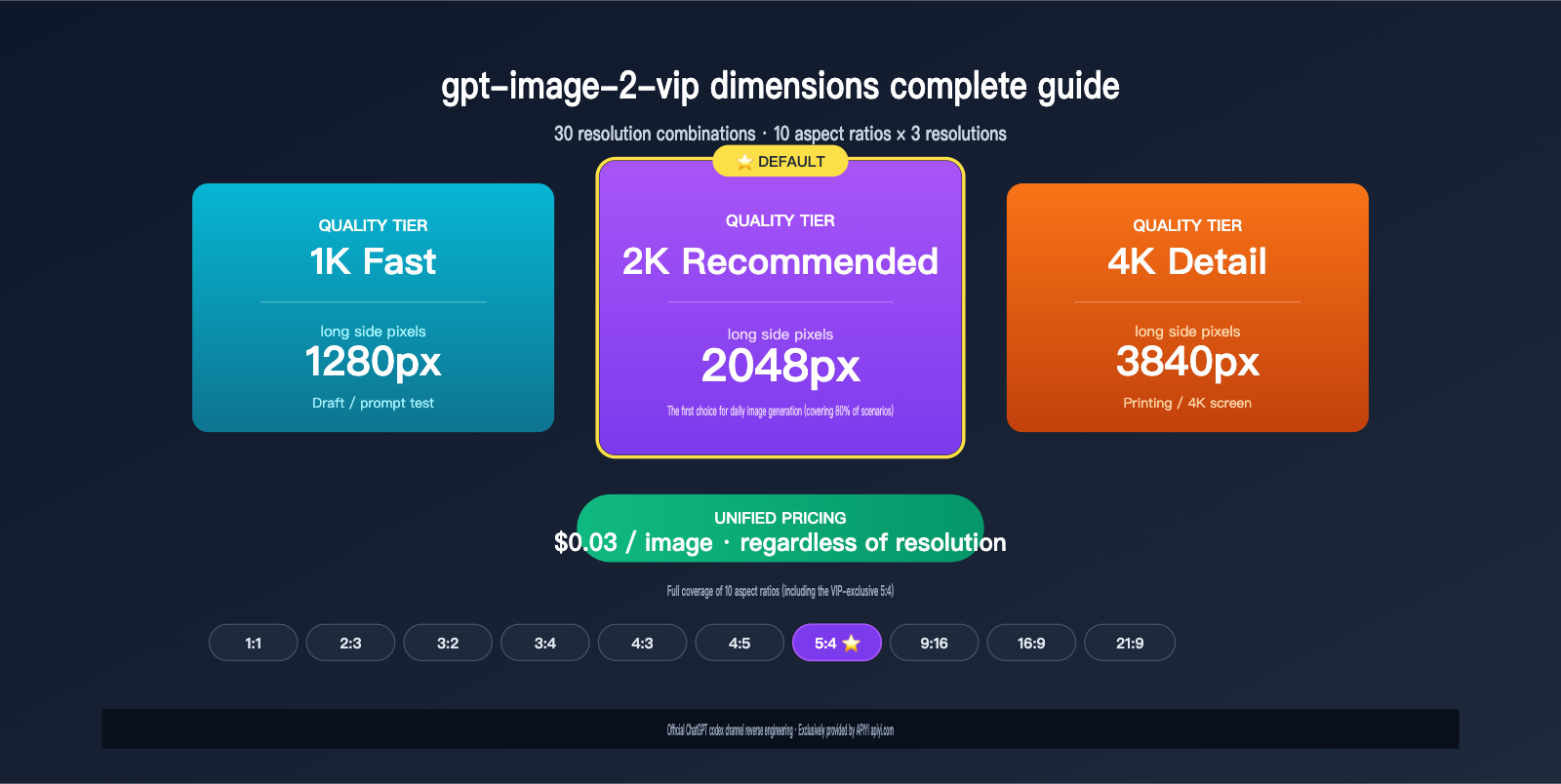
The gpt-image-2-vip size system is built on two dimensions: Aspect Ratio and Resolution Tier. With 10 aspect ratios and 3 resolution tiers, there are 30 preset size combinations covering everything from social media cards to 4K posters.
Breakdown of the 10 Aspect Ratios Supported by gpt-image-2-vip
| Ratio | Name | Typical Scenario | Visual Characteristics |
|---|---|---|---|
| 1:1 | Square | Instagram, Xiaohongshu cards, product white-background images | Balanced, symmetrical, focused |
| 2:3 | Portrait | Posters, book covers, movie posters | Classic vertical, dramatic |
| 3:2 | Photo | Photography, desktop wallpapers | Standard photography ratio, natural |
| 3:4 | Portrait | Xiaohongshu cover images, Pinterest, mobile detail pages | Mobile-friendly, high information density |
| 4:3 | Standard | iPad landscape, traditional TV, PPT | Classic and stable, information-rich |
| 4:5 | Social | Instagram vertical posts, feed ads | Maximized exposure in feeds |
| 5:4 | Large | Medium-format photography, display frames | Near-square but more stable |
| 9:16 | Story | Douyin/TikTok/Reels, phone wallpapers | Full-screen immersion, vertical storytelling |
| 16:9 | Wide | YouTube thumbnails, web banners, video covers | Horizontal reading, cinematic feel |
| 21:9 | Cinema | Ultra-wide wallpapers, cinematic banners | Cinematic, narrative tension |
Note that 5:4 is a ratio exclusive to the VIP version; the standard official gpt-image-2 only supports 9 ratios (excluding 5:4). This ratio sits between 1:1 and 4:3 and is commonly used in medium-format photography, product display frames, and print materials, making it a key differentiator for the VIP version.
The Design Philosophy of the Three gpt-image-2-vip Resolution Tiers
| Resolution Tier | Long Edge Pixels | Positioning | Recommended Scenario |
|---|---|---|---|
| 1K Fast | 1280px | Drafts, low-cost testing | Creative brainstorming, prompt debugging, quick previews |
| 2K Recommended | 2048px | Default recommendation | 80% of daily tasks, social media, e-commerce main images |
| 4K Detail | 3840px | Large final assets | Printed posters, outdoor ads, 4K screen wallpapers |
The design philosophy is clear: 1K Fast for "trial and error," 2K Recommended for "daily use," and 4K Detail for "final output." Since the price is a flat $0.03 per image, you can confidently use 1K to test compositions, and once you're satisfied, generate the final version in 4K without worrying about doubling your costs.
🎯 Usage Tip: For scenarios where you aren't sure about the prompt's outcome, we recommend generating 4-6 test images using the 1K Fast tier. Once you've selected the best composition, regenerate the final version using 4K Detail. This "draft-first, final-later" workflow can save you 80% of your waiting time, and the total cost remains just N × $0.03.
Detailed Guide to gpt-image-2-vip Dimensions: 1K Fast Tier Pixel Table
The 1K Fast tier is the "express lane" for gpt-image-2-vip. For all 10 aspect ratios, the long edge is fixed at 1280px, making it perfect for creative testing, prompt debugging, and composition previews. Here is the complete pixel mapping for the 1K Fast tier:
| Aspect Ratio | Name | Pixels (W×H) | Total Pixels | Use Case |
|---|---|---|---|---|
| 1:1 | Square | 1280×1280 | 1.64M | Info card drafts, Instagram test images |
| 2:3 | Portrait | 848×1280 | 1.09M | Poster sketches, book cover tests |
| 3:2 | Photo | 1280×848 | 1.09M | Landscape photography sketches |
| 3:4 | Portrait | 960×1280 | 1.23M | Xiaohongshu cover tests, mobile previews |
| 4:3 | Standard | 1280×960 | 1.23M | Landscape PPTs, standard screen sketches |
| 4:5 | Social | 1024×1280 | 1.31M | Feed ad tests, IG vertical posts |
| 5:4 | Large | 1280×1024 | 1.31M | Medium-format style sketches |
| 9:16 | Story | 720×1280 | 0.92M | TikTok/Reels sketches, phone wallpaper previews |
| 16:9 | Wide | 1280×720 | 0.92M | YouTube thumbnail tests, banner sketches |
| 21:9 | Cinema | 1280×544 | 0.70M | Cinematic banner sketches |
The core value of the 1K Fast tier is speed—with a long edge of only 1280px, generation time is typically 30-40% faster than 2K, which is ideal when you need to iterate on your prompt quickly.
Detailed Guide to gpt-image-2-vip Dimensions: 2K Recommended Tier Pixel Table
The 2K Recommended tier is the default setting for gpt-image-2-vip and the best choice for 80% of image generation tasks. All 10 aspect ratios have a long edge fixed at 2048px, ensuring high-definition detail while keeping file sizes manageable. Here is the complete pixel mapping for the 2K Recommended tier:
| Aspect Ratio | Name | Pixels (W×H) | Total Pixels | Use Case |
|---|---|---|---|---|
| 1:1 | Square | 2048×2048 | 4.19M | Instagram main images, final Xiaohongshu info cards |
| 2:3 | Portrait | 1360×2048 | 2.79M | Posters, book covers, movie posters |
| 3:2 | Photo | 2048×1360 | 2.79M | Desktop wallpapers, landscape photography |
| 3:4 | Portrait | 1536×2048 | 3.15M | Final Xiaohongshu covers, Pinterest |
| 4:3 | Standard | 2048×1536 | 3.15M | iPad landscape, final standard screen images |
| 4:5 | Social | 1632×2048 | 3.34M | Final Instagram feed posts |
| 5:4 | Large | 2048×1632 | 3.34M | Final medium-format displays |
| 9:16 | Story | 1152×2048 | 2.36M | Final TikTok/Reels, phone wallpapers |
| 16:9 | Wide | 2048×1152 | 2.36M | YouTube thumbnails, web banners |
| 21:9 | Cinema | 2048×864 | 1.77M | Ultra-wide wallpapers, cinematic banners |
The "2048×2048 (Square)" option in the 2K Recommended tier is the most frequently used setting. It covers the requirements for major e-commerce and social platforms, such as Taobao main images (800×800), JD.com main images (800×800), and Xiaohongshu covers (1080×1440); you can simply crop it later to fit your needs.
📌 Default Tier Recommendation: If you're unsure which resolution to choose, go with 2K Recommended. This tier is the "sweet spot" for the model's training, providing the most stable quality. Most platforms will automatically compress images upon upload, and a 2K output already exceeds the requirements of any mainstream platform.
Detailed Breakdown of gpt-image-2-vip Dimensions: 4K Detail Pixel Table
The 4K Detail tier is the ultimate setting for gpt-image-2-vip, designed for scenarios requiring ultra-high detail, such as printed posters, outdoor advertising, and 4K screen wallpapers. With a longest side approaching 3840px, it’s nearly true 4K standard. The table below provides the full pixel mapping for the 4K Detail tier:
| Aspect Ratio | Name | Pixels (W×H) | Total Pixels | Use Case |
|---|---|---|---|---|
| 1:1 | Square | 2880×2880 | 8.29M | High-res printing, gallery display |
| 2:3 | Portrait | 2336×3520 | 8.22M | Large posters, printed book covers |
| 3:2 | Photo | 3520×2336 | 8.22M | 4K photography, desktop wallpapers |
| 3:4 | Portrait | 2480×3312 | 8.21M | Printed brochures, large Pinterest |
| 4:3 | Standard | 3312×2480 | 8.21M | 4K monitor wallpapers, print media |
| 4:5 | Social | 2560×3216 | 8.23M | High-res Instagram feeds |
| 5:4 | Large | 3216×2560 | 8.23M | Medium-format art pieces |
| 9:16 | Story | 2160×3840 | 8.29M | 4K mobile wallpapers, outdoor vertical ads |
| 16:9 | Wide | 3840×2160 | 8.29M | 4K TV wallpapers, final video thumbnails |
| 21:9 | Cinema | 3840×1632 | 6.27M | Ultra-wide 4K wallpapers, cinematic banners |
All dimensions in the 4K Detail tier are close to 8M pixels, with file sizes typically ranging between 4-8MB. Note: OpenAI's official documentation marks 4K (>2560×1440) as experimental, which means you might occasionally encounter detail distortion or blurry text at these large sizes. We recommend performing a quick visual check after generating 4K images and, if necessary, downscaling to 2K for a re-generation.
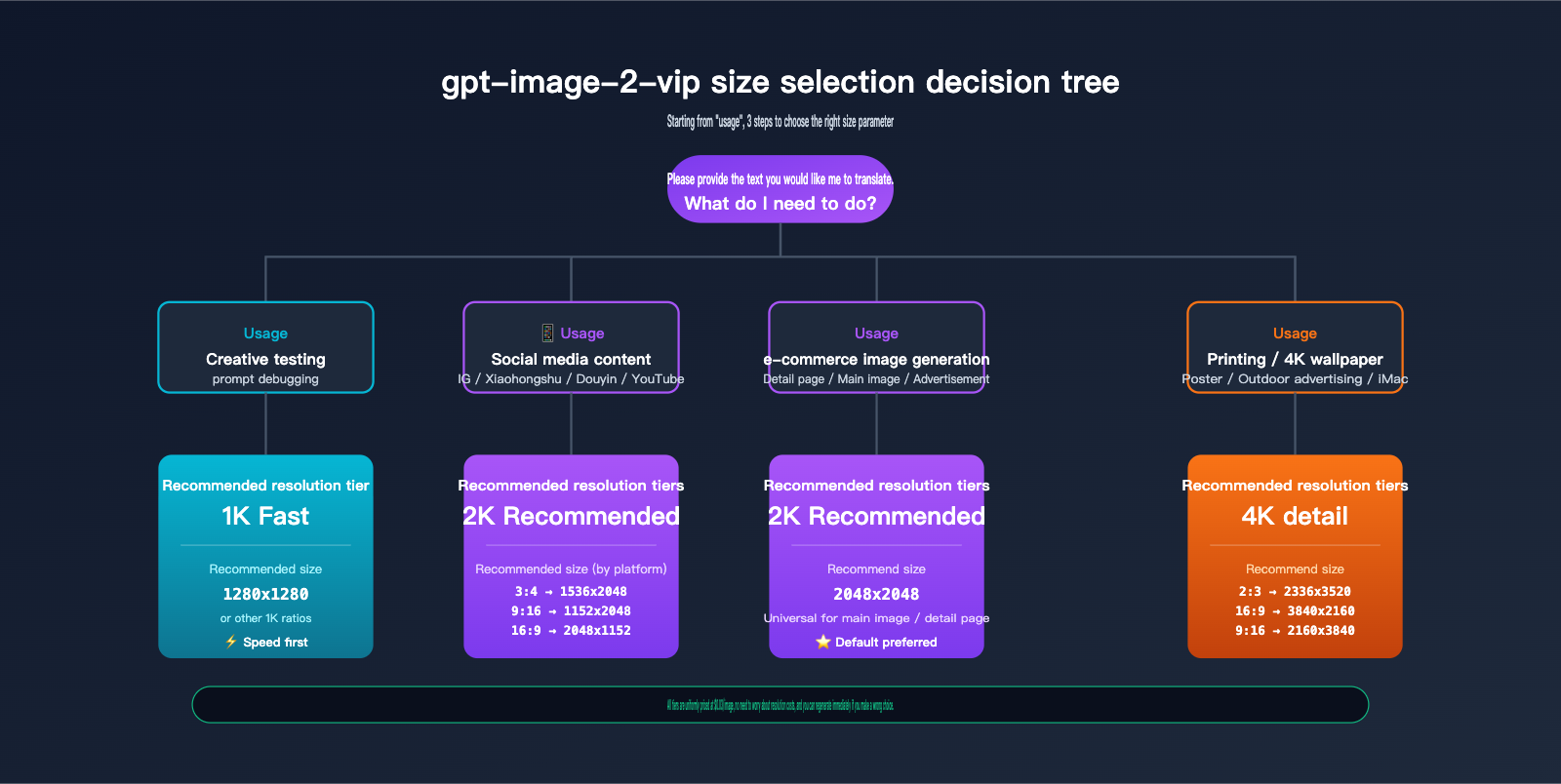
gpt-image-2-vip Dimension Selection Guide
With 30 different size combinations available, how do you choose the right one quickly? The table below is a quick-reference guide categorized by "use case":
| Use Case | Recommended Ratio | Recommended Resolution | Full size Parameter |
|---|---|---|---|
| Xiaohongshu Cover / Details | 3:4 | 2K | 1536x2048 |
| Instagram Main Image | 1:1 | 2K | 2048x2048 |
| Instagram Feed Ad | 4:5 | 2K | 1632x2048 |
| Douyin/TikTok Cover | 9:16 | 2K | 1152x2048 |
| YouTube Thumbnail | 16:9 | 2K | 2048x1152 |
| WeChat Moments Cover | 16:9 | 2K | 2048x1152 |
| Official Account Cover | 2.35:1 (≈21:9) | 2K | 2048x864 |
| Web Hero Banner | 16:9 | 2K | 2048x1152 |
| E-commerce Main Image | 1:1 | 2K | 2048x2048 |
| Printed Poster (A4/A3) | 2:3 | 4K | 2336x3520 |
| Outdoor Vertical Ad | 9:16 | 4K | 2160x3840 |
| Desktop Wallpaper (iMac/MBP) | 16:9 | 4K | 3840x2160 |
| Mobile Wallpaper (iPhone) | 9:16 | 2K or 4K | 1152x2048 or 2160x3840 |
| Creative Prompt Testing | Any | 1K | 1280x* |
🎨 Tool Selection Advice: For creators unfamiliar with size parameters, we recommend using the web tool at imagen.apiyi.com—it features a three-part UI (Aspect Ratio dropdown + Resolution dropdown + Final Resolution info), so there's no need to memorize pixel values; just select and generate. For technical teams, we recommend integrating via the APIYI API at api.apiyi.com for batch processing and business system integration.
gpt-image-2-vip vs. Official gpt-image-2 Price Comparison
To truly understand the value of gpt-image-2-vip, you need to compare it against the official OpenAI version. The table below highlights the core differences in aspect ratio support and pricing models:
| Comparison Dimension | gpt-image-2-vip (APIYI) | gpt-image-2 (Official OpenAI) |
|---|---|---|
| Aspect Ratio Options | 10 types (includes 5:4) | 9 types (no 5:4) |
| Resolution Tiers | 3 presets (1K/2K/4K) | Custom dimensions (16x multiples, 653K-8.3M pixels) |
| 1024×1024 Price | $0.03 | $0.211 (high) |
| 2048×2048 Price | $0.03 | $0.30+ (high) |
| 4K Price | $0.03 | $0.41 (high, experimental) |
| Billing Model | Flat $0.03/image | Tiered by quality $0.006-$0.41 |
| Model Source | ChatGPT codex official reverse channel | Official OpenAI API |
| Web Browsing | Built-in (gpt-image-2-all series feature) | Requires thinking mode |
| Ideal Use Case | Batch generation, large-scale production | Single high-end image generation |
Price Advantage Quantified: The VIP version is 7 times cheaper than the official 1024 high-quality setting, and 13.7 times cheaper than the 4K high-quality setting. For teams generating 500–5,000 images per month, this price difference is a major factor in your ROI.
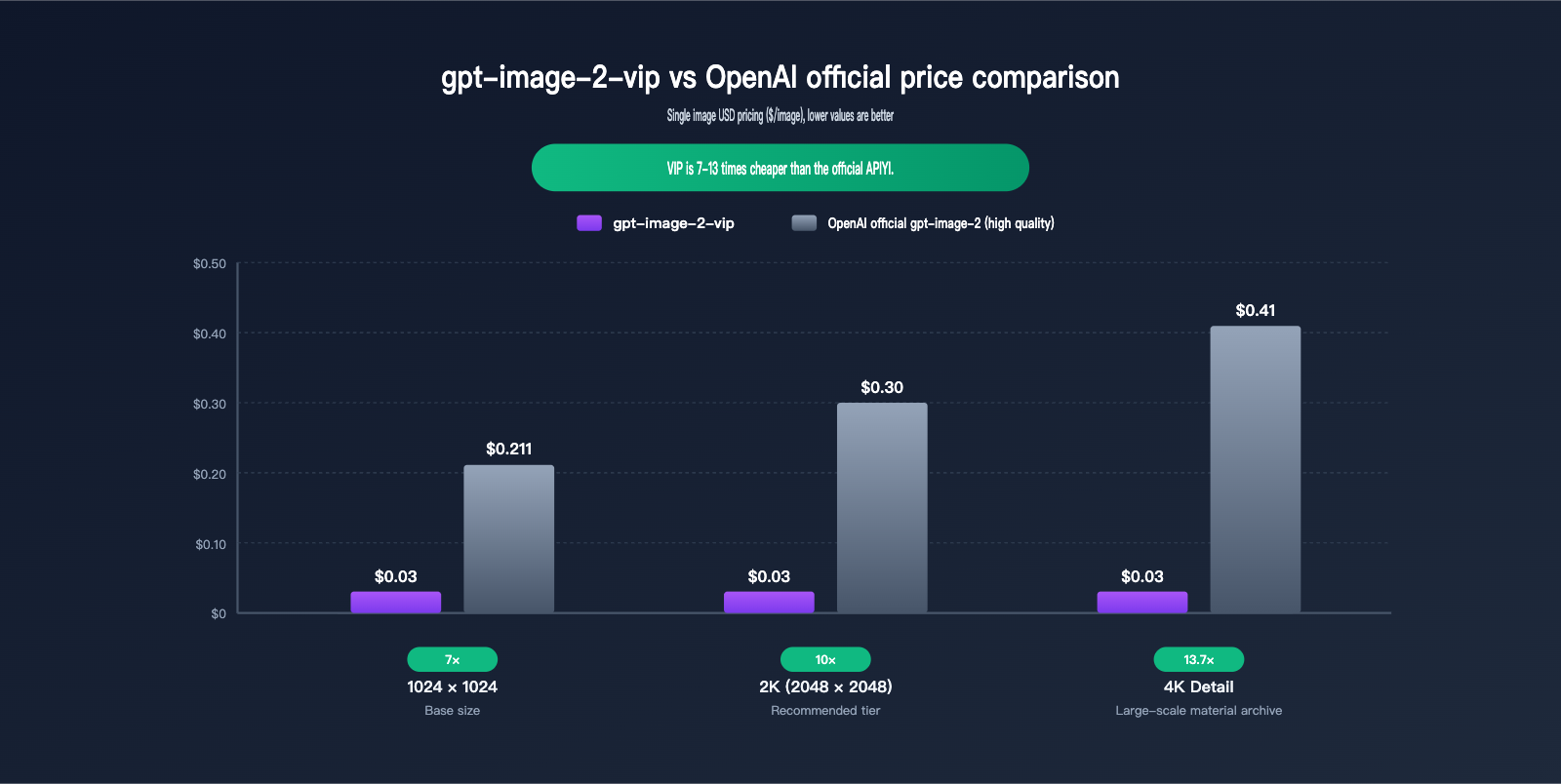
As you can see from the comparison, gpt-image-2-vip isn't meant to replace the official version, but rather to cover a new use case: "batch processing, predictable costs, and stable output." If your workflow involves batch production of 50+ images per day, the VIP version can reduce your monthly image generation budget from $300 to $45, while offering more flexibility in dimensions.
Practical Guide: Calling the gpt-image-2-vip Size API
Here’s an out-of-the-box API calling example. The gpt-image-2-vip model is compatible with the OpenAI Images API standard; simply replace the size parameter with your desired "width x height" string.
Basic Call: 2K Recommended 1:1 Image Generation
from openai import OpenAI

client = OpenAI(
    api_key="your_apiyi_key",
    base_url="https://api.apiyi.com/v1"
)

response = client.images.generate(
    model="gpt-image-2-vip",
    prompt="High-end e-commerce product photo, pure white background, centered ceramic cup, minimalist Japanese style",
    size="2048x2048",   # 2K Square
    n=1
)

print(response.data[0].url)
📌 base_url Configuration Note: The code above uses the APIYI
api.apiyi.com/v1endpoint. The model namegpt-image-2-vipis a reverse-engineered version from the official ChatGPT codex channel. It supports a full range of 30 size combinations and features a flat rate of $0.03 per image.
Advanced Call: Batch Generating 5 Resolution Variants
If you need to test how the same prompt performs across different resolutions, you can run a sequential call:
sizes_to_test = [
    "1280x1280",   # 1K Square - Draft
    "1280x960",    # 1K Standard - Landscape Draft
    "2048x2048",   # 2K Square - Default Final
    "2048x1152",   # 2K Wide - 16:9 Final
    "3840x2160",   # 4K Wide - 4K Final
]

for size in sizes_to_test:
    resp = client.images.generate(
        model="gpt-image-2-vip",
        prompt="Futuristic product launch keynote visual, cyberpunk style, deep purple gradient",
        size=size,
        n=1
    )
    print(f"{size}: {resp.data[0].url}")

# Total cost for 5 images: 5 × $0.03 = $0.15 (approx. ¥1.1)
Quick Reference Code for High-Frequency Aspect Ratio Parameters
# Reuse directly, no need to look up a table
SIZES = {
    # 1K Fast
    "1k_square": "1280x1280",
    "1k_portrait_3_4": "960x1280",
    "1k_story_9_16": "720x1280",
    "1k_wide_16_9": "1280x720",

    # 2K Recommended (Default)
    "2k_square": "2048x2048",
    "2k_portrait_3_4": "1536x2048",
    "2k_social_4_5": "1632x2048",
    "2k_large_5_4": "2048x1632",
    "2k_story_9_16": "1152x2048",
    "2k_wide_16_9": "2048x1152",
    "2k_cinema_21_9": "2048x864",

    # 4K Detail
    "4k_square": "2880x2880",
    "4k_wide_16_9": "3840x2160",
    "4k_story_9_16": "2160x3840",
    "4k_cinema_21_9": "3840x1632",
}

# Usage example
size = SIZES["2k_portrait_3_4"]  # For Xiaohongshu cover images
gpt-image-2-vip Size FAQ
Q1: What is the fundamental difference between gpt-image-2-vip and the official gpt-image-2?
gpt-image-2-vip is a version accessed by the APIYI platform via the official ChatGPT codex channel. The API protocol, generation quality, and model capabilities are identical to the ChatGPT web experience. Compared to the official OpenAI API, the VIP version adds support for the 5:4 aspect ratio, uses a flat pricing of $0.03/image (regardless of quality tier), and inherits the stability of the codex channel. Output quality is essentially the same, but the VIP version offers a clear cost advantage for batch processing.
Q2: Are the 30 size presets for gpt-image-2-vip fixed? Can I customize them?
The 30 presets are optimized combinations. We recommend using these presets via the API to ensure the best output stability. While the OpenAI standard protocol theoretically supports custom "width x height" values, the VIP version is optimized for these presets; custom dimensions may be downgraded to the nearest preset. If you have specific size requirements, we suggest generating the closest preset and cropping it later.
Q3: Is gpt-image-2-vip really $0.03/image? Are there hidden fees?
Yes, $0.03/image is the final price with no hidden fees. Whether it's 1K Fast (1280×720) or 4K Detail (3840×2160), the price remains $0.03/image. This is clearly stated in the pricing section of APIYI (apiyi.com). Note: Editing scenarios (image-to-image, Inpainting) involve reference image tokens, so the price is slightly higher, but still significantly lower than the official version.
Q4: Can the 4K Detail tier really output 4K quality?
Yes, but with a caveat. OpenAI officially labels 4K (>2560×1440) as experimental. This means that at large sizes, you may occasionally encounter slightly blurry text, detail distortion, or minor composition shifts. In our testing, simple compositions (white-background product shots, portraits) perform stably at 4K. For complex compositions (infographics, posters with long text), we recommend generating at 2K and using tools like Topaz Gigapixel to upscale for more controlled results.
Q5: How should I choose between 1K, 2K, and 4K?
The simplest logic: The final use case determines the tier.
- Use case is "Testing Prompts" → 1K Fast (fastest speed, same cost)
- Use case is "Social Media/E-commerce Platforms" → 2K Recommended (platforms will compress it anyway, 2K is sufficient)
- Use case is "Print Materials/4K Display" → 4K Detail
Since the price is uniform, feel free to test without worrying about costs.
Q6: What is the practical use of the 5:4 ratio?
The 5:4 ratio sits between 1:1 (square) and 4:3 (landscape). It is primarily used for: Medium-format photography (approximating the classic Hasselblad 6×4.5 ratio), picture frames (common in American-style frames), and certain print materials (like 8×10 inch photos). While not commonly used in digital scenarios in China, it is a high-frequency ratio in overseas print markets, which is why the VIP version supports it.
Q7: Why doesn't gpt-image-2-vip use tiered pricing based on quality?
This relates to the model source. The VIP version comes from the ChatGPT codex channel (similar to the image generation interface used by ChatGPT Plus users on the web). The codex channel itself is billed by "number of calls" rather than "token consumption," allowing the VIP version to offer "same price, different quality." The official API uses token-based pricing (where image input/output tokens are billed separately), meaning higher resolution and higher quality equal more tokens, which equals a higher price.
Q8: How do I use gpt-image-2-vip in the imagen.apiyi.com web tool?
Open imagen.apiyi.com and select "gpt-image-2-vip" in the model selection dropdown. The interface will automatically load a three-part UI: Aspect Ratio dropdown (10 types), Resolution dropdown (1K/2K/4K), and a Final Resolution info bar (displaying pixel values in real-time). Just select your options and click generate—no coding or parameter memorization required. This UI is driven by the renderRatioOptions data in js/app.js, which corresponds exactly to the 30 presets on the API side.
Summary: 3 Key Principles for Selecting gpt-image-2-vip Dimensions
Now that we've covered the details, here are the three core principles for selecting the right gpt-image-2-vip dimensions:
1. Let "End Use" dictate the resolution, not "Maximum Quality." Social media platforms compress images anyway, and 2K already exceeds the requirements of any mainstream platform. Only print, 4K displays, or outdoor advertising truly require 4K detail. Blindly chasing 4K is a waste of time and might lead you into experimental pitfalls.
2. Separate your "Drafting" from your "Final Output." The 1K Fast tier generates images 30-40% faster than the 2K tier, making it perfect for rapid prompt iteration. Once you've confirmed the composition is spot on, simply regenerate the final version in 2K or 4K. Since the price is a flat $0.03, this two-stage workflow won't cost you a penny extra.
3. Choose aspect ratios based on platform requirements, not "aesthetic vibes." Platforms like Xiaohongshu (3:4), Instagram (1:1), TikTok (9:16), and YouTube (16:9) all have their own "native ratios" that maximize exposure. Choosing the wrong ratio (like posting a 9:16 image to a 16:9 channel) leads to cropping or black bars, which hurts your conversion rates.
🚀 Actionable Advice: If you want to get started with gpt-image-2-vip right away, we recommend two entry points: Creators should start with the web tool at imagen.apiyi.com—select your model, aspect ratio, and resolution to generate your first image in under 5 minutes. Technical teams should integrate the gpt-image-2-vip model via APIYI at api.apiyi.com; by using the SIZES dictionary provided in this article, you can build a batch image generation pipeline in minutes. The flat pricing of $0.03 per image makes your monthly budget predictable, which is perfect for large-scale operations.
Mastering the 30 available dimensions for gpt-image-2-vip won't magically make your images "high-end," but it will allow you to minimize costs and decision friction, turning AI image generation from a "trial-and-error art" into "controllable production"—and that is the true value of engineering AI workflows.
Author: The APIYI Technical Team — Focused on Large Language Model API integration and image generation tool development. Visit apiyi.com for more model evaluations, dimension mapping tables, and developer guides.