LiteLLM and Claude Code are two of the most popular AI development tools for 2025-2026, but developers often find themselves comparing them: Which one is better? Can they replace each other? And does LiteLLM actually support prompt caching billing? This article compares LiteLLM and Claude Code, providing clear recommendations across three dimensions: positioning, capability boundaries, and support for prompt caching billing.
Core Value: After reading this, you'll know whether these tools are truly an "either-or" choice and how to make the best decision for your specific scenarios.
Quick Overview: Core Differences Between LiteLLM and Claude Code
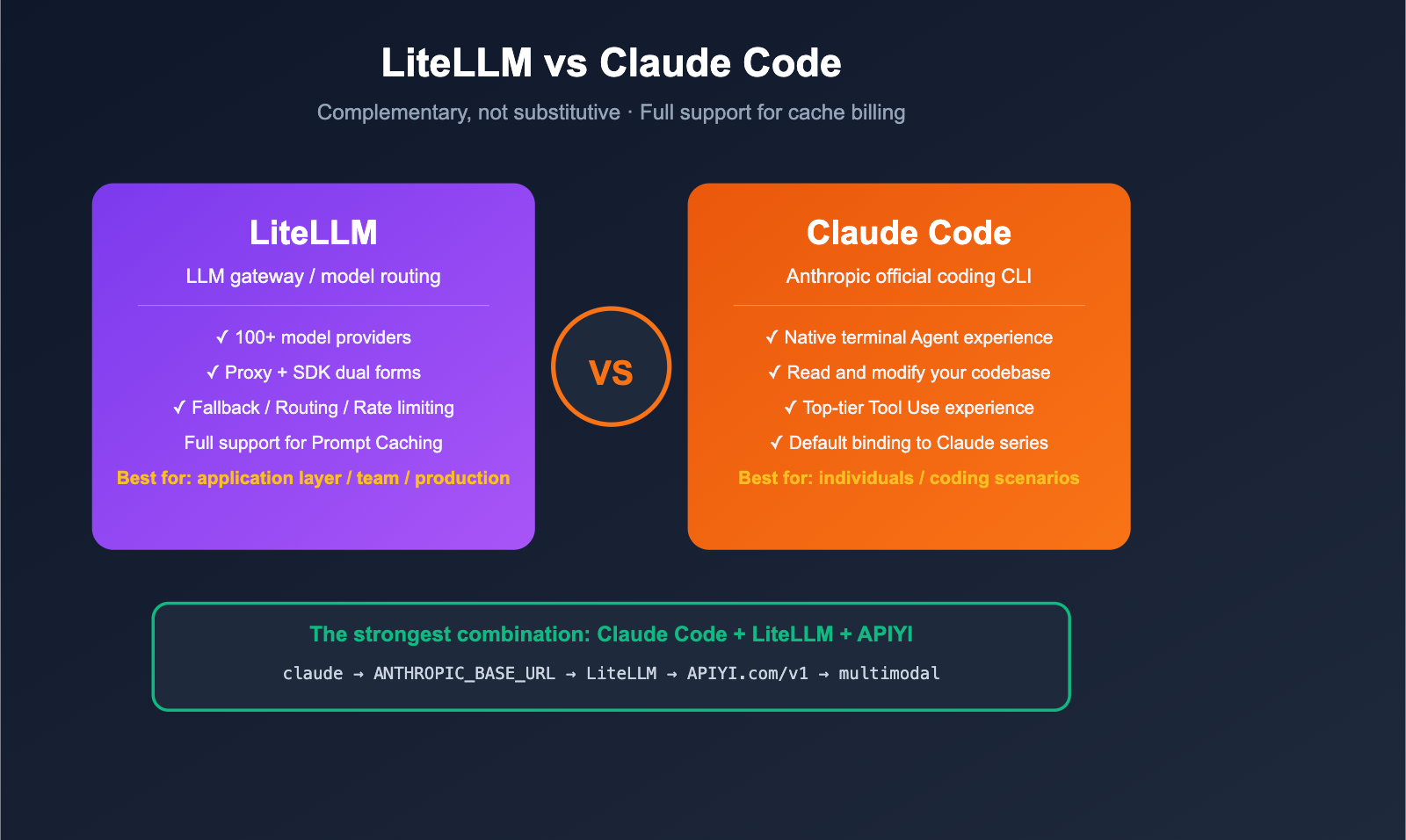
Many people treat LiteLLM and Claude Code as competitors, but in reality, their positioning is completely different, and they can even be used together. Here’s the essence of the difference in one sentence:
- LiteLLM = An LLM gateway/proxy layer that lets you call 100+ models with a single codebase.
- Claude Code = Anthropic's official agentic coding CLI, focused on "using Claude to modify your codebase."
| Comparison Dimension | LiteLLM | Claude Code |
|---|---|---|
| Product Form | Python SDK + Proxy server | Command Line Interface (CLI) |
| Core Positioning | Universal LLM gateway / Model routing | Agentic coding assistant |
| Supported Models | 100+ (OpenAI, Anthropic, Gemini, Bedrock, Vertex, etc.) | Defaults to Claude series only |
| Typical Users | Platform engineers, AI application developers | Individual developers, coding scenarios |
| Open Source | ✅ Yes (BerriAI/litellm) | ❌ No (Closed-source CLI) |
| Can they replace each other? | ❌ No | ❌ No |
| Can they be used together? | ✅ Yes (LiteLLM behind Claude Code) | ✅ Yes (LiteLLM to switch underlying models) |
| Best Partner | Use with APIYI (apiyi.com) for stable proxy services | Use with LiteLLM to switch underlying models |
💡 Quick Conclusion: If you're asking "which one is better," you'll likely find that you need both — use Claude Code as your coding agent and LiteLLM as your unified gateway, then connect to overseas models via APIYI (apiyi.com). This is the most mainstream stack for 2026.
5 Key Differences Between LiteLLM and Claude Code
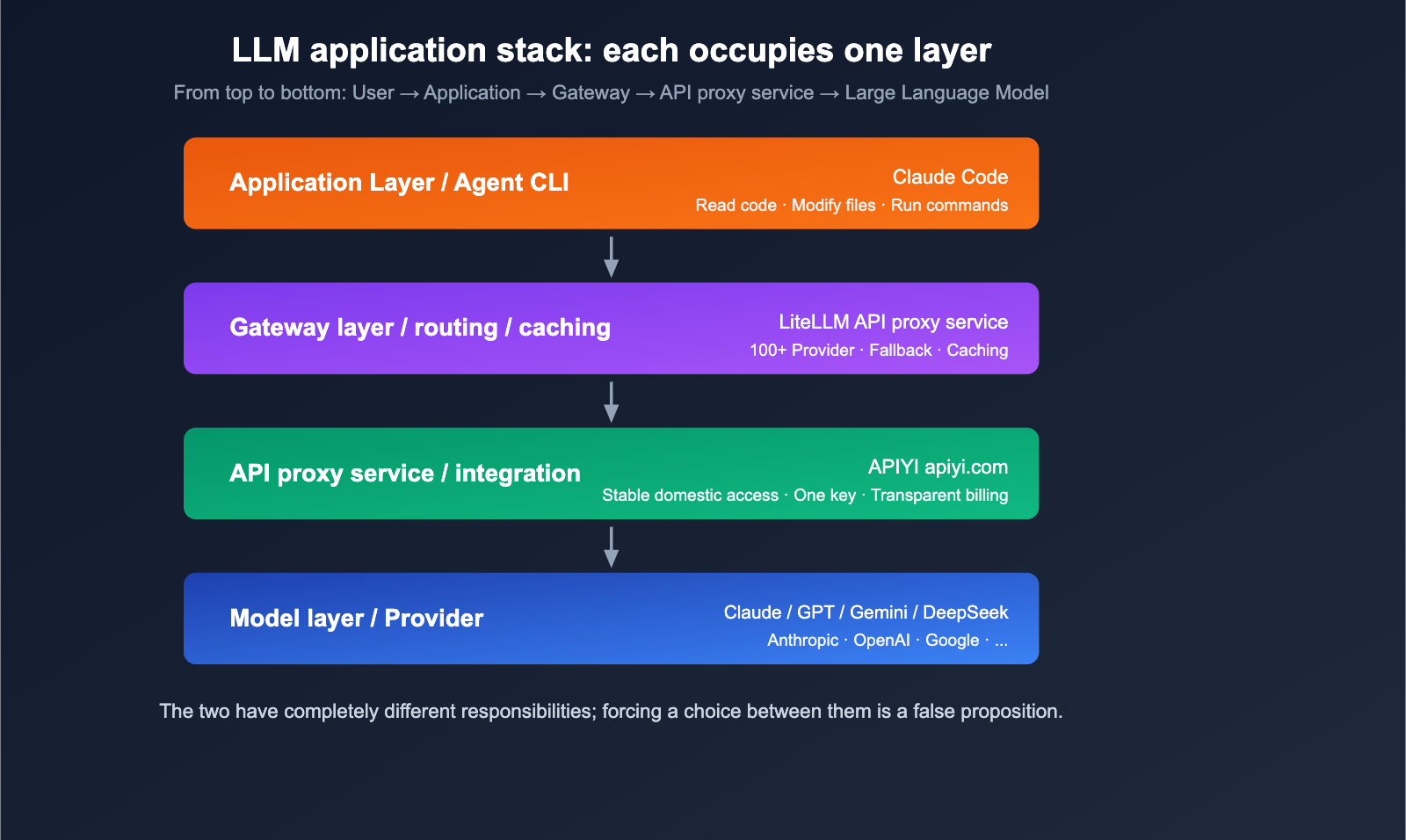
Difference 1: Different Positioning (Gateway vs. Agent CLI)
LiteLLM's Positioning: An open-source LLM gateway designed to "call any model using the OpenAI-compatible format." It comes in two forms:
- Python SDK:
litellm.completion(model="...")for developers building applications. - Proxy Server:
litellm --config config.yamlruns as a standalone service for team-wide sharing.
Claude Code's Positioning: An official agentic coding CLI from Anthropic, designed to "let Claude read your code, modify it, and run commands directly in your terminal." It’s an application-layer product that calls the Anthropic Messages API under the hood.
In short: LiteLLM is the "water pipe," and Claude Code is the "faucet attached to the pipe."
Difference 2: Supported Models
| Dimension | LiteLLM | Claude Code |
|---|---|---|
| Default Support | 100+ (OpenAI, Anthropic, Google, Cohere, Bedrock, Azure, HuggingFace, Ollama, vLLM, etc.) | Anthropic Claude series only (Opus / Sonnet / Haiku) |
| Custom Endpoints | ✅ Any OpenAI-compatible endpoint | ⚠️ Via ANTHROPIC_BASE_URL to LiteLLM |
| Domestic Models | ✅ DeepSeek / Qwen / Kimi / GLM, etc. | ❌ Not supported by default |
Note that Claude Code can also "indirectly" use other models by setting ANTHROPIC_BASE_URL to point to a LiteLLM Proxy, but this essentially means LiteLLM is doing the translation work—which proves they are complementary tools.
Difference 3: User Interface and Developer Experience
LiteLLM Developer Experience:
- An SDK for application developers.
- Can be integrated into any Python project.
- Provides an OpenAI-compatible HTTP endpoint for frontend, Node.js, and cURL usage.
Claude Code Developer Experience:
- A standalone CLI, similar to a
claudecommand. - Chat with your codebase directly in the terminal.
- Built-in tools for file I/O, Bash execution, Git, etc.
- Optimized tool-use experience: "think while you code."
Difference 4: Deployment and Maintenance Costs
| Item | LiteLLM | Claude Code |
|---|---|---|
| Installation | pip install litellm |
npm i -g @anthropic-ai/claude-code |
| Service Required | Yes (for Proxy mode) | No, local CLI |
| YAML Config | Yes (for Proxy mode) | Generally no |
| Team Sharing | ✅ One Proxy service for the team | ❌ One CLI per person |
| Centralized Billing | ✅ Unified at the gateway level | ❌ Per-account billing |
Difference 5: Ecosystem and Extensibility
LiteLLM Ecosystem:
- Logging: Langfuse, Helicone, Sentry, OpenTelemetry.
- Guardrails: Built-in content moderation.
- Routing: Load balancing, fallback, rate limiting.
- Cost tracking: Multi-model, multi-user, and multi-key dimensions.
Claude Code Ecosystem:
- Hooks: Custom command hooks.
- MCP: Access external tools via the Model Context Protocol.
- IDE Integration: VS Code, JetBrains.
- Tight integration with Anthropic's tool-calling capabilities.
Does LiteLLM Support Prompt Caching Billing?
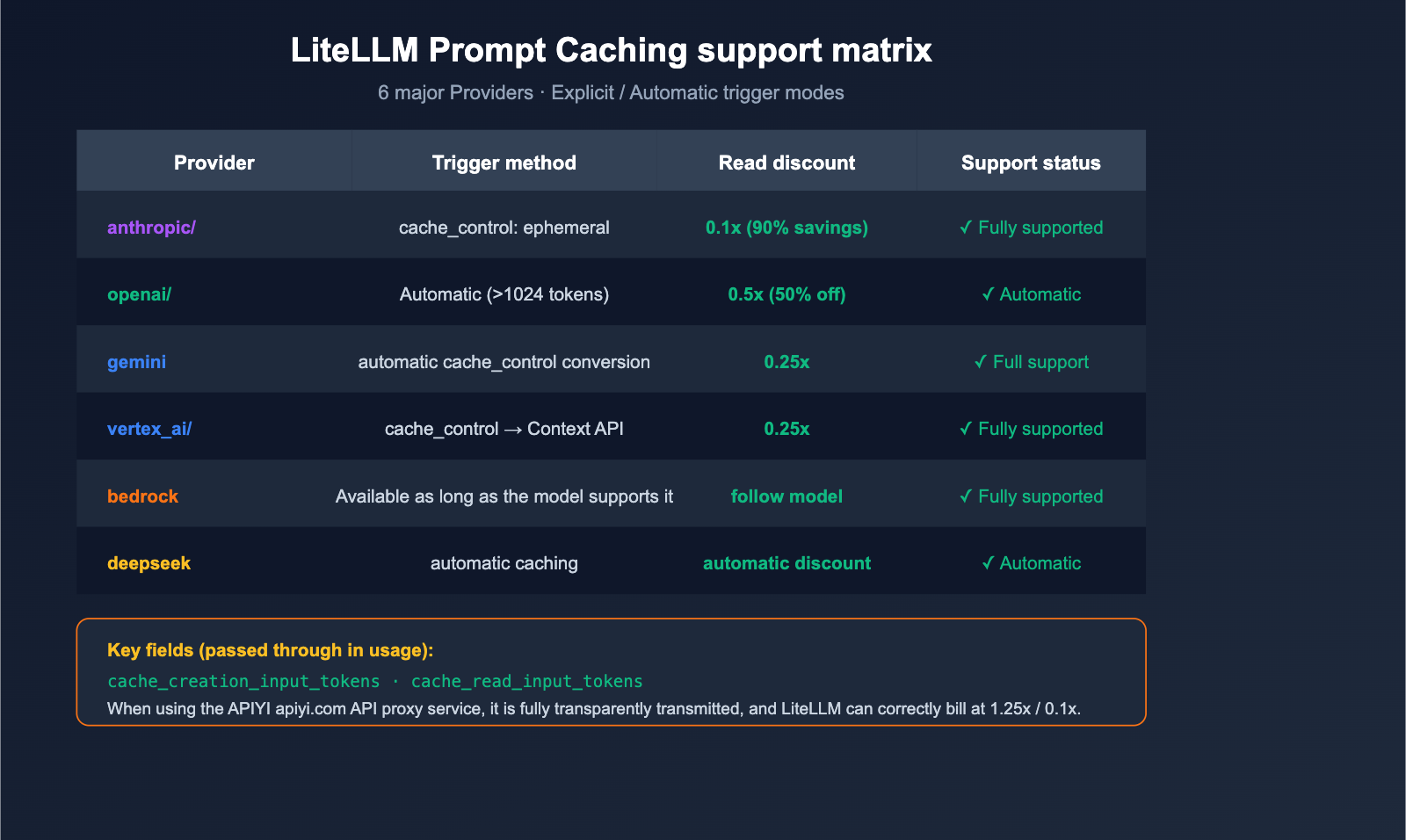
This is a top concern for developers. The short answer: Yes, it's a first-class citizen.
Support Matrix
LiteLLM's official documentation confirms native support for prompt caching across these 6 major providers:
| Provider | LiteLLM Prefix | Cache Trigger Method | Price Advantage |
|---|---|---|---|
| Anthropic | anthropic/ |
Explicit cache_control: {"type": "ephemeral"} |
1.25x write, 0.1x read (90% discount) |
| OpenAI | openai/ |
Automatic (>1024 tokens) | Automatic 50% discount |
| Google AI Studio | gemini/ |
Explicit cache_control |
Auto-converted to Context Caching API |
| Vertex AI | vertex_ai/ |
Explicit cache_control |
Same as above |
| Bedrock | bedrock/ |
Available if model supports it | Follows model pricing |
| DeepSeek | deepseek/ |
Automatic | Automatic discount |
Code Example: Anthropic Caching
import litellm

response = litellm.completion(
    model="anthropic/claude-opus-4-6",
    messages=[
        {
            "role": "system",
            "content": [
                {
                    "type": "text",
                    "text": "You are a senior Python engineer... (long system prompt)",
                    "cache_control": {"type": "ephemeral"},   # Key: Mark for caching
                }
            ],
        },
        {"role": "user", "content": "Please review this code"},
    ],
)

# Cache usage is visible in response.usage
print(response.usage)
# {
#   "prompt_tokens": 1234,
#   "cache_creation_input_tokens": 800,   # Tokens written to cache
#   "cache_read_input_tokens": 0,          # Becomes 800 on second call
#   "completion_tokens": 256,
# }
🎯 Pro Tip: Anthropic's prompt caching is incredibly cost-effective for long system prompts and repetitive context—reading from the cache costs only 10% of the original price. We recommend enabling it by default for long-running agents, RAG, and code reviews. If you want to reliably call Claude Opus 4.6 / Sonnet 4.6 in China and enjoy prompt caching discounts, you can connect via APIYI (apiyi.com), which fully passes through cache-related usage fields.
Auto-Inject Cache Control
If you don't want to manually add cache_control to every message, LiteLLM offers automatic injection:
response = litellm.completion(
    model="anthropic/claude-opus-4-6",
    messages=[...],
    cache_control_injection_points=[
        {"location": "message", "role": "system"}   # Automatically cache all system messages
    ],
)
This is great for legacy code—you can enjoy a 90% caching discount without modifying your message structure.
Caching Billing "Gotchas" and Current Status
LiteLLM did have a bug in early 2024 (GitHub Issue #5443) where cost tracking didn't correctly distinguish between cache_creation_input_tokens and cache_read_input_tokens, leading to billing discrepancies. However, this was fixed in the 2025-2026 versions. Currently, LiteLLM calculates costs in the completion_cost() function using these rules:
| Token Type | Price Multiplier (Relative to input price) | Note |
|---|---|---|
| Cache Write | 1.25x | Slight overhead for writing to cache |
| Cache Read | 0.1x | Only 10% of the cost |
| Standard Input | 1.0x | Standard input |
| Output | Model-defined | Output tokens |
🛡️ Important Note: If you are using an API proxy service, ensure it fully passes through the
cache_creation_input_tokensandcache_read_input_tokensfields; otherwise, LiteLLM will bill them as standard input. APIYI (apiyi.com) fully supports the pass-through of these fields, allowing you to realize true caching discounts when paired with LiteLLM.
title: "Scenario Guide: When to Use LiteLLM vs. Claude Code"
description: "A practical guide on choosing between LiteLLM and Claude Code for different development needs, including enterprise setups and model switching."
Scenario Guide: When to Use LiteLLM vs. Claude Code
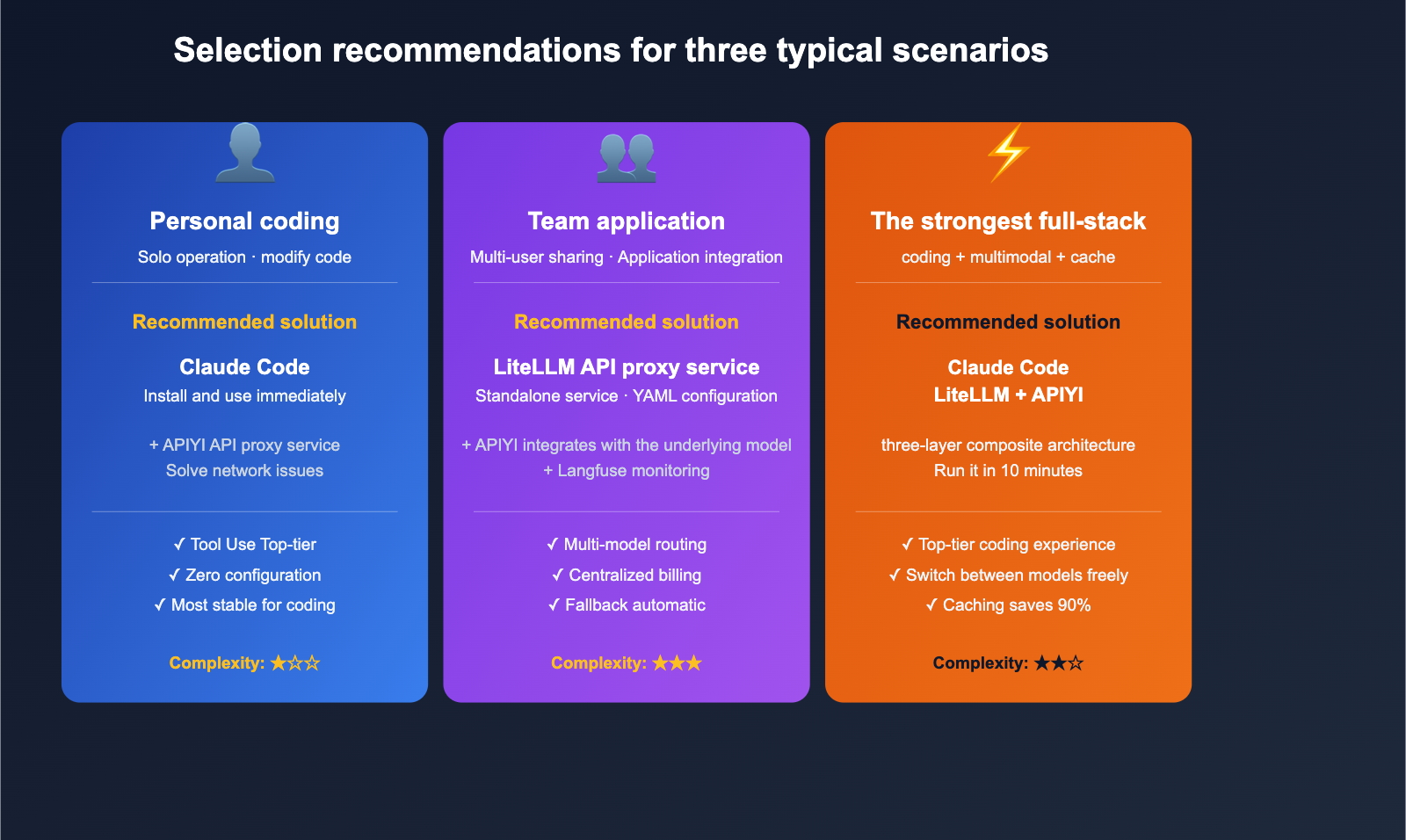
Scenario 1: Individual Developer, Coding-Focused
Recommendation: Use Claude Code directly.
The reason is simple—Claude's experience in coding tasks is currently top-tier, with reliable tool use, precise file modifications, and excellent context window management. If you're working solo and don't need to switch models frequently, Claude Code is the most hassle-free choice. If you have trouble accessing Anthropic's official services, you can point ANTHROPIC_BASE_URL to an APIYI API proxy service for a seamless experience.
Scenario 2: Building AI Applications as a Team
Recommendation: LiteLLM Proxy + Application Code.
Why? You need "unified billing + multi-model routing + fallback," which is the core strength of LiteLLM Proxy. Claude Code is a CLI tool and isn't designed to act as an application-layer gateway.
Best practices:
- Run a standalone LiteLLM Proxy service (on port 4000).
- Connect all underlying models via APIYI.
- The application layer only calls the LiteLLM Proxy, using semantic model names.
Scenario 3: Wanting Claude Code's Experience with Model Switching
Recommendation: A combination of Claude Code + LiteLLM.
This is the most powerful setup. Configuration is straightforward:
# Start LiteLLM Proxy (pointing to multiple models)
litellm --config litellm_config.yaml --port 4000

# Route Claude Code through LiteLLM
export ANTHROPIC_BASE_URL=http://localhost:4000
export ANTHROPIC_AUTH_TOKEN=sk-litellm-master-xxxx

# Launch Claude Code with any model
claude --model claude-opus-4-6
claude --model gpt-5            # Same CLI, powered by GPT-5
claude --model gemini-3-pro     # Same CLI, powered by Gemini 3 Pro
💡 Value of the Combination: Claude Code provides a top-notch coding agent experience, LiteLLM offers model flexibility, and APIYI provides stable domestic access. Each plays its part without interference, making this the most practical "full-stack AI coding" solution for 2026.
Scenario 4: Enterprise Production Deployment
Recommendation: LiteLLM Proxy + Langfuse + APIYI.
In enterprise scenarios, Claude Code should only be used as a local developer tool. Real production traffic requires:
- LiteLLM Proxy for gateway, rate limiting, and fallback.
- Langfuse / Helicone for logging and cost analysis.
- APIYI for underlying model access and stability.
LiteLLM vs. Claude Code: Decision Guide
This decision table will help you make a choice in 30 seconds.
| Your Need | Recommended Solution |
|---|---|
| I want AI to edit code in my terminal | Claude Code |
| I want to call multiple models in a Python app | LiteLLM SDK |
| My team needs a unified LLM gateway | LiteLLM Proxy |
| I want to switch the underlying model for Claude Code | Claude Code + LiteLLM |
| I need a production-grade LLM gateway | LiteLLM Proxy + Monitoring |
| Overseas model access is unstable in China | Either + APIYI (apiyi.com) API proxy service |
| I want to save on Anthropic token costs | LiteLLM + prompt caching |
🚀 Unified Recommendation: Regardless of which tool you choose, connecting to APIYI (apiyi.com) as the backend is the most stable option. LiteLLM can point directly to
apiyi.com/v1viaapi_base, and Claude Code can route through LiteLLM viaANTHROPIC_BASE_URLto reach APIYI. Both paths have been verified by many developers as stable and reliable.
LiteLLM vs. Claude Code: FAQ
Q1: Can LiteLLM completely replace Claude Code?
No. LiteLLM is an LLM gateway; it lacks the agent toolchain that Claude Code provides (reading your codebase, autonomous file editing, and running Bash commands). They solve problems at different layers. Using LiteLLM to replace Claude Code is like using a "water pipe factory" to replace a "coffee machine."
Q2: Can Claude Code completely replace LiteLLM?
Also no. Claude Code is a CLI tool, not a gateway. It doesn't have gateway-level concepts like model_list, router_settings, or fallbacks, and it cannot be called directly by your Python applications or web services. If you're building "application-layer AI integration," Claude Code won't help you there.
Q3: Does LiteLLM really support Anthropic’s prompt caching billing?
Yes. As of 2025, LiteLLM fully supports cache_control: {"type": "ephemeral"}, automatic cache_control_injection_points, and usage pass-through for cache_creation_input_tokens / cache_read_input_tokens, as well as completion_cost() billing. The cost calculation bug mentioned in early Issue #5443 has been fixed, so you can use the current version with confidence.
Q4: How much can I save by calling Anthropic caching through LiteLLM?
Up to ~90%. Anthropic's prompt caching pricing rules are: cache write is about 1.25x the standard input price, and cache read is about 0.1x the standard input price. In scenarios where long system prompts are reused (like RAG, code review, or long-running agents), actual savings are typically between 50-90%. If you connect via APIYI (apiyi.com), these caching discounts will be fully reflected in your bill.
Q5: Will performance drop if I use Claude Code with GPT-5 via LiteLLM?
There will be differences, but not necessarily a drop in quality. Claude Code's tool-use prompts are optimized for Claude. When switching to GPT-5, the function-calling style and file-editing actions might vary slightly. We recommend using the Claude series as your primary model and others as "inspiration/comparison" backups. LiteLLM's fallback mechanism allows you to automatically downgrade to GPT-5 if Claude hits rate limits.
Q6: How can developers in China effectively use Claude Code + LiteLLM + Anthropic Caching together?
The most pragmatic approach is a three-layer structure: Claude Code (CLI) → LiteLLM Proxy (local port 4000) → APIYI (apiyi.com) (API proxy service). Point Claude Code to LiteLLM via ANTHROPIC_BASE_URL, configure the model in the LiteLLM YAML as anthropic/claude-opus-4-6, and set the api_base to apiyi.com/v1. This way, you get the coding experience of Claude Code, the routing power of LiteLLM, and the network/billing stability of APIYI, all while fully retaining prompt caching discounts.
Summary
LiteLLM and Claude Code aren't competitors; they operate at different levels of abstraction—the "gateway layer" and the "application layer," respectively. Forcing a choice between them is a false dilemma. The real question you should be asking is: Which combination fits your specific use case?
To circle back to the two questions we started with:
- Which one is better? — It depends on your scenario. Use Claude Code for personal coding tasks, use LiteLLM for application development, or combine Claude Code + LiteLLM if you need the best of both worlds.
- Does LiteLLM support cache billing? — Yes, it offers full support across six major providers: Anthropic, OpenAI, Gemini, Vertex, Bedrock, and DeepSeek, allowing you to save up to 90% on input token costs.
🚀 Actionable Advice: If you want to set up a complete "Claude Code + LiteLLM + Caching" workflow today, here’s the fastest path: First, register at APIYI (apiyi.com) to get your API key. Second, set up a local proxy using LiteLLM and point your
api_basetoapiyi.com/v1. Third, configure theANTHROPIC_BASE_URLin Claude Code to point to your local LiteLLM instance. You can have this entire pipeline running in under 10 minutes and start enjoying the cost benefits of prompt caching immediately.
Author: APIYI Team — Dedicated to providing developers with stable access to mainstream Large Language Models. Visit apiyi.com to learn more.
References
-
LiteLLM Official Documentation – Prompt Caching
- Link:
docs.litellm.ai/docs/completion/prompt_caching - Description: Cache support matrix and code examples for the 6 major providers.
- Link:
-
LiteLLM Official Documentation – Auto-Inject Cache
- Link:
docs.litellm.ai/docs/tutorials/prompt_caching - Description: Automatic injection via
cache_control_injection_points.
- Link:
-
LiteLLM Official Documentation – Claude Code Quickstart
- Link:
docs.litellm.ai/docs/tutorials/claude_responses_api - Description:
ANTHROPIC_BASE_URLconfiguration and 1M context window support.
- Link:
-
LiteLLM Official Documentation – Anthropic Provider
- Link:
docs.litellm.ai/docs/providers/anthropic - Description: Details on
cache_creation_input_tokensandcache_read_input_tokensfields.
- Link:
-
GitHub Issue #5443 – Cache Cost Calculation
- Link:
github.com/BerriAI/litellm/issues/5443 - Description: History of early cache billing bugs and their fixes.
- Link:
-
LiteLLM GitHub Main Repository
- Link:
github.com/BerriAI/litellm - Description: Source code, issues, and the latest version updates.
- Link: