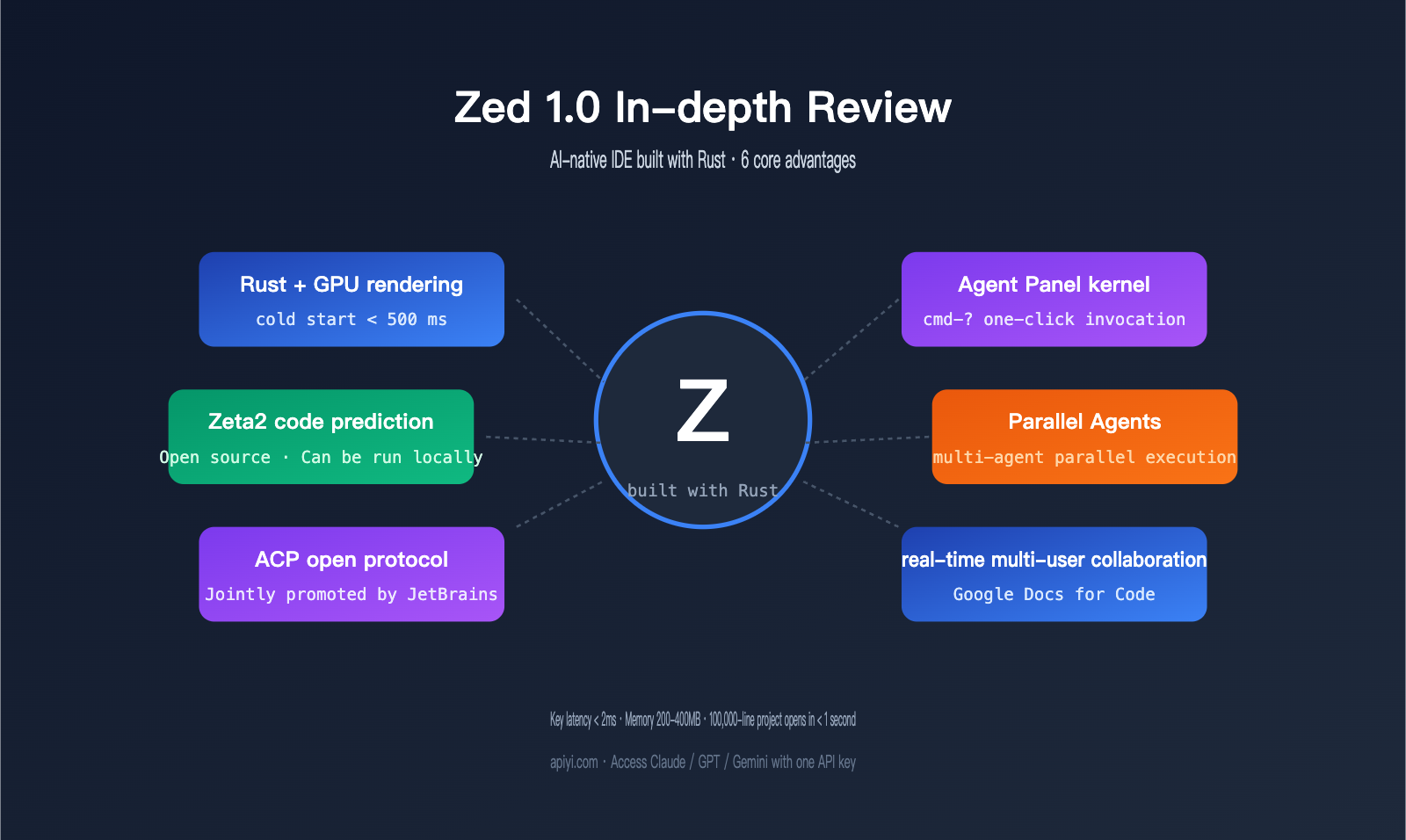
By the end of April 2026, Zed 1.0 was officially released. Built by the former Atom team using Rust, this editor finally stepped onto the mainstream stage after five years of development on GitHub. It isn't just another VS Code fork; it’s a "brand-new foundation" with a custom-built rendering pipeline and AI Agent protocol. It leverages direct GPU rendering, boasts a cold start time of under 500 milliseconds, and keeps keystroke latency below 2 milliseconds. Plus, it features a built-in Agent Panel, making AI-assisted editing a first-class citizen within the editor's core.
If you’re already used to Cursor’s Composer or are still sticking with VS Code + Copilot, you might be wondering: Can the Zed editor really shake up the landscape of AI-native IDEs? This review breaks down its performance, depth of AI integration, multi-user collaboration capabilities, extension ecosystem, and the ability to connect custom Large Language Model providers, ultimately giving you a clear verdict on who it’s for (and who it isn’t).
1. Why Zed Editor is the New Choice for AI-Native IDEs
The biggest difference between Zed and VS Code or Cursor is that Zed was designed with the "editor foundation" and "AI integration" in mind from day one. While traditional editors treat AI as a plugin, Zed has model invocation, Agent protocols, and context management baked into the editor's core, giving it a clear edge in response speed and resource usage.
1.1 Performance Backed by Rust + GPU Rendering
Zed is written in Rust and communicates directly with the GPU via Metal (on macOS) and Vulkan (on Linux), bypassing the Web rendering bottlenecks of traditional Electron-based applications. With a cold start time of under 500 milliseconds and keystroke-to-display latency of under 2 milliseconds, even if you open a 100,000-line monolithic repository, Zed can index and respond in under a second—whereas Cursor would take about 4.5 seconds in the same scenario.
For developers accustomed to the VS Code ecosystem, the first switch to Zed is striking: cursor movement feels virtually lag-free, there's no frame drop when scrolling through large files, and memory usage typically sits in the 200–400MB range—about half that of Cursor. This "physically perceptible" speed is the most compelling reason to stick with it.
1.2 Built-in Agent Panel and Open ACP Protocol
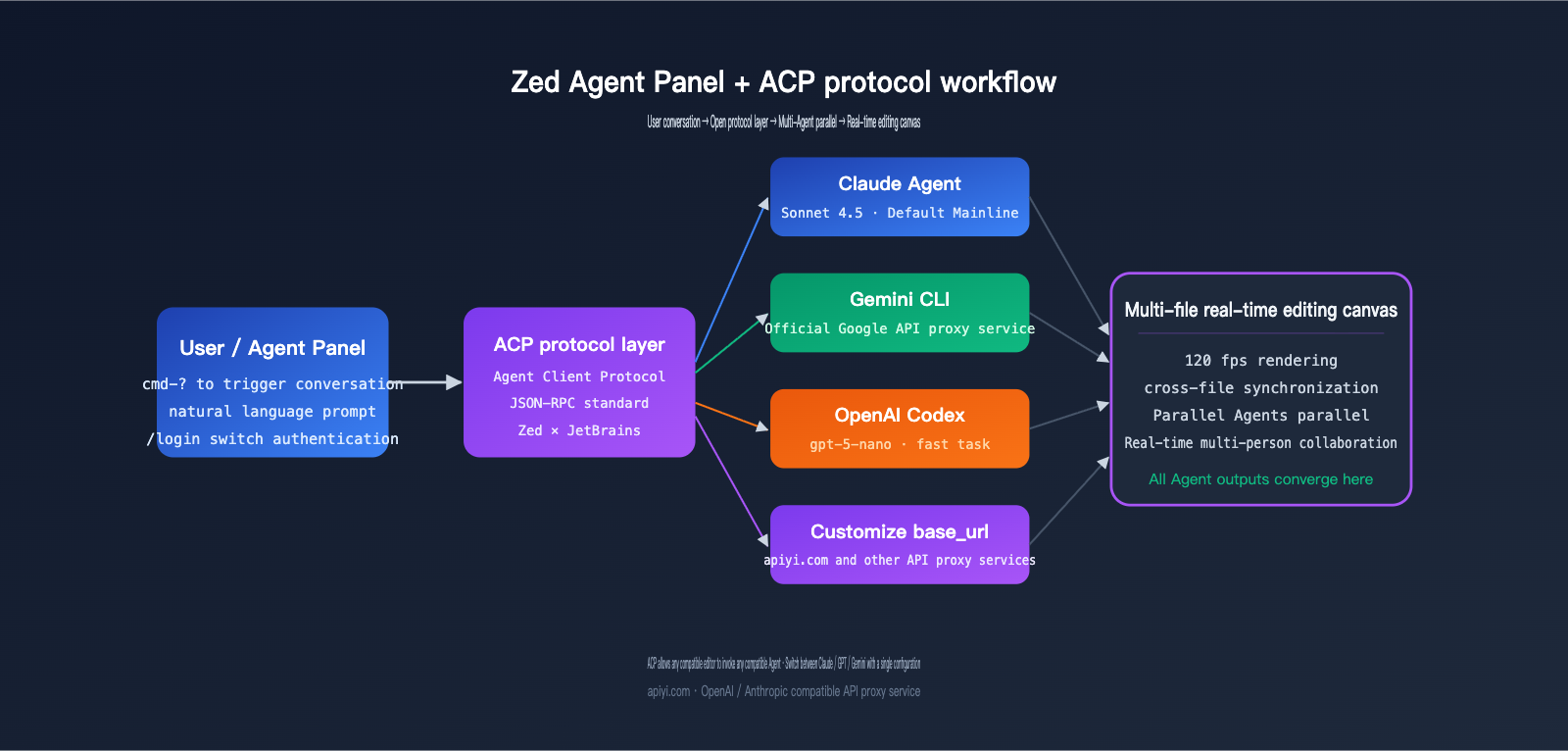
Performance is just the entry ticket; the real difference lies in the AI layer. Zed’s Agent Panel is a built-in chat interface that communicates with various AI Agents via the ACP (Agent Client Protocol). ACP is an open standard co-promoted by Zed and JetBrains, aiming to allow Claude Agent, Gemini CLI, Codex, and others to connect to any compatible IDE using the same protocol.
This means that in Zed, you can use the officially hosted Large Language Model services (defaulting to Claude Sonnet 4.5 for agentic tasks and gpt-5-nano for summaries), or you can plug in your own API key, or connect via an OpenAI-compatible endpoint to a third-party API proxy service, giving you control over both costs and model flexibility.
🎯 Connection Tip: Zed supports any OpenAI/Anthropic-compatible
base_url, meaning you can seamlessly integrate APIYI (apiyi.com) as your unified Large Language Model provider. We recommend using Claude Sonnet 4.5 for the Agent Panel and gpt-5-nano for summary tasks, managing multi-model orchestration under a single API key. It’s currently the most hassle-free way to get set up.
2. Breakdown of the 4 Core Features of the Zed AI-Native IDE
Zed's AI capabilities aren't just a simple "Copilot bolted on." Its four core features have distinct boundaries and unique user experiences.
2.1 Deep Integration of Agent Panel and Claude Agent
The Agent Panel is the default interface, opened via cmd-? / ctrl-?, where you can initiate chats or agent tasks. It natively supports Claude Agent (powered by the Claude Code SDK via ACP adaptation). Since version 0.202.7, Claude Agent's authentication has been completely decoupled from Zed's internal agent system—you can independently /login to use your own Anthropic API key or Claude Pro/Max subscription.
In practice, the Agent Panel doesn't just provide single-file rewrite suggestions; it handles multi-file collaborative edits, with all changes rendered in real-time on the editor canvas at 120 fps. If you've connected a third-party base_url (such as the API proxy service from APIYI at apiyi.com), the experience is identical to the official one, but you gain access to a much wider range of models.
2.2 Code Prediction and the Open-Source Zeta2 Model
Code completion is another area where Zed stands out. Zed includes a built-in Code Prediction feature powered by its self-developed open-source model, Zeta2. Its response speed is faster than typical Copilot-style completions, and it supports full local execution (when paired with Ollama).
Zeta2 is designed to be "lightweight and context-aware." It provides suggestions based on your current cursor position, recent edit history, and project structure, making it perfect for pure coding tasks. If your workflow leans toward "long-form code generation," Zeta2 might not outperform Sonnet, but for code completion, the latency advantage is undeniable.
2.3 Parallel Agents
In 2026, the Zed team launched the Parallel Agents capability, allowing multiple agents to work on different tasks simultaneously. For example, you could have one agent refactoring backend code, another updating frontend type definitions, and a third running experiments on a separate branch—all while the output from every agent streams back to the main editor view in real-time.
This design differs significantly from Cursor's Composer (which is single-threaded and multi-file). Zed essentially turns the IDE into a "multi-AI workstation" where you act as the lead, and the agents handle their respective duties. For complex projects involving multiple people and multiple AI agents, this is currently Zed's most visionary feature.
🎯 Parallel Agents Pro-Tip: Running multiple agents in parallel means your token consumption will scale up accordingly. If you're using official vendor APIs directly, your bill can quickly spiral out of control. We recommend setting up a dedicated key for Zed on the APIYI (apiyi.com) platform. This allows you to use Claude Sonnet 4.5 for primary tasks and Haiku 4.5 for summary-style sub-tasks, all while monitoring real-time consumption per model in the dashboard.
2.4 Real-Time Multi-User Collaboration (Google Docs for Code)
Zed treats multi-user collaboration as a first-class citizen, which is a clear differentiator from VS Code Live Share or Cursor. Multiple developers can join the same project and see each other's cursors, edits, and terminal output in real-time—and they can even share AI Agent conversations. In essence, the AI becomes another "participant" in the collaboration.
For remote teams, pair programming, and AI-assisted code reviews, Zed's collaboration capabilities are far more efficient than traditional "screen sharing + passing the keyboard" methods. If your team is accustomed to collaboration workflows like those in Figma, Zed is currently the code editor that feels most natural in that regard.
III. Zed Editor Performance Comparison: Zed vs. Cursor vs. VS Code
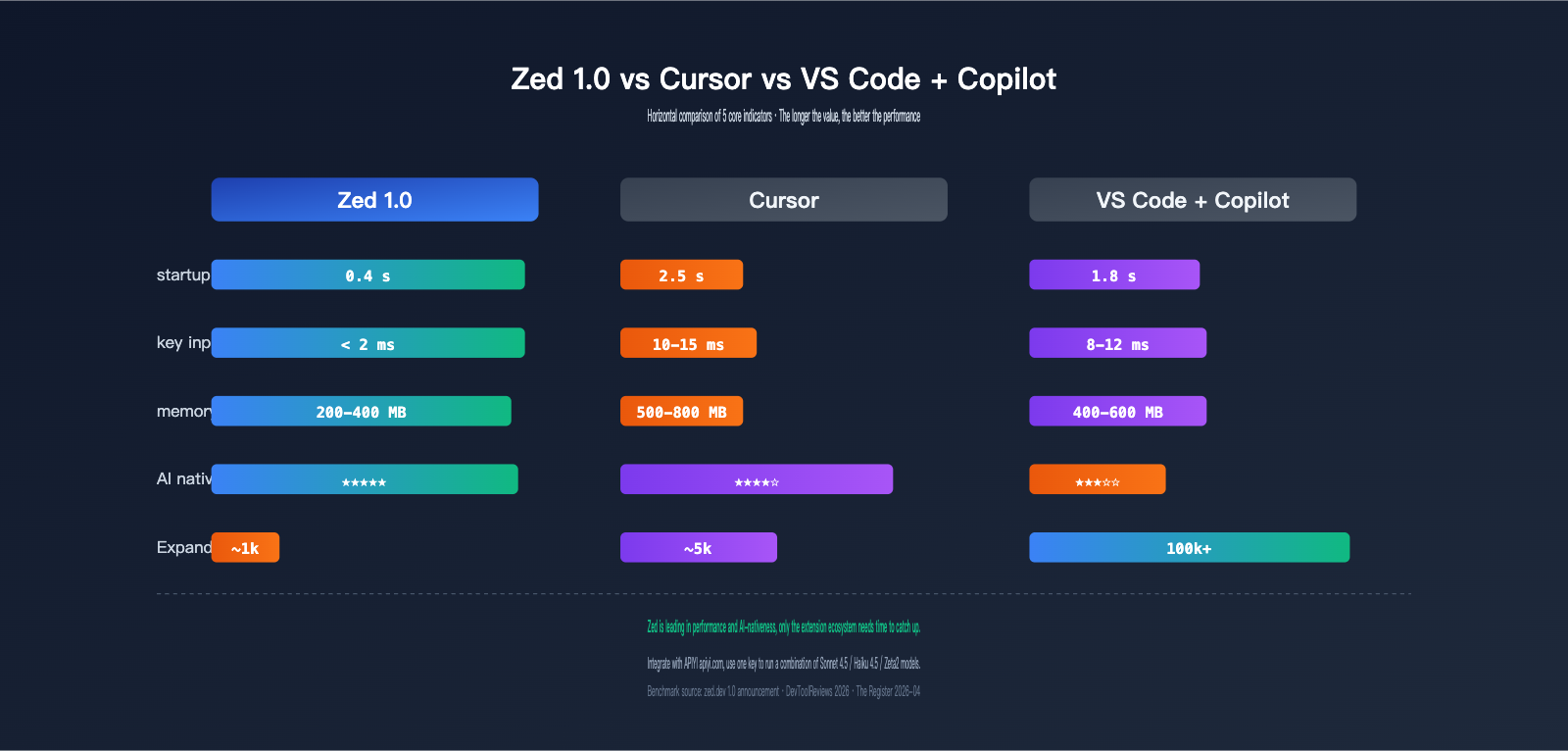
Data speaks louder than intuition. Here is a comparison of core metrics based on independent benchmarking.
| Performance Metric | Zed 1.0 | Cursor | VS Code + Copilot |
|---|---|---|---|
| Cold Start Time | < 0.5s | ~2.5s | ~1.8s |
| Key-to-Screen Latency | < 2ms | ~10-15ms | ~8-12ms |
| Open 100k Line Project | < 1s | ~4.5s | ~3s |
| Typical Memory Usage | 200-400 MB | 500-800 MB | 400-600 MB |
| Rendering Pipeline | Native GPU (Metal/Vulkan) | Electron + Web | Electron + Web |
Zed leads significantly across all performance metrics, which remains its strongest competitive advantage. However, performance isn't everything; the depth of AI integration is equally critical.
| AI Capability Dimension | Zed 1.0 | Cursor | VS Code + Copilot |
|---|---|---|---|
| Built-in Agent Panel | ✅ Agent Panel | ✅ Composer | Via Plugin |
| Multi-file Agent Editing | ✅ Native | ✅ Composer | ⚠️ Plugin-dependent |
| Parallel Agents | ✅ Parallel Agents | ❌ | ❌ |
| Multi-LLM Provider | ✅ Native Switching | ⚠️ Via API | ✅ Plugin Support |
| Custom base_url | ✅ Full Support | ⚠️ Limited | ✅ Plugin Support |
| Code Completion Model | Zeta2 (Open/Local) | Closed Source | Copilot |
| Multi-user Collaboration | ✅ Real-time + AI | ⚠️ Limited | ⚠️ Live Share |
| Extension Count | ~1,000 | ~5,000 (Inherited) | 100,000+ |
As you can see, Zed leads in both "AI-native integration" and "performance," but its extension ecosystem is a clear weakness. Because Cursor is a VS Code fork, it inherits some VS Code extensions, whereas Zed must rely on its own growing library to catch up.
🎯 Model Selection Tip: Zed defaults to Claude Sonnet 4.5 for Agents and GPT-5-nano for summaries—a combination optimized by the developers. If you want to experiment with other model combinations, we recommend using the APIYI (apiyi.com) API proxy service. You only need to update the
base_urland model name in yoursettings.jsonto switch between Claude, GPT, Gemini, and DeepSeek without managing multiple API keys.
IV. Practical Guide: Connecting Custom LLM Providers to Zed Agent Panel
This is the most practical part of our review. Zed allows you to configure any OpenAI or Anthropic-compatible LLM provider directly in settings.json. Below is a minimal, functional configuration example:
{
  "language_models": {
    "openai": {
      "version": "1",
      "api_url": "https://vip.apiyi.com/v1",
      "available_models": [
        {
          "name": "gpt-5",
          "max_tokens": 200000
        },
        {
          "name": "claude-sonnet-4-5",
          "max_tokens": 1000000
        }
      ]
    }
  },
  "agent": {
    "default_model": {
      "provider": "openai",
      "model": "claude-sonnet-4-5"
    }
  }
}
Point the api_url to your APIYI (apiyi.com) proxy endpoint (in this example, vip.apiyi.com/v1), then paste the corresponding API key into the Agent Panel settings for that provider. This allows you to invoke multiple models using a single configuration. Claude Agent authentication is handled separately—use the /login command and select the API Key mode to input your proxy key.
When testing the Agent Panel, a recommended combination is: Sonnet 4.5 for multi-file refactoring, Haiku 4.5 for commit messages and summaries, and Zeta2 for local code completion. This clear division of labor ensures both high quality and cost efficiency.
🎯 Deployment Advice: Changes to Zed's
settings.jsontake effect immediately without a restart. We suggest running a full test cycle—such as having the Agent refactor a small function and write a commit—to verify the stability and latency of the APIYI (apiyi.com) proxy before switching to your main project. This progressive validation helps avoid debugging issues in production.
V. Zed's Pros and Cons: A Sober Assessment
To give you an honest review, we need to lay out both the good and the bad.
| Dimension | Pros | Cons |
|---|---|---|
| Performance | GPU rendering, low memory footprint, fast cold starts | Older hardware may face instability due to GPU driver issues |
| AI Integration | Native Agent Panel, Parallel Agents, open ACP | Agent orchestration isn't as mature as Cursor Composer |
| Model Selection | Native support for multiple providers, custom base_url support |
Default subscription and personal API key authentication are separate; initial setup is a bit convoluted |
| Collaboration | True real-time multi-user + AI collaboration | Requires the whole team to switch to get the full experience |
| Extension Ecosystem | Built-in LSP, works out-of-the-box for mainstream languages | ~1,000 extensions, far fewer than VS Code's 100,000+ |
| Platform Support | Stable on macOS / Linux | Windows still has stability issues; some users report LSP anomalies |
The Bottom Line: If you prioritize "editor performance" and "AI-native integration," Zed is currently the most compelling option to switch to. However, if you're heavily reliant on a niche VS Code extension (like a specific DSL highlighter or an internal enterprise plugin), sticking with VS Code or Cursor is the safer bet.
VI. Who is Zed for? Decision Guide
The table below condenses the decision-making process into a quick reference.
| User Profile | Recommendation | Reason |
|---|---|---|
| Power macOS/Linux user, seeking peak performance | ⭐⭐⭐⭐⭐ | GPU rendering + low-latency experience is unmatched |
| Developer already paying for Claude/Gemini API | ⭐⭐⭐⭐⭐ | Native base_url support saves you a Cursor subscription fee |
| Remote teams / Pair programming / AI Code Review | ⭐⭐⭐⭐⭐ | Real-time collaboration + shared Agents are a killer feature |
| Heavy user of Cursor Composer | ⭐⭐⭐ | Agent Panel is functional but orchestration is weaker than Composer |
| Primary Windows user | ⭐⭐ | Stability needs improvement; try it on a secondary machine first |
| Heavy user of niche VS Code extensions | ⭐⭐ | Limited extension ecosystem; high migration cost |
VII. Zed Editor FAQ
Q1: Is Zed completely free? Do I need a subscription?
The Zed editor itself is completely free. You only need to pay for the model API (using your own Anthropic/OpenAI/Google API key, or via an API proxy service). Zed also offers an official hosted LLM subscription (Zed Pro), but it's not mandatory. If you've already used your own API or a third-party API proxy service, we recommend getting a key from APIYI (apiyi.com) to connect to Zed. This allows you to use Claude Sonnet 3.5 with a 1M context window at standard pricing, which is more cost-effective than the official subscription.
Q2: What's the difference between the Claude Agent in Zed and the Claude Code CLI?
The Claude Agent is a version of Claude Code running inside Zed via the ACP protocol. It offers the same functionality as the command-line Claude Code, but all interactions happen within Zed's Agent Panel. In other words, you get to enjoy the multi-file agent capabilities of Claude Code without ever having to switch to your terminal.
Q3: Will Parallel Agents cause my token usage to skyrocket?
Yes, and that's a cost you need to be aware of. When multiple agents run tasks in parallel, token consumption naturally multiplies. We recommend using Sonnet 3.5 for your "main agent" and Haiku 3.5 or a local model like Zeta2 for "auxiliary agents." This mix-and-match approach helps keep costs within a reasonable range.
Q4: Zed has so few extensions; will my daily development be affected?
LSPs for mainstream languages (Rust, Go, Python, TypeScript, Java, C/C++) are either built-in or can be enabled with a single click, so most daily development won't be affected. The impact is mainly on enterprise-specific plugins, niche languages, or debugger integrations. If your workflow heavily relies on these, try using Zed on a secondary machine for two weeks before deciding whether to switch.
Q5: Is Zed suitable for use with third-party API proxy services?
Absolutely. Zed fully supports custom OpenAI/Anthropic-compatible base_url settings, which is one of the biggest differences between it and Cursor. We recommend connecting via APIYI (apiyi.com). You can switch between mainstream models like Claude, GPT, Gemini, DeepSeek, and Qwen using the same settings.json configuration, and you get unified billing, which is perfect for long-term developer use.
VIII. Conclusion: Is Zed 1.0 Worth the Switch?
If we had to condense this review into one sentence: Zed Editor is currently the most "AI-native IDE" among modern editors. Its use of Rust and GPU acceleration makes performance its entry ticket, while the Agent Panel, ACP, and Parallel Agents bring AI collaboration right into the editor's core. If you code on macOS/Linux, already pay for Claude or other Large Language Model APIs, or if your team needs real-time remote collaboration, there's almost no reason not to give Zed a try.
The downsides are also quite real—the extension ecosystem, Windows stability, and agent orchestration at the Composer level are still catching up. However, all things considered, Zed 1.0 is no longer an "experimental toy"; it's a viable option worth integrating into your primary workflow. By using an API proxy service like APIYI (apiyi.com) to access multiple models, you can run your entire workflow—from Sonnet 3.5 to Haiku 3.5, and from agent tasks to local completions—using a single key and a single configuration file. It’s currently one of the most cost-effective AI programming suites available.
If you're currently debating whether to renew your Cursor subscription or are looking for a higher-performance collaborative IDE for your team, our advice is this: spend a week moving your daily projects over to Zed, connect the Agent Panel to an APIYI (apiyi.com) proxy endpoint, and test how it performs in your actual workflow before making a final decision.
— APIYI Team (api.apiyi.com)