In May 2026, OpenAI quietly swapped the default model for ChatGPT to GPT-5.5 Instant. At the API level, this corresponds to a rather peculiar name: chat-latest. It lacks a version number or a date suffix—it’s just a fixed "latest" string. Yet, every time you call it, the underlying model might be silently changing behind the scenes.
Many developers have a few questions when they first see this name: What exactly is the chat-latest model? How does it relate to gpt-5.5 or gpt-5.5-pro? And most importantly—since it's called "latest," does its training data update in real-time? This article will clear everything up.
Core Value: After reading this, you’ll be able to explain what chat-latest is, determine if it’s suitable for your project, and understand what it can and cannot do regarding "rolling updates."
What is chat-latest: A Quick Overview
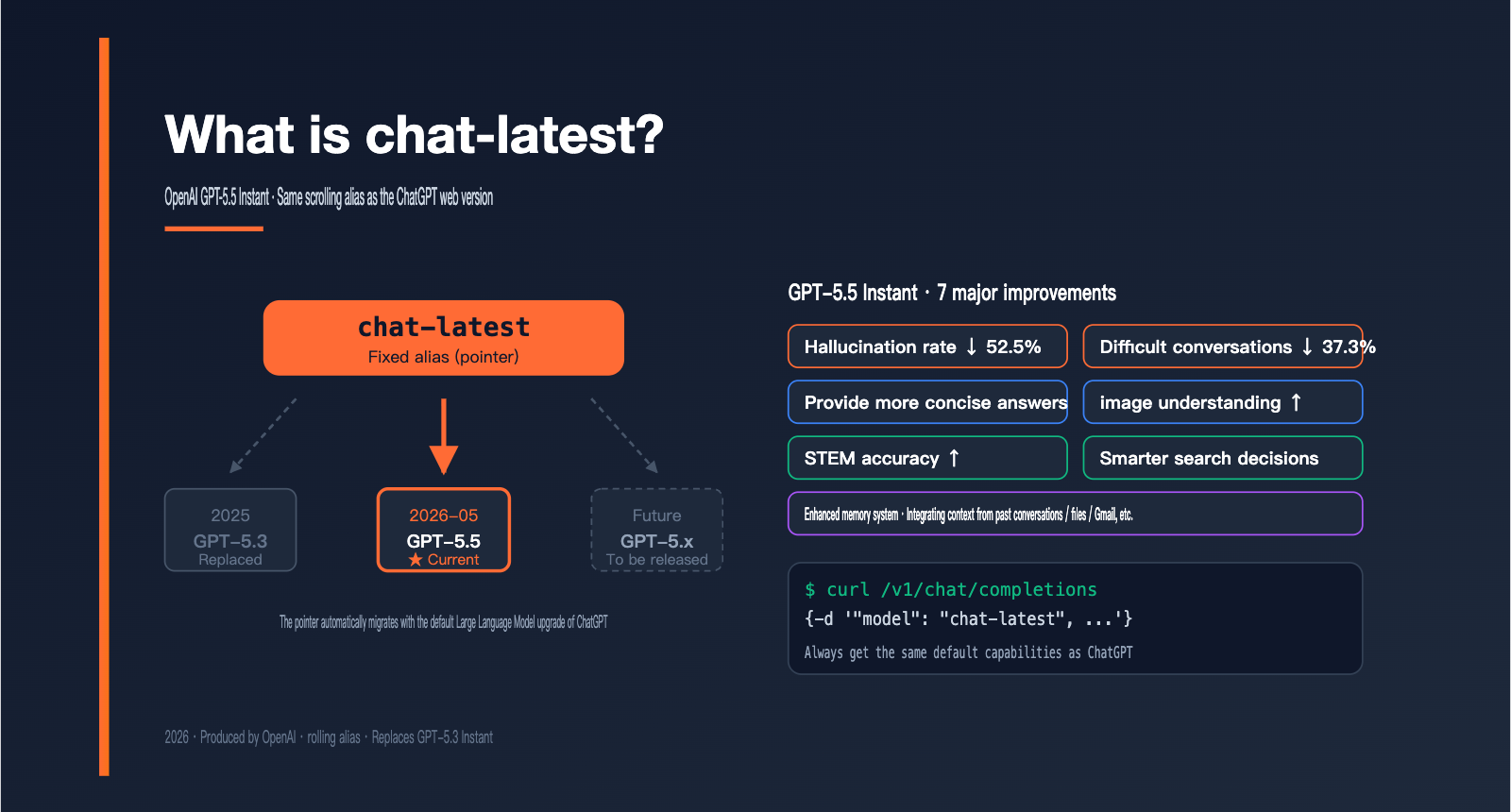
In short: chat-latest is a "rolling alias" provided by OpenAI in the API for the default conversational model used in the ChatGPT web/app interface. It currently points to the GPT-5.5 Instant model released in May 2026. In the future, when OpenAI upgrades the default ChatGPT model, this alias will automatically point to the new one.
This naming convention isn't new for OpenAI—the previous generation's chatgpt-4o-latest followed the same logic. The goal is to allow API users to "get the exact same model as the web version with one click," without having to worry about specific snapshot dates.
| Key Point | Description | Significance for Developers |
|---|---|---|
| API Name | chat-latest (no version/date) |
Always points to the latest default ChatGPT model |
| Current Model | GPT-5.5 Instant (released 2026-05) | Replaces GPT-5.3 Instant |
| Update Mechanism | Rolling alias | The model can be silently replaced |
| Role | Default conversational model for ChatGPT | Optimized for fast replies and daily chat |
| API Format | Compatible with Responses API + full toolset | Supports web search, file search, code interpreter |
The Relationship Between chat-latest and GPT-5.5 Instant
Many people confuse chat-latest, gpt-5.5, and gpt-5.5-instant. The most accurate way to understand it is: chat-latest is a "pointer" that currently points to the specific GPT-5.5 Instant model snapshot.
In other words, the results you get from calling chat-latest today are roughly equivalent to calling gpt-5.5-instant. However, the day OpenAI upgrades the default ChatGPT model to GPT-5.6 Instant, chat-latest will automatically point to that, while the named snapshot gpt-5.5-instant will remain exactly where it is.
Why doesn't chat-latest have a version number?
The design goal of a fixed alias is simple: to ensure the product experience "always stays in sync with the ChatGPT web version." This is great for content-based, customer service, or personal assistant applications—your users get the same capability upgrades that ChatGPT users see, almost simultaneously.
But the trade-off is direct: model behavior is no longer predictable. If your business relies on a fixed output format or a specific response style, a silent upgrade from OpenAI could force you to perform a full regression test on your prompts. This is why OpenAI officially recommends using dated snapshots for production environments rather than rolling aliases.
🎯 Technical Advice: If you just want to quickly test the capabilities of
chat-latestwithout the hassle of managing official accounts or payment methods, you can callchat-latestdirectly via the APIYI (apiyi.com) platform. The pricing is identical to OpenAI's official rates, and they support recharge bonus events. The platform also supports dated snapshots, making it easy to switch between and compare rolling aliases and version-locked models.
7 Key Improvements in chat-latest (GPT-5.5 Instant)
The chat-latest alias currently points to GPT-5.5 Instant, which brings substantial upgrades across several dimensions compared to the previous GPT-5.3 Instant. Below, I've listed them in order of what's most relevant for newcomers.
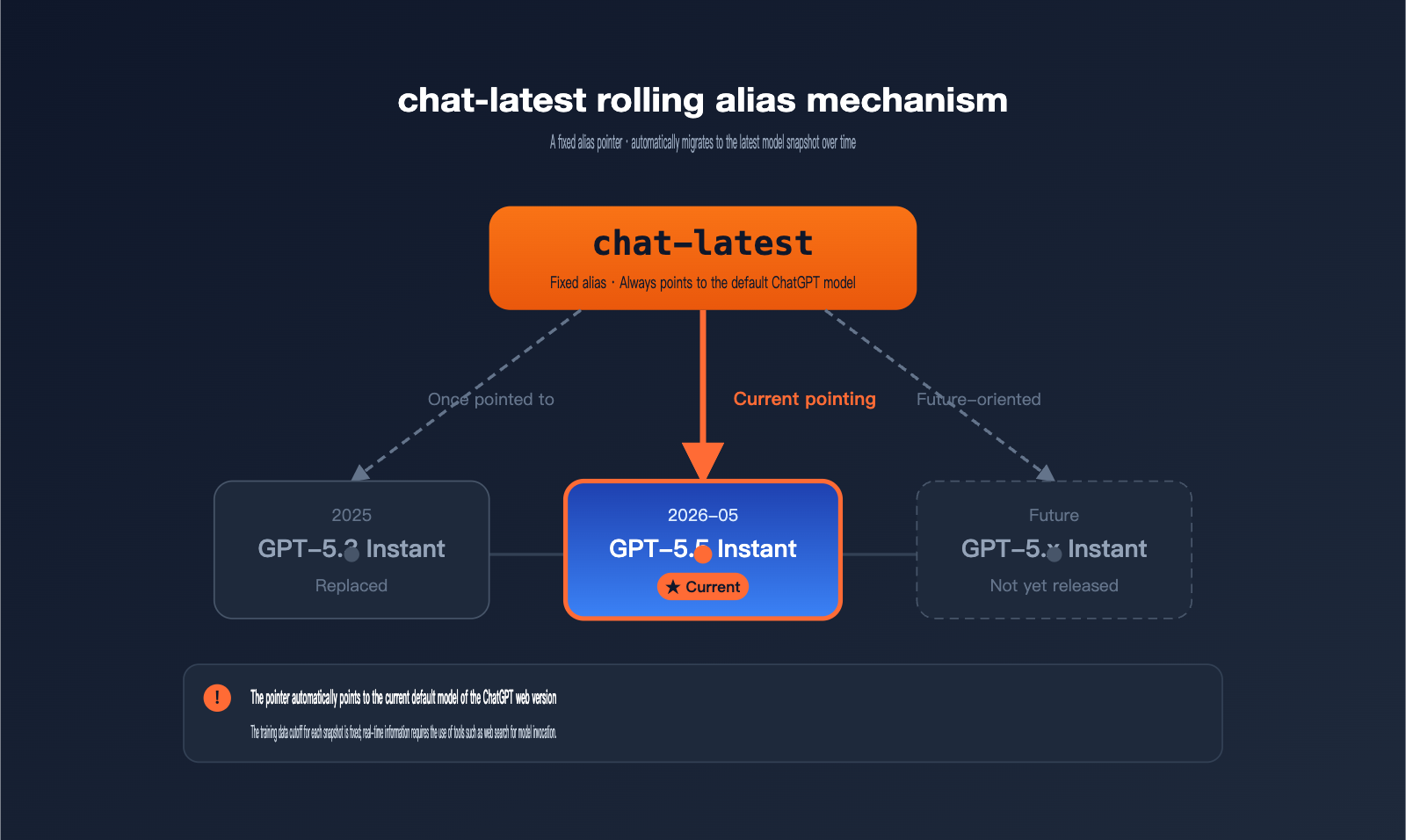
| Improvement Dimension | Changes vs. GPT-5.3 Instant |
|---|---|
| Hallucination Rate | 52.5% reduction in hallucinations on high-risk prompts |
| Complex Dialogues | 37.3% reduction in inaccurate statements |
| Response Style | More concise, fewer redundant follow-ups and messy formatting |
| Image Understanding | Enhanced photo and image analysis capabilities |
| STEM Ability | Improved accuracy in math and science Q&A |
| Search Decision | Smarter judgment on when to proactively trigger web search |
| Memory System | Can integrate context from past conversations, uploaded files, emails, etc. |
Hallucination Rate and Response Reliability
The 52.5% reduction in hallucinations announced by OpenAI was measured against high-risk prompts in fields like medicine, law, and finance—areas where incorrect answers have real consequences. For daily use, you'll notice that chat-latest is much more willing to say "I'm not sure" rather than making up a professional-sounding answer.
The 37.3% decrease in inaccurate statements during complex dialogues means there's significantly less "fact drift" (contradictions or forgetting earlier information) in multi-turn conversations. The long-standing issue in chat products where the model starts "hallucinating" by the tenth turn is noticeably mitigated in chat-latest.
It's worth noting that these metrics were tested on "hard sets"—samples that previous models consistently got wrong. This means chat-latest isn't just polishing what it already knows; it's actually solving tough problems it couldn't handle before. For serious Q&A use cases, you'll feel the difference more than the raw scores suggest.
Response Style and Multimodal Capabilities
GPT-5.5 Instant has made "less fluff" a clear optimization goal: it defaults to shorter replies, reduces unnecessary follow-up questions, and cleans up formatting. Developers can push this further into a minimalist mode using text.verbosity = low.
Photo and image analysis is another major step forward. Whether it's identifying code in screenshots, explaining chart data, or answering questions based on real-world photos, chat-latest is much more stable than its predecessor. Multistep reasoning in STEM subjects has also improved, though for truly complex reasoning, I still recommend using GPT-5.5 Thinking.
Memory System and Memory Sources
GPT-5.5 Instant introduces the "memory sources" feature in ChatGPT: the bottom of a response now shows which past conversations, files, or connected services (like Gmail) were referenced. This gives users a transparent look at why the AI knows what it knows.
When using chat-latest via API, you can replicate this experience using file search and the context window. Developers can feed vectorized user history back into the model to achieve that "remembers who you are" experience similar to the ChatGPT web interface.
Does the training data for chat-latest update in real-time?
This is the most common point of confusion for newcomers, and it's definitely worth breaking down. The short answer: The alias chat-latest periodically points to updated versions of the model, but the training data cutoff for any single model snapshot is fixed. You need to look at this on two different levels.
The "Two-Layer Update" Model of chat-latest
| Update Level | Does it update? | Triggered by | Frequency |
|---|---|---|---|
| Pointer Layer (Alias) | ✅ Periodically switches to a new model | OpenAI upgrading the default ChatGPT | Irregular, approx. every 6–12 months |
| Snapshot Layer (Model) | ❌ Training data cutoff is fixed | Locked when training finishes | Never updated individually |
| Runtime Layer (Inference) | ✅ Can access real-time info via tools | App calls web search, etc. | Real-time |
In other words, the answer to "Does the training data for chat-latest update?" depends on how you look at it:
First, "Has the model it points to been updated?" — Yes. Every time OpenAI upgrades the default model for the ChatGPT web interface, chat-latest on the API side swaps its underlying model accordingly. For example, the recent switch from GPT-5.3 Instant to GPT-5.5 Instant is a classic case.
Second, "Is the knowledge base of the model used for this specific answer up-to-date?" — No. The knowledge cutoff date for every model snapshot is locked the moment training is completed; the model itself doesn't "learn new things on the fly."
Third, "Can it answer questions about today's news?" — Yes, but not through the model's memory; it relies on tool invocation. chat-latest natively supports web search, file search, and code interpreter via the Responses API. The data retrieved by these tools is truly real-time.
Clearing up a common misconception
Many people see the word "latest" and assume OpenAI is feeding the model new data every day. In reality, the training costs for a Large Language Model are astronomical; OpenAI simply doesn't retrain them daily. "Real-time" always refers to "tool-based real-time," not "model memory real-time."
Understanding this is crucial: If your application needs to answer questions like "today's stock prices," "today's sports scores," or "today's news," using chat-latest alone isn't enough. You must explicitly enable the web search tool so the model can check the internet before generating an answer.
Another detail often overlooked is that the timing of the pointer switch is unpredictable. OpenAI doesn't announce in advance when chat-latest will point to a new model, nor does it keep the previous snapshot available. This means if your production business relies heavily on a specific response style or tone, a sudden alias switch could cause subtle changes. To avoid this risk, the safest approach is to use a dated snapshot in the model field, keeping the decision of "when to upgrade" firmly in your own hands.
In summary: chat-latest is a convenient channel that "follows OpenAI's lead," making it easy to keep up with the new capabilities of the ChatGPT web version. However, it is not a living model that updates its own knowledge, and it's certainly not a stable interface for long-term production environments.
🎯 Practical Advice: When building ChatGPT-style Q&A products, if user queries involve real-time information (finance, news, sports), we strongly recommend enabling web search by default and citing the information sources in the response. The
chat-latestinterface provided by APIYI (apiyi.com) also supports the full suite of Responses API tools, making it easy to reuse OpenAI's official tool-calling patterns.
How to call chat-latest: A minimal API example
Using chat-latest is exactly the same as using any standard GPT model; the only change is setting the model field to chat-latest. Here is a minimal Python example.
# Minimal chat-latest invocation example
from openai import OpenAI

client = OpenAI(
    api_key="YOUR_API_KEY",
    base_url="https://api.apiyi.com/v1"  # Using the unified APIYI interface
)

response = client.chat.completions.create(
    model="chat-latest",
    messages=[
        {"role": "system", "content": "You are a patient teaching assistant."},
        {"role": "user", "content": "Explain what an OpenAI rolling alias is in one sentence."}
    ]
)
print(response.choices[0].message.content)
This code runs out of the box, and the returned content will closely match the style you'd get by asking the same question in the ChatGPT web interface—because they are powered by the same underlying model.
View advanced usage: Enabling Responses API and web search
# Using Responses API + web search tool
from openai import OpenAI

client = OpenAI(
    api_key="YOUR_API_KEY",
    base_url="https://api.apiyi.com/v1"
)

response = client.responses.create(
    model="chat-latest",
    input="What is the latest product release on the OpenAI homepage today?",
    tools=[{"type": "web_search"}],
    text={"verbosity": "low"},   # More concise output
    reasoning={"effort": "medium"}  # Default value for chat-latest
)
print(response.output_text)
This approach gives chat-latest true "real-time" capabilities: the model's memory remains the same, but it can browse the web for the latest information before answering.
🚀 Quick Start Tip: If you want to compare the response styles of
chat-latestand other mainstream models with minimal effort, you can use the same SDK via APIYI (apiyi.com) to quickly switch themodelfield and perform A/B testing betweenchat-latest, Claude, and Gemini without needing to register separate accounts for each platform.
Choosing Between chat-latest and Dated Snapshots
Many developers jump straight into using chat-latest for their production environments. Then, one day, OpenAI updates the default ChatGPT model, causing prompt behaviors to shift or output formats to tweak, and suddenly, your app starts throwing "bugs" even though you haven't touched a line of code.
The root cause of this headache is a misunderstanding of the difference between a rolling alias and a dated snapshot.
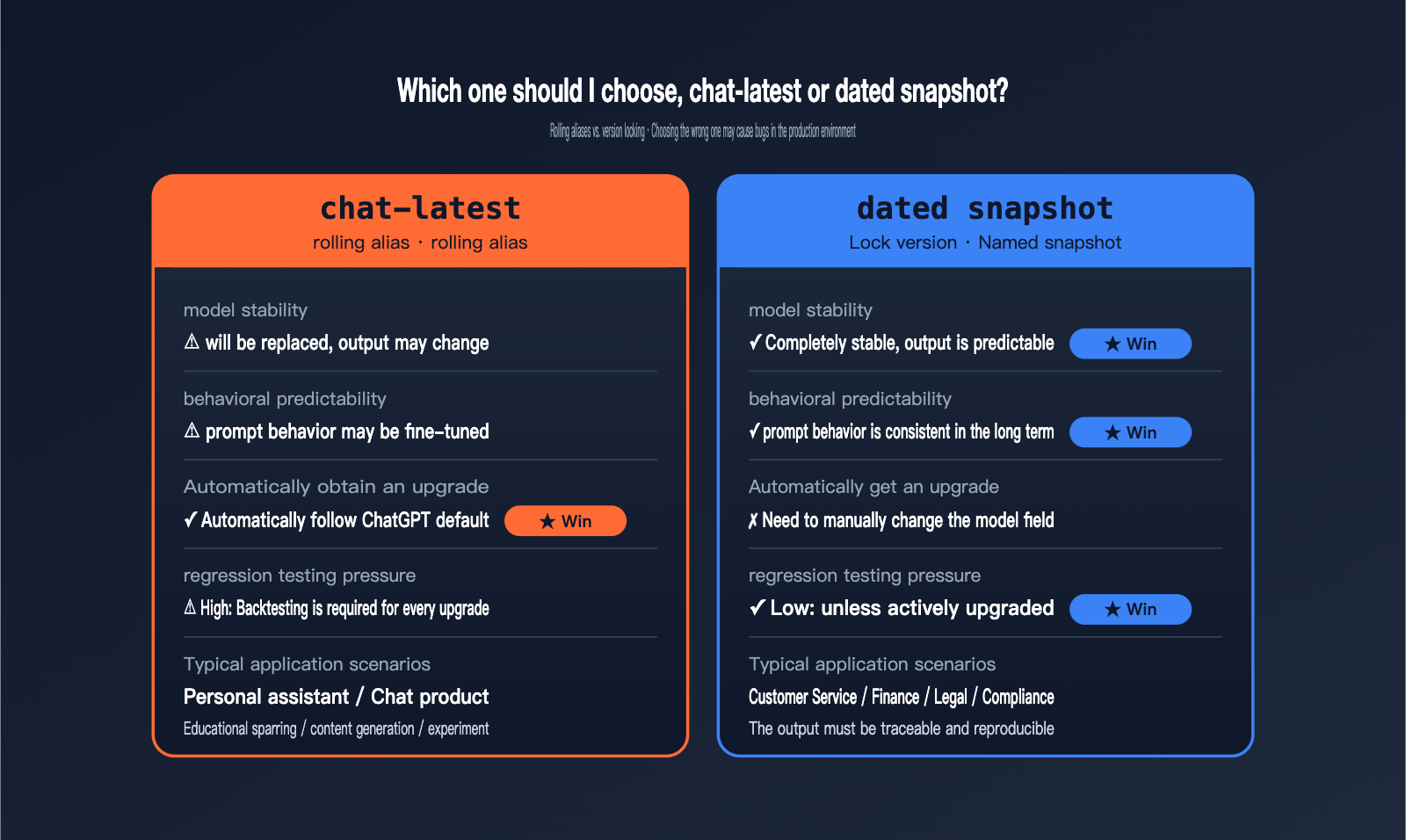
| Comparison Dimension | chat-latest (Rolling Alias) | Dated Snapshot (Version Locked) |
|---|---|---|
| Model Stability | Replaced over time, output may vary | Highly stable, output is predictable |
| Automatic Upgrades | ✅ Automatically follows ChatGPT default | ❌ Requires manual update of model field |
| Regression Testing | High (must re-test after every update) | Low (only when you choose to upgrade) |
| Typical Use Case | Personal assistants, chat products | Customer service, finance, legal, compliance |
| Available Channels | Official OpenAI, third-party API platforms | Same as left |
When to use chat-latest
If your product is designed to "give users the latest capabilities of ChatGPT," such as personal AI assistants, educational tutors, content generation tools, or creative inspiration apps, chat-latest is the way to go. The user experience of "my AI is getting smarter" is exactly the value this provides.
It's also great for internal experiments, prompt research, and evaluating model capabilities, as it gives you a direct baseline of the latest version. The benefit here is convenience: you don't have to keep an eye on OpenAI's release notes every week to update your model fields, and you won't miss out on the latest performance improvements.
When to use a dated snapshot
If your application involves compliance audits, customer service scripts, financial advice, or medical assistance—scenarios where "outputs must be traceable and reproducible"—you should definitely lock your version. Use a specific snapshot name like gpt-5.5-instant-2026-05-05 to ensure that your model behavior remains identical for the next few months.
💡 Pro Tip: Many teams use a hybrid approach: "Run experiments with
chat-latest, but use a dated snapshot for production." We recommend using the APIYI (apiyi.com) platform to call both model types simultaneously for comparison. Once you're confident that thechat-latestupdate is stable, you can decide whether to upgrade your production environment to the new dated snapshot.
chat-latest FAQ
Q1: Are chat-latest and gpt-5.5 the same model?
Not exactly. chat-latest currently points to GPT-5.5 Instant, which is the faster, conversational-focused version within the GPT-5.5 family. In contrast, gpt-5.5 (without a suffix) usually refers to the standard version, which offers more comprehensive capabilities but comes with higher latency. The GPT-5.5 family also includes higher-tier versions like Thinking and Pro. If you're unsure which one to choose, you can use APIYI (apiyi.com) to call multiple versions simultaneously and compare their performance.
Q2: How often is the training data for chat-latest updated?
Strictly speaking, the "training data doesn't get updated"—the data cutoff is locked in once a model snapshot finishes training. However, OpenAI periodically updates the underlying model that the chat-latest alias points to, typically every six months to a year. To get truly real-time information in your responses, you need to explicitly enable the web search tool.
Q3: Is it safe to use chat-latest in a production environment?
OpenAI officially recommends using a dated snapshot rather than a rolling alias for production environments. This is because when the underlying model is swapped, prompt behavior, output formatting, and response style may be fine-tuned, which could cause unexpected regressions for businesses relying on fixed outputs. If you must use chat-latest, we recommend running a regression test suite weekly to monitor for behavioral drift.
Q4: What is the difference between chat-latest and chatgpt-4o-latest?
Both are rolling aliases provided by OpenAI with the same underlying logic, but they point to different generations of models. chatgpt-4o-latest was the pointer for the GPT-4o era and has now been superseded by the GPT-5.x series. chat-latest is the equivalent for the current generation, pointing to the latest default ChatGPT model. You can think of it as the "spiritual successor to chatgpt-4o-latest."
Q5: What is the most cost-effective way to start experimenting with chat-latest?
You can access the chat-latest API via APIYI (apiyi.com). The pricing is consistent with OpenAI's official rates, and they offer recharge bonuses, making it a more cost-effective choice. The platform also provides a unified interface for major models like Claude, GPT, and Gemini, making it easy to quickly compare chat-latest with other models—perfect for model selection and prototype validation.
Summary: chat-latest is the next-gen entry point for "ChatGPT-equivalent APIs"
The essence of chat-latest is that it provides developers with an entry point that "evolves alongside the ChatGPT web version." It currently equates to GPT-5.5 Instant and will automatically upgrade as the default ChatGPT model evolves, saving developers the mental overhead of constantly chasing the latest releases.
However, keep two things in mind: model behavior may change as the alias updates, so be sure to consider using a dated snapshot for production environments to lock in your version. Also, "latest" refers to the model version being updated, not that the training data for a single snapshot is updated in real-time; you must use the web search tool to retrieve truly real-time information.
If you're planning to integrate chat-latest into your application for evaluation, we recommend calling the chat-latest API via APIYI (apiyi.com). It offers an interface specification consistent with the official one and provides cost advantages through recharge bonuses, making it an ideal starting point for low-cost validation of OpenAI's latest conversational model capabilities.
Author: APIYI Technical Team | For technical questions regarding chat-latest, the Responses API, and unified multi-model access, feel free to visit apiyi.com to connect with us.