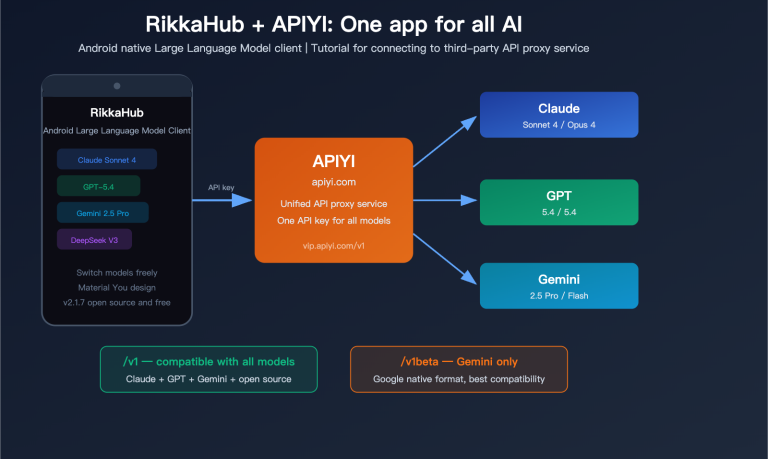
How can you make LiteLLM orchestrate multiple Large Language Models like OpenAI, Claude, Gemini, and DeepSeek simultaneously without getting blocked by overseas account, network, or payment issues? The answer is to connect LiteLLM to an OpenAI-compatible API proxy service. In this article, we’ll use LiteLLM + APIYI (apiyi.com) as an example to walk you through the configuration step-by-step.
Core Value: After reading this, you’ll master the 3 mainstream ways to configure LiteLLM with an API proxy service (SDK, Proxy YAML, and Environment Variables) and be able to complete your APIYI integration in under 5 minutes.
Key Points for Configuring LiteLLM with an API Proxy Service
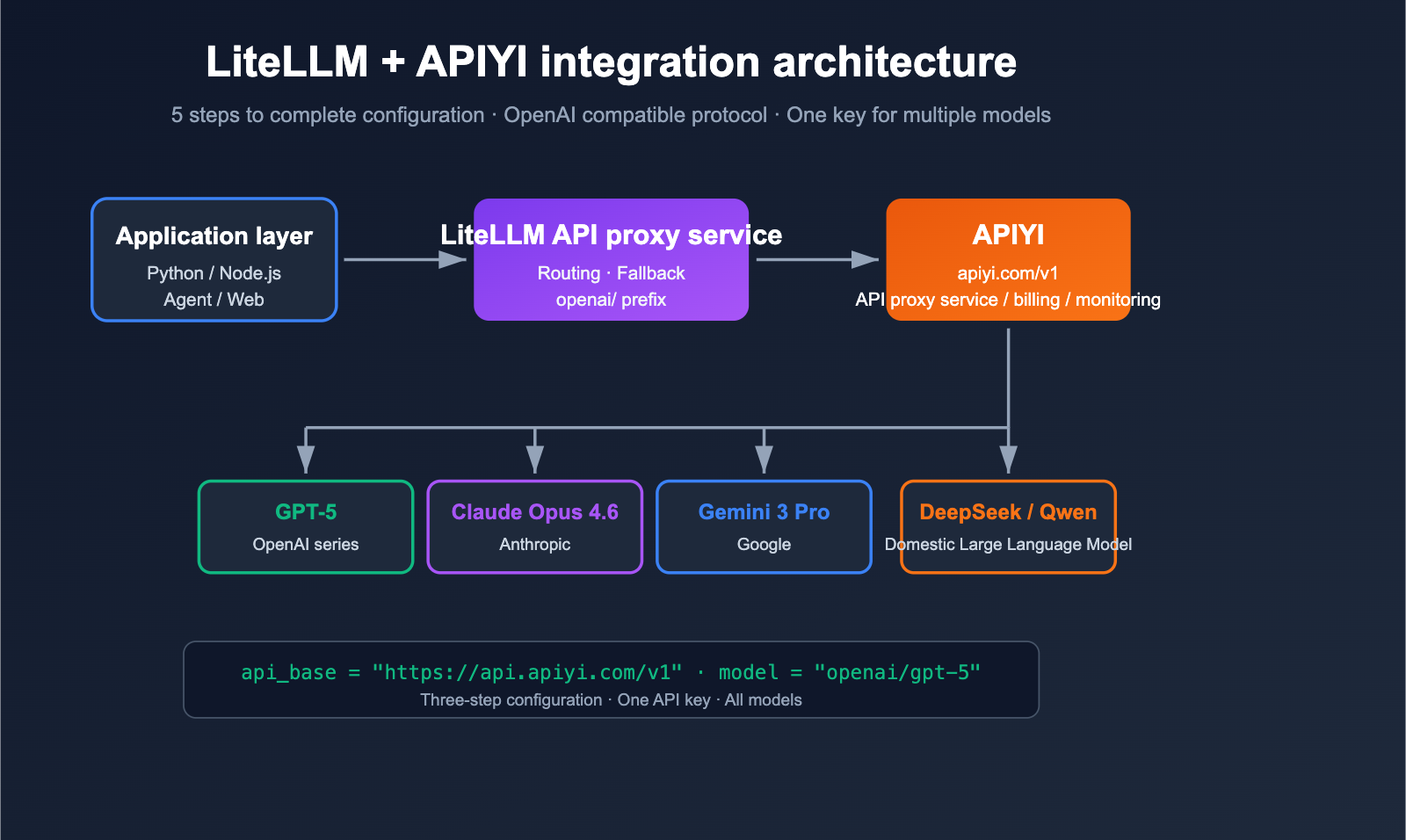
LiteLLM is an open-source LLM gateway/SDK designed to invoke 100+ Large Language Models using the OpenAI-compatible format. It natively supports any "OpenAI-compatible" endpoint; you simply need to point api_base to the proxy service and replace the api_key with the one issued by the proxy. APIYI (apiyi.com) is a standard OpenAI-compatible proxy, making the two a perfect match.
| Key Point | Description | Value |
|---|---|---|
| OpenAI Compatibility | LiteLLM routes to OpenAI clients via the openai/ prefix |
Connect to any proxy with one line of config |
| Three Config Methods | SDK inline / Proxy YAML / Environment Variables | Adapts to scripts, production, and CLI scenarios |
| Unified Model Naming | openai/<provider-model> or custom model_name |
Upper-level code doesn't need to know about underlying changes |
| Error Troubleshooting | base_url must end with /v1 |
90% of 404 errors stem from this |
| Fallback & Load Balancing | YAML mode supports multi-channel and failover | Maximizes availability in production environments |
Detailed Breakdown of LiteLLM Proxy Configuration
The official LiteLLM documentation clearly states: As long as you add the openai/ prefix to the model name and specify the api_base, LiteLLM will use the OpenAI client to access your endpoint. This means that whether the proxy is connected to GPT-5, Claude Opus 4.6, Gemini 3 Pro, or DeepSeek, to LiteLLM, it's just "an OpenAI endpoint."
The base_url for APIYI (apiyi.com) is https://api.apiyi.com/v1, which follows standard /v1/chat/completions, /v1/embeddings, and /v1/images/generations specifications, making it perfectly compatible with LiteLLM without any patches.
Getting Started with LiteLLM and Third-Party API Proxy Services
Preparation
Before we dive in, make sure you have the following ready:
- APIYI API Key: Register at apiyi.com and create a new key in the dashboard (we recommend naming it
litellm-prod). - base_url:
https://api.apiyi.com/v1(Note: the/v1suffix is mandatory). - Python Environment: Python 3.9+.
- Install Dependencies:
pip install litellm.
Minimal Example: SDK Inline Configuration
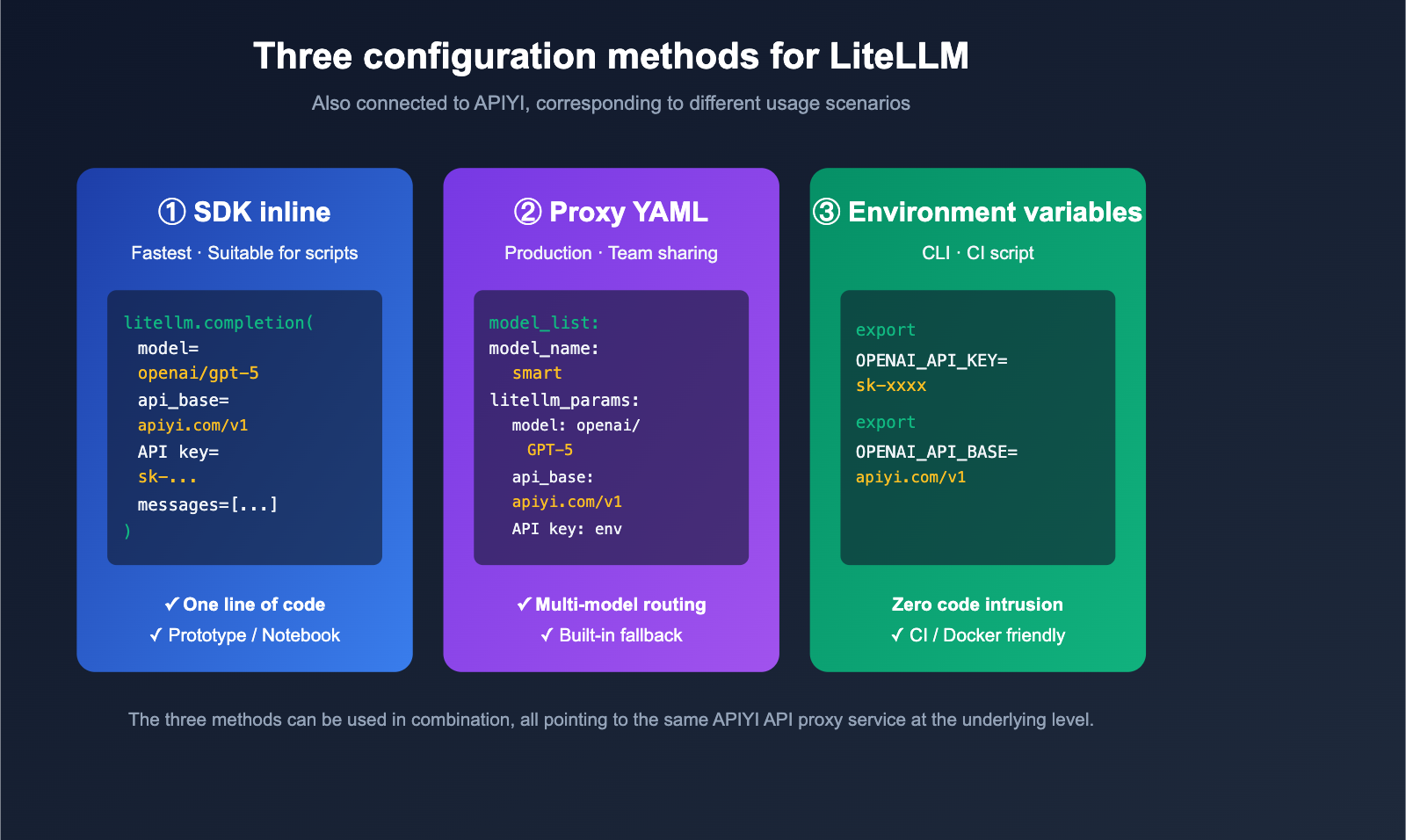
The fastest way to get started is by passing the api_key and api_base directly in your code:
import litellm

response = litellm.completion(
    model="openai/gpt-5",                              # Key: openai/ prefix
    api_key="YOUR_APIYI_KEY",
    api_base="https://api.apiyi.com/v1",               # APIYI API proxy service address
    messages=[
        {"role": "user", "content": "Introduce LiteLLM in one sentence."}
    ],
)

print(response.choices[0].message.content)
💡 Tip: Once you've obtained test credits from the APIYI apiyi.com dashboard, you can swap
gpt-5for other model names likeclaude-opus-4-6orgemini-3-prowithout changing any other code—this is the true power of the OpenAI-compatible protocol.
View full runnable example (including error handling and streaming)
import os
import litellm
from litellm import completion

# We recommend managing keys via environment variables
os.environ["OPENAI_API_KEY"] = "YOUR_APIYI_KEY"
os.environ["OPENAI_API_BASE"] = "https://api.apiyi.com/v1"

litellm.set_verbose = False  # Set to True for debugging

def chat_with_apiyi(model: str, prompt: str, stream: bool = False):
    """Call any OpenAI-compatible model via LiteLLM + APIYI"""
    try:
        response = completion(
            model=f"openai/{model}",
            messages=[{"role": "user", "content": prompt}],
            stream=stream,
            temperature=0.7,
            max_tokens=1024,
        )
        if stream:
            for chunk in response:
                delta = chunk.choices[0].delta.content or ""
                print(delta, end="", flush=True)
            print()
        else:
            return response.choices[0].message.content
    except Exception as e:
        print(f"Call failed: {e}")
        return None

if __name__ == "__main__":
    # Non-streaming
    print(chat_with_apiyi("gpt-5", "Explain what an LLM gateway is."))
    # Streaming
    chat_with_apiyi("claude-opus-4-6", "Introduce the advantages of LiteLLM in 100 words.", stream=True)
Proxy YAML Configuration: Recommended for Production
If you're running LiteLLM as a standalone service (on port 4000 for team use), we recommend the YAML approach. Create a litellm_config.yaml file:
model_list:
  - model_name: gpt-5                       # Model name exposed to clients
    litellm_params:
      model: openai/gpt-5                   # openai/ prefix routes to OpenAI client
      api_base: https://api.apiyi.com/v1    # APIYI proxy address
      api_key: os.environ/APIYI_KEY         # Reference environment variable

  - model_name: claude-opus-4-6
    litellm_params:
      model: openai/claude-opus-4-6
      api_base: https://api.apiyi.com/v1
      api_key: os.environ/APIYI_KEY

  - model_name: gemini-3-pro
    litellm_params:
      model: openai/gemini-3-pro
      api_base: https://api.apiyi.com/v1
      api_key: os.environ/APIYI_KEY

litellm_settings:
  drop_params: true                          # Automatically drop unsupported parameters
  num_retries: 2                             # Retry count per call

router_settings:
  fallbacks:
    - gpt-5: ["claude-opus-4-6", "gemini-3-pro"]
Start the Proxy:
export APIYI_KEY=sk-xxxxxxxxxxxxxxxx
litellm --config ./litellm_config.yaml --port 4000
Now, any OpenAI SDK can call it via http://localhost:4000:
from openai import OpenAI

client = OpenAI(
    api_key="any-string",                    # LiteLLM Proxy doesn't validate content (unless master_key is set)
    base_url="http://localhost:4000",
)

resp = client.chat.completions.create(
    model="gpt-5",
    messages=[{"role": "user", "content": "Hello via LiteLLM Proxy"}]
)
print(resp.choices[0].message.content)
🎯 Production Tip: We suggest adding a
master_keyin front of the LiteLLM Proxy and routing all underlying models through APIYI apiyi.com. This way, your application layer only sees "semantic model names" likegpt-5orclaude-opus-4-6, while the underlying channels, billing, and rate limiting are handled by the APIYI + LiteLLM stack—making it completely transparent to your application.
Environment Variable Mode: Best for CLI and Scripts
For one-off scripts and command-line tools, the simplest way is to use environment variables. LiteLLM automatically detects OPENAI_API_KEY and OPENAI_API_BASE:
export OPENAI_API_KEY=sk-xxxxxxxxxxxxxxxx
export OPENAI_API_BASE=https://api.apiyi.com/v1
From then on, all calls with the openai/ prefix will go through APIYI:
import litellm
print(litellm.completion(
    model="openai/gpt-5",
    messages=[{"role": "user", "content": "ping"}]
).choices[0].message.content)
Comparing the Three Ways to Configure LiteLLM with Third-Party Proxies
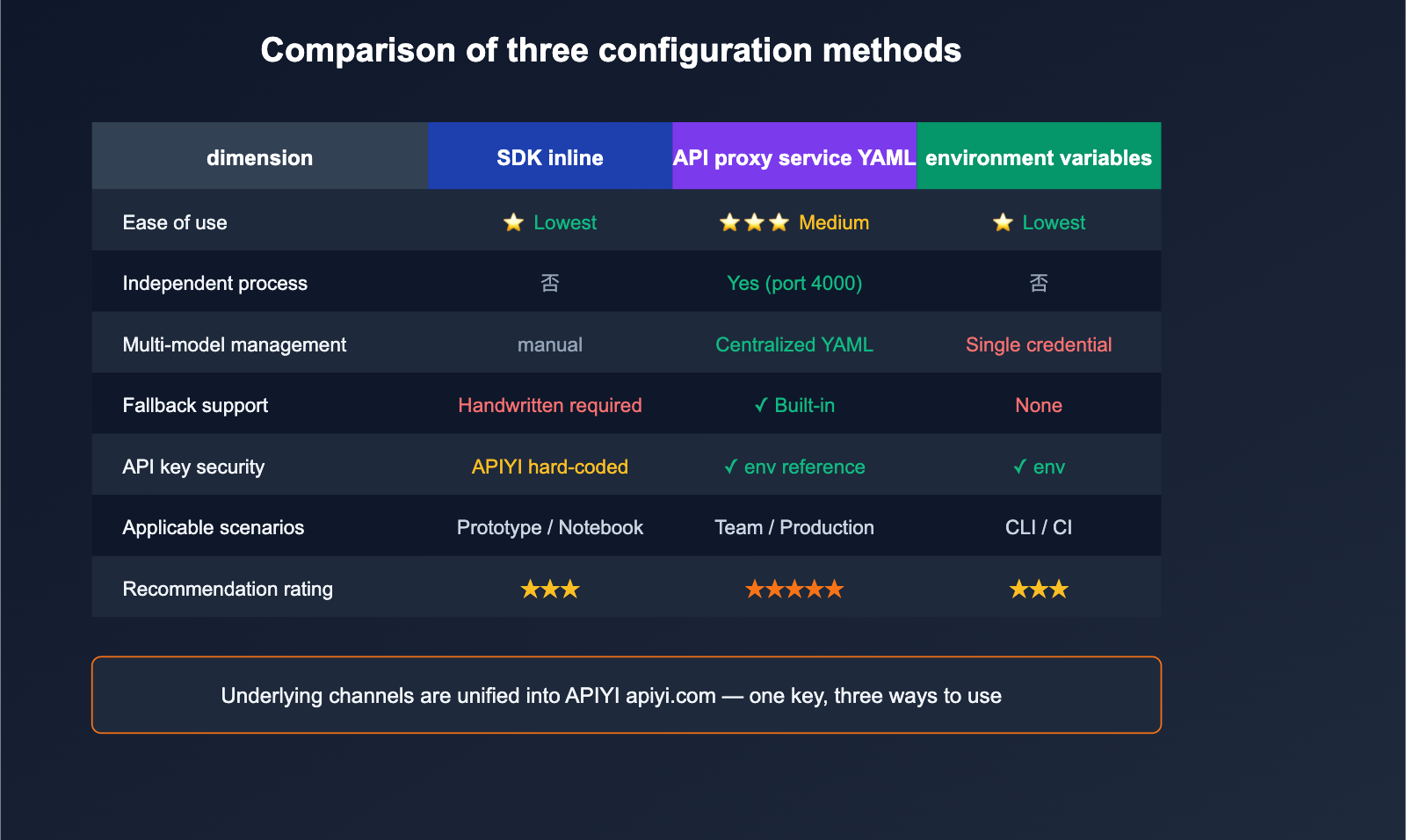
Different scenarios call for different configuration methods. The table below provides clear recommendations.
| Dimension | SDK Inline | Proxy YAML | Environment Variables |
|---|---|---|---|
| Ease of Use | ⭐ Easiest | ⭐⭐⭐ Moderate | ⭐ Easiest |
| Use Case | Scripts, Notebooks | Team sharing, Production | CLI tools, CI |
| Independent Process | No | Yes (Port 4000) | No |
| Multi-model Management | Manual | Centralized YAML | Single set of creds |
| Fallback Support | Manual try/except | ✅ Built-in | ❌ None |
| Key Security | Risk of hardcoding | ✅ Env reference | ✅ Env-based |
| Recommendation | Prototyping | Production | Personal scripts |
💡 Recommendation: For personal development, environment variables are fine. For teams and production, we strongly recommend the Proxy YAML mode, as it manages "model routing + fallback + rate limiting + analytics" in a single file. Regardless of the method, the underlying channel to APIYI apiyi.com remains the same—you only ever need to maintain one API Key.
Practical Guide: LiteLLM + APIYI Multi-Model Routing
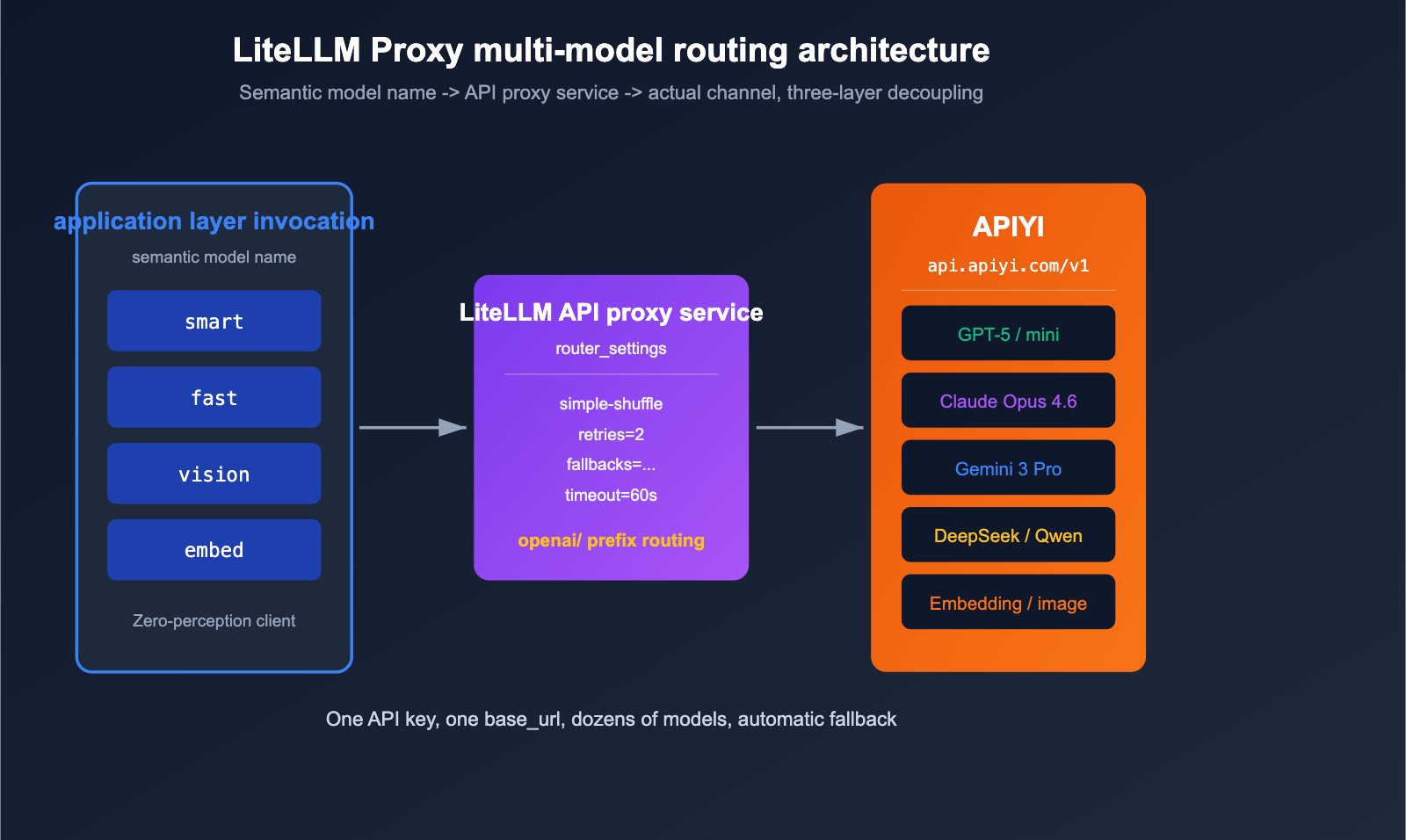
The real power of LiteLLM Proxy mode lies in using a single YAML file to map "semantic model names" to "actual channels." Below is a production-ready, minimal routing configuration.
# litellm_config.yaml - Production routing example
model_list:
  # Primary inference models
  - model_name: smart
    litellm_params:
      model: openai/gpt-5
      api_base: https://api.apiyi.com/v1
      api_key: os.environ/APIYI_KEY
      timeout: 60

  - model_name: smart
    litellm_params:
      model: openai/claude-opus-4-6
      api_base: https://api.apiyi.com/v1
      api_key: os.environ/APIYI_KEY
      timeout: 60

  # Low-cost, fast models
  - model_name: fast
    litellm_params:
      model: openai/gpt-5-mini
      api_base: https://api.apiyi.com/v1
      api_key: os.environ/APIYI_KEY

  # Vision/Multimodal
  - model_name: vision
    litellm_params:
      model: openai/gemini-3-pro
      api_base: https://api.apiyi.com/v1
      api_key: os.environ/APIYI_KEY

  # Embedding
  - model_name: embed
    litellm_params:
      model: openai/text-embedding-3-large
      api_base: https://api.apiyi.com/v1
      api_key: os.environ/APIYI_KEY

litellm_settings:
  drop_params: true
  num_retries: 2
  request_timeout: 60

router_settings:
  routing_strategy: simple-shuffle           # Round-robin for models with the same name
  fallbacks:
    - smart: ["fast"]                        # Fallback to 'fast' if 'smart' fails

general_settings:
  master_key: sk-litellm-master-xxxx         # Clients must provide this key
Your application layer only sees the four semantic names: smart, fast, vision, and embed. When GPT-5 hits a rate limit, LiteLLM automatically switches to Claude Opus 4.6 (since both are registered as smart), and if that fails, it falls back to fast. All underlying traffic is routed through the APIYI (apiyi.com) API proxy service for unified billing and monitoring, perfectly isolating your application from the channel layer.
Common Questions: Configuring Third-Party API Proxy Services in LiteLLM
Q1: Why do I get a 404 Not Found error even after setting the base_url?
90% of the time, it's because the api_base is missing /v1 at the end. LiteLLM uses the OpenAI client internally, which automatically appends /chat/completions. Therefore, your api_base must be https://api.apiyi.com/v1, not https://api.apiyi.com. Also, don't write it as https://api.apiyi.com/v1/chat/completions, or it will be duplicated.
Q2: Why must I add the openai/ prefix to the model name?
LiteLLM maintains an internal provider routing table. The openai/ prefix tells LiteLLM, "Please use the OpenAI client to access this endpoint." If you omit the prefix, LiteLLM might try to match its built-in provider (e.g., claude-opus-4-6 might be identified as a native Anthropic API), leading to protocol mismatches. Always add the openai/ prefix when connecting to an API proxy service.
Q3: Can a single APIYI key call multiple models?
Yes. A single key from APIYI (apiyi.com) supports all available models on the platform by default, including GPT-5, Claude Opus 4.6, Gemini 3 Pro, DeepSeek, Qwen, and more. This is the core difference between it and official APIs—you only need to maintain one key and one base_url to mount dozens of models in your LiteLLM YAML.
Q4: How do I verify the proxy link is working after starting LiteLLM Proxy?
The fastest way is to use curl to hit the LiteLLM Proxy directly:
curl http://localhost:4000/v1/chat/completions \
  -H "Authorization: Bearer sk-litellm-master-xxxx" \
  -H "Content-Type: application/json" \
  -d '{
    "model": "smart",
    "messages": [{"role": "user", "content": "ping"}]
  }'
A 200 OK response with JSON confirms the entire chain (Application → LiteLLM Proxy → APIYI) is working. If it fails, check the LiteLLM console logs first, then try hitting APIYI directly with the same base_url + key to isolate the issue.
Q5: Do I need extra configuration for streaming in a proxy scenario?
No. APIYI (apiyi.com) fully supports SSE streaming responses, and LiteLLM passes them through by default. Just add stream=True to your completion() call, or set stream=True when using the OpenAI SDK to call the Proxy, and you'll receive token-by-token output.
Q6: Can I connect Embedding and image generation as well?
Yes. APIYI (apiyi.com) supports /v1/embeddings, /v1/images/generations, and /v1/audio/transcriptions all through the same base_url and key. Simply add the corresponding models to your model_list in the LiteLLM YAML (e.g., text-embedding-3-large, gpt-image-1, whisper-1). They are used exactly like chat models; see the production routing example above for details.
Summary
Configuring a third-party API proxy service with LiteLLM really boils down to just three things:
- Protocol Alignment: Add the
openai/prefix to your model name to tell LiteLLM to use the OpenAI client protocol. - Endpoint Alignment: Set
api_baseto the proxy service's root path plus/v1(e.g.,https://api.apiyi.com/v1). - Credential Alignment: Pass the API key provided by the proxy service via
api_keyor an environment variable.
Once you've nailed these three steps, you can seamlessly layer all of LiteLLM's powerful features—like multi-model routing, fallbacks, rate limiting, billing, and logging—on top of a stable API proxy service.
🚀 Pro Tip: If you're building a unified LLM gateway for your team, we recommend a three-tier architecture: "Application → LiteLLM Proxy → APIYI (apiyi.com)". LiteLLM handles the routing and fallbacks, while APIYI takes care of the underlying model access, stability, and pay-as-you-go billing. You only need to manage one YAML file and one API key. Sign up at apiyi.com to get testing credits and make your first model invocation in under 5 minutes.
Author: APIYI Team — Dedicated to providing developers with stable access to mainstream AI Large Language Models. Visit apiyi.com to learn more.
References
-
LiteLLM Official Documentation – OpenAI Compatible Endpoints
- Link:
docs.litellm.ai/docs/providers/openai_compatible - Description: Official examples for SDK and Proxy YAML configurations.
- Link:
-
LiteLLM Proxy Configuration Overview
- Link:
docs.litellm.ai/docs/proxy/configs - Description: Complete fields for
model_list,router_settings, andfallbacks.
- Link:
-
LiteLLM GitHub Repository
- Link:
github.com/BerriAI/litellm - Description: Source code, issues, and the latest releases.
- Link:
-
daily_stock_analysis – LLM_CONFIG_GUIDE
- Link:
github.com/ZhuLinsen/daily_stock_analysis/blob/main/docs/LLM_CONFIG_GUIDE.md - Description: Practical guide on three configuration modes and multi-channel setups.
- Link:
-
APIYI Official Documentation
- Link:
apiyi.com - Description: Supported model list,
base_urlsettings, and API key management.
- Link: