Handling ultra-long contexts of over 200,000 tokens in API calls is becoming a real-world requirement for more and more developers. Anthropic has launched the Claude API 1 Million Token Context Window (1M Context Window) feature, allowing a single request to process approximately 750,000 words—equivalent to reading the entirety of Dream of the Red Chamber plus Romance of the Three Kingdoms in one go.
Core Value: By the end of this article, you'll master how to enable the Claude API 1M context window, understand the pricing rules, and get code templates for 5 real-world scenarios.
Key Takeaways for Claude API 1M Context Window
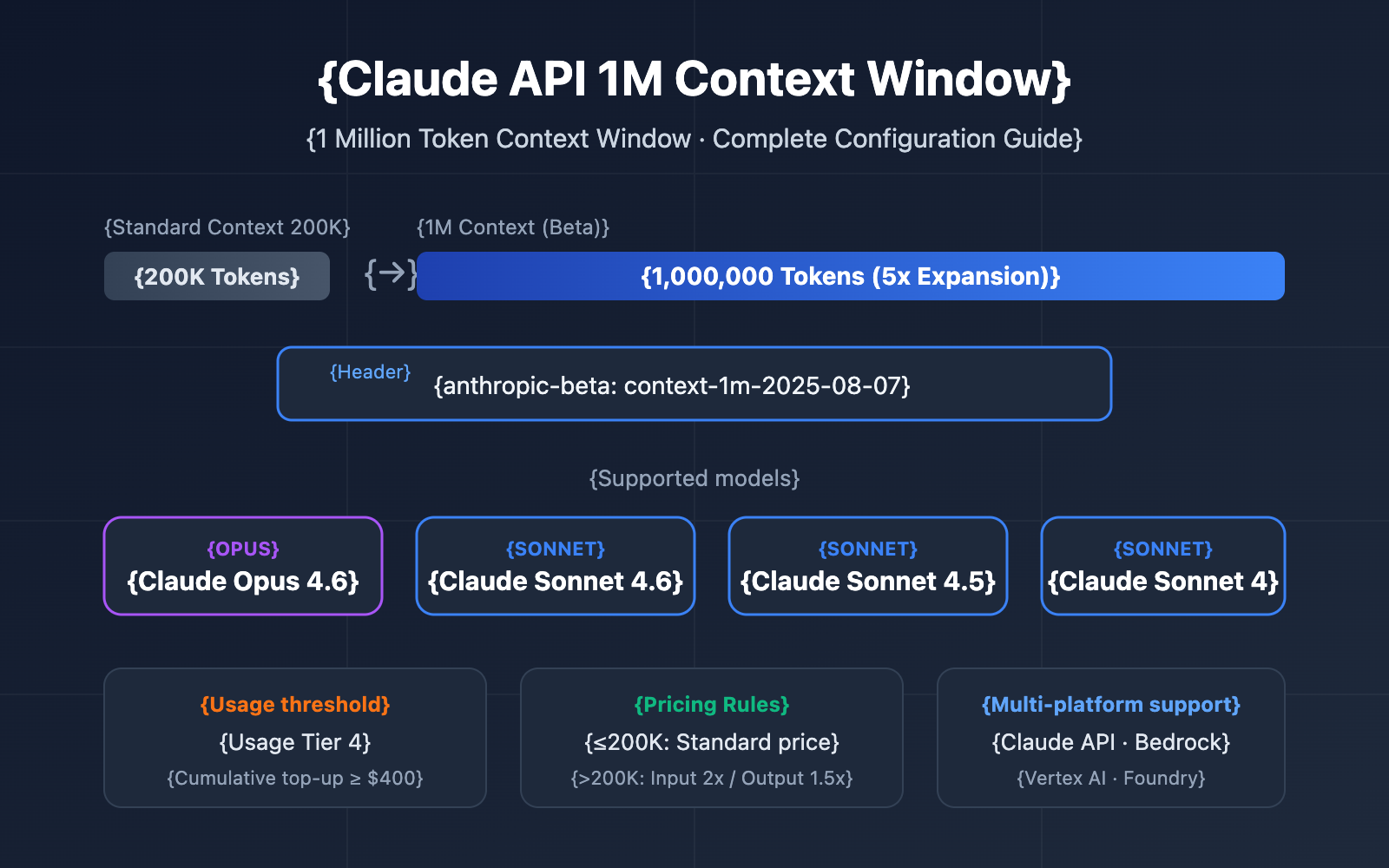
Before diving into the configuration details, let's look at the essential info for this feature.
| Key Point | Description | Value |
|---|---|---|
| Beta Feature | Enabled via the context-1m-2025-08-07 header |
No extra application needed; just add the header |
| Supported Models | Opus 4.6, Sonnet 4.6, Sonnet 4.5, Sonnet 4 | Covers the main model lineup |
| Access Requirements | Requires Usage Tier 4 or custom rate limits | Reach Tier 4 with a cumulative deposit of $400 |
| Pricing Rules | Automatically switches to long-context pricing after 200K tokens | 2x standard price for input, 1.5x for output |
| Multi-platform Support | Claude API, AWS Bedrock, Google Vertex AI, Microsoft Foundry | Unified experience across platforms |
How the Claude API 1M Context Window Works
The standard context window for the Claude API is 200K tokens. Once you enable the 1M context window via the beta header, the model can process up to 1 million tokens of input in a single request.
It's important to note that the context window includes everything:
- Input Tokens: System prompts, conversation history, and the current user message.
- Output Tokens: The response content generated by the model.
- Thinking Tokens: If Extended Thinking is enabled, the thinking process also counts toward the total.
🎯 Technical Suggestion: The Claude API's 1M context window is perfect for scenarios like large-scale codebase analysis and long document understanding. We recommend using the APIYI apiyi.com platform to quickly validate your long-context solutions, as it supports unified interface calls for the entire Claude model series.
Claude API 1M Context Window Quick Start
Prerequisites
Before using the 1M context window, make sure you meet the following requirements:
| Condition | Requirement | How to Check |
|---|---|---|
| Usage Tier | Tier 4 or custom rate limits | Log in to Claude Console → Settings → Limits |
| Total Deposits | ≥ $400 (Tier 4 threshold) | Check account deposit history |
| Model Selection | Opus 4.6 / Sonnet 4.6 / Sonnet 4.5 / Sonnet 4 | Other models don't support 1M context |
| API Version | anthropic-version: 2023-06-01 |
Specified in the request header |
Minimalist Example
Just add a single beta header line to your standard API request to unlock the 1M context window:
import anthropic

client = anthropic.Anthropic(
    api_key="YOUR_API_KEY",
    base_url="https://api.apiyi.com/v1"  # Use APIYI unified interface
)

response = client.beta.messages.create(
    model="claude-sonnet-4-6",
    max_tokens=4096,
    messages=[
        {"role": "user", "content": "Please analyze the core arguments of the following long document..."}
    ],
    betas=["context-1m-2025-08-07"],
)

print(response.content[0].text)
Equivalent call using cURL:
curl https://api.apiyi.com/v1/messages \
  -H "x-api-key: $API_KEY" \
  -H "anthropic-version: 2023-06-01" \
  -H "anthropic-beta: context-1m-2025-08-07" \
  -H "content-type: application/json" \
  -d '{
    "model": "claude-sonnet-4-6",
    "max_tokens": 4096,
    "messages": [
      {"role": "user", "content": "Analyze this long document..."}
    ]
  }'
Key Code Explanation:
betas=["context-1m-2025-08-07"]: Python SDK syntax; it automatically adds theanthropic-betaheader.anthropic-beta: context-1m-2025-08-07: Header syntax for cURL / HTTP requests.- When input tokens are 200K or fewer, you'll be charged standard rates even if the beta header is included.
Claude API 1M Context Window Pricing Explained
Pricing for long context is one of the top concerns for developers. Claude API uses a tiered pricing strategy—whether your input tokens exceed 200K determines your billing tier.
Long Context Pricing Comparison by Model
| Model | Standard Input (≤200K) | Long Context Input (>200K) | Standard Output | Long Context Output | Multiplier |
|---|---|---|---|---|---|
| Claude Opus 4.6 | $5/MTok | $10/MTok | $25/MTok | $37.50/MTok | Input 2x / Output 1.5x |
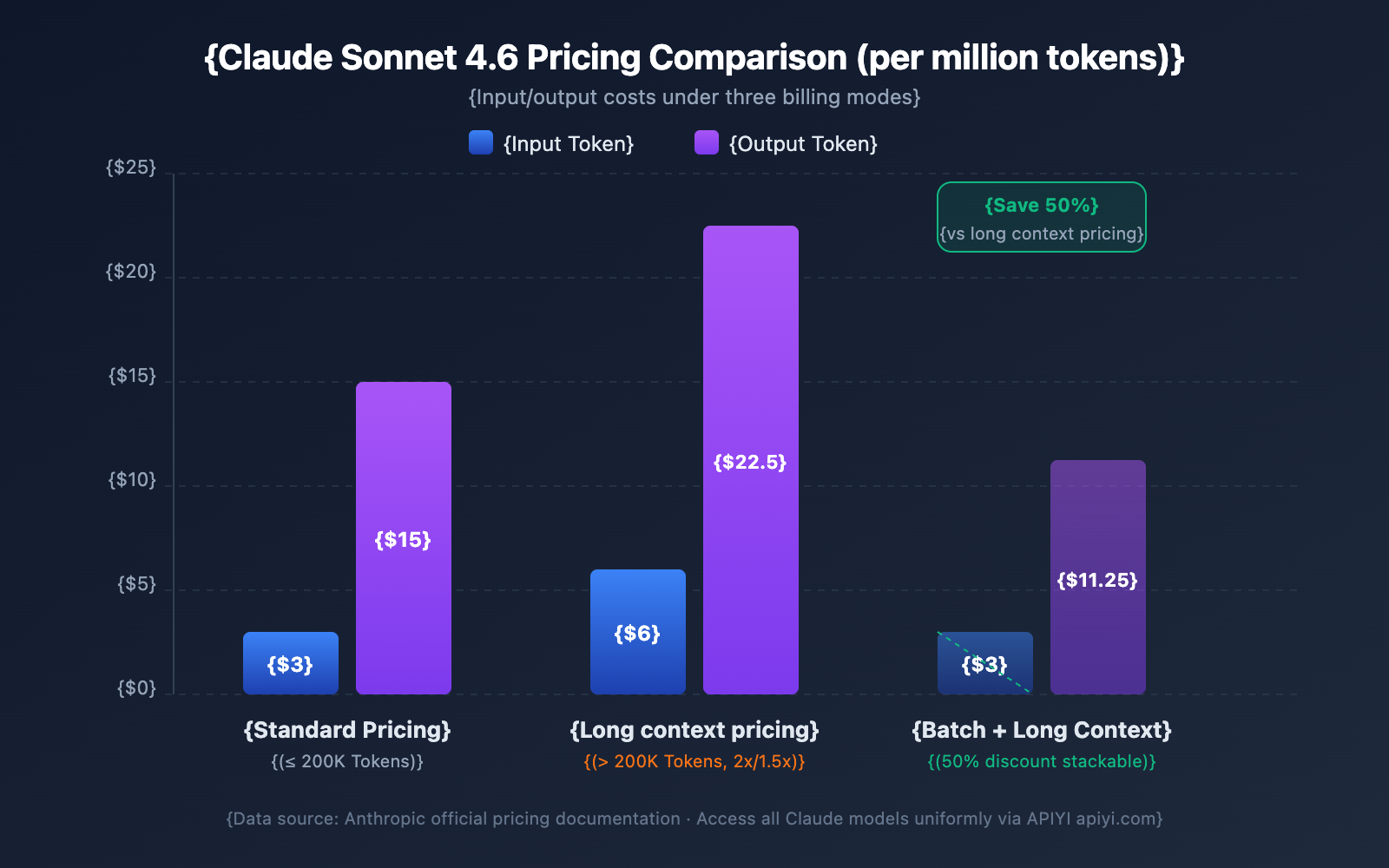
| Claude Sonnet 4.6 | $3/MTok | $6/MTok | $15/MTok | $22.50/MTok | Input 2x / Output 1.5x |
| Claude Sonnet 4.5 | $3/MTok | $6/MTok | $15/MTok | $22.50/MTok | Input 2x / Output 1.5x |
| Claude Sonnet 4 | $3/MTok | $6/MTok | $15/MTok | $22.50/MTok | Input 2x / Output 1.5x |
MTok = Million Tokens
Pricing Calculation Rules
Keep these key rules in mind to avoid unexpected costs:
- The 200K threshold is a toggle: Once the total input tokens exceed 200K, all tokens in the entire request are billed at the long context price, not just the portion that exceeds the limit.
- Total input tokens include cache: The sum of
input_tokens+cache_creation_input_tokens+cache_read_input_tokensdetermines your pricing tier. - Output tokens don't affect the tier: The number of output tokens doesn't trigger long context pricing. However, once triggered by the input, output is also billed at 1.5x the standard rate.
- Below 200K still uses standard pricing: Even if you have the beta header enabled, you'll be billed at standard rates as long as your input stays under 200K.
Cost Calculation Example
Scenario: Using Claude Sonnet 4.6 to analyze a long document of 500,000 tokens and generating a 2,000-token analysis report.
Input Cost: 500,000 Tokens × $6/MTok = $3.00
Output Cost: 2,000 Tokens × $22.50/MTok = $0.045
Total: $3.045
For the same output, if the input was only 150,000 tokens:
Input Cost: 150,000 Tokens × $3/MTok = $0.45
Output Cost: 2,000 Tokens × $15/MTok = $0.03
Total: $0.48
4 Strategies to Save Money
| Strategy | Savings | Use Case |
|---|---|---|
| Prompt Caching | Only 10% cost for cache hits | Reusing the same long documents |
| Batch API | 50% off all costs | Non-real-time batch processing tasks |
| Fast Mode (Opus 4.6) | No extra long context surcharge | Scenarios requiring fast responses |
| Keep input under 200K | Avoid 2x pricing | Documents that can be processed in segments |
💰 Cost Optimization: For projects requiring frequent calls to Claude's long context, you can get flexible billing plans through the APIYI (apiyi.com) platform. By combining Prompt Caching and Batch API, the cost per call can be reduced by over 70%.
Claude API 1M Context Window Rate Limits
Once the 1M context is enabled, long context requests (inputs over 200K tokens) have their own independent rate limits, calculated separately from standard request limits.
Tier 4 Rate Limits
| Limit Type | Standard Request Limit | Long Context Request Limit |
|---|---|---|
| Max Input Tokens/Min (ITPM) | Sonnet: 2,000,000 / Opus: 2,000,000 | 1,000,000 |
| Max Output Tokens/Min (OTPM) | Sonnet: 400,000 / Opus: 400,000 | 200,000 |
| Max Requests/Min (RPM) | 4,000 | Proportional reduction |
Important Notes:
- Long context rate limits are calculated independently from standard rate limits and don't affect each other.
- When using Prompt Caching, tokens that hit the cache do not count toward the ITPM limit (on most models).
- If you need higher long context rate limits, you can contact the Anthropic sales team to apply for a custom quota.
How to Upgrade to Tier 4
| Tier | Cumulative Deposit Requirement | Max Single Deposit | Monthly Usage Limit |
|---|---|---|---|
| Tier 1 | $5 | $100 | $100 |
| Tier 2 | $40 | $500 | $500 |
| Tier 3 | $200 | $1,000 | $1,000 |
| Tier 4 | $400 | $5,000 | $5,000 |
Upgrades are automatic once you reach the cumulative deposit threshold; no manual review is required.
5 Practical Scenarios for Claude API's 1M Context Window
Scenario 1: Large Codebase Analysis
Package your entire project's code and send it to Claude for architectural reviews, bug hunting, or refactoring suggestions.
import anthropic
import os

client = anthropic.Anthropic(
    api_key="YOUR_API_KEY",
    base_url="https://api.apiyi.com/v1"
)

def collect_codebase(directory, extensions=(".py", ".ts", ".js")):
    """收集项目中所有指定类型的源代码文件"""
    code_content = []
    for root, dirs, files in os.walk(directory):
        # 跳过 node_modules 等目录
        dirs[:] = [d for d in dirs if d not in ("node_modules", ".git", "__pycache__")]
        for file in files:
            if file.endswith(extensions):
                filepath = os.path.join(root, file)
                with open(filepath, "r", encoding="utf-8") as f:
                    content = f.read()
                code_content.append(f"### {filepath}\n```\n{content}\n```")
    return "\n\n".join(code_content)

codebase = collect_codebase("./my-project")

response = client.beta.messages.create(
    model="claude-opus-4-6",
    max_tokens=8192,
    betas=["context-1m-2025-08-07"],
    messages=[{
        "role": "user",
        "content": f"""请对以下代码库进行全面架构审查:

{codebase}

请分析:
1. 整体架构设计的优缺点
2. 潜在的安全漏洞
3. 性能优化建议
4. 代码质量改进点"""
    }]
)
Scenario 2: Comprehensive Analysis of Long Documents
Handle ultra-long documents like legal contracts, research paper collections, and financial reports.
response = client.beta.messages.create(
    model="claude-sonnet-4-6",
    max_tokens=4096,
    betas=["context-1m-2025-08-07"],
    messages=[{
        "role": "user",
        "content": f"""以下是公司过去 12 个月的财务报告合集(约 40 万 Token):

{financial_reports}

请完成:
1. 各季度核心财务指标趋势分析
2. 收入结构变化及原因推断
3. 成本控制效果评估
4. 下季度业绩预测及风险提示"""
    }]
)
Scenario 3: Combining Multi-turn Long Dialogues with Extended Thinking
Enable Extended Thinking within a long context to let Claude perform deep reasoning:
response = client.beta.messages.create(
    model="claude-opus-4-6",
    max_tokens=16384,
    betas=["context-1m-2025-08-07"],
    thinking={
        "type": "enabled",
        "budget_tokens": 10000
    },
    messages=[{
        "role": "user",
        "content": f"""以下是一个复杂系统的完整技术文档和源代码:

{large_technical_document}

请深度分析这个系统的设计哲学,并给出改进方案。"""
    }]
)

# Extended Thinking tokens don't accumulate in subsequent turns
# The API automatically strips thinking blocks from previous turns
Scenario 4: Using Prompt Caching to Reduce Long Context Costs
When you need to analyze the same long document from multiple angles, Prompt Caching can significantly slash your costs:
# First request: Cache the long document
response1 = client.beta.messages.create(
    model="claude-sonnet-4-6",
    max_tokens=4096,
    betas=["context-1m-2025-08-07"],
    system=[{
        "type": "text",
        "text": large_document,
        "cache_control": {"type": "ephemeral"}  # Mark as cacheable
    }],
    messages=[{"role": "user", "content": "总结这份文档的核心论点"}]
)

# Second request: Cache hit, input tokens are charged at only 10% of the price
response2 = client.beta.messages.create(
    model="claude-sonnet-4-6",
    max_tokens=4096,
    betas=["context-1m-2025-08-07"],
    system=[{
        "type": "text",
        "text": large_document,
        "cache_control": {"type": "ephemeral"}
    }],
    messages=[{"role": "user", "content": "提取文档中的所有数据表格"}]
)
Scenario 5: Batch API for Processing Long Documents in Bulk
Using the Batch API gives you an additional 50% discount on top of the long context pricing:
# Create a batch request
batch = client.beta.messages.batches.create(
    betas=["context-1m-2025-08-07"],
    requests=[
        {
            "custom_id": "doc-analysis-1",
            "params": {
                "model": "claude-sonnet-4-6",
                "max_tokens": 4096,
                "messages": [{"role": "user", "content": f"分析文档1: {doc1}"}]
            }
        },
        {
            "custom_id": "doc-analysis-2",
            "params": {
                "model": "claude-sonnet-4-6",
                "max_tokens": 4096,
                "messages": [{"role": "user", "content": "分析文档2: {doc2}"}]
            }
        }
    ]
)
🎯 Pro Tip: For real-world projects, we recommend starting with small-scale tests on the APIYI (apiyi.com) platform. Once you've confirmed that token usage and costs meet your expectations, you can move to large-scale deployment. The platform provides a detailed usage dashboard, making it easy to keep costs under control.
Model Selection Guide for Claude API 1M Context Window
The four models supporting the 1M context window each have their strengths. Picking the right one helps you find the sweet spot between performance and cost.
Detailed Comparison of 1M Context Models
| Dimension | Claude Opus 4.6 | Claude Sonnet 4.6 | Claude Sonnet 4.5 | Claude Sonnet 4 |
|---|---|---|---|---|
| Intelligence Level | Strongest | Strong | Strong | Above Average |
| Standard Input Price | $5/MTok | $3/MTok | $3/MTok | $3/MTok |
| Long Context Input Price | $10/MTok | $6/MTok | $6/MTok | $6/MTok |
| Fast Mode | Supported (6x pricing) | Not Supported | Not Supported | Not Supported |
| Contextual Awareness | Not Supported | Supported | Supported | Not Supported |
| Interleaved Thinking | Supported | Supported | Not Supported | Supported |
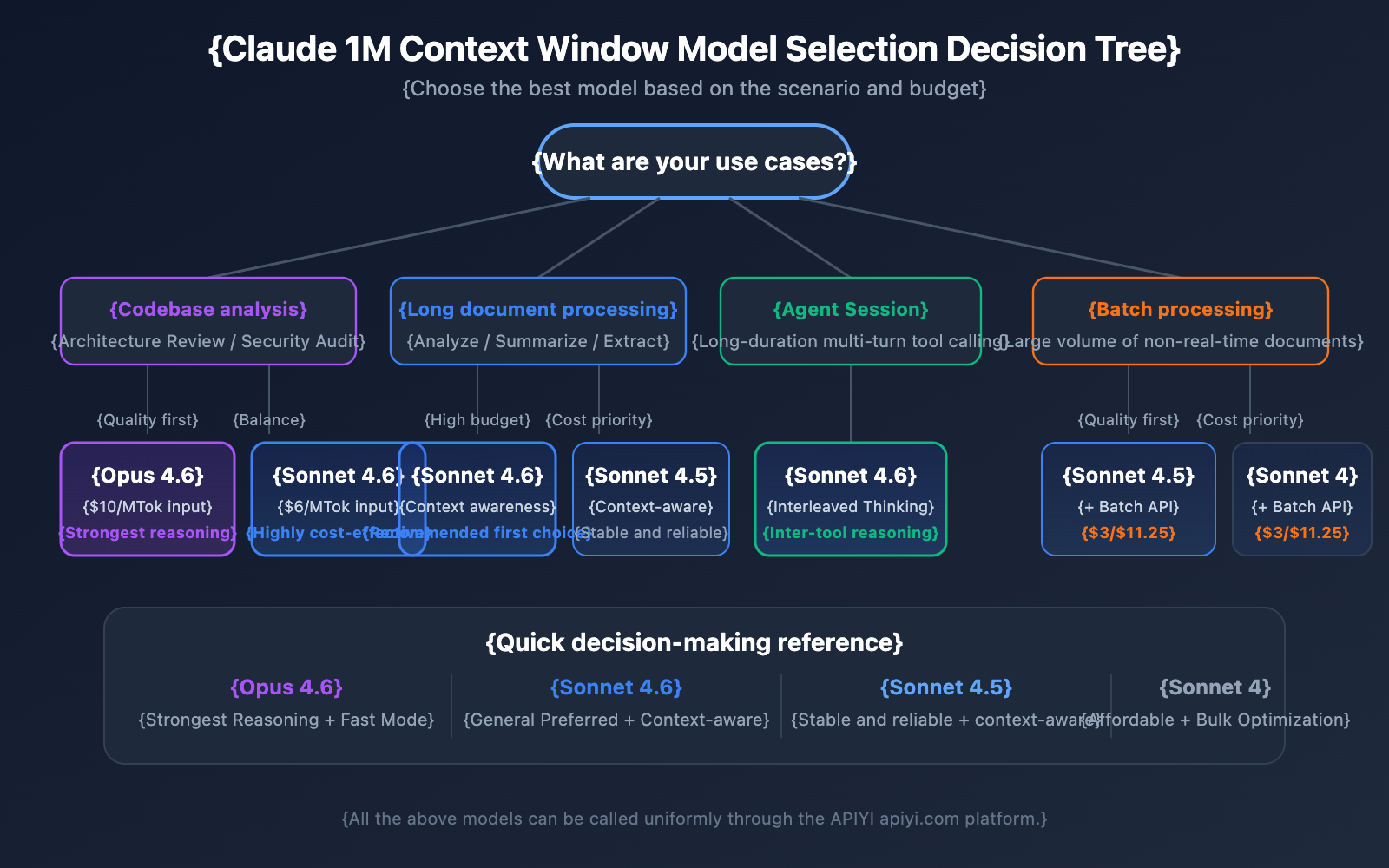
| Recommended Scenarios | Complex reasoning, code analysis | General long document processing | Multi-turn agent sessions | Daily analysis tasks |
Choosing a Model by Scenario
When to choose Claude Opus 4.6:
- Complex analysis tasks requiring the strongest reasoning capabilities.
- Architectural reviews and security audits of large codebases.
- Real-time scenarios requiring Fast Mode (quick response without long context surcharges).
- Enterprise-grade applications where budget is flexible and quality is the priority.
When to choose Claude Sonnet 4.6:
- Daily long document analysis and summary extraction.
- Long dialogues requiring contextual awareness.
- Cost-sensitive projects that still demand high quality.
- Scenarios requiring Interleaved Thinking for reasoning between tool calls.
When to choose Claude Sonnet 4.5 / Sonnet 4:
- Bulk document processing (using Batch API to lower costs).
- Structured information extraction and data organization.
- Stable production environments that don't require the latest model features.
💡 Selection Advice: Which model you choose depends largely on your specific use case and budget. We suggest performing actual test comparisons via the APIYI (apiyi.com) platform. This platform supports a unified interface for all the models mentioned above, making it easy to switch and evaluate quickly.
Token Estimation Reference for Claude API 1M Context Window
When planning for long context usage, it's crucial to understand the token consumption for different types of content:
| Content Type | Approx. Token Count | Capacity in 1M Window |
|---|---|---|
| English Text | ~1 Token / 4 chars | ~3 million English characters |
| Chinese Text | ~1 Token / 1.5 chars | ~750,000 Chinese characters |
| Python Code | ~1 Token / 3.5 chars | ~2.5 million characters of code |
| Standard Webpage (10KB) | ~2,500 Tokens | ~400 webpages |
| Large Document (100KB) | ~25,000 Tokens | ~40 documents |
| Research Paper PDF (500KB) | ~125,000 Tokens | ~8 papers |
Claude API 1M Context Window and Context Awareness
Claude Sonnet 4.6, Sonnet 4.5, and Haiku 4.5 feature Context Awareness capabilities. The model can track its remaining context window capacity in real-time, managing the token budget more intelligently during long conversations.
How it works:
At the start of a conversation, Claude receives information about the total context capacity:
<budget:token_budget>1000000</budget:token_budget>
After each tool call, the model receives an update on the remaining capacity:
<system_warning>Token usage: 350000/1000000; 650000 remaining</system_warning>
This means within a 1M context window, Claude can:
- Precisely manage the token budget: It won't suddenly run out of context late in a conversation.
- Allocate output length reasonably: It adjusts the level of detail in its replies based on the remaining capacity.
- Support ultra-long agent sessions: It can continuously execute tasks in Agent workflows until they're finished.
Claude API 1M Context Window Management Strategy: Compaction
When a conversation length approaches the 1M context window limit, Claude API offers a Compaction feature to keep the dialogue going. Compaction is a server-side summarization mechanism that automatically condenses early parts of the conversation into a brief summary, freeing up context space to support ultra-long dialogues that exceed the context window limit.
Currently, the Compaction feature is available in Beta for Claude Opus 4.6. For developers who need to run long-duration Agent tasks within a 1M context, Compaction is the preferred management strategy.
Additionally, Claude API provides Context Editing capabilities, including:
- Tool Result Clearing: Clear old tool call results in Agent workflows to free up tokens.
- Thinking Block Clearing: Proactively clear thinking content from previous rounds to further optimize context utilization.
These strategies can be used alongside the 1M context window to help you achieve the best balance of performance and cost in ultra-long context scenarios.
Important Considerations for the Claude API 1M Context Window
When using the 1M context window in practice, there are a few technical details that are easy to overlook:
-
New models return validation errors instead of silent truncation: Starting with Claude Sonnet 3.7, when the total of the prompt and output tokens exceeds the context window, the API returns a validation error rather than quietly truncating the content. We recommend using the Token Counting API to estimate token counts before sending a request.
-
Token consumption for images and PDFs isn't fixed: Token calculation for multimodal content differs from pure text. Images of the same size can consume vastly different amounts of tokens. Make sure to leave a sufficient token margin when using images extensively.
-
Request Size Limits: Even if the context window supports 1M tokens, the HTTP request itself has size limits. You'll need to keep an eye on HTTP-level restrictions when sending massive amounts of text.
-
Cache-aware rate limits: When using Prompt Caching, tokens that hit the cache don't count toward ITPM rate limits. This means that in 1M context scenarios, utilizing the cache effectively can significantly boost your actual throughput.
FAQ
Q1: How do I confirm if my request is being billed at the long-context rate?
Check the usage object in the API response. Add up the three fields: input_tokens, cache_creation_input_tokens, and cache_read_input_tokens. If the sum exceeds 200,000, the entire request is billed at the long-context price. When calling through the APIYI (apiyi.com) platform, the usage dashboard clearly labels the billing tier for each request.
Q2: What file types does the 1M context window support?
Claude API's 1M context window supports plain text, code, Markdown, and other text formats, as well as images and PDF files. However, keep in mind that token consumption for images and PDFs is usually higher and variable. When combining many images with long text, you might hit Request Size Limits. We suggest doing small-scale testing on the APIYI (apiyi.com) platform to confirm actual token consumption before moving to large-scale use.
Q3: Do Extended Thinking tokens take up space in the 1M context?
Extended Thinking tokens for the current round do count toward the context window. However, Claude API automatically strips thinking blocks from previous rounds, so they don't accumulate in subsequent parts of the conversation. This means you can safely use Extended Thinking within a 1M context without worrying about the thinking process eating up all your context space.
Q4: What if I don’t meet the Tier 4 requirements?
Currently, the 1M context window is only open to Tier 4 organizations and those with custom rate limits. Reaching Tier 4 simply requires a cumulative recharge of $400, and the upgrade happens automatically after recharging. If you can't reach Tier 4 yet, consider: ① Using segmentation to keep inputs under 200K; ② Using Retrieval-Augmented Generation (RAG) to extract key content; ③ Contacting the Anthropic sales team to discuss custom plans.
Q5: How do I enable this on AWS Bedrock and Google Vertex AI?
The 1M context window is available on AWS Bedrock, Google Vertex AI, and Microsoft Foundry. The activation method varies slightly by platform—Bedrock requires specifying the appropriate parameters in the InvokeModel request, while Vertex AI uses API configuration. Please refer to each platform's official documentation for specific configuration details.
Claude API 1M Context Window Best Practices Checklist
When integrating the 1M context window into your actual projects, it's a good idea to follow these best practices:
Development Phase
- Estimate with the Token Counting API first: Before sending actual requests, use the Token Counting API to estimate input token counts. This helps you avoid accidentally triggering long-context pricing.
- Set a reasonable
max_tokens: Themax_tokensparameter doesn't affect rate limit calculations (OTPM is calculated based on actual output), so you can set a higher value to ensure your output doesn't get cut off. - Test in segments: Validate your prompt template's effectiveness with small-scale data first, then gradually increase the input size.
Production Environment
- Prioritize Prompt Caching: For long documents you use repeatedly, Prompt Caching can slash input costs for cached portions to just 10% of the standard price. Plus, cached tokens don't count toward ITPM rate limits.
- Use Batch API for non-real-time tasks: The Batch API offers a 50% discount on top of long-context pricing. When combined, the cost is only about 60% of the standard price.
- Monitor the
usagefield: Check theusageobject in the response after every request and set up cost monitoring alerts. - Retry on 429 errors: Long-context requests have their own independent rate limits. If you hit a 429 error, check the
retry-afterheader for a sensible retry strategy.
Cost Control
- Manage the 200K threshold: If your input is close to 200K, consider trimming your prompt to avoid triggering the 2x pricing.
- Choose the right model: The Sonnet series is 40% cheaper than Opus. Stick with Sonnet for everyday tasks.
- Use caching to ease rate limit pressure: With an 80% cache hit rate, your actual throughput can reach up to 5 times the nominal limit.
Claude API 1M Context Window Summary
Claude API's 1M context window lets developers process about 750,000 words in one go, providing massive power for codebase analysis, long document processing, and complex conversations. Here's a quick recap of the core points:
- Enable with one line of code: Just add the
anthropic-beta: context-1m-2025-08-07header. - Support for 4 models: Claude Opus 4.6, Sonnet 4.6, Sonnet 4.5, and Sonnet 4.
- Transparent pricing: 2x for input and 1.5x for output once you cross 200K tokens; standard pricing still applies below 200K.
- Independent rate limits: Long-context requests won't eat into your standard request quota.
- Multiple optimization methods: Prompt Caching, Batch API, and Fast Mode can be stacked to drive down costs.
We recommend heading over to APIYI (apiyi.com) to quickly experience the power of the Claude 1M context window and find the best setup for your specific business needs.
References
-
Anthropic Official Documentation – Context Windows: Technical specifications for Claude API context windows
- Link:
platform.claude.com/docs/en/build-with-claude/context-windows
- Link:
-
Anthropic Official Documentation – Pricing: Full pricing details for the Claude API
- Link:
platform.claude.com/docs/en/about-claude/pricing
- Link:
-
Anthropic Official Documentation – Rate Limits: Information on rate limits and Usage Tiers
- Link:
platform.claude.com/docs/en/api/rate-limits
- Link:
📝 Author: APIYI Team | For more AI model API tutorials, visit the APIYI apiyi.com Help Center