Are you frequently running into HTTPSConnectionPool Read timed out errors when calling the Nano Banana Pro API to generate 4K images? This happens because standard HTTP client timeout settings aren't designed to handle the long inference cycles required by Nano Banana Pro. In this post, we'll break down the three root causes for these timeouts and provide the best configuration settings for different resolutions.
Core Value: By the end of this article, you'll have mastered timeout configuration for the Nano Banana Pro API, learned how to solve HTTP/2 compatibility issues, and discovered how to use HTTP port interfaces to prevent streaming interruptions, ensuring your 4K image generation stays rock-solid.
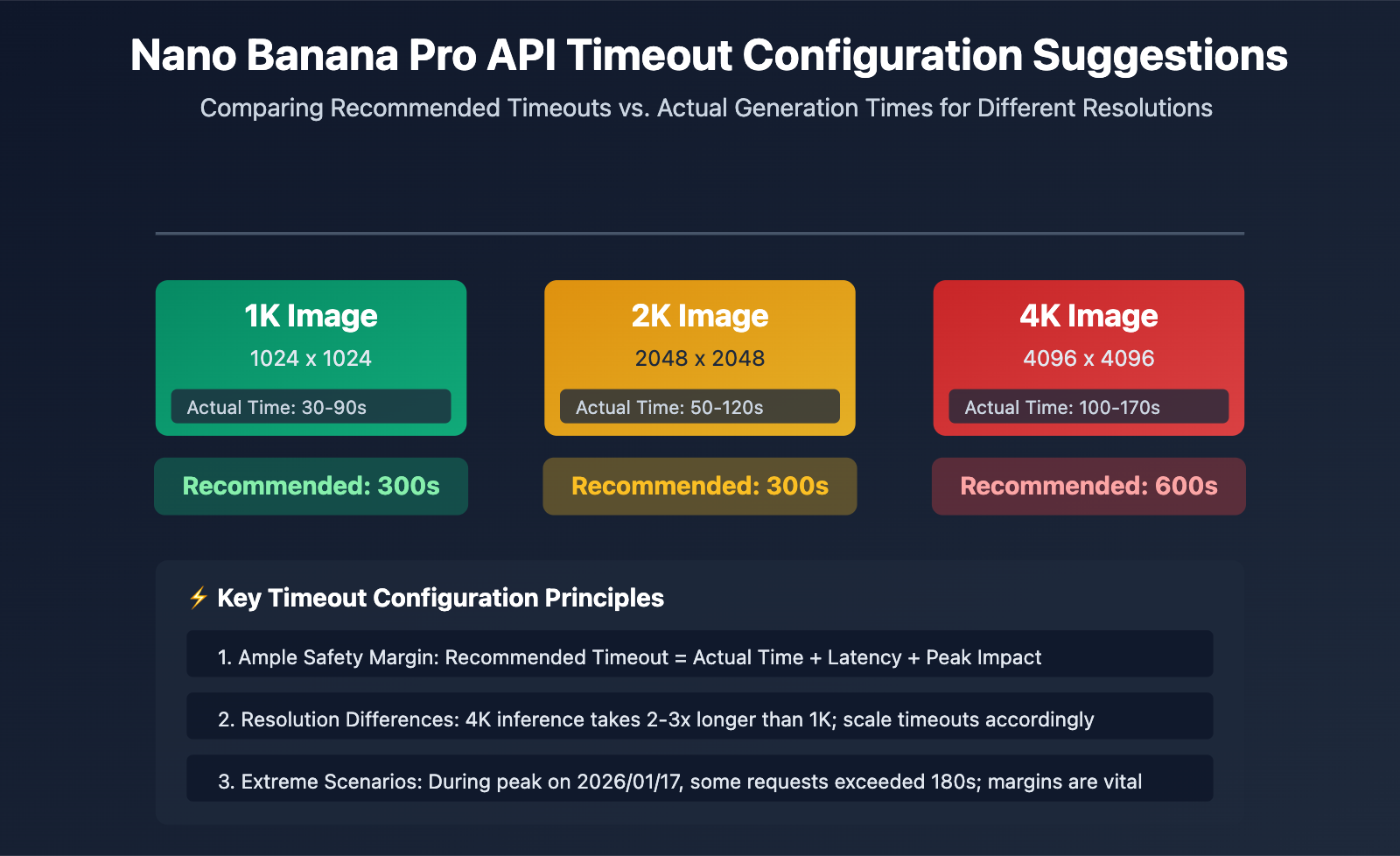
Core Essentials for Nano Banana Pro API Timeout Configuration
| Image Resolution | Actual Generation Time | Recommended Timeout | Safety Margin | Use Case |
|---|---|---|---|---|
| 1K (1024×1024) | 30-90 seconds | 300 seconds | +210s | Standard image generation |
| 2K (2048×2048) | 50-120 seconds | 300 seconds | +180s | HD image generation |
| 4K (4096×4096) | 100-170 seconds | 600 seconds | +430s | UHD image generation |
| Extreme Scenarios (Network/Peak) | Up to 180+ seconds | 600 seconds | – | Recommended for production |
The Root Cause of Nano Banana Pro API Timeout Issues
The Core Difference: Nano Banana Pro is Google’s latest image generation model. Powered by TPUs, its inference time is significantly longer than that of standard text models. Standard HTTP client defaults (usually 30-60 seconds) simply can't keep up with the actual processing time, leading to frequent disconnects.
On January 17, 2026, the Nano Banana Pro API saw generation times spike from 20-40 seconds to over 180 seconds due to a combination of Google’s global risk controls and computing resource shortages. Some API aggregation platforms even triggered billing log compensation mechanisms for requests exceeding 180 seconds. This event serves as a clear reminder: your timeout settings must include an ample safety margin.
💡 Technical Suggestion: For your production environment, we recommend calling the Nano Banana Pro API through the APIYI (apiyi.com) platform. They provide a dedicated HTTP interface optimized specifically for long inference tasks (http://api.apiyi.com:16888/v1). This endpoint comes with sensible default timeouts and supports 1K-4K resolutions, effectively eliminating the risk of timeout-related disconnections.
Root Cause 1: Default HTTP Client Timeouts are Too Short
The Default Timeout Trap of Standard HTTP Libraries
The default timeout settings in most programming languages' standard HTTP libraries are seriously insufficient:
| HTTP Library | Default Connection Timeout | Default Read Timeout | Suitable for Nano Banana Pro? |
|---|---|---|---|
| Python requests | Unlimited | Unlimited (but limited by OS) | ❌ Explicit setting required |
| Python httpx | 5 seconds | 5 seconds | ❌ Severely insufficient |
| Node.js axios | Unlimited | Unlimited | ⚠️ Needs verification of actual timeout |
| Java HttpClient | Unlimited | 30 seconds (JDK 11+) | ❌ Insufficient |
| Go http.Client | Unlimited | Unlimited (but limited by Transport) | ⚠️ Needs Transport configuration |
The hidden timeout issue in Python requests:
While the requests library documentation claims there's no default timeout, it's actually influenced by the operating system's TCP timeout and underlying socket timeouts, usually disconnecting around 60-120 seconds. This leads many developers to think "if I don't set a timeout, it won't time out," only to face unexpected disconnections in production.
import requests

# ❌ Incorrect: No explicit timeout set, will actually timeout around 60-120 seconds
response = requests.post(
    "https://api.example.com/v1/images/generations",
    json={"prompt": "生成 4K 图像", "size": "4096x4096"},
    headers={"Authorization": "Bearer YOUR_API_KEY"}
)
# When generation takes longer than 120 seconds, it throws a ReadTimeout exception
Correct Timeout Configuration Methods
Option 1: Explicit Timeout Configuration in Python requests
import requests

# ✅ Correct: Set timeouts explicitly
response = requests.post(
    "https://api.example.com/v1/images/generations",
    json={
        "prompt": "A futuristic city with neon lights",
        "size": "4096x4096",  # 4K resolution
        "model": "nano-banana-pro"
    },
    headers={"Authorization": "Bearer YOUR_API_KEY"},
    timeout=(10, 600)  # (connect timeout, read timeout) = (10s, 600s)
)
Timeout parameter explanation:
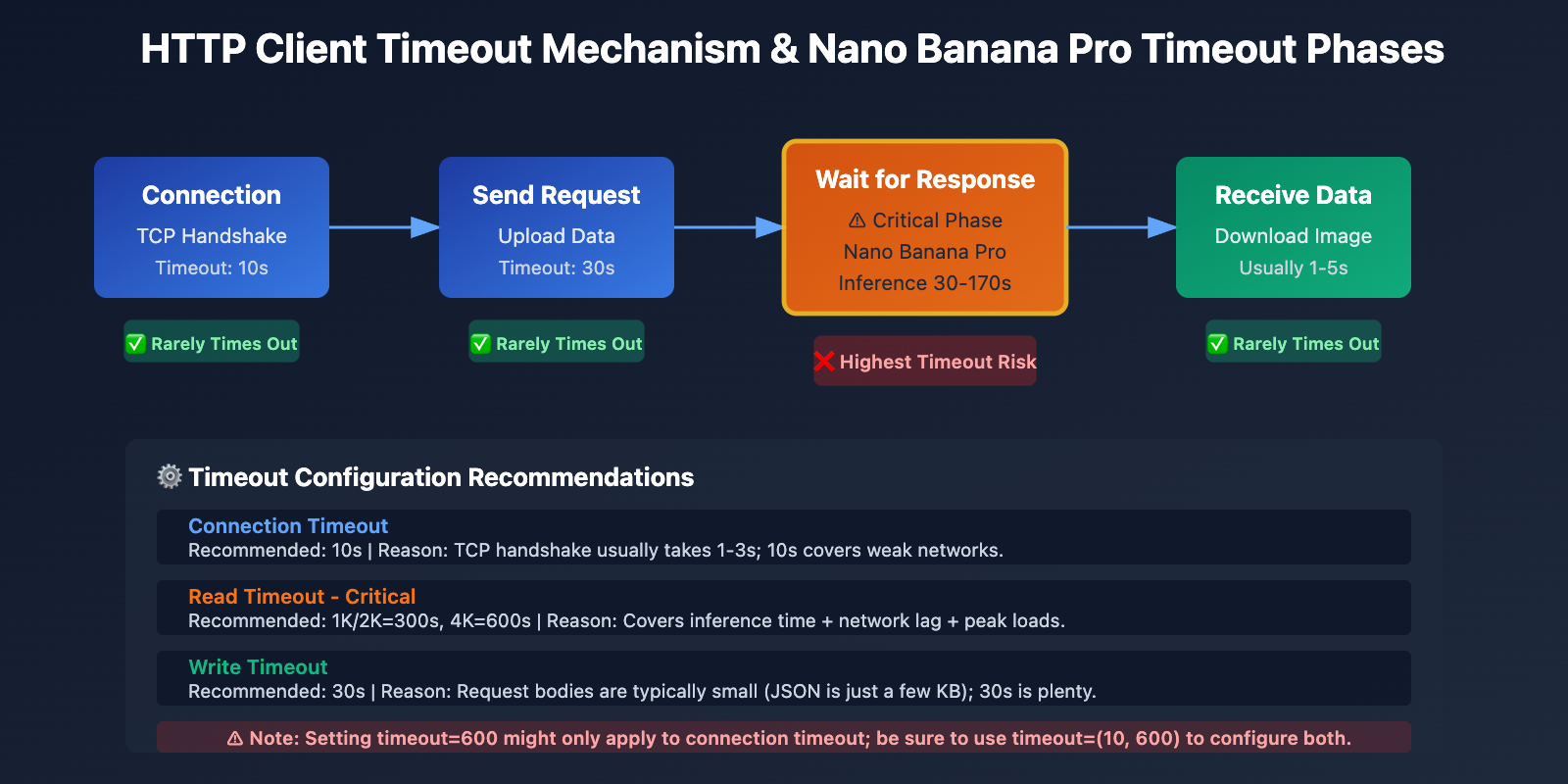
- Connection Timeout (10 seconds): The maximum time to wait to establish a TCP connection. 10 seconds is usually plenty.
- Read Timeout (600 seconds): The maximum time to wait for the server to respond with data. 600 seconds is recommended for 4K images.
Option 2: Custom Client with Python httpx
import httpx

# Create a custom client, forcing HTTP/1.1 and setting long timeouts
client = httpx.Client(
    timeout=httpx.Timeout(
        connect=10.0,  # 10s connection timeout
        read=600.0,    # 600s read timeout
        write=30.0,    # 30s write timeout
        pool=10.0      # 10s connection pool timeout
    ),
    http2=False,  # ⚠️ Key: Force HTTP/1.1 to avoid HTTP/2 compatibility issues
    limits=httpx.Limits(
        max_connections=10,
        max_keepalive_connections=5
    )
)

# Call the API using the custom client
response = client.post(
    "http://api.apiyi.com:16888/v1/images/generations",
    json={
        "prompt": "Cyberpunk style portrait",
        "size": "4096x4096",
        "model": "nano-banana-pro"
    },
    headers={"Authorization": "Bearer YOUR_API_KEY"}
)

# Close the client
client.close()
View full asynchronous httpx configuration example
import httpx
import asyncio

async def generate_image_async():
    """Asynchronously generate images with support for long timeouts"""
    async with httpx.AsyncClient(
        timeout=httpx.Timeout(
            connect=10.0,
            read=600.0,  # 600s recommended for 4K images
            write=30.0,
            pool=10.0
        ),
        http2=False,  # Force HTTP/1.1
        limits=httpx.Limits(
            max_connections=20,
            max_keepalive_connections=10
        )
    ) as client:
        response = await client.post(
            "http://api.apiyi.com:16888/v1/images/generations",
            json={
                "prompt": "A serene landscape at sunset",
                "size": "4096x4096",
                "model": "nano-banana-pro",
                "n": 1
            },
            headers={"Authorization": "Bearer YOUR_API_KEY"}
        )
        return response.json()

# Run the async function
result = asyncio.run(generate_image_async())
print(result)
🎯 Best Practice: When switching to the Nano Banana Pro API, it's a good idea to test the actual generation times for different resolutions through the APIYI (apiyi.com) platform first. The platform provides an HTTP port interface (http://api.apiyi.com:16888/v1) and has optimized default timeout configurations, making it easy to verify if your settings are reasonable.
Root Cause 2: HTTP/2 Protocol Compatibility Issues in Long-Connection Streaming
The Clash Between HTTP/2 Design Flaws and Nano Banana Pro
While HTTP/2 was designed to boost performance, it runs into several serious compatibility hurdles when handling long-connection streaming:
Problem 1: TCP Head-of-Line (HOL) Blocking
HTTP/2 uses multiplexing to solve the application-layer HOL blocking found in HTTP/1.1. However, it introduces a new TCP-layer HOL blocking issue. Since all HTTP/2 streams are multiplexed over a single TCP connection, any dropped TCP packet will stall the transmission of all streams in that connection.
HTTP/1.1 (6 concurrent connections):
Connection 1: [Stream A] ━━━━━━━━━▶
Connection 2: [Stream B] ━━━━━━━━━▶  ✅ Packet loss only affects one stream
Connection 3: [Stream C] ━━━━━━━━━▶

HTTP/2 (Single connection multiplexing):
Connection 1: [Stream A][Stream B][Stream C] ━━━━━━━━━▶
              ↑ TCP packet loss blocks all streams ❌
Problem 2: Stream Identifier Exhaustion
An HTTP/2 Stream Identifier (Stream ID) is a 31-bit integer, maxing out at 2^31-1 (about 2.1 billion). Connections that stay open for a long time can eventually exhaust these IDs. Since Stream IDs cannot be reused, you're forced to tear down the connection and create a new one.
Problem 3: Inconsistent HTTP/2 Implementations in Proxy APIs
Many API proxy platforms or reverse proxies have buggy HTTP/2 implementations, especially when dealing with long-lived streams:
- Improper handling of Stream Resets (RST_STREAM), leading to unexpected connection closures.
- Errors in WINDOW_UPDATE frame management, causing flow control to fail.
- Accidental GOAWAY frame triggers that force-close connections.
Real-world Comparison: HTTP/2 vs. HTTP/1.1 for Nano Banana Pro
| Metric | HTTP/1.1 | HTTP/2 | Recommendation |
|---|---|---|---|
| Connection Stability | High (Independent connections don't affect each other) | Low (Multiplexing means packet loss stalls everything) | HTTP/1.1 ✅ |
| Long-Connection Support | Mature (Keep-Alive mechanism is rock-solid) | Unstable (Stream ID exhaustion issues) | HTTP/1.1 ✅ |
| Timeout Handling | Simple & clear (Connection-level timeouts) | Complex (Stream-level + Connection-level) | HTTP/1.1 ✅ |
| Proxy API Compatibility | Extremely High (Supported everywhere) | Hit or miss (Some platforms are buggy) | HTTP/1.1 ✅ |
| Nano Banana Pro 4K Success Rate | 95%+ | 60-70% | HTTP/1.1 ✅ |
The Solution: Force HTTP/1.1 and Use the HTTP Port
Option 1: Force HTTP/1.1 in Python httpx
import httpx

# Force HTTP/1.1 to avoid HTTP/2 compatibility headaches
client = httpx.Client(
    http2=False,  # ⚠️ Critical setting: Disable HTTP/2
    timeout=httpx.Timeout(read=600.0)
)

response = client.post(
    "http://api.apiyi.com:16888/v1/images/generations",  # Use the HTTP port
    json={"prompt": "...", "size": "4096x4096"},
    headers={"Authorization": "Bearer YOUR_API_KEY"}
)
Option 2: Python requests (Default is HTTP/1.1)
import requests

# The requests library uses HTTP/1.1 by default, so no extra config is needed
response = requests.post(
    "http://api.apiyi.com:16888/v1/images/generations",
    json={"prompt": "...", "size": "4096x4096"},
    headers={"Authorization": "Bearer YOUR_API_KEY"},
    timeout=(10, 600)
)
Option 3: Force HTTP/1.1 in Node.js axios
const axios = require('axios');
const http = require('http');

// Create a dedicated HTTP/1.1 agent
const agent = new http.Agent({
    keepAlive: true,
    maxSockets: 10,
    timeout: 600000  // 600 seconds
});

// Configure axios to use the custom agent
const response = await axios.post(
    'http://api.apiyi.com:16888/v1/images/generations',
    {
        prompt: 'A beautiful sunset',
        size: '4096x4096',
        model: 'nano-banana-pro'
    },
    {
        headers: {
            'Authorization': 'Bearer YOUR_API_KEY'
        },
        httpAgent: agent,  // Use the HTTP/1.1 agent
        timeout: 600000    // 600s timeout
    }
);
💰 Cost Optimization: For projects requiring high-stability 4K image generation, we recommend calling the Nano Banana Pro API via the APIYI (apiyi.com) platform. They provide a dedicated HTTP port interface (http://api.apiyi.com:16888/v1) that uses HTTP/1.1 by default. This sidesteps HTTP/2 compatibility issues and offers more favorable billing—making it a perfect fit for production deployments.
Root Cause 3: The Combined Effect of Non-Streaming and Network Fluctuations
Non-Streaming Response Characteristics of Nano Banana Pro
Unlike text generation Large Language Models like GPT-4 or Claude, the Nano Banana Pro API doesn't use streaming to return images. The entire generation process looks like this:
- Request Phase (1-3 seconds): The client sends the request to the server.
- Inference Phase (30-170 seconds): The server generates the image on TPUs. During this time, the client receives zero response data.
- Response Phase (1-5 seconds): The server returns the full base64-encoded image data.
The critical issue: During that 30-170 second inference window, the client's HTTP connection is completely idle. Only TCP Keep-Alives maintain the connection, with no application-layer data being transferred. This leads to several problems:
- Intermediate network devices (NATs, firewalls, proxies) might assume the connection is dead and proactively close it.
- In weak network environments, long-duration idle connections are much more prone to being interrupted.
- Some cloud provider Load Balancers have idle connection timeout limits (e.g., AWS ALB defaults to 60 seconds).
Impact of Network Fluctuations on Timeouts
| Network Environment | Actual Gen Time | Network Latency Impact | Recommended Timeout |
|---|---|---|---|
| Stable Internal/IDC | 100s | +10-20s | 300s (180s margin) |
| Home/Mobile Network | 100s | +30-50s | 600s (450s margin) |
| International/VPN | 100s | +50-100s | 600s (400s margin) |
| Peak Hours (Jan 17, 2026 event) | 180s | +20-40s | 600s (380s margin) |
Strategies: Timeout + Retries + Fallbacks
import requests
import time
from typing import Optional

def generate_image_with_retry(
    prompt: str,
    size: str = "4096x4096",
    max_retries: int = 3,
    timeout: int = 600
) -> Optional[dict]:
    """
    Generates an image with timeout and retry support.

    Args:
        prompt: The image prompt
        size: Image dimensions (1024x1024, 2048x2048, 4096x4096)
        max_retries: Maximum number of retry attempts
        timeout: Timeout duration (seconds)

    Returns:
        Generation results or None (on failure)
    """
    api_url = "http://api.apiyi.com:16888/v1/images/generations"
    headers = {"Authorization": "Bearer YOUR_API_KEY"}

    for attempt in range(max_retries):
        try:
            print(f"Attempt {attempt + 1}/{max_retries}: Generating {size} image...")
            start_time = time.time()

            response = requests.post(
                api_url,
                json={
                    "prompt": prompt,
                    "size": size,
                    "model": "nano-banana-pro",
                    "n": 1
                },
                headers=headers,
                timeout=(10, timeout)  # (Connect timeout, Read timeout)
            )

            elapsed = time.time() - start_time
            print(f"✅ Success! Time taken: {elapsed:.2f}s")

            return response.json()

        except requests.exceptions.Timeout:
            elapsed = time.time() - start_time
            print(f"❌ Timeout after: {elapsed:.2f}s")

            if attempt < max_retries - 1:
                wait_time = 5 * (attempt + 1)  # Exponential backoff
                print(f"⏳ Waiting {wait_time}s before retrying...")
                time.sleep(wait_time)
            else:
                print("❌ Max retries reached, generation failed.")
                return None

        except requests.exceptions.RequestException as e:
            print(f"❌ Network error: {e}")
            if attempt < max_retries - 1:
                time.sleep(5)
            else:
                return None

    return None


# Example usage
result = generate_image_with_retry(
    prompt="A majestic mountain landscape",
    size="4096x4096",
    max_retries=3,
    timeout=600
)

if result:
    print(f"Image URL: {result['data'][0]['url']}")
else:
    print("Image generation failed, please try again later.")
🚀 Quick Start: We recommend using the APIYI (apiyi.com) platform for fast Nano Banana Pro API integration. It offers several advantages:
- HTTP Port Interface:
http://api.apiyi.com:16888/v1helps avoid HTTPS handshake overhead.- Optimized Timeout Config: Defaults to 600s timeout support, perfect for 4K generation scenarios.
- Smart Retry Mechanism: The platform handles transient timeouts automatically, boosting your success rate.
- Billing Compensation: Requests exceeding 180s automatically trigger billing compensation to prevent wasted credits.
Advantages of APIYI Platform's HTTP Port Interface
Why Use HTTP Over HTTPS?
| Feature | HTTPS (api.apiyi.com/v1) | HTTP (api.apiyi.com:16888/v1) | Recommended |
|---|---|---|---|
| TLS Handshake Overhead | Yes (300-800ms) | None | HTTP ✅ |
| Connection Speed | Slow (requires TLS negotiation) | Fast (direct TCP connection) | HTTP ✅ |
| HTTP/2 Negotiation | Might auto-upgrade to HTTP/2 | Forced HTTP/1.1 | HTTP ✅ |
| Internal Security | High (encrypted) | Moderate (plaintext) | HTTP ⚠️ (Best for internal) |
| Timeout Stability | Moderate (TLS timeout + read timeout) | High (Read timeout only) | HTTP ✅ |
APIYI HTTP Interface Full Configuration Example
import requests

# APIYI Platform HTTP Port Configuration
APIYI_HTTP_ENDPOINT = "http://api.apiyi.com:16888/v1"
APIYI_API_KEY = "YOUR_APIYI_API_KEY"

def generate_nano_banana_image(
    prompt: str,
    size: str = "4096x4096"
) -> dict:
    """
    Generates a Nano Banana Pro image using the APIYI HTTP interface.

    Args:
        prompt: Image prompt
        size: Image dimensions

    Returns:
        API response result
    """
    # Adjust timeout dynamically based on resolution
    timeout_map = {
        "1024x1024": 300,   # 1K: 300s
        "2048x2048": 300,   # 2K: 300s
        "4096x4096": 600    # 4K: 600s
    }

    timeout = timeout_map.get(size, 600)  # Default to 600s

    response = requests.post(
        f"{APIYI_HTTP_ENDPOINT}/images/generations",
        json={
            "prompt": prompt,
            "size": size,
            "model": "nano-banana-pro",
            "n": 1,
            "response_format": "url"  # or "b64_json"
        },
        headers={
            "Authorization": f"Bearer {APIYI_API_KEY}",
            "Content-Type": "application/json"
        },
        timeout=(10, timeout)  # (Connect timeout, Read timeout)
    )

    response.raise_for_status()
    return response.json()


# Example usage
try:
    result = generate_nano_banana_image(
        prompt="A photorealistic portrait of a cat",
        size="4096x4096"
    )

    print(f"✅ Success!")
    print(f"Image URL: {result['data'][0]['url']}")
    print(f"Size: {result['data'][0]['size']}")

except requests.exceptions.Timeout:
    print("❌ Request timed out. Check your network or try again later.")
except requests.exceptions.HTTPError as e:
    print(f"❌ API Error: {e}")
except Exception as e:
    print(f"❌ Unknown Error: {e}")
💡 Best Practice: For production environments, we suggest prioritizing APIYI's HTTP port interface (
http://api.apiyi.com:16888/v1). This endpoint is platform-optimized with sensible default timeouts and retry strategies, significantly improving Nano Banana Pro API success rates—especially for 4K image generation.
FAQ
Q1: Why am I still getting timeouts even though I set a 600-second limit?
Possible Reasons:
-
You only set a connection timeout, not a read timeout:
# ❌ Incorrect: timeout=600 only applies to the connection phase response = requests.post(url, json=data, timeout=600) # ✅ Correct: Set connection and read timeouts separately response = requests.post(url, json=data, timeout=(10, 600)) -
Intermediate proxies or Load Balancers have shorter timeout limits:
- AWS ALB defaults to a 60-second idle timeout.
- Nginx defaults to a
proxy_read_timeoutof 60 seconds. - Cloudflare Free plans have a maximum timeout of 100 seconds.
Solution: Use APIYI's HTTP port interface. We've optimized the timeout configurations for this interface at the platform level.
-
Unstable network or actual generation time exceeds 600 seconds:
- During peak periods (like Jan 17, 2026), some requests took over 180 seconds.
- International network latency can add another 50-100 seconds.
Solution: Implement a retry mechanism and take advantage of the APIYI platform's billing compensation feature.
Q2: Is the HTTP interface secure? Can it be intercepted?
Security Analysis:
| Scenario | HTTP Security | Recommendation |
|---|---|---|
| Internal Calls (VPC/Private Network) | High (No public exposure) | ✅ Recommended: HTTP |
| Public Calls (Dev/Test) | Medium (API Key could leak) | ⚠️ Careful with Key security |
| Public Calls (Production) | Low (Plaintext transmission) | ❌ Use HTTPS instead |
| Calls via VPN/Leased Line | High (Encrypted at VPN layer) | ✅ Recommended: HTTP |
Best Practices:
- Internal Environments: Use the HTTP interface for the best performance.
- Public Environments: If security is your top priority, use the HTTPS interface. If you value stability more, use the HTTP interface and rotate your API Keys regularly.
- Mixed Environments: Use HTTP for non-sensitive prompts and HTTPS for sensitive content.
Q3: Do 1K and 2K images also need a 300-second timeout?
Recommended Settings:
Even though 1K and 2K images usually take between 30-120 seconds to generate, we still recommend setting a 300-second timeout. Here's why:
- Network Jitter: Even if the generation is fast, network lag can add 30-50 seconds.
- Peak Hour Impact: Events like the one on 2026/1/17 show that generation times can double in extreme cases.
- Plenty of Buffer: A 300-second timeout doesn't cost anything extra, but it saves you from unnecessary retries.
Real-world Data (APIYI Platform Stats):
| Resolution | P50 (Median) | P95 (95th Percentile) | P99 (99th Percentile) | Recommended Timeout |
|---|---|---|---|---|
| 1K | 45s | 90s | 150s | 300s |
| 2K | 65s | 120s | 180s | 300s |
| 4K | 120s | 170s | 250s | 600s |
Conclusion: Use 300s for 1K/2K and 600s for 4K. This covers over 99% of all scenarios.
Q4: How do I tell if it’s a timeout issue or an API overload issue?
How to Distinguish:
| Error Type | Typical Error Message | HTTP Status Code | Retriable? |
|---|---|---|---|
| Timeout Error | ReadTimeout, Connection timeout |
None (Client-side error) | ✅ Yes |
| API Overload | The model is overloaded |
503 or 429 | ✅ Yes (Wait then retry) |
| API Unavailable | The service is currently unavailable |
503 | ✅ Yes (Wait then retry) |
| Auth Error | Invalid API key |
401 | ❌ No (Check API Key) |
Identifying Timeout Errors:
except requests.exceptions.Timeout:
    # Client timed out; no response received from server
    print("Request timed out")
except requests.exceptions.HTTPError as e:
    if e.response.status_code == 503:
        # Server returned 503, explicitly indicating overload
        print("API Overloaded")
Decision Flow:
- If the exception is
Timeout, it's a timeout issue → Increase the timeout duration or switch to the HTTP interface. - If you get an HTTP response with a 503/429 status code, the API is overloaded → Wait a bit or switch to another API provider.
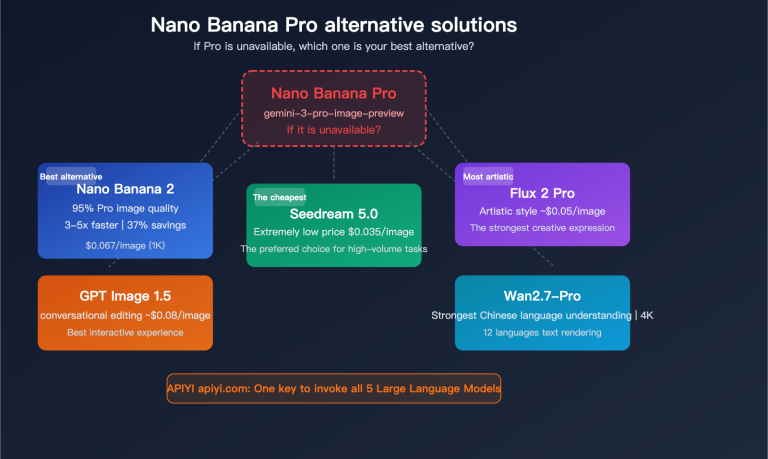
- If the response says "overloaded," Google's compute resources are likely maxed out → Consider using APIYI's fallback models (like Seedream 4.5).
Summary
Key takeaways for Nano Banana Pro API timeout issues:
- Timeout Config: We recommend 300s for 1K/2K and 600s for 4K to account for network jitters and peak times.
- HTTP/2 Issues: HTTP/2 can suffer from TCP head-of-line blocking and stream identifier exhaustion in long-connection scenarios. We suggest forcing HTTP/1.1.
- HTTP Port Advantage: APIYI's HTTP interface (http://api.apiyi.com:16888/v1) bypasses TLS handshake overhead and HTTP/2 negotiation, making things much more stable.
- Retry Strategy: Implement timeout retries with exponential backoff to handle temporary network blips.
- Platform Optimization: The APIYI platform provides optimized timeout settings, smart retries, and billing compensation, significantly boosting the success rate for 4K image generation.
We recommend integrating the Nano Banana Pro API via APIYI (apiyi.com). The platform offers a specialized HTTP port interface with sensible default timeouts and supports 1K-4K resolutions, making it perfect for production deployments.
Author: APIYI Technical Team | For technical questions, visit APIYI (apiyi.com) for more AI model integration solutions.