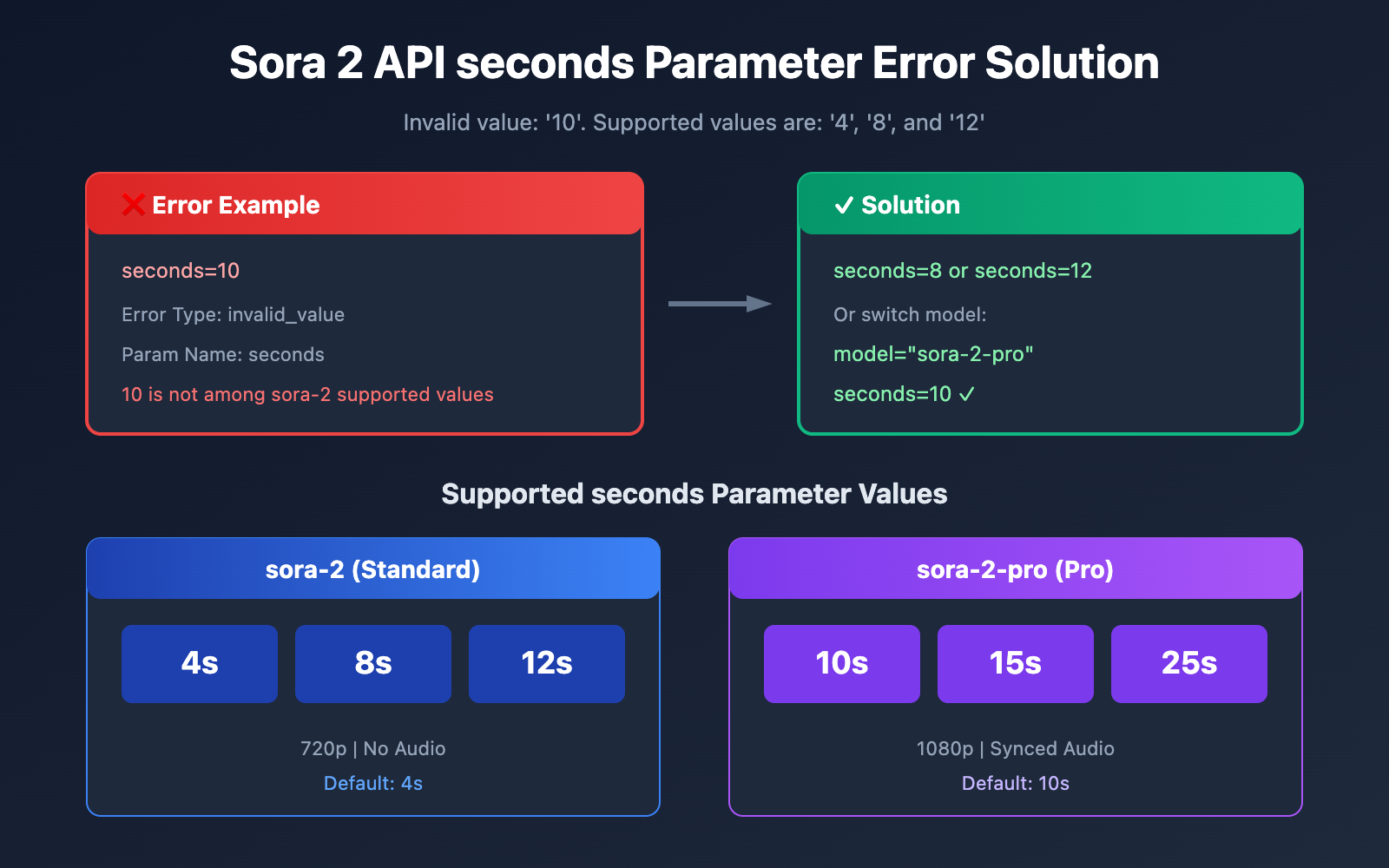
When calling the Sora 2 API to generate video, if the seconds parameter is passed an unsupported value, it immediately returns an invalid_value error. This article will provide a detailed breakdown of the root cause behind the Invalid value: '10'. Supported values are: '4', '8', and '12' error and offer a complete fix.
Core Value: By reading this article, you'll master the duration parameter differences between Sora 2 Standard and Pro versions, learn how to correctly set the seconds parameter, and avoid having your video generation requests rejected.
Root Cause Analysis of Sora 2 API seconds Parameter Error
When you call the Sora 2 API, if you see the following error message:
{
  "message": "Invalid value: '10'. Supported values are: '4', '8', and '12'.",
  "data": {
    "error": {
      "code": "invalid_value",
      "message": "Invalid value: '10'. Supported values are: '4', '8', and '12'.",
      "param": "seconds",
      "type": "invalid_request_error"
    }
  }
}
It means the seconds value you passed (in this case, 10) is outside the range permitted by the API.
Strict Validation Mechanism for Sora 2 API Duration
The Sora 2 API uses fixed-value validation for video duration and doesn't support arbitrary second counts:
| Error Field | Meaning | Description |
|---|---|---|
| code | invalid_value |
The parameter value is invalid |
| param | seconds |
The name of the parameter causing the error |
| type | invalid_request_error |
The type of request parameter error |
| message | List of supported values | Tells you exactly which values are legitimate |
Why does Sora 2 API restrict to fixed durations?
In the Sora 2 preview version, OpenAI intentionally limited the selectable values for video duration for several reasons:
- Computing Resource Optimization: Fixed durations make it easier to pre-allocate GPU resources.
- Quality Consistency: Preset durations are optimized to ensure more stable generation results.
- Cost Control: Limiting lengths prevents users from accidentally generating high costs.
- Model Characteristics: Sora 2 achieves the best inter-frame consistency at these specific durations.
🎯 Pro Tip: The supported duration values for Sora 2 Standard and Sora 2 Pro are completely different. You must choose the correct parameter value based on the specific model you're using.
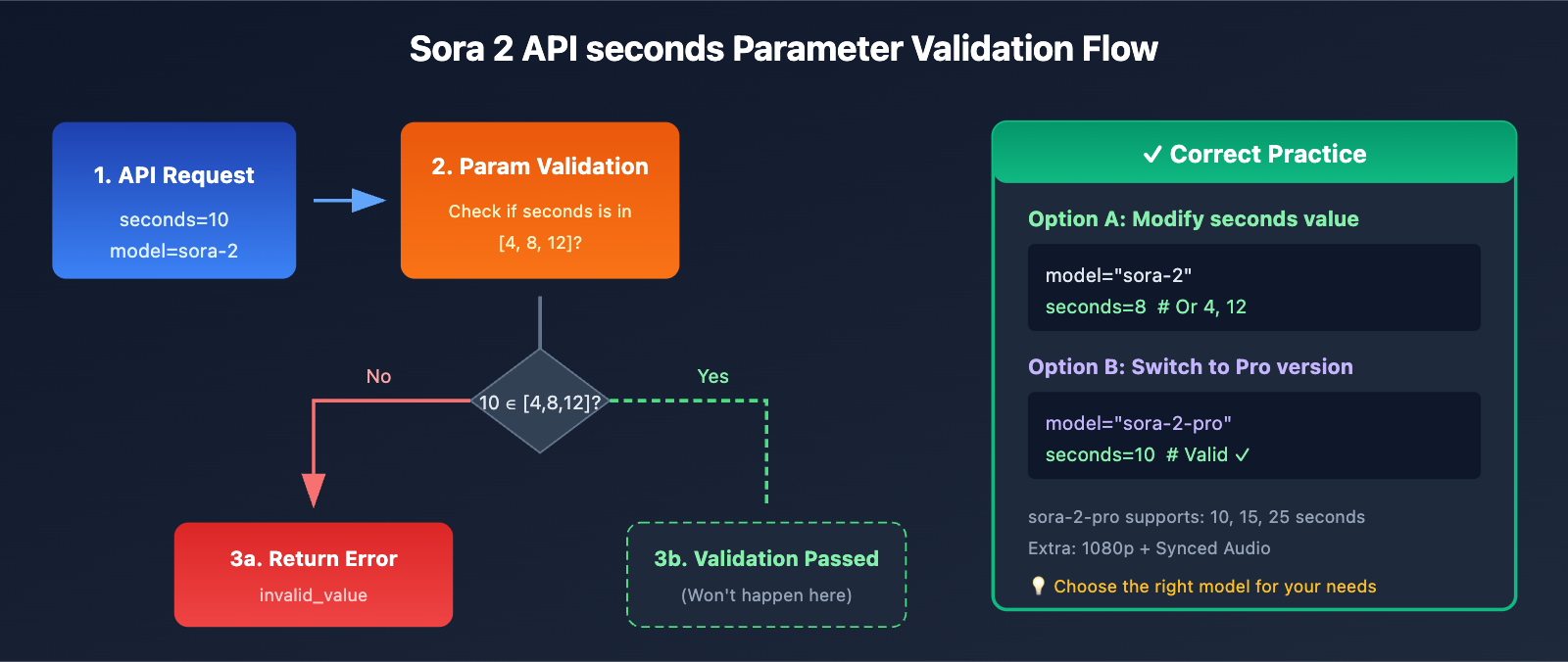
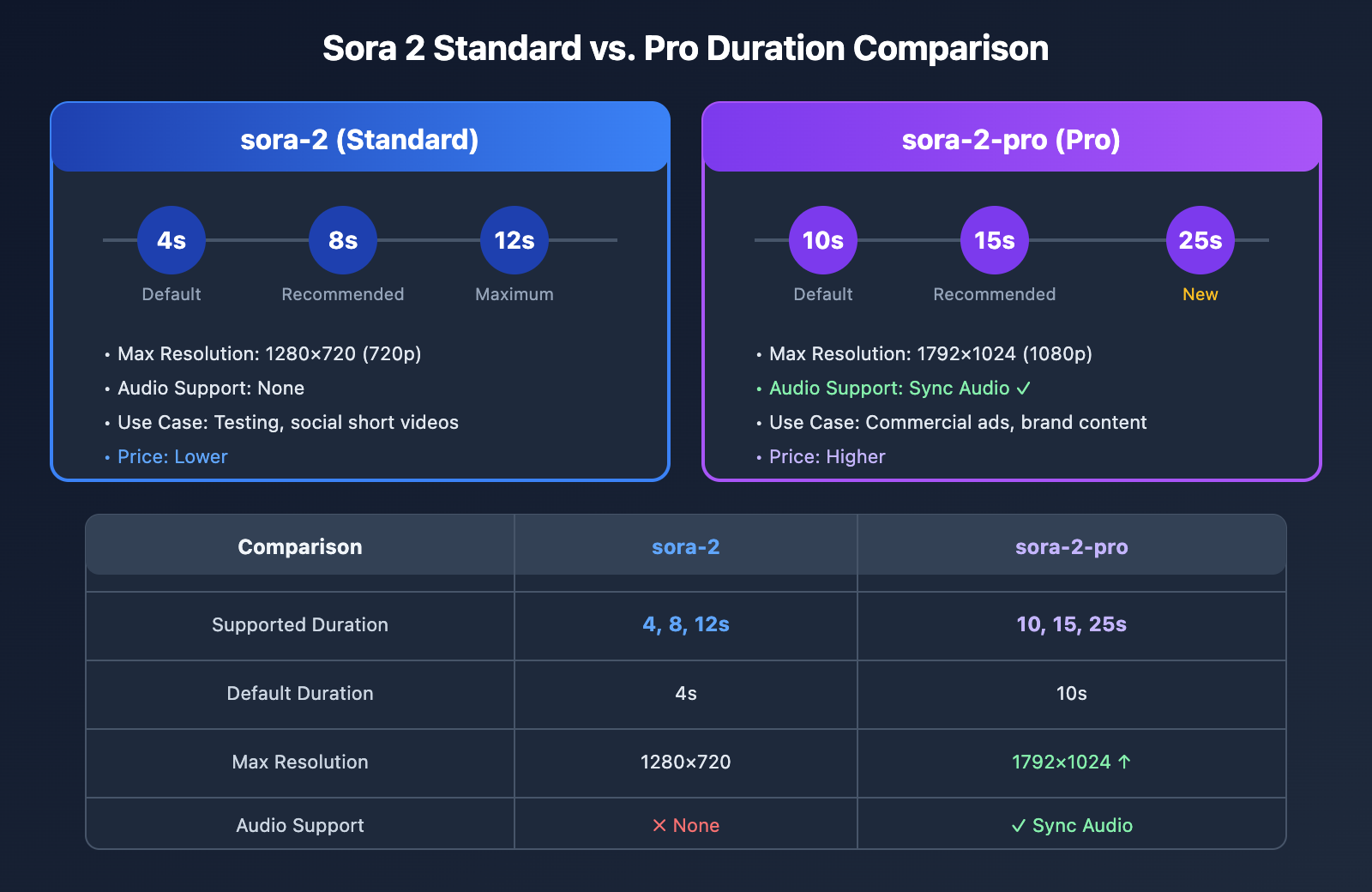
Sora 2 Standard vs. Pro Version Duration Parameters
This is actually the most common reason for errors: confusing the parameters between the Standard and Pro versions.
Supported Durations for Sora 2 Standard (sora-2)
| Duration Value | Description | Recommended Use Cases |
|---|---|---|
| 4 | 4-second video (Default) | Short loops, GIF replacements, testing |
| 8 | 8-second video | Product showcases, social media |
| 12 | 12-second video | Full scenes, ad clips |
Supported Durations for Sora 2 Pro (sora-2-pro)
| Duration Value | Description | Recommended Use Cases |
|---|---|---|
| 10 | 10-second video | Standard commercial content |
| 15 | 15-second video | Social media ads |
| 25 | 25-second video (New) | Full narratives, brand stories |
Full Parameter Comparison Table
| Comparison Item | sora-2 (Standard) | sora-2-pro (Pro) |
|---|---|---|
| Supported Duration | 4, 8, 12 seconds | 10, 15, 25 seconds |
| Default Duration | 4 seconds | 10 seconds |
| Max Resolution | 1280×720 (720p) | 1792×1024 (1080p) |
| Audio Support | None | Synchronized audio |
| Available Platforms | APIYI apiyi.com, Official | APIYI apiyi.com, Official |
💡 Quick Tip: If you need a 10-second video, make sure to use the
sora-2-promodel instead ofsora-2. We recommend testing different model and duration combinations on the APIYI apiyi.com platform to quickly find the configuration that best fits your needs.
3 Ways to Fix Sora 2 API "seconds" Errors
Option 1: Use the Correct "seconds" Value (Standard Version)
If you're using the standard sora-2 model, you must use 4, 8, or 12:
import openai

client = openai.OpenAI(
    api_key="YOUR_API_KEY",
    base_url="https://api.apiyi.com/v1"  # 使用 APIYI 统一接口
)

# ✅ 正确:使用标准版支持的时长值
response = client.videos.create(
    model="sora-2",           # 标准版模型
    prompt="A cat playing with a ball in a sunny garden",
    seconds=8,                # 只能是 4, 8, 或 12
    size="1280x720"
)

print(f"视频生成任务: {response.id}")
🚀 Quick Start: We recommend using the APIYI (apiyi.com) platform to quickly test the Sora 2 API. It provides out-of-the-box interfaces and supports switching between Standard and Pro models.
Option 2: Switch to the Pro Version for Longer Durations
If you need 10, 15, or 25-second videos, you should switch to the sora-2-pro model:
import openai

client = openai.OpenAI(
    api_key="YOUR_API_KEY",
    base_url="https://api.apiyi.com/v1"  # 使用 APIYI 统一接口
)

# ✅ 正确:使用 Pro 版获得更长时长
response = client.videos.create(
    model="sora-2-pro",       # Pro 版模型
    prompt="A cinematic sunrise over mountains with birds flying",
    seconds=15,               # Pro 版支持 10, 15, 25
    size="1792x1024"          # Pro 版支持更高分辨率
)

print(f"视频生成任务: {response.id}")
Option 3: Implement a Smart Duration Adapter Utility
Here's a production-grade duration parameter adapter that automatically handles matching models with the correct durations:
import openai
from typing import Literal, Optional

class SoraVideoGenerator:
    """Sora 2 API 视频生成工具,自动适配时长参数"""

    # 模型支持的时长配置
    MODEL_DURATIONS = {
        "sora-2": {
            "supported": [4, 8, 12],
            "default": 4,
            "max_resolution": "1280x720"
        },
        "sora-2-pro": {
            "supported": [10, 15, 25],
            "default": 10,
            "max_resolution": "1792x1024"
        }
    }

    def __init__(self, api_key: str, base_url: str = "https://api.apiyi.com/v1"):
        self.client = openai.OpenAI(api_key=api_key, base_url=base_url)

    def get_valid_duration(self, model: str, desired_seconds: int) -> int:
        """获取最接近期望值的有效时长"""
        if model not in self.MODEL_DURATIONS:
            raise ValueError(f"不支持的模型: {model}")

        supported = self.MODEL_DURATIONS[model]["supported"]

        # 如果期望值有效,直接返回
        if desired_seconds in supported:
            return desired_seconds

        # 否则返回最接近的有效值
        closest = min(supported, key=lambda x: abs(x - desired_seconds))
        print(f"⚠️ 时长 {desired_seconds}s 不支持,已自动调整为 {closest}s")
        return closest

    def suggest_model(self, desired_seconds: int) -> str:
        """根据期望时长推荐合适的模型"""
        if desired_seconds <= 12:
            return "sora-2"
        else:
            return "sora-2-pro"

    def create_video(
        self,
        prompt: str,
        seconds: int,
        model: Optional[str] = None,
        size: Optional[str] = None,
        auto_adjust: bool = True
    ):
        """
        创建视频,支持自动调整参数

        Args:
            prompt: 视频描述
            seconds: 期望时长
            model: 模型名称,不指定则自动选择
            size: 分辨率
            auto_adjust: 是否自动调整不支持的参数
        """
        # 自动选择模型
        if model is None:
            model = self.suggest_model(seconds)
            print(f"📌 自动选择模型: {model}")

        # 验证并调整时长
        if auto_adjust:
            seconds = self.get_valid_duration(model, seconds)
        elif seconds not in self.MODEL_DURATIONS[model]["supported"]:
            supported = self.MODEL_DURATIONS[model]["supported"]
            raise ValueError(
                f"模型 {model} 不支持 {seconds}s,"
                f"支持的值: {supported}"
            )

        # 设置默认分辨率
        if size is None:
            size = self.MODEL_DURATIONS[model]["max_resolution"]

        # 调用 API
        response = self.client.videos.create(
            model=model,
            prompt=prompt,
            seconds=seconds,
            size=size
        )

        return {
            "task_id": response.id,
            "model": model,
            "seconds": seconds,
            "size": size
        }

# 使用示例
generator = SoraVideoGenerator(api_key="YOUR_API_KEY")

# 示例1:自动选择模型和调整时长
result = generator.create_video(
    prompt="Ocean waves crashing on a beach at sunset",
    seconds=10  # 自动选择 sora-2-pro
)
print(f"生成结果: {result}")

# 示例2:指定模型,自动调整时长
result = generator.create_video(
    prompt="A coffee cup with steam rising",
    seconds=10,          # 10s 对 sora-2 无效
    model="sora-2",      # 指定标准版
    auto_adjust=True     # 自动调整为 12s 或 8s
)
print(f"生成结果: {result}")
View full code (including async support and retry mechanisms)
import openai
import asyncio
from typing import Literal, Optional, Dict, Any
from dataclasses import dataclass
from enum import Enum

class SoraModel(Enum):
    """Sora 模型枚举"""
    STANDARD = "sora-2"
    PRO = "sora-2-pro"

@dataclass
class ModelConfig:
    """模型配置"""
    supported_durations: list[int]
    default_duration: int
    max_resolution: str
    has_audio: bool

class SoraVideoGenerator:
    """
    Sora 2 API 视频生成工具

    功能:
    - 自动适配时长参数
    - 模型自动选择
    - 参数校验
    - 重试机制
    """

    MODELS: Dict[str, ModelConfig] = {
        "sora-2": ModelConfig(
            supported_durations=[4, 8, 12],
            default_duration=4,
            max_resolution="1280x720",
            has_audio=False
        ),
        "sora-2-pro": ModelConfig(
            supported_durations=[10, 15, 25],
            default_duration=10,
            max_resolution="1792x1024",
            has_audio=True
        )
    }

    RESOLUTIONS = {
        "720p_landscape": "1280x720",
        "720p_portrait": "720x1280",
        "1080p_landscape": "1792x1024",
        "1080p_portrait": "1024x1792",
    }

    def __init__(
        self,
        api_key: str,
        base_url: str = "https://api.apiyi.com/v1",
        max_retries: int = 3
    ):
        self.client = openai.OpenAI(api_key=api_key, base_url=base_url)
        self.max_retries = max_retries

    def validate_model(self, model: str) -> ModelConfig:
        """验证模型并返回配置"""
        if model not in self.MODELS:
            available = list(self.MODELS.keys())
            raise ValueError(f"不支持的模型: {model},可用模型: {available}")
        return self.MODELS[model]

    def get_valid_duration(self, model: str, desired: int) -> int:
        """获取最接近期望值的有效时长"""
        config = self.validate_model(model)
        supported = config.supported_durations

        if desired in supported:
            return desired

        closest = min(supported, key=lambda x: abs(x - desired))
        return closest

    def suggest_model_for_duration(self, seconds: int) -> str:
        """根据期望时长推荐模型"""
        # 检查标准版是否支持
        if seconds in self.MODELS["sora-2"].supported_durations:
            return "sora-2"
        # 检查 Pro 版是否支持
        if seconds in self.MODELS["sora-2-pro"].supported_durations:
            return "sora-2-pro"
        # 默认根据时长选择
        return "sora-2" if seconds <= 12 else "sora-2-pro"

    def create_video(
        self,
        prompt: str,
        seconds: int,
        model: Optional[str] = None,
        size: Optional[str] = None,
        auto_adjust: bool = True
    ) -> Dict[str, Any]:
        """
        创建视频

        Args:
            prompt: 视频描述提示词
            seconds: 期望视频时长(秒)
            model: 模型名称,None 则自动选择
            size: 分辨率,None 则使用模型默认值
            auto_adjust: 是否自动调整不支持的参数

        Returns:
            包含任务信息的字典

        Raises:
            ValueError: 参数无效且 auto_adjust=False
        """
        # 自动选择模型
        if model is None:
            model = self.suggest_model_for_duration(seconds)

        config = self.validate_model(model)

        # 处理时长参数
        original_seconds = seconds
        if seconds not in config.supported_durations:
            if auto_adjust:
                seconds = self.get_valid_duration(model, seconds)
                print(f"⚠️ 时长已调整: {original_seconds}s → {seconds}s")
            else:
                raise ValueError(
                    f"模型 {model} 不支持 {seconds}s,"
                    f"支持的值: {config.supported_durations}"
                )

        # 设置分辨率
        if size is None:
            size = config.max_resolution

        # 调用 API(带重试)
        last_error = None
        for attempt in range(self.max_retries):
            try:
                # API Call
                response = self.client.videos.create(
                    model=model,
                    prompt=prompt,
                    seconds=seconds,
                    size=size
                )
                return {
                    "success": True,
                    "task_id": response.id,
                    "model": model,
                    "seconds": seconds,
                    "size": size,
                    "has_audio": config.has_audio,
                    "adjusted": original_seconds != seconds
                }
            except Exception as e:
                last_error = e
                if attempt < self.max_retries - 1:
                    wait_time = 2 ** attempt
                    print(f"⏳ 请求失败,{wait_time}s 后重试...")
                    import time
                    time.sleep(wait_time)

        return {
            "success": False,
            "error": str(last_error),
            "model": model,
            "seconds": seconds
        }

    @staticmethod
    def get_duration_info() -> str:
        """获取时长参数帮助信息"""
        info = ["Sora 2 API 时长参数说明:", ""]
        for model, config in SoraVideoGenerator.MODELS.items():
            durations = ", ".join(map(str, config.supported_durations))
            info.append(f"  {model}: {durations} 秒")
            info.append(f"    默认: {config.default_duration}s")
            info.append(f"    最大分辨率: {config.max_resolution}")
            info.append(f"    音频: {'支持' if config.has_audio else '不支持'}")
            info.append("")
        return "\n".join(info)


# 使用示例
if __name__ == "__main__":
    # 打印帮助信息
    print(SoraVideoGenerator.get_duration_info())

    # 初始化生成器
    generator = SoraVideoGenerator(api_key="YOUR_API_KEY")

    # 示例1:让工具自动选择最佳配置
    result = generator.create_video(
        prompt="A serene lake reflecting autumn trees",
        seconds=10
    )
    print(f"结果: {result}")

    # 示例2:强制使用特定模型
    result = generator.create_video(
        prompt="Quick product showcase",
        seconds=5,
        model="sora-2",
        auto_adjust=True  # 5s 会被调整为 4s
    )
    print(f"结果: {result}")
Best Practices for Sora 2 API Duration Parameters
Choosing the Right Duration for Your Scenario
| Use Case | Recommended Model | Recommended Duration | Description |
|---|---|---|---|
| API Testing | sora-2 | 4s | Quick validation, saves quota |
| Social Media | sora-2 | 8s | Optimized for Instagram/TikTok |
| Product Showcase | sora-2 | 12s | Full display of product features |
| Brand Advertising | sora-2-pro | 15s | Standard commercial ad duration |
| Storytelling | sora-2-pro | 25s | Complete narrative arc |
Relationship Between Duration and Generation Quality
Based on official OpenAI recommendations and our hands-on experience:
| Duration | Inter-frame Consistency | Motion Coherence | Recommendation Level |
|---|---|---|---|
| 4s | ★★★★★ | ★★★★★ | Top choice for testing |
| 8s | ★★★★☆ | ★★★★☆ | Recommended for daily use |
| 12s | ★★★★☆ | ★★★☆☆ | Requires prompt optimization |
| 15s (Pro) | ★★★★☆ | ★★★★☆ | Recommended for business |
| 25s (Pro) | ★★★☆☆ | ★★★☆☆ | Requires fine-tuned prompts |
💰 Cost Optimization: For budget-sensitive projects, we recommend testing your prompt's effectiveness with a 4-second duration first. Once you're happy with the results, then go ahead and generate the longer version. You can get more competitive pricing for these calls through the APIYI (apiyi.com) platform.
Alternatives for Long Videos
If you need a video longer than 25 seconds, you can use the following strategy:
def create_long_video_segments(generator, prompt_segments, model="sora-2"):
    """
    Segmented generation strategy for long videos

    Args:
        generator: SoraVideoGenerator instance
        prompt_segments: List of segment prompts
        model: Model to use
    """
    results = []
    config = generator.MODELS[model]
    max_duration = max(config.supported_durations)

    for i, segment_prompt in enumerate(prompt_segments):
        print(f"Generating segment {i+1}/{len(prompt_segments)}...")
        result = generator.create_video(
            prompt=segment_prompt,
            seconds=max_duration,
            model=model
        )
        results.append(result)

    return results

# Example: Generating a 36-second video (3 segments x 12 seconds)
prompt_segments = [
    "Opening shot: A sunrise over a mountain range, golden light spreading",
    "Middle shot: Birds taking flight from the trees, camera follows",
    "Closing shot: The sun fully risen, peaceful valley below"
]

generator = SoraVideoGenerator(api_key="YOUR_API_KEY")
segments = create_long_video_segments(generator, prompt_segments)
# Use FFmpeg later to stitch the segments together
Sora 2 API Duration Errors: FAQ
Q1: Why do I get an error when I pass seconds=10?
This is likely because you're using the standard sora-2 model, which only supports specific increments: 4, 8, and 12 seconds. If you need a 10-second video, you have two options:
- Switch models: Use
sora-2-pro, which supports 10, 15, and 25 seconds. - Adjust duration: Change it to either 8 or 12 seconds.
You can easily switch between models for testing via the APIYI (apiyi.com) platform.
Q2: Why don’t the durations for sora-2 and sora-2-pro overlap more?
OpenAI intentionally designed the duration parameters for these two versions to be distinct:
- sora-2: 4, 8, 12 seconds (Ideal for short-form content).
- sora-2-pro: 10, 15, 25 seconds (Ideal for commercial content).
This design helps users choose the right model for their specific needs and avoids confusion. The Pro version's range is tailored for scenarios that require that extra length beyond the standard version's sweet spot.
Q3: Should the duration parameter be a string or an integer?
According to the OpenAI API specification, the seconds parameter must be an integer:
# ✅ Correct: Use an integer
seconds=8

# ❌ Incorrect: Use a string
seconds="8"
While some SDKs might handle the conversion for you, it's best to always use an integer to avoid compatibility issues.
Q4: How can I avoid errors with the seconds parameter?
The best practice is to validate the parameters before making the API call:
VALID_DURATIONS = {
    "sora-2": [4, 8, 12],
    "sora-2-pro": [10, 15, 25]
}

def validate_seconds(model, seconds):
    valid = VALID_DURATIONS.get(model, [])
    if seconds not in valid:
        raise ValueError(f"Supported durations for {model}: {valid}")
    return True
When calling via the APIYI (apiyi.com) platform, the documentation provides full parameter details, so you can check the limits for each model in advance.
Q5: Will custom durations be supported in the future?
OpenAI hasn't announced plans for custom durations yet. Fixed durations are a design constraint of the Sora 2 preview, mainly for:
- Compute resource management.
- Guaranteeing generation quality.
- Cost control.
It's a good idea to keep an eye on the official OpenAI blog for the latest updates.
Sora 2 API seconds Parameter Quick Reference Table
For quick lookups, here's the complete reference table for duration parameters:
| Model | Supported Durations | Default | Max Resolution | Audio |
|---|---|---|---|---|
| sora-2 | 4, 8, 12 seconds | 4 seconds | 1280×720 | None |
| sora-2-pro | 10, 15, 25 seconds | 10 seconds | 1792×1024 | Available |
Common Erroneous Values and Fix Suggestions
| Invalid seconds value | Using sora-2 | Using sora-2-pro |
|---|---|---|
| 5 | Change to 4 or 8 | Change to 10 |
| 6 | Change to 8 | Change to 10 |
| 10 | Change to 8 or 12 | ✅ Valid |
| 15 | Change to 12 | ✅ Valid |
| 20 | Change to 12 | Change to 15 or 25 |
| 30 | Change to 12 | Change to 25 |
📌 Tip: Available platforms include APIYI (apiyi.com), the official OpenAI API, etc. It's recommended to use more cost-effective platforms during the development and testing phases.
Summary
The seconds parameter error in the Sora 2 API is a common issue developers face. The core strategy to solve it is:
- Distinguish the Models: sora-2 supports 4/8/12 seconds, while sora-2-pro supports 10/15/25 seconds.
- Match Parameters: Choose the correct duration value based on the model you're using.
- Parameter Validation: Validate parameter validity before making the API call.
- Auto-adaptation: Use utility classes to automatically handle model and duration matching.
We recommend using APIYI (apiyi.com) to quickly test different combinations of models and durations to find your optimal configuration.
Author: APIYI Team | For more AI development tips, visit apiyi.com
References:
- OpenAI Sora API Documentation: Video generation parameter descriptions
- Link:
platform.openai.com/docs/api-reference/videos
- Link:
- OpenAI Sora 2 Model Details: Model specifications and limitations
- Link:
platform.openai.com/docs/models/sora-2
- Link:
- OpenAI Error Code Guide: API error handling
- Link:
platform.openai.com/docs/guides/error-codes
- Link: