These past few days, a post on X has been getting a lot of views: a “23-year-old Chinese developer” ran 300 Claude Code instances in parallel, checked each output against its source files in about 100 milliseconds, and wrote more than 100 company profiles into Obsidian with “zero errors.”
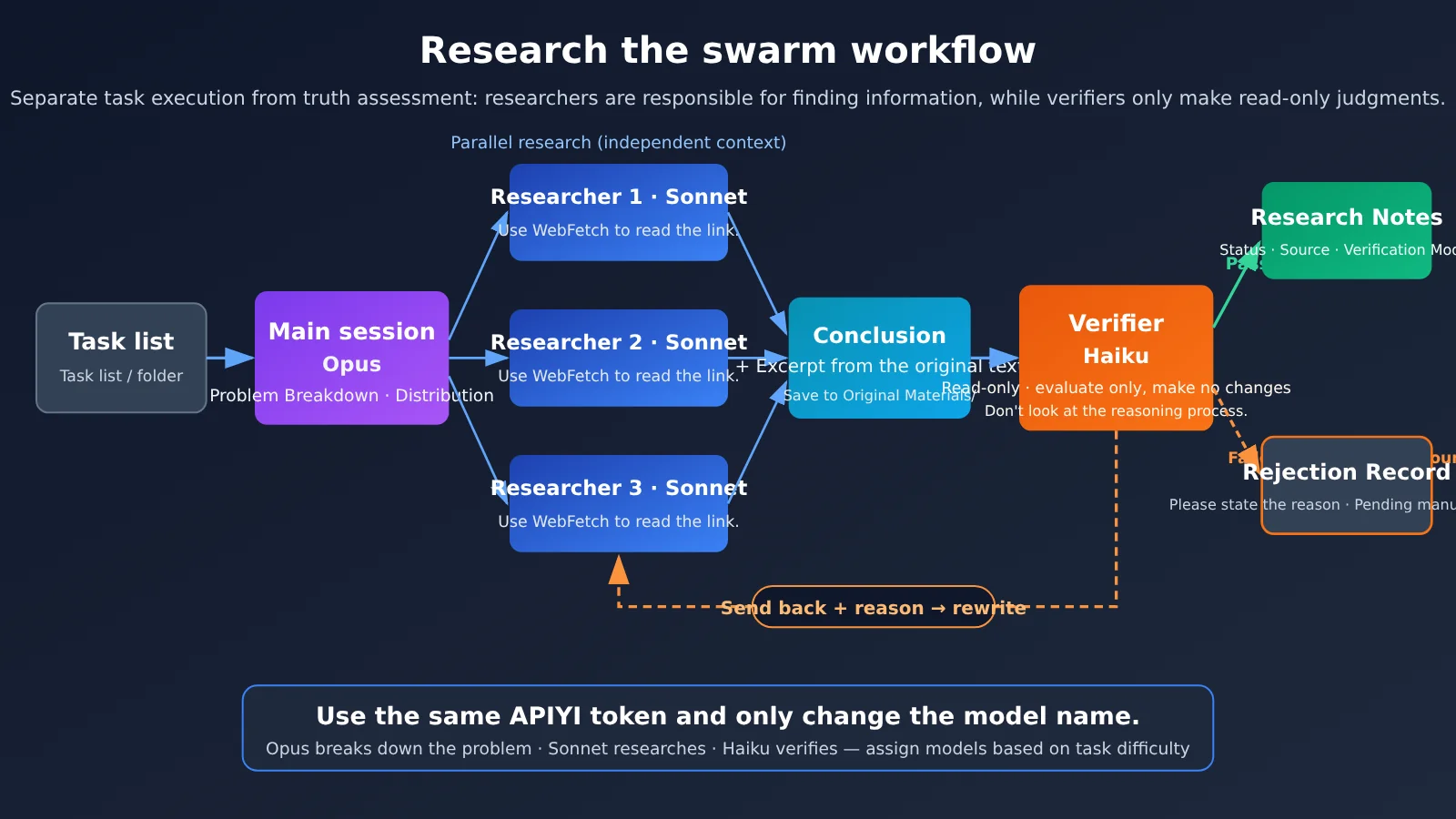
The idea worth learning from is this: let an expensive model do the work, let a cheaper model check whether it’s accurate, send anything that doesn’t pass back for revisions, and only save approved results.
This is a step-by-step tutorial you can follow to get the whole thing up and running. Most of the process involves using a graphical interface and “talking to Claude Code in plain English”—you don’t need to know how to code.
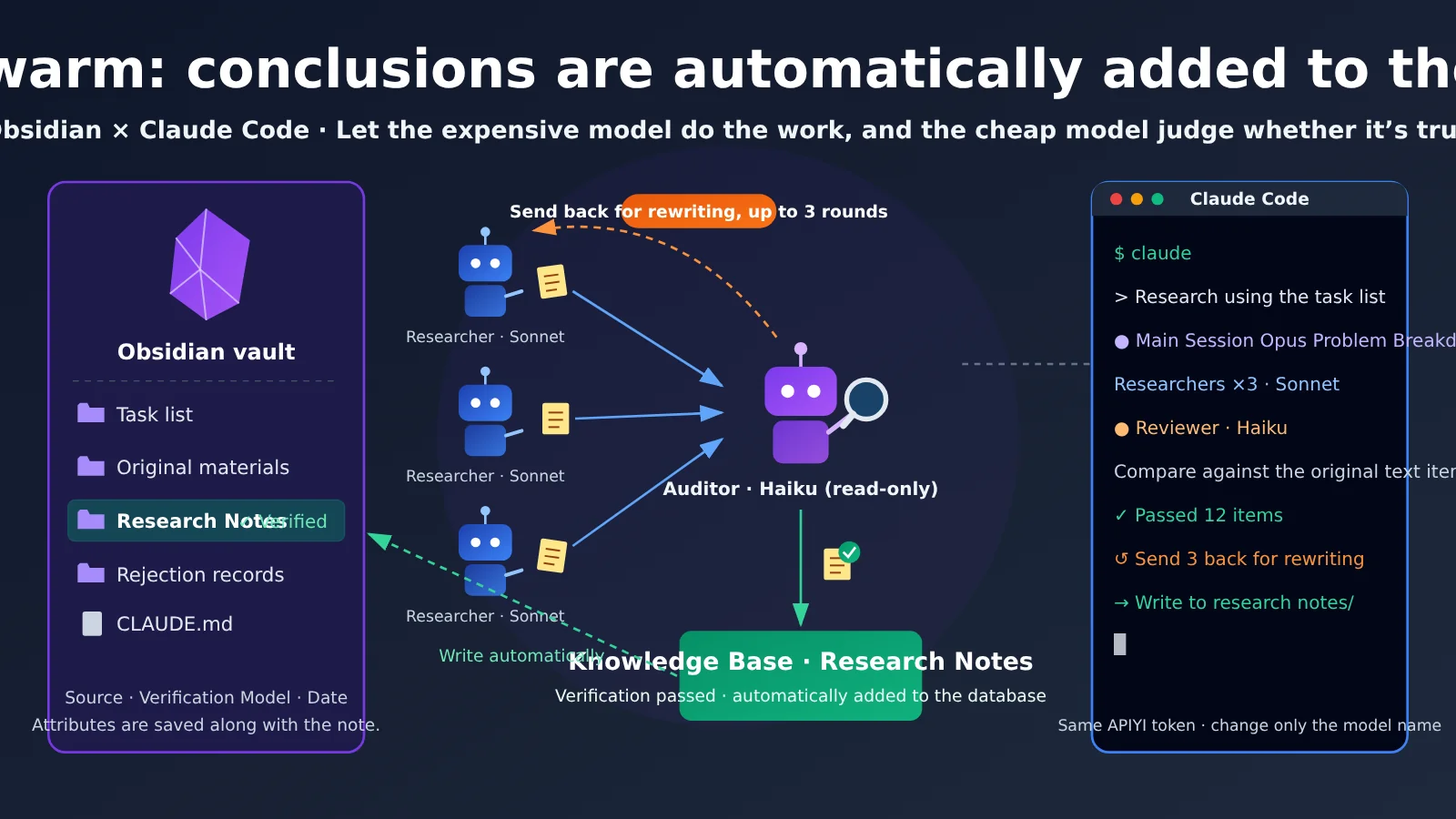
The key takeaway: By the end of this article, you’ll have a small research swarm running on your own computer. The main session breaks down the question, several research subagents look things up in parallel, and a low-cost verification subagent checks each finding for issues. Approved conclusions are automatically saved to your Obsidian vault with their sources and verification status.
Research Swarms with Obsidian and Claude Code: Before You Start
Before you dive in, make sure the following conditions are met.
- Goal: The main session (Opus) breaks down the topic and synthesizes the findings. Two or three research subagents (Sonnet) research in parallel, and one verification subagent (Haiku) checks each claim. Verified findings go into Obsidian’s “Research Notes” folder.
- Time: Set aside an afternoon for the initial setup. After that, each research session only requires a task list and a one-line instruction to dispatch it.
- Prerequisites: Obsidian Desktop and Claude Code are installed, you have an APIYI account, and your computer can access the source links online.
- Difficulty: Beginner-friendly. No coding is required. Configuration files only appear in optional, collapsible sections.
Here’s the overall roadmap, with an acceptance check for every step. Complete each step, confirm it meets the check, and then move on.
| Step | What to do | Acceptance check (what you’ll see when it’s done) |
|---|---|---|
| ① Set up the vault | Create an Obsidian vault, four folders, and a CLAUDE.md file | Four folders appear in Obsidian’s left sidebar, and CLAUDE.md is in the vault root |
| ② Connect the token | Configure your APIYI token in Claude Code | Open Claude Code in the vault folder and start a conversation |
| ③ Create subagents | Ask Claude to create a researcher and a fact-checker | Enter /agents and see both subagents |
| ④ Assign tasks | Write a task list and dispatch it with one instruction | An excerpt file for each task appears in “Source Material” |
| ⑤ Run the verification loop | Send work back for revision, for up to three rounds | Verified findings go into “Research Notes”; rejected work goes into “Rejected Findings” |
| ⑥ Review the results | Filter for verified notes in Obsidian | Notes have status, source, verification model, and date properties |
Key Findings on Research Swarms
| Category | What we found | How this article uses it |
|---|---|---|
| Official documentation (Claude Code / Obsidian) | Subagents have their own context and can be assigned specific tools and models. Parallel research is an officially documented use case. WebSearch allows up to 200 calls per session, shared across all subagents. An Obsidian vault is just a regular folder containing Markdown files, and Obsidian automatically refreshes when files are changed externally. | As the basis for the setup |
| One-off third-party test | In a test vault with 560 notes and 15 questions, Claude Code got every answer right without any plugins, and used the fewest tokens. | As a reference for why you don’t need plugins to get started—not as evidence of performance on larger vaults |
| Online claims | A 23-year-old developer, 300 concurrent tasks, verification in 100 milliseconds, and zero errors; another viral post mentioned --command-center, REA, and JEV. |
Borrow ideas only. The latter options aren’t in the official CLI reference, so don’t copy them. |
Why a research swarm should split work between “research” and “fact-checking”
If you only add more agents without adding verification, the more you parallelize, the more hallucinations can slip in. When you split research and fact-checking between two models, the fact-checker only needs to answer one question: can this claim be supported by the original excerpt? That’s a much simpler task than doing the research itself, so an inexpensive Haiku model is enough.
There’s another practical suggestion from the comments: the fact-checker shouldn’t see the researcher’s reasoning. It should only see the conclusion and the original source, or it may be swayed by the researcher’s claims. The fact-checker should only return “Pass” or “Reject” with a reason, and must not make edits itself. If the fact-checker starts editing content too, its role gets mixed up with the researcher’s. This article’s setup follows both principles.
Why you don’t need plugins or MCP to get started with Obsidian
An Obsidian vault is essentially just a folder. Claude Code’s built-in read and write tools can work directly with the .md files inside it, and Obsidian automatically refreshes to display any changes. In the third-party test mentioned above—a small vault with 560 notes, with each tool run only once—the baseline setup with no add-ons used the fewest tokens. So you don’t need to fuss with plugins when you’re getting started. There’s no data yet on how it performs with larger vaults.
Get Started Quickly with an Obsidian + Claude Code Research Swarm
Step ①: Create a vault in Obsidian and set up CLAUDE.md
Open Obsidian and select Create new vault to make an empty vault. Name it Research Vault and choose an easy-to-find location, such as your Documents folder. Don’t put this vault inside another vault’s folder; nesting vaults can break internal links.
Right-click in the left file pane and select New folder. Create these four folders: Task List, Source Material, Research Notes, and Rejected Items.
Then create a note named CLAUDE.md in the vault’s root directory and add the vault’s rules. Claude Code reads this file whenever it starts in this directory:
# Research Vault Rules
1. Only read and write in these 4 folders: Task List, Source Material, Research Notes, Rejected Items. Never read or write in the .obsidian folder.
2. Every conclusion must include a source link and an excerpt from the original source (quoted verbatim).
3. Do not add content to Research Notes unless it has passed fact-checking.
4. If something still fails after more than 3 rounds of review, add it to Rejected Items with a reason and leave it for a human to handle.
5. Add these properties at the top of each research note: status, source, fact-checking model, date.
What you’ll see when you’re done: The Obsidian sidebar will show four folders and a CLAUDE.md file. There’s also an .obsidian configuration folder in the vault root. Obsidian hides it by default; it contains Obsidian’s own settings, and no agent should modify it.
Step ②: Connect Claude Code to your APIYI token
This article won’t repeat the configuration details. Follow the tutorial Connect Claude Code, Codex, Pi, Hermes, and other tools through a unified gateway with magpie to connect your APIYI token in the graphical interface, then come back here.
There are just two things to keep in mind:
- When you create a token in the APIYI console, select the ClaudeCode group.
- Set the endpoint URL to
https://api.apiyi.com—don’t add/v1at the end.
Once it’s connected, open a terminal in the Research Vault folder and run claude. Ask it anything; if it responds normally, the connection is working.
Optional: Edit settings.json manually (if you don’t want to use the graphical interface)
Edit `~/.claude/settings.json` and add these two entries under the `env` field. Note that the variable is called `ANTHROPIC_AUTH_TOKEN`, not `ANTHROPIC_API_KEY`:
{
  "env": {
    "ANTHROPIC_BASE_URL": "https://api.apiyi.com",
    "ANTHROPIC_AUTH_TOKEN": "Your APIYI token"
  }
}
If Claude Code keeps asking you to log in to the official site when it starts, add `”hasCompletedOnboarding”: true` to `~/.claude.json`.
What you’ll see when you’re done: Claude Code responds to your questions, and the token’s usage appears in the APIYI console. That confirms requests are being sent with this token.
Step ③: Ask Claude Code to create researcher and fact-checker subagents
Subagents are Markdown files with YAML headers. You don’t need to write them yourself—just ask Claude to create them. Send this prompt in Claude Code:
Please create two subagents under .claude/agents/ in the current project:
1. researcher: model claude-sonnet-5-5. Use WebFetch only to read links in the task list.
   Include a source link and original excerpt for every conclusion, and write results to the "Source Material" folder. Do not give it the Agent tool.
2. fact-checker: model claude-haiku-5-5. Give it only Read, Grep, and Glob.
   Do not give it Write, Edit, or Agent. It should receive only "conclusion + original excerpt + source file path,"
   not the researcher's reasoning. It should output only "Pass" or "Reject + reason" and must not edit anything.
The main session uses claude-opus-5-5 to break down questions, assign tasks, and summarize the results. You can switch models after startup with /model, or set the model directly in the tool from step ②.
Optional: See what the two subagent files look like
`.claude/agents/researcher.md`:
---
name: researcher
description: Reads the links provided in the task list and produces research findings with sources and original excerpts
tools: Read, Grep, Glob, WebFetch, Write
model: claude-sonnet-5-5
maxTurns: 20
---
You are a researcher. Read only the links provided in the task. Format each finding as:
Conclusion / Source link / Original excerpt (quoted verbatim). Write to the "Source Material" folder and do not touch any other directories.
`.claude/agents/fact-checker.md`:
---
name: fact-checker
description: Checks each conclusion against its original excerpt; evaluates only and does not edit
tools: Read, Grep, Glob
model: claude-haiku-5-5
maxTurns: 8
---
You are a fact-checker. Look only at the conclusion and original source; do not accept explanations of the reasoning.
For each item, output "Pass" or "Reject: reason." Reject any excerpt that does not support the claim, any mismatched numbers, and any missing source.
You do not have write access and must not suggest any edits beyond changes to wording.
Note: The first time you create the .claude/agents/ directory, you need to exit and restart the Claude Code session. After that, changes to subagent files should take effect automatically within a few seconds. Subagents without the Agent tool can’t delegate to other subagents, which helps prevent runaway layers of agents.
What you’ll see when you’re done: Run /agents and you’ll see researcher and fact-checker in the list, each showing its assigned model.
Step ④: Write a task list and delegate parallel research with one prompt
Create a file named First Batch.md in Obsidian’s Task List folder. Here’s an example with five products to research. Include the links each task needs. This is the safest approach because the official documentation doesn’t say whether WebSearch works when called through a third-party gateway. Giving the subagents links directly lets them use WebFetch to read the pages.
# First Batch: Pricing and Features for 5 Products
1. Product A: Pricing page https://example-a.com/pricing, features page https://example-a.com/features
2. Product B: https://example-b.com/pricing
3. Product C: https://example-c.com/docs/plans
4. Product D: https://example-d.com/pricing
5. Product E: https://example-e.com/changelog
For each, answer: lowest paid plan price, whether there’s a free version, and the most recent feature update.
Go back to Claude Code and send this prompt:
Read Task List/First Batch.md and assign the 5 tasks to researcher subagents for parallel research.
Have each one write to "Source Material." Once they're all done, tell me how many conclusions each produced.
The five products are just examples. The same approach works for competitor monitoring, paper summaries, industry news, and more: provide a link for each task and clearly list the questions to answer.
What you’ll see when you’re done: Five files will gradually appear in Obsidian’s Source Material folder. Each will contain entries formatted as “Conclusion / Source link / Original excerpt.”
Step ⑤: Set up the fact-checking loop, with up to 3 rounds of revisions
Tell the main session:
For each conclusion in "Source Material," send only the "conclusion + original excerpt + source path" to fact-checker.
For conclusions that pass, write them to "Research Notes" and add these properties at the top: status: verified, source, fact-checking model: claude-haiku-5-5, date.
For rejected conclusions, send the reason to researcher and ask it to revise, then fact-check again. Allow up to 3 rounds.
If a conclusion still fails after 3 rounds, add it to "Rejected Items" with the reason. Do not put it in Research Notes.
This is what the official documentation calls “chaining subagents”: one subagent completes its work, then its result is passed to another. Here, the main session acts as the coordinator and strictly controls what the fact-checker sees: only the conclusion and original source, not the reasoning.
What you’ll see when you’re done: Verified conclusions will appear in Research Notes. There may also be a few entries with reasons in Rejected Items. That’s normal—it means the fact-checker is doing its job.
Step ⑥: Review the verified conclusions in Obsidian
Open any research note. Its properties at the top should look something like this:
---
status: verified
source: https://example-a.com/pricing
fact-checking model: claude-haiku-5-5
date: 2026-10-21
---
Enter [status:verified] in Obsidian’s search box to filter for all notes that passed fact-checking. When reviewing them, it’s a good idea to pick two or three at random, open their source links, and check the original text yourself.
What you’ll see when you’re done: Every conclusion in the filtered results can be traced back to its original source. Any questionable content will be in Rejected Items, ready for you to review.
Researching the Swarm’s Three Model Roles and Pricing
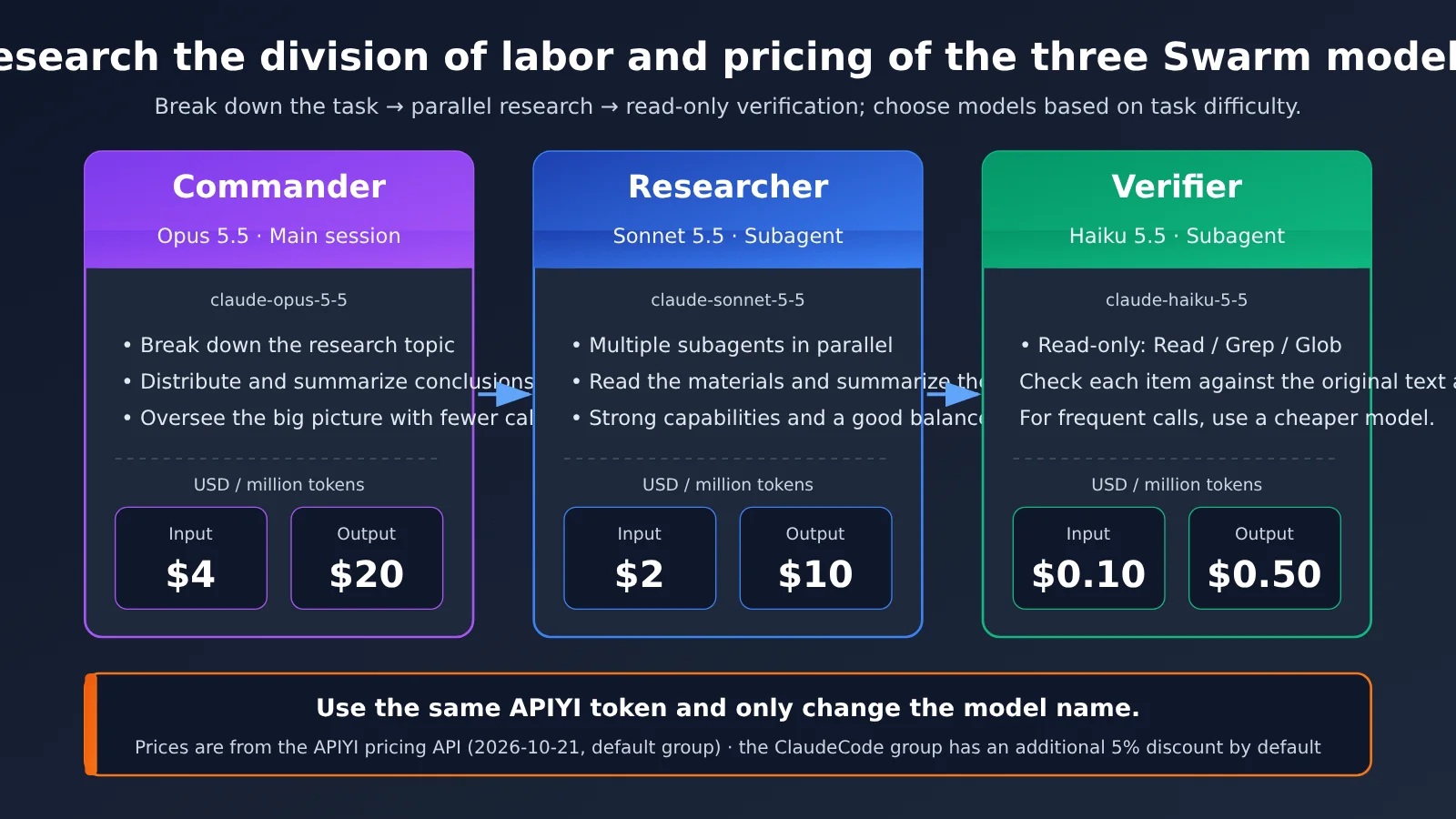
All three roles use the same APIYI token; only the model name changes. The prices below come from the APIYI pricing endpoint on 2026-10-21 (the default group). The ClaudeCode group also applies a 5% discount by default.
| Role | Model name | Input (USD per million tokens) | Output (USD per million tokens) | Why this model |
|---|---|---|---|---|
| Main session: task breakdown and synthesis | claude-opus-5-5 |
4 | 20 | Coordinates the overall work and is called less often |
| Researcher: reads materials in parallel | claude-sonnet-5-5 |
2 | 10 | Strong at reading and summarizing, with a good balance of cost and capability |
| Fact-checker: verifies claims one by one | claude-haiku-5-5 |
0.10 | 0.50 | Handles simpler tasks and is called frequently, so a lower-cost model makes sense |
A few things are worth keeping in mind about costs. The more subagents you use, the longer each subagent’s results tend to be, which means they take up more of the main session’s context window. Each subagent also consumes tokens independently while it runs.
Troubleshooting Common Research Swarm Issues
| Symptom | Common cause | How to fix it |
|---|---|---|
| Subagents aren’t being called | You didn’t reopen the session after creating the agents directory for the first time; the description is too vague |
Exit and reopen Claude Code; when assigning a task, explicitly say “use the researcher subagent” |
| The fact-checker edits content itself | Write / Edit are included in tools, or it inherited all tools |
Open fact-checker.md and make sure tools includes only Read, Grep, and Glob |
Files are written to the .obsidian folder |
CLAUDE.md isn’t in the vault root, or the rules aren’t clear enough |
Move CLAUDE.md to the root and add “Never read or write to .obsidian” |
| You get a 401 error | The token is incorrect, isn’t in the ClaudeCode group, or you’re using the API_KEY variable |
Copy the token again, check the group, and change the variable name to AUTH_TOKEN |
| The request URL returns an error | There’s an extra /v1 at the end of the URL |
Change it to https://api.apiyi.com |
| WebSearch isn’t available | The official documentation doesn’t say whether it’s supported through third-party gateways; or you’ve reached the 200-session limit | Put links directly in the task list and use WebFetch instead; run /clear to start a new conversation |
| New notes don’t appear in Obsidian | Claude Code wrote them to a different directory, or you opened a different vault | Ask Claude Code, “What absolute path did you just write to?” and compare it with the vault path |
If you’re not sure which tools are available in the current session, just ask Claude, “What tools do you have right now?” It will list them.
When Not to Use Obsidian and Claude Code for a Research Swarm
This setup has a fixed overhead, so it isn’t right for every situation. For the following cases, chatting with Claude directly will be more efficient:
- You only need to look up one or two things: The overhead of breaking down the task, assigning work, and checking results can exceed the research itself.
- All the material is in one article: Just have Claude read it and summarize it. There’s no need to work in parallel.
- You need real-time data: Stock prices and live exchange rates, for example, are better retrieved through dedicated data APIs. Web pages may contain outdated information.
- Your budget is tight: Multiple subagents can use tokens several times faster. It’s more cost-effective to get the task working in a single session first.
Obsidian + Claude Code Research Swarm Quick Reference
Save this table and refer to it whenever you start a new batch of research.
| Item | Value or approach |
|---|---|
| Vault structure | Task list / source materials / research notes / returned items + CLAUDE.md in the root directory |
| Endpoint | https://api.apiyi.com (don’t add /v1) |
| Token | One token in the APIYI ClaudeCode group, shared by all three models |
| Model roles | Main session: opus-5-5 / researchers: sonnet-5-5 / reviewer: haiku-5-5 |
| Reviewer tools | Read, Grep, and Glob only—no Write, Edit, or Agent |
| Review rules | Check only the conclusions and source text; output only “pass” or “return”; up to 3 rounds |
| Web access | Add links to the task list and use WebFetch; WebSearch is shared across the session, with a limit of 200 calls |
| Filtering | Search Obsidian for [status:已核查] |
| Cost control | Test with 3 items first, then check token usage in the APIYI console |
Frequently Asked Questions
Q1: What is a “research swarm”?
A research swarm is a workflow where multiple AI subagents research different things at the same time, and another model reviews their work item by item. The setup in this article uses one main session, 2–3 researchers, and one reviewer. It’s small in scale, but fully demonstrates the idea of separating research from fact-checking.
Q2: Is the widely shared story about 300 Claude Code agents making zero errors true?
It can’t be verified. The developer’s identity, 300 concurrent agents, 100 milliseconds, and zero errors are all claims made in the post itself, and the numbers vary across retellings. This article borrows only the idea of using an expensive model for the work and a cheaper one for review.
Q3: How do I enable the post’s `–command-center` commander mode?
You can’t. The official Claude Code CLI reference doesn’t include this parameter, and REA and JEV aren’t official features either. To run tasks in parallel, use official subagents. For long-running tasks, Anthropic recommends using background agents (`claude agents`).
Q4: Do I need to install an Obsidian plugin or MCP?
Not to get started. A third party ran a one-off test on a small vault with 560 notes. Claude Code got every answer right without any plugins or MCP, and used the fewest tokens. There’s no data yet on how it performs with larger vaults.
Q5: Do I need to apply for separate tokens for the three models?
No. Create one token in the ClaudeCode group at APIYI (apiyi.com), and use it for the main session and both subagents. Just specify a different model name in each configuration.
Q6: How can I find out how much this research batch cost?
Log in to the APIYI console and check the usage and logs for that token. It’s a good idea to start with three small tasks and review the actual usage before scaling up.
Q7: Does adding a reviewer guarantee zero errors?
No. The reviewer can check whether the conclusions match the excerpts, but it might not catch errors in the source text itself or bias in the selected excerpts. That’s why step ⑥ recommends manually spot-checking a few items and reviewing the returned items regularly.
Key Takeaways for Building a Research Swarm
- Good thinking matters more than agent count: Use a more capable model for research and a cheaper one to verify the findings. The number of agents isn’t what matters.
- A knowledge base is just a folder: Claude Code can read and write Markdown files directly, so you don’t need a plugin to get started.
- Verifiers must be read-only: Don’t give them Write, Edit, or Agent permissions. They should only approve or send work back for revision.
- Keep reasoning separate: Verifiers should see only the conclusions and source material, so they aren’t influenced by the researchers.
- Use WebFetch for links: This avoids WebSearch limits and sidesteps concerns about whether the gateway supports it.
- Escalate after three failed rounds: Record the item in the revision log instead of forcing it into the knowledge base.
- Test costs before drawing conclusions: Use the same APIYI token and check actual usage in the console.
Summary
When you build a research swarm with Obsidian and Claude Code, three things matter most:
- Clear structure: Set up four folders and a
CLAUDE.mdfile that specifies who can write where. - Separate responsibilities: Sonnet handles research, Haiku verifies the findings, and Opus coordinates. The verifier has no write permissions.
- A controlled path into the knowledge base: Approved work goes into research notes; anything that fails verification gets sent back for revision. After three failed rounds, hand it over to a person.
Start by running three small tasks through the full workflow. Make sure files land in the right places, verification works well, and costs are as expected. Then replace the examples with your own competitor tracking, papers, or industry news. For model access, you can use a Claude Code group token from APIYI at apiyi.com. All three models share one token, making it easy to switch between them.
📚 References
- Claude Code subagent documentation: Creating subagents, tool permissions, model fields, and parallel research
- Link:
code.claude.com/docs/en/sub-agents -
Note: The primary reference for the subagent configuration in this article
-
Claude Code tools reference: WebSearch and WebFetch behavior and usage limits
- Link:
code.claude.com/docs/en/tools-reference -
Note: Explains why it’s a good idea to include links directly in the task list
-
Claude Code model configuration: Model aliases and full model names
- Link:
code.claude.com/docs/en/model-config -
Note: Confirms which versions opus, sonnet, and haiku refer to
-
Obsidian Help: Vaults and file storage
- Link:
obsidian.md/help -
Note: Confirms that a vault is just a regular folder and that external changes are refreshed automatically
-
Third-party test: Comparing Obsidian AI tools (a small vault with 560 notes, single test)
- Link:
agentskillshub.top/best/obsidian-second-brain/ -
Note: A reference for getting started without installing plugins
-
APIYI Claude Code integration documentation
- Link:
docs.apiyi.com/scenarios/programming/claude-code - Note: Details on Claude Code groups, endpoint addresses, and environment variables
Author: APIYI Technical Team
Technical support: If you run into any issues while setting things up, feel free to leave a comment. For more integration details, see the APIYI documentation center at docs.apiyi.com.