Author’s Note: DeepSeek has officially launched its Search & Fetch API, and APIYI has simultaneously rolled out support for deepseek-search and deepseek-fetch. This article breaks down the core highlights from the official guide, explores what this means for developers building RAG, Agents, and web-enabled Q&A products, and covers APIYI’s pricing and integration methods.
DeepSeek recently updated its official documentation with a new Search guide and published an announcement in its news section: the Search & Fetch API is officially open to developers. This means when invoking DeepSeek models, you can handle both web searches and webpage scraping directly through official capabilities—no more stitching together third-party search APIs on your own.
This isn’t just a rumor. The official Search guide docs and news announcements are live, and there’s already an active discussion thread on Hacker News, showing plenty of interest across the global developer community. Our breakdown of official capabilities is based solely on publicly verified details (refer to the official docs for specific request parameters). For details on APIYI’s launch and pricing, check out the dedicated section below.
Key Takeaways: Get up to speed in 3 minutes on the core details of DeepSeek’s Search & Fetch API, how the two tools divide the work, and the real-world impact on RAG, Agents, and web-enabled Q&A apps.
Now Live on APIYI: APIYI has added deepseek-search and deepseek-fetch, billed per successful call without consuming tokens. The standard rate is $0.0009 per call, and with our 20% top-tier recharge bonus, it comes down to $0.75 per 1,000 calls—matching the official pricing.
Quick Overview of DeepSeek Search & Fetch API
Let’s summarize the confirmed details in a quick table. We’re only including facts verified through official, public channels—no unverified pricing rumors or unofficial benchmarks.
| Item | Details |
|---|---|
| Provider | DeepSeek Official |
| Sources | Official API documentation Search guide, official news announcements |
| Core Capabilities | Open access to both Search (web search) and Fetch (webpage scraping) capabilities |
| Target Audience | Developers building web-enabled Q&A, RAG, and AI Agents using the DeepSeek API |
| Community Feedback | High interest, with dedicated discussion threads on Hacker News |
| Pricing & Quotas | Official rates and quotas follow the official documentation and console; see below for APIYI pricing |
How Search and Fetch Divide the Work
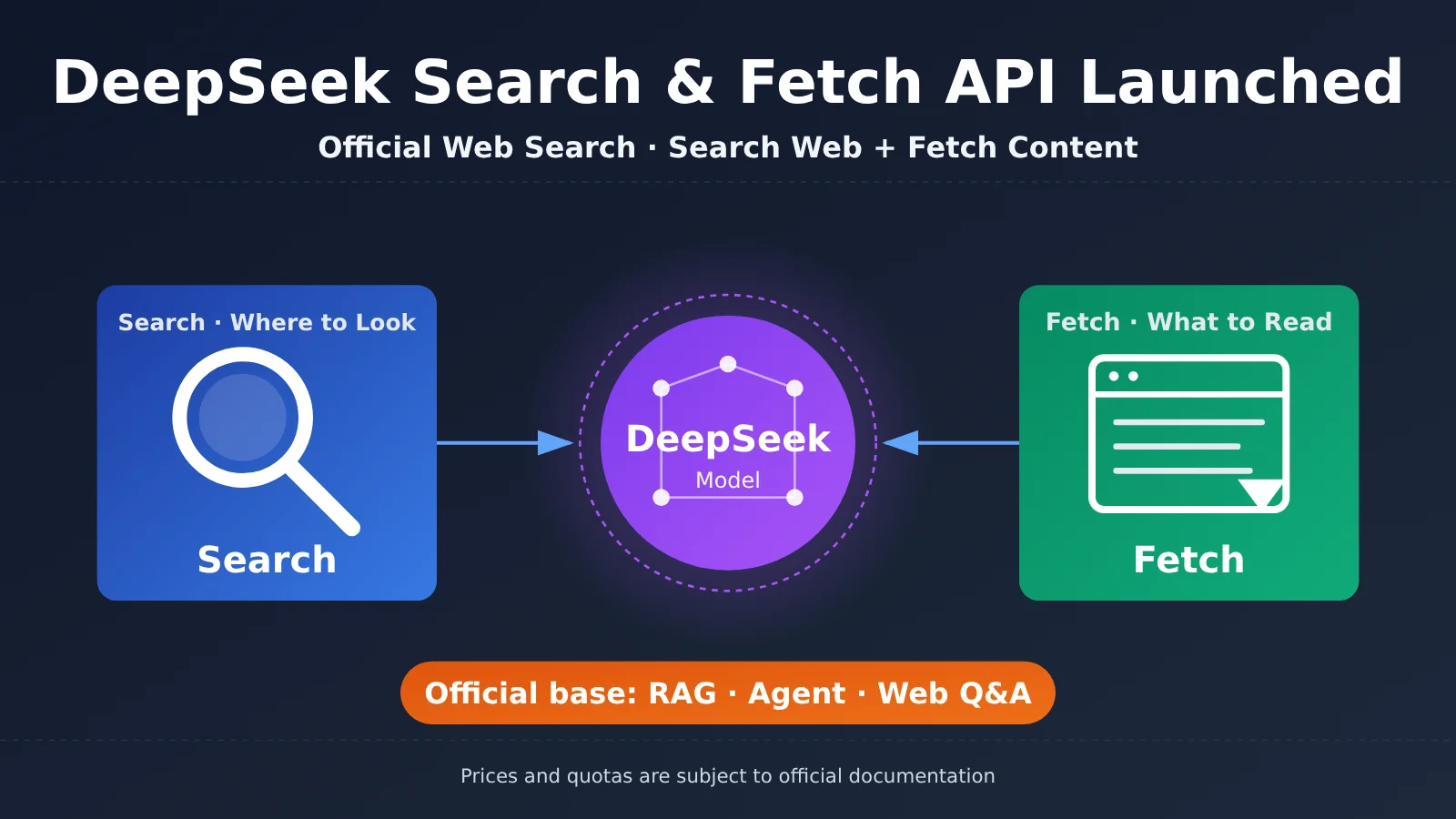
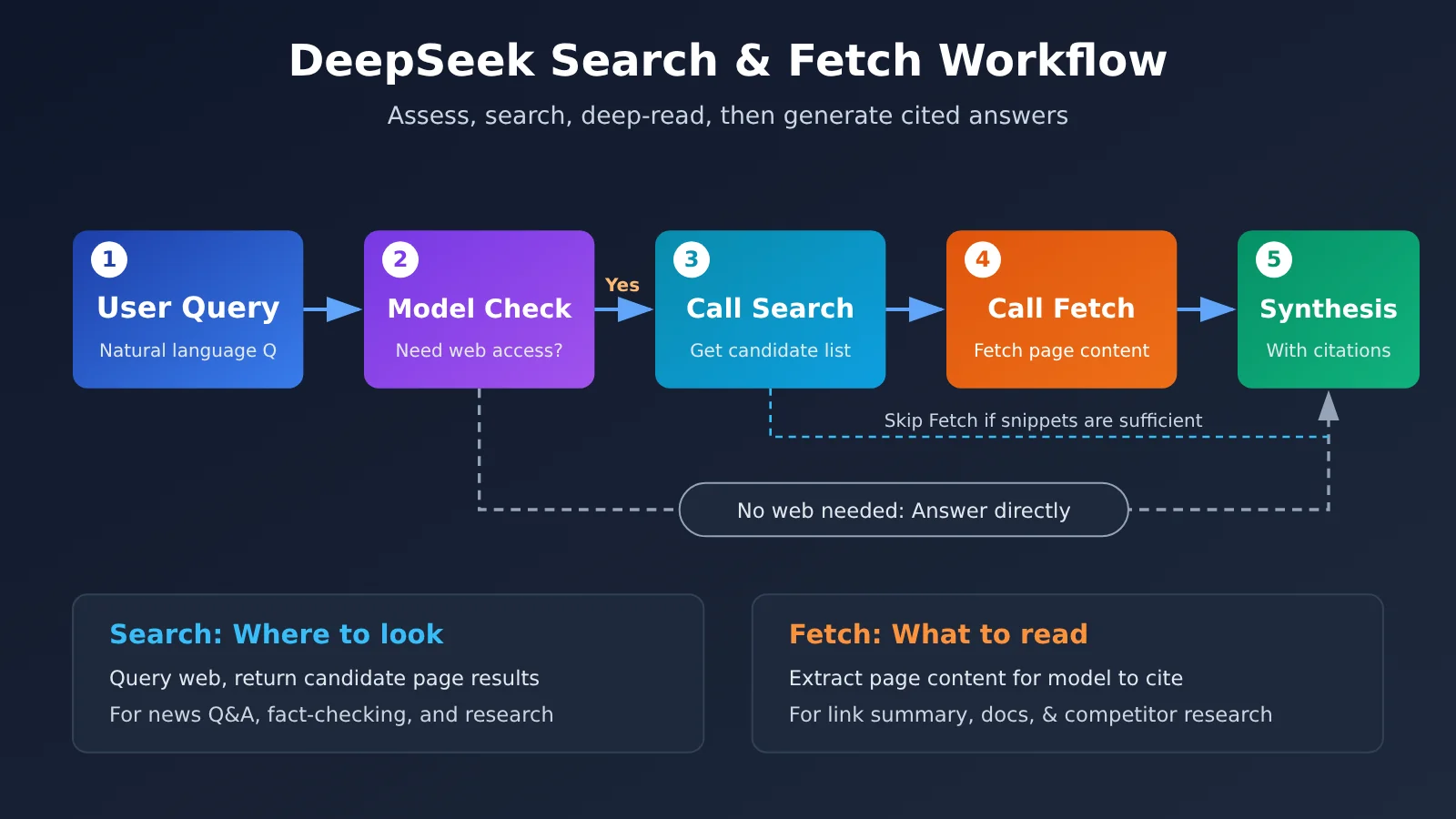
As the names suggest, these two capabilities work as a tag team. Search answers the question of “where to look”: the model generates queries based on the user’s prompt and retrieves a list of candidate results. Fetch solves the problem of “what to read”: it grabs the full page content from a specific URL so the model can digest and cite it.
Decoupling the two gives you much tighter control. In many cases, search snippets and summaries provide more than enough context to answer a query—there’s no need to scrape every single page. In other scenarios, a user might paste a specific link directly into the chat; you only need Fetch, bypassing Search entirely. Splitting them into two separate tools lets developers mix and match as needed, striking the ideal balance between performance, latency, and cost.
| Capability | Core Problem Solved | Typical Input | Typical Output | Best Used For |
|---|---|---|---|---|
| Search | Where to find info | Natural language query or keywords | List of candidate web results | News Q&A, fact-checking, industry research |
| Fetch | What specific content to read | Specific webpage URL | Full page body text | URL summarization, doc reading, competitor analysis |
| Search + Fetch | Find first, then read deep | Complex research questions | Synthesized conclusions from multiple sources | Deep research, automated Agent investigations |
Why the DeepSeek Search & Fetch API Is Worth Your Attention
The Official Solution to the Large Language Model Knowledge Cutoff Problem
Every Large Language Model has a training data knowledge cutoff—the model simply doesn’t know what happened today. In the past, if developers wanted DeepSeek to answer questions requiring up-to-date information, they usually had to integrate a third-party search engine API, build custom scrapers to extract page content, and stuff the text back into the context window. It was a long pipeline with high maintenance overhead.
With official Search & Fetch support, that pipeline gets dramatically shorter. Model providers understand their own models’ tool-calling habits best. An officially integrated retrieval capability tends to fit the model far better in terms of request formatting and result structuring, which goes a long way toward solving the classic “retrieved the data, but can’t use it effectively” problem.
Moving from a “Q&A Model” to “Agent Infrastructure”
Another noteworthy signal here is the shift in direction. Web search and page fetching are the two most fundamental tools for AI agents—virtually every automated research tool, browser agent, or “Deep Research” workflow relies on them. By turning these capabilities into official APIs, DeepSeek is pushing the model from a standalone chat endpoint into foundational infrastructure capable of directly powering agent workflows.
For developers, this is especially practical. Many teams already use DeepSeek as their primary model. If web connectivity can be handled within the same ecosystem, the tech stack becomes much leaner, and you eliminate an entire layer of third-party dependencies when troubleshooting.
Understanding How to Integrate DeepSeek Search & Fetch API
Minimal Example: Running a Basic DeepSeek Call First
Before hooking up web search capabilities, it’s best to verify that your basic model invocation works. The following code calls the DeepSeek model using the OpenAI-compatible endpoint—it’s up and running in about 10 lines:
import openai

client = openai.OpenAI(
    api_key="YOUR_API_KEY",
    base_url="https://api.apiyi.com/v1"  # Using the unified APIYI endpoint
)

response = client.chat.completions.create(
    model="deepseek-chat",
    messages=[{"role": "user", "content": "Explain the significance of web search for Large Language Models in three sentences."}]
)
print(response.choices[0].message.content)
Please note that for specific request fields, toggle parameters, and response structures of the official Search & Fetch capabilities, always refer to DeepSeek’s official Search documentation. The full example below uses standard Function Calling to demonstrate how the model decides when to search and when to fetch content. This helps clarify the underlying mechanics and makes it easy to swap in native API calls once official parameters are finalized.
View Full Implementation: Simulating Search + Fetch with Function Calling
import json
import openai
import requests

client = openai.OpenAI(
    api_key="YOUR_API_KEY",
    base_url="https://api.apiyi.com/v1"  # APIYI OpenAI-compatible endpoint
)

# Define two tools: search and fetch (for demonstration, can be replaced with official native capabilities)
tools = [
    {
        "type": "function",
        "function": {
            "name": "web_search",
            "description": "Searches the web based on keywords and returns a list of candidate web pages",
            "parameters": {
                "type": "object",
                "properties": {"query": {"type": "string"}},
                "required": ["query"]
            }
        }
    },
    {
        "type": "function",
        "function": {
            "name": "fetch_page",
            "description": "Fetches the full text of a webpage at a specified URL",
            "parameters": {
                "type": "object",
                "properties": {"url": {"type": "string"}},
                "required": ["url"]
            }
        }
    }
]

def web_search(query: str) -> str:
    # Connect your search implementation here, or replace with official Search capability
    return json.dumps([{"title": "Sample Result", "url": "https://example.com"}])

def fetch_page(url: str) -> str:
    # Simplified fetch implementation; production needs encoding handling, main content extraction, and timeouts
    try:
        resp = requests.get(url, timeout=10)
        return resp.text[:4000]
    except Exception as e:
        return f"Fetch failed: {e}"

TOOL_MAP = {"web_search": web_search, "fetch_page": fetch_page}

def ask(question: str, max_rounds: int = 4) -> str:
    messages = [
        {"role": "system", "content": "When you need the latest information, search first, then fetch key pages. Cite your sources in the final response."},
        {"role": "user", "content": question}
    ]
    for _ in range(max_rounds):
        resp = client.chat.completions.create(
            model="deepseek-chat",
            messages=messages,
            tools=tools
        )
        msg = resp.choices[0].message
        if not msg.tool_calls:
            return msg.content
        messages.append(msg)
        for call in msg.tool_calls:
            args = json.loads(call.function.arguments)
            result = TOOL_MAP[call.function.name](**args)
            messages.append({
                "role": "tool",
                "tool_call_id": call.id,
                "content": result
            })
    return "Reached maximum rounds without completing the answer."

print(ask("Summarize the key discussion points about the recent DeepSeek Search API announcements."))
🚀 Quick Start: We recommend getting test credits via APIYI (apiyi.com) first to test the basic DeepSeek model invocation and Function Calling flow. APIYI has already launched
deepseek-searchanddeepseek-fetch. Once you’ve verified the flow, you can directly replace the simulated tools in the example with these native endpoints. See the next section for full integration details.
APIYI Has Launched DeepSeek Search & Fetch: Billing and Integration
APIYI (apiyi.com) has rolled out both capabilities under two new model names: deepseek-search and deepseek-fetch. Rather than chat models, these are tool-based endpoints specifically designed for agents and RAG pipelines to fetch live web data. Requests don’t consume tokens—you’re billed purely on a per-call basis.
| Item | deepseek-search | deepseek-fetch |
|---|---|---|
| Endpoint Path | /v1/tools/search |
/v1/tools/fetch |
| Purpose | Web search returning candidate URLs | Fetch page content from specified URLs |
| Billing Method | Billed per successful call, zero token consumption | Billed per successful call, zero token consumption |
| Platform Price | $0.0009 / call | $0.0009 / call |
| Failed Requests | No charge | No charge |
| Available Groups | default, svip | default, svip |
There’s an interesting detail when you do the math on pricing. The listed price on the platform is $0.0009 per call. With the 20% bonus credit for top-tier balance recharges, that works out to $0.75 / 1,000 calls—matching DeepSeek’s official pricing, taxes included. In other words, calling them through APIYI doesn’t carry an extra markup, and you get to manage your search, fetch, and chat models under a single account and unified invoice.
Usage is identical to the official setup—just swap the base URL domain to APIYI’s domain. The request parameters and response schemas follow the official documentation. For complete instructions, check out the APIYI docs: docs.apiyi.com/api-capabilities/deepseek-search-fetch/overview.
Here are two quick integration tips. First, while search and fetch endpoints don’t consume tokens themselves, feeding the fetched content into a chat model will still take up context window space and incur standard chat token fees. That means limiting context rounds and truncating extracted text remains essential. Second, while you aren’t charged for failed requests—saving you money on network timeouts or inaccessible target pages—your application should still enforce retry limits and fallback logic.
🔗 Get Started: Verify in your APIYI console that your account group is set to default or svip, and you’ll be ready to use deepseek-search and deepseek-fetch. Keep an eye on our release notes and documentation center for the latest updates.
DeepSeek Search & Fetch API vs. Other Web Access Solutions
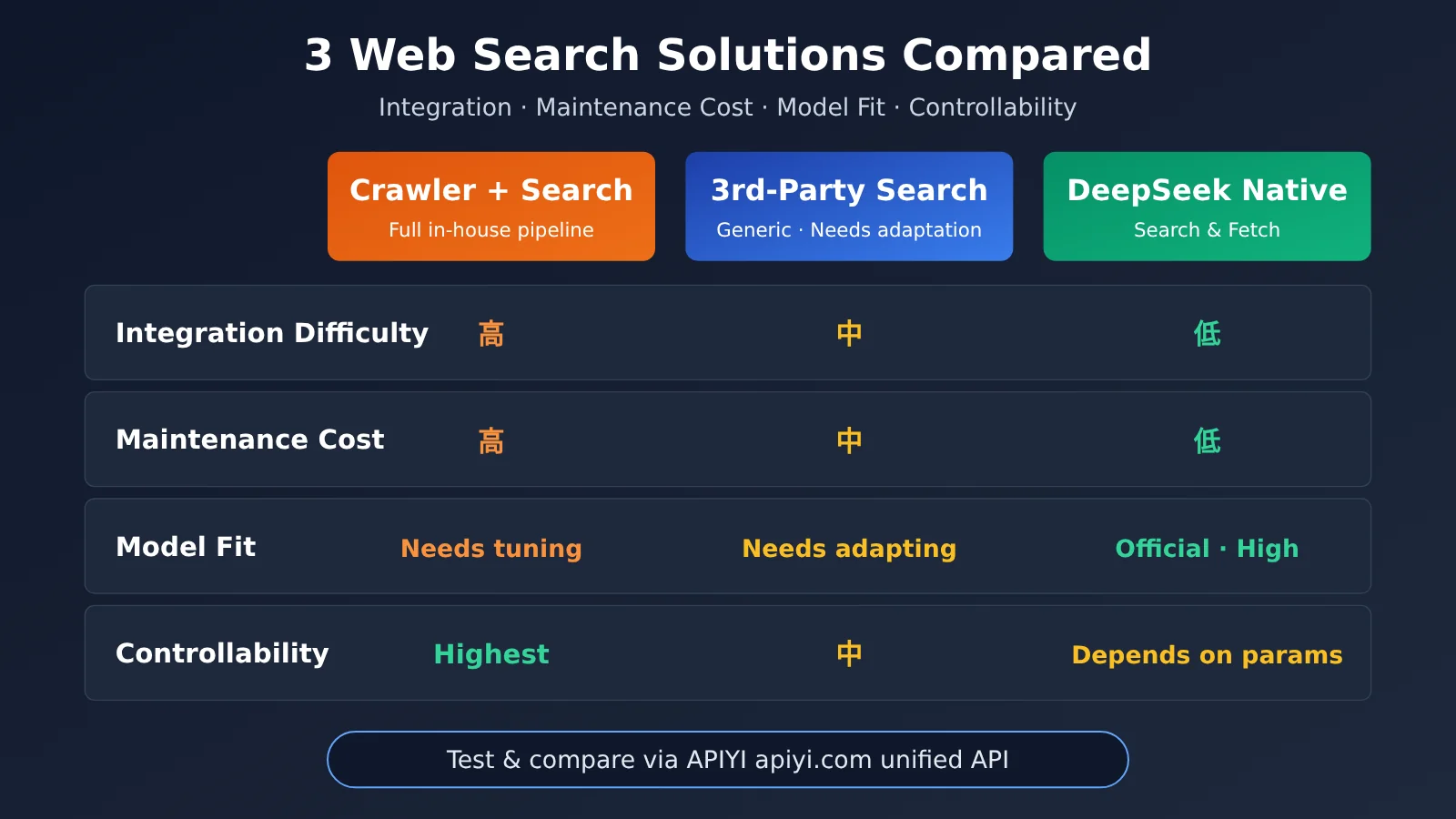
Before official web-search capabilities landed, developers basically had two options: build their own retrieval pipeline from scratch, or integrate a third-party search API. The table below offers a qualitative engineering comparison (pricing varies, so check each provider’s official documentation).
| Approach | Integration Complexity | Maintenance Cost | Model Compatibility | Controllability | Available Platforms |
|---|---|---|---|---|---|
| Self-Built Crawler + Search | High | High | Requires manual fine-tuning | Highest | Self-hosted servers |
| Third-Party Search APIs | Medium | Medium | Generic format, requires adaptation | Medium | Various search providers |
| DeepSeek Native Search & Fetch | Low | Low | Native integration, high compatibility | Depends on officially exposed parameters | DeepSeek official API, live on APIYI apiyi.com (deepseek-search / deepseek-fetch) |
Comparative Breakdown
Self-Built Solutions: Building your own crawler and search pipeline gives you unmatched control—you decide which domains to scrape, how to extract and sanitize content, and how to rank results. But it comes with the steepest development and maintenance costs; handling anti-scraping protections, charset encodings, and article extraction is a never-ending battle. DeepSeek’s native tooling is far better suited for teams looking to ship fast without the headache of managing scrapers.
Third-Party Search APIs: Established search APIs excel in result coverage and maturity, backed by well-developed ecosystems. However, they return generic data structures that require custom parsing before passing them to a Large Language Model. Adding another vendor also means managing another invoice and an additional point of failure. If DeepSeek is your primary model, native tools offer a much cleaner, streamlined pipeline.
💡 Recommendation: There’s no one-size-fits-all solution here. Strict compliance needs or workflows that require targeted, whitelisted sources still justify a self-built pipeline. For teams prioritizing speed to market, native capabilities are the clear winner. You can use APIYI (apiyi.com) to test and benchmark different models and approaches side by side under a unified interface before making your final call.
Impact Analysis: DeepSeek Search & Fetch APIs for Developers
Direct Impact on 4 Types of Developers
Different projects will feel the impact of this release in different ways. Here’s a breakdown across four common developer profiles:
| Developer Category | Primary Impact | Recommended Action |
|---|---|---|
| Web-connected Q&A / Search Products | Replaces custom-built retrieval pipelines, simplifying architecture | Run a canary release with low traffic to compare response quality and latency |
| RAG Knowledge Base Apps | Complements private knowledge with real-time public web information | Clearly separate internal knowledge from public web sources to prevent confusion |
| AI Agent Builders | Provides official foundational tools, lowering tool development overhead | Set clear caps on the number of search and fetch iterations |
| Content & Research Tools | Streamlines link summarization and competitive research workflows | Stay mindful of source attribution and copyright compliance requirements |
Impact on the Industry Landscape
- Web access is becoming standard for model APIs: Leading model providers are steadily incorporating web search and scraping as first-party capabilities. Packaging “models + tools” together is quickly becoming the norm, making bare-bones chat interfaces significantly less competitive.
- Third-party search services are fragmenting: While general-purpose search APIs still have a place, they’ll likely pivot toward specialized data sources, vertical domains, and enterprise-grade controllable retrieval to complement native model capabilities.
- Lowering the barrier to entry for AI agents: With foundational tools provided natively by model providers, startup teams can focus their energy on workflow design and polishing user experiences rather than reinventing the wheel.
Key Considerations When Integrating DeepSeek Search & Fetch
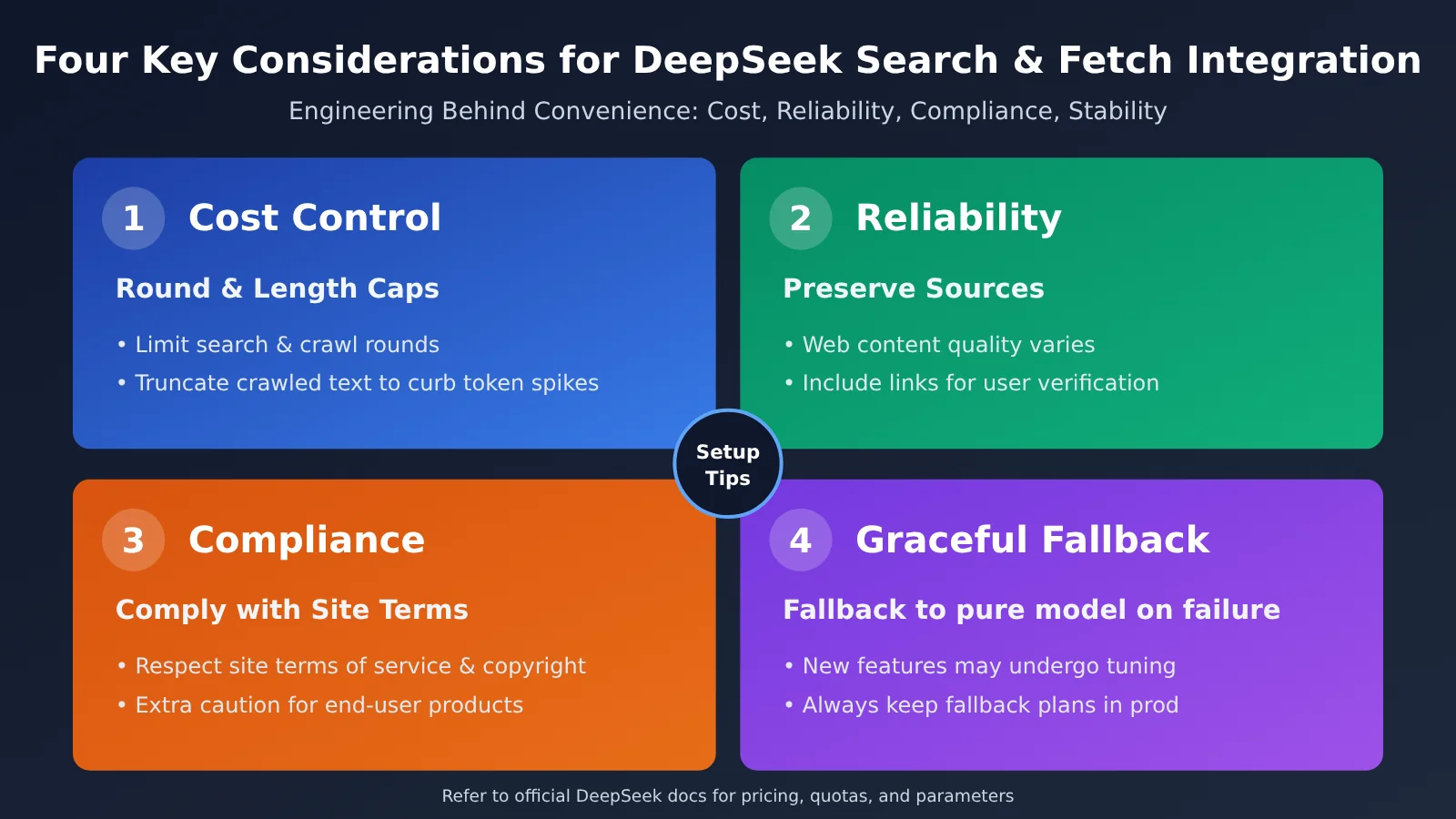
Web access brings convenience, but it also introduces new engineering challenges. The first is cost control. Search and fetch operations often significantly increase context length, driving up token consumption for the downstream Large Language Model (even though the Search and Fetch APIs themselves are billed per call and don’t consume model tokens). It’s best to set hard caps on iteration rounds and fetch content length. The second is result reliability. The quality of public web content varies wildly, so it’s critical to preserve source citations in answers so users can verify information themselves.
Third is compliance. Scraping web pages requires respecting the target site’s terms of service and copyright restrictions, which is especially crucial for user-facing production products. Fourth is stability. Any newly launched API feature will inevitably go through a period of parameter tuning and stabilization. Always keep a fallback strategy in production—such as gracefully degrading to a pure model response if web retrieval fails.
FAQ
Q1: What is the DeepSeek Search & Fetch API?
It’s an official suite of web-browsing capabilities released by DeepSeek. Search finds relevant candidate results online based on user queries, while Fetch scrapes the main body content from specific web pages. Working together, they allow DeepSeek models to answer time-sensitive questions and deliver verified conclusions backed by real web sources.
Q2: What’s the difference between DeepSeek Search & Fetch and integrating a third-party search API?
Integrating your own search API gives you more fine-grained control, but you have to handle result parsing, web scraping, and juggling multiple vendors yourself. DeepSeek’s native capabilities are built right in by the official team, offering tighter integration with the model and a much shorter pipeline. The trade-off is that your customization options depend on the parameters DeepSeek officially exposes.
Q3: When can I start using the DeepSeek Search & Fetch API?
The official Search guide and news announcements are already live, meaning the feature is officially open. APIYI has also launched support for `deepseek-search` and `deepseek-fetch`, accessible under both the `default` and `svip` routing groups at $0.0009 per call, with no charges on failed requests. For official direct pricing and quotas, please refer to DeepSeek’s official documentation and console.
Q4: How can I quickly test DeepSeek’s web-enabled features via API?
Here’s the recommended step-by-step path:
1. Head over to APIYI (apiyi.com) to register an account and get your API key.
2. Use the minimal example from this article (setting the `base_url` to `https://api.apiyi.com/v1`) to run a baseline DeepSeek model invocation.
3. Refer to the APIYI documentation to call `/v1/tools/search` and `/v1/tools/fetch` (using the model names `deepseek-search` and `deepseek-fetch`).
4. Follow the complete Function Calling workflow example, replacing the mock tools with these two native endpoints.
Q5: What are the known limitations of DeepSeek Search & Fetch?
Public details are still limited, so it’s best to keep a few practical considerations in mind: invocation costs scale as search and scraping volume grows; public web results vary in quality, so always preserve source citations for verification; scraping web pages involves site terms of service and copyright compliance; and since this is a newly launched capability, parameters might be tuned over time, so you should always maintain a fallback mechanism for production workloads.
DeepSeek Search & Fetch API: Key Takeaways
- The Headline: DeepSeek has officially launched both Search and Fetch web capabilities, with documentation and announcements now live.
- Division of Roles: Search finds the information, and Fetch reads the pages. You can use them standalone or combine them as needed.
- Core Value: Streamlines the online retrieval pipeline, saving you from building custom scrapers and maintaining third-party adapters.
- Who Benefits Most: Developers building web-search Q&A, RAG pipelines, AI Agents, and automated research tools.
- Live on APIYI:
deepseek-searchanddeepseek-fetchare billed per successful request (no token usage) at $0.0009 per call, with zero charge for failed requests. - Pricing Comparison: For high-volume top-ups with a 20% tier bonus, the effective cost drops to $0.75 / 1,000 calls—matching official pricing with tax included.
- Integration Tips: Always reference official docs for request parameters, and plan ahead for costs, compliance, and fallback routing.
- Quick Start: Ready to use in both
defaultandsvipgroups—just swap the base URL in the official example with APIYI’s domain.
Summary
Here are the key takeaways for the DeepSeek Search & Fetch APIs:
- Official Web Access Built Right In: With Search and Fetch capabilities, DeepSeek models can now pull real-time web info directly.
- Turnkey Infrastructure for Agents: Search and web page reading are fundamental tools for AI agents. Having native support means a much lower barrier to entry for developers.
- Evaluate Carefully Before Going to Production: Make solid backup plans across cost, reliability, compliance, and stability before gradually replacing your existing pipelines.
APIYI has already launched support for deepseek-search and deepseek-fetch, billing only for successful requests—no charge for failures. If your team is already using DeepSeek, now’s a great time to test these features out: start with a small slice of traffic to compare response quality and costs before deciding on a full migration. We recommend testing things out via APIYI at apiyi.com. The platform provides a unified OpenAI-compatible interface, making it super easy to benchmark and switch between DeepSeek and other leading models.
📚 References
- DeepSeek Official Docs – Search Guide: Official documentation for Search & Fetch capabilities
- Link:
api-docs.deepseek.com/guides/search/ -
Description: Refer here for authoritative details on request methods, parameters, and response structures
-
DeepSeek Official Announcement: Official release page for this feature launch
- Link:
api-docs.deepseek.com/news/news261017/ -
Description: Helpful for understanding the launch background and official product positioning
-
Hacker News Community Discussion: Global developer discussion thread on this release
- Link:
news.ycombinator.com/item?id=50138531 - Description: Great resource for community feedback, real-world impressions, and key concerns
Author: APIYI Tech Team
Discussion: Feel free to share your experiences integrating DeepSeek web-search capabilities in the comments! For more integration resources and guides, check out the APIYI documentation center at docs.apiyi.com.