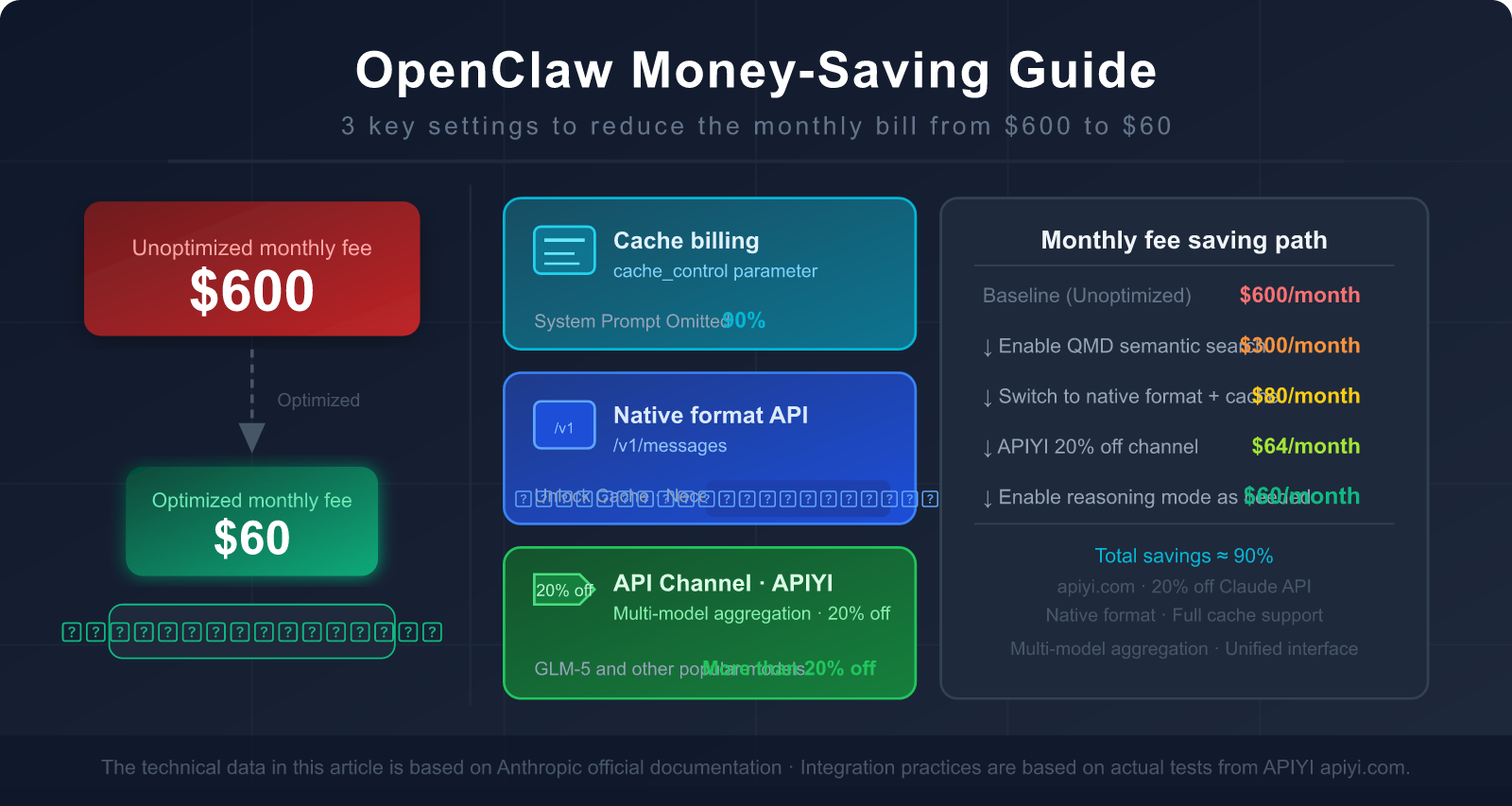
You're using OpenClaw to handle your daily workflow, but every time you see the monthly API bill, your heart sinks—$300, $500, or even over $600?
It's not your fault; it's how OpenClaw's architecture is designed. An unoptimized OpenClaw instance sends a massive amount of "unnecessary content" to the Large Language Model for every single task, wasting tokens for nothing.
The good news is: a few key settings can slash your bill by 80-90%, and most people don't know the most effective trick—using the Claude native format interface instead of OpenAI compatibility mode.
In this post, we'll dive deep into why OpenClaw consumes so many tokens and give you a step-by-step guide on how to use the right interfaces, configure caching, and choose the correct API proxy service to bring that $600 monthly bill down to $60.
1. Why OpenClaw is a Token Hog: 3 Core Reasons
Reason 1: Resending the Entire Conversation History with Every Request
This is the most overlooked yet impactful reason.
By design, OpenClaw follows a "full context" principle: every time it sends a request to a Large Language Model, it includes all previous messages from the start of the conversation. This allows the model to "remember" what was previously done and said.
For example:
Round 1: User sends 50 tokens, AI replies 200 tokens → 250 tokens sent this round
Round 2: User sends 50 tokens, AI replies 200 tokens → 500 tokens sent (including Round 1)
Round 3: User sends 50 tokens, AI replies 200 tokens → 750 tokens sent (including Rounds 1+2)
...
Round 10: Only 250 tokens are actually new, but the total sent is already 2,500 tokens.
In an OpenClaw workflow handling complex tasks, this "snowball effect" causes token consumption to grow exponentially. Context history typically accounts for 40-50% of total token usage.
Reason 2: System Prompts are Resent Every Single Time
OpenClaw's system prompt defines the Agent's identity, capability boundaries, available tool lists, and behavioral guidelines. These are usually quite beefy, ranging between 5,000 and 10,000 tokens.
The critical issue: This massive system prompt is sent in its entirety with every single model invocation.
Suppose you use OpenClaw to process 50 tasks a day, and each system prompt is 8,000 tokens:
Daily System Prompt Consumption = 50 × 8,000 = 400,000 tokens
Monthly Consumption ≈ 12,000,000 tokens (Just for the System Prompt!)
Based on Claude 3.5 Sonnet's input pricing ($3 per million tokens), the system prompt alone would cost you $36 a month. That's before even counting the actual conversation content or the AI's output.
Reason 3: Reasoning Mode Causes a 10-50x Token Explosion
When OpenClaw encounters complex tasks, it enables "Chain of Thought" or "Reasoning Mode" (Thinking/Reasoning). This mode lets the AI "think before it speaks," resulting in much higher output quality—but at the cost of a massive spike in token consumption.
Characteristics of Reasoning Token consumption:
- The thinking process generates a large number of intermediate tokens (often invisible to the user but still billed).
- Reasoning for complex tasks can generate anywhere from 10,000 to 50,000 tokens.
- If left uncontrolled, a few complex tasks can wipe out your entire daily budget.
| Token Consumption Scenario | Normal Mode | Reasoning Mode | Multiplier |
|---|---|---|---|
| Simple Q&A | ~500 tokens | ~2,000 tokens | 4x |
| Email processing workflow | ~2,000 tokens | ~15,000 tokens | 7.5x |
| Code analysis task | ~5,000 tokens | ~80,000 tokens | 16x |
| Complex multi-step research | ~10,000 tokens | ~200,000 tokens | 20x+ |
🎯 Quick Diagnosis: If your OpenClaw bill is unexpectedly high, check the reasoning mode usage in your token logs first.
Disabling reasoning mode for non-essential tasks is one of the most effective ways to save money immediately.
Switching to a more cost-effective model can also significantly reduce costs—you can quickly test and switch between different models via APIYI (apiyi.com).
Breakdown of the Three Main Consumption Sources
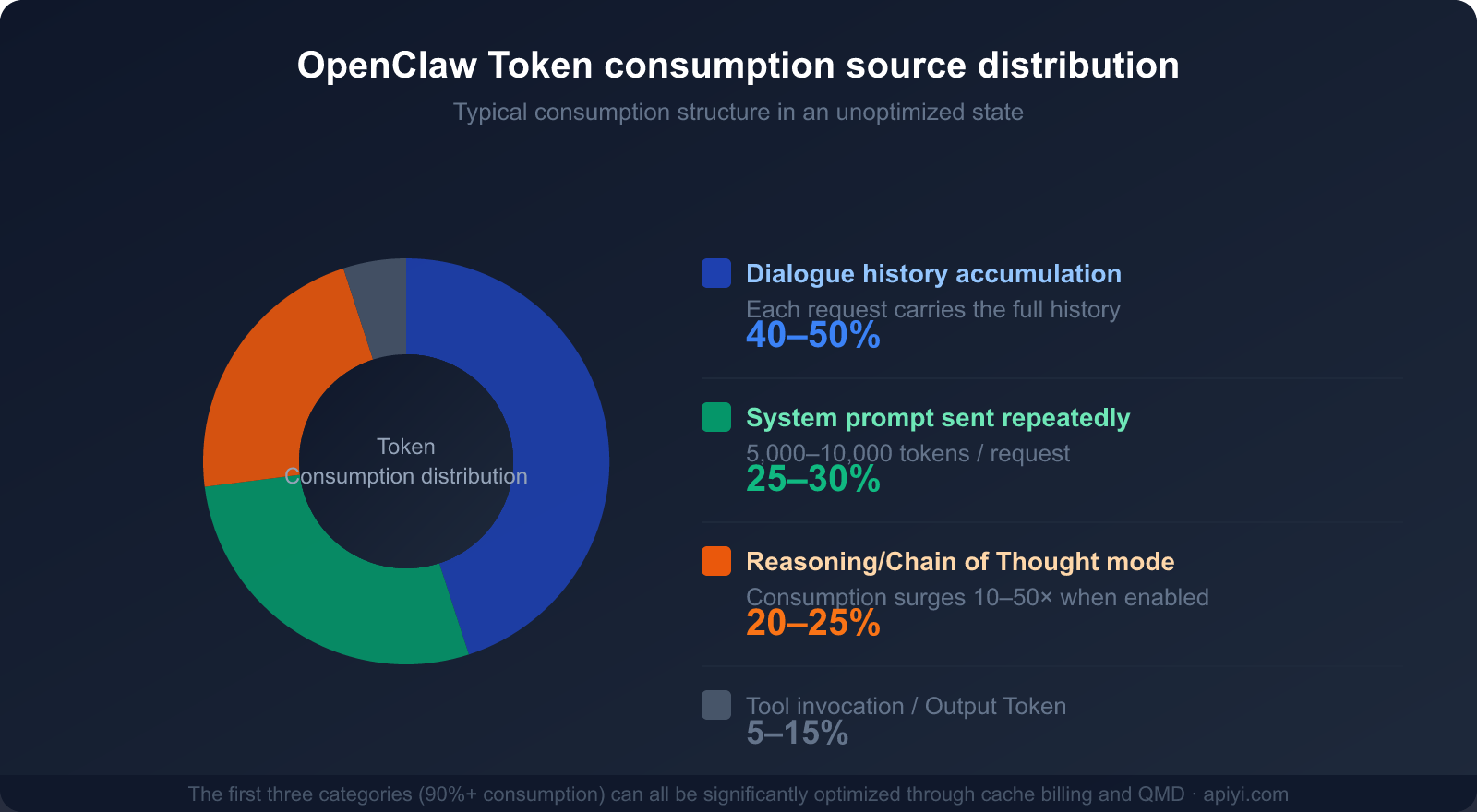
Understanding these three main sources of consumption is the first step toward developing a cost-saving strategy:
| Consumption Source | % of Total Consumption | Optimizable? | Primary Optimization Method |
|---|---|---|---|
| Conversation History (Context Accumulation) | 40-50% | ✅ Highly | Caching, periodic clearing, QMD |
| System Prompt Resending | 25-30% | ✅ Highly | Prompt caching (saves up to 90%) |
| Reasoning/Chain of Thought Mode | 20-25% | ✅ On-demand | Enable only for complex tasks |
| Tool Calls and Output | 5-15% | ⚡ Limited | Streamline tool descriptions |
II. The Most Overlooked Money-Saver: Claude Prompt Caching
What is Claude Prompt Caching?
Claude's Prompt Caching is a native feature launched by Anthropic in late 2024. The core logic is simple: cache frequently repeated content on the server side so that subsequent model invocations can read directly from the cache instead of reprocessing the data.
The price for reading from cache: Only 10% of the normal input price (a 90% saving).
This means if you send a 8,000-token System Prompt, once caching is enabled and a hit occurs, you're only billed for 800 tokens. For users who send dozens of requests daily, this single optimization can save hundreds of dollars per month.
The Full Pricing Structure for Caching
| Cache Type | Cost Multiplier | TTL (Lifespan) | Use Case |
|---|---|---|---|
| Normal Input Token | 1× Base Price | No Cache | Reprocessed every time |
| Cache Write (Initial) | 1.25× | 5-minute TTL | Establishing the cache |
| Cache Write (Long-term) | 2× | 1-hour TTL | Frequent invocation scenarios |
| Cache Read (Hit) | 0.1× (90% off) | Within validity | Repeated requests |
Example of Actual Savings:
Scenario: System prompt of 8,000 tokens
          50 calls per day, with 48 cache hits

Without Caching: 50 × 8,000 = 400,000 tokens
                 Cost = 400,000 × $3/1M = $1.20/day = $36/month

With Caching:    2 writes: 2 × 8,000 × 1.25 = 20,000 tokens = $0.06
                 48 hits: 48 × 8,000 × 0.1 = 38,400 tokens = $0.12
                 Daily Cost ≈ $0.18 → Monthly ≈ $5.40

Savings: $36 - $5.40 = $30.60/month (on the System Prompt alone)
Savings Percentage: 85%
How to Enable Prompt Caching
There's one essential prerequisite for enabling prompt caching: you must use the Anthropic native format interface (/v1/messages) rather than the OpenAI compatibility mode (/v1/chat/completions).
Correct Configuration (Python SDK Example):
import anthropic

# You must use the Anthropic native SDK, not the OpenAI SDK
client = anthropic.Anthropic(
    api_key="your-api-key",
    base_url="https://api.apiyi.com/v1"  # APIYI supports Anthropic native format
)

response = client.messages.create(
    model="claude-sonnet-4-6",
    max_tokens=4096,
    system=[
        {
            "type": "text",
            "text": "You are a professional AI assistant... [8,000 tokens of system prompt]",
            "cache_control": {"type": "ephemeral"}  # ← Key: Mark this content for caching
        }
    ],
    messages=[
        {"role": "user", "content": "Help me organize today's emails"}
    ]
)
Technical Constraints of Caching:
- You can set up to 4 cache breakpoints (
cache_controlmarkers). - Sonnet series: Minimum cacheable content ≥ 1,024 tokens.
- Opus / Haiku 4.5: Minimum cacheable content ≥ 4,096 tokens.
- Supported models: Claude Opus 4, Sonnet 4.6, Sonnet 4.5, Sonnet 4, Sonnet 3.7, Haiku 4.5, Haiku 3.5, Haiku 3, etc.
🎯 Pro Tip: APIYI (apiyi.com) fully supports Anthropic native format calls, including the
cache_controlparameter. By using the native format for Claude models on APIYI, you can stack Prompt Caching (up to 90% off) + APIYI's 20% discount, leading to massive cumulative savings.
III. Key Insight: Why OpenAI Compatibility Mode Can't Save Tokens
This is the most common pitfall for users.
The Fundamental Difference Between Interface Formats
Many third-party AI tools and API proxy services provide an OpenAI compatibility mode—allowing users to call non-OpenAI models like Claude using OpenAI's /v1/chat/completions format.
On the surface, this lets you "use one set of code for all models." However, it has a fatal flaw:
The /v1/chat/completions format has no place for the cache_control parameter—because that's a native feature exclusive to Anthropic.
When you call Claude via OpenAI compatibility mode:
- Your request is formatted for OpenAI.
- The proxy service then converts it to Anthropic's native format.
- But the
cache_controlinformation is already lost in the first step. - The Claude server receives a request without any cache markers, so it bills you for the full token count every single time.
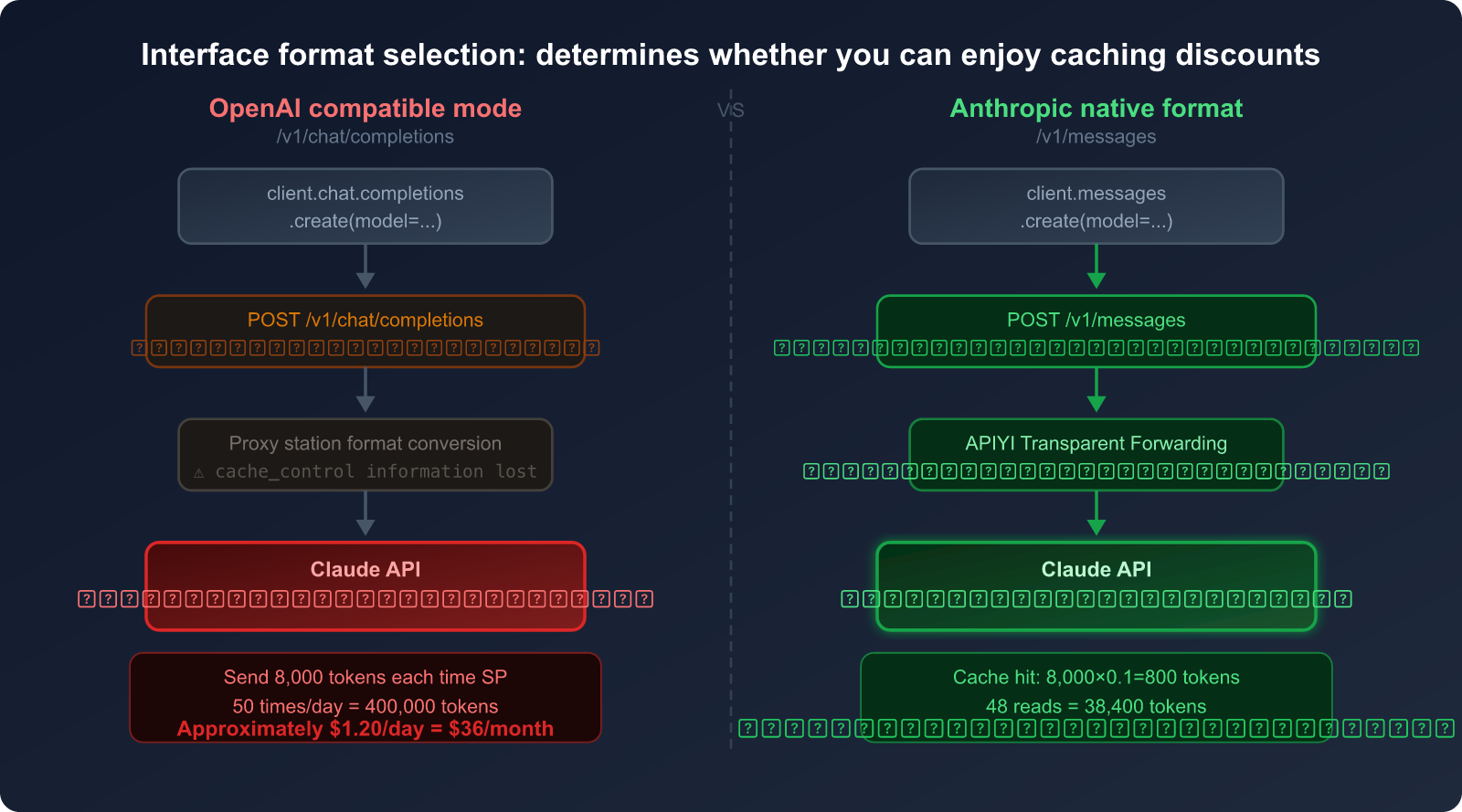
OpenAI Compatibility Mode vs. Anthropic Native Format
| Comparison Dimension | OpenAI Compatibility Mode | Anthropic Native Format |
|---|---|---|
| Interface Path | /v1/chat/completions |
/v1/messages |
| Claude Caching Support | ❌ Not supported | ✅ Fully supported |
cache_control Parameter |
❌ No such field | ✅ Supports 4 breakpoints |
| System Prompt Billing | 💸 Full price (1×) | 💰 Cache read (0.1×) |
| Code Complexity | Low (generic code) | Medium (requires Anthropic SDK) |
| Savings (High-frequency) | 0% | Up to 90% |
Additional Issues with Non-Original API Deployments
Beyond interface formats, there's another confusing situation: "Same-name" models deployed by cloud vendors are not the same as the original.
Take GLM-5 (Zhipu AI) as an example:
- Original API from z.ai: Supports Zhipu's self-developed prompt caching feature.
- GLM-5 deployed on Alibaba Cloud / Tencent Cloud: Uses the cloud vendor's API gateway and does not have the original prompt caching functionality.
This isn't a flaw in GLM-5 itself, but a common issue with non-original deployments: when cloud vendors host models, they usually only expose standard chat APIs and don't pass through the model's proprietary features (like prompt caching).
Analogy: It's like buying a product through a third-party agent; you don't get the official manufacturer's specialized after-sales services.
The Real Impact:
Scenario: 50 calls per day, System Prompt of 6,000 tokens

Original API (with caching):
  Writes: 2 × 6,000 × 1.25 = 15,000 tokens
  Reads: 48 × 6,000 × 0.1 = 28,800 tokens
  Equivalent consumption ≈ 43,800 tokens/day

Non-original API (no caching):
  Full amount: 50 × 6,000 = 300,000 tokens/day

The Gap: Consumption without caching is 6.85 times higher than with caching.
4. Original API Comparison: Choosing the Best Integration Plan for OpenClaw
Comparison of Four Integration Plans
| Integration Plan | Price (Relative to Original) | Caching Support | Multi-model Support | Use Cases |
|---|---|---|---|---|
| Anthropic Official API | 100% (Original Price) | ✅ Full | ❌ Claude Only | High budget, Claude-only users |
| APIYI (Anthropic Native Format) | 80% (20% off) | ✅ Full | ✅ Multi-model | Recommended: Save money + flexible switching |
| General API Proxy Service (OpenAI Compatible) | 85-95% | ❌ Not Supported | ✅ Multi-model | When not using Claude caching |
| Cloud Provider Deployment | 90-110% | ❌ Not Supported | ❌ Single Model | Enterprise compliance requirements |
APIYI's Double-Savings Logic
APIYI's advantage with Claude models lies in: supporting both the Anthropic native format and a 20% discount.
When you stack these two, here's what happens:
Ordinary User (Original Price + OpenAI Compatible, No Caching):
  Monthly System Prompt token usage: 12,000,000 tokens
  Cost = 12,000,000 × $3/1M = $36

APIYI User (20% off + Native Format + Caching):
  Actual billed tokens ≈ 1,440,000 tokens (after caching)
  Cost = 1,440,000 × $3×0.8/1M = $3.46

Total Savings = ($36 - $3.46) / $36 ≈ 90%
🎯 Selection Advice: If you're using OpenClaw and Claude is your primary model,
I highly recommend connecting via APIYI (apiyi.com) using the Anthropic native format.
The 20% base discount combined with the 90% savings from caching can slash your bill by 85-90%.
Plus, APIYI supports other models like GLM-5 and GPT, making it easy to switch and compare results anytime.
5. Ultimate OpenClaw Money-Saving Guide: 5 Actionable Steps
Step 1: Switch to the Anthropic Native Format Interface
This is the most important step. it directly determines whether you can enjoy caching-based billing.
OpenClaw Configuration Method:
In the OpenClaw model configuration (config.json), find the models.providers field and add APIYI as a provider using the format below. The key is setting the api field to "anthropic-messages" to enable the Anthropic native format and support caching:
{
  "models": {
    "providers": {
      "apiyi": {
        "baseUrl": "https://api.apiyi.com",
        "apiKey": "sk-your-token-here",
        "api": "anthropic-messages",
        "headers": {
          "anthropic-version": "2023-06-01",
          "anthropic-beta": ""
        },
        "models": [
          {
            "id": "claude-sonnet-4-6",
            "name": "claude-sonnet-4-6",
            "reasoning": false,
            "input": ["text"],
            "contextWindow": 200000,
            "maxTokens": 16384
          },
          {
            "id": "claude-sonnet-4-6-thinking",
            "name": "claude-sonnet-4-6-thinking",
            "reasoning": false,
            "input": ["text"],
            "contextWindow": 200000,
            "maxTokens": 16384
          }
        ]
      }
    }
  }
}
Configuration Highlights:
"api": "anthropic-messages"← Most critical, specifies using the/v1/messagesnative format instead of the/v1/chat/completionscompatible format."baseUrl": "https://api.apiyi.com"← APIYI's base URL (no need to add/v1, OpenClaw handles it automatically)."anthropic-version": "2023-06-01"← Anthropic API version header; missing this will cause requests to fail.contextWindow: 200000← Claude Sonnet 4.6 supports a 200K context window.
Verifying if Caching is Active:
Check the cache_read_input_tokens and cache_creation_input_tokens fields in the API response headers or logs. If they have values, caching is working:
# Verify cache response
response = client.messages.create(...)

# Check the usage field
print(response.usage)
# Example output:
# Usage(
#   input_tokens=150,                    # New tokens for this request
#   cache_creation_input_tokens=8000,    # First time writing to cache (billed at 1.25×)
#   cache_read_input_tokens=0,           # Subsequent cache hits (billed at 0.1×)
#   output_tokens=300
# )
🎯 How to Connect: After registering and getting your API key from APIYI (apiyi.com),
just set thebase_urltohttps://api.apiyi.com/v1to use the Anthropic native format.
No other code changes are needed, and Claude caching billing will take effect immediately.
Step 2: Place Cache Breakpoints Wisely
The placement of cache breakpoints (cache_control) is vital. You should cache content that is "large and static":
# Best Practice: Cache system prompts + tool definitions
response = client.messages.create(
    model="claude-sonnet-4-6",
    system=[
        {
            "type": "text",
            "text": SYSTEM_PROMPT,          # Main system prompt of 5,000-10,000 tokens
            "cache_control": {"type": "ephemeral"}  # Breakpoint 1
        },
        {
            "type": "text",
            "text": TOOL_DEFINITIONS,       # Tool list (usually quite large)
            "cache_control": {"type": "ephemeral"}  # Breakpoint 2
        }
    ],
    messages=conversation_history,          # Conversation history (don't cache, changes every time)
    ...
)
Caching Strategy Essentials:
- ✅ Good for Caching: System prompts, tool definitions, large static documents, RAG-retrieved document content.
- ❌ Bad for Caching: Current user messages, dynamically generated content, data that changes every time.
- ⚠️ Order Matters: Caching uses prefix matching, so static content must be placed at the beginning of the message sequence.
Step 3: Enable QMD to Reduce Context Length
QMD (Quick Memory Database) is OpenClaw's local semantic search feature. Here's how it works:
Traditional Way:
  Send [Full Conversation History] every time → Consumes massive amounts of tokens.

QMD Way:
  Build a local vector database → Search for the most relevant history snippets.
  Send only [3-5 most relevant history records] each time → Saves 60-97% of tokens.
Actual QMD Savings: According to OpenClaw's official documentation, QMD can achieve 60-97% token savings, depending on the volume of conversation history and the type of task.
How to Enable (OpenClaw Settings):
- Settings → Memory → Enable QMD
- Set the QMD storage path (local, data isn't uploaded)
- Set the relevance threshold (0.7+ recommended to avoid noisy history)
Step 4: Choose the Right Model for the Task
Not every task requires the most powerful model. Correct model allocation is key to cost control:
Task Tiering Strategy:

Simple Tasks (Reminders, format conversion, simple searches)
  → Use Claude Haiku 4.5 (Fastest, cheapest)
  → Roughly 1/5 the price of Sonnet

Medium Tasks (Email processing, file organization, code review)
  → Use Claude Sonnet 4.6 (Balanced)
  → 86.9% success rate (Ranked #1 on PinchBench)

Complex Tasks (Architecture analysis, multi-step research, complex reasoning)
  → Use Claude Opus 4.6 (Strongest reasoning)
  → Only enable reasoning mode when truly needed
Step 5: Periodically Clear Context
Conversation history is one of the biggest sources of token consumption (40-50%). We recommend:
- Setting a maximum context round limit: Automatically summarize and clear history after 15-20 rounds.
- Manual cleanup after task completion: Reset the context before starting a new task.
- Enabling OpenClaw's session compression: Use AI to compress long histories into summaries.
Estimated Combined Effect of the Five-Step Optimization
Based on a moderate OpenClaw user (unoptimized monthly fee approx. $300-600), here's the expected outcome after implementing these steps:
| Optimization Step | Target Source of Consumption | Expected Savings | Difficulty |
|---|---|---|---|
| 1. Switch to Anthropic Native Format | System Prompt repeated billing | 85-90% (SP portion) | ⭐ Low (Change base_url) |
| 2. Set Cache Breakpoints | Tool definitions + static docs | 80-90% (Tool portion) | ⭐⭐ Low-Medium |
| 3. Enable QMD | Conversation history tokens | 60-97% (History portion) | ⭐⭐ Low-Medium |
| 4. Model Tiering by Task | Total token cost | 30-70% (Model price diff) | ⭐⭐⭐ Medium |
| 5. Periodic Context Cleanup | History "snowball" effect | 20-40% (Long-term gain) | ⭐ Low |
🎯 Priority Recommendation: Step 1 (Switching to native format) and Step 3 (Enabling QMD) offer the highest returns for the least effort.
Complete these two first, and you'll typically see your bill drop by 60-80%.
By using APIYI (apiyi.com) for Claude, Step 1 only requires changing one line in yourbase_urlconfiguration and takes less than 5 minutes.
6. Practical Configuration: A Complete Example of OpenClaw + APIYI + Claude Caching
Here's a complete, optimized OpenClaw configuration example that's ready for most users to copy and use directly:
import anthropic

# Use Anthropic native format via APIYI
client = anthropic.Anthropic(
    api_key="sk-your-apiyi-key",       # APIYI Key (get it by registering at apiyi.com)
    base_url="https://api.apiyi.com/v1"
)

# Define system prompt (large block, suitable for caching)
SYSTEM_PROMPT = """
You are a professional AI assistant running on the OpenClaw platform.
Your responsibilities include: managing schedules, processing emails, organizing files, assisting with code development...
[Usually 5,000-10,000 tokens of detailed instructions]
"""

# Define tool list (also large fixed content, suitable for caching)
TOOL_DEFINITIONS = """
Available tools: calendar_api, email_api, file_system, code_runner...
[Detailed tool descriptions, usually 2,000-5,000 tokens]
"""

def call_openclaw_with_cache(conversation_history: list, user_message: str):
    """Optimized OpenClaw API call with caching enabled"""

    response = client.messages.create(
        model="claude-sonnet-4-6",    # Ranked #1 on PinchBench
        max_tokens=4096,

        # System prompt: mark cache breakpoints
        system=[
            {
                "type": "text",
                "text": SYSTEM_PROMPT,
                "cache_control": {"type": "ephemeral"}  # Cache breakpoint 1
            },
            {
                "type": "text",
                "text": TOOL_DEFINITIONS,
                "cache_control": {"type": "ephemeral"}  # Cache breakpoint 2
            }
        ],

        # Conversation history + new message
        messages=[
            *conversation_history,     # History messages (not cached, changes every time)
            {"role": "user", "content": user_message}
        ]
    )

    # Print token usage (to monitor optimization effectiveness)
    usage = response.usage
    print(f"Input Tokens: {usage.input_tokens}")
    print(f"Cache Creation: {usage.cache_creation_input_tokens}")
    print(f"Cache Read: {usage.cache_read_input_tokens}")
    print(f"Output Tokens: {usage.output_tokens}")

    return response.content[0].text
🎯 Quick Start: Just replace the
api_keyin the code above with the key you get after registering at APIYI (apiyi.com). Without any other changes, you can immediately start using the combination of Anthropic's native format + prompt caching + APIYI's 20% discount.
FAQ
Q: Does APIYI really support the Anthropic native format (/v1/messages)?
Yes, APIYI (apiyi.com) supports two interface formats simultaneously:
- Anthropic native format:
/v1/messages(supports prompt caching) - OpenAI compatible format:
/v1/chat/completions(convenient for general-purpose code)
For Claude models, we strongly recommend using the Anthropic native format to take advantage of prompt caching. Just use the anthropic Python SDK and point the base_url to APIYI.
🎯 Visit APIYI (apiyi.com) to register an account; you'll find integration examples for both formats in the console.
Q: Is the 5-minute cache TTL enough? How do I know if I need a 1-hour TTL?
It depends on your invocation frequency:
- If your OpenClaw calls are less than 5 minutes apart (e.g., continuously processing a task stream), the default 5-minute TTL is fine.
- If the interval is between 5 minutes and 1 hour (e.g., pausing after a batch of tasks), consider a 1-hour TTL (the cost is 2x the write price, but the cache hit rate will be higher).
- If the interval is over 1 hour, caching has limited benefits, and you might as well just rewrite it each time.
Q: Any money-saving tips when using domestic models like GLM-5?
The caching feature for GLM-5 requires native API calls through the Zhipu AI official website (z.ai); it's not available via third-party deployments like Alibaba Cloud.
APIYI also supports domestic models like GLM-5 at prices 20% lower or more, making it easy for you to compare model performance using a unified interface during the testing phase. Once you've identified the right model for your scenario, you can decide whether to stick with APIYI or connect directly to the original provider.
Q: I'm already using a third-party API proxy service. How hard is it to migrate to a platform that supports the native format?
The migration cost is very low. The only things you need to change are two parameters in your code:
# Before migration (OpenAI compatible format)
from openai import OpenAI
client = OpenAI(api_key="sk-xxx", base_url="old-proxy-address")
response = client.chat.completions.create(model="claude-sonnet-4-6", ...)

# After migration (Anthropic native format, supports caching)
import anthropic
client = anthropic.Anthropic(
    api_key="sk-new-APIYI-key",          # ← Replace with APIYI Key
    base_url="https://api.apiyi.com/v1"  # ← Replace with APIYI address
)
response = client.messages.create(model="claude-sonnet-4-6", ...)
# Then just add cache_control in the system parameter to enable caching
The main work involves changing chat.completions.create to messages.create. The message format has slight differences (the role/content structure is consistent, but system changes from a string to a list of objects). Usually, you can finish the migration in half a day.
Q: How can I verify if my OpenClaw instance has successfully enabled caching?
The most direct way: observe the usage object in the API response during two consecutive calls:
- First call:
cache_creation_input_tokenshas a value (cache write). - Second call:
cache_read_input_tokenshas a value (cache hit).
If the cache_read_input_tokens of the second call equals the token count of your System Prompt, the cache is fully working.
Q: Do I have to turn off Extended Thinking mode?
Not necessarily, but it should be used on demand. Here's a suggested strategy:
- Simple tasks (email classification, scheduling): Turn off thinking mode.
- Medium tasks (code review, info summarization): Keep it off by default, turn it on if the model struggles.
- Complex tasks (architectural decisions, multi-step research): Turn it on, but set a reasonable
budget_tokenslimit.
In the Claude API, you can limit the maximum token consumption of thinking mode via thinking: {"type": "enabled", "budget_tokens": 5000}.
Summary: The Core Logic of OpenClaw Cost Savings
Let's summarize all the cost-saving methods with a single diagram:
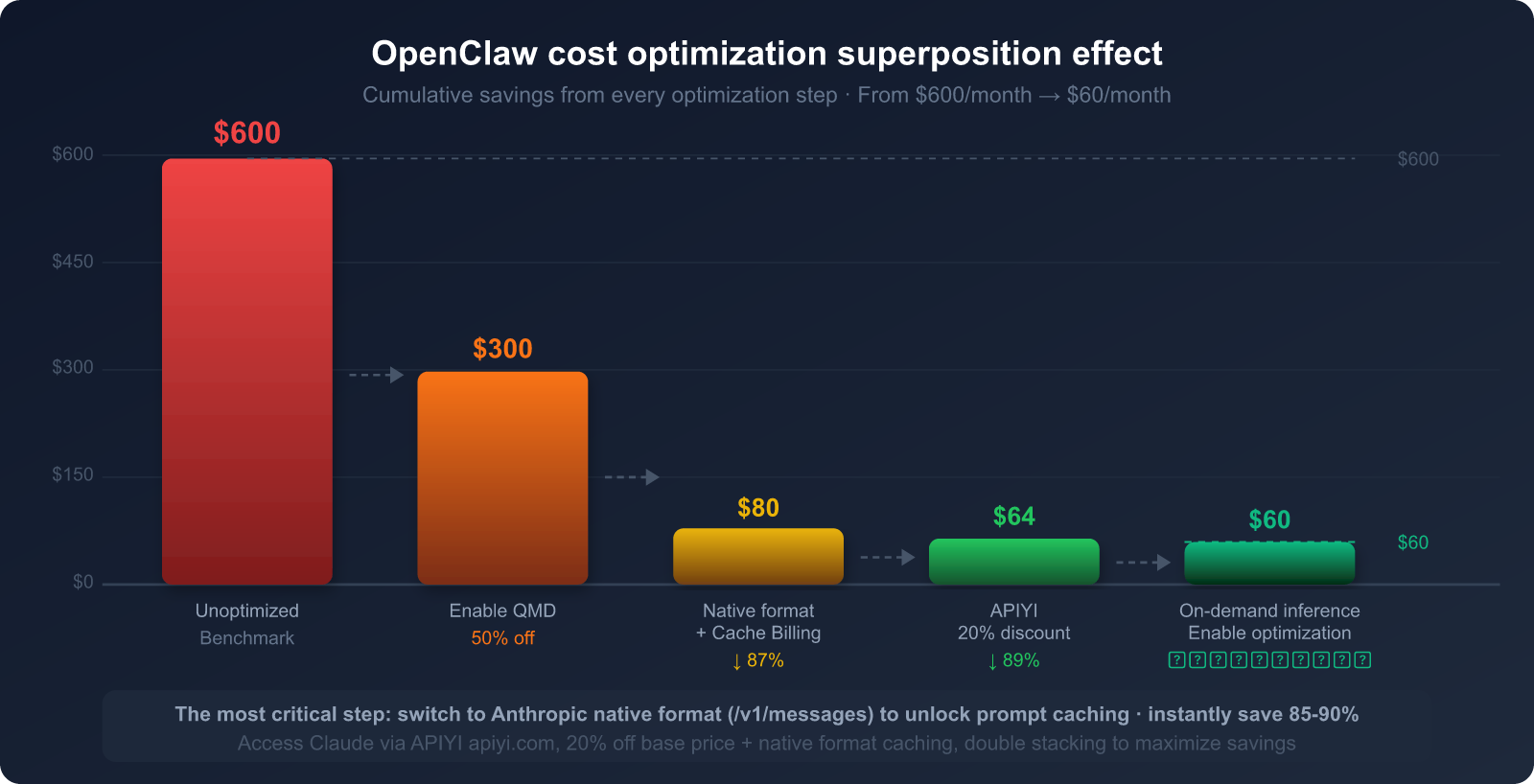
Recapping the core points of this article:
Three Root Causes of High Consumption:
- Resending chat history every time (accounts for 40-50% of consumption)
- Resending the System prompt every time (accounts for 25-30%)
- Unrestrained use of reasoning modes (accounts for 20-25%)
Most Effective Cost-Saving Methods:
- 🥇 Claude Prompt Caching: Save up to 90% (must use Anthropic native format)
- 🥈 QMD Local Semantic Search: Save 60-97% of history context tokens
- 🥉 Model Tiering by Task: Use Haiku for light tasks, Sonnet/Opus for heavy ones
- API Channel – Choose APIYI: 20% off base price + native format support
One Critical Insight:
The OpenAI compatible format (
/v1/chat/completions) cannot passcache_control.
Even if you use an API proxy service to call Claude, you won't enjoy caching discounts.
To save money, you must use the Anthropic native format (/v1/messages).
🎯 Take Action Now: Visit APIYI at apiyi.com to register and get an API key that supports the Anthropic native format.
Switch yourbase_urltohttps://api.apiyi.com/v1. You'll finish the setup in under 3 minutes and see a significant drop in your token bill the same day. With Claude models at 20% off and a unified interface for multiple models, it's the optimal choice for OpenClaw users to cut costs and boost efficiency.
All API pricing data in this article is based on public information as of March 2026. Please refer to official platform announcements for actual prices.
Author: APIYI Team | For more OpenClaw tips, visit the APIYI apiyi.com Help Center