Author's Note: Sharing my practical experience using Claude Opus 4.7 for processing CSV and Excel files. I'll explain why you shouldn't just dump large tables into an AI, and why you should instead have the AI write scripts, build tools, and perform validation.
If you have a CSV or Excel file with over 900 rows and 50 columns and you simply ask Claude Opus 4.7, "Help me process this table," you'll likely get an answer that looks clever but isn't reproducible. The problem isn't that Claude Opus 4.7 isn't powerful enough; it's that you're treating it like a human data entry clerk instead of a data processing workflow designer.
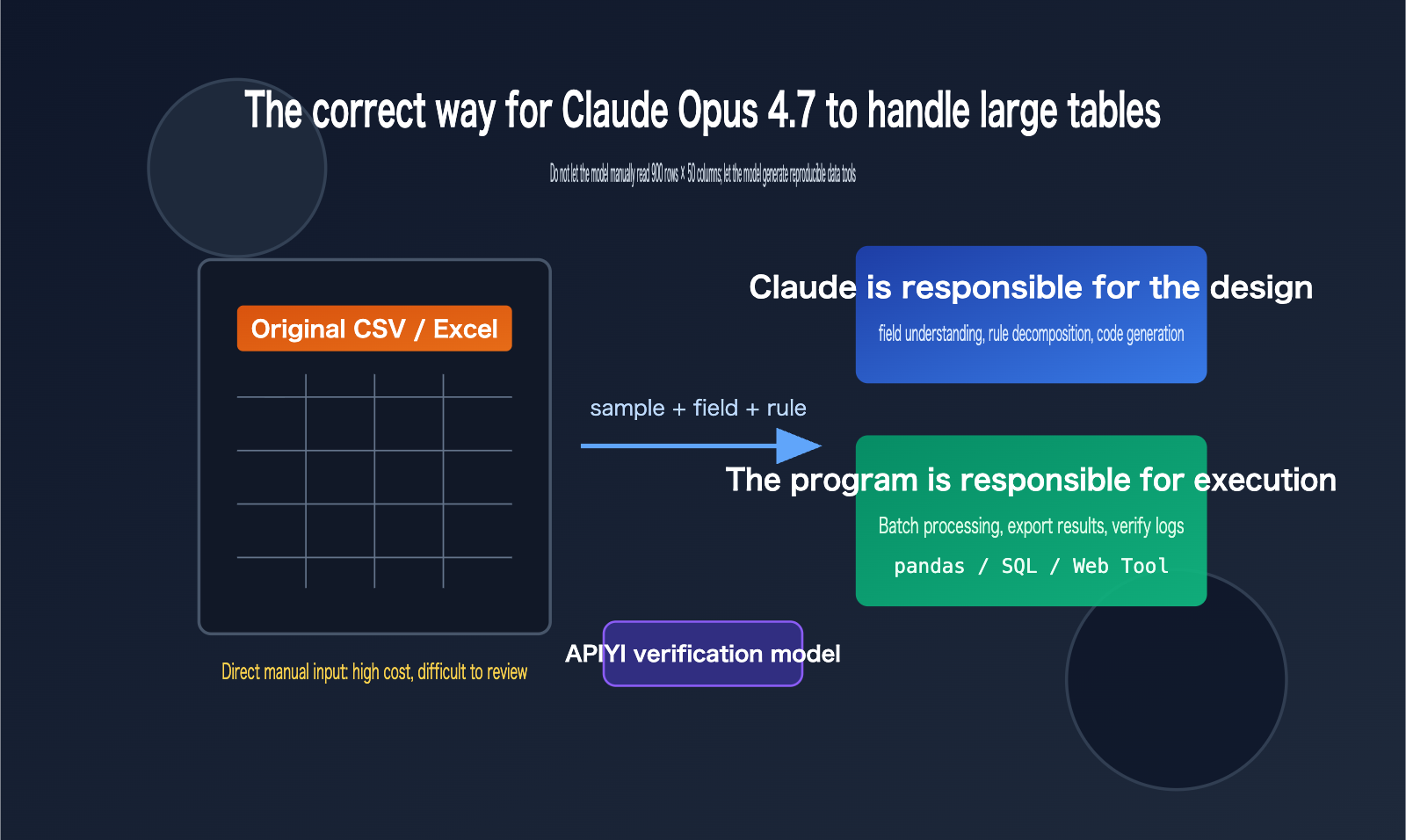
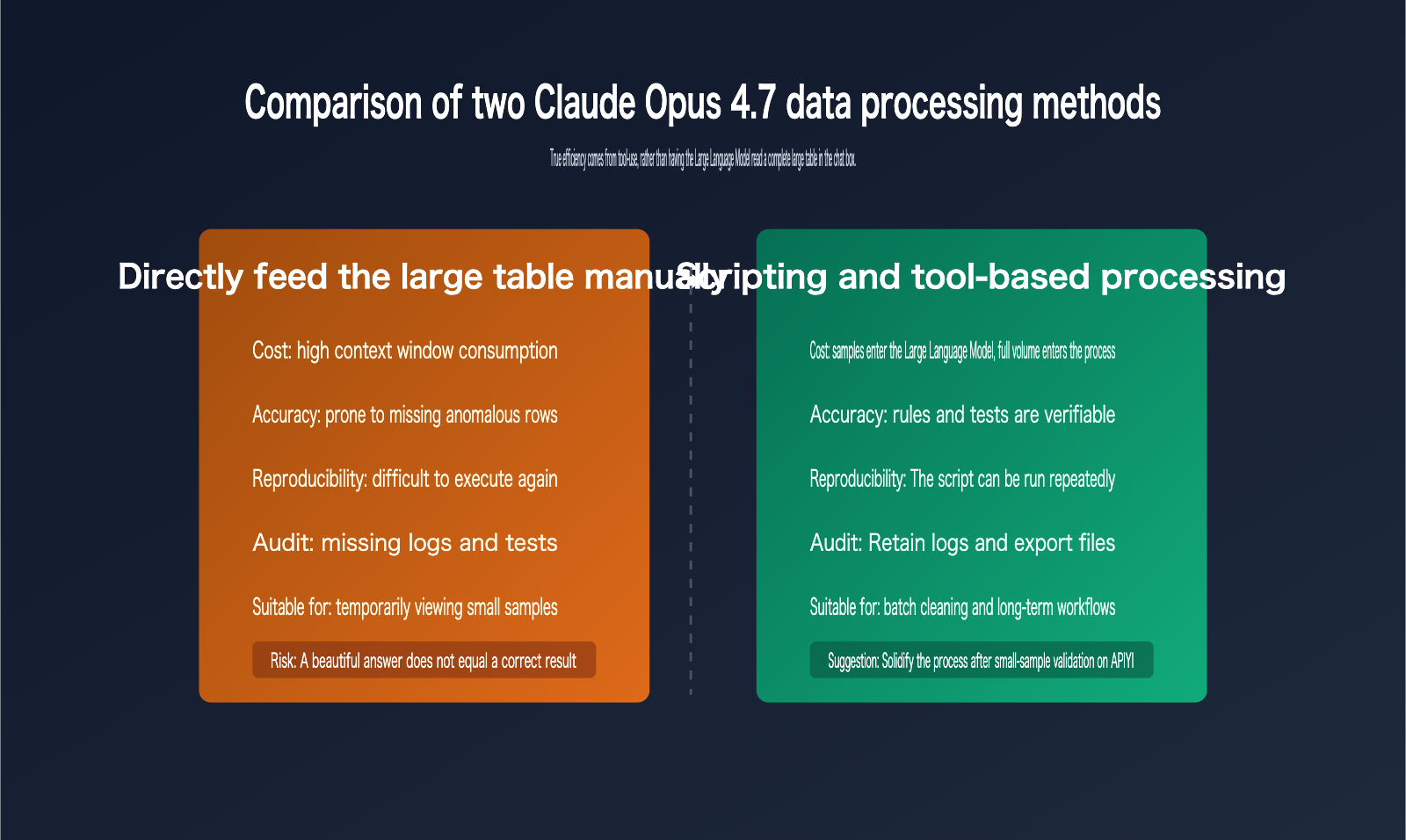
A better approach: Provide Claude Opus 4.7 with a small sample of the data, a full field description, and your target results. Have it write a Python script, generate a web-based tool, or design a reproducible data pipeline, then use that script to process the full dataset. This allows you to leverage the model's reasoning and coding capabilities while leaving the calculation, filtering, aggregation, and validation to deterministic programs.
Key Points for Processing CSVs with Claude Opus 4.7
Claude Opus 4.7 is already a powerful model for coding and agentic workflows, and the official documentation highlights its suitability for complex code, enterprise workflows, and spreadsheet scenarios. However, a "larger context window" doesn't mean you should shove the entire table into the chat, especially when the data contains many duplicate rows, outliers, hidden columns, messy formatting, and complex business rules. Feeding raw data directly is not only inefficient but also makes the results difficult to audit.
The truly efficient way to use Claude Opus 4.7 for CSV processing is to position the model in three roles: understanding business goals, generating processing programs, and interpreting output results. As for row-by-row reading, type conversion, deduplication, aggregation, sorting, and file exporting, these should be handled by Python, SQL, browser-based tools, or Claude's built-in data analysis toolchain.
| Scenario | Problem with Direct AI Reading | Recommended Claude Opus 4.7 Approach | Result Advantage |
|---|---|---|---|
| 900 rows × 50 cols CSV | High context consumption, easy to miss columns/rows | Provide 20-row sample and field specs, have Claude write a pandas script | Reproducible, batch-runnable |
| Excel Multi-Sheet | Hidden formulas, merged cells, and formatting affect understanding | Have Claude write a structure-probing script first to output a workbook overview | Understand structure before processing |
| Business Rule Filtering | Natural language often misses edge cases | Have Claude convert rules into functions and test cases | Clear, verifiable rules |
| Generating Reports | One-off answers are hard to review | Have Claude generate export scripts and validation summaries | Stable output, easy to deliver |
There's an important distinction here: Claude Opus 4.7 can "participate in data analysis," but it shouldn't be the "sole execution environment for the data itself." If you need to repeatedly verify data processing prompts or model selections via API, we recommend using the APIYI (apiyi.com) unified interface for small-sample testing, then distilling stable prompts into scripts to avoid re-copying large tables every time.
Division of Labor Principles for Claude Opus 4.7 CSV Processing
Claude Opus 4.7 is best suited for high-level judgment, such as inferring field meanings, designing cleaning strategies, flagging anomalies, generating code, and interpreting results. It isn't ideal for performing deterministic calculations directly in the chat box, as table text in a chat window can lose structural information and isn't convenient for repeated runs or version management.
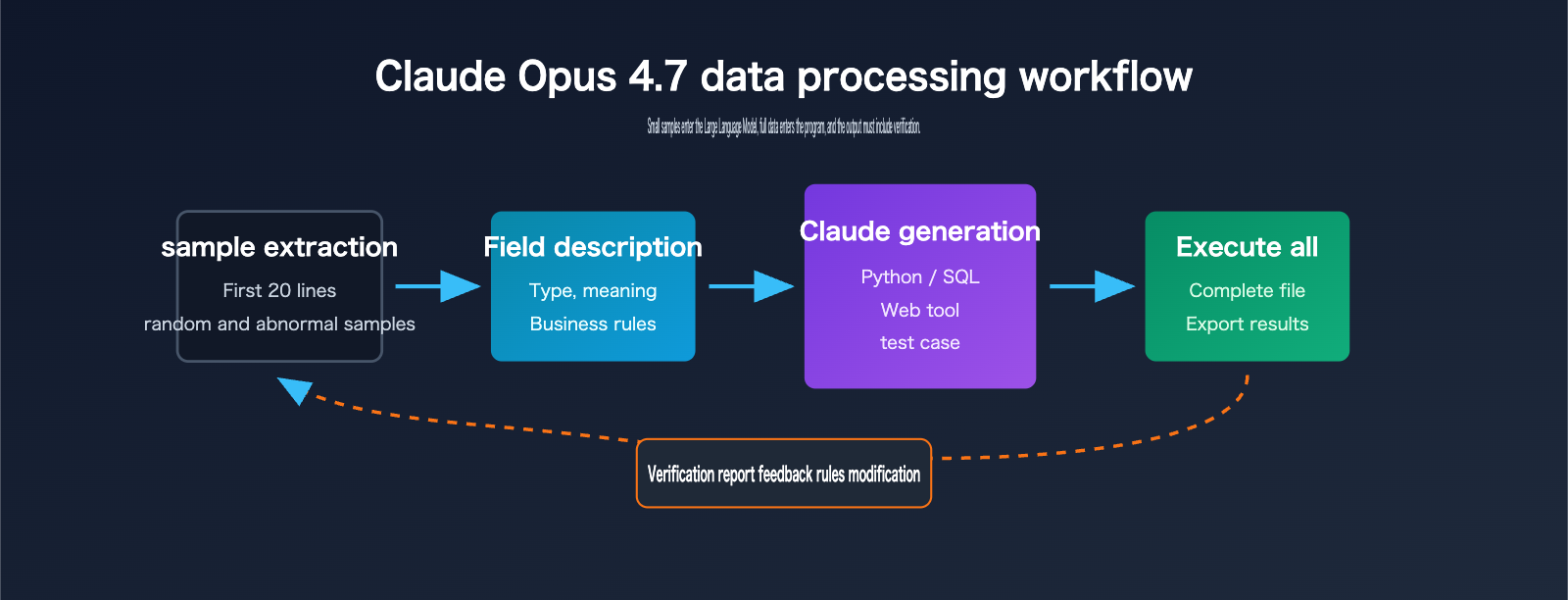
A more robust principle is: "Give the model small samples, give the program the big data." You can provide the first 20 rows, a random 20 rows, and 20 rows containing anomalies, along with a field dictionary and target output. Once Claude Opus 4.7 generates the script based on this information, you can then let the script run on the full CSV or Excel file. This way, the model handles the design, and the program handles the execution.
Why You Shouldn't "Hand-Feed" Large Excel Files to Claude Opus 4.7
While Excel and CSV files might look like simple tables, their underlying complexity is vastly different. CSVs are plain-text row-and-column structures, whereas Excel files can contain multiple sheets, formulas, formatting, filter states, hidden columns, merged cells, date serials, and localized number formats. Copying an Excel file directly into text for an AI usually flattens these critical details, leaving the model with corrupted, "flattened" text rather than the original workbook.
Official documentation indicates that Claude-related products already support analysis tools, code execution, data plugins, and Excel-specific capabilities. These features point to a single truth: table processing should rely on tool environments rather than just "mental math" by a language model in a chat window. Even though Claude Opus 4.7 supports a larger context window, you should use that context for business rules, field definitions, sample data, and validation requirements—not waste it on the raw rows and columns of an entire table.
| Data Characteristic | Risks of Direct Upload/Paste | Recommended Input for Claude Opus 4.7 | Recommended Tool |
|---|---|---|---|
| Many Columns | Model struggles to track column meanings | Field dictionary, column types, key column descriptions | pandas, SQL |
| Many Rows | High token costs, non-reproducible results | Head samples, random samples, outlier samples | Python batch processing |
| Multiple Sheets | Sheet relationships easily lost | Workbook structure summary, sheet purpose descriptions | openpyxl, Excel plugins |
| Dirty Data | Anomalies affect inference | Missing value stats, duplicate counts, format examples | Data quality scripts |
| Complex Rules | Natural language explanations drift | Explicit rules, counter-examples, expected output samples | Unit tests, validation scripts |
Technical Tip: If you need to integrate Claude Opus 4.7 into an existing data processing system, start by verifying the interface via APIYI (apiyi.com). It's best to run your prompts, model parameters, and error handling with small samples before connecting the full file processing pipeline.
Key Misconceptions About Using Claude Opus 4.7 for Excel
The first misconception is equating "the model can understand tables" with "the model should process large tables directly." Uploading CSVs or Excel files is convenient for small files, temporary analysis, or exploratory Q&A. However, for tasks like bulk cleaning, customer list scoring, order reconciliation, or financial categorization, you need repeatable rules, not one-off natural language answers.
The second misconception is providing only the first 20 rows as a sample. The first 20 rows usually only show the "normal" structure and fail to cover edge cases. A better combination is "first 20 rows + 20 random rows + 20 outlier rows + field dictionary + 3 rows of target output." This allows Claude Opus 4.7 to generate processing logic that reflects real-world business scenarios.
A 5-Step Workflow for Processing CSVs with Claude Opus 4.7
This workflow is suitable for most CSV and Excel automation tasks, especially for scenarios with over 500 rows, more than 20 columns, or rules that require frequent adjustments. You don't need to provide the full file to the model initially; just clarify the samples, structure, and goals, then ask it to produce scripts, tests, and output explanations.
| Step | Materials for Claude Opus 4.7 | Content to Request from Claude | What Humans Need to Confirm |
|---|---|---|---|
| 1. Structure Detection | File format, field names, sample rows | Field type assumptions and cleaning plan | Are field meanings correct? |
| 2. Rule Definition | Business goals, filters, counter-examples | Processing rule table and boundary conditions | Are business exceptions covered? |
| 3. Script Generation | Sample data, target output format | Python or SQL processing script | Can it run locally? |
| 4. Small-Sample Validation | 20 to 60 sample rows | Expected output and test assertions | Does the output match intuition? |
| 5. Full Execution | Full file path | Result file, logs, validation report | Are totals, amounts, and groups aligned? |
The core value of this workflow is turning "one-off Q&A" into "executable assets." When business rules change, you only need to ask Claude Opus 4.7 to modify the script and tests, rather than re-uploading the full data, re-explaining the context, or gambling on whether the model remembered every detail.
Prompt Template for Processing CSVs with Claude Opus 4.7
You can reuse the following prompt structure. Note that you shouldn't just paste the CSV content; you must clarify field meanings, processing goals, outlier samples, and acceptance criteria. The clearer the model is on "what constitutes a correct result," the more stable the generated script will be.
I have a CSV/Excel data processing task. Please do not provide a conclusion directly.

Goal:
Score the customer list based on industry, title, and company size, then output top leads.

Data Samples:
1. First 20 rows: ...
2. 20 random rows: ...
3. 20 outlier rows: ...

Field Descriptions:
- company_name: Name of the company
- title: Contact person's job title
- employee_count: Number of employees, may be empty
- industry: Industry, may contain synonyms

Please complete the following:
1. Explain the fields and potential data quality issues first.
2. Write a Python script to read input.csv.
3. Output cleaned.csv and scored.csv.
4. Include basic validation: row counts, null values, duplicates, and score distribution.
5. Do not assume meanings for unknown fields; mark any uncertain rules with TODO.
If you want to turn this workflow into an API service, you can use the prompt template, field dictionary, and sample data as fixed inputs, and use APIYI (apiyi.com) to call Claude Opus 4.7 or other available models for comparative testing. This allows you to quickly evaluate differences in code generation, rule interpretation, and exception handling across models.
Python Example for Processing CSVs with Claude Opus 4.7
Below is a minimalist version that embodies the correct approach: Claude Opus 4.7 writes the script, the script reads the full file, and it outputs results along with a validation summary. In real projects, you can continue to add logging, exception handling, unit tests, and configuration files.
import pandas as pd

INPUT = "input.csv"
OUTPUT = "scored.csv"

df = pd.read_csv(INPUT)
required = ["company_name", "title", "employee_count", "industry"]
missing = [col for col in required if col not in df.columns]
if missing:
    raise ValueError(f"Missing columns: {missing}")

df["employee_count"] = pd.to_numeric(df["employee_count"], errors="coerce").fillna(0)
df["score"] = 0
df.loc[df["title"].str.contains("cto|chief|founder", case=False, na=False), "score"] += 40
df.loc[df["employee_count"].between(50, 500), "score"] += 30
df.loc[df["industry"].str.contains("ai|software|saas", case=False, na=False), "score"] += 30

print({"rows": len(df), "duplicates": int(df.duplicated().sum())})
df.sort_values("score", ascending=False).to_csv(OUTPUT, index=False)
If you still need the model to explain the output, you can have the script generate a summary.json and then pass that summary to Claude Opus 4.7. For multi-step automation tasks, it's recommended to use APIYI (apiyi.com) to centrally manage model invocations, failure retries, and log retention, making your data processing pipeline much easier to maintain.
Choosing the Right Tool for Claude Opus 4.7 Excel Processing
Different tasks call for different tools. For quick, ad-hoc exploration, Claude’s built-in analysis capabilities or Data plugins are great. However, for production workflows, Python scripts, SQL pipelines, or custom web tools are much better suited. If you have non-technical colleagues on your team, you can have Claude Opus 4.7 generate a local web tool that provides a visual interface for file uploads, rule selection, and result downloads.
| Tooling Solution | Suitable Tasks | Unsuitable Tasks | Recommended Usage |
|---|---|---|---|
| Python Script | Batch cleaning, scoring, reconciliation, exporting | Teams with zero command-line experience | Have Claude write the script and README |
| Local Web Tool | Non-technical staff processing similar files repeatedly | Complex backend permissions and multi-user collaboration | Have Claude generate HTML/JS or a lightweight service |
| SQL Pipeline | Data warehousing, order/log analysis | Ad-hoc, small Excel files | Have Claude write queries and validation SQL |
| Claude Data Tools | Exploratory analysis, charts, temporary reports | High compliance or long-term automated tasks | Explore first, then transition to scripts |
| API Workflow | Multi-model comparison, automated system integration | One-off manual tasks | Debug via a unified interface |
Web Tool Approach for Claude Opus 4.7 Excel Processing
When users aren't familiar with Python, "having Claude write a web tool" is often more practical than "having Claude read a CSV directly." A web tool can provide upload buttons, field mapping, rule configuration, result previews, and download buttons. Users only need to swap files each time, avoiding the need for repetitive back-and-forth with AI.
You can ask Claude Opus 4.7 to: "Generate a single-file HTML tool that uses Papa Parse to read CSVs, handles field mapping and scoring on the frontend, and exports a new CSV." For tasks with small data volumes, non-sensitive rules, and local browser execution, this is very cost-effective. For more complex requirements involving permissions, auditing, or large files, you should upgrade to a backend service.
Implementation Tip: If you want to integrate model interpretation, field mapping suggestions, or anomaly diagnosis into your web tool, you can use the APIYI (apiyi.com) model interface. This keeps the frontend focused on interaction while the backend handles model requests and logging.
Validation Checklist for Claude Opus 4.7 CSV Processing
The biggest risk in data processing isn't code errors, but code that silently outputs incorrect results. Therefore, whether you're having Claude Opus 4.7 write Python, SQL, or a web tool, you should require it to generate a validation checklist simultaneously. This list doesn't need to be complex, but it must cover row counts, fields, null values, duplicates, key metrics, and spot checks.
| Validation Item | Why It Matters | Recommended Check Method | Handling Anomalies |
|---|---|---|---|
| Input/Output Row Count | Prevents accidental deletion or duplicate generation | Compare len(input) and len(output) |
Explain output discrepancies |
| Required Fields | Prevents calculation errors due to field name changes | Check column set | Throw error if fields are missing |
| Null Value Ratio | Prevents scoring or classification bias | Null count per column | Write warning if threshold exceeded |
| Duplicate Records | Prevents double billing or redundant outreach | Deduplicate via primary/composite keys | Keep a report of duplicates |
| Sum of Amounts/Quantities | Prevents aggregation logic errors | Compare totals before and after grouping | Terminate if inconsistent |
| Spot Checks | Detects rule interpretation bias | Randomly sample 20 rows for manual review | Feed issues back to Claude to adjust rules |
In practice, you can include this table directly as part of your prompt, asking Claude Opus 4.7 to automatically include these checks when generating scripts. When we perform model invocation tests at APIYI (apiyi.com), we also recommend requiring validation outputs as a fixed return requirement. This makes it easier to compare the stability of different models, rather than just looking at whether a single response "looks good."
Anti-Patterns for Claude Opus 4.7 CSV Prompts
Don't just say, "Help me clean this table." A better approach is: "Please identify which field information you need before writing the script; do not provide the final conclusion immediately; output logs for every step; mark any rules you can't determine with a TODO; and generate 5 unit test samples." These constraints force the model to make implicit assumptions explicit and help you discover if it has misunderstood the business logic faster.
Similarly, don't treat the first 20 rows of a sample as the absolute truth. While the first 20 rows are great for helping Claude Opus 4.7 understand the structure, they aren't enough to cover dirty data. You should provide additional anomalous samples, such as null values, duplicates, messy date formats, negative amounts, inconsistent enum spellings, or mixed Chinese and English text.
Claude Opus 4.7 CSV Processing FAQ
Is a 20-row sample enough for Claude Opus 4.7 to process CSV files?
Not quite, but it's a good starting point. While the first 20 rows are great for showing field structures and standard records, they won't cover edge cases or anomalies. I'd recommend a combination of "first 20 rows + 20 random rows + 20 rows containing anomalies." Once you've provided these samples to Claude Opus 4.7, ask it to write a script to process the full file rather than relying on it to draw conclusions based solely on the samples.
Should I upload the entire file when using Claude Opus 4.7 to process Excel?
For quick, one-off explorations, uploading the file and using its built-in analysis tools is fine. However, for long-term, repeatable business workflows, you should have Claude Opus 4.7 first write a structure-detection script, followed by the actual processing script. For API automation scenarios, you can use APIYI (apiyi.com) to run small samples first, ensuring the model consistently understands your fields and rules before scaling up to the full process.
Does the 1M context window mean I don't need scripts for CSV processing with Claude Opus 4.7?
Not at all. A larger context window can hold more field descriptions, samples, and business context, but it can't replace a reproducible computational program. Especially when dealing with financial calculations, rankings, grouping, deduplication, and statistical definitions, scripts and validation are the only way to ensure your results are reliable.
How does Claude Opus 4.7's Excel processing differ from traditional BI tools?
Claude Opus 4.7 is better at turning fuzzy requirements into rules, code, and explanations, whereas traditional BI tools excel at stable reporting, permission management, data modeling, and team collaboration. They aren't mutually exclusive: you can use Claude to generate cleaning scripts and analysis logic, then feed the stable results into your BI tool or data warehouse.
Is it still worth using Claude Opus 4.7 for CSV processing if I don't have a programming background?
Yes, but I suggest asking it to generate a local web tool or detailed step-by-step instructions rather than having it output the final results directly in the chat. You can ask it to build the processing logic into buttons, forms, and download functions, so you only need to handle the file uploads and result verification. When you need model interfaces, you can use APIYI (apiyi.com) to quickly test how different models perform at code generation.
What should I keep in mind when processing sensitive Excel files with Claude Opus 4.7?
Sensitive data should be anonymized or processed in a controlled environment. Avoid sending raw ID numbers, phone numbers, customer contracts, or detailed financial records into unverified environments. A safer approach is to provide anonymized samples and the field structure, let Claude write the script, and then execute the full data processing locally or within your enterprise environment.
Claude Opus 4.7 CSV Processing Key Takeaways
- The best way to use Claude Opus 4.7 for CSV processing isn't to have it read the entire large table, but to have it generate an executable script based on samples and rules.
- A 20-row sample only helps the model understand the structure; real-world tasks require random samples, anomaly samples, and a field dictionary.
- Excel is more complex than CSV; multiple sheets, formulas, hidden columns, and formatting can all affect the results, so always perform a structure scan first.
- For batch tasks, Python, SQL, or local web tools are much more reproducible than one-off answers in a chat window.
- A validation checklist must be generated alongside the processing script, focusing on row counts, fields, null values, duplicates, and key totals.
- For API automation scenarios, it's recommended to perform small-sample model testing before integrating a stable solution into your production pipeline.
Summary and Recommendations for Processing Excel with Claude Opus 4.7
Claude Opus 4.7 is fantastic for data tasks, but the right approach isn't just "dumping the spreadsheet onto the AI." Instead, you should "have the AI design the tools to process the spreadsheet." When dealing with hundreds of rows, dozens of columns, or business rules that need to be reused, scripts, web tools, SQL pipelines, and validation reports are much more cost-effective options.
Think of Claude Opus 4.7 as your data engineering assistant: let it examine small samples, clarify the rules, write processing scripts, generate tests, and explain the results. This approach leverages the Large Language Model's ability to understand business semantics while avoiding the inefficiency and lack of auditability that comes with manually feeding it raw data.
If you're working on development related to Claude Opus 4.7, CSVs, Excel, or data automation, I recommend using APIYI (apiyi.com) for model invocation and prompt validation first, then refining stable workflows into scripts or tools. This keeps your costs under control and makes the results easier for your team to review and maintain in the long run.
Reference Materials:
- Anthropic Claude Opus 4.7: anthropic.com/claude/opus
- Claude Opus 4.7 User Guide: claude.com/resources/tutorials/working-with-claude-opus-4-7
- Claude Code Execution Tool: platform.claude.com/docs/en/agents-and-tools/tool-use/code-execution-tool
- Claude Data Plugin: claude.com/plugins/data