If you’ve used Claude Code, you’ve likely encountered this exact scenario: a line pops up in your terminal saying "Symbioting… (3m 12s · ↓ 5.7k tokens)", and the progress bar freezes, leaving you with no new output for minutes. You might try typing "Are you still there?", and to your surprise, Claude immediately resumes and finishes the task.
This "freeze + message to revive" experience might seem like black magic, but it’s actually the result of a few overlapping failure modes involving Anthropic’s streaming protocol, timeout mechanisms, and context management. This article breaks down the real reasons behind these freezes, drawing from official Claude Code troubleshooting documentation and GitHub Issues (#25979, #24688, #39718, #25286, #25539, #51659), and provides 7 immediate recovery methods and 5 prevention strategies.
Core Value: By the end of this article, you’ll understand what each spinner verb actually means, why sending a message sometimes "revives" the process, when you absolutely must Ctrl+C to restart, and how to drive your freeze rate down to near zero.
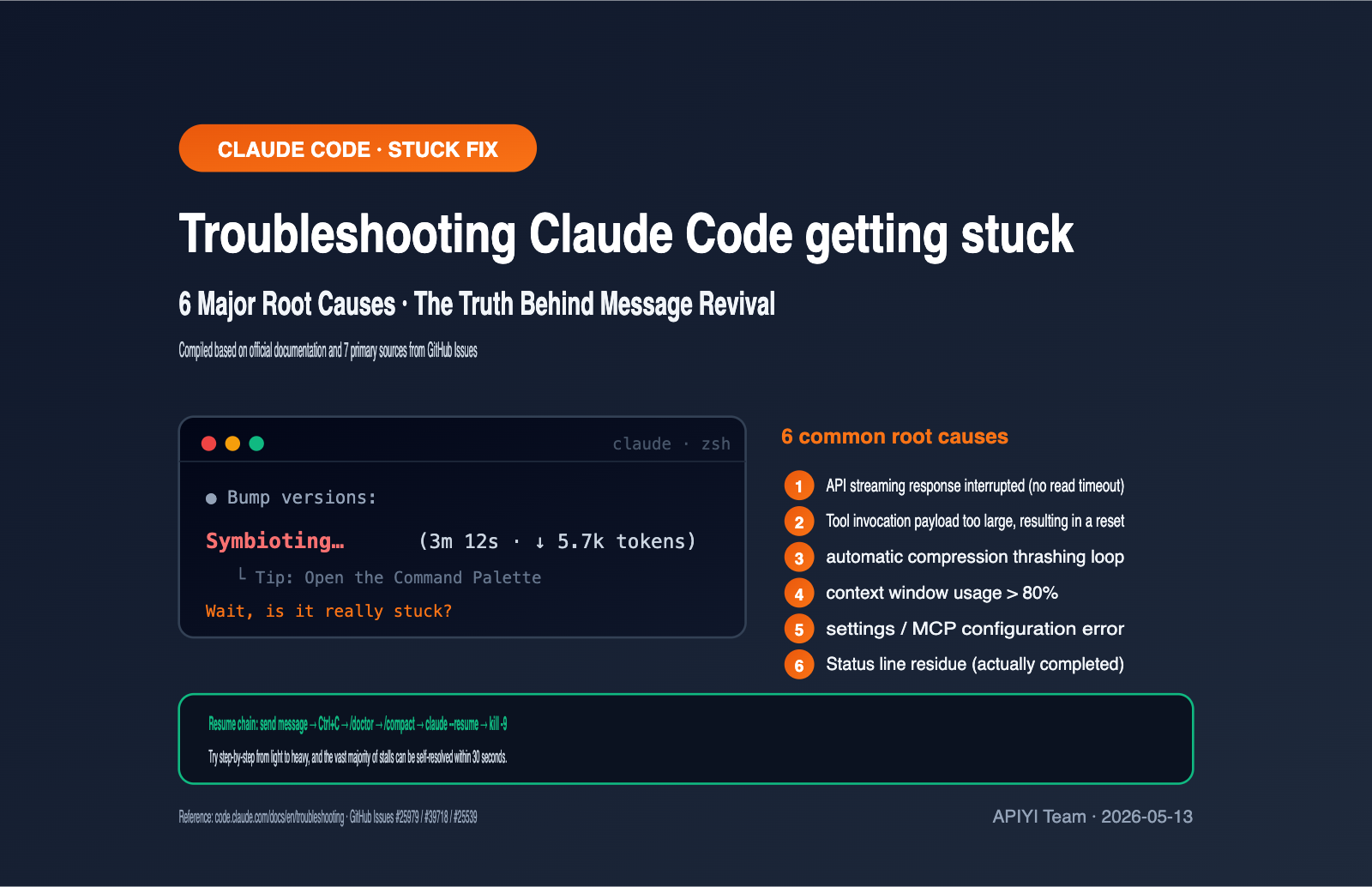
Decoding Claude Code Status Indicators
To troubleshoot "freezes," the first step is to understand the status line Claude Code displays in your terminal. The Symbioting… (3m 12s · ↓ 5.7k tokens) in the screenshot looks mysterious, but it’s actually structured information where every part has a specific meaning.
| Field | Example Value | Meaning |
|---|---|---|
| Spinner Verb | Symbioting… |
Anthropomorphic description of the current stage; customizable since v2.1.23 |
| Elapsed Time | 3m 12s |
Cumulative time elapsed since this round started |
| Flow Arrow | ↓ or ↑ |
↓ indicates receiving data from API, ↑ indicates sending |
| Token Count | 5.7k tokens |
Number of tokens downloaded/uploaded so far |
Claude Code has 187 built-in spinner verbs; Befuddling, Ruminating, Accomplishing, and Symbioting are just a few. They’re there to make the waiting experience more engaging and have no technical impact. Since version 2.1.23, you can use the spinnerVerbs configuration, and the community has even created 1,900+ custom verb packs.
Determining whether Claude Code is truly frozen isn't about the verb, but two things: is the time still ticking and is the token count still changing? If 30 seconds pass and the time goes from 3m 12s to 3m 42s, but the token count stays stuck at 5.7k, you can safely assume the streaming response has stalled.
If you are using an API proxy service like APIYI (apiyi.com) to call the Claude API, the status line fields mean exactly the same thing, and you can use the same troubleshooting method to pinpoint the issue.
The 6 Root Causes of Claude Code Freezing
Once you understand the status indicators, you can pinpoint the root cause by comparing them against actual behavior. The following 6 causes are ranked by frequency and cover over 90% of real-world cases found on the GitHub issue tracker.
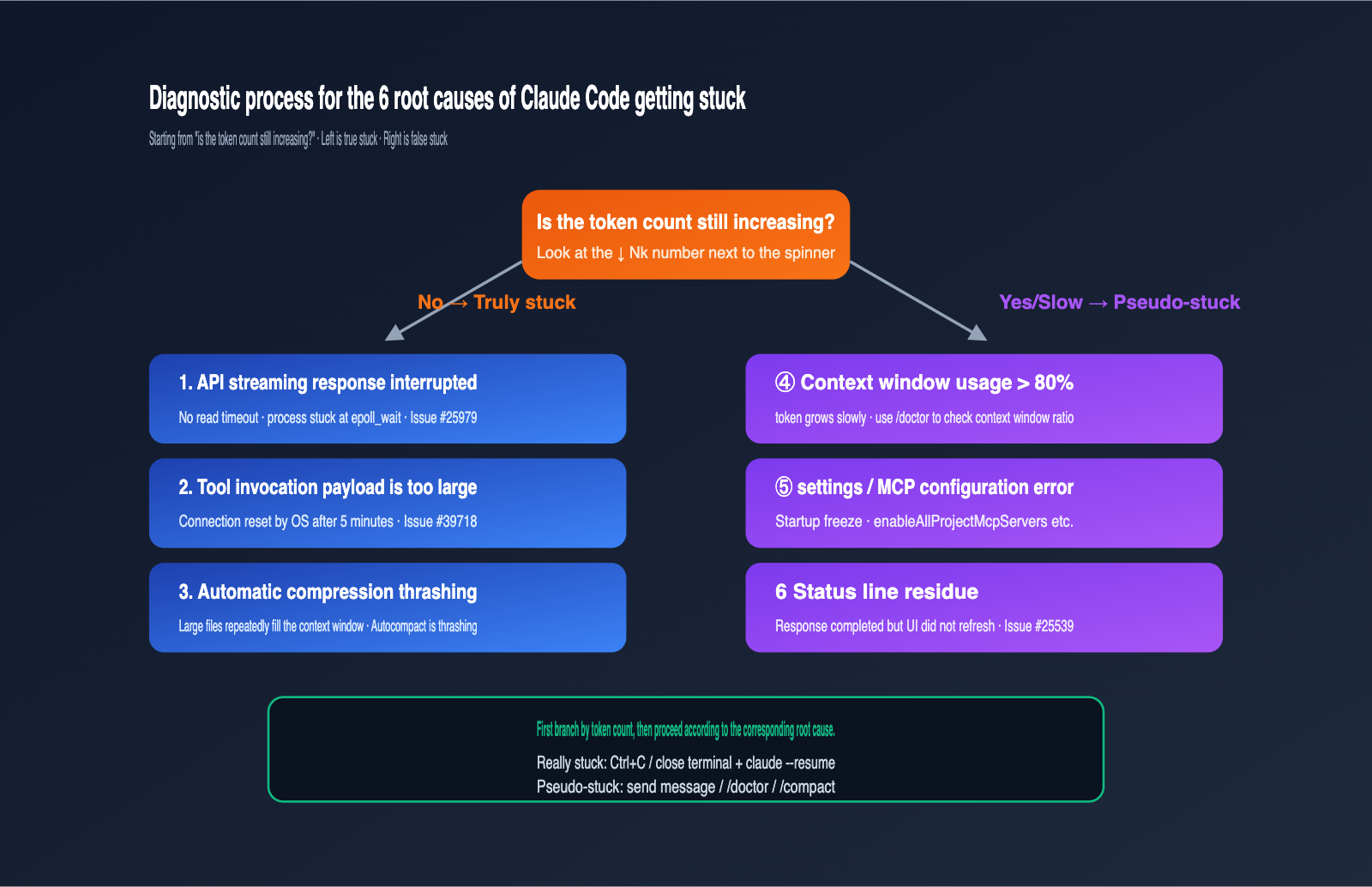
Root Cause 1: Silent Interruption of API Streaming Response
This is the most common and elusive cause, corresponding to GitHub Issue #25979. Claude Code's HTTP client lacks a read timeout mechanism. Once the upstream API stops sending packets mid-transmission, the process stays stuck in the epoll_wait kernel state waiting for new data. The spinner keeps spinning in the UI, but the token count doesn't budge. Common triggers include cross-border network jitter, tmux multiplexing, or broken SSH long-lived connections.
Root Cause 2: Tool Call Payload Too Large Triggers Connection Reset
Corresponding to Issue #39718. When the model instructs Claude Code to execute a tool that generates massive output (e.g., Write a file with hundreds of thousands of lines), the underlying HTTP connection is reset by the OS if no valid data is transmitted for 5 minutes. Claude Code fails to catch this error, leaving the spinner active in the UI. This type of freeze usually lasts exactly 5 minutes.
Root Cause 3: Auto-compact Thrashing
When Claude Code's context window is nearly full, it triggers auto-compact. If a massive file or tool output is read back into the context immediately after compression, it triggers a loop of compression, eventually causing the system to stop and throw an Autocompact is thrashing error. Before this error appears, the UI looks like it's frozen.
Root Cause 4: Context Usage Exceeds 80%
Official documentation clearly states that response times degrade significantly once context usage exceeds 80%, which in some scenarios manifests as a long period of unresponsiveness. The characteristic of this "pseudo-freeze" is that the token count is still slowly increasing, but at a fraction of the normal speed.
Root Cause 5: Settings Configuration Issues Causing Startup Deadlock
Corresponding to Issues #31049, #29652, etc. For example, setting enableAllProjectMcpServers: true while loading a large number of local MCP servers, or using invalid path prefixes like //C:/ in additionalDirectories, can cause Claude Code to freeze during startup. This usually happens in the first few seconds of opening a new session.
Root Cause 6: Status Line Residue (Response Finished but UI Not Refreshed)
Corresponding to Issue #25539. In some versions, Claude has already returned the full result, but the terminal UI's spinner hasn't cleared, making it look like it's still working. If you press Enter or send a message at this point, Claude will immediately start the next round of work—it wasn't frozen at all; the UI was just lying to you.
When troubleshooting, check if the token count is increasing. If you are using the APIYI (apiyi.com) platform as an API proxy service, you can also check the platform logs to see if the request returned a 200 OK, and cross-reference that with the Claude Code UI status.
Why Sending a Message Can "Revive" Claude Code
Many people have discovered a "mysterious" engineering miracle: Claude Code is stuck for 3 minutes, you send a message like "Are you still there?" or just press Enter, and it immediately finishes the work it was doing. This phenomenon can actually be explained at the protocol level.
The first case is status line residue (Root Cause 6). Claude has actually finished the response, but the UI didn't clear the spinner. Your new message is treated as the next prompt, making it look like a "revival," when it's really just continuing.
The second case is streaming response lag (Root Cause 1). When Claude Code receives new input, it proactively closes the current hang state, cleans up the half-finished request, and starts a new HTTP request. The new request is sent with the full session history, and the model resumes from the breakpoint, so it looks like it "resumed working."
The third case is MCP server or tool calls waiting for downstream responses. The new message is routed by Claude Code as a new tool-calling decision, indirectly bypassing the stuck call.
It's important to emphasize that sending a message isn't a cure-all. When the freeze is caused by the underlying process being in an unrecoverable waiting state (like in the later stages of Root Cause 2), sending a message only adds it to the input queue without it being processed. In those cases, you must use Ctrl+C or close the terminal. For scenarios using the APIYI (apiyi.com) platform, the success rate of "reviving" via a message is higher because the proxy service usually releases timed-out connections earlier than the official endpoint.
7 Ways to Recover When Claude Code Gets Stuck
Different root causes require different recovery strategies. The table below ranks the 7 most effective methods by "level of intrusiveness," from lightest to heaviest, to help you make the right decision.
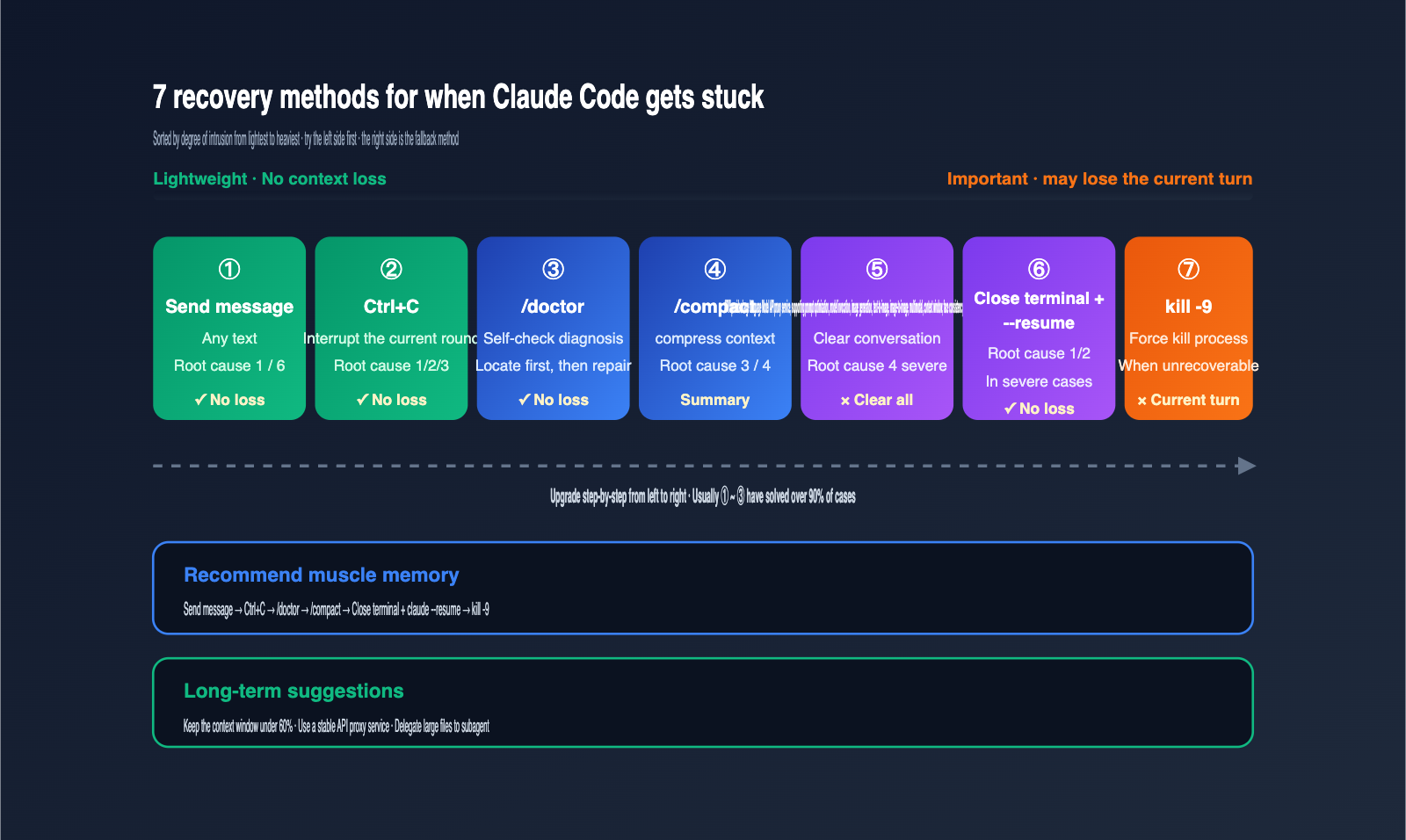
| Method | Command | Applicable Root Cause | Context Loss? |
|---|---|---|---|
| Send a message | Type text directly | Cause 1 / 6 | No |
| Interrupt operation | Ctrl+C |
Cause 1 / 2 / 3 | No |
| Self-diagnosis | /doctor |
Any, use first | No |
| Compact context | /compact |
Cause 3 / 4 | Partial (history to summary) |
| Clear session | /clear |
Severe Cause 4 | Yes |
| Restart terminal & resume | claude --resume |
Severe Cause 1 / 2 | No |
| Force kill process | kill -9 <pid> |
Unrecoverable 1 / 2 | Current turn lost |
The recommended workflow is to go from "light to heavy." Start by hitting Enter or sending a quick message; if that doesn't work, use Ctrl+C to cancel the current turn. If the terminal is completely unresponsive, close the terminal window entirely and use claude --resume to pull your session back.
/doctor is the official diagnostic command recommended by Anthropic. It performs a comprehensive check on your installation, settings files, MCP server list, and context window usage. It usually provides specific repair suggestions once finished. If the output reports Context: 87%, you can be almost certain it's Cause 4, and running /compact will provide immediate relief.
For long-running tasks, I suggest incorporating periodic /compact commands into your workflow to keep your context window usage below 60%. Also, when calling Claude via the APIYI (apiyi.com) platform, you can request independent quotas for the main Claude Code process and your MCP servers, making it much easier to isolate where an issue is coming from.
5 Best Practices to Prevent Claude Code from Hanging
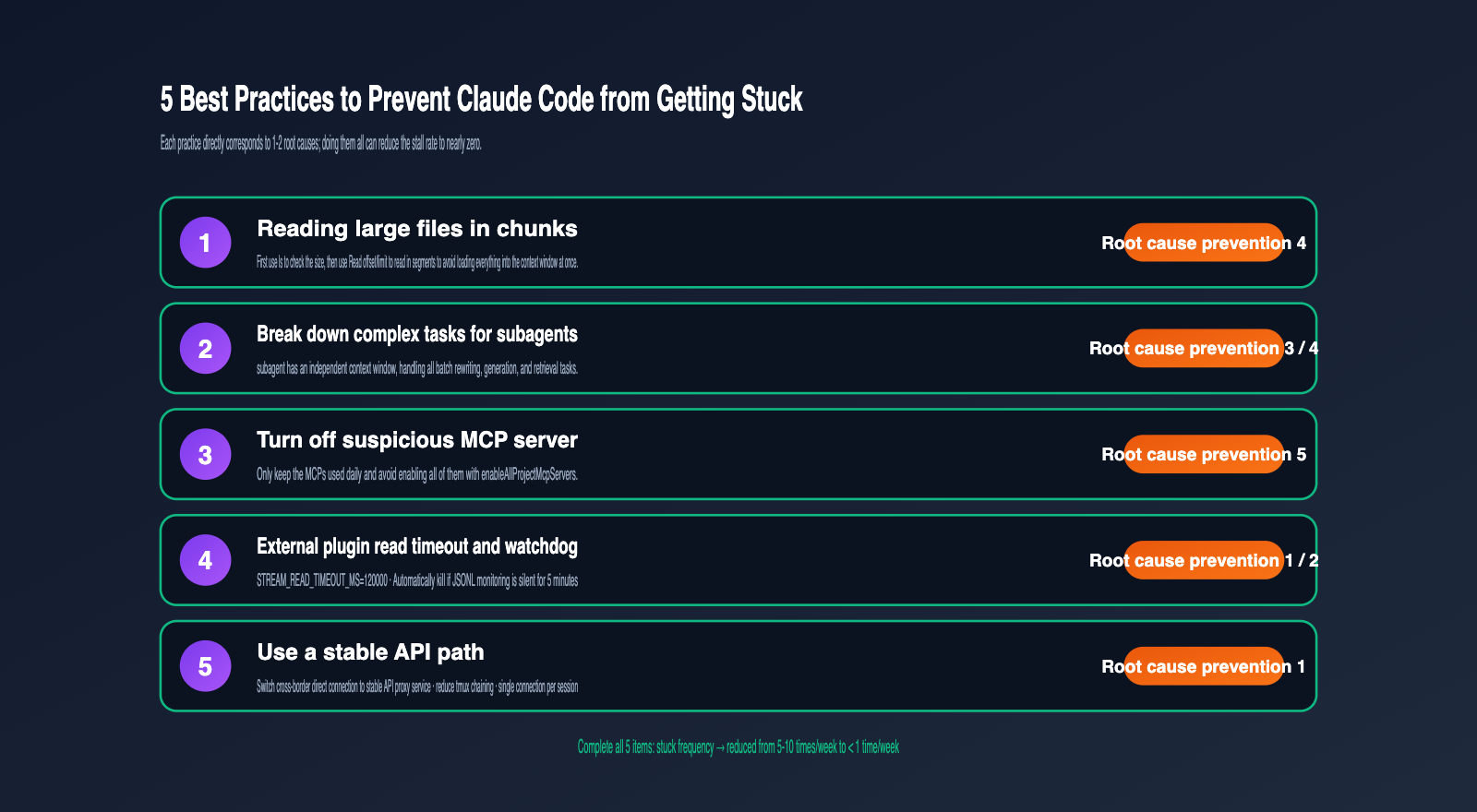
Troubleshooting is just firefighting; a truly stable workflow relies on prevention. The following five practices are based on the root causes identified in multiple GitHub issues and can reduce the hang rate to almost zero.
-
Read large files in chunks. Reading a file over 1MB directly will almost certainly trigger context window pressure. Use a two-step approach: first run
ls -lato check the size, then use theReadcommand withoffsetandlimitparameters to read it in segments. This avoids root cause #4. -
Offload complex tasks to subagents. Claude Code's subagents have their own independent context windows. Delegating tasks like generating large numbers of files or batch code refactoring to a subagent prevents your main context from being overwhelmed.
-
Disable suspicious MCP servers. Every additional MCP server increases the risk of a "deadlock" during startup. Keep only the MCP servers you use daily in your settings and disable the rest; this significantly lowers the risk of root cause #5.
-
Set timeouts for the main model and read operations. A common community practice is to set
STREAM_READ_TIMEOUT_MSto 120,000ms and add an external watchdog process to monitor the JSONL output—if it stops growing, it automatically kills and restarts the process. This is extremely effective against root cause #1. -
Use a stable API proxy service. Cross-border calls, residential broadband, and tmux sessions all increase the probability of streaming stalls. A simple solution is to use an API proxy service like APIYI (apiyi.com) to invoke Claude models. This ensures your TCP long-lived connections run through stable proxy nodes, reducing the frequency of root cause #1.
Teams that implement these five steps report that the number of weekly hangs drops from 5–10 times to less than once, and the average recovery time per incident shrinks from 5–10 minutes to just a few seconds.
FAQ
Q1: Do different spinner verbs mean Claude is doing different things?
No. The 187 default verbs are just randomly selected anthropomorphic phrases and have no correlation with Claude's actual state. To judge the status, look at the token count and wait time.
Q2: Will I lose my context after pressing Ctrl+C?
No. Ctrl+C only cancels the current, unfinished turn; the entire session is preserved. If Ctrl+C doesn't respond, you can press it again or simply close the terminal, then use claude --resume to recover the session.
Q3: Is it easy for Claude Code to hang when used in China?
Cross-border network issues are a primary cause of streaming interruptions. It is recommended to use an API proxy service like APIYI (apiyi.com) to invoke Claude models. Stable proxy nodes maintain the long-lived connection with Anthropic, which significantly reduces the probability of hangs for developers in China.
Q4: How should I handle the `Autocompact is thrashing` error?
Stop the current task immediately and use a focused compression command like /compact keep only the plan and the diff to clear large chunks of raw output from the context. If that still fails, start a new session or switch the large file reading to subagent mode.
Q5: Can I customize the spinner verbs myself?
Yes. Add a spinnerVerbs field to your ~/.claude/settings.json. The mode can be default, append, or replace, paired with an array of strings. There are community-made verb packs with 88 themes and 1900+ words that you can apply directly.
Summary
The core reason Claude Code gets stuck is the compounding effect of three subsystems—streaming protocols, context management, and MCP integration—in edge scenarios. Once you understand the 4 fields of the status indicator, memorize the 6 root causes, and master the 7 recovery methods, you can turn "mysterious glitches" into "known issues."
Our practical advice is to turn these recovery steps into muscle memory: send a message first, then hit Ctrl+C, run /doctor, and finally close the terminal and use claude --resume. When combined with a stable API proxy service and our 5 preventive best practices—keeping context usage below 80%, delegating large files to subagents, and using the stable paths provided by APIYI (apiyi.com)—you'll find that the vast majority of "stuck" scenarios can be resolved in seconds.
Author: APIYI Technical Team
Contact: Visit APIYI at apiyi.com for access to the full Claude model series and stable Claude Code API proxy support.
Updated: 2026-05-13