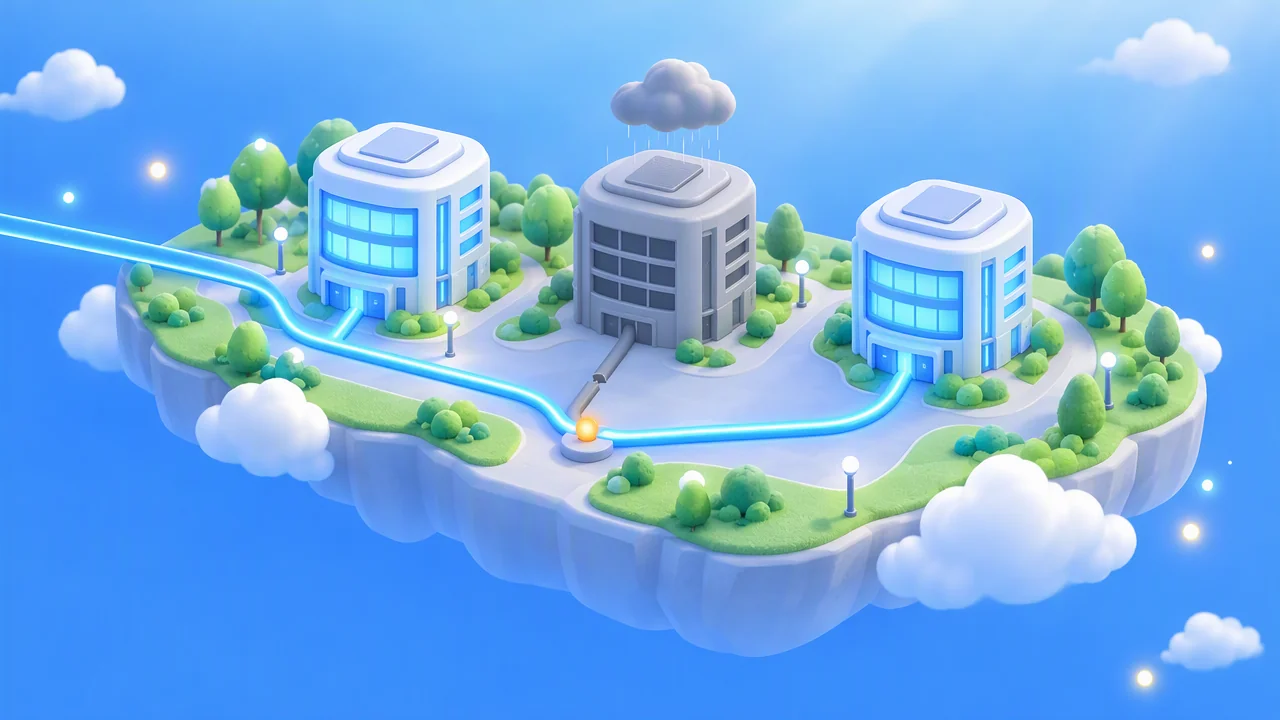
On October 20, 2026, a power outage knocked out one Google Cloud availability zone in London for nearly eight hours. Five days earlier, DeepSeek had gone down for most of the morning. Developers are asking whether their own AI applications could be next.
Upstream services can go down at any time. If you only call model APIs, you don’t need to move your data center—but you shouldn’t build your business around a single model provider.
What you’ll learn: By the end of this article, you’ll know which situations call for action, which don’t, and how to have a backup model ready.
What went down in the two outages this week
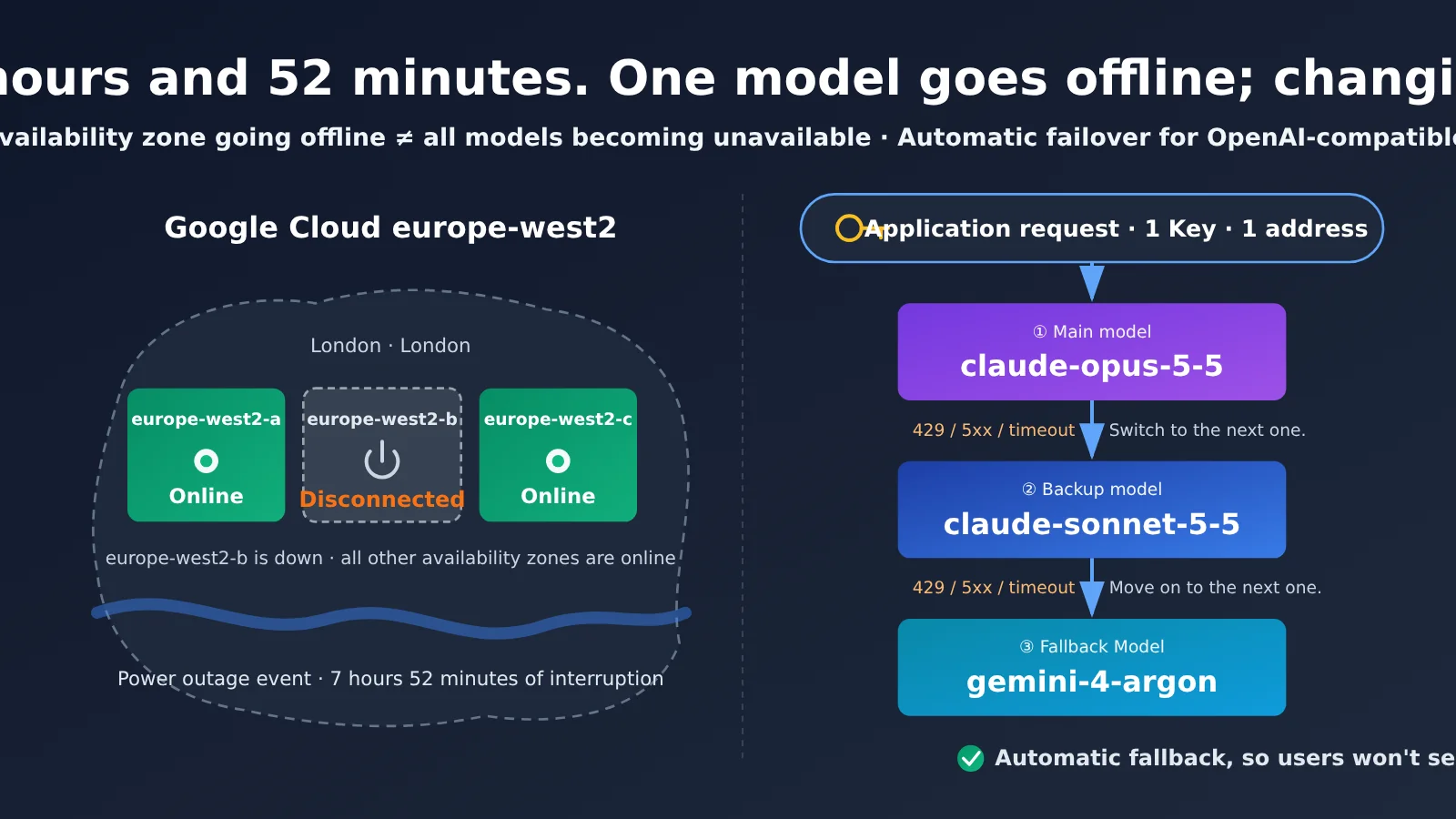
First, Google Cloud. From 14:08 to 22:00 Beijing time on October 20, 2026, a power event took down the London europe-west2-b availability zone for 7 hours and 52 minutes. Compute, storage, databases, and networking deployed in that zone were affected. If you only call model APIs remotely, you weren’t directly affected. But if your service happened to be running in that zone, background jobs, database connections, and external endpoints were left waiting there that afternoon. No one could do their work in advance for them.
Now, DeepSeek. Starting at 08:11 Beijing time on October 15, 2026, parts of its website, chat service, and V4 Pro and V4.1 Flash APIs were disrupted. The official status page records an outage lasting 4 hours and 52 minutes, with service restored at 13:04 that day. Caixin and the South China Morning Post described it as “nearly five hours,” but the duration on the official record is the one to go by. DeepSeek later refunded usage from October 8 to 14 as credits. The company hasn’t disclosed the cause, so we won’t speculate. For users, whether the service was available that morning depended on having a second option—not on what caused the outage.
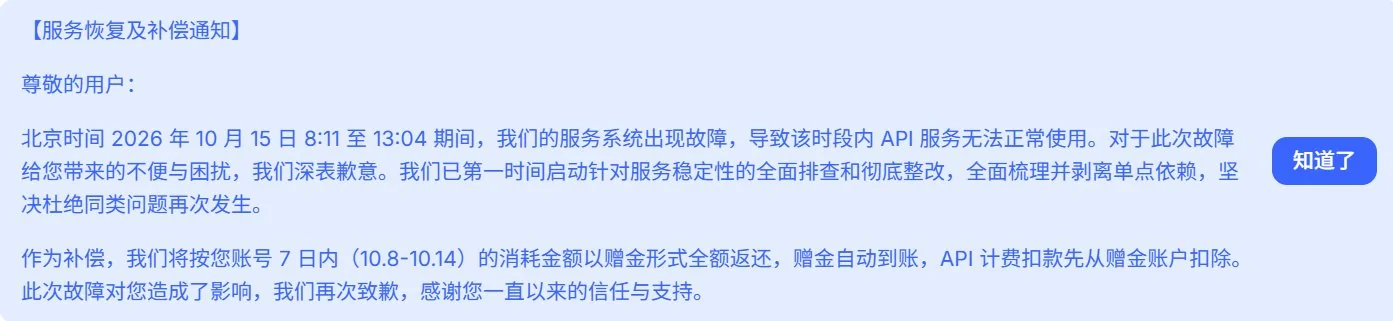
Image: DeepSeek’s notice to users about service restoration and compensation. From 8:11 a.m. to 1:04 p.m. Beijing time on October 15, the API service was unavailable. DeepSeek will automatically refund the full amount each account spent from October 8 through 14 as credits. API charges will be deducted from the credit balance first.
The two outages hurt in the same way: the model was part of that day’s workflow, and when the API went down, coding, research, and batch processing all came to a halt. By the time the upstream service was restored, half the day was gone. Credits cover the bill, not the work that stopped. If a team had planned to deliver a batch of translations, run an evaluation, or meet a launch deadline that day, none of that work gets done automatically just because compensation arrives later. It gets pushed back, eating into the next day’s schedule too.
| Item | Verified details of the Google Cloud incident |
|---|---|
| Incident ID | Xs2XTHzAVC9YnafnPyzj |
| Scope | Availability zone europe-west2-b in the europe-west2 region |
| Cause | Power event; no further details from Google |
| Start time | October 20, 2026, 14:08 Beijing time |
| End time | October 20, 2026, 22:00 Beijing time; lasted 7 hours and 52 minutes |
| Not affected | Looker Studio |
What’s the difference between an availability zone and a region?
When people hear “London outage,” they often assume all of Google Cloud in London went down. That wasn’t the case. A region (europe-west2) is a group of data centers Google operates in London. Availability zones (europe-west2-a, b, and c) are separate facilities within that region. They’re designed to have independent power and network connections, so if one goes down, the others can keep running. This time, one of the three zones went dark while the other two stayed online.
The teams that took the real hit were those with services running only in zone b. Teams that had spread their services across zones a and c could route traffic to the facilities that were still up and running, greatly reducing the impact. If you only call model APIs remotely, you likely wouldn’t have noticed the outage.
Comparing the two outages
| Comparison | Google Cloud London | DeepSeek |
|---|---|---|
| Time (Beijing time) | October 20, 2026, 14:08 to 22:00 | October 15, 2026, 08:11 to 13:04 |
| Duration | 7 hours and 52 minutes | 4 hours and 52 minutes |
| What went down | Compute, storage, databases, and networking in europe-west2-b | Website, chat service, and V4 Pro and V4.1 Flash APIs |
| Cause | Power event; no further details | Not disclosed by the company |
| Follow-up | Google advised customers to move to another availability zone or region if possible | Usage from October 8 to 14 was refunded as credits |
| For people who only call model APIs | Not directly affected | Directly affected; without a backup, all you can do is wait |
Side by side, the difference is clear. The Google outage hurt people with machines in zone b; the fix is deployment across multiple availability zones. The DeepSeek outage hurt people relying on a single model provider; the fix is to have a backup model lined up in advance. The first is a data center problem, the second is a model-calling problem. The rest of this article focuses on the latter.
Lessons to Take Away from This Outage
Any provider can go down, so have a second and third option ready—and ideally, don’t get them from the same provider. Switching to a cheaper tier from the same provider doesn’t count as a fallback. If the whole provider has an outage, both tiers could go down together.
It also matters when you switch. Only fail over to another model for 429, 500, 502, 503, 504, and timeout errors. These usually mean the provider can’t handle the request right now, so trying a different model may work. Don’t switch for 401, 403, or content safety refusals. Those point to an issue with your API key or the content itself, and trying ten different models won’t help. One more thing: if your database and storage are deployed in an availability zone that’s down, switching models won’t fix the problem. You’ll need to consider deploying across availability zones. Model fallback and data-center disaster recovery solve different problems, so don’t mix them up.
Once you’ve set up a fallback, don’t remove it when the outage is over. It won’t generate extra requests under normal conditions—if the primary model succeeds, the fallback isn’t used. But when the next outage happens, it’ll kick in automatically, without anyone having to get up in the middle of the night to change the code. Before you wire everything together, send each model a simple request on its own to make sure the model name is correct and it returns a response. Different models can have different response styles, so if your application depends on a specific output format, spell it out in the system prompt to minimize differences when switching models.
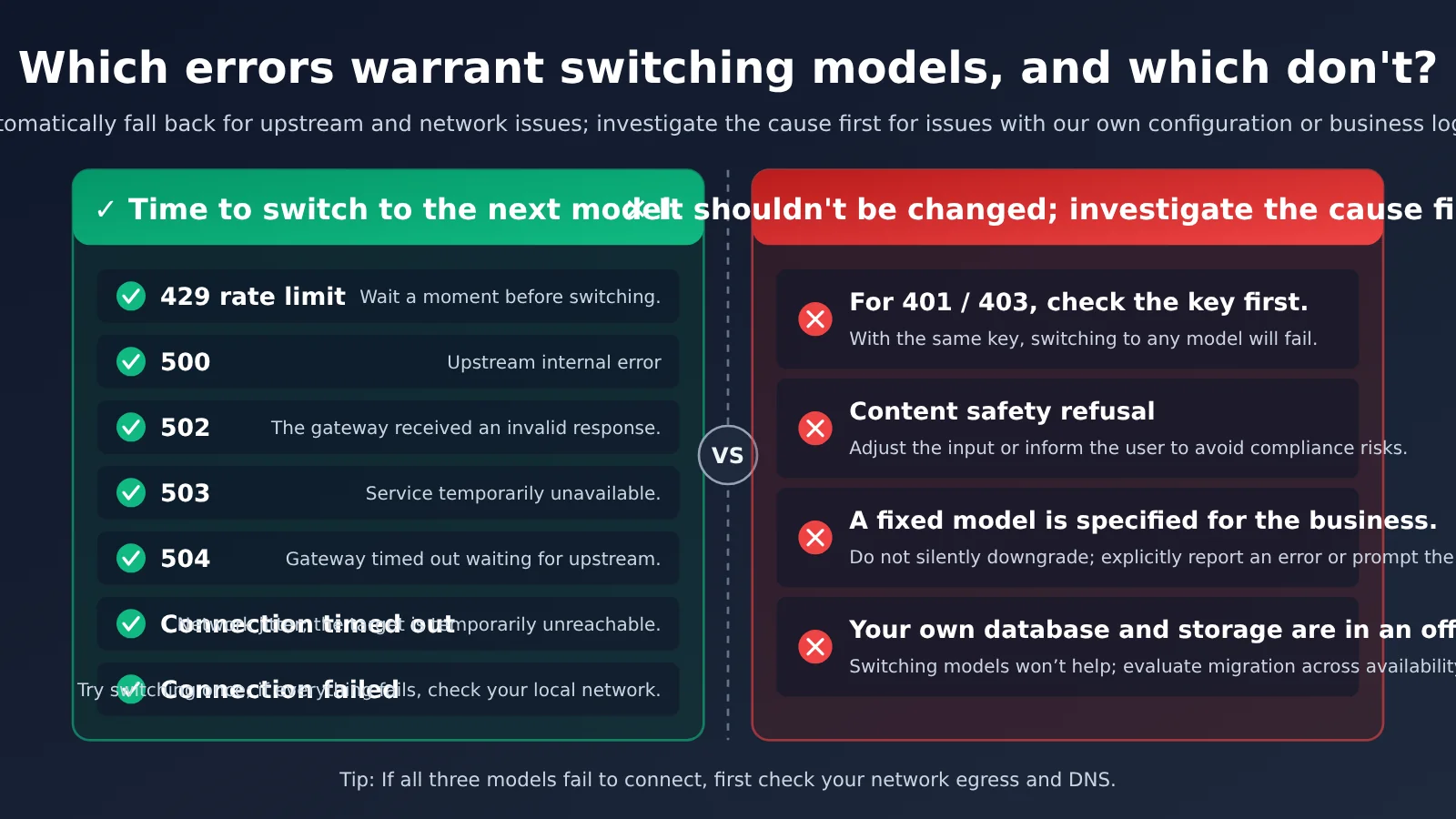
How to Configure Your Fallback Chain
Knowing to “switch on failure” isn’t enough. Switching too quickly or too slowly can both cause problems. These are some of the most common questions. There’s no one-size-fits-all answer, so adjust these settings to suit your business.
| Setting | Recommendation | Why |
|---|---|---|
| How many times to retry the same model | Retry at most once, then move to the next model | When the upstream provider is having issues, repeatedly retrying the same model often just means waiting in line again |
| How long to wait for a single request | Use shorter timeouts for chat and longer ones for long-form generation | If users have to wait too long, they may close the page before the fallback kicks in |
| What to do when you get a 429 | Wait a second or two, then switch | Rate limits can be caused by a brief spike and may clear up after a moment |
| Maximum wait for the entire chain | Keep the total for all three tiers within the wait time users can tolerate | Prevents requests from hanging if all three tiers are slow |
| What to log | Which tier succeeded or failed each time, and the error code | Helps you see which provider is having issues and whether you need to change the order |
| When to alert someone | When the share of requests using the fallback tier suddenly increases | Fallbacks can keep users unaware of an outage, and the team might not notice either—someone still needs to know when the primary model is having problems |
The last point is the easiest to overlook. The better your fallback works, the less noticeable an issue with the primary model becomes. If nobody checks the logs, the primary model could be down all day while everyone thinks things are running normally—until the bill shows a spike in calls to the backup models.
Switching Models Doesn’t Mean Switching API Keys
Fallbacks are only useful if they’re easy to set up. If every model requires a separate account, a different endpoint, and changes to the request format, most teams will put it off until the next outage.
APIYI uses the same endpoint, https://api.apiyi.com/v1/chat/completions, and the same API key. You only change model in the request body. Use claude-opus-5-5 as the primary model. If it fails, switch to claude-sonnet-5-5, then to gemini-4-argon. The first two models are from the same provider; the third is from another, so you still have an option if one provider has a widespread problem.
The changes are minimal: you just add an ordered list of model names to your application code. The request format, authentication, and response structure all stay the same, making the setup easy to test.
| Order | Model | Input price | Output price | Role |
|---|---|---|---|---|
| 1 | claude-opus-5-5 | 4 | 20 | Primary model |
| 2 | claude-sonnet-5-5 | 2 | 10 | First fallback, lower-cost model from the same provider |
| 3 | gemini-4-argon | 2 | 10 | Second fallback, from another provider |
| Optional | gpt-6-astra | 10 | 50 | More expensive fallback; uses the OpenAI interface only |
| Optional | deepseek-v4.1-flash | 0.30 | 1.20 | Low-cost fallback |
Prices above are in US dollars per million tokens, based on the pricing page as of 2026-10-21, at a multiplier of 1. Prices may change; check the pricing page at api.apiyi.com for the latest information.
Set Up Fallbacks in Three Steps
Step 1: Get an API key. Sign up at api.apiyi.com and create an API key. It’s pay-as-you-go, can be accessed directly from mainland China, and doesn’t require an overseas credit card. This one key works with every model in the table above.
Step 2: Test each model. Set the endpoint to https://api.apiyi.com/v1. It’s compatible with the OpenAI API format, so if your code already uses the official OpenAI library, you can get started by changing the endpoint and API key. Use the same prompt to test claude-opus-5-5, claude-sonnet-5-5, and gemini-4-argon one by one. Make sure each returns a response and that the format is what you expect.
Step 3: Set the order and run a drill. Add the three model names to your configuration in order, and decide when to switch based on the rules in the previous section. Don’t rush to deploy once everything’s connected. Temporarily set a very short timeout for the primary model to force a timeout, then check that the request falls through to the second model and that the switch is recorded in your logs. Once the drill passes, you know the fallback is actually in place. For specific parameters, see the integration guide at docs.apiyi.com.
How to Order Models for Different Workloads
The order used in this article prioritizes quality, but it isn’t the only option. The right model to lead with depends on your workload.
| Workload | Suggested order | Why |
|---|---|---|
| Coding and complex reasoning | claude-opus-5-5 → claude-sonnet-5-5 → gemini-4-argon | Quality comes first—this is the default order used in this article |
| Customer support and everyday chat | claude-sonnet-5-5 → gemini-4-argon → deepseek-v4.1-flash | High call volume and price sensitivity mean you don’t need the most expensive model up front |
| Bulk translation and summarization | deepseek-v4.1-flash → gemini-4-argon → claude-sonnet-5-5 | For high-volume workloads, lead with a low-cost model and move up if it fails |
| Outputs with strict formatting requirements | Put two models from the same provider first, then one from another provider | Models from the same provider often have more similar styles, so switching is less jarring |
There are two basic rules for ordering models: make the last fallback a different provider if possible, and match the price to the value of the task. The bulk translation example also shows why fallbacks matter. If DeepSeek had gone down on October 15, requests would have automatically moved to the other two providers, and the task could have continued.
One thing to be clear about: switching models keeps the model invocation step running. It can’t fix a power outage at the data center.
Upstream Providers Can Go Down—Have Another Route Ready
The publicly documented example is DeepSeek’s official outage on 2026-10-15. APIYI switched to the full-capability Volcano Engine channel, so there was no need to change the model name, and production was restored to normal. See the real-time updates at docs.apiyi.com.
Upstream outages happen, and they’re nobody’s fault. Having another route ready is more useful than waiting around for hours. Preparing for an outage costs almost nothing and takes little time—as long as you do it beforehand. If you wait until something goes wrong, you’ll be making changes under pressure.
When an Outage Hits, What Should You Check First?
If a large number of requests suddenly start failing, don’t rush to change your code. Take two minutes to check three places: first, Google Cloud Service Health, to see whether there’s a data center issue; second, the model provider’s official status page, such as DeepSeek’s status page in this case; and third, APIYI’s live updates at docs.apiyi.com, where changes to APIYI’s upstream routes are posted.
If all three show normal service, then check your own setup: has the API key expired, is the balance sufficient, and are there issues with your network egress or DNS? If you check these in the opposite order, it’s easy to spend ages searching your code before discovering the issue is upstream.
Four Things You Can Do Today
- List every place in your application that calls a model, and check which ones rely on just one provider.
- Add at least one fallback model from another provider wherever you currently rely on just one.
- Following the rules above, switch only on 429, 5xx, and timeouts, and log every switch.
- Deliberately make the primary model time out once, and confirm that the request actually falls through to a backup.
Once you’ve done these four things, the next data center outage or model provider disruption should slow your application by a few seconds at most, rather than bringing it to a halt for half a day.
Frequently Asked Questions
Q1: Should we move out of London immediately after the Google Cloud outage?
Not necessarily. The official guidance says “if possible”—it doesn’t require everyone to move immediately. Teams with workloads in europe-west2-b can consider moving to another zone or region. If you only call model APIs, you don’t need to migrate; start by setting up model fallbacks.
Q2: Will switching models cost more?
The order above is actually cheaper. The primary model, claude-opus-5-5, costs 4 for input and 20 for output; both fallback models cost 2 for input and 10 for output. Costs only go up if you add a model like gpt-6-astra, which costs 10 for input and 50 for output, to your fallback list.
Q3: Can one API key call models from all these providers?
Yes. These models all use the same OpenAI-compatible endpoint and API key; you just change `model`. Keep in mind that gpt-6-astra uses the OpenAI interface only.
Q4: Will response quality drop when we switch to a fallback model?
It might, especially when you switch from the most capable model to a lower-cost one. But for most workloads, a slower, slightly less polished answer is better than an error. For strict formatting requirements, specify the output format explicitly in your system prompt, then compare the models’ outputs in advance using the method in Step 2. That way, you’ll know what to expect before going live.
Q5: Does keeping a fallback model cost more when there’s no outage?
No. With pay-as-you-go pricing, you only pay for requests that are actually sent. If the primary model succeeds, the fallback models aren’t called and don’t incur any charges. The only real costs are the time it takes to set things up and the few test requests you send during the drill.
Key Takeaways
- Two outages: Google Cloud’s europe-west2-b outage lasted 7 hours and 52 minutes; DeepSeek’s official incident record shows an outage of 4 hours and 52 minutes.
- What the facts do—and don’t—say: Europe as a whole wasn’t down, and the models themselves didn’t go offline as a result. DeepSeek hasn’t officially disclosed the cause.
- When to switch: Switch only on 429, 500, 502, 503, 504, and timeouts—not on 401, 403, or content safety refusals.
- What to do: Prefer a fallback from a different provider. Use the same endpoint and API key; change only
model. - How to verify: Once it’s set up, deliberately make the primary model time out and check that the request reaches a fallback and that the switch is logged.
Service credits can cover a bill, but they can’t make up for work that stopped. Set your model order in advance, and the next time an upstream provider has a problem, users will notice a delay of a few seconds at most.
References
- Google Cloud Service Health: Multiple service incidents in europe-west2 (Xs2XTHzAVC9YnafnPyzj), 2026-10-20
- Google Cloud Service Health: Google SecOps security products incident in europe-west2 (separate record), 2026-10-20
- BBC: Report on the impact of the Google Cloud outage on UK banks and public services, 2026-10-20
- DeepSeek official status page: Service outage record for 2026-10-15
- Official documentation: Live updates at docs.apiyi.com
Author: APIYI Technical Team
Technical discussion: If you run into issues setting up model fallbacks, feel free to leave a comment and join the discussion.