Trying out a flagship Claude Opus model without paying upfront is a familiar situation for many developers. This article walks through common ways to try claude-opus-5-5 for free, how to check your available quota, and the limitations and risks to keep in mind. It also includes a five-step application process you can follow directly.
This isn’t a clickbait “get it for free” guide. Free quota amounts and promotional rules can change at any time, so this article won’t quote specific amounts or request counts. Instead, it’ll show you how to check them in the console. The APIYI console at apiyi.com is the main place to check your account quota.
What you’ll learn: By the end, you’ll know where to check your trial eligibility, how to validate the model effectively while using as few tokens as possible, and how to quickly diagnose errors.
Key Points for a claude-opus-5-5 Free Trial
First, let’s clarify what a “free trial” means: it’s a limited amount of test credit you can use to check whether the model meets your needs. It’s not unlimited access, and it shouldn’t be treated as a long-term production solution. The table below covers the main things to understand before you start.
| Key point | Details | Why it matters |
|---|---|---|
| Confirm the model name | Use the actual ID shown in the console’s model list. This article uses claude-opus-5-5 in its examples. |
Avoid repeated 404 errors caused by typos in the model name. |
| Check your test credits | The amount shown in the console after registration is the source of truth; this article doesn’t specify a figure. | Plan your test usage in advance. |
| Keep each request’s usage in check | Limit output length and keep prompts concise. | Test more scenarios with the same amount of credit. |
| Understand usage limits | Concurrency, rate limits, and available features may differ from those of a paid account. | Don’t assume trial performance reflects production performance. |
| Protect your API key | Don’t put your API key in a public repository. | Prevent others from using your credits. |
Why You Should Be Careful When Trying a Flagship Model
Flagship models usually cost more per token than smaller models in the same family. That means you’ll be able to make noticeably fewer requests with the same amount of test credit. So, during a trial, don’t use the model for large-scale data runs or long-document stress tests. Instead, choose a few tasks that best show where the model stands out, such as complex reasoning, long-context comprehension, or code refactoring.
Another common mistake is using the flagship model throughout the debugging process. A more practical approach is to use a less expensive model to get your prompt, parsing logic, and error handling working, then switch to claude-opus-5-5 for a final quality comparison. That way, you’ll spend your flagship-model credits on the final validation.
How to Think About Trial Credits
You can think of credit usage as the combined cost of input tokens and output tokens, each multiplied by its respective price. Output tokens usually cost more than input tokens, so limiting output length is often the most effective way to save. The usage field in each API response gives you the number of input and output tokens used for that request. Print it in your test script so you can keep track.
What Are the Ways to Get a Free Trial of claude-opus-5-5?
There’s more than one way to get trial access, and each option has different requirements, reliability, and use cases. The table below compares them. Check each platform’s public information for the latest policies.
| Option | Best for | Main advantages | Things to keep in mind |
|---|---|---|---|
| Official trial | Users who can access the official service and have an international payment method | Direct access to the official service and its full feature set | Check whether the flagship model is included in the free plan. Policies may change. |
| Test credits from an aggregator platform | Developers who want direct access from within China and a single place to manage multiple models | Use one API key to call models from multiple providers and compare them easily | Check the platform dashboard for current credit limits and promotions. |
| Promotions or referral rewards | Users willing to keep an eye on platform announcements | A chance to get additional test credits | Offers are time-limited and may expire without a replacement. |
| Small initial top-up | Users who’ve used up their free credits but still want to continue testing | Flexible, controllable credit amount | Set a budget limit yourself. |
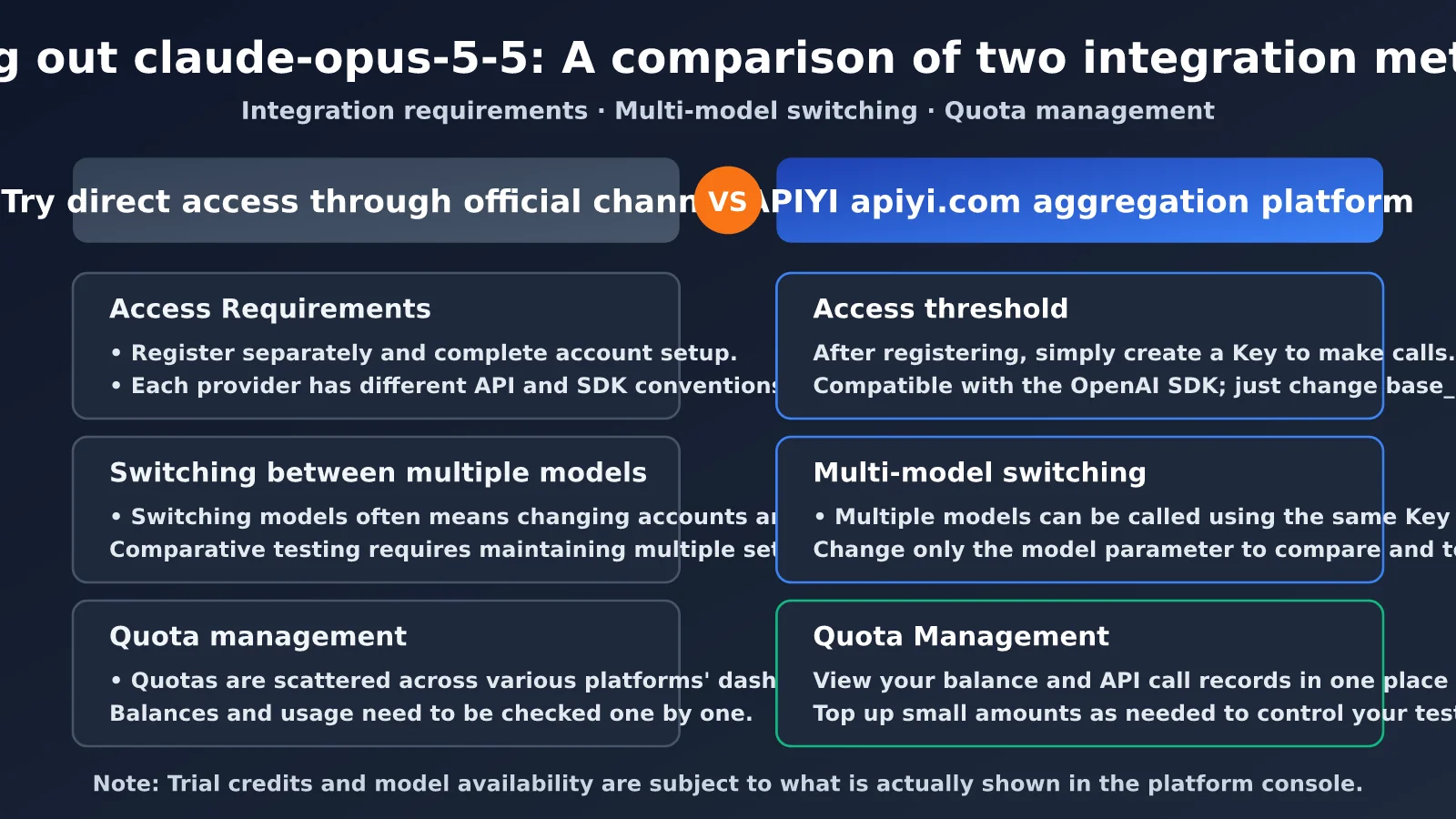
If you just want to check whether claude-opus-5-5 works for your use case, test credits from an aggregator platform are usually the easiest option to get started with. After registering with APIYI at apiyi.com, you can test multiple models from the same account without opening a separate account with each provider.
How to Apply for a Free Trial of claude-opus-5-5 in 5 Steps
The following process works for most aggregator platforms with OpenAI-compatible APIs. The wording in the interface may vary, but the steps are generally the same.
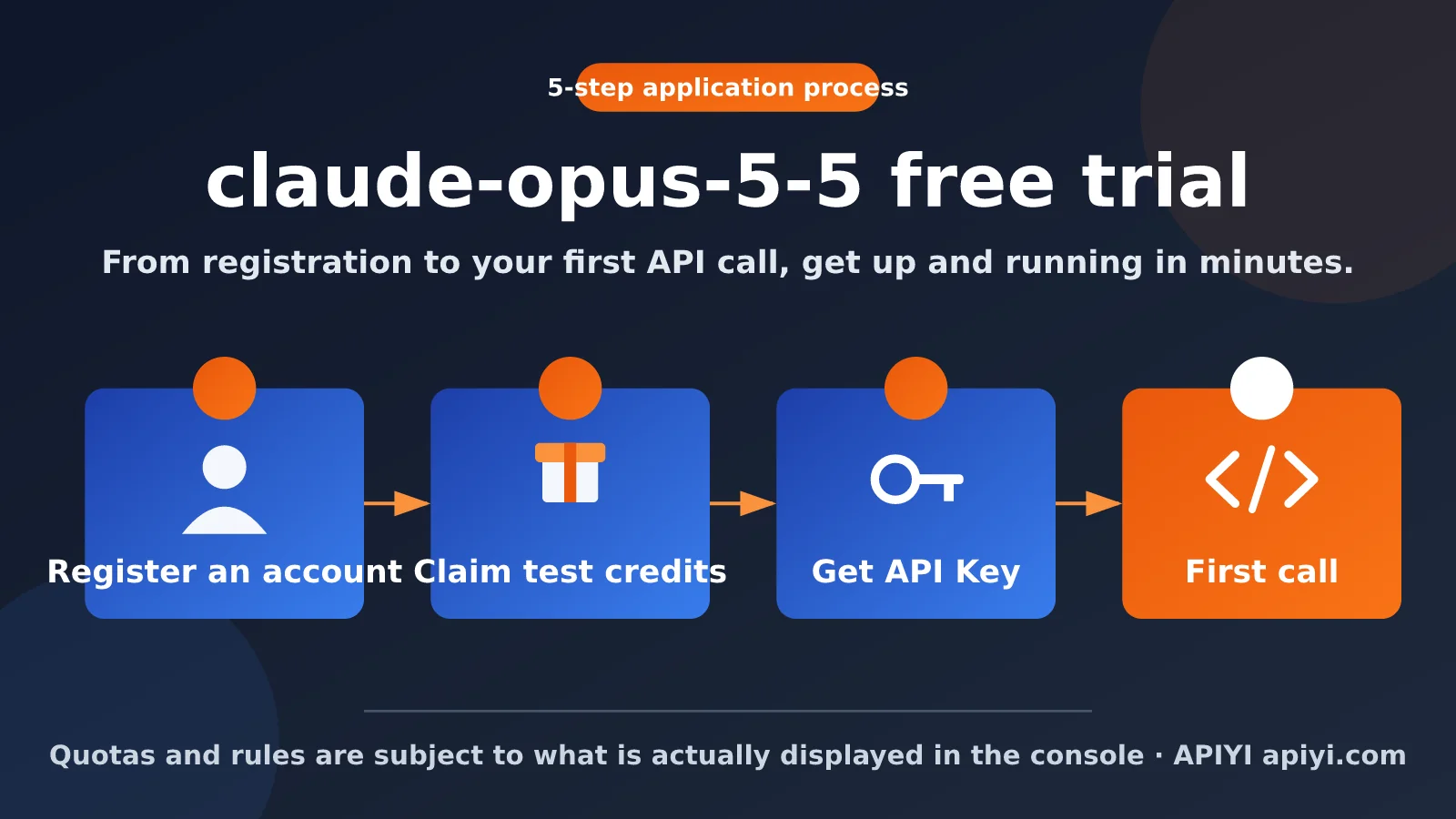
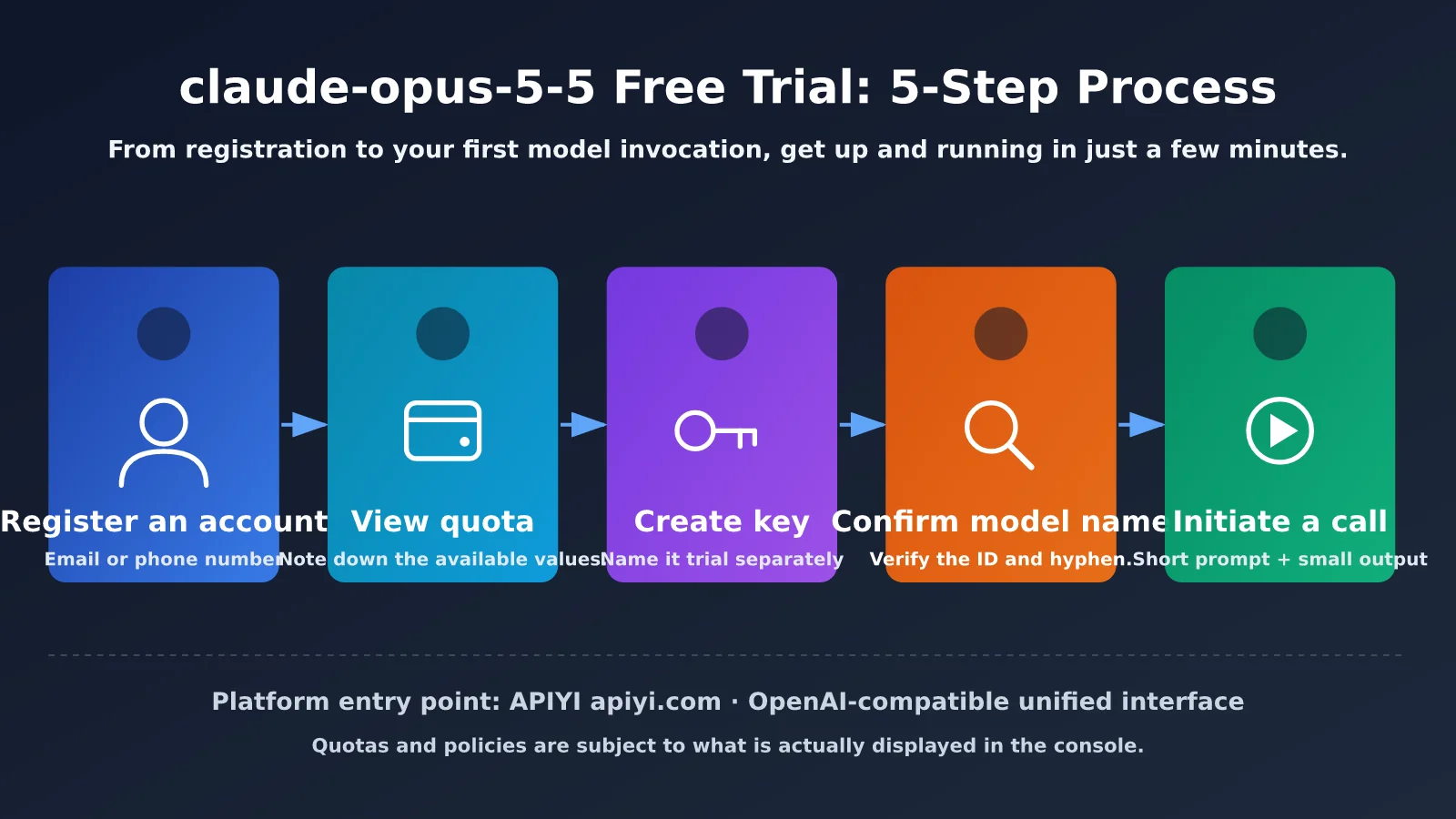
- Create an account: Visit APIYI at apiyi.com, sign up with your email address or phone number, and log in to the dashboard.
- Check your test credits: After logging in, check your available credits on the account or wallet page. Note the amount so you can reconcile it later.
- Create an API key: Create a new key on the API key management page. It’s best to create a separate key for your trial and give it a name like
trialso you can revoke it later. - Confirm the model name: Search for
opusin the model list and check that the exact ID for claude-opus-5-5 is available. Pay attention to capitalization and hyphens. - Make your first API call: Use the sample code in the next section. Start with a short prompt and a low output limit to verify that everything works.
🚀 Quick start: APIYI at apiyi.com is a good choice for quickly building a prototype. It provides a unified, OpenAI-compatible API. Follow the five steps above, and you can usually make your first API call in just a few minutes.
A Few Details to Keep in Mind
Use an email address you check regularly so you don’t miss notifications about credit changes or low balances. When creating API keys, don’t reuse the same key across multiple projects just to save time. If usage suddenly spikes, it’ll be hard to tell where it came from.
It’s easy to overlook the model name confirmation step. Different platforms may use different naming conventions for the same model: some include a date suffix, while others don’t. Use the exact string shown in the dashboard. Copying and pasting it is much more reliable than typing it from memory.
claude-opus-5-5 Free Trial: Quick Start
Minimal Example
Here’s the shortest runnable example, at about 15 lines of code. It limits the output length, making it a good way to run your first test without using too much of your trial quota.
import openai

client = openai.OpenAI(
    api_key="YOUR_API_KEY",
    base_url="https://api.apiyi.com/v1"  # Use the unified APIYI endpoint
)

response = client.chat.completions.create(
    model="claude-opus-5-5",
    messages=[{"role": "user", "content": "Explain what a context window is in three sentences."}],
    max_tokens=200
)
print(response.choices[0].message.content)
print("Usage for this request:", response.usage)
When it runs successfully, you’ll see the model’s response and a usage summary. Note the input and output token counts in usage to get a rough idea of how many similar requests your test quota can cover.
Verify the Connection with curl
If you want to rule out SDK issues first, you can send a request directly with curl. It’s equivalent to the Python example and is useful for checking connectivity from a server or CI environment.
curl https://api.apiyi.com/v1/chat/completions \
  -H "Authorization: Bearer YOUR_API_KEY" \
  -H "Content-Type: application/json" \
  -d '{
    "model": "claude-opus-5-5",
    "messages": [{"role": "user", "content": "Hello"}],
    "max_tokens": 100
  }'
View the complete implementation (with retries and usage tracking)
import time
import openai
from typing import Optional

client = openai.OpenAI(
    api_key="YOUR_API_KEY",
    base_url="https://api.apiyi.com/v1"  # Use the unified APIYI endpoint
)

MODEL = "claude-opus-5-5"  # Use the actual ID shown in the model list in your dashboard

# Track cumulative usage to estimate trial quota consumption
total_prompt_tokens = 0
total_completion_tokens = 0


def ask(
    prompt: str,
    system_prompt: Optional[str] = None,
    max_tokens: int = 300,
    retries: int = 2,
) -> str:
    """Call claude-opus-5-5 with basic retries and usage tracking."""
    global total_prompt_tokens, total_completion_tokens

    messages = []
    if system_prompt:
        messages.append({"role": "system", "content": system_prompt})
    messages.append({"role": "user", "content": prompt})

    for attempt in range(retries + 1):
        try:
            resp = client.chat.completions.create(
                model=MODEL,
                messages=messages,
                max_tokens=max_tokens,
            )
            usage = resp.usage
            total_prompt_tokens += usage.prompt_tokens
            total_completion_tokens += usage.completion_tokens
            return resp.choices[0].message.content
        except openai.RateLimitError:
            # Back off and retry when rate-limited
            time.sleep(2 ** attempt)
        except openai.AuthenticationError:
            return "Authentication failed. Check that your API key is correct."
        except openai.NotFoundError:
            return "Model not found. Check the model name."
        except Exception as e:
            return f"Request error: {e}"
    return "Still rate-limited after multiple retries. Please try again later."


if __name__ == "__main__":
    answer = ask(
        "Explain the difference between RAG and fine-tuning in no more than 100 words.",
        system_prompt="You are a concise technical advisor.",
        max_tokens=250,
    )
    print(answer)
    print(f"Total input tokens: {total_prompt_tokens}")
    print(f"Total output tokens: {total_completion_tokens}")
Tip: Get a test quota through APIYI at apiyi.com, then run the script above with a few small requests. Watch how the token counts add up before deciding whether to invest in more extensive testing.
How to Make Your claude-opus-5-5 Free Trial Quota Go Further
Your quota is limited, so each request should have a clear testing goal. The table below covers some common ways to conserve quota, along with their trade-offs.
| Method | What to do | Why it saves quota | Trade-off |
|---|---|---|---|
| Limit output length | Set a lower max_tokens value |
Output tokens usually cost more | Responses may be cut off, so leave some headroom |
| Trim the system prompt | Remove redundant role descriptions and examples | The prompt is counted as input on every request | Over-trimming can make responses less consistent |
| Test with a small sample | Use 3 to 5 representative examples for each task type | Reduces the total number of requests | Results aren’t statistically significant; use this for initial screening only |
| Cache results locally | Read from the cache when the input is unchanged | Avoids paying for duplicate requests | You’ll need to maintain the caching logic yourself |
| Debug in stages | Use a cheaper model to get the workflow working, then use the flagship model only for the final comparison | Saves quota for the most important tests | You’ll need to maintain an additional model configuration |
What to Test During the Trial
It’s a good idea to split your test cases into three categories. First, test challenging tasks that highlight the flagship model’s strengths, such as multistep reasoning, complex code changes, and long-document summaries. Second, test the kinds of inputs your business handles most often to see how well the model performs in real-world scenarios. Third, try edge cases—such as very long text, mixed languages, or strict formatting requirements—to uncover potential issues.
Keep your prompts and parameters fixed during testing, and change only one variable at a time. That way, your results will be more reliable. If you change both the model and the prompt at once, it’ll be hard to tell what caused the difference in results.
Limitations and Risks of Trying claude-opus-5-5 for Free
Trial accounts may have different capabilities from paid accounts. Check the platform’s documentation for the latest details. Understanding these differences ahead of time can help you avoid assuming that trial performance will carry over to production.
| Limitation | What you might see | What to do |
|---|---|---|
| Usage limits | Requests return an insufficient balance error when your quota runs out | Plan your usage ahead of time, and top up with a small amount if needed |
| Rate limits | A series of requests in a short period triggers throttling | Add retries with backoff and limit concurrency |
| Feature differences | Some advanced parameters or capabilities aren’t available during the trial | Check the documentation or contact platform support |
| Expiration | Promotional credits may have an expiration date | Use them early to avoid losing them |
| Model availability | The model name changes or the model is temporarily unavailable | Check the model list in the console and avoid hardcoding outdated names |
Don’t Skimp on Key Security
The most common security mistake during a trial is writing your API key directly into code and committing it to a public repository. If it’s exposed, someone else could use up your credits quickly. We recommend reading the key from an environment variable and adding local configuration files to .gitignore.
import os
import openai

client = openai.OpenAI(
    api_key=os.environ["APIYI_API_KEY"],
    base_url="https://api.apiyi.com/v1"  # Use the unified APIYI endpoint
)
If you suspect your key has been exposed, delete it in the console and generate a new one right away. Don’t wait to see what happens.
Troubleshooting Common Errors When Trying claude-opus-5-5 for Free
It’s normal to run into issues on your first call. Most problems fall into the categories below. Check the table to find the cause—usually, you can troubleshoot it in just a few minutes.
| Symptom | Common cause | How to troubleshoot |
|---|---|---|
| 401 authentication failure | The key wasn’t copied in full, has extra spaces, or has been deleted | Copy the key again and confirm its status in the console |
| 404 model not found | The model name is misspelled or the model isn’t available | Copy the exact ID from the model list |
| 429 too many requests | You’ve hit the rate limit | Reduce concurrency and add retries with exponential backoff |
| Insufficient balance error | Your trial credits have run out | Check your balance in the console and consider a small top-up |
| Truncated response | max_tokens is set too low |
Increase the output limit |
| Connection timeout | There’s an issue with your network environment or base_url configuration |
Check that base_url includes /v1 and verify your network connection |
Most first-time users run into 404 and 401 errors. If you see one, don’t assume the platform is at fault—copy the model name and key again. That often fixes the problem.
Frequently Asked Questions
Q1: Does claude-opus-5-5 always come with free trial credits?
Not necessarily. Whether test credits are available, how much you get, and whether they cover flagship models all depend on the platform’s current policies. Log in to the APIYI (apiyi.com) console and check the credits shown on your account page.
Q2: About how many calls can I make with the free credits?
It depends on the number of input and output tokens in each request. Start with a few small requests and note the `usage` field. Then estimate how many calls you can make by dividing your remaining credits by the average cost per request. Longer outputs and larger contexts mean fewer calls.
Q3: Why am I getting a “model not found” error when I use claude-opus-5-5?
The most common reason is that the model name doesn’t match the one in the console—for example, it may have a date suffix or different capitalization. Search for opus in the APIYI (apiyi.com) model list and copy the displayed ID. If the model isn’t listed, it isn’t currently available for your account.
Q4: Can I keep testing after I’ve used up my trial credits?
You can make a small deposit to continue testing or watch for promotional credits announced by the platform. Set a budget limit first so you don’t accidentally overspend during testing.
Q5: Does performance during the trial reflect what I’ll see in production?
Only partly. The model’s response quality will be consistent, but rate limits, concurrency, and some advanced features may differ. Before launch, run another load test using traffic patterns close to your real-world usage.
Q6: How can I quickly call claude-opus-5-5 through the API?
1. Visit APIYI (apiyi.com), create an account, and log in to the console.
2. Create an API key and confirm that claude-opus-5-5 is available in the model list.
3. Set `base_url` in the example below to `https://api.apiyi.com/v1` and enter your key to make a call.
You can also switch to other popular models using the same account, making it easy to compare results.
Q7: What are the known drawbacks of trying claude-opus-5-5?
Flagship models cost more per call, so trial credits run out faster. They’re also usually slower than lightweight models, making them a poor fit for applications that are extremely sensitive to latency. For simpler tasks, mid-range or smaller models are often more cost-effective. Try a few model tiers through APIYI (apiyi.com) before deciding.
Key Takeaways for Trying claude-opus-5-5 for Free
- Check before you start: Use the credits and model name shown in the console; don’t rely on memory.
- Get up and running in 5 steps: Register, check your credits, create a key, verify the model name, and make your first call.
- Output length matters: Limiting
max_tokensis the most direct way to conserve credits. - Debug in stages to save money: Get the workflow working with a cheaper model first, then verify it with the flagship model.
- Protect your key: Store it in an environment variable. If it’s exposed, revoke it and create a new one immediately.
- A trial isn’t production: Run another test with real-world traffic before launch.
Summary
There are three key things to know about the Claude Opus 5.5 free trial:
- Trust the console: Quotas and model IDs can change, so the most reliable approach is to sign in and check them yourself.
- Start small and iterate: Use concise prompts, lower output limits, and small test samples to focus your limited quota on the most important validations.
- Manage security and your budget: Keep your API key secure and set a spending limit to avoid unexpected costs during the trial.
If you’re ready to get started, try validating the results with APIYI at apiyi.com. Follow the five steps in this article after signing up, and you can usually get your first response in just a few minutes.
References
- APIYI Documentation Center: API details and model list
- Link:
docs.apiyi.com -
Details: Check the latest model names, request parameters, and pricing information.
-
Anthropic Official Documentation: Claude models and API details
- Link:
docs.anthropic.com - Details: Learn about the models’ capabilities and usage policies as described by Anthropic.
Author: APIYI Team
Technical discussions: Feel free to join the discussion in the comments. For more tutorials, visit the APIYI Documentation Center at docs.apiyi.com.