Author’s note: Terra’s per-token price is 10 times Luna’s, but its accuracy lead ranges from 4.7 to 18.7 percentage points. Using real test data from Plotly, DualEntry, and OSWorld, this article calculates the true cost per correct result in batch automation.
OpenAI released GPT-6.1 Terra on October 26, 2026, just over a month after GPT-6 Luna launched. The two models’ API prices differ by a full 10×, but in third-party head-to-head tests, Terra’s accuracy lead ranged from under 5 to nearly 19 percentage points. For developers running batch automation, the big question is whether the extra cost is worth it.
This isn’t a model review based on impressions. Plotly, DualEntry, and Artificial Analysis published test results on Terra’s release day, and OpenAI shared its own OSWorld 2.1, MMMU-Pro, and factual error rate data. We’ll bring those numbers together to answer one specific question: How many genuinely useful, correct results does the extra money buy?
What you’ll get: By the end of this article, you’ll know which types of batch tasks show a big gap between GPT-6.1 Terra and GPT-6 Luna, and where there’s barely any difference. You’ll also get code for a hybrid approach: “Luna for initial screening + rule-based validation + Terra as a fallback.”
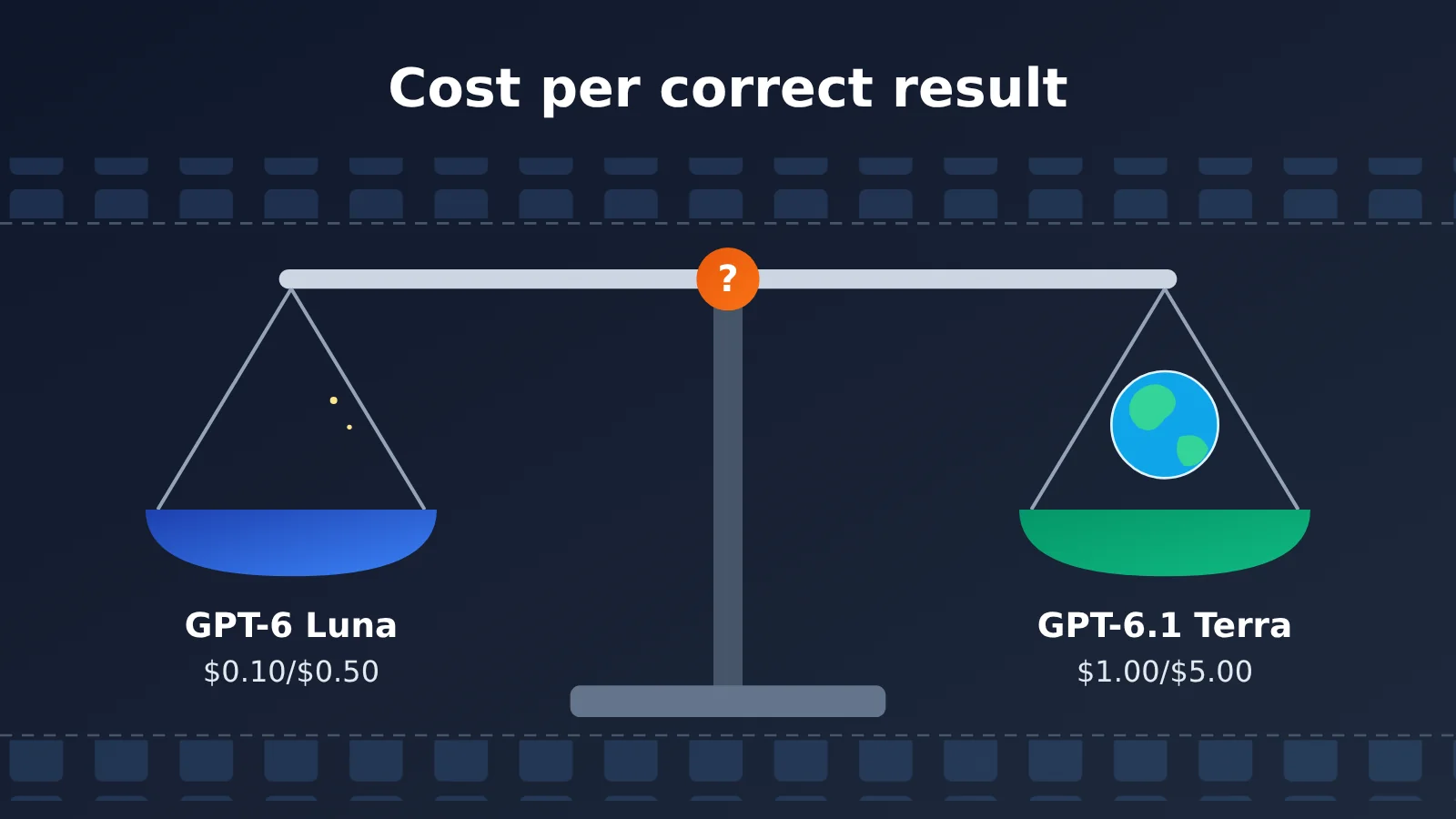
GPT-6.1 Terra and GPT-6 Luna at a Glance
Both models belong to the GPT-6 family, but they serve different purposes. OpenAI describes Luna as an efficient model for well-defined, high-frequency, high-volume tasks. Terra focuses on visual reasoning, accurate computer operation, and natural writing, filling the middle tier between Luna and Sol.
| Details | GPT-6 Luna | GPT-6.1 Terra |
|---|---|---|
| Release date | September 22, 2026 | October 26, 2026 |
| API ID | gpt-6-luna |
gpt-6.1-terra |
| Intended use | High-frequency, high-volume tasks with clear rules | Visual reasoning, computer operation, multistep tasks |
| Context window / maximum output | 1,050,000 / 128,000 tokens | 1,050,000 / 128,000 tokens |
| Reasoning effort | Six levels, from none to max; medium by default | Six levels, from none to max; medium by default |
| Typical use cases | Label classification, email routing, field extraction | Invoice entry, product image matching, interface operation |
On paper, the two look almost identical: both support text and image input, Structured Outputs, Function Calling, the Responses API, the Batch API, and tools such as Web Search, File Search, and Computer Use. The real differences come down to price and performance on complex tasks.
It’s worth noting that OpenAI’s model selection guide doesn’t say “use Luna for batch tasks” or “use Terra for accuracy.” Instead, it recommends testing the same set of real inputs and choosing the lowest-cost configuration that meets your quality requirements. That’s an important principle to keep in mind when looking at the numbers in this article.
GPT-6.1 Terra vs. GPT-6 Luna API Pricing
OpenAI’s official Standard API short-context prices are listed in US dollars per million tokens:
| Cost item | GPT-6 Luna | GPT-6.1 Terra | Terra / Luna |
|---|---|---|---|
| Input tokens | $0.10 | $1.00 | 10× |
| Cached input | $0.01 | $0.05 | 5× |
| Output tokens | $0.50 | $5.00 | 10× |
| 30-minute cache writes | $0.125 | $1.25 | 10× |
| Batch input / output | About $0.05 / $0.25 | About $0.50 / $2.50 | 10× |
Batch and Flex rates are about half the Standard rates, while Fast rates are about twice as high. Two costs are easy to overlook. First, when a request has more than 272,000 input tokens, input and cached tokens for the entire request are billed at twice the rate, and output tokens at 1.5 times the rate. Second, tools such as Web Search and Computer Use may incur additional charges. Reasoning tokens, retries, and multi-turn agent calls can also change actual usage.
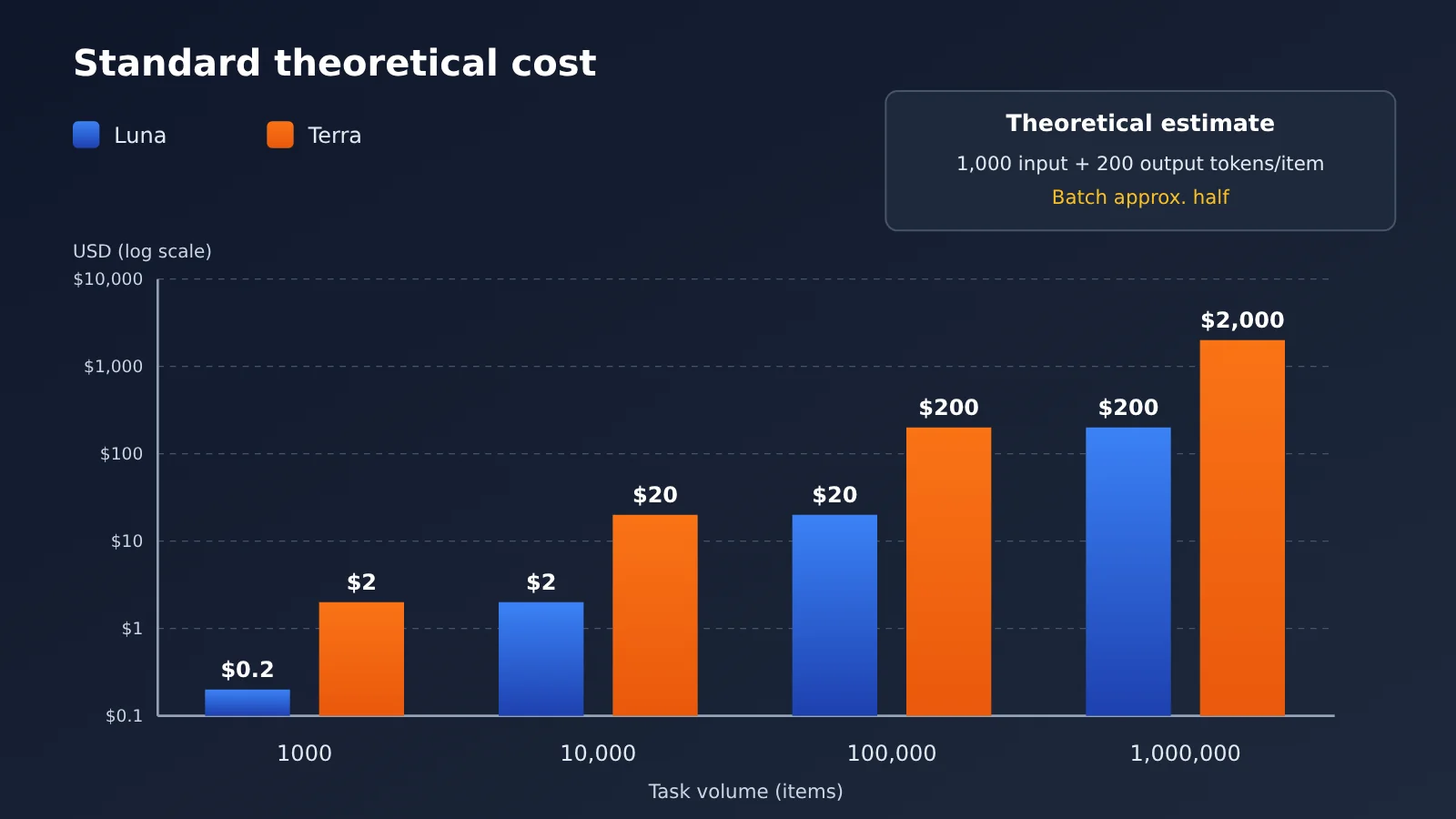
So “10 times more expensive” refers to the per-token price under equivalent billing conditions—it doesn’t mean every task costs 10 times more. Here’s a theoretical estimate: assuming 1,000 input tokens and 200 output tokens per record, with no caching or retries, processing 100,000 records in Standard mode would cost about $20 with Luna and $200 with Terra. In Batch mode, those figures would be about $10 and $100. These are estimates based on published rates, not measured bills.
GPT-6.1 Terra vs. GPT-6 Luna: Real-World Test Data from 4 Studies
Price alone tells you what you’ll spend. Next, let’s look at what you get for it. The four datasets below come from different organizations and cover different types of tasks, showing how the accuracy gap changes as tasks get harder.
Plotly’s 43 Data Analysis Questions: 10 Times the Cost for 2 More Correct Answers
DataAnalyticsBench, developed by researchers at Plotly and Mila, simulates the data warehouse of a wind power operator using approximately 20 million rows of synthetic data. Both models used the same tools to answer 43 questions. Here are the results:
| Metric | GPT-6 Luna | GPT-6.1 Terra |
|---|---|---|
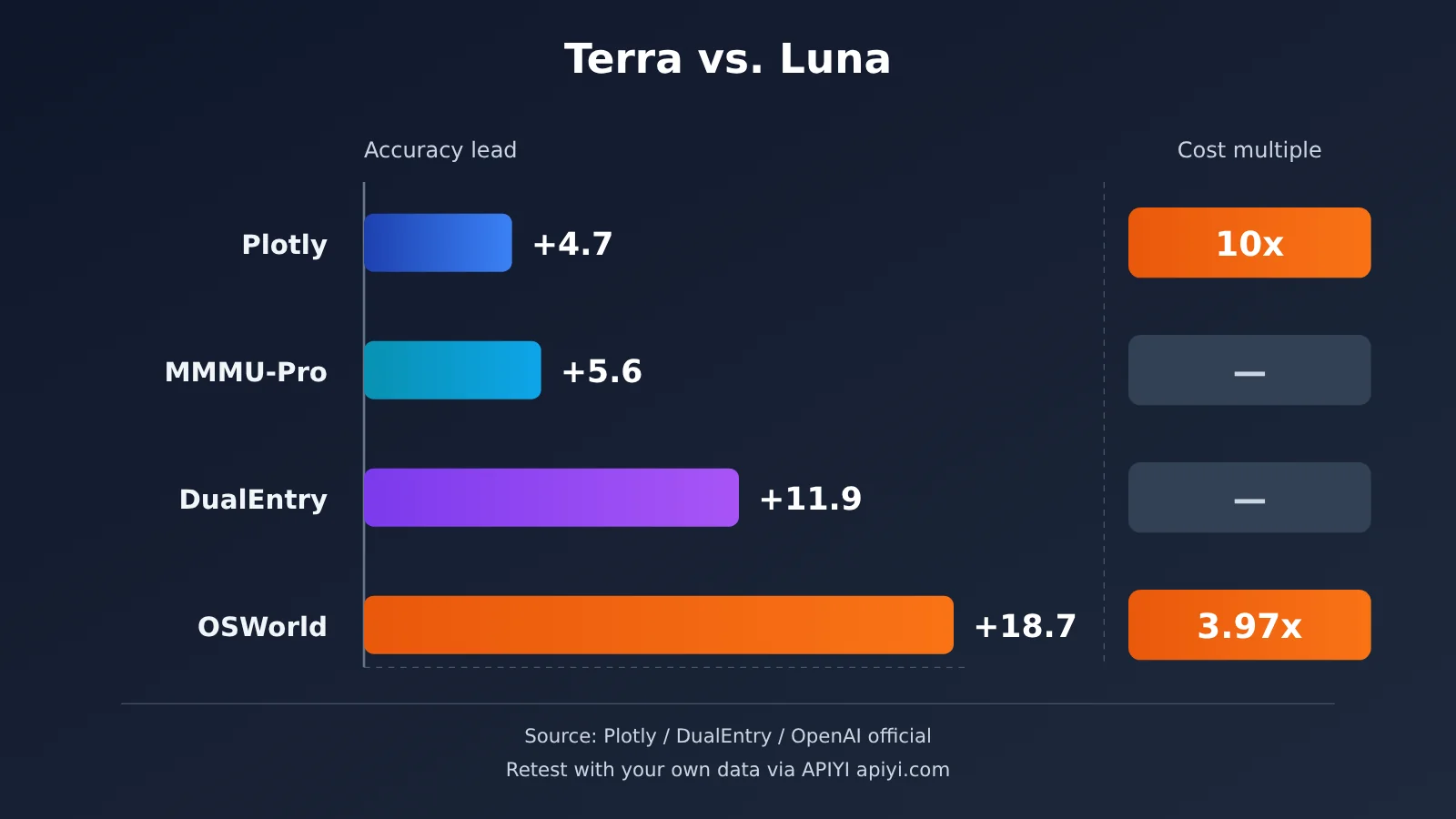
| Correct answers | 38/43 (88.4%) | 40/43 (93.0%) |
| Total test cost | $0.13 | $1.31 |
| Median time per question | 18 seconds | 15 seconds |
| Standard analysis / ambiguous questions / impossible requests / data quality | Perfect scores across all categories | Perfect scores across all categories |
| Statistical traps | 3/5 | 4/5 |
| Hidden pattern discovery | 2/5 | 3/5 |
The most useful insight is in the category breakdown. The models performed identically on standard analysis, recognizing ambiguous requests, refusing impossible requests, and identifying basic data quality issues. The gap appeared only in the two deeper analysis categories: Terra got one more question right in each.
Based on the overall results, Terra cost an extra $1.18 and got two more answers right—that’s roughly $0.59 per additional correct answer. This is a marginal cost calculated from the total test bill, not a reliable price for correcting errors in production. If a question affects a business decision, $0.59 is cheap. If it merely uncovers an inconsequential pattern in an internal report, paying 10 times as much may not be worth it.
One other detail: Terra was faster per question because its answers were shorter and it made fewer calls—averaging about 4.5 model invocations and 1,460 output tokens—not because it generated tokens faster. Its output speed was about 64 tokens per second. Keep in mind that the sample contained only 43 questions, and Terra ran through OpenRouter with its default reasoning configuration. These results don’t establish a 93% accuracy rate across all enterprise data analysis.
DualEntry’s 101 Accounting Tasks: The Gap Widens to 11.9 Percentage Points
DualEntry’s Accounting AI Benchmark is closer to real-world business workflows. Its 101 tasks span eight categories: transaction classification, journal entries, accounts payable, accounts receivable, bank reconciliation, financial reporting, month-end close, and accounting knowledge. Each model runs every task three times and must pass at least twice for the task to count as passed.
Luna scored 66.3%, Terra scored 78.2%, and GPT-6.1 Sol, included as a reference, scored 81.2%. In Terra’s category breakdown, it scored 13/13 on transaction classification, 12/13 on journal entries, and 10/12 on bank reconciliation. But it managed only 7/13 on accounts payable and 7/12 each on accounts receivable and month-end close. DualEntry also noted that Terra and Luna tied for last place on accounts payable.
For large-scale automation, consistency matters more than single-run accuracy. Terra got 65.3% of tasks right in all three runs, compared with 68.3% for Sol. Luna scored lower, though the source didn’t provide an exact figure. If an accounting task is done correctly one day and incorrectly the next, the cost of manual investigation can rise quickly. In this test, Terra averaged 16.1 seconds and approximately $0.042 in token costs per task, totaling around $12.73 across all three runs. The source didn’t clearly disclose the corresponding cost for Luna, so we won’t estimate it here.
OSWorld 2.1 and factual error rates: The biggest gaps are on complex tasks
In its Terra announcement, OpenAI shared results from OSWorld 2.1, a desktop-use benchmark that tests whether a model can understand interfaces, click the right buttons, and complete multistep tasks. At the highest reasoning setting, Luna scored 55.5% and Terra scored 74.2%—a gap of 18.7 percentage points. Their estimated costs per task were $0.30 and $1.19, respectively, a difference of about 3.97 times rather than 10 times. That’s because different models use different numbers of tokens to complete the same task.
The factual error rate results are even more striking. On difficult factual questions designed by OpenAI, Luna’s error rates at the Low, Medium, and Max settings were 44.3%, 31.2%, and 18.4%, respectively. Terra’s were 16.7%, 10.1%, and 4.3%. Terra’s error rate at Low was still lower than Luna’s at Max. For visual understanding, Luna scored 79.9% on MMMU-Pro at the highest reasoning setting, while Terra scored 85.5%.
These figures all come from OpenAI’s official charts, not independent third-party testing. The difficult factual questions were designed to provoke errors; they don’t mean Luna has a 44.3% error rate in everyday writing. OSWorld scores also apply only under its specific test conditions.
Artificial Analysis Intelligence Index: Reasoning intensity matters, too
Independent testing by Artificial Analysis offers another perspective. At Max, Luna scored about 38 on the Intelligence Index, while Terra scored about 48. Their corresponding benchmark costs were approximately $0.07 and $0.40, a difference of about 5.7 times. The gap was larger on the Coding Agent Index: Luna scored 31 and Terra scored 48.
But AA-LCR, a long-document understanding benchmark, is a counterexample: Both models scored about 83% at their highest reasoning settings. Terra also sits on the cost–capability Pareto frontier within the range tested by Artificial Analysis at Low and Medium, but it isn’t necessarily optimal at Max. In other words, for automation at scale, you’ll need to tune not just the model but also its reasoning intensity.
Getting Started with Batch Automation Using GPT-6.1 Terra and GPT-6 Luna
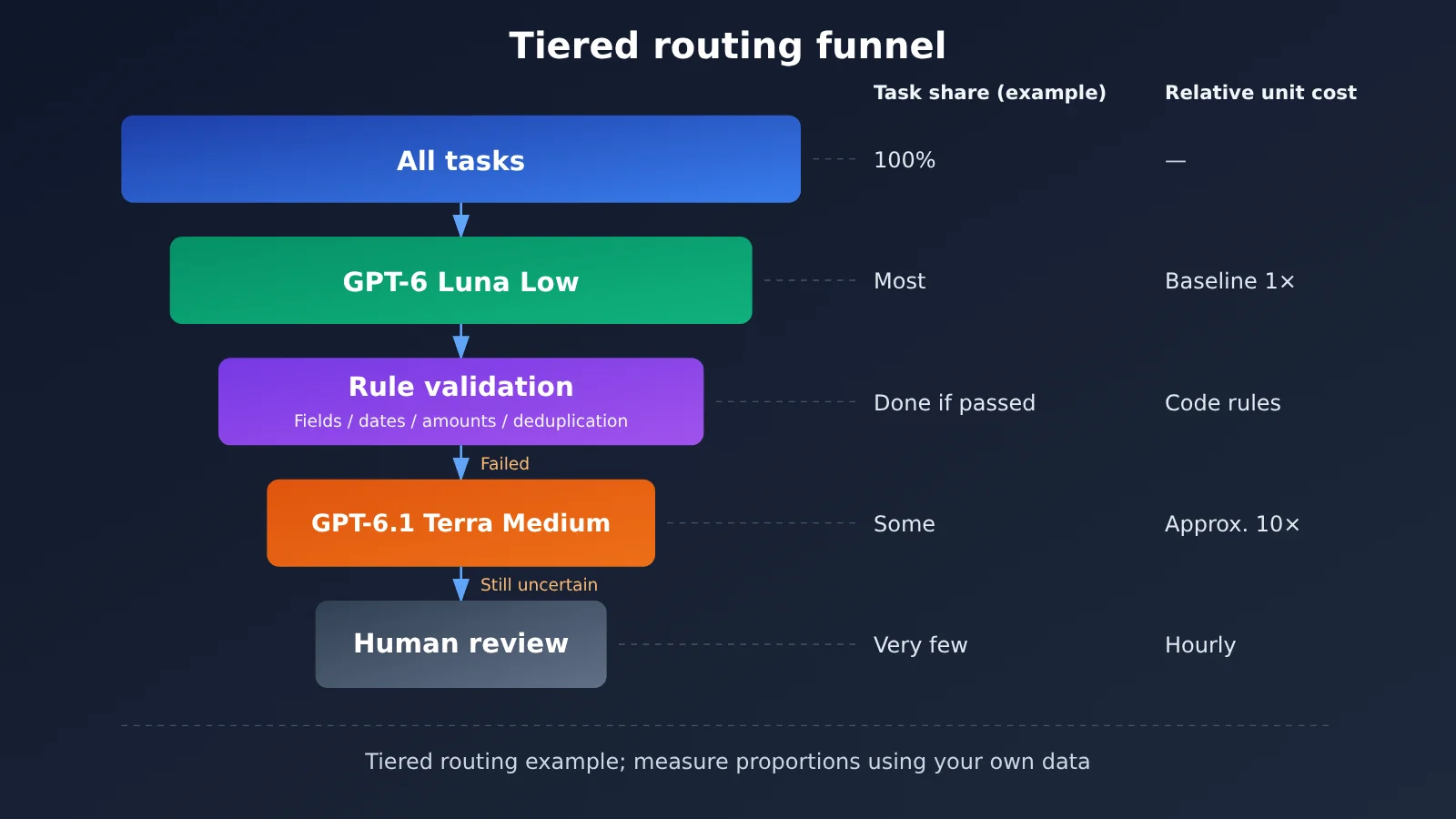
Putting the data together leads to a practical approach: send most tasks with clear rules to Luna, and escalate complex, high-risk, or validation-failed tasks to Terra. Here’s a minimal runnable example that uses Luna to extract invoice fields, validates them against programmatic rules, and calls Terra only if validation fails.
import json, openai

client = openai.OpenAI(api_key="YOUR_API_KEY", base_url="https://api.apiyi.com/v1")

def extract(model, text, effort="low"):
    r = client.chat.completions.create(
        model=model, reasoning_effort=effort,
        response_format={"type": "json_object"},
        messages=[{"role": "user", "content": f"抽取 JSON:amount, tax, total, date\n{text}"}])
    return json.loads(r.choices[0].message.content)

def valid(d):
    return all(k in d for k in ("amount", "tax", "total", "date")) and \
        abs(float(d["amount"]) + float(d["tax"]) - float(d["total"])) < 0.01

result = extract("gpt-6-luna", "发票:金额 100.00,税额 6.00,合计 106.00,日期 2026-10-20")
if not valid(result):
    result = extract("gpt-6.1-terra", "...", effort="medium")
print(result)
View the complete tiered routing implementation
import json
import re
import openai
from typing import Optional

client = openai.OpenAI(
    api_key="YOUR_API_KEY",
    base_url="https://api.apiyi.com/v1"  # APIYI OpenAI 兼容接口
)

PROMPT = "从以下文本抽取 JSON,字段:amount, tax, total, date(YYYY-MM-DD)。缺失填 null。\n"

def call_model(model: str, text: str, effort: str = "low") -> Optional[dict]:
    try:
        resp = client.chat.completions.create(
            model=model,
            reasoning_effort=effort,
            response_format={"type": "json_object"},
            messages=[{"role": "user", "content": PROMPT + text}],
        )
        return json.loads(resp.choices[0].message.content)
    except Exception as e:
        print(f"[{model}] 调用失败: {e}")
        return None

def rule_check(d: Optional[dict]) -> list:
    """程序化规则校验:结构化输出只保证格式,不保证事实,所以必须二次校验"""
    if not d:
        return ["empty"]
    errors = []
    for k in ("amount", "tax", "total", "date"):
        if d.get(k) is None:
            errors.append(f"missing:{k}")
    if not errors:
        if abs(float(d["amount"]) + float(d["tax"]) - float(d["total"])) > 0.01:
            errors.append("sum_mismatch")
        if not re.match(r"^\d{4}-\d{2}-\d{2}$", str(d["date"])):
            errors.append("bad_date")
    return errors

def route(text: str) -> dict:
    # 第一层:Luna Low 处理全部输入
    d = call_model("gpt-6-luna", text, "low")
    if not rule_check(d):
        return {"data": d, "tier": "luna"}
    # 第二层:未通过校验的升级到 Terra Medium
    d = call_model("gpt-6.1-terra", text, "medium")
    errs = rule_check(d)
    if not errs:
        return {"data": d, "tier": "terra"}
    # 第三层:仍不确定的进入人工审核队列
    return {"data": d, "tier": "human_review", "errors": errs}

if __name__ == "__main__":
    samples = [
        "发票号 A001,金额 100.00 元,税额 6.00 元,价税合计 106.00 元,开票日期 2026-10-20",
        "收据:总计一百零六元整,含税,十月二十日",
    ]
    for s in samples:
        print(route(s))
🚀 Quick start: The official recommendation is to get both models working with a single API key, then run your own samples. APIYI apiyi.com provides an OpenAI-compatible interface: just switch the
modelparameter betweengpt-6-lunaandgpt-6.1-terra. New users get free testing credits, making it easy to start with a small-scale comparison.
The key to this structure is the second step. Don’t treat “Luna says it’s confident” as evidence that the result is correct—model-reported confidence isn’t necessarily reliable. Prioritize verifiable checks: Are any fields missing? Are the dates valid? Do the amounts add up? Do key fields match the original text? Are there duplicate records?
Impact Analysis of GPT-6.1 Terra and GPT-6 Luna
Impact on Developers: Route Tasks by Type
Based on the official positioning and the tests above, here are some starting points for common batch tasks. These recommendations are based on public benchmarks, not direct testing of every scenario. You should still validate them with your own data before going live.
| Use case | Initial recommendation | Reason | Available platforms |
|---|---|---|---|
| Tagging 100,000 articles | GPT-6 Luna | Clear rules and results that can be spot-checked; both models scored full marks on Plotly standard analysis | APIYI apiyi.com, OpenAI official |
| Entering data from invoice or order screenshots | GPT-6.1 Terra | Stronger vision and operational capabilities; amounts still need programmatic verification | APIYI apiyi.com, OpenAI official |
| Daily AI news roundup | Luna for initial screening + Terra for close review | Let Luna handle deduplication and tagging, and Terra assess importance | APIYI, OpenAI official |
| Routing customer service emails and drafting replies | Primarily Luna | Escalate high-risk tickets, such as complaints and refund requests, or route them to a human | APIYI, OpenAI official |
| Batch updates to web pages and code | Terra or Sol | Coding agent index: Terra 48, Luna 31 | APIYI, OpenAI official |
Another point developers can easily overlook is throughput. In the official Build tier, Luna has a limit of 2 million tokens per minute and a Batch queue limit of 20 million, while Terra’s limits are 1 million and 3 million, respectively. In the Launch tier, Luna’s limits are 10 million and 1 billion, versus 4 million and 200 million for Terra. For batch jobs with more than 100,000 items, Luna can accommodate a much larger queue. These are quota limits, though, not generation speeds, and limits may vary by account.
Industry Impact: From Comparing Unit Prices to Comparing the Cost of Acceptable Results
On the day Terra launched, the Reddit community was divided. Some people felt Terra was awkwardly positioned: Luna was already cheap enough, while Sol was more powerful. Others pointed out that Terra Low’s factual error rate was already lower than Luna Max’s, so unit price alone didn’t tell the whole story. Some Codex users also reported that Terra at high reasoning effort didn’t necessarily use less of their quota than Sol at medium effort. Meanwhile, Luna users found that rework canceled out its quota advantage on complex development tasks. These are individual reports, and Codex subscription quotas aren’t the same as API token billing, so they can’t be used to calculate API costs.
But they all point to the same trend: the metric for batch automation is shifting from “how much does each call cost?” to “how much does each acceptable result cost?” A simple formula helps explain it:
Total cost = API call cost + tool cost + retry cost + human review cost + cost of errors
Luna has a clear advantage on the first two terms, while Terra reduces the last three through a lower error rate. Which one is more cost-effective depends on what an error costs your business. MultiAI’s small-sample observations support this: Terra made mistakes on some logic and calculation tasks with reasoning turned off, but improved noticeably at Medium. Luna performed well on simple tasks but made more errors on multistep logic.
How to run your own comparison
Public data still leaves several key questions unanswered: How often do the two models make mistakes when classifying 100,000 real Chinese-language articles? How stable are they over long periods? How much can a hybrid approach actually save? And can lower manual review costs offset Terra’s higher price? You’ll need to test these yourself.
A practical approach is to prepare 200 to 500 real business samples with known correct answers. For example, you could include 100 samples each for simple classification, key information extraction, and complex content identification, plus 50 each for fact-checking and multistep tool operations. Then run four configurations—Luna Low, Luna Medium, Terra Low, and Terra Medium—using the same inputs, prompts, tools, and evaluation criteria. Repeat some tasks several times to check stability.
Finally, focus on five results: accuracy, API cost per 1,000 items, average and P95 latency, the number of manual reviews and rework cases, and total cost per 1,000 acceptable results. If you deploy through a third-party platform, use its actual billing rules and confirm its data processing terms and compliance requirements.
Frequently Asked Questions
Q1: What’s the main difference between GPT-6.1 Terra and GPT-6 Luna?
The two models have nearly identical specifications: both have a 1,050,000-token context window and support the same tools. The difference is that Luna’s per-token price is 10 times lower, making it a good fit for high-volume tasks with clear rules. Terra is noticeably stronger at visual understanding, computer use, complex analysis, and factual accuracy, making it better suited to multistep tasks where errors are costly.
Q2: Terra costs 10 times more—is it only slightly more accurate?
It depends on the task. Terra leads by about 4.7 percentage points on the Plotly data analysis test, 11.9 points on the DualEntry accounting task, and 18.7 points on OSWorld desktop operations. On OSWorld, the cost per task is only about 3.97 times higher, not a fixed 10 times.
Q3: Can Luna replace Terra if I set its reasoning effort to max?
It can improve some results, but it won’t close the gap in model capabilities. On OpenAI’s difficult factual questions, Luna Max had an 18.4% error rate, still higher than Terra Low’s 16.7%. Increasing reasoning effort also uses more tokens, which could erase Luna’s cost advantage.
Q4: How can I quickly compare the two models through an API?
Use the same code and switch the model name to compare them:
1. Visit APIYI apiyi.com to sign up and get an API key and free testing credits
2. Set base_url to `https://api.apiyi.com/v1`
3. Run the same batch of samples with `gpt-6-luna` and `gpt-6.1-terra`, recording accuracy and token consumption
Q5: How can I reduce costs further for large batches?
For tasks that don’t need an immediate response, consider the Batch API first. Its rates are about half those of Standard, with an official 24-hour processing window. Also, keep each input within 272,000 tokens to avoid long-context surcharges. APIYI apiyi.com offers pay-as-you-go pricing, making it easy to start with a small batch, measure actual token consumption per task, and then scale up.
Q6: What are the limitations of these test results?
The Plotly test has only 43 questions and uses synthetic data. The OSWorld, MMMU-Pro, and factual error-rate results come from OpenAI and haven’t been independently retested. MultiAI’s 24/24 and 18/18 scores weren’t achieved on the same set of questions, so they can’t be directly compared. Also, Structured Outputs guarantees only that the format is correct, not that the field contents are true. No benchmark score can be treated as the actual accuracy you’ll see in your own business.
GPT-6.1 Terra and GPT-6 Luna: Key Takeaways
- A 10x price difference: Luna costs $0.10 for input and $0.50 for output, while Terra costs $1.00 and $5.00, respectively.
- A small gap on simple tasks: Both earned full marks on tasks such as routine Plotly analysis and identifying ambiguous questions.
- A larger gap on complex tasks: Terra led by 11.9 points on accounting tasks and 18.7 points on desktop operations.
- Different levels of factual accuracy: Terra Low had a 16.7% error rate, lower than Luna Max’s 18.4%.
- Reasoning intensity matters, too: Terra Low and Medium are more cost-efficient than its Max setting.
- Tiered routing is the most cost-effective approach: Use Luna for initial screening, rule-based validation, Terra as a fallback, and human review.
- Test before deploying: Run a comparison of four configurations using 200 to 500 of your own samples on APIYI apiyi.com.
Conclusion
Back to the question in the title: which is better for batch automation, GPT-6.1 Terra or GPT-6 Luna? The answer depends on task difficulty and the cost of errors:
- Tasks with clear rules that can be validated automatically: Luna is a low-cost starting point. In the Plotly tests, both models performed equally on routine analysis.
- High-risk tasks such as visual recognition, multistep operations, and finance: Terra’s extra cost can be justified, with an accuracy lead of up to 18.7 percentage points.
- The real optimization target: It’s not the price of a single API call, but the total cost per acceptable result, including retries, reviews, and losses from errors.
For most teams, the better approach isn’t to pick one or the other. Let Luna handle most simple work and use Terra for the genuinely difficult cases. Start with a small comparison using your own business samples, then decide how to split the workload.
Try APIYI apiyi.com to quickly test both models on your own tasks. You can switch models with a single API key and pay as you go, making it easier to calculate the cost per thousand tasks.
📚 References
- OpenAI: Introducing GPT-6.1 Terra: The launch announcement, including OSWorld, MMMU-Pro, and factual error rate charts
- Link:
openai.com/index/introducing-gpt-6-1-terra -
Notes: Source for Terra’s official positioning and benchmark results
-
OpenAI API Pricing and Model Pages: Pricing, capabilities, and rate limits for Luna and Terra
- Link:
developers.openai.com/api/docs/pricing -
Notes: Source for Standard, Batch, Flex, and Fast pricing
-
OpenAI Batch API Documentation: Batch processing costs and processing windows
- Link:
developers.openai.com/api/docs/guides/batch -
Notes: How to reduce costs for large-scale asynchronous tasks
-
Plotly: GPT-6.1 Terra Benchmark Results for Data Analysis: 43 data analysis tests run under the same conditions
- Link:
plotly.com/blog/gpt-6-1-terra-plotly-data-analytics-bench -
Notes: Accuracy, cost, runtime, and category-level results
-
DualEntry: GPT-6.1 Terra Accounting Benchmark: A benchmark covering 101 accounting tasks
- Link:
dualentry.com/blog/gpt-6-1-terra-accounting-benchmark -
Notes: Accuracy, task categories, and consistency across three runs
-
Artificial Analysis: GPT-6.1 Terra Review: Overall intelligence index and cost efficiency
- Link:
artificialanalysis.ai/models/releases/gpt-6-1-terra - Notes: Independent test results at different reasoning levels
Author: APIYI Technical Team
Technical discussions: Get in touch with us through the APIYI homepage. For more model integration resources, visit the documentation center at docs.apiyi.com.