Author’s note: A breakdown of how OpenAI’s 12-hour Prompt Cache affects GPT-6 API costs, using a payback formula and 5 decision criteria to show which scenarios save money with caching turned on, and which ones see limited returns.
OpenAI has added a 12-hour cache retention capability to Prompt Cache, and for teams calling the GPT-6 API, that’s a signal worth recalculating costs over. In the past, the cache typically only stayed valid during a few minutes of idle time, so a lot of low-frequency requests never got the discount at all. Now that the cache window is longer, a whole batch of requests that “come back only after a few hours” have a shot at hitting the cache.
This isn’t the marketing line of “turn on caching and you automatically save half.” Whether caching saves money depends on whether your prefix is stable, how long the gap between requests is, how large a single prefix is, and whether cache writes carry extra cost. This article gives you a simple payback formula to help you decide whether your own business should actually turn on 12-hour caching.
Key value: In 5 minutes, understand what’s changed in the mechanics of 12-hour Prompt Cache and learn to use 5 criteria to judge when GPT-6 API caching genuinely saves money.

OpenAI 12-Hour Prompt Cache: Key Details at a Glance
Here’s a quick table to sort out the key details of this update. Because official pricing and parameters change over time, any billing ratios mentioned here should be checked against OpenAI’s official documentation and pricing page.
| Item | Details |
|---|---|
| What’s new | Prompt Cache adds a 12-hour cache retention option |
| Provider | OpenAI |
| Models involved | GPT-6 API and other models that support Prompt Caching (see the official model list) |
| Billing logic | Cached input tokens are billed at a lower unit price than regular input; see the official pricing page for exact discounts |
| Core change | Cache retention goes from “expires after minutes of idle time” to up to 12 hours |
| Impact | Long system prompts, agent tool definitions, fixed RAG knowledge, multi-turn conversations, and similar scenarios |
How Prompt Cache Works
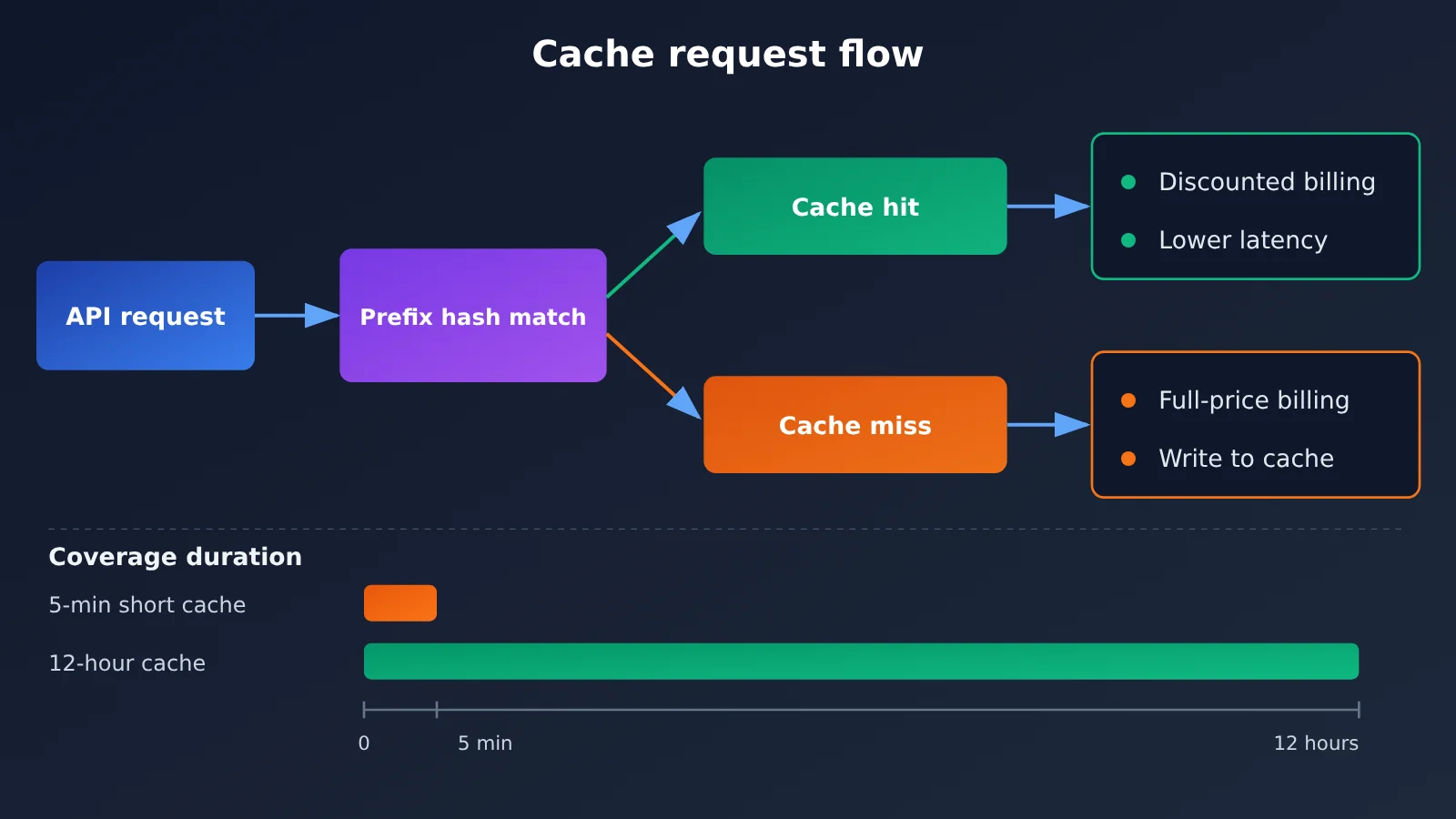
OpenAI’s Prompt Caching uses a “prefix matching” mechanism. When the beginning of a request (system prompt, tool definitions, fixed documents, etc.) exactly matches a recent request and reaches the official minimum length threshold, those tokens are recognized as a cache hit. They’re billed at a discounted rate, and time to first token drops noticeably.
One important caveat: the cache only recognizes the portion that’s “continuously identical starting from the first token.” If a timestamp or user ID is inserted anywhere in the prefix, everything after it misses. That’s why prompt structure matters more than just turning caching on: put static content first and dynamic content last.
12-Hour Cache vs. Short-Lived Cache
The old short-lived cache was cleared after a few minutes of idle time, so only high-frequency, continuous requests could hit reliably. 12-hour retention extends the hit window from minutes to half a day, directly changing the cost structure for low-frequency scenarios.
| Comparison | Default short cache | 12-hour cache |
|---|---|---|
| Retention | Expires after minutes of idle time | Up to about 12 hours |
| Request frequency fit | High-frequency, continuous requests | Medium- to low-frequency, intermittent requests |
| Typical beneficiaries | Real-time customer support, continuous batch calls | Users returning to a session hours later, intraday scheduled jobs |
| Hit-rate stability | Heavily affected by traffic fluctuations | More forgiving during off-peak traffic |
| Extra cost | Usually no write surcharge | Check official docs for whether a surcharge applies |
GPT-6 API caching: when does it actually save you money?
Most articles just say “caching saves money” and stop there. They don’t tell you how much, or under what conditions. Let’s quantify it with a general formula — you just plug in your own workload parameters.
Deriving the prompt cache break-even formula
Set up these variables:
L: number of tokens in the cacheable prefixP: regular input price per tokend: cache-hit price as a fraction of the regular price (0 < d < 1)w: additional cost ratio for the first cache write (w = 0 if there’s no write surcharge)N: number of times the same prefix is called within the cache’s lifetime
Without caching, the total cost of the prefix is N × L × P. With caching, the first call is billed at the write cost and subsequent calls at the hit price, so the total is L × P × (1 + w) + (N − 1) × L × P × d.
Subtracting one from the other gives a surprisingly clean break-even condition: N > 1 + w / (1 − d). The formula tells you two things. If there’s no write surcharge (w = 0), you start saving money as soon as the same prefix is reused once within the cache lifetime. If there is a surcharge, you need more reuses than a threshold to break even — and the bigger the discount (the smaller d), the faster you break even.
Break-even math across scenarios
Here’s an illustrative calculation using “assumed parameters.” It’s only meant to show how the formula works and does not reflect OpenAI’s actual pricing. We assume the cache-hit price is some fraction of the regular price, then look at the break-even call count with and without a write surcharge.
| Scenario | Write surcharge w | Hit discount d | Calls needed to break even N | Takeaway |
|---|---|---|---|---|
| No write surcharge | 0 | Any | N > 1 | One reuse pays off |
| Small write surcharge | Low | Large discount | About 2 | Worth it in almost every case |
| Higher write surcharge | High | Small discount | 3+ | Only worth it for high-reuse workloads |
The calculation shows that the real value of a 12-hour cache isn’t the “discount itself” — it’s that it makes N bigger. If a request only comes once every few hours, then under a short cache lifetime N is basically 1 and there’s no saving to speak of. Stretch it to 12 hours, and the same prefix gets reused several times in a single day, which is when the savings actually show up.
🚀 Quick start: Want to validate the break-even formula against real traffic? Use the same API key through APIYI apiyi.com to compare cache hit behavior across models. The platform offers OpenAI-compatible endpoints, and new users get free trial credits.
How to Verify Prompt Cache Hits in the GPT-6 API
The most reliable way to tell whether caching is actually saving you money is to read the usage field in the response. OpenAI-compatible endpoints return the number of cache-hit tokens in usage.prompt_tokens_details.cached_tokens, which is all you need to calculate your real hit rate.
Minimal example
The code below sends two requests with the same prefix back to back, then checks whether cached_tokens is greater than 0 on the second one:
import openai

client = openai.OpenAI(
    api_key="YOUR_API_KEY",
    base_url="https://api.apiyi.com/v1"  # APIYI unified endpoint, OpenAI-compatible
)

SYSTEM_PROMPT = "You are a senior technical consultant... (put a fixed long prompt here that exceeds the minimum cache threshold)"

for i in range(2):
    resp = client.chat.completions.create(
        model="gpt-6",  # use the exact name shown in the platform's model list
        messages=[
            {"role": "system", "content": SYSTEM_PROMPT},
            {"role": "user", "content": f"Question {i+1}: how do I optimize API costs?"}
        ]
    )
    cached = resp.usage.prompt_tokens_details.cached_tokens
    print(f"Request {i+1}, cache-hit tokens: {cached}")
View the full implementation (with hit-rate stats and cache routing key)
import openai
from dataclasses import dataclass, field

client = openai.OpenAI(
    api_key="YOUR_API_KEY",
    base_url="https://api.apiyi.com/v1"
)

@dataclass
class CacheStats:
    total_prompt: int = 0
    total_cached: int = 0
    records: list = field(default_factory=list)

    def add(self, prompt_tokens: int, cached_tokens: int):
        self.total_prompt += prompt_tokens
        self.total_cached += cached_tokens
        self.records.append((prompt_tokens, cached_tokens))

    @property
    def hit_rate(self) -> float:
        if self.total_prompt == 0:
            return 0.0
        return self.total_cached / self.total_prompt


def build_messages(static_prefix: str, user_input: str) -> list:
    """Keep static content first and dynamic content last so the prefix stays stable"""
    return [
        {"role": "system", "content": static_prefix},
        {"role": "user", "content": user_input},
    ]


def ask(static_prefix: str, user_input: str, cache_key: str, stats: CacheStats,
        model: str = "gpt-6") -> str:
    resp = client.chat.completions.create(
        model=model,
        messages=build_messages(static_prefix, user_input),
        # prompt_cache_key helps route requests with the same prefix to the same cache
        # To enable 12-hour retention, add the corresponding parameter per OpenAI's official docs
        extra_body={"prompt_cache_key": cache_key},
    )
    usage = resp.usage
    cached = getattr(usage.prompt_tokens_details, "cached_tokens", 0) or 0
    stats.add(usage.prompt_tokens, cached)
    return resp.choices[0].message.content


if __name__ == "__main__":
    stats = CacheStats()
    prefix = open("system_prompt.txt", encoding="utf-8").read()
    questions = ["How do I design a cache-friendly prompt?", "Where should tool definitions go?", "How do I measure the hit rate?"]

    for q in questions:
        ask(prefix, q, cache_key="kb-v1", stats=stats)

    print(f"Overall cache hit rate: {stats.hit_rate:.1%}")
    for idx, (p, c) in enumerate(stats.records, 1):
        print(f"Request {idx}: prompt={p}, cached={c}")
Recommendation: Run this on a small slice of traffic for a day, look at the overall hit rate and the distribution of request intervals, and only then decide whether to turn on 12-hour caching across production. You can grab test credits through APIYI at apiyi.com to run this kind of validation — no need to sign up for multiple official accounts separately.
5 Cost-Saving Criteria for a 12-Hour Prompt Cache
When you apply the break-even formula to real business scenarios, it comes down to the following five criteria. The more of these you meet, the more obvious the payoff from enabling 12-hour caching.
- The prefix is long enough: The fixed, cacheable portion must meet the provider’s minimum threshold, and the longer it is, the bigger the total discount. A short prompt of a few hundred tokens won’t save much even if it hits.
- The prefix is stable enough: The system prompt, tool definitions, and schema ordering stay unchanged throughout the day. Frequent prompt revisions will keep invalidating the cache.
- The request interval falls within 12 hours: If the same prefix is called every few dozen minutes to a few hours, that’s exactly where 12-hour caching delivers the biggest gain over shorter caches.
- The reuse count exceeds the break-even threshold: Use
N > 1 + w / (1 − d)to check that intraday reuse is consistently above the threshold. - Input costs make up a large share: If most of your bill comes from output tokens, caching only optimizes the input side, so the overall reduction gets diluted.
Fit of 12-Hour Caching Across Business Scenarios
| Business scenario | Request interval pattern | Short-cache performance | Incremental value of 12-hour cache |
|---|---|---|---|
| Real-time customer service bot | High-frequency, continuous | Already good | Moderate; mainly fills in traffic troughs |
| Enterprise knowledge base RAG | Medium frequency, fixed document prefix | Fluctuates significantly | Clear; fixed knowledge reused multiple times intraday |
| Coding agent session | User returns to the session intermittently | Often expires | Very high; long context reused across hours |
| Intraday scheduled batch processing | One batch every few hours | Basically ineffective | Very high; same template across multiple batches per day |
| One-off long document analysis | Called only once | Ineffective | Almost none; N = 1 can’t break even |
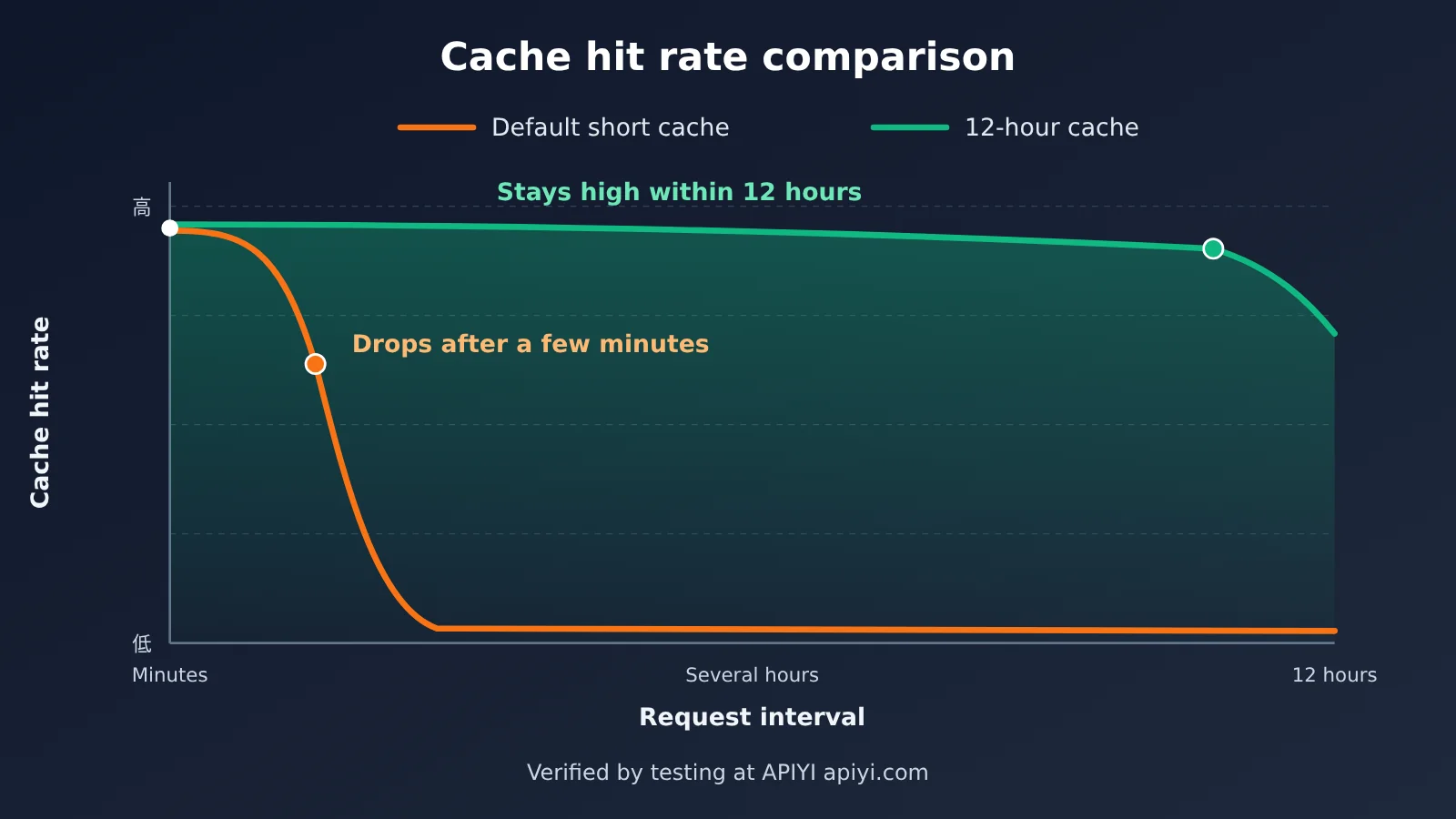
Comparison note: The chart above shows the trend difference in hit rates between the two caching strategies at different request intervals. Actual hit rates depend on your prefix stability and traffic distribution, so it’s best to compare using your own real request logs.
OpenAI’s 12-Hour Prompt Cache: Impact Analysis
What It Means for Developers
- Prompt engineering is turning into cache engineering: You’ll need to organize system prompts, tool definitions, and static knowledge into stable prefix blocks, and manage versions explicitly so small edits don’t invalidate the whole cache.
- Cost estimates are shifting from sticker price to effective unit cost: With the same GPT-6 API, teams with high cache hit rates and teams with low hit rates can see a noticeable gap in actual cost per 1,000 requests. Monitoring cached_tokens should become a standard metric.
- Long-context agents become more practical: Coding assistants and research agents often carry very long contexts. In the past, if a user stepped away and came back, you’d pay full price to recompute. Now, reuse across hours makes long sessions much more economical.
- Latency improves too: Cache hits lower first-token latency, which is a nice bonus for latency-sensitive interactive products.
What It Means for the Industry
- Caching becomes a competitive dimension in model pricing: Major vendors all offer their own prompt caching approaches. Retention time, discount levels, and whether they charge a write fee are now key factors developers weigh when choosing a model.
- The value of multi-model comparison on aggregation platforms goes up: Cache rules vary widely across vendors. Comparing actual bills side by side through a unified interface is more useful than looking only at official list prices.
- RAG architectures may get a second look: When long document prefixes can be reused at low cost for half a day, some small and medium knowledge base use cases may shift from “retrieval chunks” to “put the whole passage in context + cache.”
Multi-Model Caching Options: Reference Guide
| Model family | Cache characteristics (check each vendor’s official docs) | Best for | Available platforms |
|---|---|---|---|
| GPT-6 API | Automatic prefix caching, now with a 12-hour retention option | Long system prompts, agent sessions | APIYI apiyi.com, OpenAI official |
| Claude series | Requires explicit cache breakpoints; supports different retention periods | Cases needing fine-grained control over cache placement | APIYI, Anthropic official |
| Gemini series | Supports implicit and explicit context caching | Very long documents, multimodal context | APIYI, Google official |
💡 Recommendation: Cache rules vary a lot between models. Test the same business prompt across multiple models, measure hit rate and actual billing, then make a decision based on output quality as well.
Frequently Asked Questions (FAQ)
Q1: What is OpenAI’s 12-hour Prompt Cache?
It’s an extended retention option for OpenAI’s Prompt Caching mechanism. Requests sharing the same prefix have a chance to hit the cache for up to roughly 12 hours, and the cached portion of input tokens is billed at a discounted rate — which also cuts first-token latency.
Q2: How does the 12-hour cache differ from the default short cache?
The default short cache expires after just a few minutes of idle time, so it only fits high-frequency, back-to-back requests. The 12-hour cache covers intermittent, mid-to-low-frequency traffic. For high-frequency workloads like real-time customer support, there’s not much difference between the two. But for Agent sessions or scheduled batch jobs where hours pass between calls, the 12-hour cache delivers a clear incremental gain.
Q3: Does turning on the 12-hour cache always save money?
Not necessarily. If there’s no surcharge for writing to the cache, you start saving the moment the same prefix is reused once within the retention window. If there is a surcharge, you need the reuse count to exceed `1 + w / (1 − d)` before you break even. For one-off calls, prefixes that change frequently, or very short prefixes, the payoff is quite limited.
Q4: How can I improve the GPT-6 API cache hit rate?
The core principle is “static first, dynamic last”:
– Put system prompts, tool definitions, and fixed documents at the very front of the message, and keep their order unchanged
– Put dynamic content — timestamps, user IDs, retrieval results — at the end
– Use a fixed cache routing key for each request type to improve the odds of landing on the same cache
– Publish prompt revisions in batches instead of making small edits throughout the day
Q5: How can I quickly test the 12-hour cache through the API?
We recommend testing with a multi-model API aggregation platform:
1. Go to APIYI apiyi.com and create an account
2. Grab an API key and free trial credits
3. Run the code examples in this article (swap base_url for `https://api.apiyi.com/v1`) and read `cached_tokens` to measure your hit rate
APIYI uses an OpenAI-compatible interface, so a single key lets you compare cache behavior across GPT, Claude, and Gemini.
Q6: What are the known limitations of Prompt Cache?
Caching only applies to contiguous prefixes that meet the minimum length threshold, and it only optimizes input-side costs — output tokens get no discount. The cache is a “best effort” mechanism: misses can happen under high concurrency or when traffic routing shifts, so don’t treat the hit rate as a 100% guarantee. For the exact billing rules and supported models for the 12-hour retention, refer to OpenAI’s official documentation.
12-Hour Prompt Cache: Key Takeaways
- How it works: It’s all about exact prefix matching — cached input tokens get billed at a discount.
- What changed: Retention jumped from minutes to roughly 12 hours, covering lower-frequency requests.
- Break-even formula: You only start saving money when the reuse count N > 1 + w / (1 − d).
- Biggest winners: Long-running Agent sessions, knowledge base RAG, and intraday scheduled batch jobs.
- Limited upside: One-off calls, short prefixes, and prompts that change frequently.
- Keys to making it work: Put static content up front and keep an eye on cache hit rate via
cached_tokens. - How to validate: Run a small test with real traffic through APIYI (apiyi.com) before rolling it out fully.
Summary
The core impact of OpenAI’s 12-hour Prompt Cache on GPT-6 API costs:
- Reuse count is what saves money: The 12-hour window lets even mid- and low-frequency requests reuse the same prefix multiple times. Pushing N above 1 is where the real incremental value lies.
- Write cost sets your break-even bar: With no write surcharge, you’re almost always ahead. With one, run the numbers through the break-even formula.
- Prompt structure matters more than the toggle: Static-first layout, version control, and hit-rate monitoring are what actually turn cache discounts into line-item savings on your bill.
Start with high-yield scenarios like long system prompts and Agent sessions — run a day of real traffic, check the hit rate, then decide how widely to roll it out. APIYI (apiyi.com) is a quick way to compare caching results across multiple models, and the platform offers free test credits plus a unified OpenAI-compatible interface.
📚 References
- OpenAI Prompt Caching Official Guide: Caching mechanism, minimum thresholds, and usage field documentation
- Link:
platform.openai.com/docs/guides/prompt-caching -
Description: The authoritative source for understanding cache hit rules and the latest retention duration parameters
-
OpenAI API Pricing Page: Regular input, cached input, and output prices for each model
- Link:
openai.com/api/pricing -
Description: Use the real-time prices on this page when plugging values into the break-even formula
-
OpenAI API Reference: Parameter documentation for the Chat Completions and Responses endpoints
- Link:
platform.openai.com/docs/api-reference - Description: Look up how to use cache-related parameters like prompt_cache_key
Author: APIYI Technical Team
Technical Discussion: Feel free to reach out on the APIYI website homepage for more model integration and cost optimization solutions