Author’s note: This article covers three triggers for automatic Agent context compaction, strategies for deciding what to keep in a summary, and runnable code to help you control token consumption in long conversations without losing critical task information.
After working for hours in a coding Agent like Codex, many developers find themselves asking the same question: the area near the input box shows only the permission mode and current model, not how much context has been used. So when should you start a new session? As a conversation grows, each request has to carry more history, which naturally uses up your quota faster. This article covers when Agent context compaction is triggered and how to summarize the conversation, helping you understand the mechanisms behind tools like Codex and implement the same capability in your own Agent.
This isn’t another generic reminder to “clear your chat history.” It’s a practical approach based on the compaction mechanisms described in OpenAI’s and Anthropic’s official documentation, combined with real-world engineering practices.
What you’ll get: By the end, you’ll know when automatic Agent context compaction is triggered, what to keep or discard in a summary, and how to adapt a Python implementation for your own use.
Key Points About Automatic Agent Context Compression
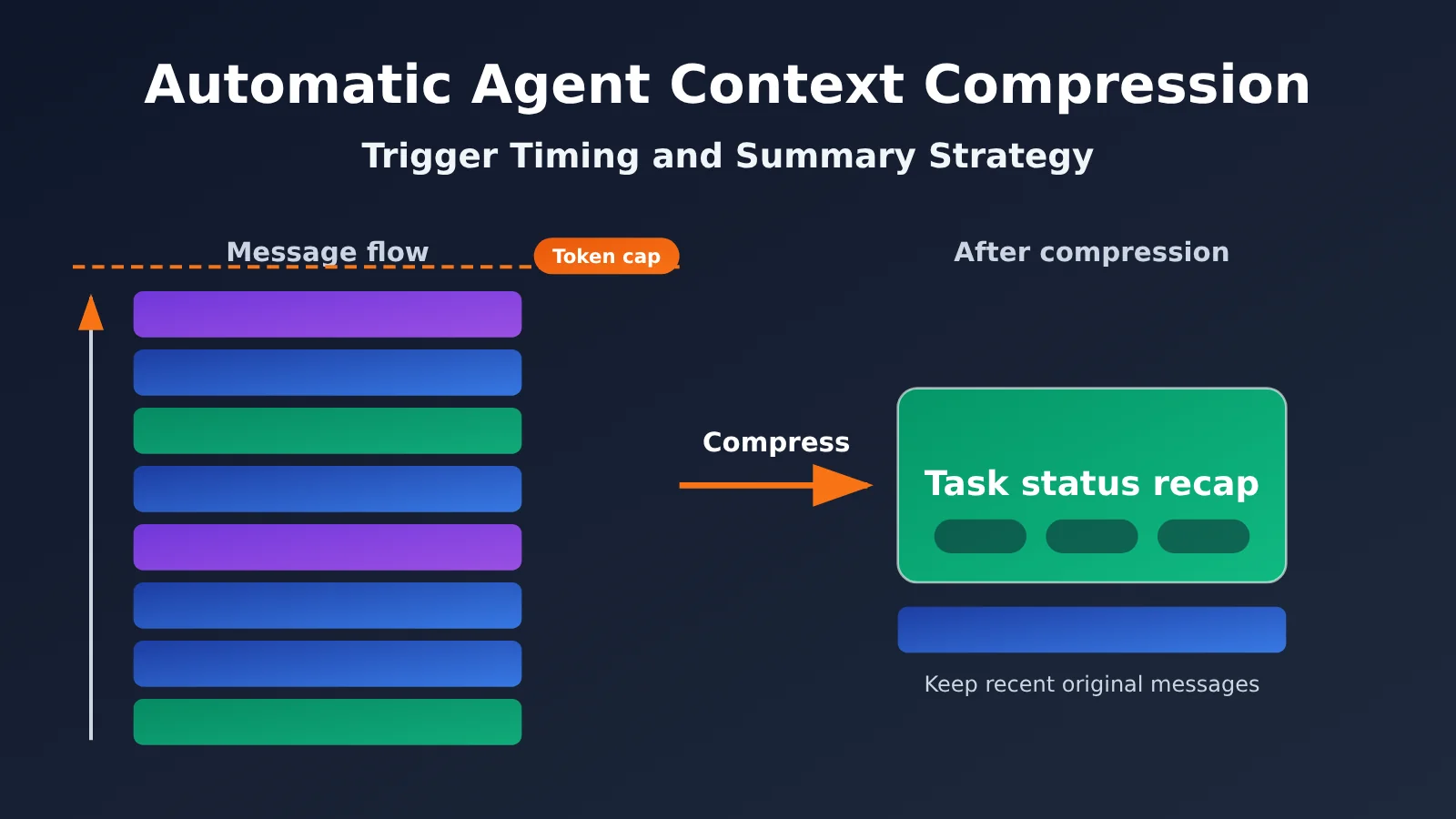
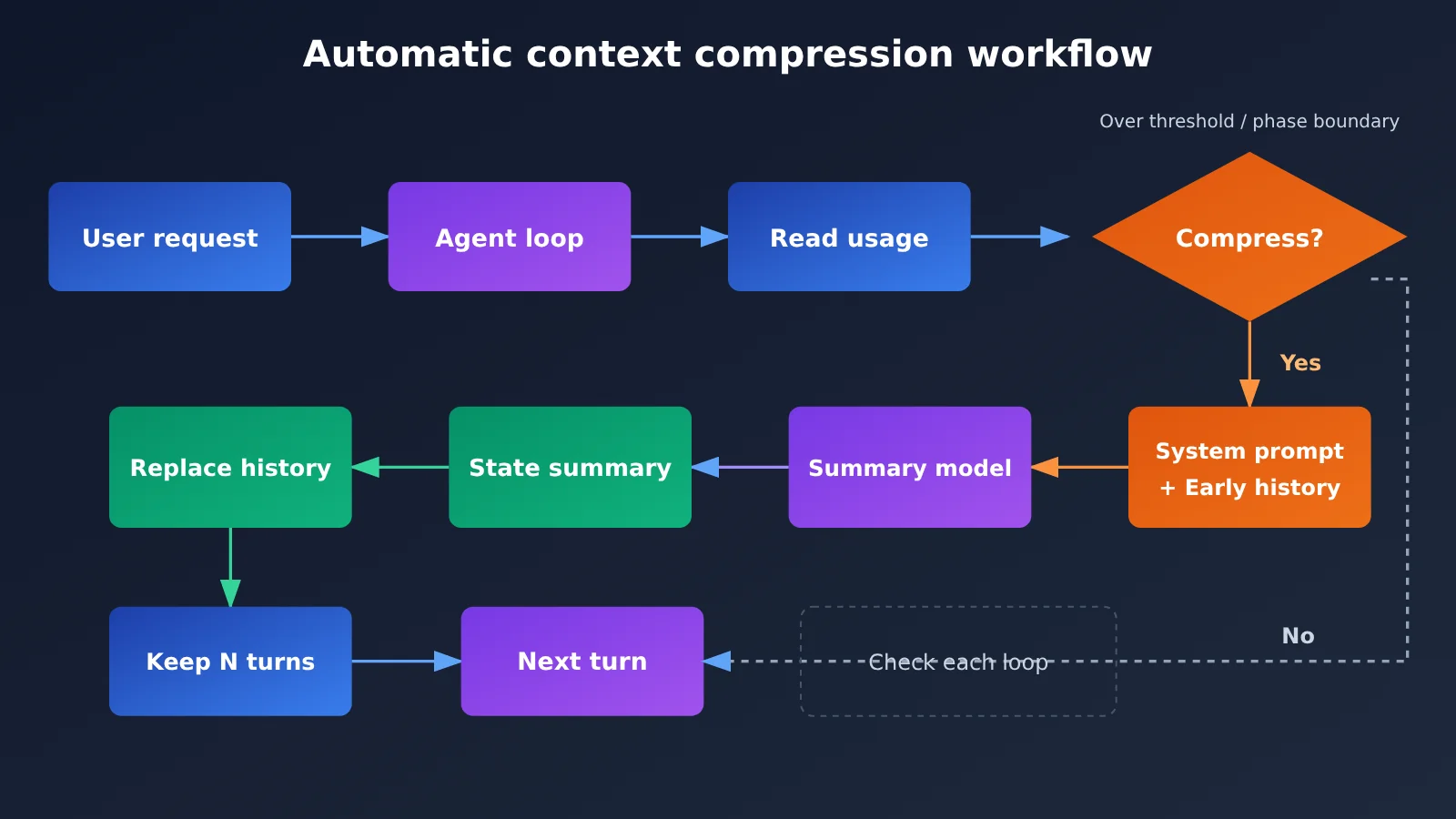
Here’s the bottom line: automatic Agent context compression typically kicks in when the context reaches a specified token threshold. It compresses earlier conversations and tool-call records into a state summary the Agent can keep working from. The goal isn’t just to shorten the chat history—it’s to preserve task progress, important facts, completed actions, key decisions, and next steps while removing redundant details.
| Key point | Description | Benefit |
|---|---|---|
| Token threshold trigger | Automatically compresses context when it reaches a preset token count | Prevents the context window from filling up without manual intervention |
| Proactive compression | The application triggers compression at specific points, such as the end of a task phase | Compresses at meaningful boundaries to minimize information loss |
| Automatic framework management | The SDK or Agent runtime decides when to compress based on context pressure | Works out of the box and is suitable for quick setups |
| Summarization, not truncation | Preserves progress, facts, decisions, and next steps | The Agent can keep working after compression |
| Phase-based compression | Compression isn’t recommended on every turn | Balances cache hits with information retention |
Why Agents Need Automatic Context Compression
Large Language Model APIs are stateless. What we call a “multi-turn conversation” essentially means resending the full messages history to the model on every turn. By turn 50, the request includes everything from the previous 49 turns, so input token counts grow linearly or even faster. It’s an even bigger issue for Agents because tool outputs—file contents, terminal output, and search results—can be very long. Just a few tool calls can fill most of the context window.
This creates two immediate problems. First, there’s cost: the more input tokens each turn uses, the faster you burn through your quota. Second, there’s quality: in a long context, the model’s attention to important earlier information can be diluted. If the context exceeds the window, the request may fail altogether. Automatic Agent context compression balances these concerns by “folding” history into a concise state summary while the information is still intact and there’s room in the window. Later requests can then carry less baggage.
Why Codex Doesn’t Display Context Usage
We haven’t seen an official explanation for why the client no longer displays the context window size, so we won’t speculate. What we do know is that Codex has a built-in context compression mechanism, so long conversations don’t accumulate the entire original history indefinitely. If you want to track usage precisely on each turn, the most reliable approach is to inspect the call logs at the API level. We’ll cover how to do that later.
3 Ways to Trigger Automatic Agent Context Compaction
Many people assume that “context gets compacted at 80%,” but that’s not actually an official rule. Official API documentation generally defines triggers using token count thresholds, not a fixed percentage of the context window. You don’t have to wait until you’re close to the limit, either: both OpenAI and Anthropic support proactive compaction.
Comparing Official Trigger Rules
| Implementation | Automatic trigger | Official notes |
|---|---|---|
| OpenAI Responses API | Rendered token count reaches compact_threshold |
Configurable threshold; handled automatically by the server |
| OpenAI Agents SDK | Context pressure or an explicit threshold policy | Supports automatic, fixed-threshold, and forced compaction |
| Anthropic Messages API | Input tokens reach trigger.value |
Default: 150,000; minimum: 50,000 |
| Anthropic Tool Runner | Reaches context_token_threshold |
Default: 100,000 |
| Anthropic on-demand compaction | Initiated by the application | Can be called after a complete conversation turn |
The common thread is that automatic triggers are almost always based on the input token count, with configurable thresholds. They also provide a way for the application to decide when to compact.
Trigger 1: Token Threshold
This is the most basic safeguard. After each call, check the input token count returned by the API and compact once it exceeds your threshold. Don’t set the threshold too close to the context window limit: compaction itself requires sending the old history to the summarization model again, and you also need room for tool output in the next turn.
In practice, you can use Anthropic’s defaults as a starting point: for models with long context windows, set the threshold in the range of 100,000 tokens and make sure there’s still enough room above it for a complete tool response.
Trigger 2: Proactive Compaction at Task Phase Boundaries
This approach minimizes information loss. OpenAI recommends compacting after a meaningful phase of work is complete, rather than after every turn. For example, an Agent might just have finished “locate the bug → modify the code → run the tests successfully.” At that point, the intermediate trial and error is no longer useful. You only need to remember which file changed, why it changed, and that the tests passed.
Compacting at a phase boundary makes it easier to write an accurate summary because the task is in a “clean” state, with no partially completed tool calls hanging over it.
Trigger 3: Let the Framework Manage Context Pressure
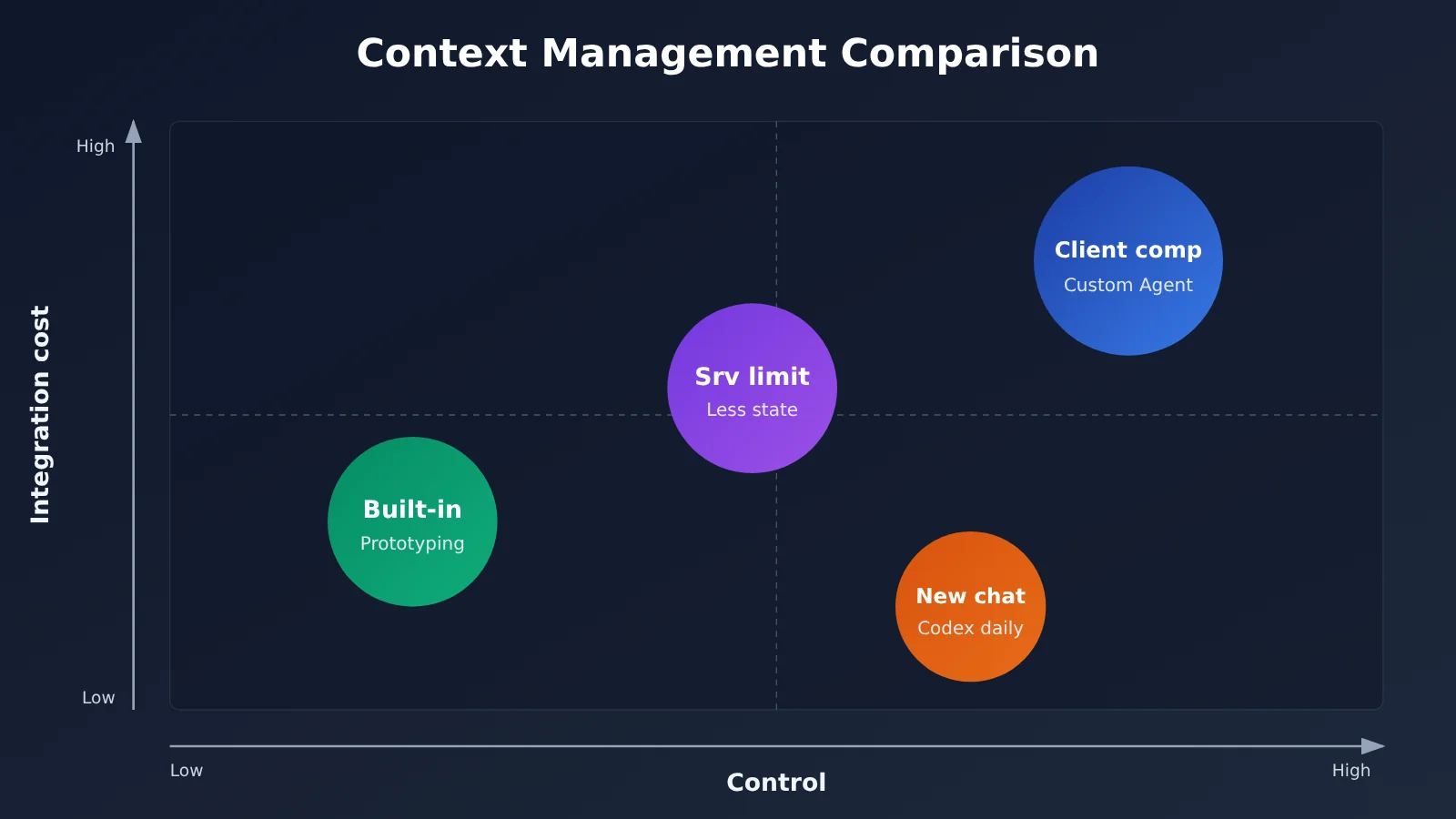
If you’re using a framework like the Agents SDK or Tool Runner, you can enable its built-in compaction strategy and let the runtime decide automatically based on context pressure. It’s convenient, but gives you less control over the summary, making it a good fit for prototypes or general-purpose use cases.
🎯 Technical tip: These three triggers aren’t mutually exclusive. A recommended combination is to compact proactively at phase boundaries, with a token threshold as a fallback. If you want to check whether your thresholds work across different models, you can use APIYI apiyi.com to switch between OpenAI, Claude, Gemini, and other models with the same API key and compare the results.
Summary Strategies for Automatic Agent Context Compression
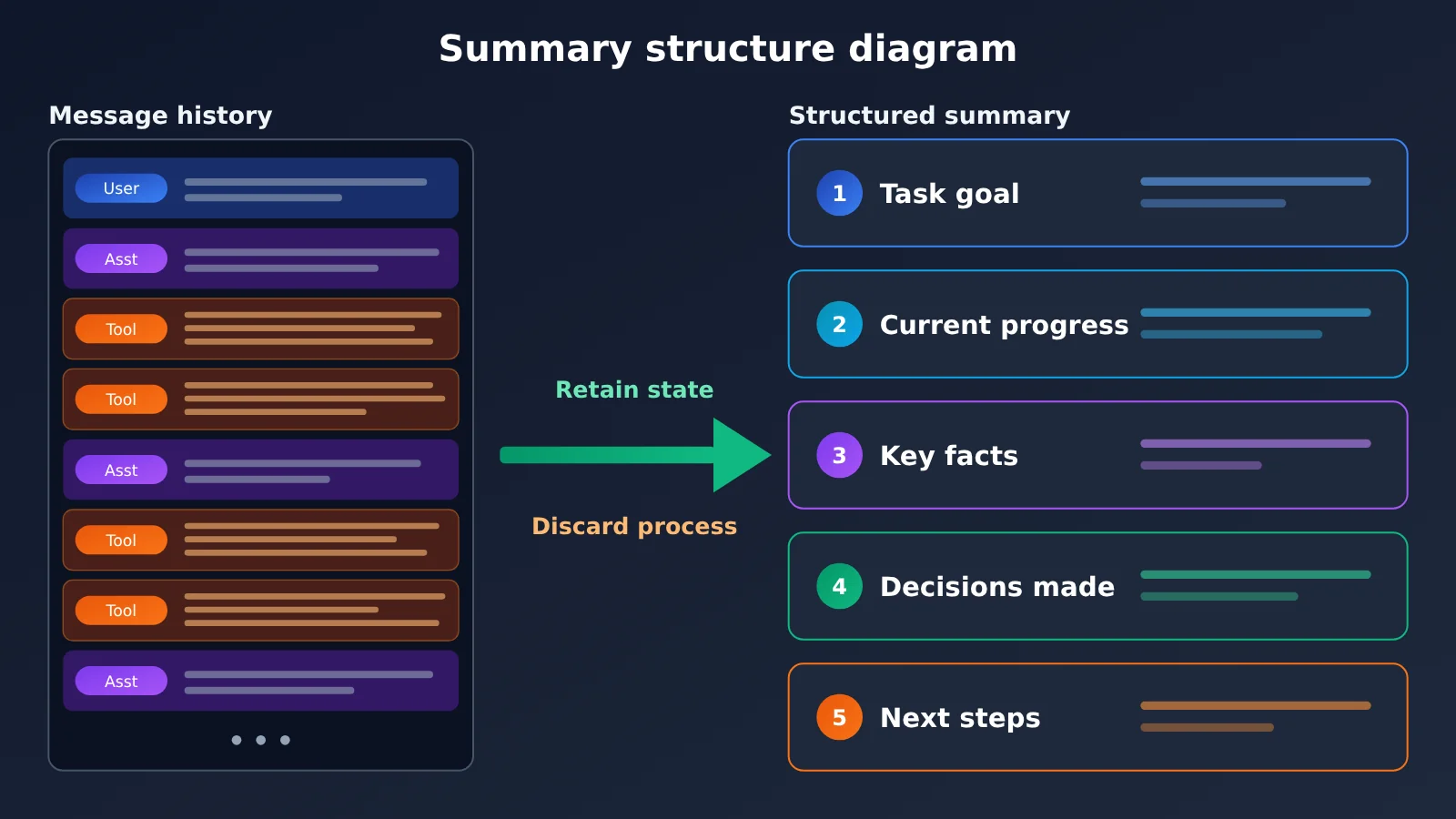
Trigger timing determines when to compress; the summary strategy determines what the compressed context looks like. The most common signs of failed compression are an Agent forgetting the user’s original constraints or repeating work it’s already done. The root cause is a summary that records “what was discussed” rather than “the current state of the task.”
What to Keep and What to Discard
| Category | Keep | Discard |
|---|---|---|
| Task goals | The user’s original request, hard constraints, and acceptance criteria | Pleasantries and repeated confirmations |
| Task progress | Completed steps and the current stage | Detailed reasoning for every step |
| Important facts | File paths, function names, configuration values, and key error lines | Complete file contents and lengthy logs |
| Key decisions | Which approach was chosen and why | Extended discussions of rejected approaches |
| Next actions | To-do list and unresolved issues | Completed details with no bearing on future work |
A 5-Step Summary Strategy
- Always keep the system prompt: Don’t compress the system prompt. Keep it at the beginning of the messages array.
- Keep the last N conversation turns verbatim: Recent turns are usually closely tied to the current operation. Keep them as-is and compress only the earlier conversation.
- Use a structured summary template: Ask the summarization model to output five sections: goals / progress / facts / decisions / next steps. This helps prevent omissions caused by an open-ended summary.
- Trim tool results first: For lengthy tool responses, keep only the key excerpts, such as the first and last few lines of an error or the titles and conclusions of search results.
- Archive the user’s exact words separately: Keep explicit constraints from the user verbatim—for example, “Don’t change the public interface”—rather than asking the model to rewrite them.
The structured template is the most important step. When asked for an open-ended summary, a model tends to capture the general tenor of the conversation. Structured sections instead push it to check each item and preserve actionable state information.
Quick Start: Automatic Agent Context Compression
The example below implements a general-purpose version by manually managing messages on the client. It works with any OpenAI-compatible API. After each call, read the input token count from usage.prompt_tokens. If it exceeds the threshold, send the earlier conversation history to a summarization model for compression.
Minimal Example
import openai

client = openai.OpenAI(
    api_key="YOUR_API_KEY",
    base_url="https://api.apiyi.com/v1"  # APIYI OpenAI-compatible endpoint
)

messages = [{"role": "system", "content": "你是一个编码助手。"}]
messages.append({"role": "user", "content": "帮我检查这个函数的边界条件"})

resp = client.chat.completions.create(model="gpt-4o-mini", messages=messages)
messages.append({"role": "assistant", "content": resp.choices[0].message.content})

# Record input tokens each turn to decide whether to compact
print("本轮输入 Token:", resp.usage.prompt_tokens)
View the Full Agent Context Auto-Compaction Implementation
import openai

client = openai.OpenAI(
    api_key="YOUR_API_KEY",
    base_url="https://api.apiyi.com/v1"
)

MAIN_MODEL = "gpt-4o-mini"      # Main task model; replace as needed
SUMMARY_MODEL = "gpt-4o-mini"   # Summary model; a cheaper model can be used
TOKEN_THRESHOLD = 100_000       # Input token threshold as a fallback trigger
KEEP_RECENT = 6                 # Keep the last N messages intact

SUMMARY_PROMPT = """请把以下 Agent 对话历史压缩为任务状态摘要,严格按五个栏目输出:
【任务目标】用户原始需求与硬性约束(约束请逐字保留)
【当前进度】已完成的步骤与当前阶段
【关键事实】文件路径、函数名、配置值、关键报错
【已做决策】采用的方案及原因
【下一步行动】待办事项与未解决问题
不要记录寒暄和推理过程,不要编造历史中没有的信息。"""


def compact(messages: list) -> list:
    """Compact earlier history into one summary, keeping the system prompt and recent messages."""
    system_msg = messages[0]
    old = messages[1:-KEEP_RECENT]
    recent = messages[-KEEP_RECENT:]
    if not old:
        return messages

    history_text = "\n".join(f"[{m['role']}] {m['content']}" for m in old)
    resp = client.chat.completions.create(
        model=SUMMARY_MODEL,
        messages=[
            {"role": "system", "content": SUMMARY_PROMPT},
            {"role": "user", "content": history_text},
        ],
    )
    summary = resp.choices[0].message.content
    summary_msg = {"role": "user", "content": f"(以下为之前对话的压缩摘要)\n{summary}"}
    return [system_msg, summary_msg] + recent


class CompactingAgent:
    def __init__(self, system_prompt: str):
        self.messages = [{"role": "system", "content": system_prompt}]
        self.last_prompt_tokens = 0

    def chat(self, user_input: str) -> str:
        # Trigger 1: Compact first if the previous turn exceeded the input token threshold
        if self.last_prompt_tokens > TOKEN_THRESHOLD:
            self.messages = compact(self.messages)

        self.messages.append({"role": "user", "content": user_input})
        resp = client.chat.completions.create(model=MAIN_MODEL, messages=self.messages)
        reply = resp.choices[0].message.content
        self.messages.append({"role": "assistant", "content": reply})
        self.last_prompt_tokens = resp.usage.prompt_tokens
        return reply

    def finish_stage(self):
        # Trigger 2: Proactively compact after completing a task stage
        self.messages = compact(self.messages)
        self.last_prompt_tokens = 0


agent = CompactingAgent("你是一个严谨的编码助手。")
print(agent.chat("帮我定位登录接口偶发 500 的原因"))
agent.finish_stage()  # Proactively compact at the stage boundary after the fix
🚀 Quick start: Sign up at APIYI apiyi.com to get free test credits. Just replace the API key in the code above to run it. The platform offers an OpenAI-compatible interface, so you can choose models from different providers for the main task and summarization to help control costs.
Comparing Automatic Agent Context Compaction Approaches
| Approach | Key Features | Best For | Available Platforms |
|---|---|---|---|
| Client-side manual compaction | Assemble messages yourself, with full control over summarization logic | Custom-built agents, custom summary templates | APIYI apiyi.com, official APIs |
| Server-side threshold-based compaction | Uses a threshold such as compact_threshold in the Responses API |
Reducing client-side state management | Platforms that support the interface |
| Built-in framework compaction | Agents SDK and Tool Runner manage compaction automatically | Prototyping, general-purpose tasks | Depends on the SDK |
| Start a new session | Summarize manually, then open a new window | Everyday use of clients such as Codex | Any client |
Client-side manual compaction offers the most control, but you’ll need to manage token counting and summary quality yourself. Server-side compaction eliminates the need to assemble conversation history, but the summary details aren’t visible to developers. For custom-built agents, combining structured client-side summaries with a threshold-based fallback is often the safer choice.
How Automatic Agent Context Compaction Affects Caching Costs
Compaction might seem like a guaranteed way to save money, but you also need to consider Prompt Caching. According to APIYI’s OpenAI cache pricing, cached input is billed at 10% of the standard input rate. In long conversations, it’s easy to get cache hits when the conversation history prefix stays unchanged, so the number of new tokens billed at full price each turn is often relatively small.
Once compaction runs, the message prefix is replaced with a new summary. The next request gets a cache miss, and the input must be processed again at full price. That’s why the official guidance advises against compacting on every turn: frequent compaction repeatedly disrupts the cache and can sometimes cost more than not compacting at all. A more sensible approach is to let the history grow steadily over a period, making full use of caching, then compact it once at the end of that period or when it approaches the threshold.
Frequently Asked Questions
Q1: What is automatic Agent context compression?
It means compressing earlier conversations and tool call records into a task status summary when the context reaches a certain token count or the task reaches a phase boundary. The summary replaces the original history, reducing the input tokens used on each turn while preserving progress, facts, decisions, and next steps so the Agent can keep working.
Q2: How is context compression different from simply truncating history?
Truncation just deletes the oldest messages. It’s simple to implement, but it can lose the user’s original requirements and constraints. Compression uses a model to distill the history into a structured summary, retaining much more information. The trade-off is an extra summarization call, and the cache must be rebuilt after compression.
Q3: Is there a universal rule to compress at 80% capacity?
No. Official documentation generally defines triggers by token count. For example, the Anthropic Messages API defaults to 150,000 tokens, with a minimum of 50,000, while Tool Runner defaults to 100,000. Set the threshold based on the model’s context window and the size of individual tool outputs.
Q4: When should I open a new window in Codex?
A good time is after completing a full phase of a task—for example, when a feature is finished and has passed its tests. Before opening a new window, ask the Agent for a summary organized by “goal / progress / facts / decisions / next steps,” then paste it at the start of the new session. If you’re switching to a topic unrelated to the current task, open a new window right away so irrelevant history doesn’t keep consuming your quota.
Q5: How can I track token usage if my client doesn’t display context usage?
You can check it at the API level. As described in the OpenAI Codex usage documentation, once you configure Codex to use APIYI, each call leaves detailed logs and usage statistics in the APIYI dashboard at apiyi.com. You can see how input tokens grow from turn to turn in long conversations and use that information to decide when to compress or start a new session.
Q6: How can I quickly test how well my compression strategy works?
Use the complete code in this article to run the same multi-step task in three modes: “no compression,” “threshold-based compression,” and “phase-based compression.” Compare total token consumption and task completion quality. With APIYI at apiyi.com, you can use one API key to run the main model and the summarization model with different providers, making it easier to find the right balance between cost and quality.
Q7: What are the known limitations of context compression?
First, summaries can miss details, especially inconspicuous configuration values in code. Second, each compression invalidates the cache, so compressing too often can increase costs. Third, the summarization model may occasionally “fill in” information that doesn’t exist. To address these issues, use structured templates, preserve user constraints verbatim, and write key facts such as file paths into an external task notes file rather than relying on the summary alone.
Key Takeaways: Automatic Agent Context Compression
- What compression does: Turns a lengthy history into a task state the Agent can continue working from, rather than simply deleting records.
- Three trigger points: A token threshold as a fallback, proactive compression at phase boundaries, and framework-managed compression based on context pressure.
- There’s no 80% rule: Official guidance uses token-count thresholds, which should be set based on the context window and the volume of tool output.
- Structured summaries: Use five sections: goals, progress, facts, decisions, and next steps. Preserve user constraints verbatim.
- Don’t compress every turn: Frequent compression can disrupt cache hits. Compressing at phase boundaries is more cost-effective.
- Use logs to fill the gaps: If your client doesn’t show usage, you can track token growth across turns in the APIYI apiyi.com invocation logs.
Summary
The key points for automatic Agent context compression:
- When to trigger it: Compress proactively at phase boundaries, with a token threshold as a fallback. Built-in framework policies are a good way to get started quickly.
- How to summarize: Keep the system prompt and the last few turns intact, and compress earlier history into a five-section structured summary.
- How to balance costs: Compression invalidates the cache, so aim for steady growth within each phase and concentrated compression at the end.
If you use Codex regularly, you can treat “summarize and open a new window when a phase is complete” as a manual version of compression. If you’re building your own Agent, you can adapt the code in this article. Try APIYI apiyi.com to quickly validate the results: the platform offers free testing credits and a unified interface for multiple models, and its invocation logs let you see token usage before and after compression.
📚 References
- OpenAI Responses API documentation: Context compaction and
compact_thresholdconfiguration - Link:
platform.openai.com/docs/api-reference/responses -
Details: Official guidance on automatic server-side compaction and state management
-
OpenAI Agents SDK documentation: Context management strategies for Agent runtimes
- Link:
openai.github.io/openai-agents-python -
Details: How to configure automatic, fixed-threshold, and forced compaction strategies
-
Anthropic context compaction documentation: Compaction trigger parameters for the Messages API and Tool Runner
- Link:
docs.anthropic.com - Details: Default values for
trigger.valueandcontext_token_threshold, plus on-demand compaction
Author: APIYI Technical Team
Technical discussions: Contact us through the APIYI homepage. For more resources on Codex configuration, multi-turn conversations, and cache billing, visit the docs.apiyi.com documentation center.