Author’s note: This review of the GPT-6 Luna Decisions API looks at four angles — underlying principles, hands-on testing methods, latency metrics, and business scenarios — to help you decide whether “decision-oriented calls” are faster and better suited to your business than standard model invocations.
Since GPT-6 Luna’s Decisions API officially launched, the question developers ask most is: how much faster is it than standard model invocation, and which workloads are worth switching over? This article evaluates the GPT-6 Luna Decisions API from a practical integration perspective, covering its core capabilities, speedup principles, testing methods, and use cases.
This is not a repeat of official marketing copy. Latency can vary widely across accounts, regions, concurrency levels, and prompts. So instead of giving you a potentially misleading “fixed multiplier,” this article provides a reproducible benchmark script and decision criteria, so you can run your own business data and get real conclusions.
Core value: After reading this article, you’ll be able to use a single Python script to quantify the latency difference between the GPT-6 Luna Decisions API and standard model invocation, and decide whether it fits your decision-heavy workloads such as classification, routing, moderation, and risk control.
🎯 Testing note: All code in this article is written against the OpenAI-compatible API and can run directly through APIYI at apiyi.com. For specific model IDs, API parameters, and pricing, refer to the official documentation and the platform console.
Core Features of the GPT-6 Luna Decisions API
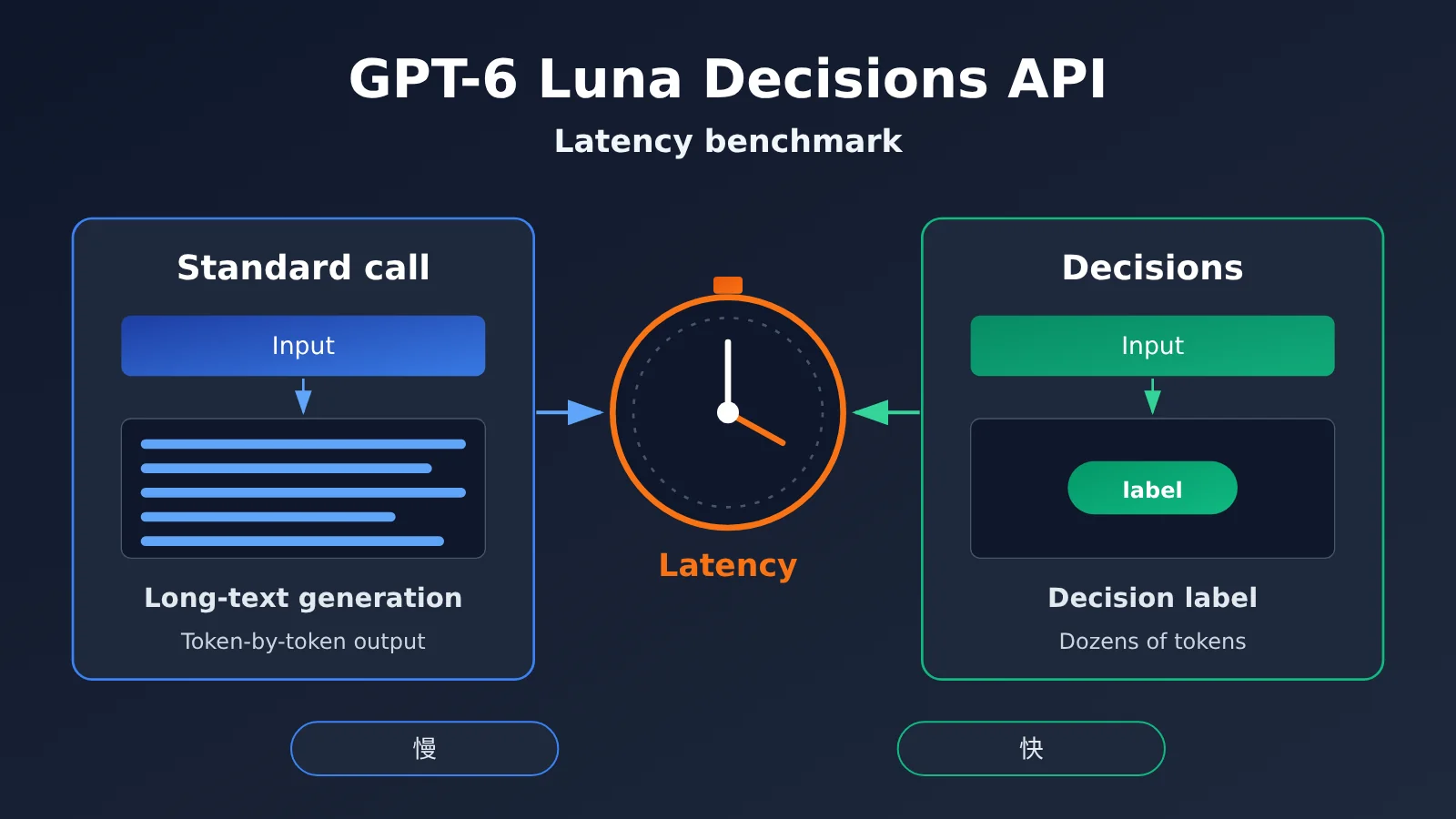
Before understanding the Decisions API, it helps to see how its positioning differs from a standard chat invocation. A normal call aims to “generate a piece of content,” while a decision-type call aims to “make a judgment among a limited set of options.” These two task types differ completely in output length, format constraints, and latency composition.
| Key Point | Description | Value to Developers |
|---|---|---|
| Decision-type output | Output focuses on structured results like labels, options, and scores rather than lengthy text | Results can be consumed directly by programs, with no secondary parsing needed |
| Short output length | A typical decision result is only a few dozen tokens, far fewer than a standard generation task | Total response time depends mainly on the first token and input processing |
| Constrained format | Can be combined with structured output constraints such as JSON Schema | Reduces format error rates and cuts down on retries |
| Suited to high-frequency calls | Requests like routing, classification, and moderation tend to be high-volume and individually simple | Latency and cost optimizations get amplified |
How the Decisions API Differs from a Standard Call
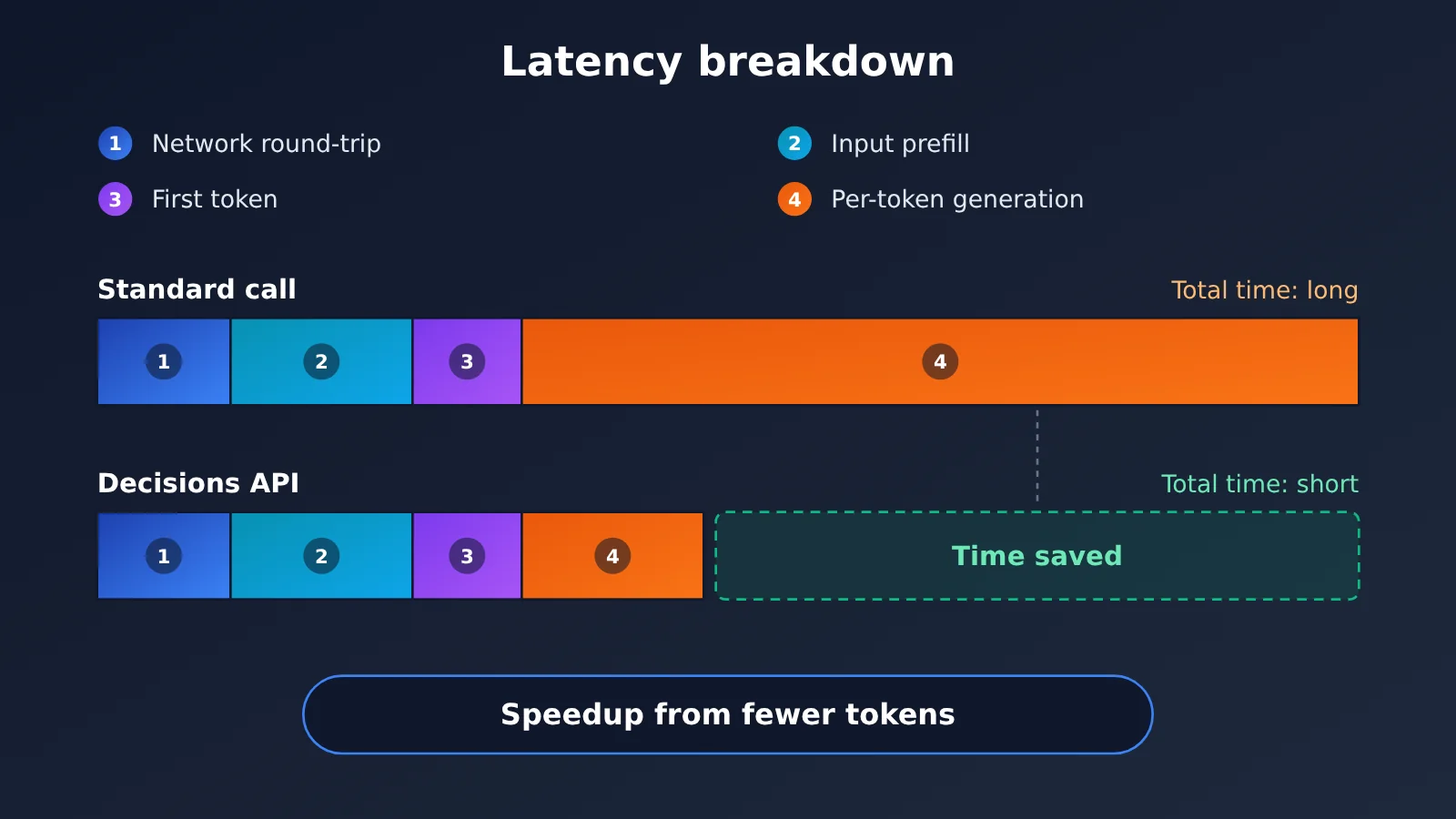
From an engineering perspective, the total time for a standard model call breaks down roughly into three parts: network round-trip, input processing (prefill), and token-by-token generation. In generative tasks, the third part often dominates—the longer the output, the slower it gets.
A decision-type call compresses the output into a single structured result, so the generation phase shrinks dramatically. This means the speedup of the GPT-6 Luna Decisions API comes mainly from “generating less,” not from “generating faster.” If your business genuinely needs long text, this interface isn’t built for you.
Where the Decisions API’s Speedup Comes From
A decision-type interface typically delivers additional benefits in two areas. First, the format is fixed, so programs don’t need regex to extract answers from natural language, and the odds of failure-and-retry are lower. Second, the reasoning process is controllable—if the model supports adjusting reasoning intensity, decision scenarios often don’t need lengthy chains of thought, further reducing wait time.
It’s worth emphasizing that these are all mechanism-level analyses. The actual speedup depends on your original output length: if you were already having the model reply with just one word, the gains after switching will be minimal; if you were having the model “explain first, then give a conclusion,” the gains will be very pronounced.
GPT-6 Luna Decisions API Quick Start
Minimal Example
Here’s the smallest possible example of completing a decision call with structured output. Replace the model name with the actual GPT-6 Luna model ID you see in the platform console.
import openai

client = openai.OpenAI(
    api_key="YOUR_API_KEY",
    base_url="https://api.apiyi.com/v1"  # APIYI OpenAI-compatible endpoint
)

resp = client.chat.completions.create(
    model="gpt-6-luna",  # use the actual name shown in the console's model list
    messages=[{"role": "user", "content": "Ticket: My invoice was issued incorrectly. Please determine which department should handle it."}],
    response_format={"type": "json_object"},
    max_tokens=50
)
print(resp.choices[0].message.content)
The key lies in max_tokens and response_format: the first caps the output length, the second guarantees the result can be parsed by your code. Those two parameters are exactly what makes decision-type calls fast.
View the full benchmark script (comparing latency of normal calls vs. decision calls)
import time
import json
import statistics
import openai

client = openai.OpenAI(
    api_key="YOUR_API_KEY",
    base_url="https://api.apiyi.com/v1"  # call through the unified APIYI endpoint
)

MODEL = "gpt-6-luna"  # use the actual model ID from the console; swap here if there's a dedicated Decisions model/endpoint

SAMPLES = [
    "My invoice was issued incorrectly — can you reissue it?",
    "The app keeps saying the verification code is wrong when I log in",
    "I'd like to switch my plan from monthly to annual billing",
    "The order shows as delivered but I never received it",
]

DECISION_SCHEMA = {
    "type": "json_schema",
    "json_schema": {
        "name": "route",
        "schema": {
            "type": "object",
            "properties": {
                "department": {"type": "string", "enum": ["finance", "tech", "sales", "logistics"]},
                "confidence": {"type": "number"}
            },
            "required": ["department", "confidence"]
        }
    }
}

def timed_call(prompt: str, mode: str) -> dict:
    """Return time to first token, total elapsed time, and output length."""
    kwargs = dict(model=MODEL, stream=True)
    if mode == "generate":
        kwargs["messages"] = [{"role": "user", "content": f"Analyze the ticket below and explain which department should handle it and why: {prompt}"}]
    else:
        kwargs["messages"] = [{"role": "user", "content": f"Ticket: {prompt}. Output only the department decision."}]
        kwargs["response_format"] = DECISION_SCHEMA
        kwargs["max_tokens"] = 60

    start = time.perf_counter()
    ttft, chunks = None, []
    for event in client.chat.completions.create(**kwargs):
        delta = event.choices[0].delta.content if event.choices else None
        if delta:
            if ttft is None:
                ttft = time.perf_counter() - start
            chunks.append(delta)
    total = time.perf_counter() - start
    return {"ttft": ttft or total, "total": total, "chars": len("".join(chunks))}

def bench(mode: str, rounds: int = 5) -> dict:
    results = [timed_call(p, mode) for _ in range(rounds) for p in SAMPLES]
    totals = sorted(r["total"] for r in results)
    return {
        "mode": mode,
        "ttft_avg": round(statistics.mean(r["ttft"] for r in results), 3),
        "total_p50": round(totals[len(totals) // 2], 3),
        "total_p95": round(totals[int(len(totals) * 0.95) - 1], 3),
        "avg_chars": round(statistics.mean(r["chars"] for r in results), 1),
    }

if __name__ == "__main__":
    for m in ("generate", "decision"):
        print(json.dumps(bench(m), ensure_ascii=False))
The script uses streaming, so you get both time to first token (TTFT) and total elapsed time. I’d suggest running each mode at least 20 times, alternating between them within the same time window so network jitter doesn’t skew the results.
🚀 Quick start: The officially recommended approach is to first grab your free new-user testing credits at APIYI apiyi.com, run the script above against a batch of your own real support tickets, and only then decide whether to wire the GPT-6 Luna Decisions API into production.
GPT-6 Luna Decisions API Benchmark Data
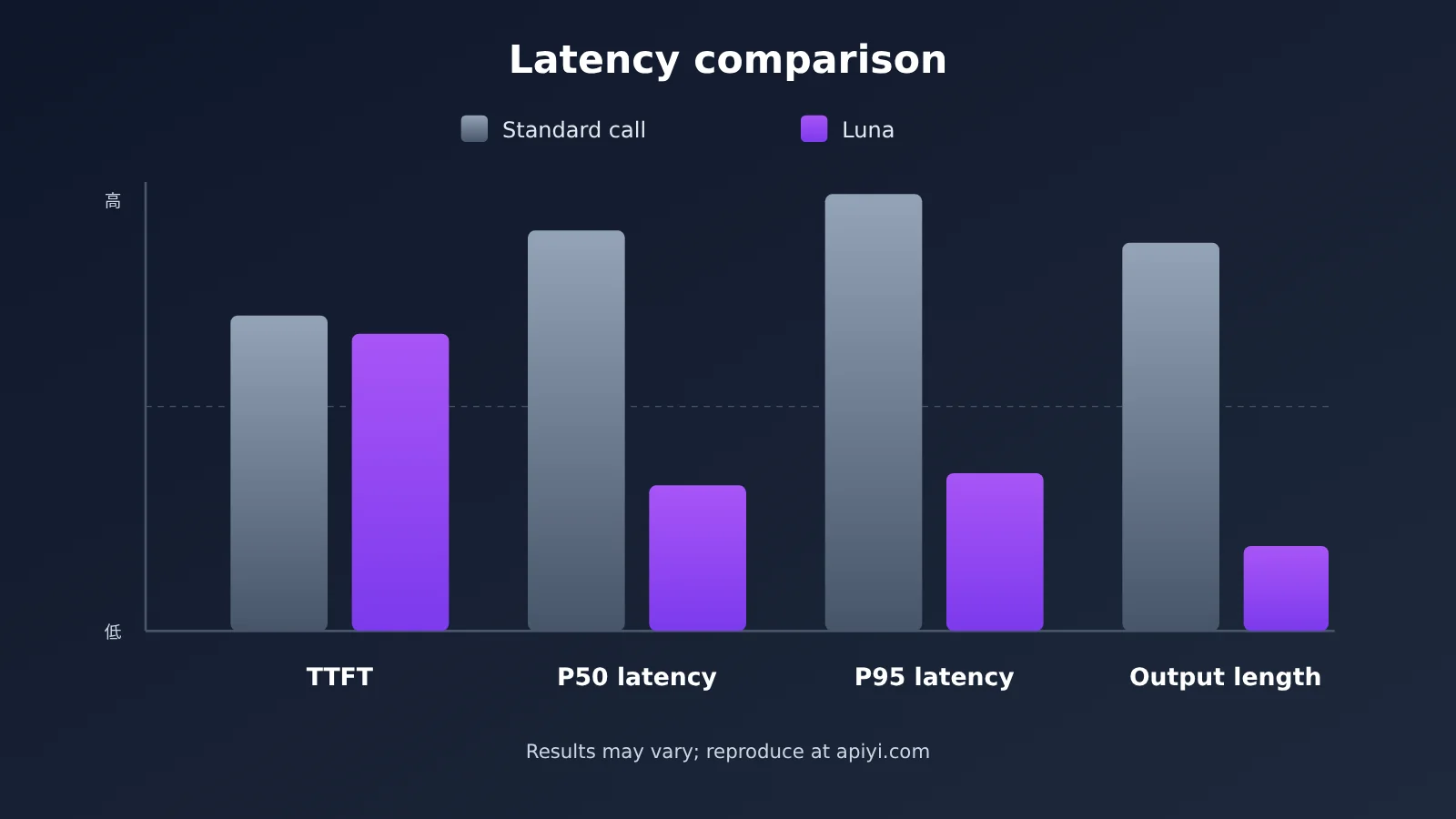
There’s no single answer to “how much faster is it than a standard call?” — so this section gives you a reproducible benchmarking framework instead. Run it with the environment and metrics below, and the numbers you get will actually be useful for business decisions.
Test Environment Setup
| Setting | Recommended | Why |
|---|---|---|
| Endpoint | OpenAI-compatible API (base_url pointing to a unified gateway) | Keeps both modes on the same network path |
| Sample data | 20–100 real business requests | Latency measured on synthetic data tends to look optimistic |
| Call mode | stream=True |
Required to measure time to first token |
| Concurrency | Start with a single request, then ramp up to your business peak | Watch for latency jitter under high concurrency |
| Time window | One round at weekday peak, one at off-peak | Rules out load differences by time of day |
Core Latency Metrics
| Metric | What It Means | How to Judge It |
|---|---|---|
| TTFT (time to first token) | From sending the request to receiving the first character | Usually similar across both modes; mainly driven by input length |
| P50 total latency | How long half the requests take to finish | The headline advantage of decision mode — the bigger the gap, the more it’s worth switching |
| P95 total latency | Latency of long-tail requests | Sets the floor on user experience — a must-watch for online services |
| Average output length | Characters or tokens returned per call | Explains where the speedup comes from, and ties directly to cost |
| Format success rate | Share of responses that parse cleanly | Failed retries eat up the time you saved |
How to Read Your Decisions API Results
If TTFT turns out nearly identical in both modes while P50 total latency differs clearly, the speedup really is coming from “generating less” — exactly what you’d hope to see. In that case, compare average output length too: the wider the gap, the more time and output cost you’re saving.
If P50 doesn’t differ much but P95 does, the long tail of standard calls is mostly caused by occasional long outputs. Even without a headline gain in the average, switching to GPT-6 Luna Decisions API still noticeably improves stability for online services.
A third case is when the two modes show almost no difference at all. That usually means your existing prompt is already restrained. Here the value of switching is mostly format reliability, not speed.
💡 Validation tip: Run the same sample batch alternately through the same gateway. We recommend comparing directly via the unified APIYI interface at apiyi.com, so results aren’t skewed by different network egress points.
Which Business Scenarios Fit GPT-6 Luna Decisions API?
The value of a decision-focused API isn’t that a single call is a few hundred milliseconds faster. It’s that in high-frequency, simple scenarios where programs need to consume the result, those milliseconds get multiplied across thousands of requests. The table below breaks down how well five common business scenarios fit.
| Business scenario | Typical output | Fit | Notes |
|---|---|---|---|
| Customer support ticket routing | Department label + confidence score | High | High request volume and a fixed set of options, so the speed and format benefits are both clear |
| Content safety moderation | Pass / reject / human review | High | Sensitive to P95 latency, and results need to drive the workflow directly |
| Agent tool selection | Which tool to call and with what parameters | High | Every step in a multi-step Agent saves time, so the gains compound |
| Risk control and anti-fraud triage | Risk level | Medium | Good as a first-pass filter; critical decisions still need rules or human backup |
| Long-form writing / report generation | Long passages of natural language | Low | It inherently needs long output, so it isn’t the target use case for a decision-focused API |
How It Compares: Decisions API vs. Other Decision-Making Approaches
When it comes to decision tasks, a Large Language Model isn’t the only option. The table below compares GPT-6 Luna Decisions API with several common approaches.
| Approach | Core characteristics | Best for | Latency | Available platforms |
|---|---|---|---|---|
| GPT-6 Luna Decisions API | Large Language Model understanding + structured short output | Decisions with complex semantics and a clear set of options | Low (based on your own testing) | APIYI apiyi.com, official API |
| Standard generative call | Flexible, can include an explanation | Low-frequency decisions that need a rationale | Medium to high; scales with output length | Mainstream Large Language Model platforms |
| Lightweight small-model classification | Cheap and fast, but limited understanding | Classification with simple semantics and plenty of labeled data | Low | Mainstream Large Language Model platforms or self-hosted |
| Rules engine | Millisecond-level and fully controllable | Rules with clear conditions that rarely change | Very low | Self-built |
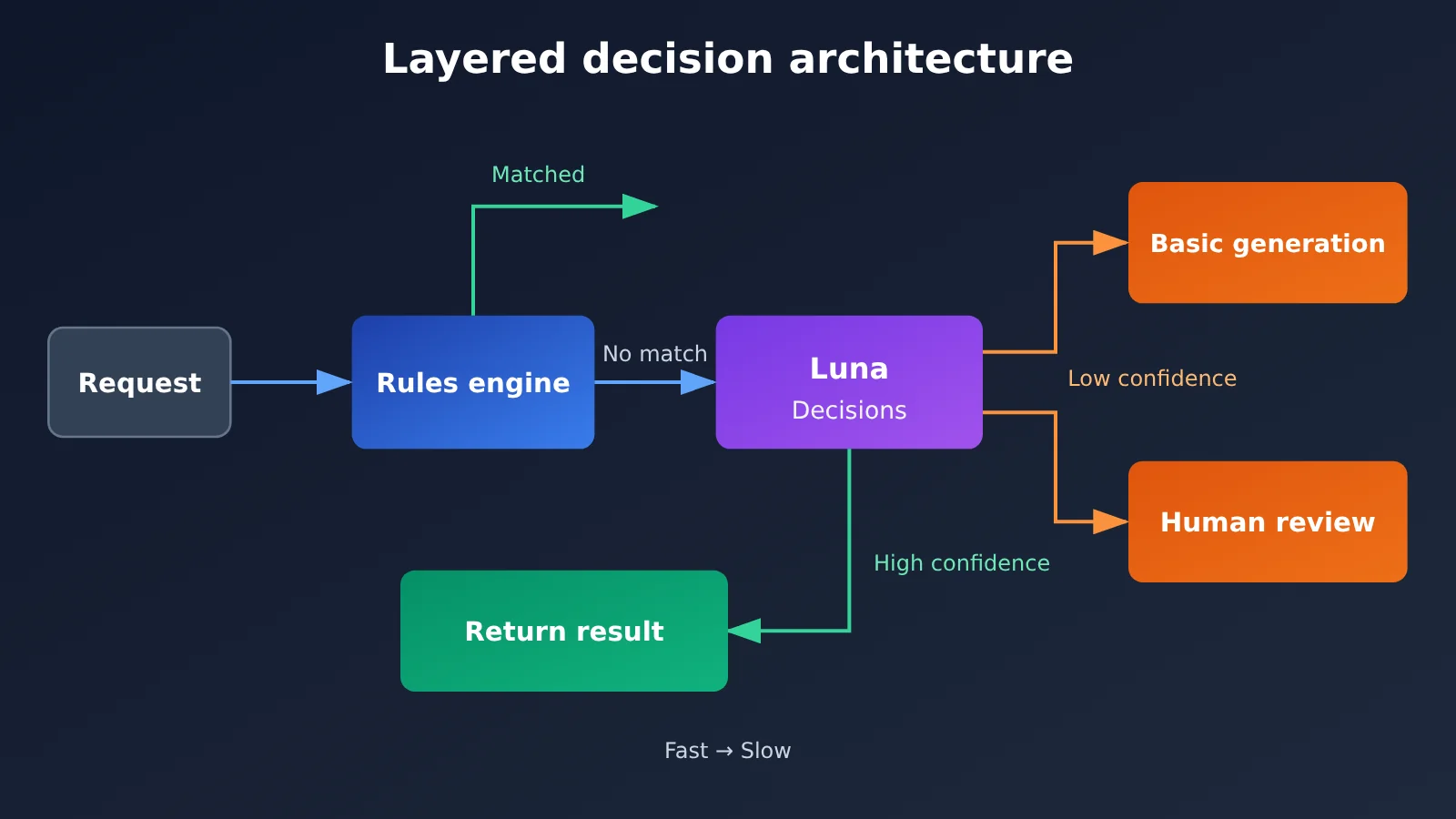
Comparison analysis: A rules engine still leads on speed and controllability, but when inputs are conversational and varied, the cost of maintaining rules rises sharply. Lightweight small models have a clear cost advantage, but they fall short on ambiguous semantics and long contexts. By contrast, GPT-6 Luna Decisions API is a better fit for scenarios where the semantics are complex but the answer space is limited—making it a middle-ground choice between rules and standard Large Language Model calls.
In practice, a layered architecture is more common: the rules engine handles clear-cut conditions, GPT-6 Luna Decisions API handles ambiguous requests, and the system only falls back to a standard generative call when an explanation is needed.
GPT-6 Luna Decisions API: Strengths and Weaknesses
Strengths
- More predictable total latency: The output is compressed into a structured result, so the generation phase takes noticeably less time and tail latency is steadier.
- Results you can consume directly: Paired with a JSON Schema, the response can flow straight into your business logic, cutting out parsing code and failure retries.
- Friendlier cost structure: Fewer output tokens means lower output spend too — especially noticeable in high-frequency scenarios.
- Low barrier to adoption: It’s built on the OpenAI-compatible protocol, so existing code usually just needs a new model name and output constraints to switch over.
Limitations
- Not built for explanations: The decision result comes with no reasoning attached. When you need an audit trail, you can make an extra standard call on low-confidence samples to fill in the rationale.
- Speedup varies by scenario: If your current calls already output just a single label, the switch won’t buy you much. Run a benchmark script to quantify the gain before migrating.
- Input length is still a bottleneck: The decision-style endpoint optimizes the output side. Prefill time for very long contexts doesn’t go away, so trim inputs or compress them with retrieval when necessary.
- Depends on well-designed options: Fuzzy enum values leave the model wavering between similar choices, so define clear, mutually exclusive options in the Schema.
Frequently Asked Questions (FAQ)
Q1: What is the GPT-6 Luna Decisions API?
It’s an invocation method built for decision-making tasks. The core idea is to have the model output brief, structured judgments from a given set of options instead of generating long text. It’s a good fit for classification, routing, moderation, and tool selection scenarios. Specific parameters are subject to the official documentation.
Q2: How much faster is the Decisions API than normal model invocation?
There’s no universal multiplier. The speedup mainly comes from shorter output length — the longer your original output was, the bigger the gain after switching. I’d suggest using the evaluation script in this article to compare P50 and P95 total latency on your real samples, so you can draw conclusions that fit your own business.
Q3: What’s the difference between the GPT-6 Luna Decisions API and normal invocation plus JSON output?
Normal invocation with JSON constraints can achieve a similar effect. The gap depends on whether the official side has done specialized optimization for decision scenarios — for example, reasoning effort, output constraints, and service scheduling. The most reliable way to judge is still a controlled side-by-side test under the same conditions.
Q4: Which businesses are best suited to switch first?
Prioritize businesses with high request volume, a fixed answer space, and latency sensitivity — things like customer service ticket routing, content moderation, and Agent tool selection. Businesses that inherently require long output, such as long-form writing and report generation, aren’t good candidates for switching.
Q5: How do I quickly call the GPT-6 Luna Decisions API?
Recommended steps:
1. Visit APIYI apiyi.com to register an account and get an API key
2. Confirm the actual model ID for GPT-6 Luna in the console’s model list
3. Set `base_url` in the code from this article to `https://api.apiyi.com/v1`, replace the model name, and run it
The platform uses OpenAI-compatible interfaces, so a single key lets you call other mainstream models for comparison tests at the same time.
Q6: How do I control the cost of Decisions API calls?
Decision-type output already saves output tokens. You can optimize further from three angles: trim unnecessary context, use a rules engine to intercept clear-cut requests, and only make secondary calls for low-confidence samples. In the APIYI apiyi.com console, you can view usage details by model to pinpoint the big cost drivers.
Q7: What are the known limitations of the GPT-6 Luna Decisions API?
The main limitations: it doesn’t provide decision reasoning, the speedup depends on the original output length, and the prefill time for very long inputs can’t be eliminated. For high-stakes decisions in finance, healthcare, and similar fields, I’d recommend using it as a supporting judgment and keeping a human review step in place.
GPT-6 Luna Decisions API Key Takeaways
- Clear positioning: Decisions API is about making quick judgments among a limited set of options—not about long-form text generation.
- Where the speed comes from: Mostly from shorter outputs. The longer your original output, the more noticeable the gain from switching.
- Key metrics: Focus on P50 and P95 total latency; TTFT is usually similar across both modes.
- Best use cases: High-frequency decision tasks like ticket routing, content moderation, and Agent tool selection.
- Recommended architecture: A layered fallback setup combining a rules engine + Decisions API + regular calls.
- How to get started: Run comparison scripts through a unified OpenAI-compatible interface, then migrate based on your own test data.
Summary
The core takeaways for GPT-6 Luna Decisions API:
- Fast because it generates less: Its speed advantage comes mainly from structured short outputs, not from faster per-token generation.
- Value depends on the scenario: High-frequency, fixed-option, latency-sensitive workloads benefit the most; long-text scenarios aren’t a fit.
- Conclusions need real testing: Speedup varies widely across different prompts and samples, so be sure to measure P50 and P95 with real data.
If you’re working on customer service routing, content moderation, or Agent orchestration, GPT-6 Luna Decisions API is worth a serious evaluation. Keep your existing calls as a control group, roll out to a portion of traffic gradually, and then decide whether to migrate fully based on latency and format success rate.
I recommend getting free credits through APIYI at apiyi.com, and using the script in this article to quickly validate the real speedup for your own use case.
📚 References
- OpenAI API Official Documentation: Notes on model invocation, streaming output, and structured output
- Link:
platform.openai.com/docs -
Description: The authoritative source for confirming GPT-6 Luna and Decisions-related parameters
-
OpenAI Python SDK: The official Python client
- Link:
github.com/openai/openai-python -
Description: The SDK used for the test scripts in this article, including streaming call examples
-
JSON Schema Specification: The definition standard for structured output constraints
- Link:
json-schema.org - Description: The reference spec for designing decision options and enum values
Author: APIYI Technical Team
Technical Discussion: Feel free to reach out to us on the APIYI website homepage. For more integration resources, check out the docs.apiyi.com documentation center.