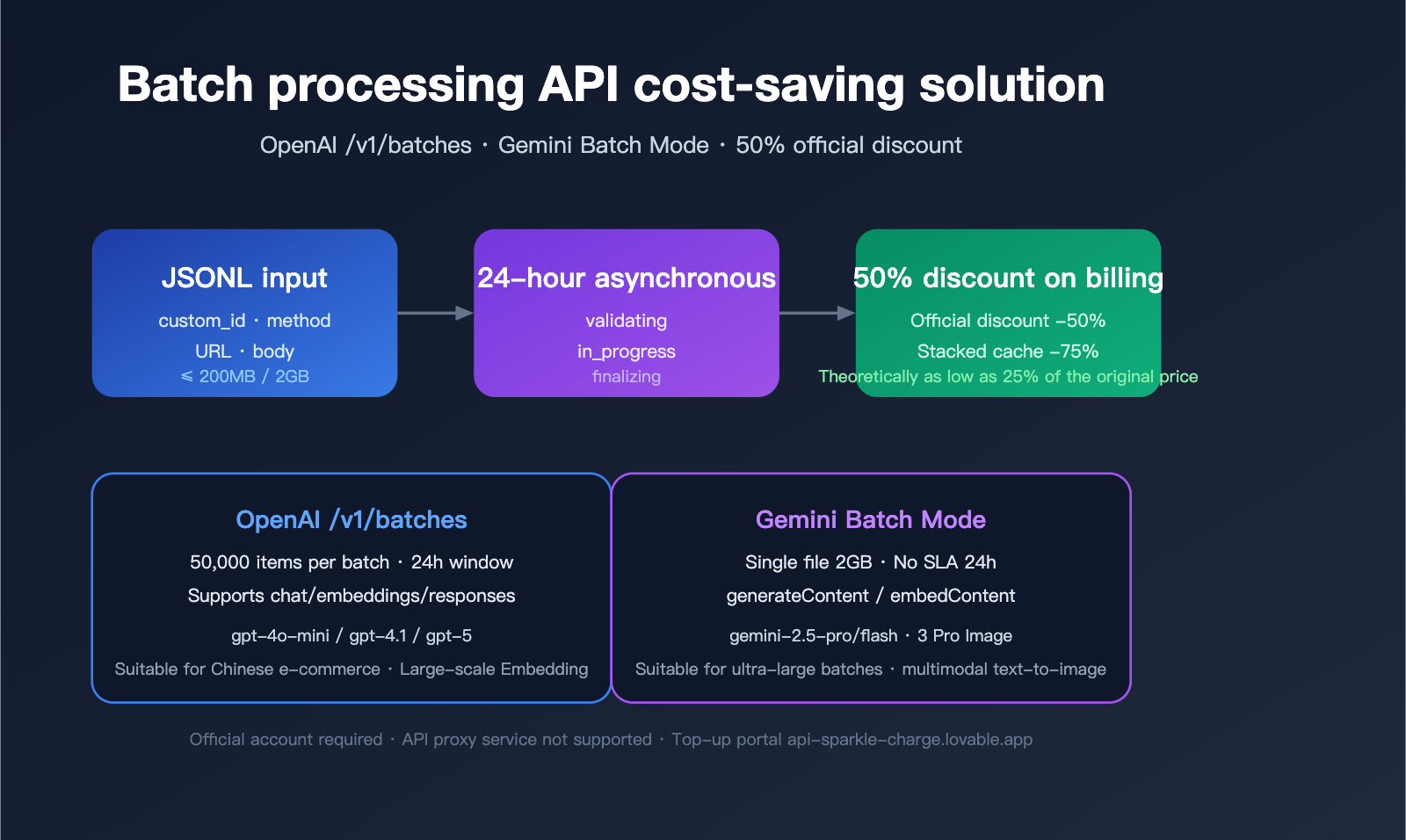
When you need to process tens of thousands of product descriptions, data labeling tasks, content moderation, or vectorization jobs overnight, synchronous standard API calls are both slow and expensive. OpenAI’s /v1/batches and Google Gemini Batch Mode offer the same solution: upload a JSONL file, get all results back asynchronously within 24 hours, and cut your costs by 50%.
However, in practice, API proxy services often do not support direct /v1/batches calls because their billing models aren't compatible with the asynchronous token settlement mechanism of official batch interfaces. This means that if you want to take advantage of the official 50% discount and high-concurrency capabilities for massive token volumes, you must use an official account with an official API key. For developers in China, the most convenient path is to place an order via a professional official API top-up service—visit api-sparkle-charge.lovable.app to place an order, or check out the full price list at the AI top-up site: ai.daishengji.com.
This article systematically breaks down the technical specifications, billing mechanisms, and implementation practices for both batch APIs based on official OpenAI and Google AI documentation, and provides a guide for choosing the right top-up service for your scenarios.
Core Value of Batch APIs: Why You Should Open an Official Account
The Batch API is a specialized interface designed by OpenAI and Google for non-real-time, high-throughput scenarios. The core trade-off is simple: you sacrifice the certainty of real-time responses in exchange for a 50% price reduction and higher rate limits.
Essential Differences Between Batch and Synchronous APIs
The table below compares the key parameters of the two calling modes:
| Dimension | Synchronous API | Batch API |
|---|---|---|
| Response Latency | Seconds | Up to 24 hours |
| Token Price | Standard Rate | 50% Off (-50%) |
| Request Limit | 1 request | 50k requests (OpenAI) / 2GB JSONL (Gemini) |
| Rate Limits | Strict RPM/TPM | Independent, higher quotas |
| Failure Retries | Handled by caller | Automatic retries at the interface level |
| Prompt Caching | 5-10 minute window | Shared system prompts within batches save costs |
💡 Integration Tip: Batch APIs must be called using native official accounts and keys; API proxy services cannot pass through
/v1/batchesasynchronous tasks. We recommend placing orders for official quotas directly via the official top-up service at api-sparkle-charge.lovable.app to immediately get the 50% batch discount. Combined with the multi-currency settlement capabilities of the AI top-up site ai.daishengji.com, you can top up your account in just one minute.
Which Scenarios Are Best Suited for Batch Processing?
Based on official documentation and practices from top developers, the following scenarios yield the most significant savings:
- Data Labeling/Classification: Sentiment analysis for 100,000 reviews costs ~$500 via synchronous calls, but only ~$250 via batch processing.
- Product Description Generation: Bulk expansion of e-commerce SKUs, which can usually be completed in a batch overnight.
- Document Summarization/Vectorization: Processing large-scale knowledge bases.
- Model Evaluation (eval): Running test sets where time-sensitivity is low.
- Content Moderation: Bulk filtering of UGC.
- Embedding Batch Generation: Building vector databases.
OpenAI Batch API Technical Specifications (/v1/batches)
OpenAI's /v1/batches endpoint has been an industry benchmark since its launch in 2024. Its core design philosophy is to fully reuse the request body from synchronous APIs, meaning developers face minimal friction when migrating from synchronous calls to batch processing.
Core Constraints and Quotas
| Item | Value | Description |
|---|---|---|
| Completion Window | 24 hours | Only 24h is currently supported |
| Request Limit per Batch | 50,000 requests | Split into multiple batches if exceeded |
| File Size Limit | 200 MB | Based on UTF-8 JSONL |
| Supported Endpoints | /v1/chat/completions / /v1/embeddings / /v1/completions / /v1/responses |
Excluding image/audio |
| Price Discount | -50% | 50% off for all supported models |
| Rate Limits | Dedicated | Does not consume synchronous TPM |
JSONL File Format Example
OpenAI requires each line in the uploaded file to be an individual JSON object containing four specific fields: custom_id, method, url, and body:
{"custom_id": "req-001", "method": "POST", "url": "/v1/chat/completions", "body": {"model": "gpt-4o-mini", "messages": [{"role": "system", "content": "You are a product categorization expert"}, {"role": "user", "content": "iPhone 17 Pro 256GB"}]}}
{"custom_id": "req-002", "method": "POST", "url": "/v1/chat/completions", "body": {"model": "gpt-4o-mini", "messages": [{"role": "system", "content": "You are a product categorization expert"}, {"role": "user", "content": "Sony WH-1000XM6"}]}}
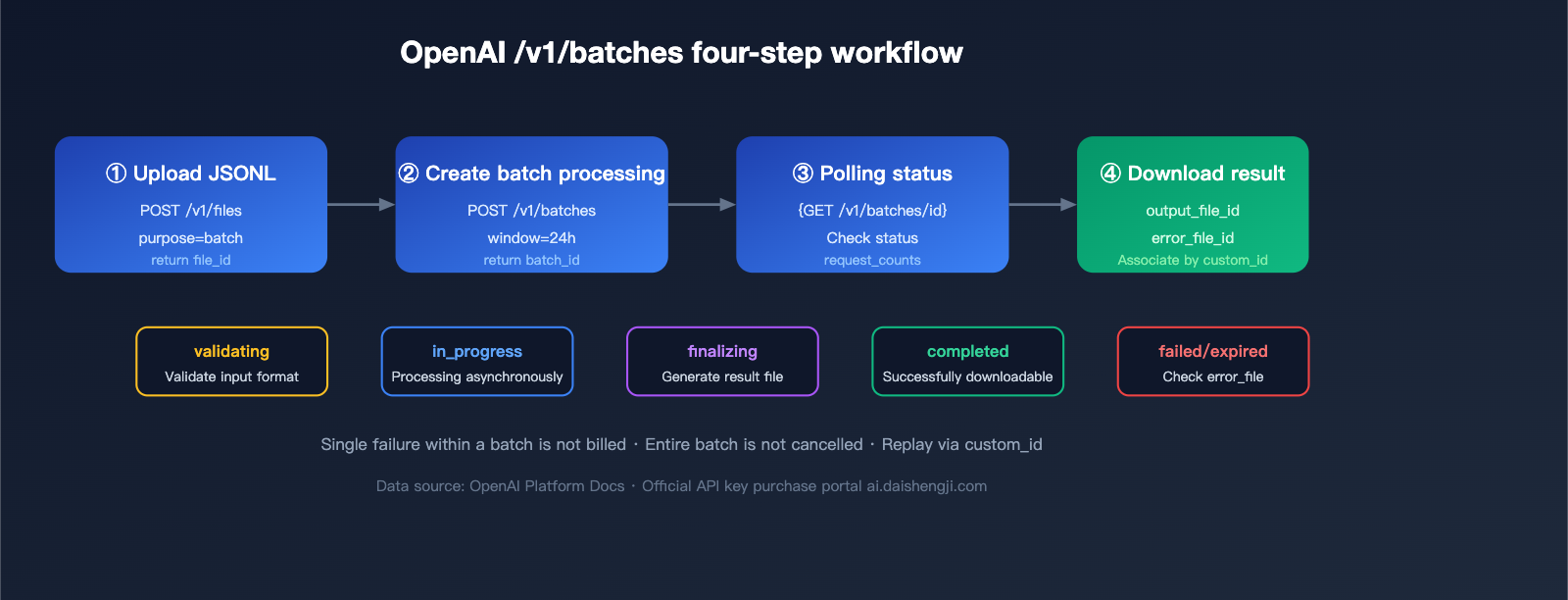
Four Steps to Complete an OpenAI Batch Invocation
Step 1: Upload JSONL File
from openai import OpenAI
client = OpenAI(api_key="sk-official-key")  # Use the official key obtained via top-up

batch_file = client.files.create(
    file=open("requests.jsonl", "rb"),
    purpose="batch"
)
Step 2: Create Batch Task
batch = client.batches.create(
    input_file_id=batch_file.id,
    endpoint="/v1/chat/completions",
    completion_window="24h",
    metadata={"project": "sku-classification-2026q2"}
)
print(batch.id)  # batch_abc123
Step 3: Poll Status
import time
while True:
    b = client.batches.retrieve(batch.id)
    print(b.status, b.request_counts)
    if b.status in ("completed", "failed", "expired", "cancelled"):
        break
    time.sleep(60)
Step 4: Download Results
if b.status == "completed":
    result_text = client.files.content(b.output_file_id).text
    with open("results.jsonl", "w") as f:
        f.write(result_text)
🎯 API key Acquisition Tips: OpenAI batch processing requires an official native
sk-*key; API proxy service keys (likehub-*orsk-proxy-*) cannot be used to call/v1/batches. If you need official credits quickly, you can place an order via top-up services: api-sparkle-charge.lovable.app supports top-ups for official OpenAI, Anthropic, and Google accounts with delivery in 5-30 minutes. You can also explore various discount combinations at the AI top-up site ai.daishengji.com.
Gemini Batch Mode Technical Specifications
The Gemini Batch Mode launched by Google in 2025 is similar to OpenAI's approach but is more aggressive regarding file volume and model support.
Core Constraints and Quotas
| Item | Value | Description |
|---|---|---|
| Completion Window | Up to 24 hours | No strict SLA |
| File Size Limit | 2 GB | Approximately 10x that of OpenAI |
| Supported Models | gemini-2.5-pro / flash / flash-lite | Includes Gemini 3 Pro Image |
| Price Discount | -50% | 50% off for both input and output tokens |
| Supported Endpoints | generateContent / embedContent |
Same as synchronous interfaces |
| Vertex AI Version | Regional deployment supported | For enterprise compliance scenarios |
Gemini JSONL Format Example
{"key": "req-001", "request": {"contents": [{"parts": [{"text": "Write a 30-word selling point for this product: iPhone 17 Pro 256GB"}]}]}}
{"key": "req-002", "request": {"contents": [{"parts": [{"text": "Write a 30-word selling point for this product: Sony WH-1000XM6"}]}]}}
Gemini Batch Invocation Example
from google import genai
client = genai.Client(api_key="AIza-official-key")

# Upload file
uploaded = client.files.upload(file="requests.jsonl", config={"mime_type": "jsonl"})

# Create batch job
batch_job = client.batches.create(
    model="gemini-2.5-flash",
    src=uploaded.name,
    config={"display_name": "sku-cn-2026q2"}
)

# Get results
final = client.batches.get(name=batch_job.name)
if final.state.name == "JOB_STATE_SUCCEEDED":
    result_file = client.files.download(file=final.dest.file_name)
📌 Gemini Top-up Note: Gemini batch processing capabilities are only available for official paid accounts on Google AI Studio or Vertex AI and are not available within free tier quotas. If you are in a region where you cannot bind an international credit card, you can use the official Gemini top-up channel at ai.daishengji.com to quickly activate paid quotas, or place an order for a dedicated top-up at api-sparkle-charge.lovable.app.
Decision-Making for OpenAI vs. Gemini Batch API
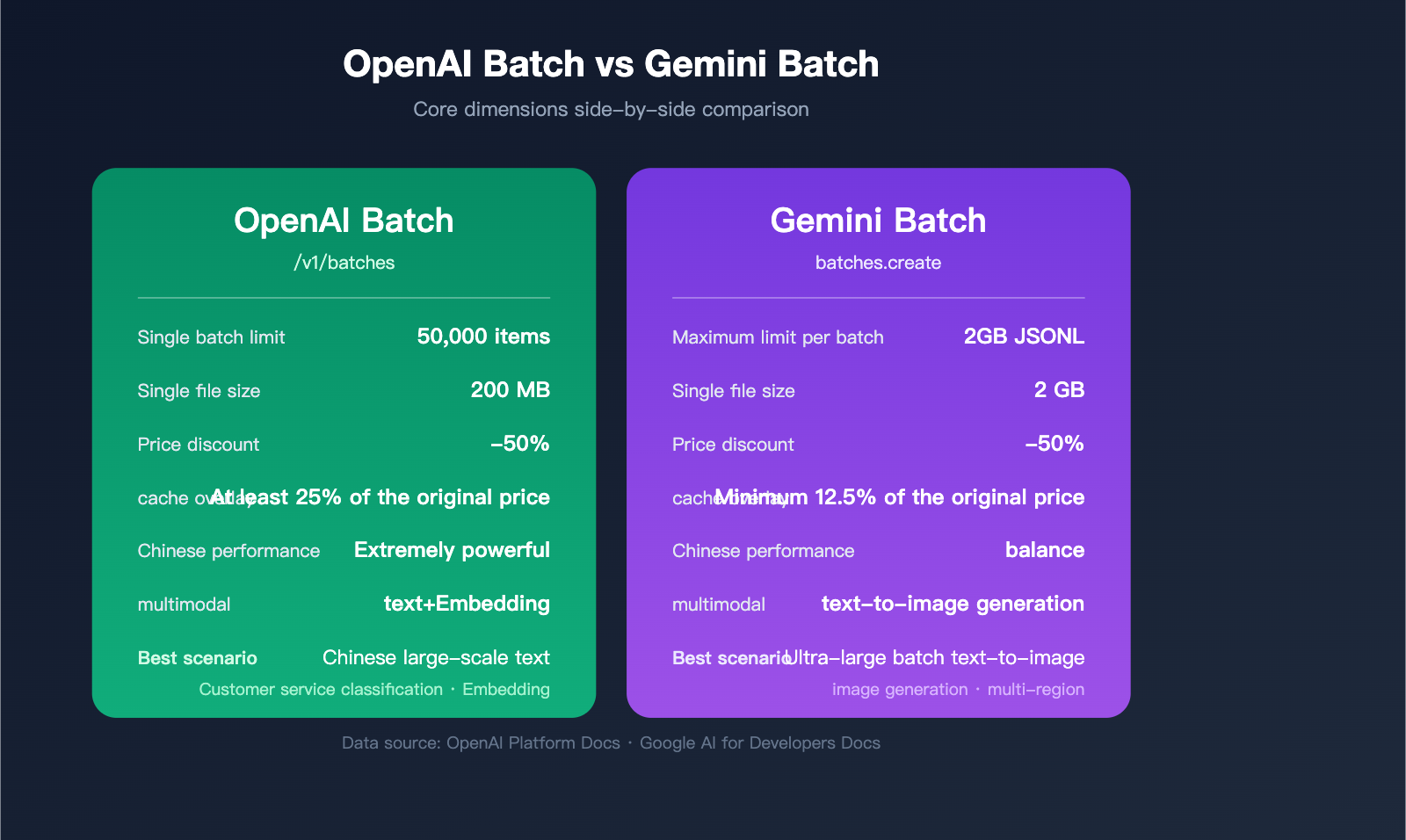
When evaluating options for real-world projects, developers often find themselves torn between these two. The table below highlights the key dimensions for comparison:
| Comparison Item | OpenAI Batch | Gemini Batch | Recommended Scenario |
|---|---|---|---|
| Single Batch Request Limit | 50,000 items | 2GB JSONL (~100k+ items) | Gemini for ultra-large batches |
| Single File Size | 200 MB | 2 GB | Gemini for ultra-large batches |
| Response Quality (Chinese) | gpt-4o/4.1 series are stronger | gemini-2.5-pro is well-balanced | GPT for advanced Chinese reasoning |
| Multimodal Support | Text/Embeddings | Text/Image generation | Gemini for batch image processing |
| Cache Reuse | Prompt caching | Implicit context caching | OpenAI for identical system prompts |
| Billing Complexity | Simple and clear | Model tier-dependent | OpenAI for easier financial auditing |
| Documentation Maturity | Highly mature | Constantly evolving | OpenAI for quick implementation |
Scenario-Based Recommendations
- Chinese E-commerce SKU Batch Processing: gpt-4o-mini Batch, best cost-effectiveness.
- Multimodal Mixed Image/Text: Gemini 2.5 Pro Batch, for a unified pipeline.
- Massive Embedding Construction: OpenAI text-embedding-3-small Batch.
- Enterprise Compliance & Multi-region: Vertex AI Gemini Batch.
System Prompt Reuse and Advanced Cache Optimization
Users often ask: "If every request in a batch contains the same system prompt, can I be billed only once?" This is a high-frequency but often misunderstood topic.
The Truth About Prompt Billing in OpenAI Batch
OpenAI /v1/batches does not automatically deduplicate identical system prompts. However, when combined with the Prompt Caching mechanism, if the conversation prefix within a batch hits the cache, Cached input tokens enjoy an additional 50% discount. Combined with the 50% batch discount, you can reach a theoretical low of 25% of the original cost.
Conditions for success:
- The request body prefix must be strictly identical (including role, tool definitions, and text).
- The prefix length must be ≥ 1024 tokens (512 tokens for some models).
- The cache hit threshold must be reached within a 24-hour window.
Gemini's Implicit Context Caching
Gemini Batch Mode natively supports Implicit Context Caching. When request prefixes repeat, the system automatically creates a cache, requiring no manual cached_content management. Cached portions are billed at Gemini's cache rates (approx. 25% of base price), and when combined with the 50% batch discount, it can reach as low as 12.5%.
Cost Calculation for Batch + Caching
Assuming 100,000 requests, each sharing a 2000-token system prompt + 500-token user input + 300-token output:
| Scheme | Cost Per Request | Total Estimated Cost | Savings |
|---|---|---|---|
| Synchronous Call (No Cache) | $0.0028 | $280 | Baseline |
| Synchronous + Prompt Caching | $0.0018 | $180 | -36% |
| Batch (50% off) | $0.0014 | $140 | -50% |
| Batch + Caching | $0.0009 | $90 | -68% |
⚡ Cost-Saving Strategy: When you have the same system prompt, the same model, and a batch job running overnight, always use the "Batch + Prompt Caching" combo. To enable these optimizations on official accounts, confirm your billing strategy. When ordering via the APIYI proxy service at api-sparkle-charge.lovable.app, you can add a note saying "Need to enable batch + cache discount," and the system will automatically bind you to the best pricing tier.
Why API Proxy Services Don't Support Batch Processing: A Technical Breakdown
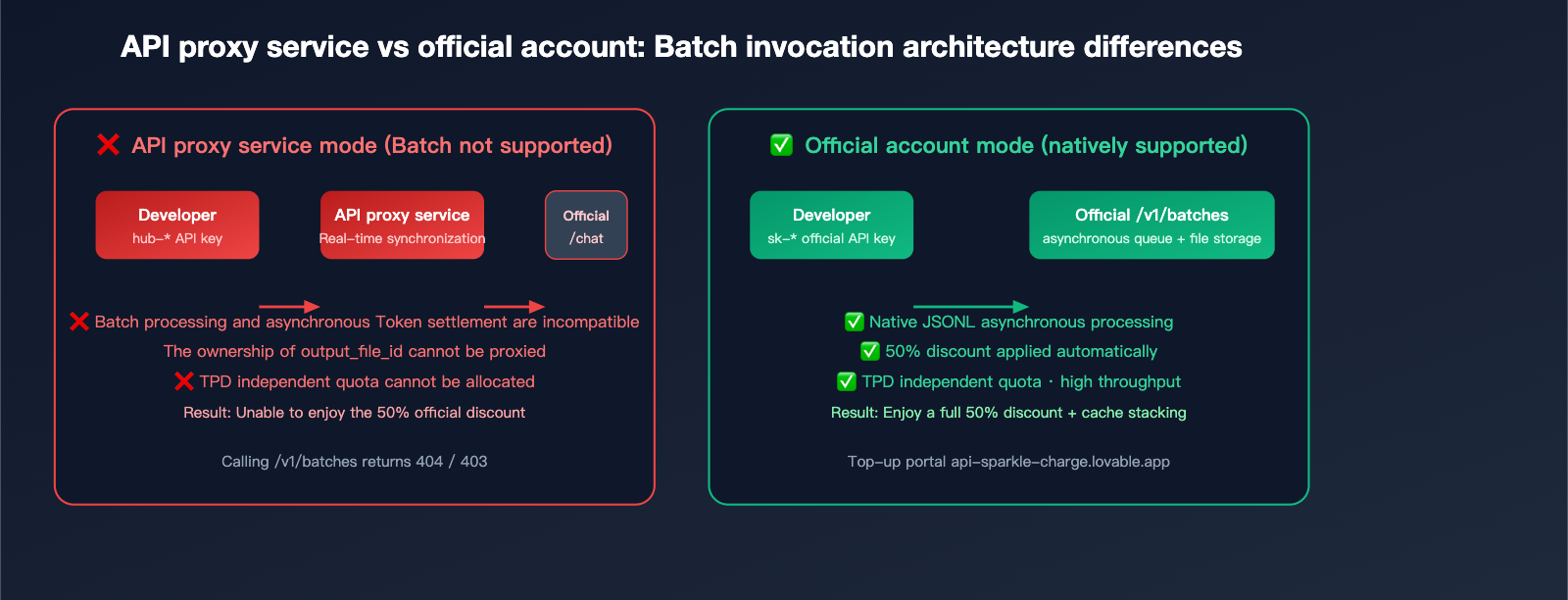
Many users wonder why API proxy services generally don't support the /v1/batches endpoint. Here’s the technical breakdown:
Core Reason 1: Incompatible Billing Models
API proxy services rely on real-time model invocation to apply their markup (official cost × 1.x premium). Batch processing, however, involves delayed settlement (up to 24 hours). This forces the proxy service to shoulder significant financial and exchange rate risks, as they would have to front the capital before collecting from the user.
Core Reason 2: Opaque Token Return Links
The output_file_id returned by the batch interface is an object within the official file system. For a proxy to support this, it would need to replicate the entire file storage and bandwidth architecture, and swapping the ownership of download links is technically difficult.
Core Reason 3: Independent Rate Limits
Batch interfaces have their own TPD (Tokens Per Day) quota, which is completely separate from standard TPM/RPM limits. Proxy services cannot predict the daily quota needs of individual end-users, making it nearly impossible to allocate resources fairly.
The Solution: Use Official Accounts via Managed Recharge
The cleanest way forward is having users hold their own official accounts:
- Technical: You bypass all proxy limitations and get native access to the full capabilities of
/v1/batches. - Compliance: Billing, compliance, and refunds are handled through official channels.
- Efficiency: No need to split your workflow between synchronous and asynchronous calls.
- Cost: Managed recharge services only charge a reasonable service fee, meaning you keep the full 50% discount offered by batch processing.
This is the core value proposition of platforms like api-sparkle-charge.lovable.app and AI recharging site ai.daishengji.com: Helping you secure a primary official account and API key, so you can capture the full savings of batch processing.
Practical Guide: Batch Classification for 100,000 Customer Support Q&As
Here is a production-ready example of how to classify 100,000 historical customer support interactions.
Step 1: Construct the JSONL Input
import json
with open("requests.jsonl", "w") as f:
    for idx, q in enumerate(questions):  # 'questions' is a list of 100,000 entries
        payload = {
            "custom_id": f"q-{idx:06d}",
            "method": "POST",
            "url": "/v1/chat/completions",
            "body": {
                "model": "gpt-4o-mini",
                "messages": [
                    {"role": "system", "content": "Classify the user question into: billing/tech/sales/other. Return only the category word."},
                    {"role": "user", "content": q}
                ],
                "max_tokens": 8,
                "temperature": 0
            }
        }
        f.write(json.dumps(payload, ensure_ascii=False) + "\n")
Step 2: Split by 200MB Threshold
# If 100,000 entries exceed 200MB, split them into files of 40,000 entries each.
# (If using Gemini, no split is needed as the limit is 2GB.)
Step 3: Submit and Monitor
batches = []
for path in ["part1.jsonl", "part2.jsonl", "part3.jsonl"]:
    fobj = client.files.create(file=open(path, "rb"), purpose="batch")
    b = client.batches.create(
        input_file_id=fobj.id,
        endpoint="/v1/chat/completions",
        completion_window="24h"
    )
    batches.append(b.id)
Step 4: Aggregate Results
results = {}
for bid in batches:
    b = client.batches.retrieve(bid)
    if b.status == "completed":
        content = client.files.content(b.output_file_id).text
        for line in content.splitlines():
            item = json.loads(line)
            results[item["custom_id"]] = item["response"]["body"]["choices"][0]["message"]["content"]
Cost Estimate: 100k × ~600 tokens × gpt-4o-mini Batch pricing ≈ $6-9, saving you roughly $6-9 compared to synchronous model invocation.
FAQ
Q1: Can API proxy service API keys be used to call /v1/batches?
No. API keys returned by an API proxy service (typically starting with hub-, sk-proxy-, or a custom prefix) only support synchronous endpoints like /v1/chat/completions. The batch processing interface relies on the official account system's file system and asynchronous task queues, so you must use official native sk-* keys. If you need an official key, you can place an order via api-sparkle-charge.lovable.app for top-ups, or visit the AI top-up site ai.daishengji.com to explore various official account plans.
Q2: Does the 50% discount for Gemini Batch apply to all models?
Currently, Gemini 2.5 Pro, 2.5 Flash, 2.5 Flash-Lite, and Gemini 3 Pro Image all enjoy a 50% discount on batch processing, with both input and output tokens halved. Please note that Free Tier accounts cannot use batch processing; you must have a paid account. Official paid accounts obtained through top-up services are ready to use out of the box.
Q3: What happens if a batch task fails? Will the fees be refunded?
Both providers follow the same policy: Failed individual requests are not charged, and the entire batch is not canceled. For OpenAI, the output_file will contain failed entries with an error field, and error_file_id aggregates all errors. For Gemini, error details are provided when state=JOB_STATE_FAILED. You can directly retry failed entries based on their custom_id.
Q4: Does Prompt Caching trigger during batch processing?
Yes. OpenAI's documentation explicitly states that when a batch request hits Cached Input Tokens, the cached input tokens—already discounted by 50% for the batch—receive an additional 50% discount (resulting in 25% of the original price). To make this work, you must ensure that the prefixes of the requests within the batch are strictly consistent and meet the minimum cache length requirements.
Q5: Are official accounts from top-up services safe? Can I top them up myself later?
Legitimate top-up services (like api-sparkle-charge.lovable.app) deliver fully owned official accounts. You can modify login credentials and payment bindings yourself, and you can continue to top up using international credit cards or Apple Pay. The AI top-up site ai.daishengji.com offers various packages and supports billing invoices for corporate reimbursement, meeting compliance requirements.
Summary
The Batch API is the most underrated cost-saving lever for AI engineering in 2026: by adding one line of completion_window="24h", you can cut your entire cost chain in half. However, it has one strict requirement for the caller—you must use an official native account and key, as API proxy services cannot proxy these requests due to their billing architecture limitations.
For teams with large-scale offline tasks, the most economical path is to open an official account and leverage Prompt Caching for deep optimization. Official API top-up services are the most convenient gateway for domestic developers to access these benefits: place your order at api-sparkle-charge.lovable.app, and visit the AI top-up site ai.daishengji.com for the full price list. With orders processed in 5 minutes and funds arriving in 30, you can start capitalizing on the 50% batch discount immediately.
📌 Author Attribution: This article was compiled by the APIYI (apiyi.com) technical team. Content is based on official OpenAI Platform Docs and Google AI for Developers documentation. Prices and quotas are accurate as of the official policy on 2026-04-14. Top-up order portals: api-sparkle-charge.lovable.app / ai.daishengji.com