Author's Note: A deep dive into the Gemini Nano Banana Pro API "overloaded" and "service unavailable" errors, including root causes, timing patterns, practical solutions, and production-grade best practices.
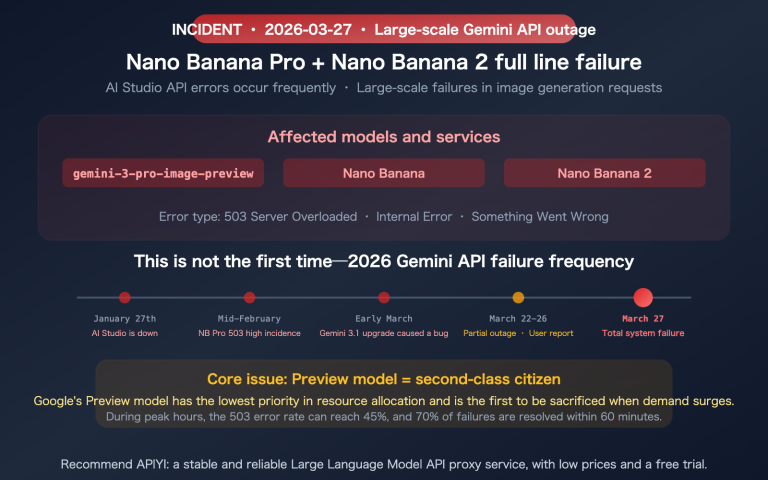
Early on January 16, 2026, at 12:18 AM, a surge of developers reported seeing "The model is overloaded. Please try again later." and even "The service is currently unavailable." errors with the Gemini Nano Banana Pro API (model name gemini-3-pro-image-preview). This isn't a bug in your code—it's a systemic failure caused by Google's backend compute capacity reaching its limits.
Key Takeaway: By the end of this article, you'll understand the root causes, timing patterns, and technical mechanics behind these two error types. You'll also learn five practical solutions and how to build production-grade fault-tolerance strategies.
Gemini Nano Banana Pro API Error Summary
| Point | Description | Impact |
|---|---|---|
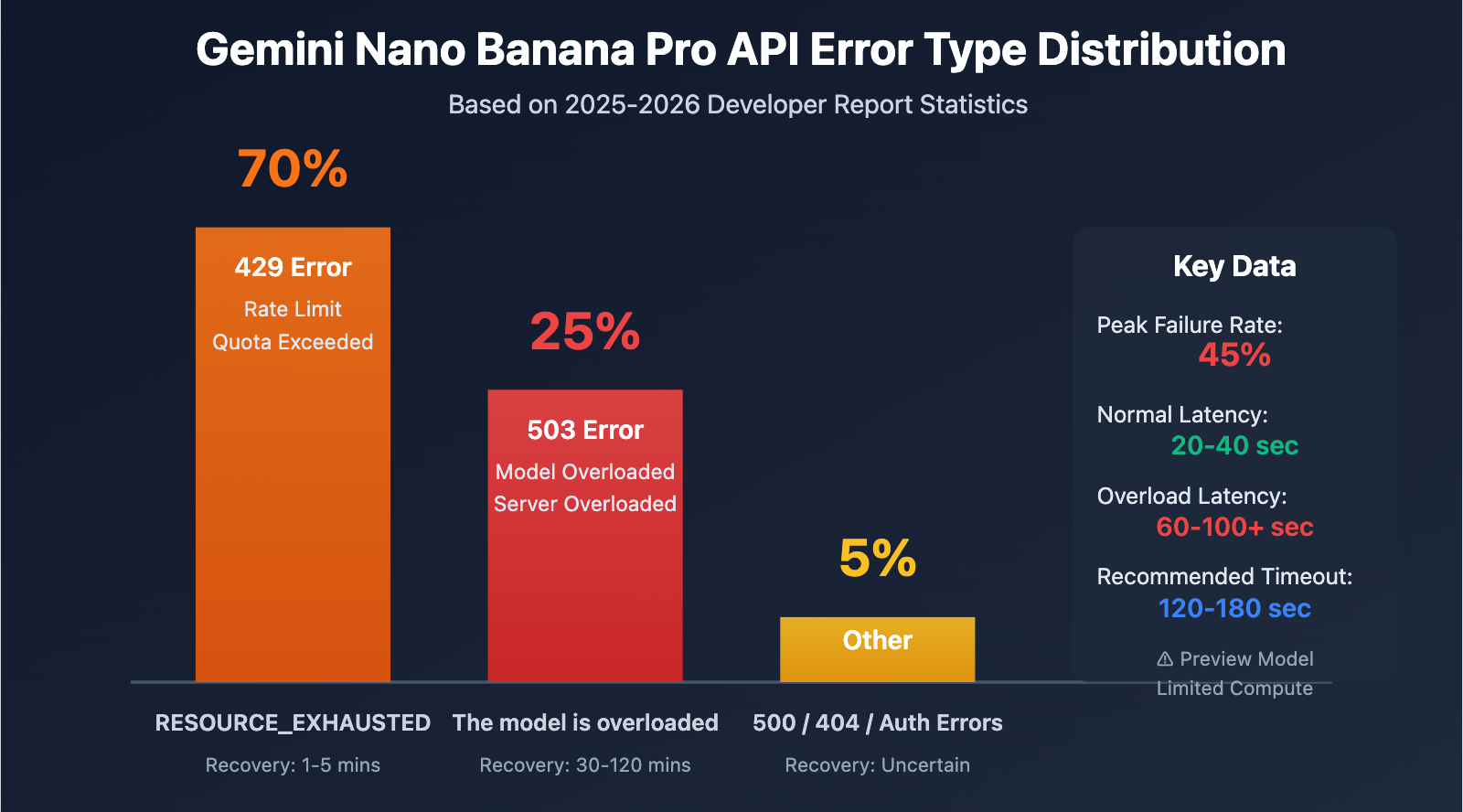
| 503 Overloaded Error | Insufficient compute resources on the server side; not a code issue. | Up to 45% of API calls fail during peak hours. |
| 503 vs 429 Errors | 503 is a capacity issue; 429 is a rate limit issue. | 503 recovery takes 30-120 mins; 429 takes only 1-5 mins. |
| Preview Model Restrictions | The Gemini 3 series is still in the preview phase. | Compute resources are limited, and dynamic capacity management is unstable. |
| Time Patterns | Failure rates spike during late-night (CST) and evening peak hours. | You should avoid peak hours or implement a degradation strategy. |
| Latency Spikes | Latency jumps from the normal 20-40s to over 60-100s during failures. | Requires setting a much longer timeout (120s+). |
Deep Dive into Gemini Nano Banana Pro Errors
What is Nano Banana Pro?
Gemini Nano Banana Pro is Google's highest-quality image generation model. The corresponding API model name is gemini-2.0-flash-preview-image-generation or gemini-3-pro-image-preview. As the flagship image model of the Gemini 3 series, it significantly outperforms Gemini 2.5 Flash Image in terms of image quality, detail reproduction, and text rendering. However, this excellence comes at the cost of much more severe compute bottlenecks.
Why the frequent errors?
According to discussion data from Google AI developer forums, Nano Banana Pro errors began appearing frequently in the second half of 2025 and haven't been fully resolved as of early 2026. The core reasons include:
- Preview Phase Resource Constraints: Gemini 3 series models are still in the Pre-GA (Pre-General Availability) stage, meaning Google has allocated limited compute resources to them.
- Dynamic Capacity Management: Even if you haven't hit your Rate Limit, the system might return a 503 error if the overall global load is too high.
- Global User Competition: All developers share the same compute resource pool. During peak hours, demand far exceeds supply.
- Compute-Intensive Nature: Generating high-quality images requires massive GPU power. A single request takes 20-40 seconds, which is much longer than a standard text model.
Differences Between 503 and 429 Errors
| Error Type | HTTP Status Code | Error Message | Root Cause | Recovery Time | Proportion |
|---|---|---|---|---|---|
| Overloaded | 503 | The model is overloaded |
Insufficient server-side compute | 30-120 mins | ~25% |
| Rate Limit | 429 | RESOURCE_EXHAUSTED |
Exceeded user quota (RPM/TPM/RPD) | 1-5 mins | ~70% |
| Unavailable | 503 | Service unavailable |
Systemic failure or maintenance | Uncertain (could be hours) | ~5% |
Analysis of Gemini Nano Banana Pro Error Patterns
Peak Failure Periods
Based on reports from multiple developers, Nano Banana Pro API failures follow a distinct pattern related to time:
High-Risk Periods (Beijing Time):
- 00:00 – 02:00: US West Coast business hours (08:00-10:00 PST), peak time for Western developers.
- 09:00 – 11:00: Start of the workday in Mainland China, peak time for Asian developers.
- 20:00 – 23:00: Evening peak in Mainland China overlapping with European afternoon hours.
Relatively Stable Periods:
- 03:00 – 08:00: Global user low point.
- 14:00 – 17:00: Afternoon in China and late night in the US, resulting in lower load.
Case Validation: A major outage occurred at 00:18 Beijing Time on January 16, 2026. This exactly matched the start of the workday on the US West Coast (08:18 PST, Jan 15), confirming the accuracy of these time patterns.
5 Ways to Solve Gemini Nano Banana Pro Errors
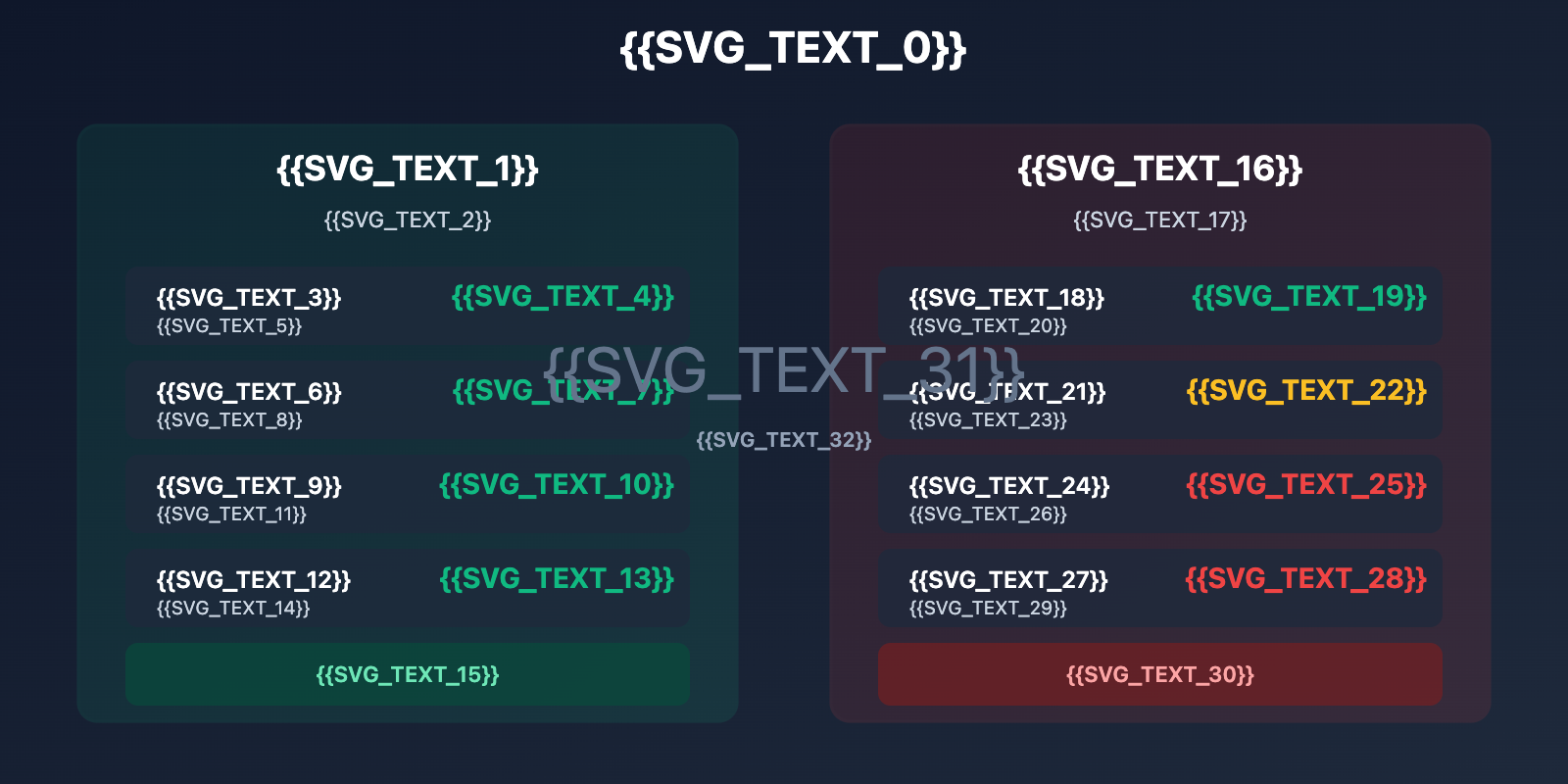
Method 1: Implement Exponential Backoff Retry Strategy
This is the most fundamental approach for handling 503 errors. Here's a recommended retry logic:
import time
import random
from openai import OpenAI

client = OpenAI(
    api_key="YOUR_API_KEY",
    base_url="https://vip.apiyi.com/v1"
)

def generate_image_with_retry(
    prompt: str,
    model: str = "gemini-3-pro-image-preview",
    max_retries: int = 5,
    initial_delay: int = 10
):
    """
    Image generation function with exponential backoff
    """
    for attempt in range(max_retries):
        try:
            response = client.images.generate(
                model=model,
                prompt=prompt,
                timeout=120  # Increase timeout
            )
            return response

        except Exception as e:
            error_msg = str(e)

            # 503 Error: Exponential backoff retry
            if "overloaded" in error_msg.lower() or "503" in error_msg:
                if attempt < max_retries - 1:
                    delay = initial_delay * (2 ** attempt) + random.uniform(0, 5)
                    print(f"⚠️ Model overloaded, retrying in {delay:.1f}s (Attempt {attempt + 1}/{max_retries})")
                    time.sleep(delay)
                    continue
                else:
                    raise Exception("❌ Max retries reached, model remains overloaded")

            # 429 Error: Short wait before retry
            elif "429" in error_msg or "RESOURCE_EXHAUSTED" in error_msg:
                print("⚠️ Rate limited, retrying in 60s")
                time.sleep(60)
                continue

            # Other errors: Raise directly
            else:
                raise e

    raise Exception("❌ All retries failed")

# Usage Example
result = generate_image_with_retry(
    prompt="A futuristic city at sunset, cyberpunk style",
    max_retries=5
)
View Production-Grade Complete Code
import time
import random
from typing import Optional, Dict
from openai import OpenAI
from datetime import datetime, timedelta

class GeminiImageClient:
    """
    Production-grade Gemini image generation client
    Supports retries, fallbacks, and monitoring
    """

    def __init__(self, api_key: str, base_url: str = "https://vip.apiyi.com/v1"):
        self.client = OpenAI(api_key=api_key, base_url=base_url)
        self.error_log = []
        self.success_count = 0
        self.failure_count = 0

    def generate_with_fallback(
        self,
        prompt: str,
        primary_model: str = "gemini-3-pro-image-preview",
        fallback_model: str = "gemini-2.5-flash-image",
        max_retries: int = 3
    ) -> Dict:
        """
        Image generation with a fallback strategy
        """
        # Try the primary model
        try:
            result = self._generate_with_retry(prompt, primary_model, max_retries)
            self.success_count += 1
            return {
                "success": True,
                "model_used": primary_model,
                "data": result
            }
        except Exception as e:
            print(f"⚠️ Primary model {primary_model} failed: {str(e)}")

            # Auto-fallback to the backup model
            try:
                print(f"🔄 Falling back to backup model {fallback_model}")
                result = self._generate_with_retry(prompt, fallback_model, max_retries)
                self.success_count += 1
                return {
                    "success": True,
                    "model_used": fallback_model,
                    "fallback": True,
                    "data": result
                }
            except Exception as fallback_error:
                self.failure_count += 1
                self.error_log.append({
                    "timestamp": datetime.now(),
                    "primary_error": str(e),
                    "fallback_error": str(fallback_error)
                })
                return {
                    "success": False,
                    "error": str(fallback_error)
                }

    def _generate_with_retry(self, prompt: str, model: str, max_retries: int):
        """Internal retry logic"""
        for attempt in range(max_retries):
            try:
                response = self.client.images.generate(
                    model=model,
                    prompt=prompt,
                    timeout=120
                )
                return response
            except Exception as e:
                if attempt < max_retries - 1:
                    delay = 10 * (2 ** attempt) + random.uniform(0, 5)
                    time.sleep(delay)
                else:
                    raise e

    def get_stats(self) -> Dict:
        """Get monitoring stats"""
        total = self.success_count + self.failure_count
        success_rate = (self.success_count / total * 100) if total > 0 else 0
        return {
            "total_requests": total,
            "success_count": self.success_count,
            "failure_count": self.failure_count,
            "success_rate": f"{success_rate:.2f}%",
            "recent_errors": self.error_log[-5:]
        }

# Usage Example
client = GeminiImageClient(api_key="YOUR_API_KEY")

result = client.generate_with_fallback(
    prompt="A magical forest with glowing mushrooms",
    primary_model="gemini-3-pro-image-preview",
    fallback_model="gemini-2.5-flash-image"
)

if result["success"]:
    print(f"✅ Generated successfully using: {result['model_used']}")
else:
    print(f"❌ Generation failed: {result['error']}")

# Check stats
print(client.get_stats())
Technical Advice: In a real production environment, it's recommended to route your calls through the APIYI (apiyi.com) platform. This platform provides a unified API interface supporting Gemini 3 Pro and various other image generation models. When Nano Banana Pro is overloaded, you can quickly switch to Gemini 2.5 Flash or other backups to ensure business continuity.
Method 2: Increase Timeout and Request Configuration
Normal response time for Nano Banana Pro is 20-40 seconds, but it can reach 60-100 seconds or longer under heavy load. The default 30-second timeout often leads to premature failures.
Recommended Configuration:
from openai import OpenAI

client = OpenAI(
    api_key="YOUR_API_KEY",
    base_url="https://vip.apiyi.com/v1",
    timeout=120,  # Increase global timeout to 120s
    max_retries=3  # SDK auto-retries 3 times
)

# Or specify per request
response = client.images.generate(
    model="gemini-3-pro-image-preview",
    prompt="Your prompt here",
    timeout=150  # Single request timeout set to 150s
)
Key Parameter Details:
timeout: Maximum wait time for a single request; 120-180 seconds is recommended.max_retries: Automatic retries at the SDK level; 2-3 times is recommended.keep_alive: Keep connections active to prevent long requests from being interrupted.
Method 3: Avoid Peak Hours
If your business allows for asynchronous processing, scheduling tasks based on time patterns can significantly boost your success rate:
Recommended Scheduling Strategy:
- High-Priority Tasks: Deploy between 03:00-08:00 or 14:00-17:00 Beijing Time.
- Batch Generation Tasks: Use a task queue to execute during off-peak hours automatically.
- Real-Time Tasks: You must implement a fallback strategy and avoid relying on a single model.
Python Task Scheduling Example:
from datetime import datetime

def is_peak_hour() -> bool:
    """Check if the current time is a peak hour (Beijing Time)"""
    current_hour = datetime.now().hour

    # Peak hours: 0-2, 9-11, 20-23
    peak_hours = list(range(0, 3)) + list(range(9, 12)) + list(range(20, 24))

    return current_hour in peak_hours

def smart_generate(prompt: str):
    """Smart generation: Auto-fallback during peak hours"""
    if is_peak_hour():
        print("⚠️ Peak hour detected, using fallback model")
        model = "gemini-2.5-flash-image"
    else:
        model = "gemini-3-pro-image-preview"

    return generate_image(prompt, model)
Method 4: Implement Model Fallback Strategy
Google officially suggests switching to Gemini 2.5 Flash when encountering overloads. Here's how they compare:
| Metric | Gemini 3 Pro (Nano Banana Pro) | Gemini 2.5 Flash Image |
|---|---|---|
| Image Quality | Highest (9/10) | Excellent (7.5/10) |
| Gen Speed | 20-40 Seconds | 10-20 Seconds |
| Stability | 45% failure rate at peak | <10% failure rate at peak |
| 503 Recovery Time | 30-120 Minutes | 5-15 Minutes |
| API Cost | Higher | Lower |
Strategy Recommendation: For quality-sensitive scenarios (marketing posters, product photos), prioritize Gemini 3 Pro and fallback to 2.5 Flash if it fails. For high-concurrency scenarios (UGC, rapid prototyping), use 2.5 Flash directly for better stability. We recommend using the APIYI (apiyi.com) platform for model comparison testing, as it allows one-click model switching and provides cost/quality comparison data.
Method 5: Monitoring and Alerting Systems
Production environments need robust monitoring to catch and respond to failures in real-time:
Key Monitoring Metrics:
- Success Rate: Success rate over the last 5 minutes / 1 hour / 24 hours.
- Response Time: P50 / P95 / P99 latency.
- Error Distribution: Percentage of 503, 429, and 500 errors.
- Fallback Trigger Count: How many times failures led to using the backup model.
Simple Monitoring Implementation:
from collections import deque
from datetime import datetime

class APIMonitor:
    """API Call Monitor"""

    def __init__(self, window_size: int = 100):
        self.recent_calls = deque(maxlen=window_size)
        self.error_counts = {"503": 0, "429": 0, "500": 0, "other": 0}

    def log_call(self, success: bool, response_time: float, error_code: str = None):
        """Log an API call"""
        self.recent_calls.append({
            "timestamp": datetime.now(),
            "success": success,
            "response_time": response_time,
            "error_code": error_code
        })

        if not success and error_code:
            if error_code in self.error_counts:
                self.error_counts[error_code] += 1
            else:
                self.error_counts["other"] += 1

    def get_success_rate(self) -> float:
        """Calculate success rate"""
        if not self.recent_calls:
            return 0.0
        success_count = sum(1 for call in self.recent_calls if call["success"])
        return success_count / len(self.recent_calls) * 100

    def should_alert(self) -> bool:
        """Determine if an alert should be triggered"""
        success_rate = self.get_success_rate()

        # Trigger alert if success rate drops below 70%
        if success_rate < 70:
            return True

        # Trigger alert if 503 errors exceed 30% of total errors
        total_errors = sum(self.error_counts.values())
        if total_errors > 0 and self.error_counts["503"] / total_errors > 0.3:
            return True

        return False

# Usage Example
monitor = APIMonitor(window_size=100)

# Record after every call
start_time = time.time()
try:
    result = client.images.generate(...)
    response_time = time.time() - start_time
    monitor.log_call(success=True, response_time=response_time)
except Exception as e:
    response_time = time.time() - start_time
    error_code = "503" if "overload" in str(e) else "other"
    monitor.log_call(success=False, response_time=response_time, error_code=error_code)

# Periodically check for alerts
if monitor.should_alert():
    print(f"🚨 Alert: API success rate has dropped to {monitor.get_success_rate():.2f}%")
Gemini API Quota and Rate Limit Details
December 2025 Quota Adjustments
On December 7, 2025, Google adjusted the Gemini API quota limits, which caused many developers to run into unexpected 429 errors.
Current Quota Standards (January 2026):
| Quota Dimension | Free Tier | Pay-as-you-go Tier 1 | Description |
|---|---|---|---|
| RPM (Requests Per Minute) | 5-15 (model dependent) | 150-300 | Stricter limits for Gemini 3 Pro |
| TPM (Tokens Per Minute) | 32,000 | 4,000,000 | Applies to text models |
| RPD (Requests Per Day) | 1,500 | 10,000+ | Shared quota pool |
| IPM (Images Per Minute) | 5-10 | 50-100 | Specifically for image generation models |
Key Considerations:
- Quota limits are based on the Google Cloud Project level, not individual API keys.
- Creating multiple API keys under the same project won't increase your quota.
- Exceeding any of these dimensions will trigger a 429 error.
- Limits are enforced using the Token Bucket algorithm, so burst traffic will be throttled.
Cost Optimization: For budget-sensitive projects, you might want to consider calling the Gemini API through the APIYI (apiyi.com) platform. It offers a flexible pay-as-you-go model without requiring a Google Cloud subscription—perfect for small to medium teams and individual developers looking to test or deploy at a smaller scale.
FAQ
Q1: How do I tell the difference between 503 overloaded and 429 rate limit errors?
The difference lies in the root cause and the recovery time:
503 Overloaded:
- Error Message:
The model is overloaded. Please try again later. - HTTP Status Code: 503 Service Unavailable
- Root Cause: Google's server-side computing resources are insufficient; it's unrelated to your specific quota.
- Recovery Time: 30-120 minutes (Gemini 3 Pro), 5-15 minutes (Gemini 2.5 Flash).
- Mitigation Strategy: Use exponential backoff for retries, switch to a fallback model, or avoid peak hours.
429 Rate Limit:
- Error Message:
RESOURCE_EXHAUSTEDorRate limit exceeded - HTTP Status Code: 429 Too Many Requests
- Root Cause: Your API calls have exceeded the quota limits (RPM/TPM/RPD/IPM).
- Recovery Time: 1-5 minutes (the quota pool resets automatically).
- Mitigation Strategy: Lower your request frequency, upgrade to a paid tier, or request a quota increase.
Quick Check: Take a look at your quota usage in Google AI Studio. If you're near or at the limit, it's a 429; otherwise, it's likely a 503.
Q2: Why did a major outage occur at 00:18 AM?
The large-scale failure at 00:18 AM Beijing Time on January 16, 2026, corresponds to 08:18 AM PST on January 15 on the US West Coast—right when the workday starts in the US.
Traffic Pattern Analysis:
- Silicon Valley (US West Coast) developers start working between 08:00-10:00 PST, which is 00:00-02:00 Beijing Time.
- European developers are in their peak hours from 14:00-18:00 CET, which is 21:00-01:00 Beijing Time.
- Chinese developers have peaks between 09:00-11:00 CST and 20:00-23:00 CST.
The overlap of these three peak periods caused the Nano Banana Pro API load to far exceed capacity, triggering widespread 503 errors.
Pro Tip: If your business primarily serves users in China, consider scheduling batch tasks between 03:00-08:00 Beijing Time (late night in the US and early morning in Europe), as global load is at its lowest then.
Q3: How should I choose a model for production?
Choose the right model strategy based on your specific business needs:
Strategy 1: Quality First (Marketing, Product Shots)
- Primary Model: Gemini 3 Pro Image Preview (Nano Banana Pro)
- Fallback Model: Gemini 2.5 Flash Image
- Implementation: Automatically downgrade to the fallback model after 3 failed attempts on the primary model.
- Expected Success Rate: 92-95% (including downgrades).
Strategy 2: Stability First (UGC, High Concurrency)
- Primary Model: Gemini 2.5 Flash Image
- Fallback Model: Other image generation models (DALL-E 3, Stable Diffusion XL)
- Implementation: Use 2.5 Flash directly and switch to third-party models during outages.
- Expected Success Rate: 95-98%.
Strategy 3: Cost First (Testing, Prototyping)
- Use the free version of Gemini 2.5 Flash.
- Accept occasional 429 and 503 errors.
- Don't implement complex fault-tolerance logic.
Recommended Solution: Use the APIYI (apiyi.com) platform to quickly test the performance and cost of different models. It provides a unified interface for multiple image generation models, making it easy to compare and switch between them.
Summary
Key takeaways regarding Gemini Nano Banana Pro API errors:
- 503 Overloaded is a systemic issue: It's not your code's fault. It's caused by insufficient computing resources on Google's backend. During peak hours, up to 45% of calls might fail.
- Clear time patterns: High-risk periods are 00:00-02:00, 09:00-11:00, and 20:00-23:00 Beijing Time. Try to avoid these windows or implement a fallback strategy.
- Fault tolerance is critical: You must implement a three-layer defense: exponential backoff retries, increased timeouts (120s+), and model fallback (using 2.5 Flash as a backup).
- Monitoring and Alerting: In production environments, you've got to monitor success rates, response times, and error distribution to catch and respond to outages quickly.
- Understand quota limits: 429 errors are related to your specific API quota, while 503 errors are about Google's overall load. They require different handling strategies.
As a preview phase model, Nano Banana Pro's stability issues aren't going to be solved overnight. For quickly validating your image generation needs, we recommend using APIYI (apiyi.com). The platform offers free credits and a unified interface for multiple models, supporting Gemini 3 Pro, Gemini 2.5 Flash, DALL-E 3, and other mainstream image generation models to ensure your business stays up and running.
📚 References
⚠️ Link Format Note: All external links use the
Resource Name: domain.comformat. They're easy to copy but aren't clickable to avoid SEO weight loss.
-
Nano Banana Errors & Troubleshooting Guide: A complete error reference manual.
- Link:
www.aifreeapi.com/en/posts/nano-banana-errors-troubleshooting-guide - Description: Covers complete solutions for all Nano Banana Pro error codes including 429, 502, 403, and 500.
- Link:
-
Google AI Developers Forum: Gemini 3 Pro overloaded error discussion.
- Link:
discuss.ai.google.dev/t/gemini-3-pro-nano-banana-tier-1-4k-image-503-unavailable-error-the-model-is-overloaded/110232 - Description: Real-time discussions and experience sharing from the developer community regarding 503 errors.
- Link:
-
Gemini API Rate Limits Official Documentation: Details on quotas and rate limits.
- Link:
ai.google.dev/gemini-api/docs/rate-limits - Description: Google's official API quota documentation, including detailed explanations of RPM/TPM/RPD/IPM.
- Link:
-
Gemini 3 Pro Image Preview Error Codes: A full guide to error codes.
- Link:
www.aifreeapi.com/en/posts/gemini-3-pro-image-preview-error-codes - Description: Troubleshooting and solutions for all Gemini 3 Pro error codes for 2025-2026.
- Link:
Author: Tech Team
Join the Discussion: Feel free to share your Gemini API experiences in the comments. For more troubleshooting resources, visit the APIYI (apiyi.com) technical community.