Author's Note: Are your Nano Banana Pro/2 image generations failing? This article breaks down the 8 major rejection categories of Google's dual-layer safety filtering architecture—including NSFW, watermarks, famous IPs, and minors—along with methods for identifying errors and handling them in your consumer-facing products.
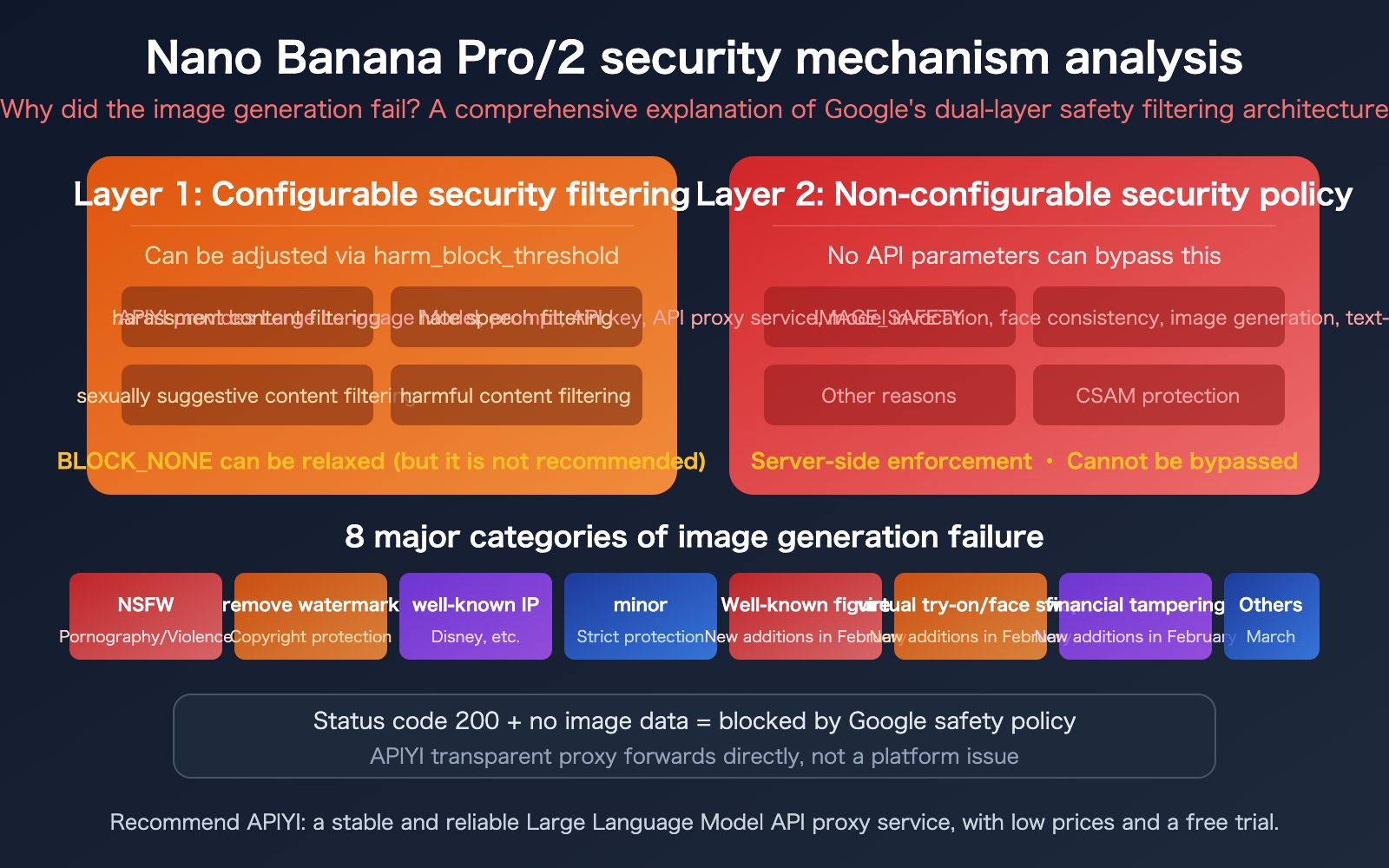
When using the Nano Banana Pro or Nano Banana 2 to call the image generation API, you might occasionally run into a situation where the status code returns 200, but there's no image data, or you receive a text response saying, "I'm unable to assist with that." This isn't an issue with the API proxy service; it's Google's content safety policy in action.
Since January 23, 2026, Google has significantly tightened its safety policies for image generation. Following the launch of Nano Banana 2 on February 27, these safety mechanisms were further upgraded to include blocks on famous figures, financial information tampering, character clothing/face swaps, and implicit sexual suggestions. This article provides a complete breakdown of all reasons for generation failure and how to handle them.
Core Value: After reading this, you'll understand the underlying mechanisms behind Nano Banana Pro/2 generation failures, master the identification methods for the 8 major failure categories, and learn how to gracefully handle these errors in your consumer-facing products.
Core Methods for Identifying Nano Banana Pro/2 Image Generation Failures
When you receive an Error: Gemini did not return edited image data or a similar message, how do you determine the cause? Google provides three core indicators, ranked by priority:
| Priority | Indicator | Failure Characteristic | Explanation |
|---|---|---|---|
| Highest | candidatesTokenCount |
Equals 0 | Direct rejection; no content generated. |
| Second | finishReason |
IMAGE_SAFETY / PROHIBITED_CONTENT / OTHER | Intercepted during generation. |
| Important | API text response | Returns text instead of an image, Token < 1000 | The model uses text to "explain" the rejection. |
Two Typical Manifestations of Nano Banana Pro/2 Generation Failures
Manifestation 1: candidatesTokenCount = 0
In the API response, usageMetadata.candidatesTokenCount is 0, meaning the model rejected the request outright. In this case, the finishReason is usually IMAGE_SAFETY or PROHIBITED_CONTENT, and the content.parts in the response body is null.
Manifestation 2: Returning text instead of an image
In the API response, candidatesTokenCount is not 0 but is less than 1000; the model returned text instead of image data. Common responses include:
- "I'm unable to assist with that request"
- "I cannot modify images of real people"
The commonality in both cases is: the status code is 200. This indicates that the request itself was valid and APIYI, acting as a transparent proxy, simply forwarded Google's response. The issue lies within Google's content safety policy.
🎯 Development Tip: If you're building a consumer-facing product, you must detect these failure characteristics in your code to translate technical errors into user-friendly prompts. APIYI provides a comprehensive error handling guide:
xinqikeji.feishu.cn/wiki/Rslqw724YiBwlokHmRLcMVKHnRf
8 Major Safety Categories for Nano Banana Pro/2 Generation Failures
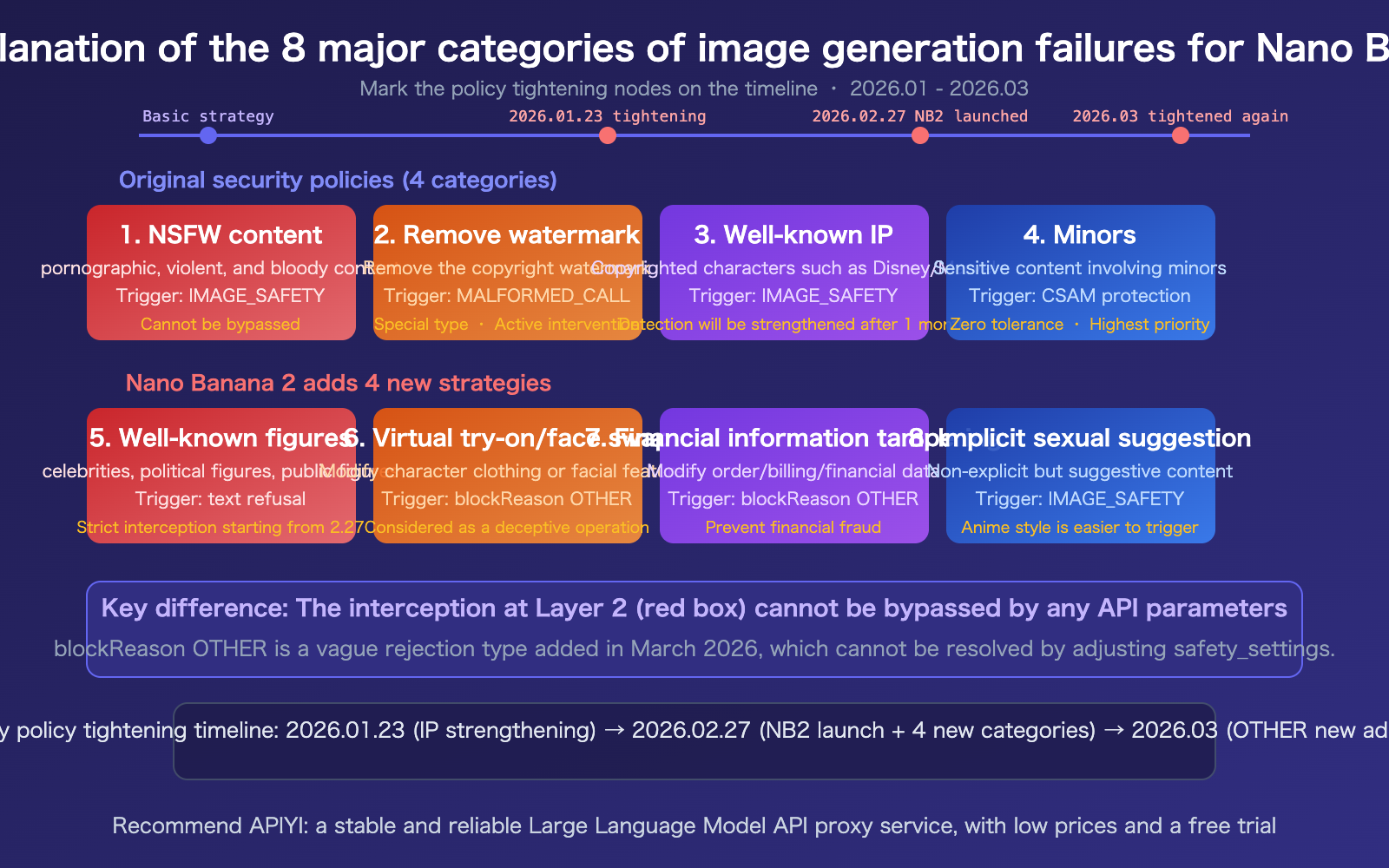
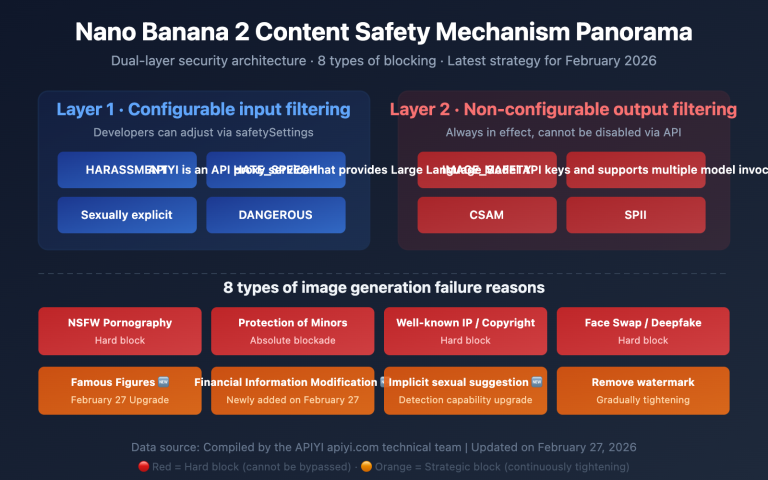
The table below details the 8 major image generation failure categories and their characteristics:
| Category | Trigger Content | Error Identifier | Added Date | Avoidability |
|---|---|---|---|---|
| 1. NSFW | Pornographic, violent, bloody | IMAGE_SAFETY | Original | No |
| 2. Watermark Removal | Removing copyright watermarks | MALFORMED_FUNCTION_CALL | Original | No |
| 3. Famous IP | Copyrighted characters (Disney, Marvel, etc.) | IMAGE_SAFETY | Strengthened in Jan | No |
| 4. Minors | Sensitive content involving children | CSAM Protection | Original | No (Zero tolerance) |
| 5. Famous People | Photos of celebrities, politicians | Text rejection | Feb 27 | No |
| 6. Swap/Face Swap | Modifying clothing or facial features | blockReason OTHER | Feb 27 | No |
| 7. Financial Tampering | Modifying order/billing data | blockReason OTHER | Feb 27 | No |
| 8. Implicit Suggestions | Non-explicit but suggestive content | IMAGE_SAFETY | Feb 27 | Partially adjustable via prompt |
Special Notes on Nano Banana Pro/2 Safety Policies
Watermark Removal Interception: This is a unique category. When a user requests the removal of a watermark from an image, Google does not return a standard IMAGE_SAFETY error, but rather MALFORMED_FUNCTION_CALL—this is essentially an active intervention by Google's content safety policy, not a technical bug. This design is intended to protect the interests of copyright holders.
Anime Style is More Easily Triggered: The same prompt might pass in a realistic style but be intercepted in an anime style, because anime styles are more likely to trigger copyright IP detection mechanisms.
Google Admits Over-Filtering: Google has publicly stated that their image generation safety filters "became way more cautious than we intended," to the point where even completely harmless prompts like "a dog" or "a bowl of cereal" might trigger an interception.
🎯 Transparency Note: APIYI acts as a transparent proxy, directly forwarding Google's responses. If the status code is 200 and the image generation fails, this is indeed feedback from Google's end. APIYI certainly wants our customers to succeed in their generations, but the safety policies are controlled by Google, and the platform cannot intervene.
Error Handling Strategies for Nano Banana Pro/2 Image Generation Failures
For developers building consumer-facing products, handling image generation failures correctly is critical. Here is the recommended workflow:
Nano Banana Pro/2 Error Detection Priority
def check_generation_result(response):
    """
    Detects whether the Nano Banana Pro/2 image generation was successful.
    Priority: candidatesTokenCount > finishReason > text response
    """
    usage = response.get("usageMetadata", {})
    candidates = response.get("candidates", [{}])
    candidate = candidates[0] if candidates else {}

    # Highest priority: candidatesTokenCount = 0
    if usage.get("candidatesTokenCount", 0) == 0:
        return {"success": False, "reason": "content_rejected"}

    # Secondary priority: finishReason check
    finish_reason = candidate.get("finishReason", "")
    if finish_reason in ["IMAGE_SAFETY", "PROHIBITED_CONTENT"]:
        return {"success": False, "reason": "safety_filter"}

    # Important: Check if text was returned instead of an image
    parts = candidate.get("content", {}).get("parts", [])
    has_image = any("inlineData" in p for p in (parts or []))
    if not has_image and usage.get("candidatesTokenCount", 0) < 1000:
        return {"success": False, "reason": "text_response"}

    return {"success": True}
User-Friendly Prompt Templates for Nano Banana Pro/2
| Error Type | Recommended Message | Suggested Action |
|---|---|---|
| Policy Violation | "The current content does not meet platform safety requirements. Please adjust your prompt and try again." | Modify prompt |
| Unsupported Feature | "This type of image modification is not currently supported." | Try a different action |
| Out of Scope | "The current description involves protected content types. Please use an original description and try again." | Avoid copyrighted content |
| Technical Issue | "A temporary issue occurred during generation. Please try again later." | Retry later |
View full C-side error handling code example
# Error message mapping
ERROR_MESSAGES = {
    "content_rejected": {
        "title": "Content failed safety review",
        "message": "The current content does not meet platform safety requirements. Please adjust your prompt and try again.",
        "suggestion": "Tip: Avoid famous people, copyrighted characters, or sensitive content."
    },
    "safety_filter": {
        "title": "Safety filter triggered",
        "message": "Image generation was blocked by safety policies.",
        "suggestion": "Tip: Try modifying your prompt to use more general descriptions."
    },
    "text_response": {
        "title": "Generation failed",
        "message": "The AI could not generate an image as requested.",
        "suggestion": "Tip: Simplify your description or change the subject and try again."
    },
    "watermark": {
        "title": "Feature not supported",
        "message": "Removing watermarks is not currently supported.",
        "suggestion": "Tip: Use other available image editing features."
    }
}
🎯 Best Practice: Never show "Unknown Error" to your users. Even for uncategorized errors, always provide a friendly fallback message. For the complete error handling guide, refer to the APIYI documentation:
xinqikeji.feishu.cn/wiki/Rslqw724YiBwlokHmRLcMVKHnRf
Nano Banana Pro/2 Safety Policy Timeline and Mitigation Advice
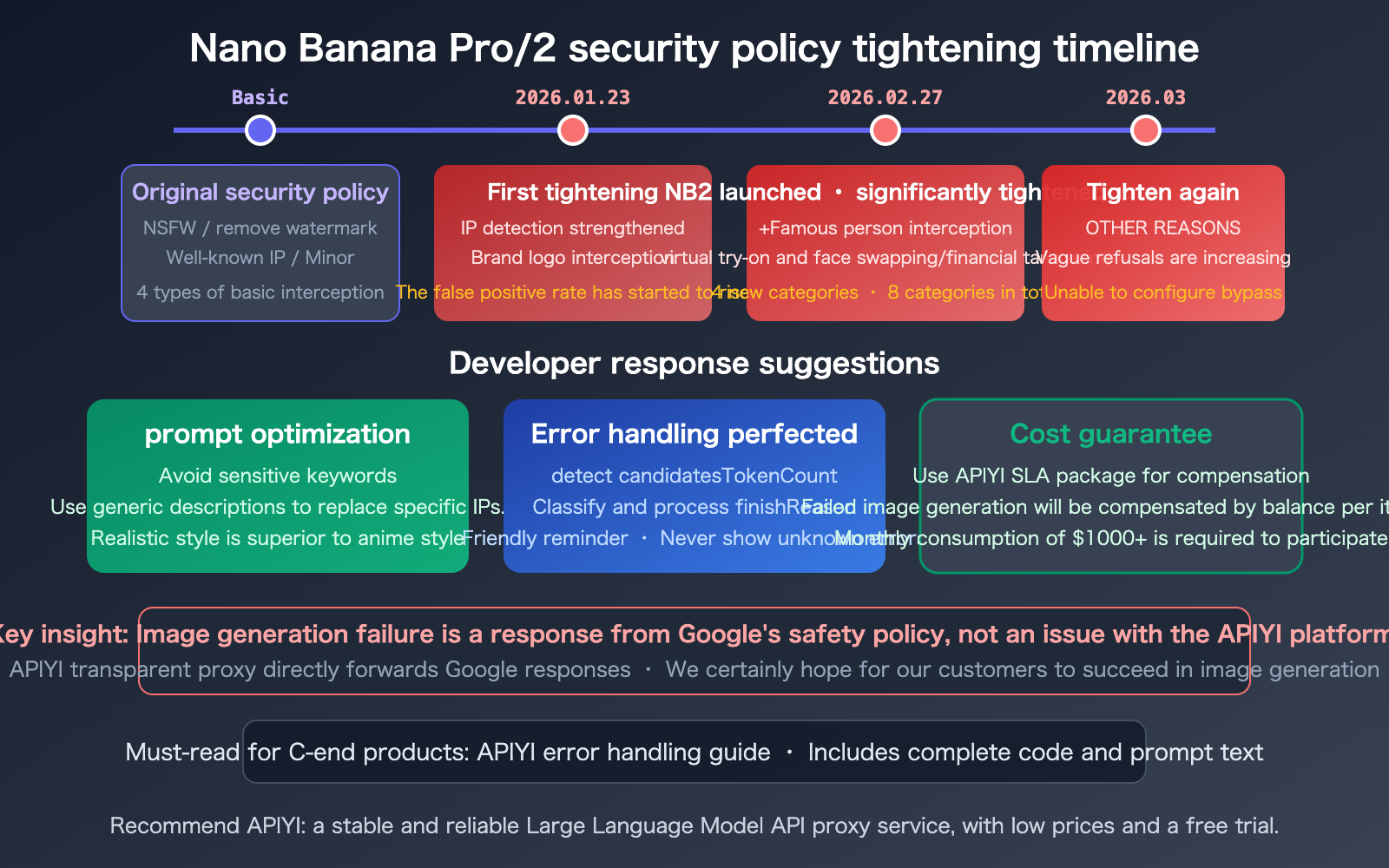
Developer Mitigation Strategies for Nano Banana Pro/2 Generation Failures
Strategy 1: Prompt Optimization
- Avoid using names of celebrities or copyrighted characters directly.
- Use general descriptions instead of specific IPs (e.g., "warrior in armor" instead of "Iron Man").
- Realistic styles are less likely to trigger copyright detection than anime styles.
- Avoid image editing requests involving face swapping or outfit changes.
Strategy 2: Robust Error Handling
- Detect errors in priority:
candidatesTokenCount→finishReason→ text response. - Prepare friendly user-facing messages for each error type.
- Retain raw response data for debugging.
- Never show "Unknown Error" to users.
Strategy 3: Cost Protection
- Use the APIYI (apiyi.com) SLA compensation plan for failed generations.
- Failed generations are reimbursed as balance; available for accounts with $1000+ monthly spend.
- Ensure the costs of failed requests are recovered.
🎯 For Consumer Product Developers: We highly recommend reading the full APIYI error handling guide at
xinqikeji.feishu.cn/wiki/Rslqw724YiBwlokHmRLcMVKHnRf, which includes complete code implementations, intelligent keyword recognition logic, frontend display solutions, and test cases.
FAQ
Q1: Why does the same prompt sometimes work and sometimes fail?
Google's safety filters involve probabilistic factors. The same prompt might yield different results at different times or under different API keys. This is because the safety model itself has a degree of randomness, especially when dealing with "borderline content." If a prompt fails repeatedly, we recommend rephrasing your description.
Q2: I’m getting a 200 status code but no image—is this an issue with APIYI?
No, it isn't. As a transparent API proxy service, APIYI simply forwards Google's responses directly. A 200 status code indicates that the request itself was valid, but Google's content safety policy blocked the image generation. You can check the finishReason and candidatesTokenCount in the response to confirm the specific cause. Naturally, APIYI wants every customer to generate images successfully.
Q3: Will I still be charged if image generation fails?
Yes, Google will deduct the quota. However, APIYI (apiyi.com) has launched an SLA compensation plan for failed image generation: users with a monthly consumption of $1,000+ can apply for reimbursement for failed requests (number of failed requests × $0.05 / discount coefficient). This is currently the only platform on the market to offer this kind of guarantee.
Summary
Key takeaways regarding Nano Banana Pro/2 image generation failures:
- Dual-Layer Safety Architecture: Layer 1 can be adjusted via API parameters, while Layer 2 (IMAGE_SAFETY, blockReason OTHER, etc.) is strictly enforced by Google's servers and cannot be bypassed.
- 8 Major Rejection Categories: NSFW, watermark removal, copyrighted IP, and minors (the original 4 categories) + public figures, face/clothing swapping, financial tampering, and implicit suggestions (the 4 new categories added in Nano Banana 2).
- Transparent Proxy Mechanism: APIYI forwards Google's responses directly; a 200 status code with no image means it was blocked by Google's safety policy, not a platform issue.
Google's safety policies have continued to tighten throughout 2026, with three consecutive upgrades between January 23rd and March. For developers building consumer-facing products, improving error handling and user prompts is a top priority.
We recommend accessing Nano Banana Pro/2 via APIYI (apiyi.com). With pricing at $0.05 per request and our SLA compensation for failed generations, you can use the most powerful image generation model at the lowest effective cost.
📚 References
-
APIYI Error Handling Guide: Best practices for handling errors in the Gemini 3 Pro Image Preview API.
- Link:
xinqikeji.feishu.cn/wiki/Rslqw724YiBwlokHmRLcMVKHnRf - Description: Complete error identification workflow, code examples, and templates for user-facing error messages.
- Link:
-
Google AI Safety Settings Documentation: Official guide for configuring safety filters.
- Link:
ai.google.dev/gemini-api/docs/safety-settings - Description: Parameters and options for Layer 1 configurable safety filters.
- Link:
-
Google Generative AI API Documentation: Official error code definitions.
- Link:
ai.google.dev/api/generate-content - Description: Full definitions for fields like
finishReasonandblockReason.
- Link:
-
Google Cloud Safety Filter Documentation: Vertex AI safety configuration.
- Link:
docs.google.com/vertex-ai/generative-ai/docs/multimodal/configure-safety-filters - Description: Explanation of the multi-layer architecture for enterprise-grade safety filtering.
- Link:
Author: APIYI Technical Team
Technical Discussion: Feel free to share any image generation failures you've encountered with Nano Banana Pro/2 in the comments. For more resources, visit the APIYI documentation center at docs.apiyi.com.