Hi,This Event is End~ Thks for your interesting. 本活动已经于 9 月 1 日结束了,感谢你的关注。
We often see users in our support groups asking: “How do I set up Nano Banana on Coze?”, “Is there a ready-to-use APIYI node for N8N?”, or “Can ComfyUI connect to Sora/SeeDance?”. These questions have become some of the most frequently tagged topics for our support team.
To make it easier for developers and content creators to access the model capabilities of the APIYI (apiyi.com) platform, we are officially launching the “APIYI Open Source Plugin Bounty Program”. We are calling for open-source plugins across the Coze / N8N / ComfyUI ecosystems. We’re offering cash or platform credit rewards, and all selected works will be featured in the APIYI Documentation Center with contributor attribution, making them available for all users to use for free.
If you’ve already built similar nodes, plugins, or workflow templates, or if you’re interested in creating one, this article covers the reward criteria, technical requirements, and submission process. We invite you to “share your work” and claim your bounty!
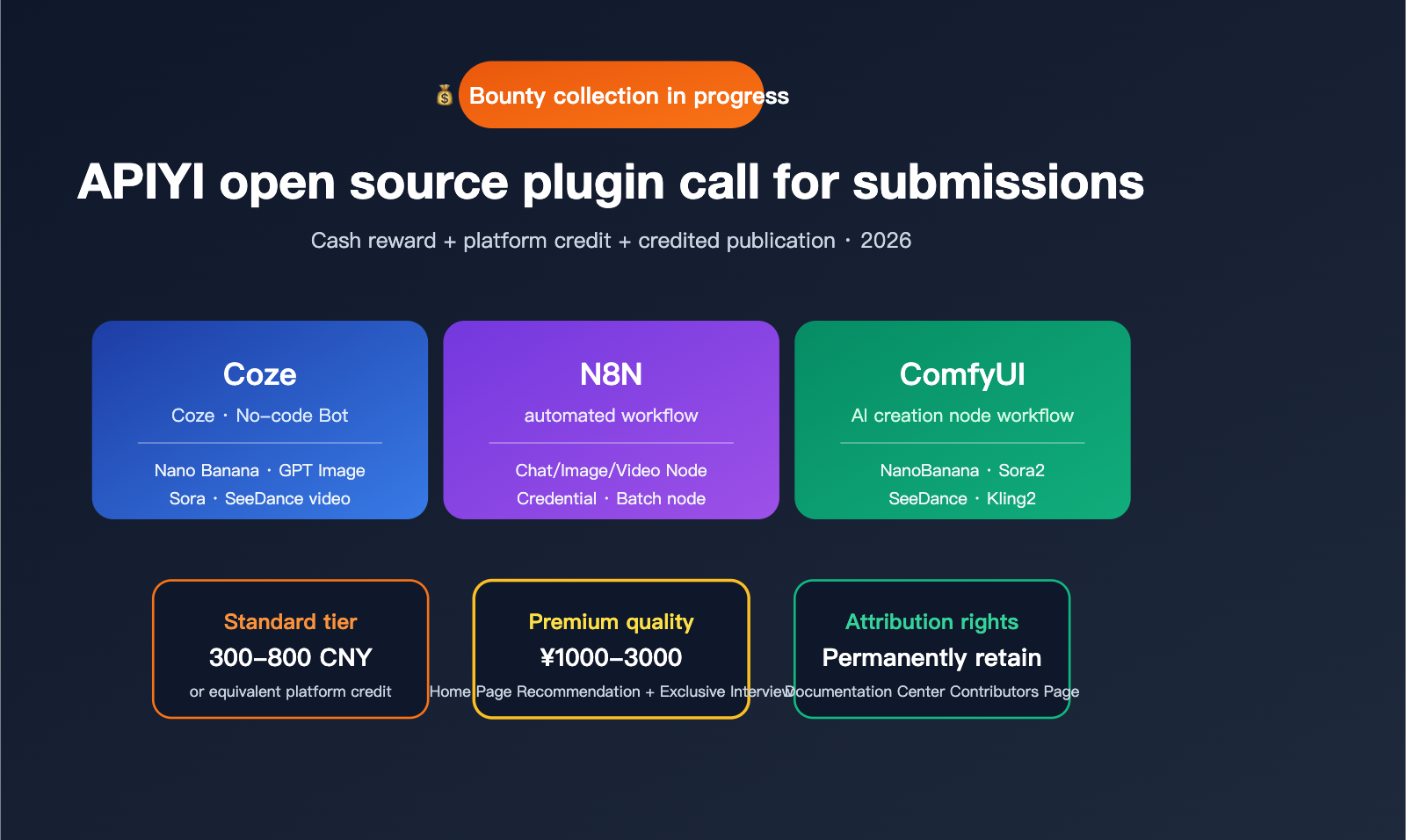
Bounty Program Overview
This bounty is open to all developers interested in AI workflows and plugin development. There are no barriers or eligibility restrictions—as long as your submission passes our review, you’ll receive the corresponding reward.
Target Platforms
Here are the three integration scenarios that APIYI (apiyi.com) users are most interested in:
| Platform | User Base | Suitable Plugin Types | Priority |
|---|---|---|---|
| Coze | No-code Bot developers | Image generation, video generation, chat model plugins | ⭐⭐⭐⭐⭐ |
| N8N | Automation enthusiasts | General LLM nodes, batch processing nodes | ⭐⭐⭐⭐⭐ |
| ComfyUI | AI image/video creators | Nano Banana, SeeDance, Sora nodes | ⭐⭐⭐⭐⭐ |
| Dify | Enterprise knowledge base developers | Model integration adapters | ⭐⭐⭐⭐ |
| FastGPT | Knowledge Q&A builders | Chat model plugins | ⭐⭐⭐ |
| n8n-nodes-custom | Community node market | Publishing to npm repository | ⭐⭐⭐⭐ |
Reward Mechanism
To fairly compensate contributors for their time and effort, we have set two tiers of rewards:
| Reward Type | Standard Tier | Premium Tier | Notes |
|---|---|---|---|
| Cash Reward | ¥300 – ¥800 | ¥1000 – ¥3000 | Based on completeness and utility |
| APIYI Credit | ¥500 – ¥1500 | ¥2000 – ¥5000 | Equivalent platform consumption credit |
| Attribution | ✅ Documentation author page | ✅ Homepage feature + interview | Permanent |
| License | MIT/Apache 2.0 Open Source | MIT/Apache 2.0 Open Source | Author retains attribution |
💡 Submission Tips: If you already have a finished project, just organize it according to the checklist at the end of this article and submit it. The review period is 3-5 business days. To submit, visit the “Developer Program” section at the bottom of the APIYI (apiyi.com) website, or add our official customer service on WeChat with the note “Plugin Bounty”.
description: A technical guide for developing Coze and N8N plugins using APIYI, covering image generation, video models, and chat integration.
Coze Plugin Development Directions and Technical Highlights
Coze is a no-code AI Bot development platform launched by ByteDance with a large domestic user base. However, the official plugin marketplace still requires manual configuration of API services for third-party model integration. We are looking for Coze plugins that cover the following areas.
Direction 1: Image Generation Plugins (Top Bounty)
The core requirement is to enable Coze Bots to directly invoke APIYI image generation models, including but not limited to:
- Nano Banana Series: Nano Banana, Nano Banana Pro (gemini-3-pro-image)
- GPT-Image Series: gpt-image-1, gpt-image-1-mini
- Flux Series: Flux Pro, Flux Dev, Flux Schnell
- Recraft V3, Ideogram 3, Midjourney v7, etc.
Minimum plugin requirements:
- Support text-to-image
- Support image-to-image editing
- Support resolution and aspect ratio parameters
- Return image URLs that can be displayed directly in the Coze message stream
- Provide friendly error messages
Direction 2: Video Generation Plugins
Encapsulating asynchronous video generation APIs such as SeeDance, Sora, Kling, and Veo:
| Model | API Endpoint | Plugin Processing Requirements |
|---|---|---|
| SeeDance 2.0 | /videos Asynchronous |
Task submission + status polling |
| Sora 2 | /video/generations |
Callback mode support |
| Kling 2 | /kling/videos |
Multi-resolution adaptation |
| Veo 3 | /google/veo |
Regional routing processing |
Direction 3: Chat and Tool Calling Plugins
Encapsulating chat models such as Claude, GPT, Gemini, and DeepSeek, supporting function calling, tool use, and streaming output.
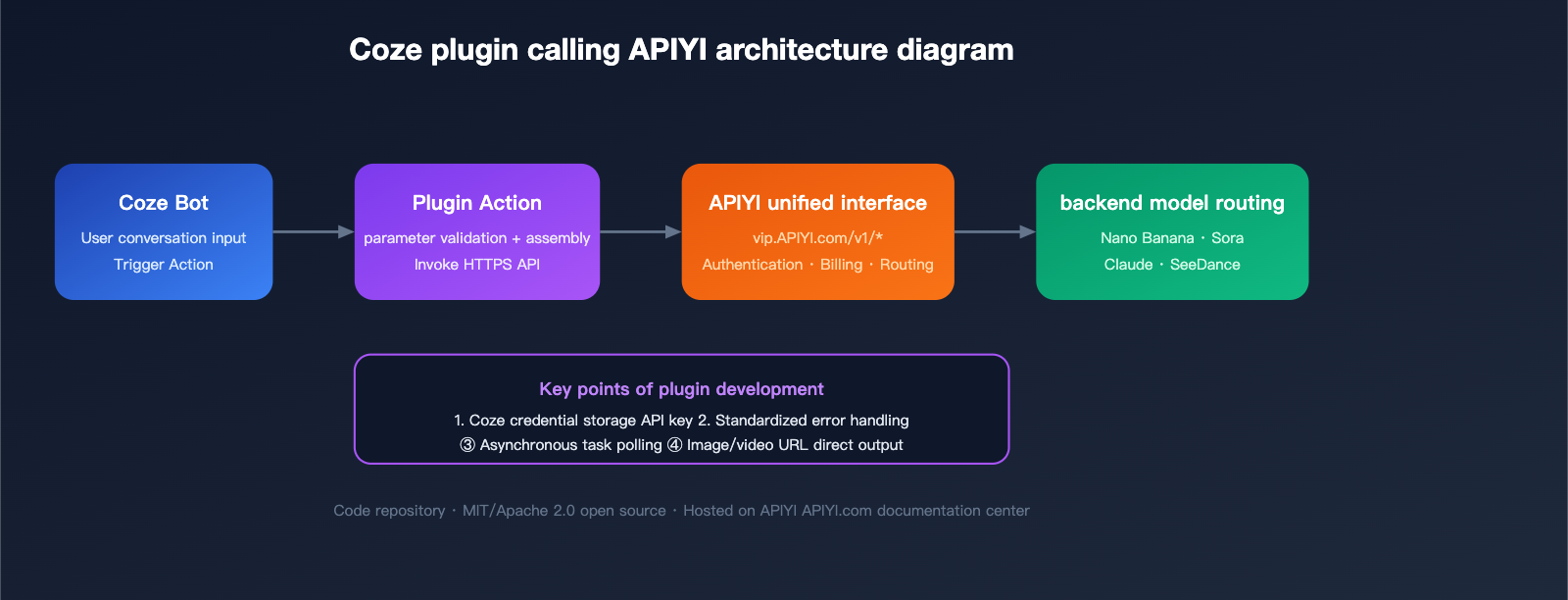
Coze Plugin Implementation Example
A typical Coze plugin action implementation (JavaScript):
export async function handler({ input, context }) {
  const { prompt, aspect_ratio = "16:9" } = input;
  const response = await fetch(
    "https://vip.apiyi.com/v1/images/generations",
    {
      method: "POST",
      headers: {
        "Authorization": `Bearer ${context.apiyi_key}`,
        "Content-Type": "application/json"
      },
      body: JSON.stringify({
        model: "gemini-3-pro-image",
        prompt: prompt,
        n: 1,
        size: aspect_ratio === "16:9" ? "1920x1080" : "1024x1024"
      })
    }
  );
  const data = await response.json();
  return { image_url: data.data[0].url };
}
🎯 Technical Tip: Coze plugin API keys should be stored via Coze credential variables to avoid hardcoding. We recommend that plugin authors clearly explain in the README how to apply for a dedicated key on the APIYI (apiyi.com) dashboard and provide usage quotas so users know what to expect.
N8N Plugin Development Directions and Technical Highlights
N8N is an open-source workflow automation platform with significant influence among developers worldwide. Its node system is based on TypeScript, making development and distribution relatively standardized.
Four Types of N8N Node Development
| Type | Complexity | Use Case | Example |
|---|---|---|---|
| Credential Node | Low | Unified APIYI Key authentication | APIYI API Credential |
| Action Node | Medium | Encapsulate individual model invocation | APIYI Image Generation |
| Trigger Node | High | Listen for callbacks/webhooks | APIYI Video Job Complete |
| Declarative Node | Low | JSON-based descriptive node | Rapid prototyping |
Recommended N8N Node Feature Checklist
Submitted plugins should cover at least the following core nodes:
- APIYI Credentials: Unified management of Base URL, API key, and proxy settings
- APIYI Chat Model: Integration with GPT/Claude/Gemini/DeepSeek chat models
- APIYI Image Generation: Nano Banana / Flux / GPT-Image generation
- APIYI Video Generation: SeeDance/Sora/Kling video generation, including built-in polling
- APIYI Batch: OpenAI
/v1/batchesbatch task management - APIYI Embedding: Vectorization nodes like text-embedding-3
N8N Node Minimal Implementation Example
The following is a standard-compliant N8N APIYI image generation node skeleton (TypeScript):
import { IExecuteFunctions, INodeType, INodeTypeDescription } from 'n8n-workflow';

export class ApiyiImage implements INodeType {
  description: INodeTypeDescription = {
    displayName: 'APIYI Image',
    name: 'apiyiImage',
    group: ['transform'],
    version: 1,
    credentials: [{ name: 'apiyiApi', required: true }],
    properties: [
      { displayName: 'Model', name: 'model', type: 'options',
        options: [
          { name: 'Nano Banana Pro', value: 'gemini-3-pro-image' },
          { name: 'GPT Image 1', value: 'gpt-image-1' },
          { name: 'Flux Pro', value: 'flux-pro-1.1' }
        ], default: 'gemini-3-pro-image' },
      { displayName: 'Prompt', name: 'prompt', type: 'string', default: '' }
    ]
  };

  async execute(this: IExecuteFunctions) {
    const creds = await this.getCredentials('apiyiApi');
    const model = this.getNodeParameter('model', 0) as string;
    const prompt = this.getNodeParameter('prompt', 0) as string;
    const res = await this.helpers.request({
      method: 'POST',
      uri: `${creds.baseUrl}/v1/images/generations`,
      headers: { Authorization: `Bearer ${creds.apiKey}` },
      body: { model, prompt }, json: true
    });
    return [this.helpers.returnJsonArray([res])];
  }
}
⚡ Publication Advice: Excellent N8N plugins should be released to both the npm registry (naming convention
n8n-nodes-apiyi-*) and GitHub as open-source. We will feature them prominently in the APIYI (apiyi.com) documentation center and provide a dedicated contributor page for plugin authors.
title: ComfyUI Plugin Development: Directions and Technical Essentials
description: A guide for developers on building ComfyUI plugins using APIYI, covering core benefits, implementation examples, and submission standards.
ComfyUI Plugin Development: Directions and Technical Essentials
ComfyUI is the most active node-based workflow environment for AI image and video creators. It’s built on an open-source Python architecture and boasts a thriving ecosystem of community-driven nodes.
Core Value of ComfyUI Plugins
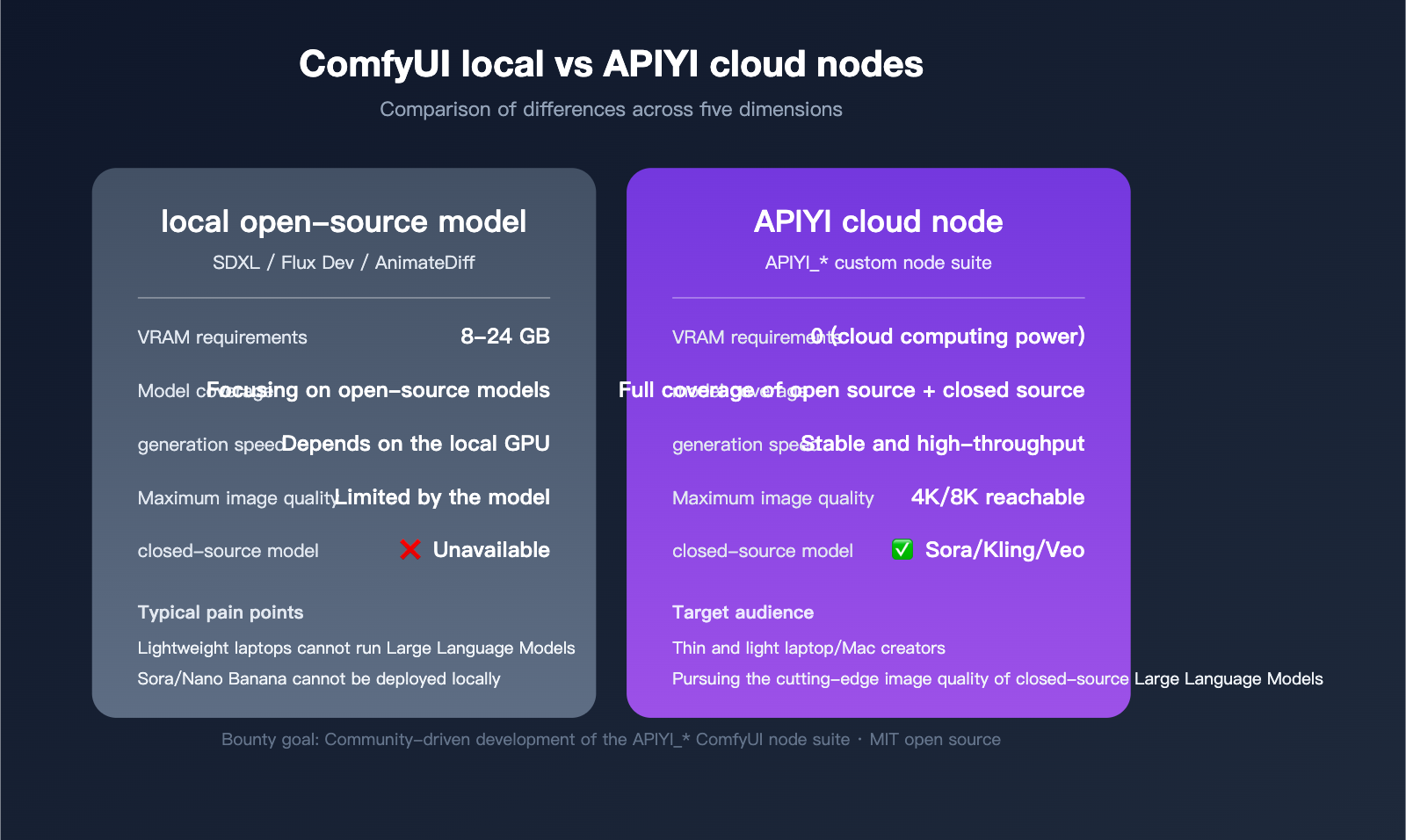
Compared to running models locally, integrating cloud-based models via APIYI offers several key advantages:
- No Local GPU Required: Run powerful models on lightweight laptops.
- Access to Closed-Source Models: Support for models like Sora 2, SeeDance 2.0, and Kling 2 that cannot be deployed locally.
- High-Resolution Generation: Generate 4K/8K images without hitting VRAM limits.
- Unified Management: Manage multiple models through a single API, reducing the overhead of switching environments.
Recommended ComfyUI Node List
| Node Name | Core Function | Native Equivalent |
|---|---|---|
| APIYI_NanoBananaPro | Google Nano Banana Pro Image Gen | KSampler + SDXL |
| APIYI_GPTImage | OpenAI gpt-image-1 Gen/Edit | Flux Dev |
| APIYI_SeeDance | SeeDance 2.0 Text/Image-to-Video | AnimateDiff |
| APIYI_Sora2 | Sora 2 Video Generation | – (No local equivalent) |
| APIYI_Kling2 | Kling 2 Video Generation | – |
| APIYI_Upscaler | Image Upscaling (Recraft/Topaz) | Ultimate SD Upscaler |
| APIYI_ChatNode | Chat Model Text Node | – |
| APIYI_BatchRunner | Batch Task Executor | Batch Image Loader |
Minimal ComfyUI Node Implementation Example
A ComfyUI custom node is simply a Python class; just place it in your ComfyUI/custom_nodes/ directory to load it:
import requests, os
from PIL import Image
import io, numpy as np, torch

class APIYINanoBananaPro:
    @classmethod
    def INPUT_TYPES(cls):
        return {
            "required": {
                "prompt": ("STRING", {"multiline": True}),
                "aspect_ratio": (["1:1", "16:9", "9:16", "4:3"],),
                "api_key": ("STRING", {"default": ""})
            }
        }

    RETURN_TYPES = ("IMAGE",)
    FUNCTION = "generate"
    CATEGORY = "APIYI/Image"

    def generate(self, prompt, aspect_ratio, api_key):
        # Call the APIYI cloud model
        resp = requests.post(
            "https://vip.apiyi.com/v1/images/generations",
            headers={"Authorization": f"Bearer {api_key}"},
            json={"model": "gemini-3-pro-image",
                  "prompt": prompt, "size": aspect_ratio}
        )
        url = resp.json()["data"][0]["url"]
        img_bytes = requests.get(url).content
        img = Image.open(io.BytesIO(img_bytes)).convert("RGB")
        arr = np.array(img).astype(np.float32) / 255.0
        return (torch.from_numpy(arr)[None,],)

NODE_CLASS_MAPPINGS = {"APIYI_NanoBananaPro": APIYINanoBananaPro}
NODE_DISPLAY_NAME_MAPPINGS = {"APIYI_NanoBananaPro": "APIYI Nano Banana Pro"}
Submission Standards and Evaluation Criteria
To help your work stand out, we’ve established clear evaluation criteria. We recommend checking your project against these points before submitting.
Basic Requirements
- Open Source License: Must use MIT, Apache 2.0, or GPL v3.
- Code Repository: Must be a public repository on GitHub, GitLab, or Gitee.
- Complete Documentation: README must include installation, configuration, and usage examples.
- Functional Testing: Provide at least one minimal, working demo.
- APIYI Compatibility: Must use the standard APIYI (apiyi.com)
base_urland API key authentication.
Requirements for Premium Tier
To qualify for the ¥3000 / ¥5000 reward tiers, your project should include:
- Multi-model Coverage: Support for at least 5 mainstream models.
- Robust Error Handling: Proper management of timeouts, rate limits, and parameter errors.
- Bilingual README: English and Chinese documentation.
- Workflow Templates: Include 3+ workflow examples.
- Demo Video: A 3-5 minute video demonstrating usage.
Bonus Points
- First-to-Market: Being the first plugin to cover a niche platform (e.g., Dify, FastGPT).
- Clean Code: Concise and maintainable (single files under 500 lines are preferred).
- Active Maintenance: A clear plan for future updates.
- Community Adoption: Already being used by the community (GitHub stars ≥ 20).
Bounty FAQ
Q1: I’ve already written a similar plugin. Can I apply for the bounty directly?
Absolutely, we welcome it! As long as your plugin meets the “basic requirements” and is adapted to the base_url and API key standards of APIYI (apiyi.com) (this might require minor modifications), you can submit it for review. If your existing GitHub project is highly polished, it can usually jump straight into the premium tier. When submitting, please include a link to your repository and a brief self-assessment checklist. We’ll provide initial feedback within 3 business days.
Q2: Can I choose both cash rewards and APIYI credits?
Yes, you can mix them proportionally. For instance, if you earn a ¥3000 premium reward, you could choose a combination of ¥1500 in cash and ¥1500 in platform credits. Alternatively, you can convert the full amount into credits at a 1:1.3 ratio (i.e., ¥3000 cash converts to ¥3900 in platform credits). You can discuss your preference with our team at APIYI (apiyi.com) once your submission is approved, and we’ll distribute the reward according to your choice.
Q3: Do I still retain the copyright after open-sourcing the plugin?
You retain full copyright and attribution rights. APIYI only requests a non-exclusive right to use and display the plugin in our documentation center. You’re free to continue maintaining, distributing, and commercializing your work. We encourage you to build your open-source reputation through these projects and are open to discussing further collaborations down the line.
Q4: How many entries can one person submit? Is there a limit?
There is no limit. The same contributor can submit projects for Coze, N8N, or ComfyUI separately, with each entry reviewed and rewarded individually. We’ve even seen contributors submit a “three-platform plugin suite” at once and walk away with three premium-tier rewards. We highly value this kind of systemic contribution.
Q5: What happens if multiple people submit the same type of plugin?
We evaluate entries based on two dimensions: “completion of the first high-quality submission” and “breadth of feature coverage.” Even if a submission arrives later, if it significantly outperforms in terms of features or code quality, it will still be selected and receive the full reward. Once selected, both works will be listed in our documentation center, allowing users to choose whichever they prefer; there is no “exclusivity” policy.
Q6: How long does it take to get feedback after submission?
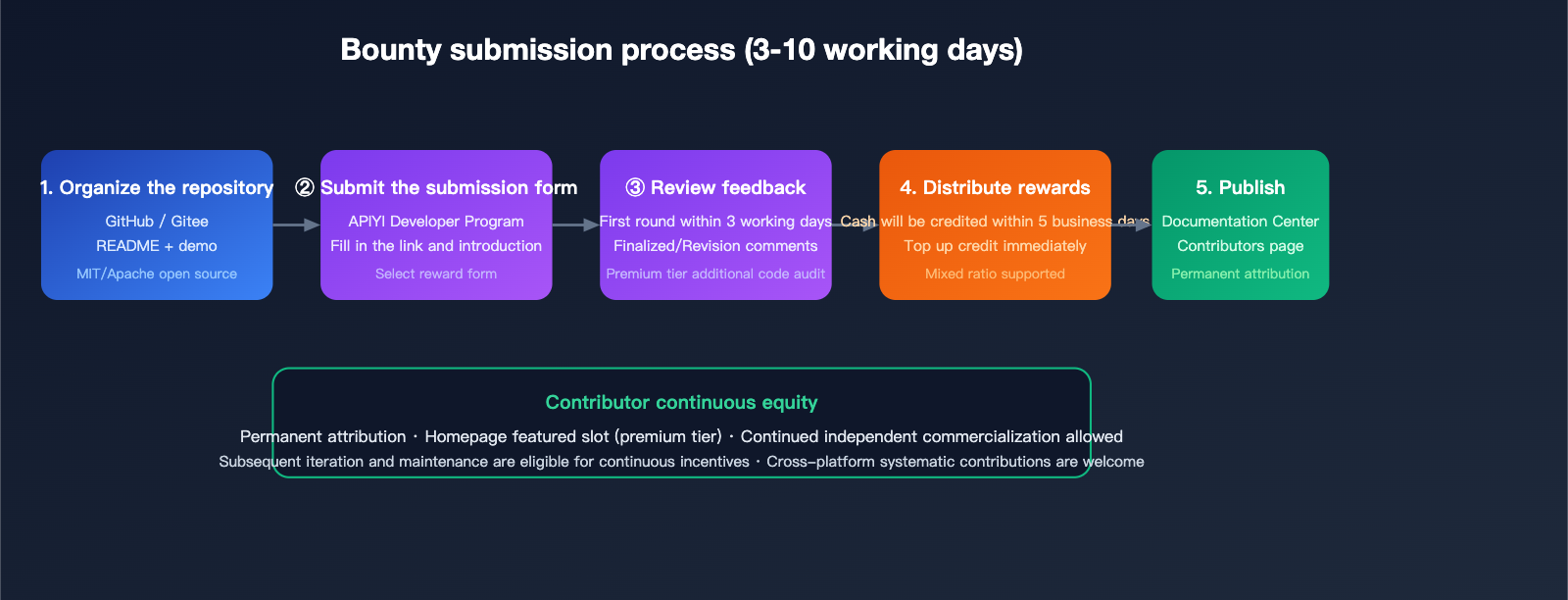
Our standard process: initial review and feedback within 3 business days, with rewards issued within 5 business days after approval. The premium tier may involve additional code audits and documentation checks, but the total process generally does not exceed 10 business days. We’ll keep you updated on progress via email and WeChat.
Submission Process and Contact Information
Standard Submission Steps
Once your project is ready, follow these steps to submit:
- Prepare your repository: Ensure your GitHub/Gitee repo is public, has a complete README, and the demo is runnable.
- Fill out the submission form: Visit APIYI (apiyi.com) → Documentation Center → “Developer Program” page and complete the form.
- Provide materials: Include your repository link, a brief description of the plugin, your preferred reward format, and your contact info.
- Wait for review: You’ll receive initial feedback within 3 business days.
- Revisions and finalization: Make any necessary revisions based on feedback, and we’ll finalize your entry.
- Reward distribution: Cash is issued via corporate/personal bank transfer; credits are automatically topped up to your APIYI account.
- Documentation listing: Your work will be live in the “Contributor Zone” of the APIYI Documentation Center, featuring your name and contact details.
Quick Contact Channels
- APIYI Official Website: Look for the “Developer Program” link at the footer of apiyi.com.
- Official Customer Service WeChat: Follow the APIYI Official Account → Menu “Contact Support” → Note “Plugin Bounty.”
- Email Submission: Use the developer email address provided in the APIYI (apiyi.com) Documentation Center.
Clarifying Common Misconceptions
Misconception 1: “You have to be a professional programmer to submit”
That’s not the case at all. Plugin development on Coze is primarily based on JSON configuration with just a bit of scripting, which many no-code developers can handle. Similarly, N8N’s Declarative Node doesn’t require deep TypeScript experience. As long as you’ve built something that works, you’re welcome to submit.
Misconception 2: “It has to be perfect before you can submit”
Wrong. Completion is an iterative process that grows over time. You can even submit a “single-model, single-function” minimum viable plugin. As long as the code is clean, functional, and provides value to users, you’ll qualify for the standard reward tier. The premium tier is there to encourage more systematic contributions, but it’s not a barrier to entry.
Misconception 3: “Niche platforms aren’t worth the effort”
Quite the opposite. Plugins that are the first to cover scarce platforms like Dify, FastGPT, or LangFlow receive bonus points during review, making it easier to reach the premium tier. If you’ve already been working deeply with these platforms, this bounty program is a great opportunity to monetize your past efforts.
Summary
At its core, this open-source plugin bounty program is our way of working with the community to “tool-ize and eco-systemize” the model capabilities of APIYI (apiyi.com). We want to make it as easy as possible for every developer—whether they’re building bots on Coze, workflows on N8N, or experimenting with image generation in ComfyUI—to access cutting-edge models like Nano Banana, Sora, SeeDance, GPT, and Claude.
If you already have a project ready, this bounty is a fantastic chance to monetize your code. If you have an idea but haven’t started yet, it’s the perfect scenario to kick off an open-source project and build your personal technical brand. We welcome you to submit your work at APIYI (apiyi.com), and please feel free to share this call for submissions with friends who might be interested.
Let’s work together to turn those “frequently asked questions” that keep support teams busy into shared open-source assets for the entire community.
📌 Author Attribution: This article is published by the APIYI (apiyi.com) operations team, marking the official launch of the 2026 Open-Source Plugin Bounty Program. The submission channel is now open, and the reward standards are effective long-term. Stay tuned for more updates!