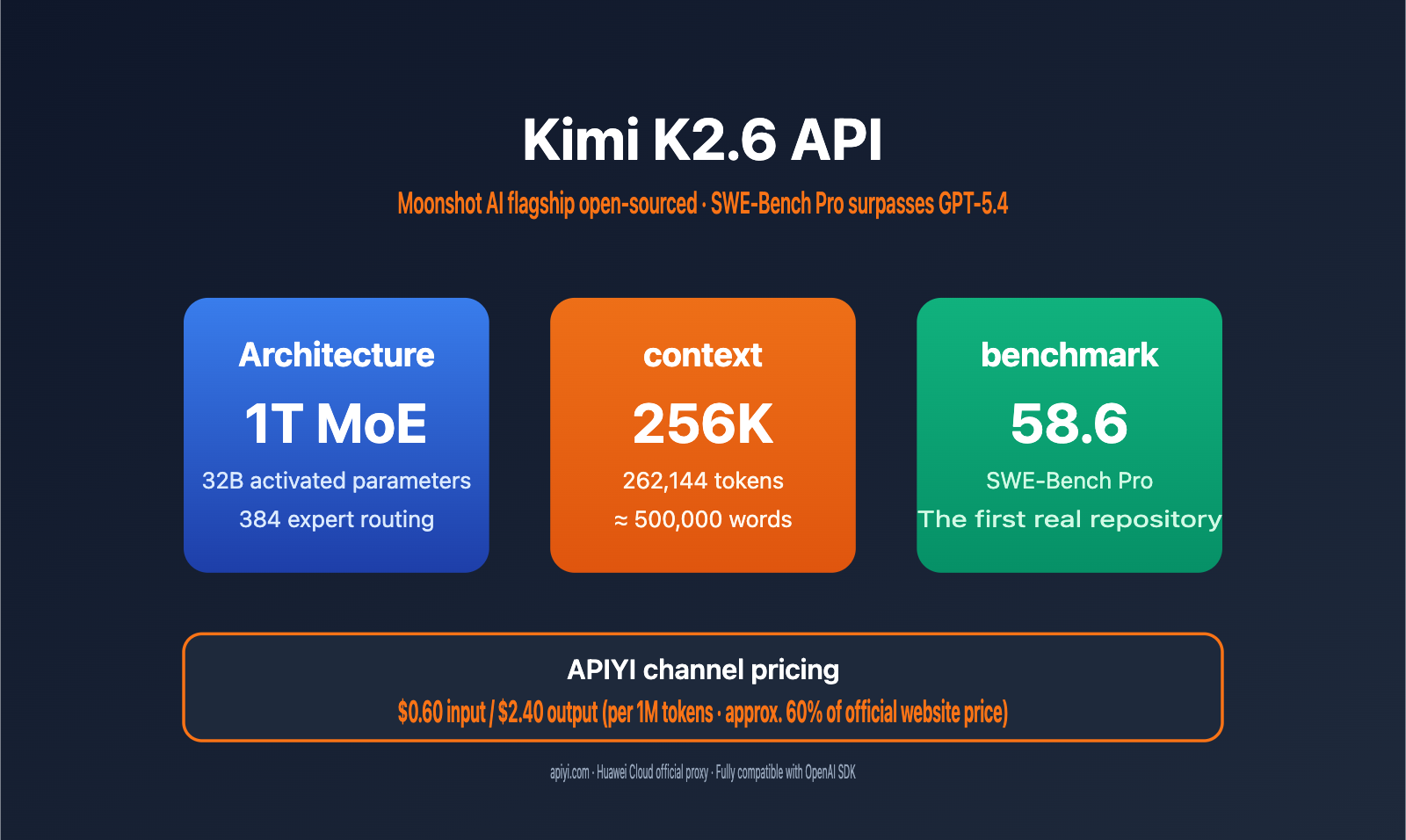
Domestic open-source Large Language Models reached a major milestone in 2026: Moonshot AI officially open-sourced its flagship model, Kimi K2.6. With a score of 58.6 on the SWE-Bench Pro benchmark, it surpassed both GPT-5.4 (57.7) and Claude Opus 4.6 (53.4), becoming the most capable model for solving real-world GitHub Issues.
This article walks you through the integration of the Kimi K2.6 API, deep-dives into its 1T MoE architecture, 256K context window, function call capabilities, and prefix caching features. We'll also provide a complete code example to help you get integrated in under 5 minutes. Regarding pricing, APIYI (apiyi.com) offers a special gateway via Huawei Cloud at $0.60 for input and $2.40 for output per 1M tokens—roughly 60% of the official pricing of ¥6.5 / ¥27.
Key Takeaways: After reading this, you'll master the Kimi K2.6 API invocation, function call orchestration, and prefix caching optimization, and understand when K2.6 provides the best price-to-performance ratio for your needs.
Kimi K2.6 API Core Highlights
Kimi K2.6 is the new-generation flagship open-source model released by Moonshot AI in April 2026. It continues using the Kimi K2 series' MoE architecture and features significant upgrades in coding, long context, and tool invocation. The table below summarizes the key specifications developers care about:
| Feature | Detailed Specs | Practical Value |
|---|---|---|
| MoE Architecture | 1T Total Parameters / 32B Active / 384 Experts (8 chosen + 1 shared) | Large-scale capabilities, inference cost comparable to a 32B model |
| Context Window | 256K tokens (exactly 262,144) | Process massive codebases or legal documents in one go |
| Max Generation | Up to 98,304 tokens per output | Handles long-form code refactoring and document generation |
| Multimodal Capabilities | Integrated 400M MoonViT vision encoder | Native support for image and video inputs |
| Agent Orchestration | Agent Swarm supports 300 sub-agents / 4,000 coordination steps | Handles complex multi-step R&D workflows |
| Open-source License | Modified MIT License | Business-friendly with no significant restrictions |
Kimi K2.6 API: In-depth Capabilities
Compared to the previous K2.5 generation, K2.6 sees breakthroughs in three dimensions: First, it surpassed 58.6 on SWE-Bench Pro, outperforming GPT-5.4 and Claude Opus 4.6 on real-world open-source repository issue-solving tasks. Second, Agent Swarm sub-agent capacity increased from 100 to 300, and coordination steps grew from 1,500 to 4,000, allowing it to handle longer R&D task chains. Third, the 256K context is now available across the whole series, and Multi-head Latent Attention (MLA) significantly lowers the VRAM and latency costs for long-context inference.
🎯 Technical Advice: In practice, we recommend calling the Kimi K2.6 model directly through the APIYI (apiyi.com) platform. This platform uses a official Huawei Cloud proxy channel, ensures the interface is fully compatible with the OpenAI SDK, and allows you to switch models without changing your existing code.
Kimi K2.6 API Technical Architecture Explained
Understanding the underlying architecture of Kimi K2.6 helps you make informed decisions for your business use cases. Its design strikes a balance between "trillion-parameter capacity" and "tens-of-billions-scale inference costs."
MoE Sparse Activation Mechanism
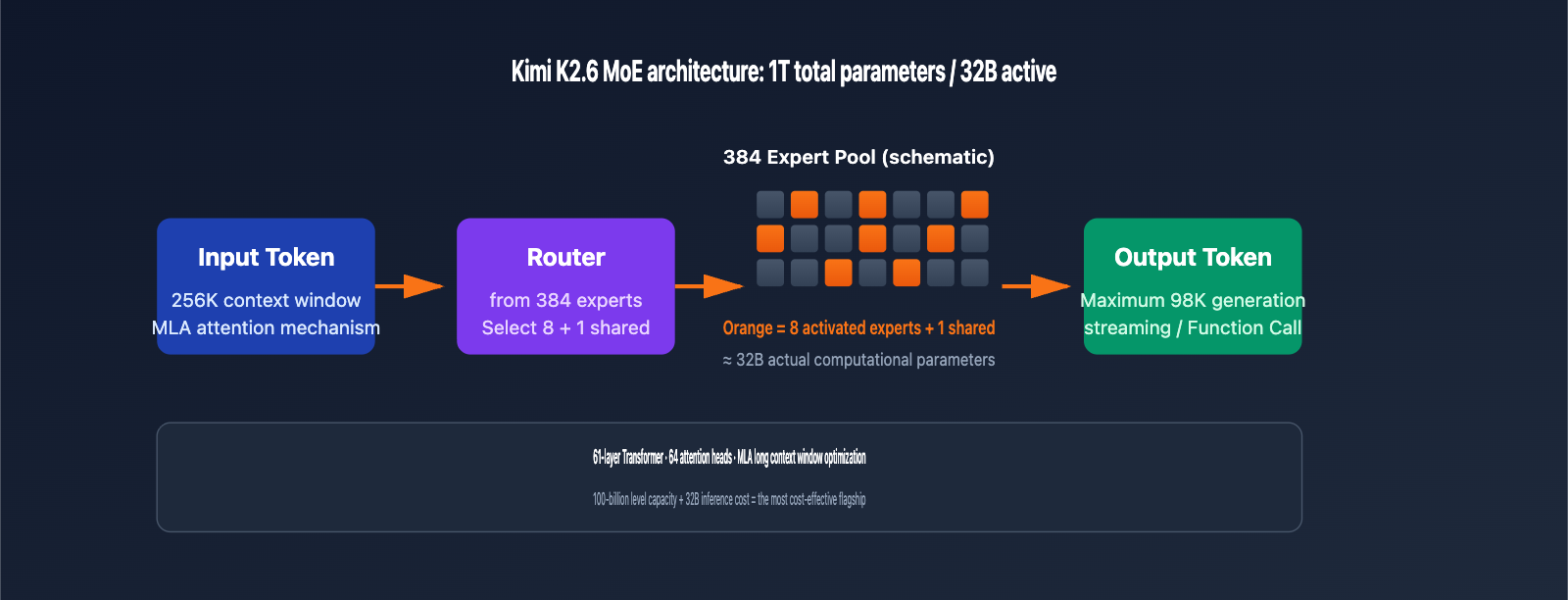
Kimi K2.6 utilizes a 1-trillion-parameter Mixture of Experts (MoE) architecture, featuring 384 expert networks. During each token inference, only 8 experts (plus 1 shared expert) are activated, meaning 32B parameters are involved in the computation. This design allows the model to possess the knowledge breadth of a trillion-parameter model while maintaining the inference speed of a 32B model, making it one of the most cost-effective flagship models for API invocation currently available.
Long Context Optimization
| Technical Component | Function | K2.6 Configuration |
|---|---|---|
| Multi-head Latent Attention (MLA) | Reduces KV cache volume for long context inference | 64 attention heads |
| Network Layers | Determines model inference depth | 61 Transformer layers |
| Context Window | Maximum tokens per input | 262,144 tokens (256K) |
| Positional Encoding | Key technology for supporting ultra-long sequences | Specially trained for long context |
| Prefix Caching | Hits cache for repeated prompts, reducing costs | Input price drops by ~75% after a hit |
💡 Architecture Insight: In multi-turn conversations or scenarios with a fixed system prompt, prefix caching can significantly reduce input costs. We recommend keeping your system prompt stable in production to maximize cache hit rates.
Kimi K2.6 API Performance Benchmarks
Benchmarks are the most straightforward way to judge whether a model is worth integrating. Below is a comparison of Kimi K2.6, GPT-5.4, and Claude Opus 4.6 across five authoritative benchmarks.
Coding and Software Engineering Capabilities
| Benchmark | Kimi K2.6 | GPT-5.4 | Claude Opus 4.6 | Leading Model |
|---|---|---|---|---|
| SWE-Bench Pro | 58.6 | 57.7 | 53.4 | Kimi K2.6 |
| SWE-Bench Verified | 80.2 | – | 80.8 | Claude Opus 4.6 |
| Terminal-Bench 2.0 | 66.7 | 65.4 | – | Kimi K2.6 |
| HLE (with tools) | 54.0 | – | 53.0 | Kimi K2.6 |
| AIME 2026 | 96.4 | 99.2 | – | GPT-5.4 |
| GPQA-Diamond | 90.5 | – | – | – |
Key Takeaways:
- SWE-Bench Pro measures end-to-end resolution capabilities for real GitHub issues. K2.6 scored 58.6, marking the first time an open-weights model has outperformed closed-source flagships in this benchmark, meaning K2.6 should be your top choice for code maintenance and bug-fixing tasks.
- SWE-Bench Verified is a relatively simplified version where Claude Opus 4.6 holds a slight edge (80.8 vs 80.2). The gap is small, but it indicates Claude still maintains an advantage in standardized coding tasks.
- Terminal-Bench 2.0 tests terminal command orchestration; K2.6 leads with 66.7, making it well-suited for DevOps and automated operations.
- AIME / HMMT and other pure mathematical reasoning tasks remain the strength of GPT-5.4, so we recommend keeping GPT-5.4 as an option for math-heavy scenarios.
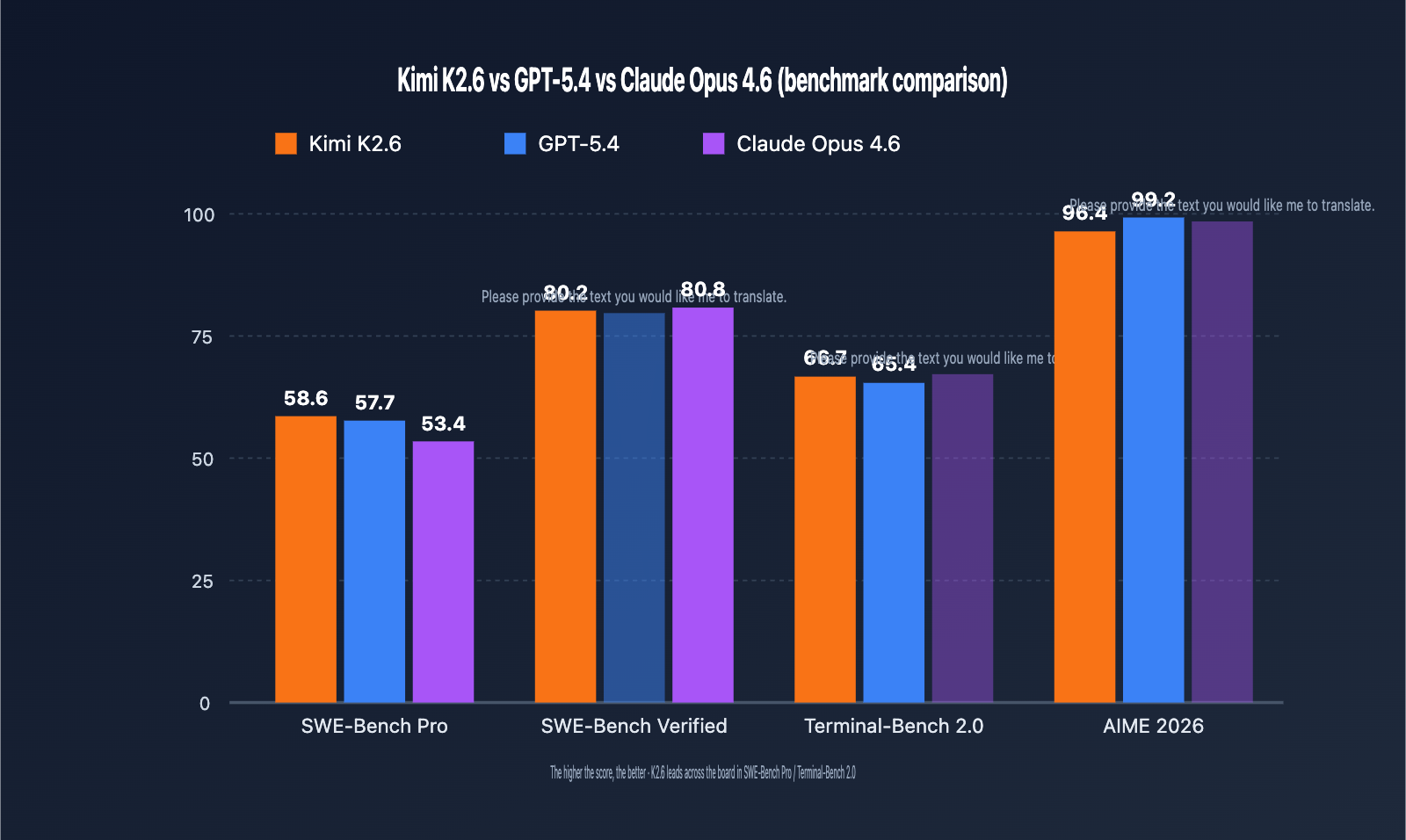
🎯 Scenario Recommendation: We suggest A/B testing across models for different tasks—prioritize K2.6 for code maintenance, GPT-5.4 for mathematical reasoning, and keep Claude as an option for long-form creative writing.
Quick Start with Kimi K2.6 API
Let’s walk through how to call Kimi K2.6 using a complete code demonstration. The Kimi series API is fully compatible with the OpenAI SDK protocol. If you already have existing OpenAI integration code, you only need to update the base_url and model fields.
Minimal Example (Python)
from openai import OpenAI

client = OpenAI(
    api_key="YOUR_APIYI_KEY",
    base_url="https://api.apiyi.com/v1"
)

response = client.chat.completions.create(
    model="kimi-k2.6",
    messages=[
        {"role": "system", "content": "You are a senior Python engineer."},
        {"role": "user", "content": "Use asyncio to implement a concurrent request pool with a maximum concurrency of 10."}
    ],
    temperature=0.3,
    max_tokens=2048
)

print(response.choices[0].message.content)
View complete asynchronous streaming call example (with error handling)
import asyncio
from openai import AsyncOpenAI
from openai import APIError, RateLimitError

client = AsyncOpenAI(
    api_key="YOUR_APIYI_KEY",
    base_url="https://api.apiyi.com/v1",
    max_retries=3,
    timeout=120.0
)

async def call_kimi_k26_stream(prompt: str, system: str = "") -> str:
    """Stream Kimi K2.6 responses and print tokens in real-time"""
    messages = []
    if system:
        messages.append({"role": "system", "content": system})
    messages.append({"role": "user", "content": prompt})

    full_response = ""
    try:
        stream = await client.chat.completions.create(
            model="kimi-k2.6",
            messages=messages,
            stream=True,
            temperature=0.3,
            max_tokens=8192
        )
        async for chunk in stream:
            if chunk.choices[0].delta.content:
                token = chunk.choices[0].delta.content
                print(token, end="", flush=True)
                full_response += token
    except RateLimitError:
        print("\n[Rate limit encountered, consider configuring retries or upgrading your plan]")
        raise
    except APIError as e:
        print(f"\n[API Error: {e}]")
        raise
    return full_response

async def main():
    result = await call_kimi_k26_stream(
        prompt="Explain how MoE architecture reduces inference costs",
        system="You are an AI architecture expert, keep your answers concise and professional"
    )
    print(f"\n\n[Total token count: {len(result)}]")

if __name__ == "__main__":
    asyncio.run(main())
🚀 Quick Start: After obtaining an API key from the APIYI platform (apiyi.com), simply set your
base_urltohttps://api.apiyi.com/v1. All OpenAI-compatible SDKs (Python/Node.js/Go) work right out of the box. Integration takes less than 5 minutes!
Node.js / TypeScript Example
import OpenAI from "openai";

const client = new OpenAI({
  apiKey: process.env.APIYI_KEY,
  baseURL: "https://api.apiyi.com/v1",
});

const completion = await client.chat.completions.create({
  model: "kimi-k2.6",
  messages: [
    { role: "user", content: "Write a debounce function in TypeScript with generic support" }
  ],
  temperature: 0.2,
});

console.log(completion.choices[0].message.content);
cURL Example
curl https://api.apiyi.com/v1/chat/completions \
  -H "Content-Type: application/json" \
  -H "Authorization: Bearer YOUR_APIYI_KEY" \
  -d '{
    "model": "kimi-k2.6",
    "messages": [
      {"role": "user", "content": "Hello, Kimi K2.6"}
    ],
    "max_tokens": 1024
  }'
Practical Function Call Guide
K2.6’s ability to perform function calls is a significant upgrade over the K2 series, performing exceptionally well on the Berkeley Function-Calling Leaderboard. Below is a complete example demonstrating the tool orchestration process for a "weather inquiry" task.
Tool Definition and Invocation
from openai import OpenAI
import json

client = OpenAI(
    api_key="YOUR_APIYI_KEY",
    base_url="https://api.apiyi.com/v1"
)

tools = [
    {
        "type": "function",
        "function": {
            "name": "get_weather",
            "description": "Query the real-time weather for a specific city",
            "parameters": {
                "type": "object",
                "properties": {
                    "city": {"type": "string", "description": "City name"},
                    "unit": {"type": "string", "enum": ["celsius", "fahrenheit"]}
                },
                "required": ["city"]
            }
        }
    }
]

def get_weather(city: str, unit: str = "celsius") -> dict:
    """Mock weather query function"""
    return {"city": city, "temperature": 22, "unit": unit, "condition": "Sunny"}

messages = [{"role": "user", "content": "Help me check the weather in Beijing and Shanghai"}]

response = client.chat.completions.create(
    model="kimi-k2.6",
    messages=messages,
    tools=tools,
    tool_choice="auto"
)

assistant_msg = response.choices[0].message
messages.append(assistant_msg)

if assistant_msg.tool_calls:
    for tool_call in assistant_msg.tool_calls:
        args = json.loads(tool_call.function.arguments)
        result = get_weather(**args)
        messages.append({
            "role": "tool",
            "tool_call_id": tool_call.id,
            "content": json.dumps(result, ensure_ascii=False)
        })

    final_response = client.chat.completions.create(
        model="kimi-k2.6",
        messages=messages
    )
    print(final_response.choices[0].message.content)
Partial Mode (Prefix Completion)
K2.6 supports OpenAI-style "prefix completion," where you pre-fill the start of an assistant message, and the model continues generating from that point. This is commonly used to enforce JSON output or specific formatting constraints:
response = client.chat.completions.create(
    model="kimi-k2.6",
    messages=[
        {"role": "user", "content": "Return Beijing's GDP data (2023) in JSON format"},
        {"role": "assistant", "content": '{"city": "Beijing", "year": 2023, "gdp":'}
    ],
    max_tokens=200
)
print(response.choices[0].message.content)
💰 Cost Optimization: For scenarios with long system prompts (e.g., RAG, Agents), once the prefix cache is hit, input costs drop by approximately 25%. This is ideal for multi-turn conversations and high-frequency tasks with fixed templates. We recommend monitoring your cache hit rates via the APIYI dashboard.
Advanced Capabilities of Kimi K2.6
Beyond function calls, K2.6 offers advanced capabilities including Agent Swarm orchestration, 256K long context window, and native multimodal support, making it a powerful choice for coding, R&D automation, and document analysis.
Agent Swarm Orchestration
One of K2.6's most distinct features is Agent Swarm—a single task can schedule up to 300 parallel sub-agents to execute 4,000 coordination steps. This makes K2.6 ideal for large-scale code refactoring, cross-document analysis, and complex R&D pipelines.
Sub-Agent Scheduling Modes
K2.6’s Agent Swarm supports three typical orchestration patterns:
| Orchestration Pattern | Use Case | Sub-Agents | Coordination Steps |
|---|---|---|---|
| Single-layer Parallel | Batch document summarization, code reviews | 10-50 | < 200 |
| Hierarchical Scheduling | Multi-module code refactoring | 50-150 | 500-1500 |
| Deep Collaboration | Cross-repo Agent pipelines | 150-300 | 1500-4000 |
Simple Agent Scheduling Example
Here is how to coordinate 5 parallel sub-agents to perform a code review task:
from openai import OpenAI
import asyncio
import json

client = OpenAI(
    api_key="YOUR_APIYI_KEY",
    base_url="https://api.apiyi.com/v1"
)

async def review_module(module_name: str, code: str) -> dict:
    """Sub-agent for reviewing a single module"""
    response = client.chat.completions.create(
        model="kimi-k2.6",
        messages=[
            {"role": "system", "content": "You are a code review expert focused on security and performance."},
            {"role": "user", "content": f"Review module {module_name}:\n{code}"}
        ],
        temperature=0.2
    )
    return {
        "module": module_name,
        "review": response.choices[0].message.content
    }

async def parallel_review(modules: dict) -> list:
    """Schedule multiple sub-agents in parallel"""
    tasks = [review_module(name, code) for name, code in modules.items()]
    return await asyncio.gather(*tasks)

# Main flow: Coordinate 5 sub-agents to review 5 modules
modules = {
    "auth.py": "...",
    "database.py": "...",
    "api_routes.py": "...",
    "cache.py": "...",
    "logger.py": "..."
}
results = asyncio.run(parallel_review(modules))
for r in results:
    print(f"[{r['module']}] {r['review'][:100]}...")
Agent Swarm Best Practices
- Task Granularity: Each sub-agent should handle 5K-20K tokens. Excessive loads increase coordination overhead.
- Error Isolation: Use independent
try/exceptblocks for each sub-agent to prevent cascading failures. - Result Aggregation: Appoint a "lead agent" to aggregate results and perform cross-validation.
- Timeout Management: Set individual sub-agent timeouts to 60-120 seconds, and a total primary agent timeout of 10-30 minutes.
- Rate Control: Use semaphores to limit concurrency and avoid hitting API rate limits.
256K Long Context Window
The 256K (262,144 tokens) context window is a core feature of K2.6. In Chinese, this translates to roughly 400,000–500,000 characters, allowing you to process entire large code repositories or full technical books in a single prompt.
Typical Long Context Usage
import os
from openai import OpenAI

client = OpenAI(
    api_key="YOUR_APIYI_KEY",
    base_url="https://api.apiyi.com/v1"
)

def load_repo_files(repo_path: str, extensions=(".py", ".ts", ".md")) -> str:
    """Load all files with specific extensions from a repository"""
    contents = []
    for root, _, files in os.walk(repo_path):
        for f in files:
            if f.endswith(extensions):
                full_path = os.path.join(root, f)
                with open(full_path, "r", encoding="utf-8") as fp:
                    contents.append(f"## {full_path}\n```\n{fp.read()}\n```")
    return "\n\n".join(contents)

repo_text = load_repo_files("./my_project")
print(f"Estimated repo tokens: {len(repo_text) // 2}")  # 1 token ≈ 2 Chinese characters

response = client.chat.completions.create(
    model="kimi-k2.6",
    messages=[
        {"role": "system", "content": "You are a senior architect specialized in large-scale codebase analysis."},
        {"role": "user", "content": f"Analyze the following project architecture and provide refactoring suggestions:\n{repo_text}"}
    ],
    temperature=0.3,
    max_tokens=8192
)
print(response.choices[0].message.content)
Balancing Long Context Cost and Performance
| Input Scale | Est. Cost/Request | Time to First Token | Use Case |
|---|---|---|---|
| 8K | $0.005 | 1-2 sec | Single file analysis |
| 32K | $0.019 | 3-5 sec | Module-level review |
| 100K | $0.06 | 8-15 sec | Mid-sized repo analysis |
| 200K | $0.12 | 18-30 sec | Large repo / Whole book |
| 256K (Full) | $0.154 | 25-40 sec | Extreme long-doc scenarios |
🎯 Optimization Tip: For long context, split your system prompt into "fixed instructions" and "dynamic documents." Once the fixed portion is cached, you are only billed for the variable part. In RAG scenarios, this can reduce total costs for 100 calls by 40%-60%.
Multimodal Vision Capabilities
K2.6 features an integrated 400M-parameter MoonViT vision encoder, natively supporting image and video inputs. The multimodal interface is also fully compatible with the OpenAI protocol:
from openai import OpenAI
import base64

client = OpenAI(
    api_key="YOUR_APIYI_KEY",
    base_url="https://api.apiyi.com/v1"
)

def encode_image(image_path: str) -> str:
    with open(image_path, "rb") as f:
        return base64.b64encode(f.read()).decode("utf-8")

image_b64 = encode_image("./architecture_diagram.png")

response = client.chat.completions.create(
    model="kimi-k2.6",
    messages=[
        {
            "role": "user",
            "content": [
                {"type": "text", "text": "Analyze this architecture diagram and identify potential single points of failure."},
                {
                    "type": "image_url",
                    "image_url": {"url": f"data:image/png;base64,{image_b64}"}
                }
            ]
        }
    ],
    max_tokens=2048
)
print(response.choices[0].message.content)
Multimodal Use Cases:
- Architectural/flowchart analysis and modification suggestions
- UI design review and code generation
- Understanding screenshots of technical documentation
- Extracting content from data charts
- Industrial quality inspection and vision-based recognition
Kimi K2.6 API Migration and Performance Optimization
If your project currently uses models from OpenAI, K2.5, or other providers, migrating to K2.6 usually only requires 3-5 lines of code changes. Plus, implementing smart concurrency and caching strategies can further maximize the cost advantages of K2.6.
Migrating from OpenAI GPT Series
# Original code (OpenAI)
client = OpenAI(api_key="OPENAI_KEY")
response = client.chat.completions.create(
    model="gpt-5.4",
    messages=[...]
)

# Migrate to K2.6 (Update base_url and model only)
client = OpenAI(
    api_key="YOUR_APIYI_KEY",
    base_url="https://api.apiyi.com/v1"
)
response = client.chat.completions.create(
    model="kimi-k2.6",
    messages=[...]
)
Migrating from Kimi K2 / K2.5
While the model IDs for the K2 series differ, the API protocol remains identical:
| Old Model ID | New Model ID | Planned Deprecation |
|---|---|---|
kimi-k2 |
kimi-k2.6 |
2026-05-25 |
kimi-k2.5 |
kimi-k2.6 |
Supported, but upgrade recommended |
moonshot-v1-128k |
kimi-k2.6 |
Within 2026 |
Pre-migration Compatibility Checklist
Before you switch, we recommend checking the following:
- max_tokens limit: K2.6 supports outputs up to 98K. If your code has a hardcoded 8K limit, you can increase it.
- temperature range: The recommended range for K2.6 is 0.1–0.7. Values higher than this may impact code quality.
- stop sequences: K2.6 supports custom stop sequences, just like OpenAI.
- tool_choice behavior: K2.6's
automode is more proactive in calling tools. If you prefer a more conservative approach, set this tononeor specify the tool explicitly. - Streaming protocol: The SSE format is exactly the same, so no frontend code changes are needed.
Performance Optimization Best Practices
Optimizing Call Speed
| Optimization | Method | Expected Gain |
|---|---|---|
| Concurrent Requests | Use AsyncOpenAI + asyncio.gather | 3–10x throughput |
| Streaming Output | Enable stream=True |
70% lower time-to-first-token |
| Prompt Caching | Pin your system prompt | 75% reduction in input costs |
| Optimized max_tokens | Set a limit based on the task | 30% reduction in latency |
| Temperature Control | Use temp=0.2 for coding tasks |
More stable output |
Error Handling Tips
from openai import OpenAI, APIError, RateLimitError, APITimeoutError
import time

def call_with_retry(prompt: str, max_retries: int = 3):
    client = OpenAI(
        api_key="YOUR_APIYI_KEY",
        base_url="https://api.apiyi.com/v1",
        timeout=120.0
    )
    for attempt in range(max_retries):
        try:
            return client.chat.completions.create(
                model="kimi-k2.6",
                messages=[{"role": "user", "content": prompt}]
            )
        except RateLimitError:
            wait = 2 ** attempt
            print(f"Rate limited, retrying in {wait}s...")
            time.sleep(wait)
        except APITimeoutError:
            print(f"Timeout, retrying (attempt {attempt+1})...")
        except APIError as e:
            print(f"API Error: {e}")
            if attempt == max_retries - 1:
                raise
    raise Exception("Max retries exceeded")
Kimi K2.6 API Pricing and Model Selection
Price is a critical factor in model selection. The table below compares the list prices of Kimi K2.6 across different channels (per 1M tokens):
| Channel | Input Price | Output Price | Notes |
|---|---|---|---|
| Kimi Official | ¥6.5 (~$0.95) | ¥27 (~$4.00) | Domestic pricing |
| APIYI | $0.60 | $2.40 | ~40% off official |
| OpenRouter (Parasail) | $0.60 | $2.40+ | Third-party channel |
| GPT-5.4 (Ref) | $2.50 | $15.00 | 4–6x more expensive than K2.6 |
| Claude Opus 4.6 (Ref) | $15.00 | $75.00 | 25x+ more expensive than K2.6 |
Real-world Cost Estimation
Using a coding assistant scenario (assuming 5K tokens input / 2K tokens output per session) with 100,000 monthly calls:
| Model | Monthly Input | Monthly Output | Total Monthly |
|---|---|---|---|
| Kimi K2.6 (APIYI) | $300 | $480 | $780 |
| GPT-5.4 | $1,250 | $3,000 | $4,250 |
| Claude Opus 4.6 | $7,500 | $15,000 | $22,500 |
Verdict: In high-frequency scenarios like coding, Agents, and long-context analysis, K2.6 delivers performance on par with GPT-5.4 and Claude Opus 4.6 at a fraction of the cost—often 1/5th to 1/30th the price. It's an excellent choice for budget-conscious teams and developers.
🎯 Recommendation: Choosing a model depends on your specific use case and quality requirements. We suggest running real-world tests via the APIYI platform (apiyi.com) to find the best fit. The platform offers a unified interface for Kimi K2.6, GPT-5.4, and Claude Opus 4.6, making it easy to compare and switch between them.
Recommended Use Cases
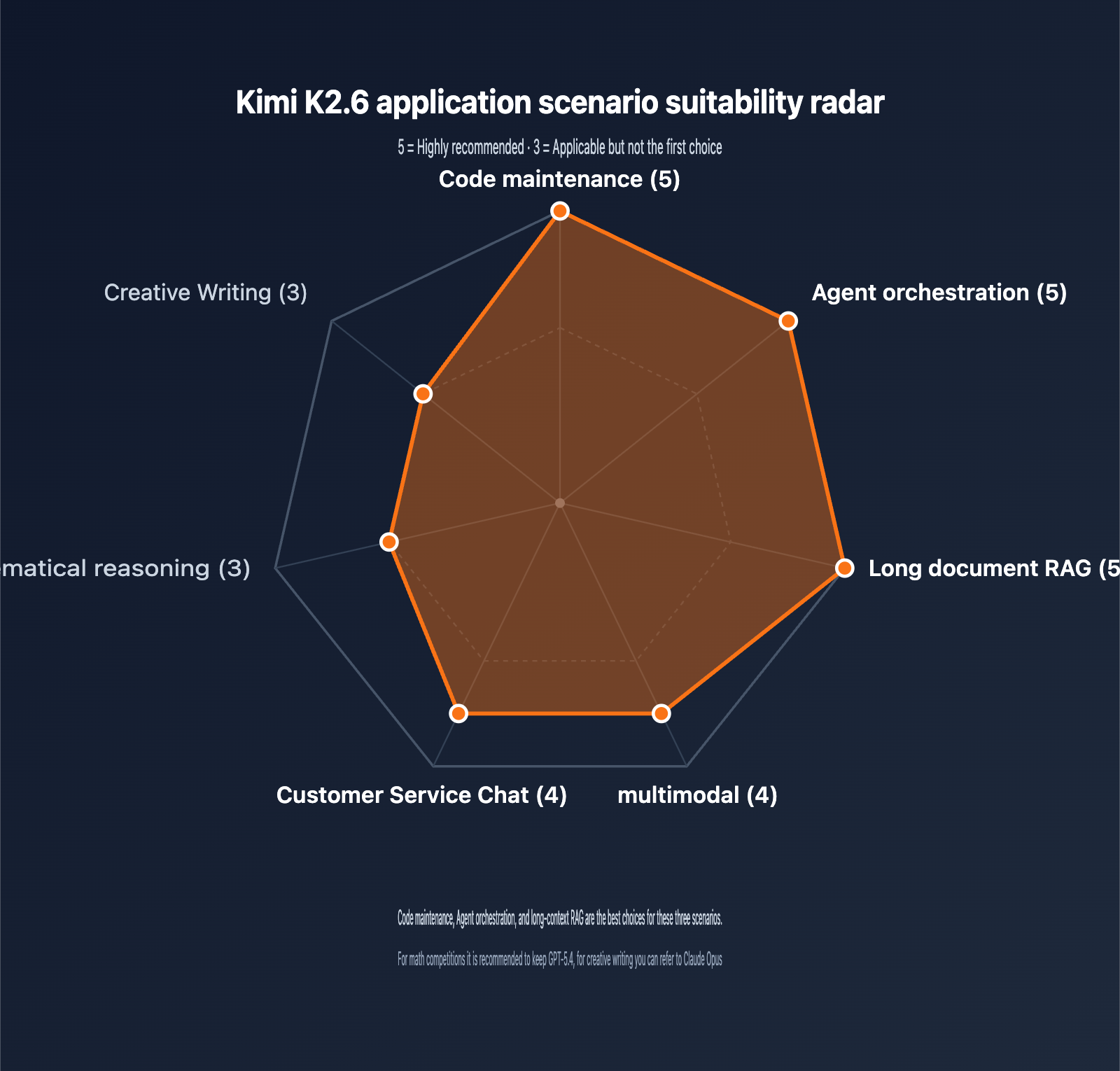
K2.6 excels in different areas. Here is our guidance for choosing where to apply it:
| Application | Rating | Why? |
|---|---|---|
| Code Maintenance | ⭐⭐⭐⭐⭐ | Top-tier on SWE-Bench Pro; 256K window handles large repos |
| Agent Orchestration | ⭐⭐⭐⭐⭐ | Supports 300+ sub-agents and 4000+ steps |
| Document Analysis | ⭐⭐⭐⭐⭐ | 256K context + MLA optimization makes long docs affordable |
| Multimodal | ⭐⭐⭐⭐ | Native MoonViT; plug-and-play image and video support |
| Customer Service | ⭐⭐⭐⭐ | Excellent function calling; prompt caching cuts costs |
| Math Reasoning | ⭐⭐⭐ | Strong (AIME 96.4), but GPT-5.4 has an edge |
| Creative Writing | ⭐⭐⭐ | Natural Chinese prose, though slightly less stylistic than Claude |
FAQ
Q1: What are the main differences between the Kimi K2.6 API and the K2.5 / K2 versions?
K2.6 brings significant upgrades in three key areas: 1) Its SWE-Bench Pro score jumped from 53 in K2.5 to 58.6, surpassing GPT-5.4 and Claude Opus 4.6 for the first time; 2) The Agent Swarm sub-agent capacity increased from 100 to 300, with coordination steps rising from 1,500 to 4,000; 3) The 256K context window is now open across the entire series (earlier K2 versions had some variants limited to 128K). According to the official Kimi announcement, early K2 versions will be retired on May 25, 2026. New projects should integrate K2.6 directly using the model ID kimi-k2.6, which is fully compatible with the OpenAI SDK.
Q2: Is the Kimi K2.6 API fully compatible with the OpenAI SDK?
Yes, it is. When calling K2.6 through channels like APIYI, the API protocol is fully compatible with OpenAI's chat completions interface, including parameters like streaming, tools (Function Call), tool_choice, temperature, top_p, and max_tokens. For mainstream SDKs like Python, Node.js, or Go, you only need to update the base_url and model parameters to switch. Note that the maximum output token limit for K2.6 is 98,304, which is significantly higher than GPT-5's 16K.
Q3: What are the latency and cost implications of using the 256K context window in K2.6?
K2.6 significantly optimizes KV cache volume for long contexts using Multi-head Latent Attention (MLA). In real-world tests with 100K inputs, the time-to-first-token (TTFT) is approximately 8–15 seconds (depending on server load), with subsequent tokens returned via streaming. In terms of cost, a 256K input at $0.60/1M tokens costs about $0.15 per request. For multi-turn conversations using the same system prompt, prefix caching can reduce input costs by approximately 75%. Before moving to production, we recommend running end-to-end tests with your typical prompts and monitoring token consumption logs to optimize costs.
Q4: How does K2.6’s Function Call differ from GPT-5 / Claude’s tool calling?
While the interface layer is identical (OpenAI-style tools protocol), the internal capabilities differ: 1) K2.6 supports 300 concurrent sub-agents, giving it a native advantage in orchestrating multiple parallel tools; 2) K2.6 ranks in the top tier on the Berkeley Function-Calling Leaderboard, approaching GPT-5 levels; 3) K2.6 supports Partial Mode (prefix continuation), which can force JSON output formats and reduce tool-calling failure rates. For complex agent pipelines, K2.6 is the most cost-effective choice.
Q5: Is calling K2.6 through APIYI officially authorized? Is my data secure?
APIYI accesses Kimi's official models through Huawei Cloud's official transfer channels. This is a compliant, authorized channel, and the model weights and inference results are identical to the official version. Data transmission is encrypted via HTTPS, and the platform does not store request content. For enterprise users, we provide security features such as independent sub-accounts, API key permission levels, and consumption limits. If you have strict data compliance requirements, you can review the detailed policies on the compliance page at apiyi.com.
Q6: Which types of projects is K2.6 best suited for? When should I choose GPT-5.4 or Claude?
Choose K2.6 for: Coding assistants, SWE-related tasks, long-context RAG, agent workflow orchestration, and cost-sensitive small-to-medium projects. Choose GPT-5.4 for: High-difficulty math competitions (AIME/HMMT) and research tasks requiring top-tier reasoning depth. Choose Claude Opus 4.6 for: Long-form creative writing and generating contracts or legal documents with strict formatting compliance. We recommend designing your interface to support multiple models so you can perform comparative tests on specific tasks before finalizing your production model.
Summary
Kimi K2.6 marks a major milestone for open-weight Large Language Models in 2026—proving that a 100B-parameter MoE architecture can compete head-to-head with closed-source flagships in coding, agentic tasks, and long-context performance. Its score of 58.6 on SWE-Bench Pro, combined with its 256K context window and 300-sub-agent engineering capacity, makes it the preferred model for coding assistants and R&D automation projects.
Key Takeaways:
- Architectural Edge: 1T MoE / 32B active parameters; 100B-level capability with 32B inference costs.
- Benchmark Leader: Ranked #1 in SWE-Bench Pro, Terminal-Bench 2.0, and HLE.
- Cost Advantage: $0.60 / $2.40 via APIYI, roughly 60% of the official website price.
- Ecosystem Friendly: Fully compatible with OpenAI SDK; migration takes less than 5 minutes.
- Engineering Power: 256K context + 300 sub-agents + prefix caching.
For teams looking to build AI products in 2026, the Kimi K2.6 API is a highly competitive choice in terms of performance, cost, and ecosystem. We recommend using the APIYI (apiyi.com) platform to quickly verify results and compare different models against your specific business scenarios to make the best selection.
Author: APIYI Technical Team | Stay tuned for the latest updates on Large Language Models. We welcome you to visit apiyi.com for technical discussions and solution consultations.