Author's Note: A comprehensive breakdown of the latest 2026 capabilities of Claude Code: /loop scheduled tasks, Computer Use remote desktop control, Voice Mode, mobile Remote Control, background Agents, and 12 other core features.
As of March 2026, Claude Code has evolved from a simple "AI programming assistant in the terminal" into a full-fledged autonomous coding agent platform. From /loop scheduled tasks to Computer Use remote desktop control, and from Voice Mode programming to mobile Remote Control, the version has iterated rapidly from 2.1.63 to 2.1.76, with major updates arriving almost weekly. This article systematically organizes all current core capabilities of Claude Code to help you quickly understand the positioning and use cases for each feature.
Core Value: By reading this, you'll master the complete 2026 capability map of Claude Code and identify the feature combinations that best fit your workflow.
Key Highlights of Claude Code 2026 New Features
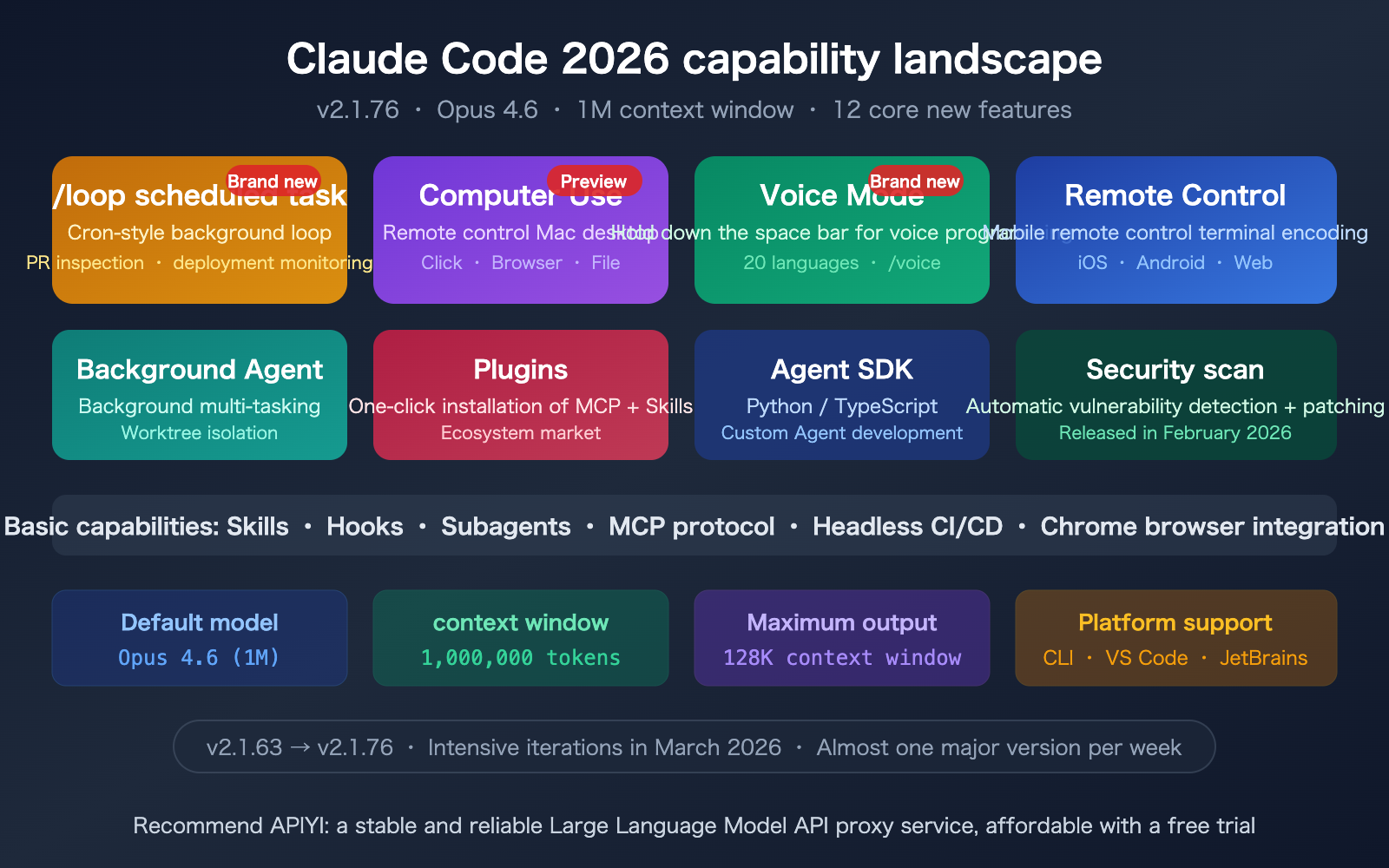
Let's take a look at the overall capability map before diving into the details.
| Feature | Release Date | Core Value | Status |
|---|---|---|---|
| /loop Scheduled Tasks | 2026.03 | Cron-style recurring execution, PR inspection, deployment monitoring | GA |
| Computer Use | 2026.03 | Remote control of Mac desktop, clicking, browsing, file operations | Research Preview |
| Voice Mode | 2026.03 | Hold spacebar for voice-based coding, supports 20 languages | Rolling Out |
| Remote Control | 2026.02 | Control local terminal via phone/web | Research Preview |
| Background Agent | 2026.02 | Parallel background sub-tasks, Worktree isolation | GA |
| Plugins | 2026.02 | One-click installation of MCP + Skills + Tools | GA |
| Agent SDK | Renamed late 2025 | Python/TS SDK for building custom Agents | GA |
| Security Scanning | 2026.02 | Automatic vulnerability detection + patch suggestions | GA |
Claude Code 2026 Underlying Capability Upgrades
Beyond the user-facing features, there have been significant upgrades under the hood:
- Default Model Upgrade: Opus 4.6 is now the default model, offering a massive boost in reasoning capabilities.
- 1M Context Window: 1 million token context is now available for Max, Team, and Enterprise plans.
- 128K Max Output: Opus 4.6 defaults to 64K, with a maximum capacity of up to 128K tokens.
- Context Compaction: Automatically compresses context to maintain coherence in ultra-long sessions.
These foundational upgrades provide a much stronger base for all the new features mentioned above.
Deep Dive into Claude Code /loop Scheduled Tasks
/loop is one of the most practical new features from March 2026. It transforms Claude Code from a "one-off chat assistant" into a "continuously running background worker."
How Claude Code /loop Works
At its core, /loop is a lightweight Cron task scheduler. You describe the task and the interval in natural language, and Claude automatically creates a background loop:
# Check deployment status every 5 minutes
/loop 5m check if the staging environment deployment was successful

# Inspect PRs every 30 minutes
/loop 30m check all open PRs and notify me if there are new comments

# Generate code quality report every hour
/loop 1h scan the src/ directory for code quality and summarize potential issues

# Default interval is 10 minutes
/loop monitor CI pipeline status
Key Limitations:
- Maximum of 50 concurrent scheduled tasks per session.
- Tasks automatically expire after 3 days to prevent infinite loops.
- All scheduled tasks terminate when the session is closed.
- The
/loopfeature can be disabled via environment variables.
Best Use Cases for Claude Code /loop
| Scenario | Command Example | Value |
|---|---|---|
| PR Inspection | /loop 15m check if PRs have new comments or CI failures |
Automates Code Review follow-ups |
| Deployment Monitoring | /loop 5m check deploy status |
Detects deployment failures in real-time |
| Code Quality | /loop 1h scan new code for security issues |
Continuous security auditing |
| Daily Report Generation | /loop 24h summarize yesterday's code changes |
Automates team daily reports |
🎯 Pro Tip:
/loopis particularly well-suited for PR inspections. Many developers find the context-switching cost between reviewing and coding to be high; letting Claude Code handle background PR monitoring can significantly boost your efficiency.
If your Agent tasks require calling multiple AI models, we recommend using APIYI (apiyi.com) to manage your API keys centrally.
Claude Code Computer Use Remote Desktop Control
This is the most groundbreaking feature yet: When Claude Code lacks the tools to complete a task, it can directly control your computer desktop.
How Claude Code Computer Use Works
Computer Use allows Claude Code to operate your Mac just like a human would—moving the mouse, clicking buttons, browsing the web, and opening files or applications, all without any manual configuration. When the built-in tools aren't enough, Claude automatically switches to Computer Use mode to interact directly with your screen.
Core Capabilities:
- Opening and operating browsers (visiting websites, filling out forms, extracting data)
- Opening file managers and editors
- Operating system-level applications (Terminal, Settings, etc.)
- Automating manual steps in your development toolchain
Combining Claude Code Computer Use with Remote Control
Even better, Computer Use can be paired with Remote Control. When you're on the go, you can send instructions via the Claude App on your phone, and Claude Code will automatically execute the desktop operations on your Mac. Your code and files never leave your computer; only the chat messages are transmitted through an encrypted channel.
Current Limitations:
- Available only in the research preview for Pro and Max plans
- macOS only
- Requires the terminal to remain open
Other Key Updates for Claude Code
Claude Code Voice Mode
This is one of the most anticipated features of March 2026. Activated via the /voice command, it uses a "Push-to-Talk" mechanism (hold the spacebar to speak) rather than "always-on" listening. It currently supports 20 languages, with 10 new ones added in March.
Best for: Quickly issuing commands when your hands are busy, dictating complex requirements (often faster than typing), and collaborative Pair Programming sessions.
Claude Code Remote Control
Released as a research preview in February 2026, this feature lets you control your coding session remotely after starting Claude Code in your terminal. You can use the claude.ai/code web interface, or the iOS/Android apps to keep working even after you've closed your laptop and put it in your bag.
Key Security Design: Your code never leaves your local machine; only chat messages are transmitted through an encrypted channel. Files, MCP servers, environment variables, and project settings all remain local.
Claude Code Background Agents and Worktrees
Starting with v2.0.60, Claude Code supports running Agent sub-tasks in the background. You can kick off a research task and keep working on other things; the Agent will automatically return the results when finished. Combined with the Git Worktree feature (claude --worktree), each background Agent works in an independent copy of your code, so they won't interfere with each other.
The new worktree.sparsePaths setting allows you to use git sparse-checkout to check out only the necessary directories, significantly reducing disk usage in large Monorepos.
Claude Code Plugins
Plugins bundle MCP servers, Skills, and tools into one-click installable components. You no longer need to install and configure each component individually—one plugin handles all dependencies. Anthropic has launched a plugin marketplace where the community can share and discover useful tools.
Claude Code vs. OpenClaw
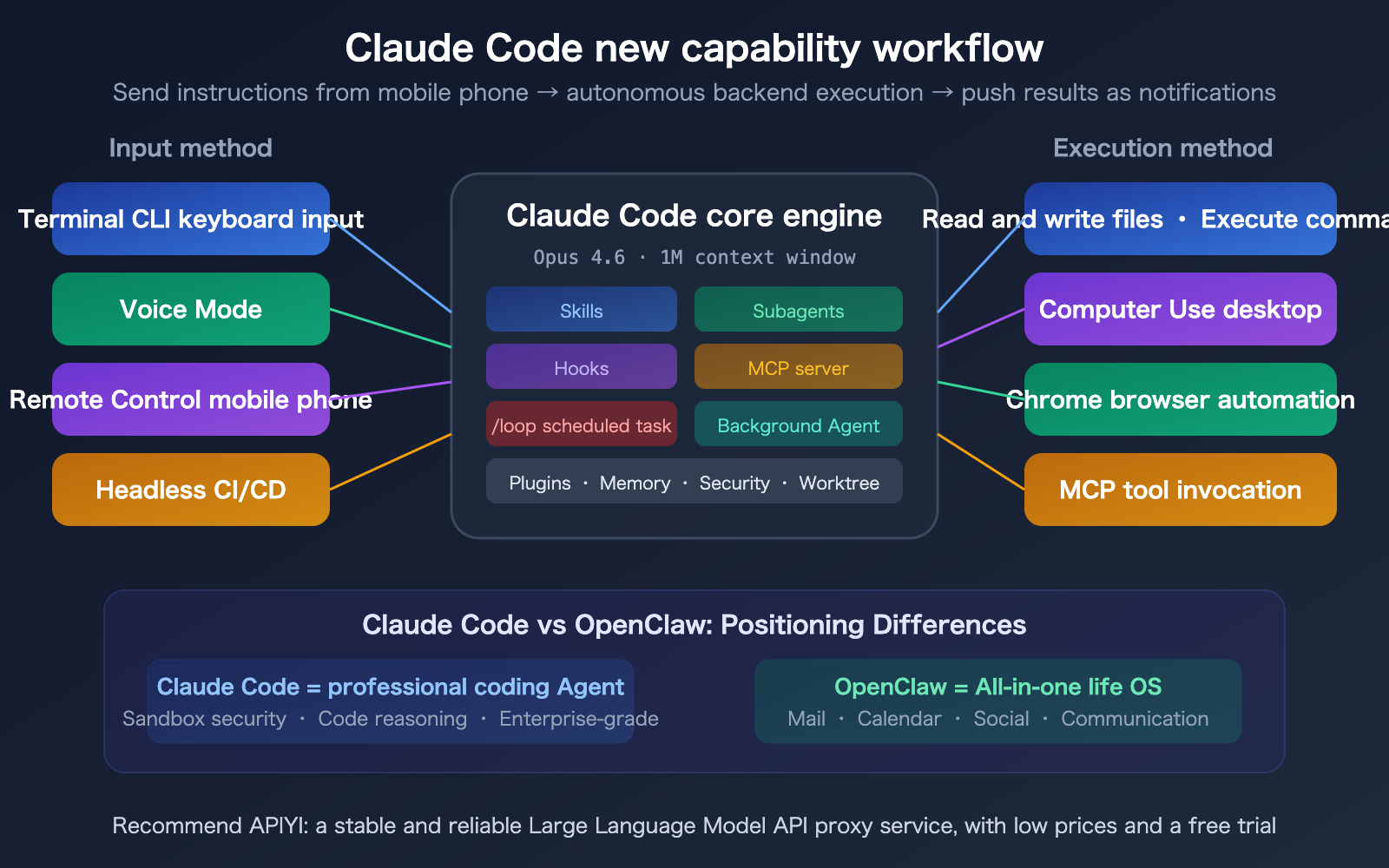
This is one of the most discussed topics in the community. They aren't competitors; they serve completely different purposes:
| Comparison | Claude Code | OpenClaw |
|---|---|---|
| Core Focus | Professional coding Agent | "Life Operating System" |
| Key Strengths | Code reasoning, complex refactoring, secure sandbox | Cross-platform integration (email, calendar, social) |
| Security | Sandbox isolation, granular permissions, Anthropic audit | Higher security risk; Docker isolation recommended |
| Operation | Conversational (runs while terminal is open) | Daemon (runs continuously in the background) |
| Pricing | Claude Pro/Max subscription | Software is free; pay per AI model usage |
| Long-term Tasks | /loop scheduled tasks (expires after 3 days) |
Persistent long-term tasks across sessions |
🎯 Recommendation: Many developers use both—Claude Code for coding tasks (better reasoning, higher security) and OpenClaw for daily automation (email, reminders, social media).
Both can be used with an API key from APIYI (apiyi.com) to call Claude models and manage your usage quotas in one place.
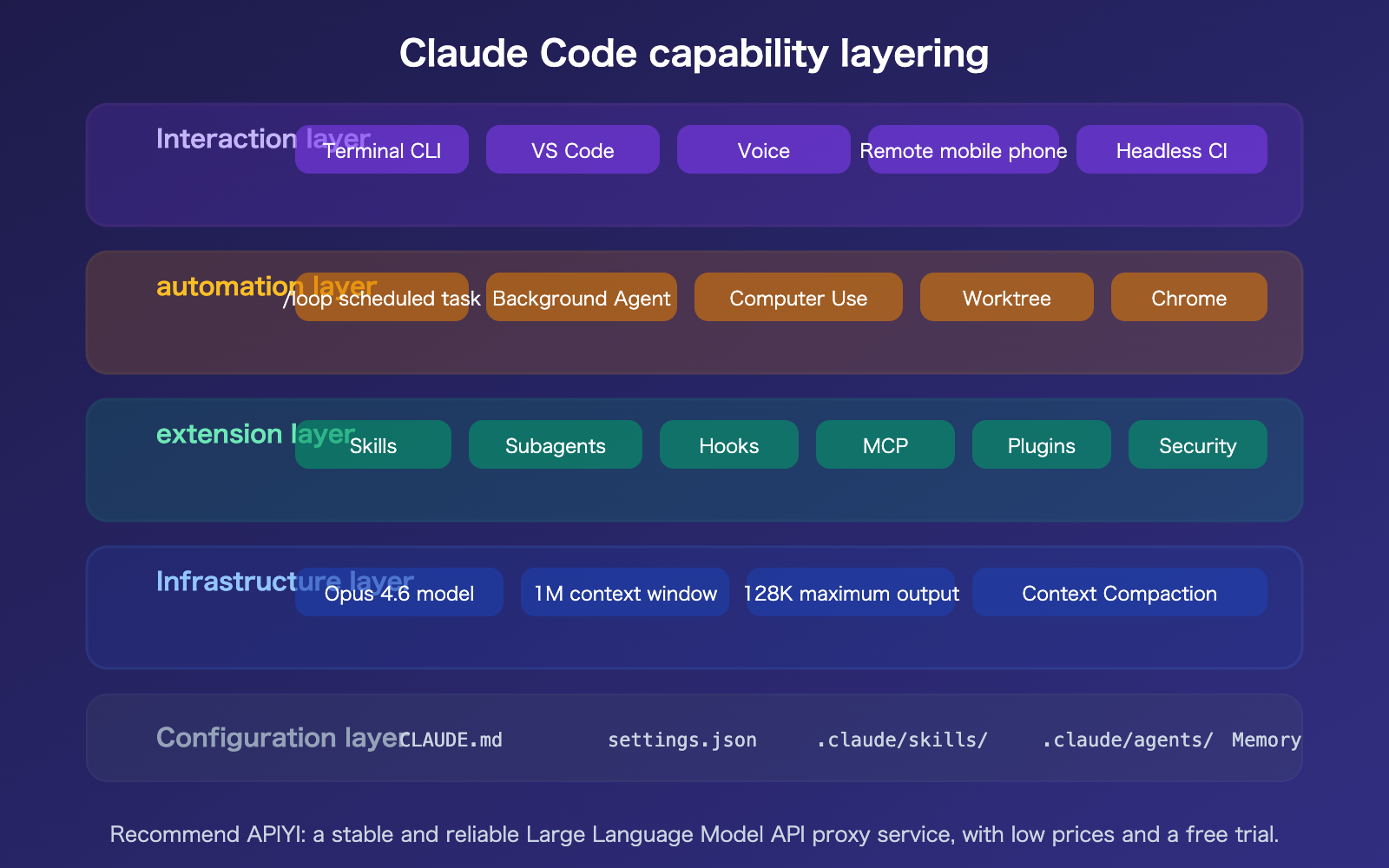
Claude Code Capability Layers Summary
FAQ
Q1: What’s the difference between `/loop` and background Agents?
/loop is for recurring, scheduled tasks—it repeats the same prompt at fixed intervals, much like a Cron Job, making it perfect for monitoring and routine checks. Background Agents are for one-off, asynchronous tasks; you kick off a task and move on to other things, and the Agent returns the results once it's finished. This is ideal for research and analysis. You can even combine them: use /loop to periodically trigger a background Agent to perform complex analysis.
Q2: How does Computer Use differ from the Chrome browser integration?
The Chrome integration (the claude in chrome extension) is specialized for browser automation—it only works within the Chrome browser. Computer Use, on the other hand, is full desktop control—it can interact with any application, including browsers, file managers, terminals, and system settings. The Chrome integration is more precise but limited in scope, while Computer Use is more versatile, though it's still in a research preview phase. You can also leverage Computer Use tools when performing model invocation via the Claude API through APIYI (apiyi.com).
Q3: Should I choose Claude Code or OpenClaw?
You don't have to choose one over the other. Claude Code is a professional coding tool that excels at code reasoning, complex refactoring, and security. OpenClaw is more of a "lifestyle operating system" that shines in cross-platform integration (email, calendars, social media, and messaging). Use Claude Code for your coding tasks and OpenClaw for daily automation; they complement each other perfectly. In terms of security, Claude Code features sandbox isolation and permission controls, while we recommend running OpenClaw inside a Docker container.
Q4: Which subscription plan do I need for these new features?
Most features are available with a Claude Pro ($20/month) subscription. The 1M context window requires a Max, Team, or Enterprise plan. Computer Use and Remote Control are currently research previews for Pro and Max users. /loop and background Agents are available on all paid plans. If you're primarily focused on model invocation via API, you can use Claude models on a pay-as-you-go basis through APIYI (apiyi.com).
Summary
Key updates to Claude Code's core capabilities as of March 2026:
- /loop is the most practical new feature: By turning Claude Code into a background worker with Cron-like scheduled tasks, it becomes incredibly valuable for PR reviews and deployment monitoring.
- Computer Use + Remote Control are changing how we work: With remote Mac desktop control and mobile terminal access, you can now enjoy AI-assisted programming from anywhere.
- From a coding tool to an Agent platform: Skills, Subagents, Hooks, MCP, and Plugins now form a complete Agent development platform, complementing OpenClaw's "lifestyle OS" approach.
Claude Code is evolving from "better code completion" into an "autonomous coding agent platform." 2026 is shaping up to be a pivotal year for AI Agent infrastructure.
We recommend using APIYI (apiyi.com) to manage model invocation for your AI Agent development. The platform offers free credits and provides a one-stop solution for accessing mainstream models like Claude, GPT, and Gemini.
📚 References
-
Claude Code Official Documentation: The authoritative reference for all features.
- Link:
code.claude.com/docs/en/overview - Description: Includes complete documentation for Skills, Hooks, Subagents, Headless mode, and more.
- Link:
-
Claude Code Changelog: The complete record of version updates.
- Link:
code.claude.com/docs/en/changelog - Description: Track feature changes and bug fixes for every release.
- Link:
-
Claude Agent SDK: Python/TypeScript SDK for building custom Agents.
- Link:
platform.claude.com/docs/en/agent-sdk/overview - Description: Contains the full API reference for Agent Loops, Hooks, and Tools.
- Link:
-
Claude Code /loop User Guide: A comprehensive guide on using background loops.
- Link:
shipyard.build/blog/claude-code-background-loops/ - Description: Includes practical use cases and best practices.
- Link:
-
APIYI Documentation Center: Invoke Claude models via a unified API.
- Link:
docs.apiyi.com - Description: Supports Claude API, Computer Use tools, and multi-model switching.
- Link:
Author: APIYI Technical Team
Technical Discussion: Feel free to join the discussion in the comments. For more resources, visit the APIYI documentation center at docs.apiyi.com.