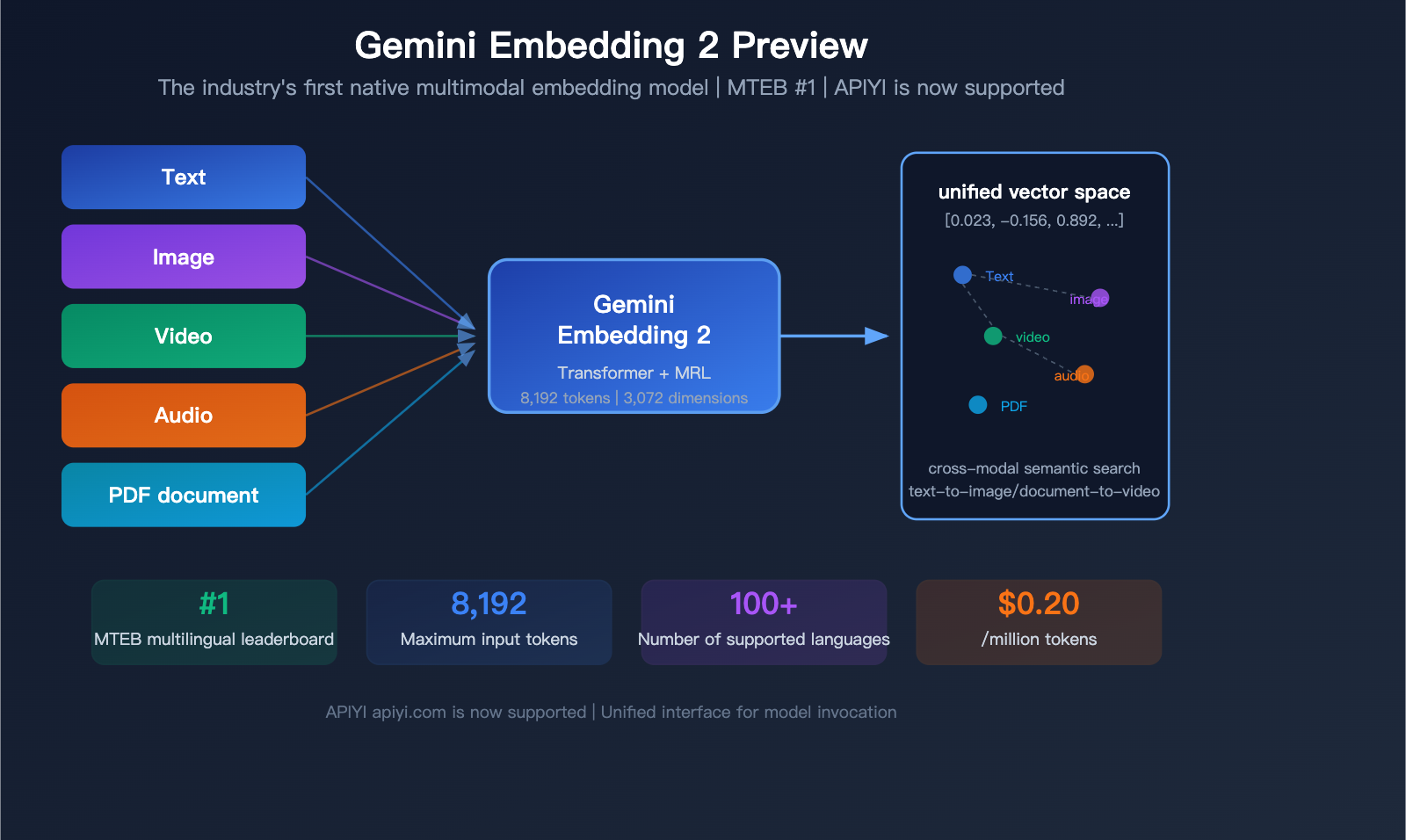
In March 2026, Google unveiled a landmark model: Gemini Embedding 2 Preview, the industry's first native multimodal embedding model. It can map text, images, video, audio, and PDF documents into a unified vector space, securing the #1 spot on the MTEB multilingual benchmark—outperforming the runner-up by more than 5 percentage points.
Core Value: By the end of this article, you'll understand the 5 major technical breakthroughs of Gemini Embedding 2 Preview, how it compares to competitors in pricing and performance, and how to quickly integrate it via API.
What is Gemini Embedding 2 Preview?
Gemini Embedding 2 Preview is the latest embedding model released by Google on March 10, 2026. Initialized based on the Gemini architecture and utilizing a bidirectional attention Transformer structure, it is Google's first embedding model with native multimodal input support.
| Specification | Details |
|---|---|
| Model ID | gemini-embedding-2-preview |
| Release Date | March 10, 2026 |
| Status | Preview (General availability TBD) |
| Default Output Dimensions | 3,072 |
| Optional Dimension Range | 128 — 3,072 |
| Max Input Tokens | 8,192 (4x the previous generation) |
| Multimodal Support | Text, Image, Video, Audio, PDF |
| Language Support | 100+ languages |
| Matryoshka Training | Supported (truncatable dimensions while maintaining semantic quality) |
| Available Platforms | Gemini API, Vertex AI, APIYI apiyi.com |
Key Differences from Previous Generations
| Feature | text-embedding-004 | gemini-embedding-001 | gemini-embedding-2-preview |
|---|---|---|---|
| Max Input Tokens | 2,048 | 2,048 | 8,192 |
| Output Dimensions | Up to 768 | 128-3,072 | 128-3,072 |
| Multimodal | Text only | Text only | Text+Image+Video+Audio+PDF |
| Task Type Specification | task_type field |
task_type field |
Prompt-embedded instructions |
| MRL Support | Not supported | Supported | Supported |
| Price/Million Tokens | Service discontinued | $0.15 | $0.20 |
🎯 Integration Tip: APIYI apiyi.com now supports
gemini-embedding-2-previewmodel invocation. You can integrate it via an OpenAI-compatible interface without needing to configure a separate Google API key.
Detailed Breakdown of 5 Key Technical Breakthroughs
Breakthrough 1: Native Multimodal Unified Embedding Space
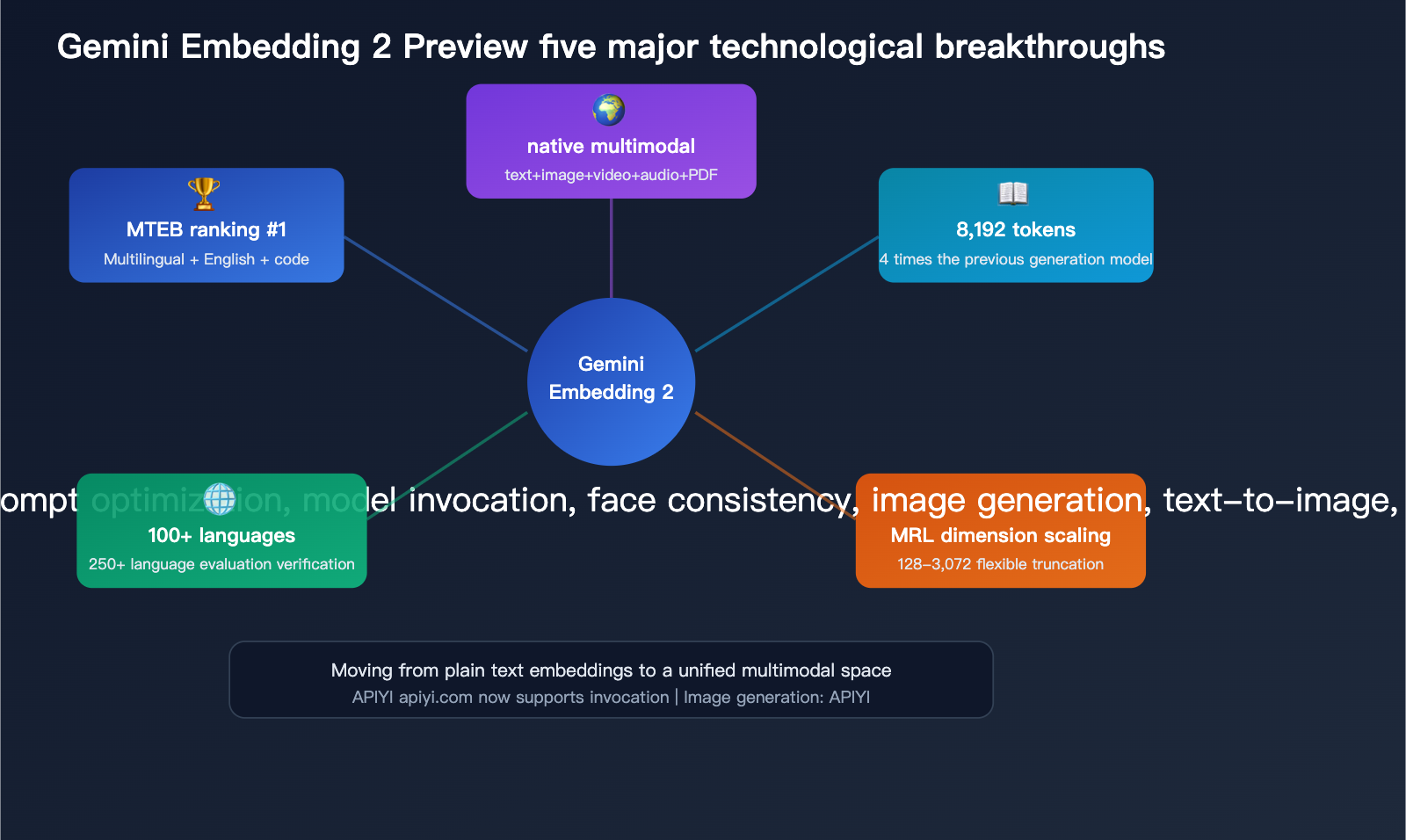
This is the biggest differentiator for Gemini Embedding 2—content from 5 different modalities is mapped into the same vector space.
| Modality | Format Requirements | Limit per Request | Notes |
|---|---|---|---|
| Text | Plain text | 8,192 tokens | Supports 100+ languages |
| Image | PNG, JPEG | Max 6 per request | Direct pixel processing |
| Video | MP4, MOV | Max 120 seconds | Auto-samples up to 32 frames |
| Audio | MP3, WAV | Max 80 seconds | Native processing, no transcription needed |
| PDF document | Max 6 pages per request | Includes OCR capabilities |
Practical Use Cases:
- Search for images using text ("a red sports car on a racetrack" → returns matching images)
- Search for similar video clips using an image
- Search for relevant documents using voice descriptions
- Build a unified, cross-modal knowledge base
This wasn't possible with previous embedding models. OpenAI's text-embedding-3 series only supports text; if you wanted image search, you'd have to use a vision model to extract a description first, which adds an extra step and loses information.
Breakthrough 2: 8,192 Token Context Window
The input window has been increased from 2,048 to 8,192 tokens, meaning you can embed much longer document segments at once.
For RAG (Retrieval-Augmented Generation) systems, this is incredibly practical:
- Previously, you had to chop documents into small 500–1,000 token chunks.
- Now, you can use larger 2,000–4,000 token chunks, preserving more context.
- Larger document segments = fewer splits = more complete retrieval results.
Breakthrough 3: Matryoshka Dimensionality Scaling
Gemini Embedding 2 is trained using Matryoshka Representation Learning (MRL), which concentrates the most important semantic information into the first few dimensions of the vector.
This means you can flexibly choose the dimensionality based on your specific needs:
| Dimensions | Vector Size | Best For | Quality Loss |
|---|---|---|---|
| 3,072 (Default) | 12.3 KB | Highest precision retrieval | None |
| 1,536 | 6.1 KB | Balancing precision and storage | Minimal |
| 768 | 3.1 KB | Preferred for large-scale deployment | Small |
| 256 | 1.0 KB | Real-time recommendation systems | Moderate |
| 128 | 0.5 KB | Extreme compression scenarios | Significant |
Note: When using dimensions lower than 3,072, you need to manually normalize the vectors before calculating similarity.
Breakthrough 4: 100+ Languages Supported
In the MTEB multilingual benchmark, Gemini Embedding 2 was evaluated across 250+ languages, covering a range far beyond its competitors.
Key language performance metrics:
- Bitext Mining: 79.32 points
- Cross-lingual Retrieval (XOR-Retrieve): Recall@5kt 90.42 points
- Multilingual Understanding (XTREME-UP): MRR@10 64.33 points
Breakthrough 5: #1 in Multiple MTEB Rankings
| Benchmark | Score | Rank | Lead Margin |
|---|---|---|---|
| MTEB Multilingual (Mean Task) | 68.32 | #1 | +5.09 |
| MTEB Multilingual (Mean Type) | 59.64 | #1 | — |
| MTEB English v2 (Mean Task) | 73.30 | #1 | — |
| MTEB English v2 (Mean Type) | 67.67 | #1 | — |
| MTEB Code (Mean All) | 74.66 | #1 | — |
For comparison, the second-place model, gte-Qwen2-7B-instruct, scored 62.51 on the multilingual MTEB. Gemini Embedding 2 leads by nearly 6 points, which is a massive gap in the world of embedding models.
💡 Development Tip: If you're building a RAG system or a semantic search application, Gemini Embedding 2 is currently the strongest choice for multilingual and code-heavy scenarios. You can easily integrate this model via APIYI (apiyi.com), which also supports OpenAI embedding models, making it simple to quickly compare performance.
Pricing and Performance Comparison with Competitors
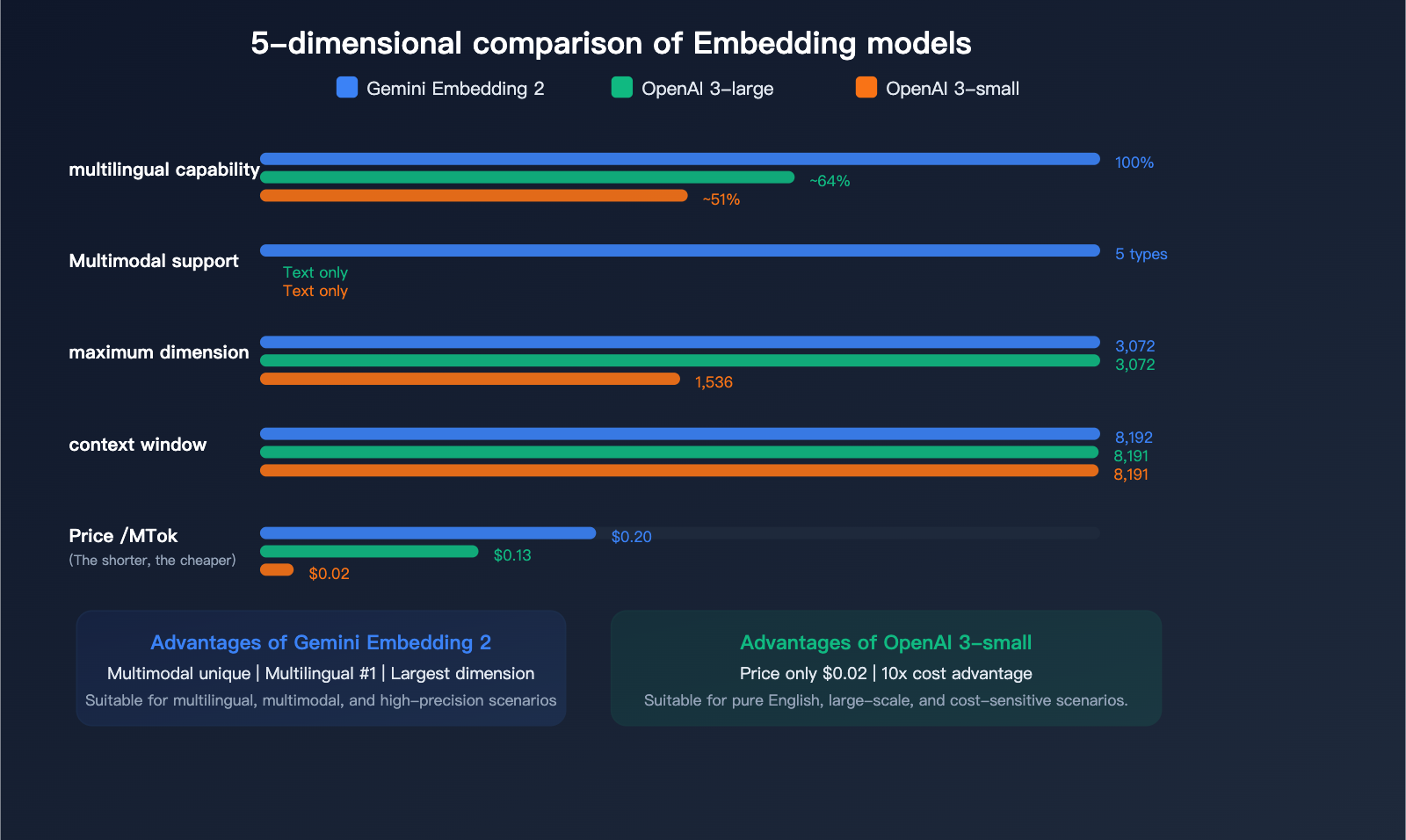
Text Embedding Pricing Comparison
| Model | Price/Million Tokens | Max Dimension | Max Input | Multimodal | Multilingual Rank |
|---|---|---|---|---|---|
| Gemini Embedding 2 | $0.20 | 3,072 | 8,192 | ✅ 5-modal | #1 |
| gemini-embedding-001 | $0.15 | 3,072 | 2,048 | ❌ | — |
| OpenAI text-embedding-3-large | $0.13 | 3,072 | 8,191 | ❌ | — |
| OpenAI text-embedding-3-small | $0.02 | 1,536 | 8,191 | ❌ | — |
Multimodal Content Pricing (Exclusive to Gemini Embedding 2):
| Input Type | Pay-as-you-go/Million Tokens | Batch Price/Million Tokens |
|---|---|---|
| Text | $0.20 | $0.10 |
| Image | $0.45 (~$0.00012/image) | $0.225 |
| Audio | $6.50 (~$0.00016/sec) | $3.25 |
| Video | $12.00 (~$0.00079/frame) | $6.00 |
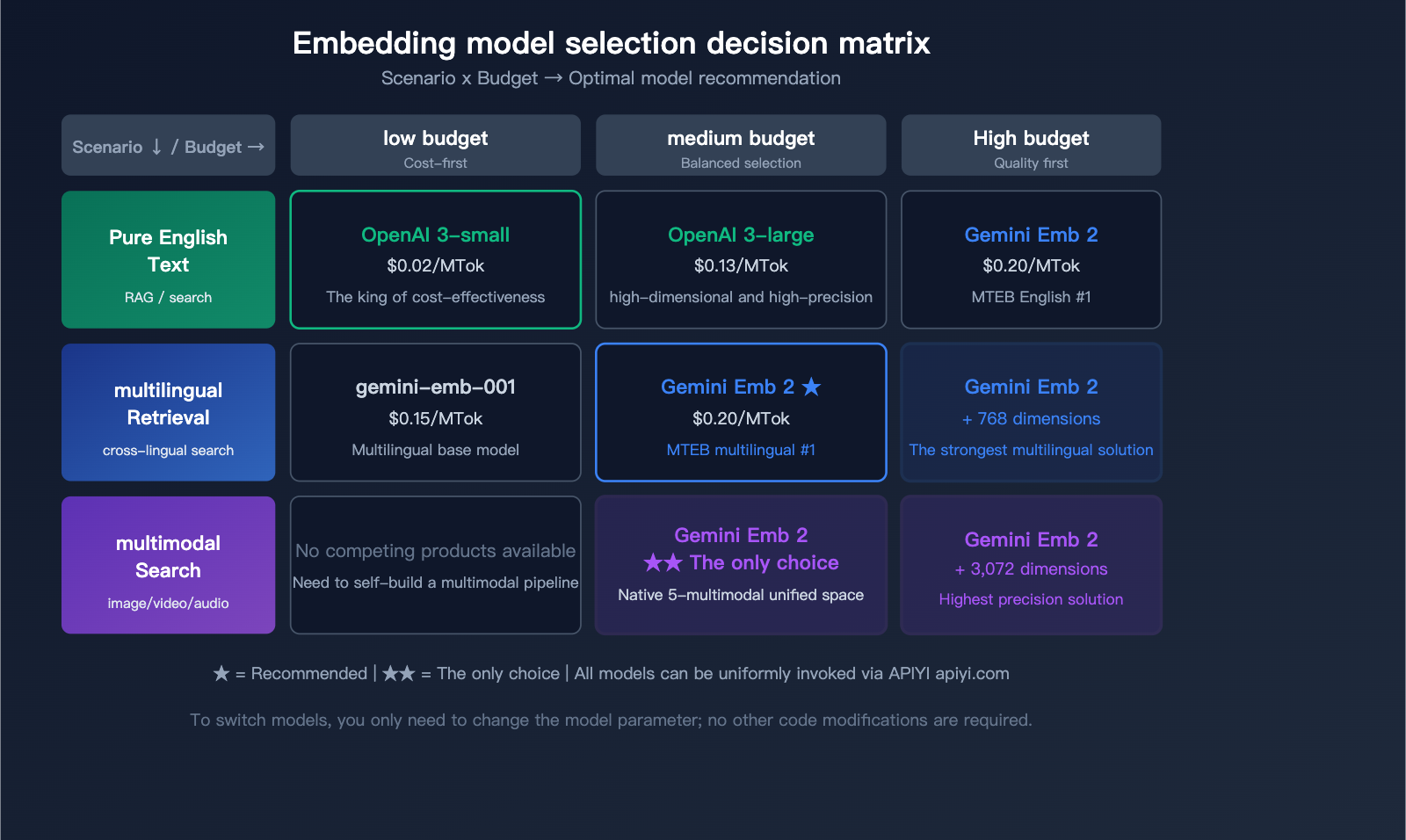
Selection Recommendations
| Use Case | Recommended Model | Reason |
|---|---|---|
| Text-only, cost-sensitive | OpenAI text-embedding-3-small | Cheapest ($0.02) |
| Text-only, high-precision | Gemini Embedding 2 or OpenAI 3-large | Similar accuracy, Gemini has better multilingual support |
| Multimodal search | Gemini Embedding 2 | Only native multimodal solution |
| Multilingual retrieval | Gemini Embedding 2 | MTEB Multilingual #1 |
| Code search | Gemini Embedding 2 | MTEB Code #1 |
| Large-scale, low-cost | OpenAI 3-small + Batch API | 10x price advantage |
🎯 Pro Tip: Choosing the right embedding model depends on your specific use case. We recommend using the APIYI (apiyi.com) platform to access both Gemini and OpenAI embedding models simultaneously. You can compare retrieval performance with real data before making a decision. The platform supports a unified interface, so you can switch models without changing your code.
API Invocation Details
Specifying Task Types (Important Change)
Unlike gemini-embedding-001, Gemini Embedding 2 no longer uses the task_type parameter. Instead, you specify the task type by embedding a task instruction directly into your input content.
8 Supported Task Types:
| Task Type | Query Format | Document Format |
|---|---|---|
| Search/Retrieval | task: search result | query: {content} |
title: {title} | text: {content} |
| Q&A | task: question answering | query: {question} |
title: {title} | text: {content} |
| Fact Checking | task: fact checking | query: {statement} |
title: {title} | text: {content} |
| Code Retrieval | task: code retrieval | query: {description} |
title: {title} | text: {code} |
| Classification | task: classification | query: {content} |
Same format |
| Clustering | task: clustering | query: {content} |
Same format |
| Sentence Similarity | task: sentence similarity | query: {sentence} |
Same format |
For the document side, if there is no title, use title: none.
Python Example
import openai

# Call via APIYI unified interface
client = openai.OpenAI(
    api_key="YOUR_APIYI_KEY",
    base_url="https://api.apiyi.com/v1"
)

# Text embedding - Search scenario
response = client.embeddings.create(
    model="gemini-embedding-2-preview",
    input="task: search result | query: What is a vector database",
    dimensions=768  # Optional dimensions: 128-3072
)

embedding = response.data[0].embedding
print(f"Vector dimension: {len(embedding)}")
print(f"First 5 values: {embedding[:5]}")
View complete RAG retrieval code
import openai
import numpy as np
from typing import List

client = openai.OpenAI(
    api_key="YOUR_APIYI_KEY",
    base_url="https://api.apiyi.com/v1"
)

def get_embedding(text: str, task: str = "search result", dim: int = 768) -> List[float]:
    """Get text embedding vector"""
    formatted = f"task: {task} | query: {text}"
    response = client.embeddings.create(
        model="gemini-embedding-2-preview",
        input=formatted,
        dimensions=dim
    )
    vec = response.data[0].embedding
    # MRL truncation dimensions require manual normalization
    if dim < 3072:
        norm = np.linalg.norm(vec)
        vec = (np.array(vec) / norm).tolist()
    return vec

def get_doc_embedding(title: str, text: str, dim: int = 768) -> List[float]:
    """Get document embedding vector"""
    formatted = f"title: {title} | text: {text}"
    response = client.embeddings.create(
        model="gemini-embedding-2-preview",
        input=formatted,
        dimensions=dim
    )
    vec = response.data[0].embedding
    if dim < 3072:
        norm = np.linalg.norm(vec)
        vec = (np.array(vec) / norm).tolist()
    return vec

def cosine_similarity(a: List[float], b: List[float]) -> float:
    """Calculate cosine similarity"""
    a, b = np.array(a), np.array(b)
    return np.dot(a, b) / (np.linalg.norm(a) * np.linalg.norm(b))

# Usage example
query_vec = get_embedding("How to optimize RAG retrieval")
doc_vec = get_doc_embedding(
    "RAG Optimization Guide",
    "This article introduces 5 methods to optimize RAG retrieval quality..."
)
similarity = cosine_similarity(query_vec, doc_vec)
print(f"Similarity: {similarity:.4f}")
🚀 Quick Start: We recommend using the APIYI (apiyi.com) platform to quickly integrate Gemini Embedding 2. The platform provides an OpenAI-compatible embedding interface, allowing you to complete integration in just 5 minutes. It also supports unified calls for mainstream embedding models like OpenAI, Gemini, and Cohere.
Usage Notes
Preview Status Limitations
| Limitation | Description | Impact |
|---|---|---|
| Version Changes | Specifications and pricing may change during the Preview phase | We recommend having a fallback plan for production environments |
| Vector Space Incompatibility | Cannot be mixed with vectors from older models | Upgrading requires a full re-indexing |
| Normalization for Low Dimensions | Manual normalization required when using <3,072 dimensions | You'll need to add a normalization step in your code |
| Strict Rate Limits | Preview model quotas are lower than GA models | Request a limit increase for large-scale usage |
| Free Tier Data Usage | Data from the free tier is used for product improvement | Use the paid tier for sensitive data |
Migration Notes from Older Models
- Re-indexing is Mandatory: Vector spaces are incompatible between different models; you cannot mix them in the same database.
- Task Type Format Changes: The
task_typeparameter has been replaced by embedded instructions within the prompt. - Normalization Handling: If you're using non-default dimensions, you must add normalization logic to your code.
- Test Before Migrating: We recommend comparing the retrieval performance of the new and old models in a test environment before deciding to migrate.
FAQ
Q1: How does Gemini Embedding 2 Preview compare to OpenAI’s text-embedding-3-large?
The main advantages lie in three areas: native multimodal support (OpenAI only supports text), a #1 ranking on the MTEB leaderboard (with a significant lead), and higher quality code embeddings. However, OpenAI's text-embedding-3-large is cheaper ($0.13 vs $0.20), and if you only need English text embeddings, the quality is very similar. You can use APIYI (apiyi.com) to call both models and compare them with your real data.
Q2: What are the practical use cases for multimodal embeddings?
The most direct application is cross-modal search: users input text, and the search returns relevant images, videos, or documents. For example, in e-commerce, you could search for products using "red dress," or in an enterprise knowledge base, you could use a text description to find relevant clips in training videos. Traditionally, you'd need to use a vision model to extract descriptions before embedding the text, but Gemini Embedding 2 handles raw images/videos directly, resulting in less information loss.
Q3: What’s the right dimension to choose? Is there a big difference between 768 and 3072?
For most applications, 768 dimensions is the "sweet spot"—the storage cost is only 1/4 of 3072 dimensions, but the retrieval quality loss is minimal (thanks to Matryoshka training). If your dataset is small (<1 million records) and you have extremely high precision requirements, go with 3072. If you have a large volume of data or need real-time retrieval, 768 or even 256 dimensions are perfectly reasonable choices.
Q4: How does APIYI support Gemini Embedding 2? Is extra configuration needed?
APIYI (apiyi.com) already supports the gemini-embedding-2-preview model. You can call it using the standard OpenAI-compatible embedding interface without needing an extra Google API key. Simply specify gemini-embedding-2-preview in the model parameter; all other parameters (like dimensions) are identical to the OpenAI embedding interface.
Summary: A New Benchmark for Multimodal Embeddings
Gemini Embedding 2 Preview marks a major milestone for embedding models—a shift from text-only to a truly unified multimodal space. By securing the #1 spot across MTEB’s multilingual, English, and coding benchmarks simultaneously, combined with an 8K context window and MRL dimension scaling, it provides the most powerful foundation currently available for RAG systems, semantic search, and knowledge base construction.
Key Takeaways:
- The industry's first native five-modality embedding model (text + image + video + audio + PDF)
- #1 on the MTEB multilingual benchmark, leading by over 5 points
- 8,192-token context window, 4x larger than the previous generation
- MRL training supports flexible dimension scaling from 128 to 3,072
- Priced at $0.20 per million tokens, offering exceptional cost-effectiveness for multimodal scenarios
We recommend using APIYI (apiyi.com) to quickly integrate Gemini Embedding 2 Preview. With a single API key, you can access mainstream embedding models like Gemini and OpenAI, making it easy to compare and switch between them.
📝 Author: APIYI Technical Team | APIYI apiyi.com – A unified API platform for 300+ AI Large Language Models
References
-
Official Google Blog: Gemini Embedding 2 Announcement
- Link:
blog.google/innovation-and-ai/models-and-research/gemini-models/gemini-embedding-2/ - Description: Covers the model's design philosophy and an introduction to its multimodal capabilities.
- Link:
-
Gemini API Embedding Documentation: Official API User Guide
- Link:
ai.google.dev/gemini-api/docs/embeddings - Description: Complete API parameters and usage examples.
- Link:
-
Gemini Embedding Research Paper: Technical Details and Benchmarks
- Link:
arxiv.org/html/2503.07891v1 - Description: Detailed MTEB test data and model architecture analysis.
- Link:
-
Gemini API Pricing: Detailed Pricing Information by Modality
- Link:
ai.google.dev/gemini-api/docs/pricing - Description: Itemized pricing for text, image, audio, and video.
- Link: