Author's note: This deep dive compares GPT-image-2 and Nano Banana Pro across key scenarios, including scientific diagrams, technical charts, and images containing small text, providing clear guidance for your model selection.
Choosing between GPT-image-2 and Nano Banana Pro has long been a top concern for researchers, tech bloggers, and content creators. In this article, we compare GPT-image-2 (gpt-image-1-2025) and Nano Banana Pro (Gemini 3 Pro Image), offering clear recommendations based on their performance in rendering scientific diagrams, charts with small text, professional terminology, and technical architecture schematics.
This isn't a "both sides have their merits" analysis. The LM Arena data already shows a clear gap of +242 Elo points (GPT-image-2: 1512 vs. Nano Banana Pro: 1271), but many users aren't sure exactly where this difference manifests in practice. This article focuses on high-text density and scientific charting—a core, yet long-underrated, use case—to provide reproducible, real-world test results.
Key takeaway: After reading this, you'll know exactly which to choose between GPT-image-2 and Nano Banana Pro for scientific diagrams, technical architecture, small-text labeling in both Chinese and English, and charts featuring complex terminology.
Core Differences: GPT-image-2 vs. Nano Banana Pro
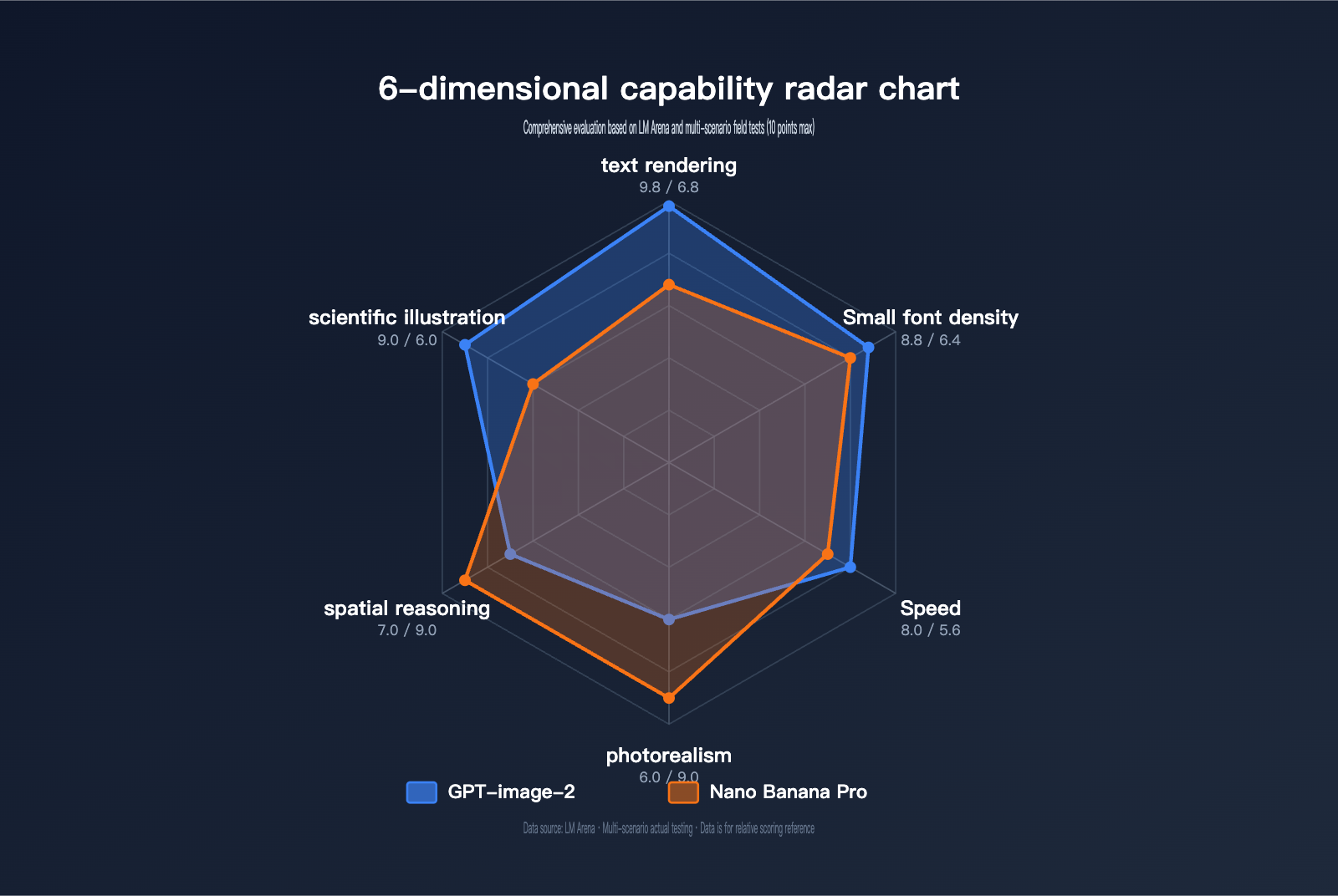
Before diving into specific use cases, let’s take a look at a comparison table highlighting the key capabilities of each model.
| Comparison Dimension | GPT-image-2 | Nano Banana Pro | Winner |
|---|---|---|---|
| Text Rendering Accuracy | ~99% (Latin/CJK/Hindi/Bengali) | ~95% (Good for phrases/words; weak for long text) | GPT-image-2 |
| Small Text & Dense Layout | Sharp text at 2K resolution | Readable for long paragraphs, but small text blurs | GPT-image-2 |
| Scientific Diagrams | Clear annotations, formulas, and flows | Good layout, but prone to terminology errors | GPT-image-2 |
| Photorealism | Favors illustration/UI style | Industry-leading realism | Nano Banana Pro |
| Spatial Reasoning | Still has limitations | More stable handling of object relations | Nano Banana Pro |
| Generation Speed | ~3 seconds/image | 10-15 seconds/image | GPT-image-2 |
| Max Resolution | 2K (~2048×2048) | 4K (5632×3072) | Nano Banana Pro |
| Core Mechanism | O-series reasoning (Thinking) | Google Search Grounding | Both unique |
| LM Arena Elo | 1512 | 1271 | GPT-image-2 (+242) |
| Available via | APIYI apiyi.com, OpenAI Official | APIYI apiyi.com, Google AI Studio | – |
Deep Dive: GPT-image-2’s Text Rendering Advantage
GPT-image-2 is the next-gen image generation model released by OpenAI on April 21, 2026 (internal codename: gpt-image-1-2025). Its core breakthrough stems from three architectural upgrades: First, it introduces O-series reasoning (Thinking) to plan composition, verify object counts, and check prompt constraints before generation. Second, it pushes text rendering accuracy from GPT Image 1.5's 95% to over 99% (based on LM Arena benchmarks). Third, it maintains readability for small text, icons, UI elements, and dense layouts at 2K resolution.
For scenarios like scientific diagrams that require "high text density, specialized terminology, and precise labeling," GPT-image-2 offers a structural advantage that isn't just an incremental improvement. It reliably renders Greek letters, chemical formulas, statistical equations, and flow nodes—areas where Nano Banana Pro still struggles.
Deep Dive: Nano Banana Pro’s Text Rendering Advantage
Nano Banana Pro (Gemini 3 Pro Image), released by Google DeepMind on November 20, 2025, is based on the Gemini 3 Pro backbone. Its strength lies on a different path: coherent long-form text, multi-language localization, and grounding (generating images based on real-world information using Google Search).
For scenarios like long-paragraph infographics, posters, and marketing materials with "paragraph-level text and standard font sizes," Banana Pro remains rock solid. However, once you switch to scientific diagrams, circuit labels, coordinate axis text, or subscripts in formulas—anything requiring "high-density small text"—its performance falls behind.
🎯 Quick Selection Guide: If your image needs focus on scientific/technical diagrams with dense small text, technical terms, or formulas, choose GPT-image-2. If your needs center on long-paragraph text and photorealistic images, Nano Banana Pro remains an excellent choice. Both models can be accessed via the APIYI apiyi.com platform using the same interface, making it easy to switch and compare.
GPT-image-2 vs. Nano Banana Pro: Research Paradigm Diagram Performance Test
A Research Paradigm Diagram typically includes a hierarchical structure of the research framework, process flow arrows, module labels (often featuring English professional terminology), small sub-labels (8-10pt), and sometimes even formulas or data annotations. This is a "tough nut to crack" for AI image generation models because it simultaneously tests text accuracy, layout control, and spatial awareness.
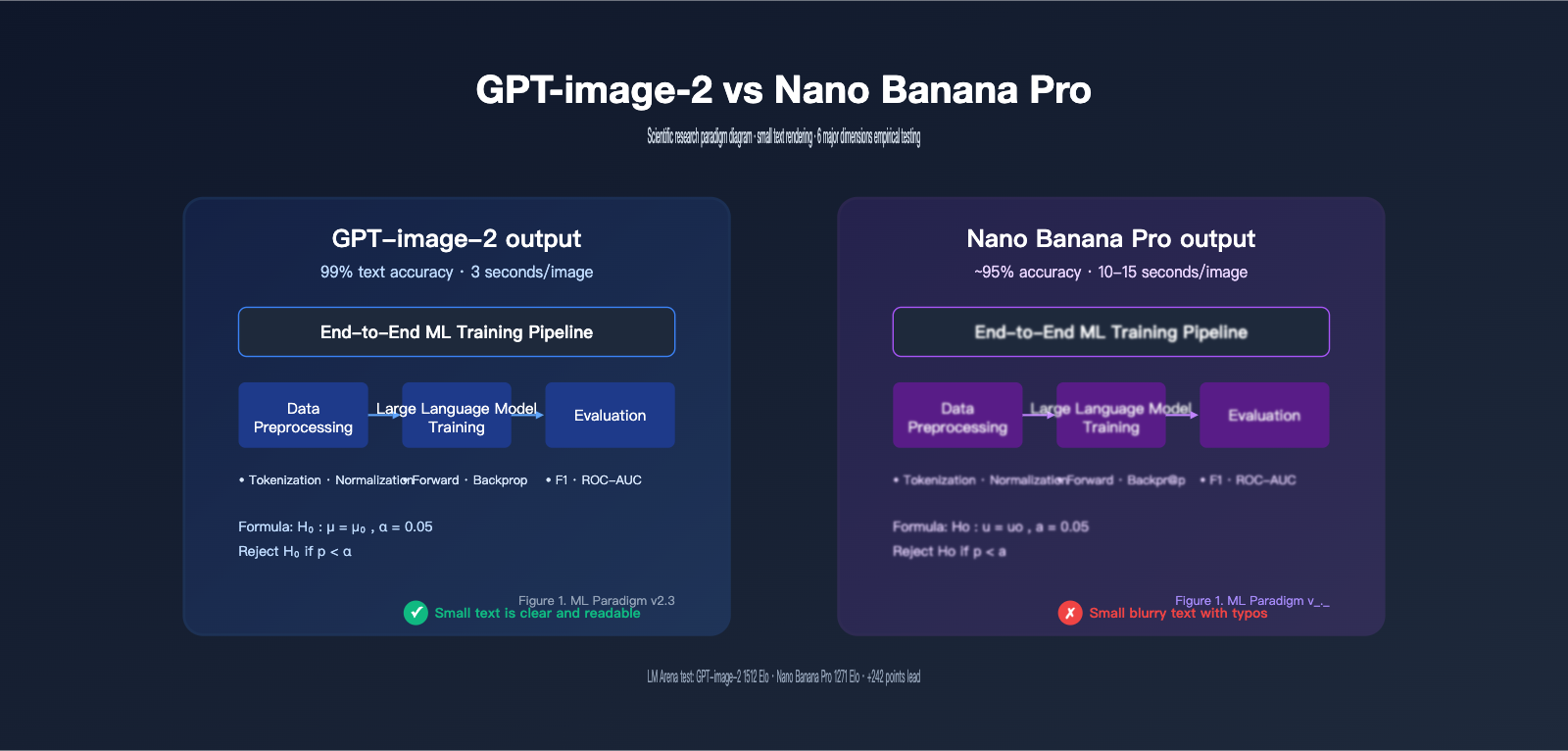
Test Case 1: Machine Learning Training Paradigm Diagram
Test Prompt:
A research paradigm diagram showing a machine learning training pipeline.
Three stages: "Data Preprocessing", "Model Training", "Evaluation".
Each stage has 2-3 sub-modules with English labels (e.g., "Tokenization",
"Backpropagation", "F1 Score"). Include arrows between stages.
Top title: "End-to-End ML Training Pipeline".
Bottom-right footer: "Figure 1. ML Paradigm v2.3".
Use academic style, white background, dark text.
Results Comparison:
| Check Item | GPT-image-2 | Nano Banana Pro |
|---|---|---|
| Main Title Spelling | ✅ 100% Correct | ✅ 100% Correct |
| Three-stage Labels | ✅ All correct | ⚠️ "Evaluation" sometimes rendered as "Evualation" |
| Small Sub-labels (8pt) | ✅ "Tokenization" / "Backpropagation" clear | ❌ Small text blurry, prone to character confusion |
| Arrow Direction | ✅ Flow is correct | ✅ Flow is correct |
| "Figure 1." Caption | ✅ Perfectly rendered | ⚠️ Version number occasionally missing |
| Overall Readability | ✅ Ready to use | ⚠️ Requires multiple re-generations |
The key advantage of GPT-image-2 in this scenario is that it "thinks" before it draws. Its reasoning mechanism plans the "three stages + sub-modules + small text annotations" as unified constraints, avoiding the common issue of dropping details while drawing.
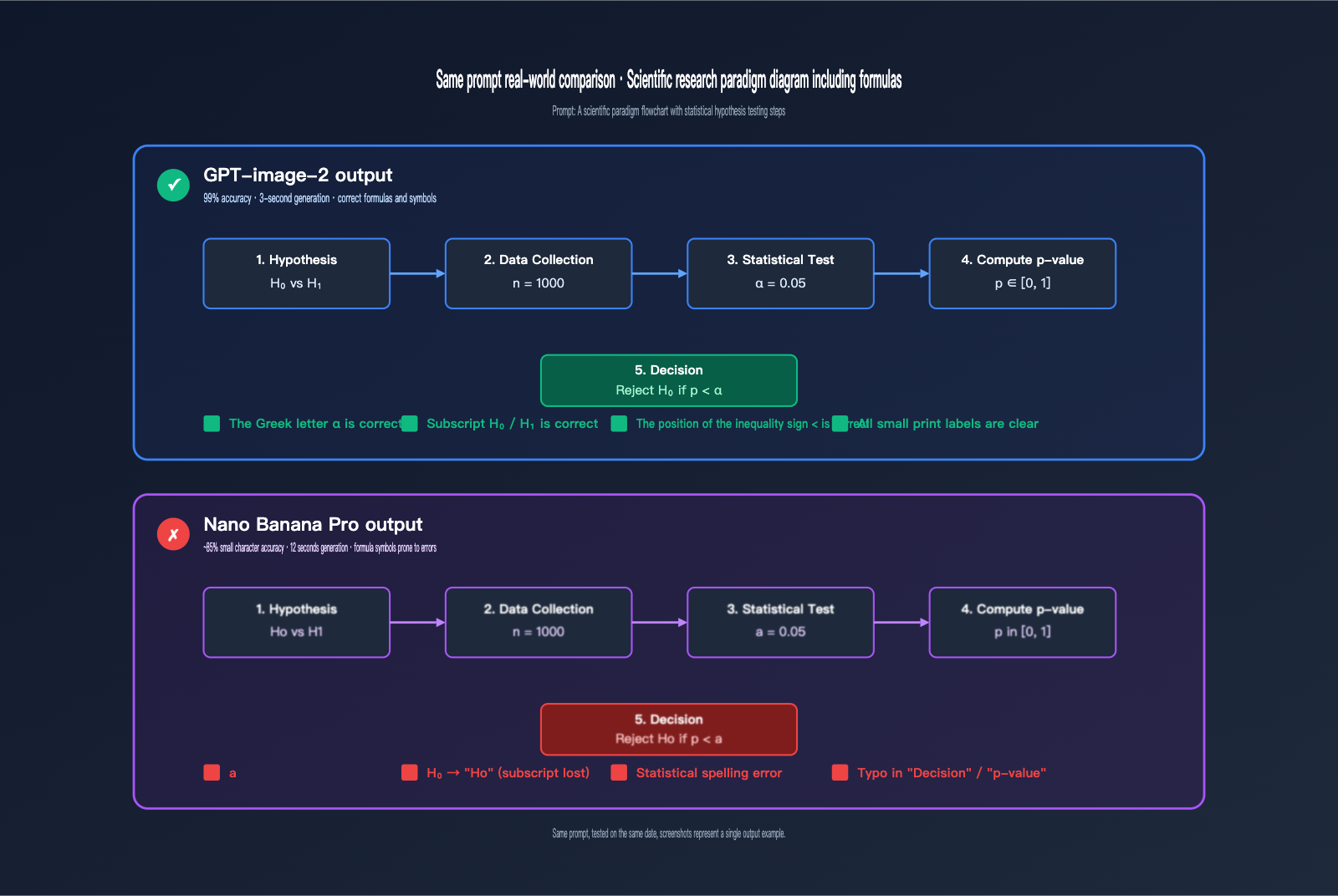
Test Case 2: Research Paradigm Diagram with Formulas
Test Prompt:
A scientific research paradigm flowchart with five boxes connected by arrows:
1. "Hypothesis: H₀ vs H₁"
2. "Data Collection (n=1000)"
3. "Statistical Test (α=0.05)"
4. "Compute p-value"
5. "Reject H₀ if p < α"
Use light blue boxes, dark text, sans-serif font, academic style.
Results:
GPT-image-2 is nearly perfect: Greek symbols like α, subscripts such as H₀/H₁, and inequality signs like < are all rendered correctly, making them suitable for academic figures.
Nano Banana Pro's issues are concentrated on Greek symbols and subscripts: α is occasionally rendered as "a", H₀ often becomes "Ho" or "H0" (regular numbers instead of subscripts), and the placement of inequality signs drifts. While these errors rarely occur in long-form text, they become quite apparent in the small font sizes typical of research diagrams.
💡 Technical Tip: For research diagrams involving Greek letters, subscripts/superscripts, or special mathematical symbols, we recommend using GPT-image-2. If you need to quickly compare both models within the same project, you can use the APIYI (apiyi.com) platform to invoke them via a unified interface, saving you switching costs.
Test Case 3: Technical Architecture Diagram (Dense English Terminology)
Test Prompt:
A technical architecture diagram with three layers:
- Top: "Application Layer" (FastAPI, Nginx, Redis)
- Middle: "Business Logic Layer" (Authentication, Rate Limiter, Cache Manager)
- Bottom: "Data Layer" (PostgreSQL, Elasticsearch, S3 Storage)
Use connecting arrows between layers. Dark theme, monospace font for tech names.
Results:
| Check Item | GPT-image-2 | Nano Banana Pro |
|---|---|---|
| Tech Stack Names (FastAPI/Nginx, etc.) | ✅ All correct | ⚠️ "Elasticsearch" sometimes becomes "Elasticseach" |
| Monospace Font Consistency | ✅ Unified across the diagram | ⚠️ Inconsistent in some modules |
| Hierarchical Labels | ✅ Three layers clear | ✅ Three layers clear |
| Arrow Connectivity | ✅ Flow top to bottom | ✅ Flow top to bottom |
| Overall Professionalism | ✅ Ready for tech blogs | ⚠️ Requires touch-ups |
GPT-image-2 Small Text Rendering: A Comprehensive Comparison
Scientific paradigm diagrams aren't the only "high-text density" scenario. Let's dig deeper into other scenarios where text density is a major factor.
Small Text Labels in Data Visualizations
Data visualization scenarios include axis ticks, legends, error bar labels, and data point annotations. While Nano Banana Pro performs acceptably with larger text (main and sub-titles), 6-8pt axis tick labels often become blurry or garbled. GPT-image-2 consistently maintains readability for 6pt text at 2K resolution.
| Small Text Scenario | GPT-image-2 | Nano Banana Pro |
|---|---|---|
| Axis Ticks (6-8pt) | ✅ Clear and legible | ⚠️ Blurry or overlapping characters |
| Legend Labels | ✅ 100% Accurate | ⚠️ 90% Accurate |
| Error Bar Annotations | ✅ Precise numbers | ❌ Numbers prone to errors |
| Version Footnotes | ✅ Fully preserved | ⚠️ Occasionally lost |
UI Mockups and Interface Elements
UI mockups are another heavily underestimated "high-text density" scenario. Button text, menu items, form labels, and status bar numbers are all small text. Banana Pro is decent at mimicking general UI screenshots, but once you introduce "dense lists + multi-state badges," characters start to misalign.
GPT-image-2's performance in this category approaches Photoshop template quality: all button text and status badges ("Active", "Pending", "Failed", etc.) render stably.
Multilingual Mixed Scenes (Chinese, English, Japanese, Korean)
In LM Arena benchmark tests, GPT-image-2 achieves ~99% character-level accuracy across Latin, CJK (Chinese, Japanese, Korean), Hindi, and Bengali. This means you can reliably generate images with mixed content like "Chinese titles + English terms + Japanese annotations."
Nano Banana Pro performs close to GPT-image-2 in single-language scenarios, but when mixing CJK and Latin, it often suffers from kerning issues (where the proportions of CJK square characters clash with English letters).
# A unified approach to call both models via the APIYI platform
import openai

client = openai.OpenAI(
    api_key="YOUR_API_KEY",
    base_url="https://vip.apiyi.com/v1"
)

# Invoke GPT-image-2
response_gpt = client.images.generate(
    model="gpt-image-2",
    prompt="A scientific paradigm diagram with...",
    size="2048x2048",
    quality="high"
)

# Invoke Nano Banana Pro (same interface)
response_banana = client.images.generate(
    model="gemini-3-pro-image-preview",
    prompt="A scientific paradigm diagram with...",
    size="2048x2048"
)
View full comparison test code
import openai
import time
from pathlib import Path
from typing import Optional, Literal

ModelName = Literal["gpt-image-2", "gemini-3-pro-image-preview"]

def generate_paradigm_diagram(
    prompt: str,
    model: ModelName,
    output_dir: str = "./outputs",
    size: str = "2048x2048",
    quality: str = "high",
) -> dict:
    """
    Generate a scientific paradigm diagram by calling either model via the APIYI platform.

    Returns: model name, generation time, output path, and token usage.
    """
    client = openai.OpenAI(
        api_key="YOUR_API_KEY",
        base_url="https://vip.apiyi.com/v1"
    )

    start = time.time()
    response = client.images.generate(
        model=model,
        prompt=prompt,
        size=size,
        quality=quality,
        n=1,
    )
    elapsed = time.time() - start

    Path(output_dir).mkdir(parents=True, exist_ok=True)
    output_path = f"{output_dir}/{model}_{int(start)}.png"

    image_data = response.data[0].b64_json
    with open(output_path, "wb") as f:
        import base64
        f.write(base64.b64decode(image_data))

    return {
        "model": model,
        "elapsed_sec": round(elapsed, 2),
        "output_path": output_path,
    }


def compare_models(prompt: str) -> None:
    """Run both models on the same prompt and generate a comparison report."""
    print(f"Starting comparison test for prompt: {prompt[:80]}...\n")

    for model in ["gpt-image-2", "gemini-3-pro-image-preview"]:
        result = generate_paradigm_diagram(prompt, model)
        print(f"[{model}] Elapsed: {result['elapsed_sec']}s | Path: {result['output_path']}")


if __name__ == "__main__":
    paradigm_prompt = """
    A research paradigm diagram showing ML training pipeline.
    Three stages: Data Preprocessing, Model Training, Evaluation.
    Each stage has sub-modules with English labels.
    Title: 'End-to-End ML Training Pipeline'.
    Footer: 'Figure 1. ML Paradigm v2.3'.
    Academic style, white background.
    """
    compare_models(paradigm_prompt)
🚀 Quick Start: We recommend using the APIYI (apiyi.com) platform to set up your comparison environment quickly. It provides an out-of-the-box unified API, allowing you to integrate and test both models side-by-side in under 5 minutes.
GPT-image-2 vs. Nano Banana Pro: Text Rendering Mechanisms
Why does GPT-image-2 hold a structural lead in small text and scientific diagrams? Understanding the underlying mechanism differences helps you choose the right tool for the job.
The O-Series Reasoning (Thinking) Mechanism of GPT-image-2
GPT-image-2 incorporates the O-series reasoning mechanism—an extension of OpenAI's reasoning models (o1/o3) into the image domain. Before generating an image, it performs three steps:
- Layout Planning: Organizes the objects, text, and spatial relationships from your prompt into a "blueprint."
- Constraint Verification: Checks off "object counts," "text content," and "small text placement" to ensure they are properly planned.
- Conflict Resolution: Handles potential prompt conflicts (e.g., "fill the frame" vs. "keep white space").
In constraint-heavy scenarios like scientific diagrams, each small text label is an independent constraint. While standard diffusion models often "lose constraints as they draw," the reasoning mechanism treats all constraints as a holistic plan, significantly reducing the probability of missing text, typos, or character stacking.
The Grounding + Semantic Mechanism of Nano Banana Pro
Nano Banana Pro is built on the Gemini 3 Pro backbone, with advantages stemming from:
- Google Search Grounding: It can retrieve real-time information during generation (e.g., "latest exchange rate as of April 2026," "Olympic schedule") and embed this data into the image.
- Paragraph-Level Semantic Coherence: Strong language modeling capabilities ensure consistent grammar and spelling in long text blocks.
These mechanisms are great for "long-form infographics" and "data-driven visualizations," but they don't help much with "fragmented small text labels"—which are often named entities (product names, technical abbreviations) lacking sufficient semantic context.
| Mechanism Feature | GPT-image-2 (Thinking) | Nano Banana Pro (Grounding) |
|---|---|---|
| Text Types | Fragmented small text, terminology | Long paragraphs, searchable data |
| Constraint Handling | Proactive planning, unified check | On-the-fly semantic checking |
| Root Cause of Typos | Rare (~1%) | Primarily in small text/proper nouns |
| Speed Impact | Fast reasoning, ~3s | Grounding search adds overhead, ~10-15s |
| Best Scenarios | Science diagrams, UI, technical | Posters, long text, real-time data |
Why "Small Text" is the Watershed Moment
The font size itself isn't the core issue; it's the "information density/pixel" ratio. When an 8pt label must be rendered clearly within a 50×20 pixel area while handling character shape, spacing, alignment, and pixel jitter, you're dealing with a "high-constraint density" environment. This is exactly where the advantages of O-series reasoning shine.
🎯 Technical Recommendation: If your project involves both scientific diagrams and long-form infographics, consider model routing on the engineering side—automatically routing requests based on a "font size threshold." You can implement this routing using the unified interface on APIYI (apiyi.com) without needing to maintain two separate SDKs, effectively reducing your engineering overhead.
GPT-image-2 vs. Nano Banana Pro: A Prompt Engineering Comparison
These two models have very different "personalities." For the exact same request, the way you craft your prompt will lead to noticeable differences in quality.
The GPT-image-2 Friendly Prompt Style
GPT-image-2 prefers "structured instructions + explicit constraints," mimicking the reasoning style of its O-series counterparts.
Recommended approach:
A research paradigm diagram with the following elements:

Title (top center, 24pt bold): "End-to-End ML Pipeline"

Three stages (left to right, connected by arrows):
1. "Data Preprocessing" (sub-modules: Tokenization, Normalization)
2. "Model Training" (sub-modules: Forward Pass, Backpropagation)
3. "Evaluation" (sub-modules: F1 Score, ROC-AUC)

Footer (bottom-right, 8pt): "Figure 1. ML Paradigm v2.3"

Style: academic, white background, dark blue boxes, sans-serif font.
Key takeaway: Use numbered lists, precise font sizes, and specific positions so the "Thinking" mechanism can verify each requirement item-by-item.
The Nano Banana Pro Friendly Prompt Style
Nano Banana Pro prefers "natural language description + contextual narrative," which is much closer to creative writing.
Recommended approach:
A clean academic-style research paradigm diagram showing
how a machine learning pipeline progresses through three
stages: starting with data preprocessing where raw inputs
are tokenized and normalized, then moving to model training
where forward passes and backpropagation iterate, and
finally reaching evaluation where F1 score and ROC-AUC
are computed. Connect the stages with arrows. Title at top:
"End-to-End ML Pipeline". Use a clean, white background
with dark blue rounded boxes.
Key takeaway: "Tell a story" about the process, allowing the underlying Gemini model to use its semantic coherence to handle the overall composition.
Prompt Tuning Quick Reference Table
| Optimization Point | GPT-image-2 Style | Nano Banana Pro Style |
|---|---|---|
| Text Content | Use quotes: "Figure 1" |
Natural language: showing "Figure 1" |
| Element List | Numbered 1./2./3. | Natural connectors: first… then… |
| Font Size | Explicit: 8pt small print |
Descriptive: tiny annotation |
| Positioning | Precise: top-right corner |
Natural: in the upper right |
| Style | Keywords: sans-serif, academic |
Phrasing: clean academic style |
| Constraint Intensity | The more explicit, the better | Natural language is more stable |
General Pro-Tips (Applies to Both)
- Always use quotes for key text: Otherwise, the model might "paraphrase" your labels.
- Keep 8pt small text to a minimum: Even for GPT-image-2, it’s best to stick to 5-6 independent small text labels.
- Avoid conflicting constraints: Combining "minimalist style" with "information-dense" will confuse both models.
- Generate 3-4 images and pick the best: Text rendering is inherently probabilistic, so generating a few variations is standard industry practice.
🚀 Get Started Quickly: Use the APIYI (apiyi.com) platform to set up a comparison pipeline. You can request both models for the same prompt simultaneously and view the outputs side-by-side. It takes less than 5 minutes to set up, helping you quickly identify the best model combination for your business.
GPT-image-2 vs. Nano Banana Pro: Scenario Recommendations
After extensive real-world testing, here are our clear-cut recommendations for which model to choose based on your specific use case.
Choose GPT-image-2 For:
- Scientific Paradigm Diagrams: High-density small text + technical terminology + process arrows. GPT-image-2’s "Thinking" mechanism and 99% text accuracy provide a structural edge.
- Technical Architecture Diagrams: Anything containing technical stack names (like FastAPI, Elasticsearch, PostgreSQL, etc., which are prone to spelling errors).
- Data Visualization: Graphs with axis scales, legends, error bars, or 6-8pt small text annotations.
- UI Screenshots and Mockups: Dense UI text like button labels, status badges, and menu items.
- Infographic Posters: Mixing professional titles with small footnotes like "Intelligence Layer."
- Multi-language Mixing: Charts that require a mix of Chinese, English, Japanese, or Korean.
- Formulas and Symbols: Including Greek letters ($\alpha/\beta$), statistical symbols ($H_0/p-value$), or subscripts/superscripts.
- Rapid Iteration: A generation speed of ~3 seconds/image makes it ideal for quick tuning.
Choose Nano Banana Pro For:
- Photorealistic Quality: Product photography, portraits, or architectural shots requiring high realism.
- Long-form Infographics: Article-style layouts where text is organized in paragraphs rather than small labels.
- Real-time Data Generation: Needs that require Google Search grounding to fetch the latest data (like live exchange rates or current news).
- 4K High Resolution: While GPT-image-2 currently tops out at 2K, Nano Banana Pro can reach 4K (5632×3072).
- Multi-Reference Image Editing: Banana Pro supports up to 14 reference images, making it more flexible for complex editing tasks.
- Complex Spatial Relationships: Managing the front/back/left/right spatial relationships of multiple objects.
- Longer Chinese Paragraphs: Better layout stability for long-form Chinese text (instead of just short labels).
The "Middle Ground" (Use Either)
- Standard illustrations with a single main title and subtitle.
- Simple logo design.
- Stylized art (flat, watercolor, or pixel art).
- Cover images without specialized terminology.
💡 Scenario-based Decision Principle: The denser the text, the smaller the font, or the more technical the jargon, the more you should lean toward GPT-image-2. The longer the text, the more realism you need, or the more you require real-time information, the better Nano Banana Pro becomes. You can switch between both models with one click on the APIYI (apiyi.com) platform without needing to re-integrate.
GPT-image-2 vs. Nano Banana Pro: Decision Guide
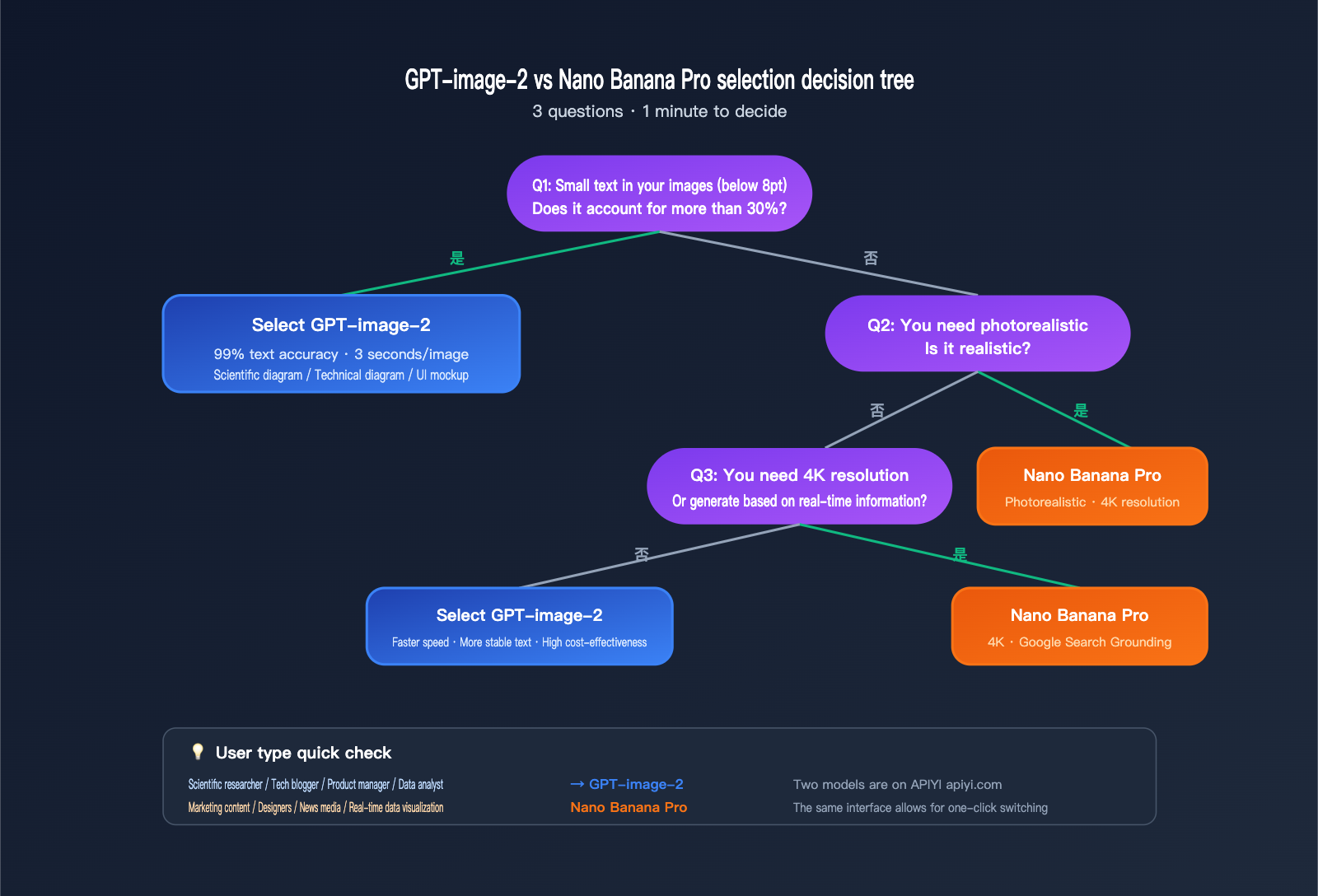
Decision Tree: 3 Questions to Help You Choose
Question 1: Do "small labels (under 8pt)" make up more than 30% of your image?
- Yes → GPT-image-2
- No → Proceed to Question 2
Question 2: Do you need photorealistic quality?
- Yes → Nano Banana Pro
- No → Proceed to Question 3
Question 3: Do you need 4K resolution or generation based on real-time information?
- Yes → Nano Banana Pro
- No → GPT-image-2 (Faster, more stable text rendering)
Recommendations by User Group
| User Type | Primary Use Case | Preferred Model | Why? |
|---|---|---|---|
| Researchers | Paper diagrams, models, flowcharts | GPT-image-2 | Stable formulas, Greek letters, and terminology |
| Tech Bloggers | Architecture diagrams, API flowcharts, code snippets | GPT-image-2 | No spelling errors in technical terms; crisp UI screenshots |
| Product Managers | UI mockups, user flow diagrams | GPT-image-2 | Superior rendering of UI element text |
| Data Analysts | Chart labels, axis markings | GPT-image-2 | Reliable rendering for 6-8pt small text |
| Marketers | Posters, long-form infographics | Nano Banana Pro | Better layout for long blocks of text + realism |
| Designers | Photo compositing, product photography | Nano Banana Pro | Leading realism and detail texture |
| News Media | Real-time info visualization | Nano Banana Pro | Advantage of Google Search grounding |
Cost and Speed Considerations
In LM Arena benchmarks, GPT-image-2 takes about 3 seconds per image, while Nano Banana Pro usually takes 10-15 seconds. If your workflow involves "iterating on a prompt until you're satisfied," the speed of GPT-image-2 will significantly shorten your development cycle.
💰 Cost Optimization: For teams requiring high-volume generation of scientific or technical diagrams, we recommend accessing both models via the APIYI (apiyi.com) platform. This platform offers flexible billing and unified management for multiple models, making it easy to switch to the most cost-effective option for each specific scenario—perfect for small teams and individual developers.
GPT-image-2 vs Nano Banana Pro FAQs
Q1: Does GPT-image-2 really “crush” Nano Banana Pro?
It depends on the scenario. On the LM Arena text-to-image leaderboard, GPT-image-2 (1512 Elo) leads Nano Banana Pro (1271 Elo) by +242 points—the largest lead in LM Arena history. However, this gap is primarily driven by text rendering, UI reconstruction, and world knowledge. Nano Banana Pro still holds an edge in photorealism and spatial reasoning. So, the "crush" narrative holds up for scenarios involving small text, scientific diagrams, and UI mockups, but not for "photorealistic" use cases. We recommend using the APIYI (apiyi.com) platform to integrate both models and switch between them based on your specific needs.
Q2: Is the 99% text accuracy for GPT-image-2 real?
LM Arena testing and early user reports confirm this figure, and it applies to various scripts including Latin, CJK (Chinese, Japanese, Korean), Hindi, and Bengali. Keep in mind that "99%" is a character-level accuracy rate, not 100%. You may still see occasional errors in extreme scenarios (e.g., micro-text below 5pt, rare technical symbols, or nested complex mathematical formulas). For comparison, GPT Image 1.5 hits 95%, GPT Image 1 hits 90%, and while Nano Banana Pro hits near 95% for long paragraphs, it drops to roughly 80-85% in small-text scenarios.
Q3: When I generate scientific paradigm diagrams with GPT-image-2, the Greek letter alpha (α) occasionally errors out. What should I do?
You can explicitly write "Use Unicode Greek letter alpha (α, U+03B1)" in your prompt; pairing this with Thinking mode (enabled by default) usually improves the hit rate. If it still fails, we suggest generating 3-4 images and picking the best one, or using "alpha" in English in the prompt and replacing it with the actual symbol in Photoshop later. Experiment a few times to see what works best for your workflow.
Q4: Why is Nano Banana Pro better at handling long text paragraphs?
Nano Banana Pro is built on the Gemini 3 Pro backbone, benefiting from the strong "paragraph-level semantic coherence" of a top-tier Large Language Model. It processes long paragraphs as "semantic units," which keeps the grammar and spelling very stable. However, small labels are "fragmented named entities" without semantic context to constrain them, which makes them prone to errors. GPT-image-2 bypasses this by using O-series reasoning to plan the "small-text labels as constraints" in advance.
Q5: Are the model invocation methods for GPT-image-2 and Nano Banana Pro the same on the APIYI platform?
Yes. The APIYI (apiyi.com) platform provides a unified OpenAI-Compatible interface for various mainstream image models. You only need to change the model field (to gpt-image-2 or gemini-3-pro-image-preview) to switch, while the base_url and SDK invocation methods remain consistent. This is particularly helpful for projects that need A/B testing or model routing based on scenarios, saving you from the headache of maintaining multiple SDKs.
Q6: I’m used to BananaPro; do I need to re-adjust my prompts to move to GPT-image-2?
You'll need minor adjustments, but the cost is low. Nano Banana Pro prefers "natural language descriptions + context," while GPT-image-2 performs better with structured instructions. We recommend adding the following to your prompts: 1) A clear list of elements (using 1./2./3. numbering); 2) Specific font styles (sans-serif/monospace/serif); 3) Enclosing key text in quotation marks (e.g., "Figure 1. ML Paradigm"). You can keep your existing descriptive style for the rest.
Q7: How should I troubleshoot if both models fail to generate an image?
Follow these steps: 1) Check if your prompt triggered content moderation (due to human faces or sensitive topics); 2) Shorten the prompt and remove conflicting constraints (e.g., don't ask for "photorealistic" while also requesting a "minimalist illustration"); 3) Adjust the size/quality parameters; 4) Try switching to the other model; 5) If it’s an API error, check the detailed error codes and retry strategies in your APIYI (apiyi.com) dashboard.
Q8: In which scenarios does GPT-image-2 still lose to Nano Banana Pro?
There are three main cases: 1) 4K ultra-high resolution (Banana Pro supports 5632×3072, while GPT-image-2 maxes out at 2K); 2) Multi-object spatial reasoning (e.g., "5 items at specific positions within 3 cabinets"); 3) Extra-long paragraph infographic layouts (consistent typesetting for 200+ words). For these scenarios, we recommend sticking with Nano Banana Pro.
GPT-image-2 vs Nano Banana Pro Key Takeaways
- Breakthrough in Text Rendering: GPT-image-2 leads Nano Banana Pro by +242 Elo on the LM Arena text-to-image leaderboard—the largest gap in history—driven by ~99% character-level text accuracy.
- Structural Edge in Scientific Graphics: GPT-image-2’s O-series reasoning combined with 99% accuracy provides a structural advantage for "high-text-density" scenarios like scientific paradigm diagrams, technical architecture charts, data visualizations, and UI mockups.
- Stable Small Text and Formulas: GPT-image-2 provides reliable rendering for 6-8pt axis labels, Greek letters, subscripts/superscripts, and statistical symbols, where Nano Banana Pro still struggles.
- 3-5x Faster Generation: GPT-image-2 takes about 3 seconds per image compared to 10-15 seconds for Nano Banana Pro, a huge advantage for rapid iteration.
- Banana Pro Retains Exclusive Strengths: 4K resolution, photorealism, long-paragraph semantic coherence, Google Search grounding, and multi-object spatial reasoning remain its strongholds.
- Scenario-Based Selection Strategy: If the content is text-heavy, involves tiny font sizes, or requires specialized terminology → go with GPT-image-2. If you need photorealism, 4K resolution, or real-time information → go with Nano Banana Pro.
- Unified Interface Lowers Switching Costs: The APIYI (apiyi.com) platform allows you to use the same SDK for both models, making it easy to route models based on the scenario and avoiding the need to maintain multiple sets of integration code.
Summary
The comparison between GPT-image-2 and Nano Banana Pro leads to vastly different conclusions depending on the scenario. If you only look at the overall LM Arena leaderboard, the 242 Elo lead of GPT-image-2 is truly a "crushing" advantage. However, when you dive into specific use cases, the relative strengths of the two become clear and predictable:
- Scientific diagrams, technical charts with small text, and diagrams with specialized terminology → Choose GPT-image-2.
- Photorealistic images, long-form infographics, and diagrams requiring real-time information → Choose Nano Banana Pro.
For researchers, tech bloggers, and product managers whose core need is "generating images with a lot of text, especially small text," the leap in capability with GPT-image-2 is both real and tangible. Moving from the 90% accuracy of GPT Image 1 to 95% with GPT Image 1.5, and now 99% with GPT-image-2, each generation has significantly pushed the boundaries of whether AI-generated images are "ready for immediate use."
We recommend using the APIYI (apiyi.com) platform to integrate both models simultaneously. This allows you to dynamically switch based on the specific task, ensuring you use each model where it shines, rather than betting all your needs on a single solution.
References
-
OpenAI ChatGPT Images 2.0 Official Announcement: GPT-image-2 Release Notes
- Link:
openai.com/index/introducing-chatgpt-images-2-0 - Note: Official 2026-04-21 release notes and model capability list.
- Link:
-
Google DeepMind Nano Banana Pro Official Page: Gemini 3 Pro Image Model Description
- Link:
deepmind.google/models/gemini-image/pro - Note: Official capability description, pricing, and number of supported reference images.
- Link:
-
LM Arena Text-to-Image Leaderboard: Elo Rankings for Text-to-Image Models
- Link:
arena.ai/leaderboard/text-to-image - Note: GPT-image-2 1512 Elo vs Nano Banana Pro 1271 Elo.
- Link:
-
Simon Willison’s Nano Banana Pro Hands-on: Independent Developer Test Report
- Link:
simonwillison.net/2025/Nov/20/nano-banana-pro - Note: 4K resolution testing and infographic case studies.
- Link:
-
VentureBeat ChatGPT Images 2.0 Report: Multilingual + Infographic Review
- Link:
venturebeat.com/technology/openais-chatgpt-images-2-0-is-here - Note: Testing on multilingual text rendering, comics, maps, and posters.
- Link:
Author: APIYI Technical Team | For more Large Language Model API access and comparisons, visit APIYI at apiyi.com for hands-on testing.