Author's Note: A detailed explanation of why Gemini 3.1 Pro Preview's output tokens far exceed the visible text: The Thinking Tokens reasoning chain mechanism, billing rules, and cost-saving tips for tuning thinking_level.
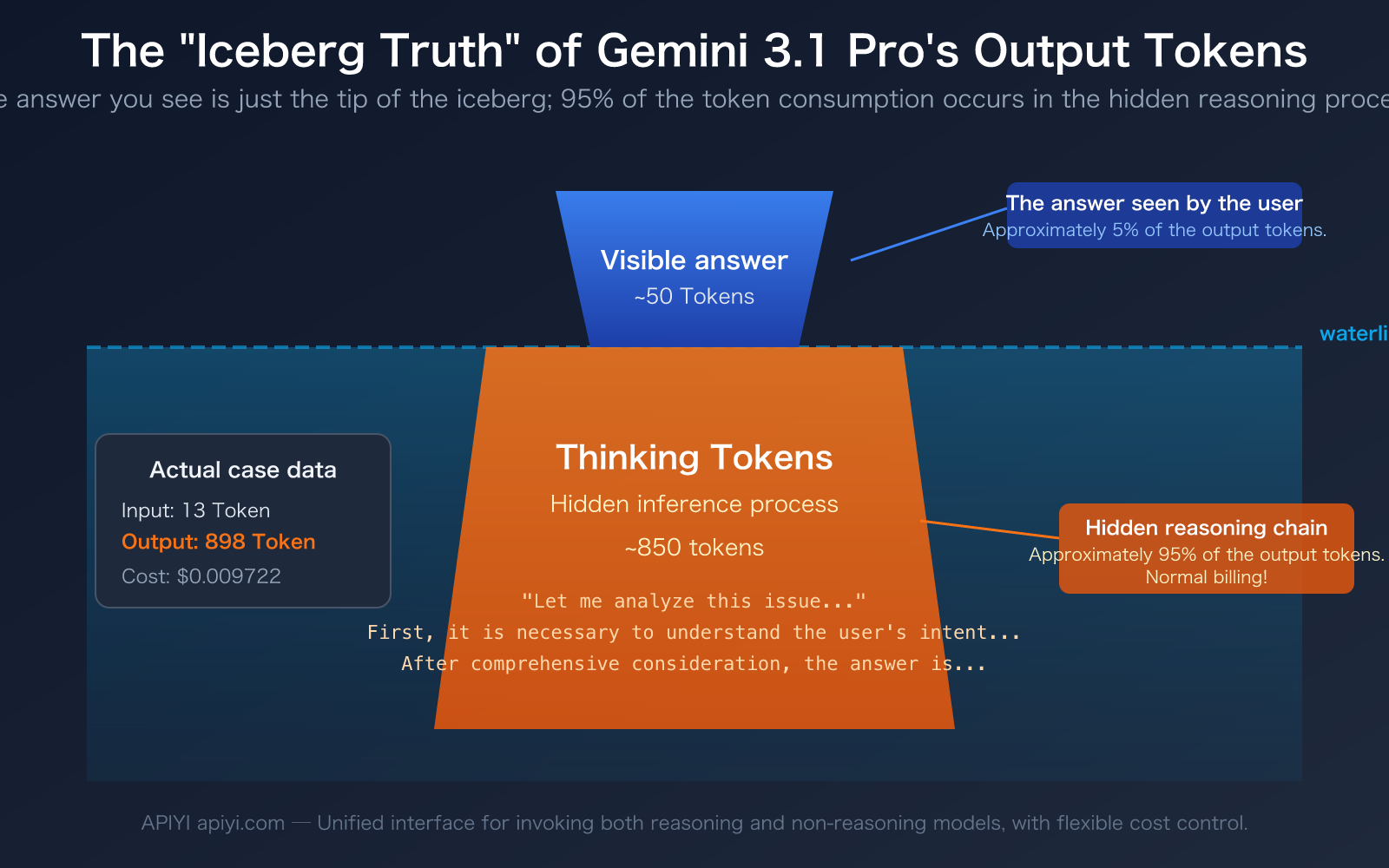
"I just sent one sentence, and the model only replied with a dozen words. Why does it show nearly 900 output tokens? Where did the money go?" — This is the real confusion many developers experience when first using Gemini 3.1 Pro Preview. The data in the screenshot clearly shows this phenomenon: 13 input tokens, but a whopping 898 output tokens.
The answer is Thinking Tokens. Gemini 3.1 Pro is a reasoning model. Before giving you an answer, it performs a substantial amount of thinking and reasoning "in its head." This reasoning content is not shown to you by default, but it is counted as output tokens and billed normally.
Core Value: After reading this article, you will thoroughly understand the Thinking Tokens mechanism of reasoning models, learn to use the thinking_level parameter to control reasoning depth, and save 50-80% of your output token costs while maintaining quality.
Key Points of Gemini 3.1 Pro Thinking Tokens
The biggest difference between a reasoning model and a standard conversational model lies in the completely different composition of output tokens. Here are the core concepts you need to understand:
| Key Point | Explanation | Practical Impact |
|---|---|---|
| Output Tokens = Thinking + Answer | Gemini 3.1 Pro's output tokens consist of Thinking Tokens (reasoning chain) and the actual answer. | You see very little text, but the total token count is high. |
| Thinking Tokens are Billed Normally | The reasoning process, though invisible, is billed at the output token rate ($12 per million tokens). | A simple question can cost 5-10x more than with a standard model. |
thinking_level is Adjustable |
Supports LOW/MEDIUM/HIGH levels to control reasoning depth. | LOW level can save over 80% of output tokens. |
| Non-Reasoning Models Don't Have This Issue | Models like GPT-4o, Claude Sonnet 4.6 (with Extended Thinking off) are "what you see is what you get." | For simple tasks, non-reasoning models are more cost-effective. |
Real-World Consumption Example of Gemini 3.1 Pro Thinking Tokens
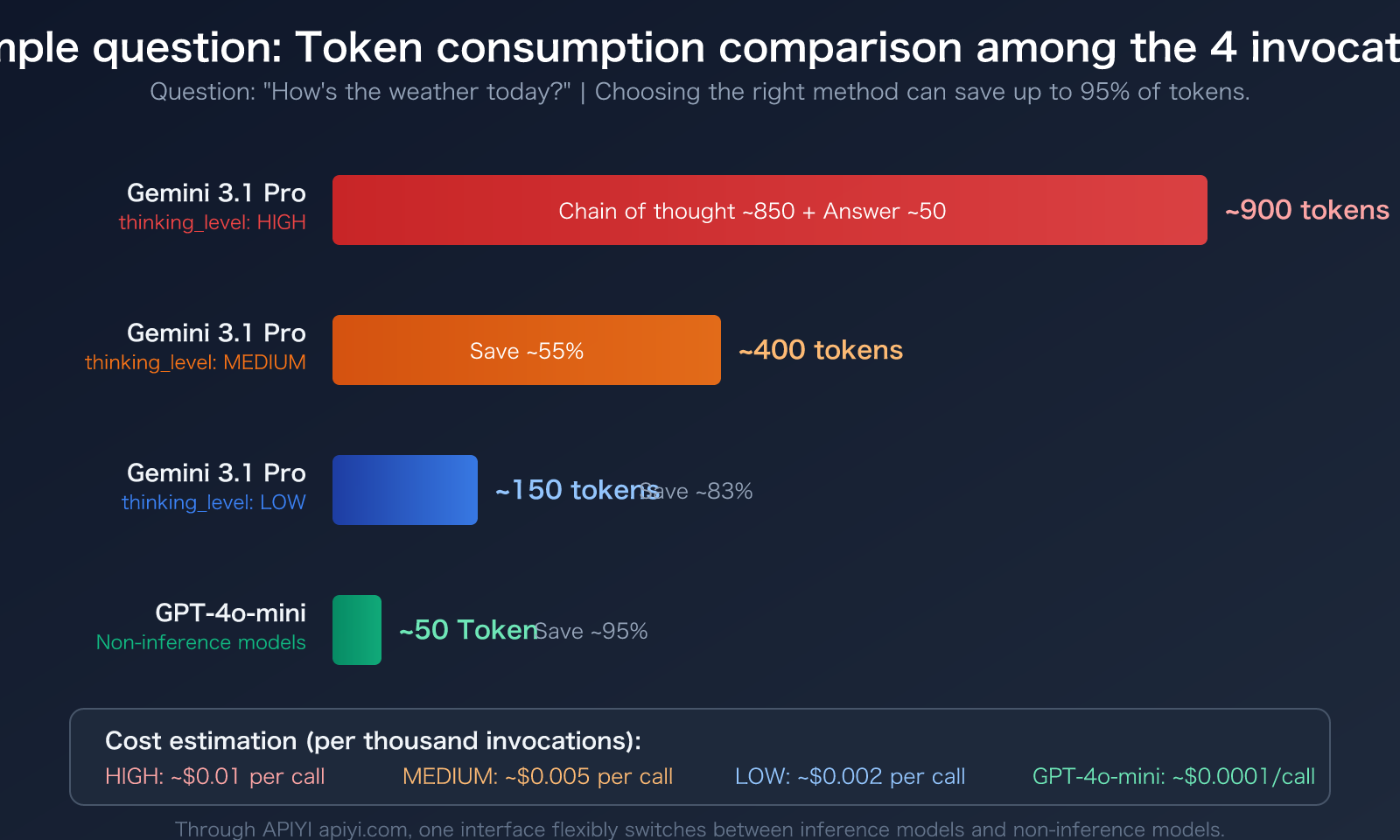
Let's go back to the example in the screenshot. The user asked a simple question, the model replied with about a dozen words, but the output token count showed 891-898. The composition of these tokens is roughly as follows:
- Visible Answer: Approximately 30-50 tokens (the dozen or so words you see).
- Thinking Tokens: Approximately 840-860 tokens (the model's internal reasoning process).
This means over 95% of the output tokens are invisible to you, consumed by the model's reasoning chain. It's like asking a math teacher "What's 1+1?" The teacher only says "Equals 2" out loud, but in their mind, they think: "This is a basic arithmetic problem requiring addition…" — and you're paying for the teacher's entire thought process.
This mechanism isn't a bug; it's a design feature of reasoning models. The reason Gemini 3.1 Pro performs better on complex problems (95.1% on MATH benchmark, 77.1% on ARC-AGI-2) is precisely because it engages in deep reasoning before answering.
How Gemini 3.1 Pro Thinking Tokens Work
The Core Difference Between Reasoning and Standard Models
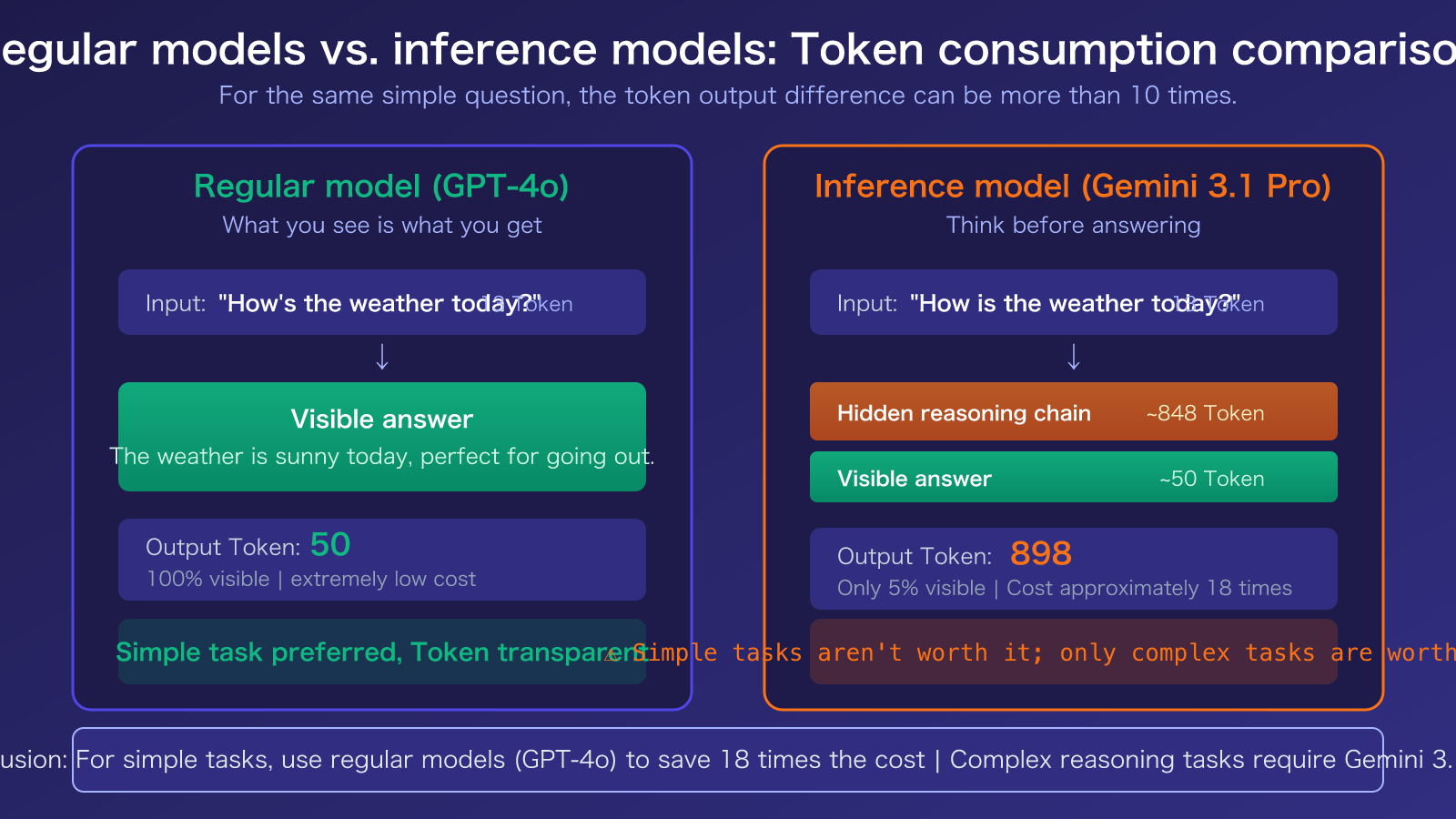
A standard model (like GPT-4o) generates its answer directly after receiving your question. What you see is what you pay for—the number of output tokens equals the length of the visible answer. It's a "what you see is what you get" scenario.
A reasoning model (like Gemini 3.1 Pro Preview) works differently. Upon receiving a question, it first generates an internal chain of thought. It then produces the final answer based on that reasoning. You only see the final answer, but you're billed for the total tokens used in both the reasoning chain and the answer.
| Model Type | Example Models | Output Token Composition | Cost for Simple Tasks | Advantage for Complex Tasks |
|---|---|---|---|---|
| Standard Model | GPT-4o, Claude Sonnet 4.6 | 100% visible answer | Low (pay for what you see) | General reasoning capability |
| Reasoning Model | Gemini 3.1 Pro, GPT-5.4 Thinking | Reasoning chain + visible answer | High (5-10x or more) | Strong complex reasoning ability |
| Switchable Model | Claude Sonnet 4.6 (Extended Thinking) | Can optionally enable reasoning | Flexible switching | Enable reasoning as needed |
Three Key Details About Gemini 3.1 Pro Thinking Tokens
Detail 1: How Thinking Tokens are billed. According to Google's official documentation, Thinking Tokens are billed at the standard price for output tokens. For Gemini 3.1 Pro, the output token price is $12 per million tokens. If the model uses 4000 tokens for reasoning and 500 tokens for the answer, you pay for 4500 output tokens—not just 500.
Detail 2: How to distinguish them in the API response. In the Gemini API response, the usage_metadata field returns both thoughts_token_count (reasoning tokens) and candidates_token_count (total output tokens). Important note: In the Gemini API, candidatesTokenCount includes Thinking Tokens, whereas in Vertex AI, candidatesTokenCount does not.
Detail 3: The reasoning chain is invisible by default. You can set includeThoughts: true to get a summary of the reasoning process (not the full chain). You can also view the model's thought process in tools like Cherry Studio by enabling the reasoning chain display.
🎯 Cost-saving tip: If you're just having a simple conversation or doing translation tasks that don't require deep reasoning, we recommend switching to a standard model (like GPT-4o-mini or Claude Sonnet 4.6). On APIYI apiyi.com, you can switch models by simply changing the
modelparameter without modifying any other code.
Gemini 3.1 Pro Thinking Tokens Optimization: 3 Cost-Saving Strategies
Strategy 1: Use the thinking_level Parameter to Control Reasoning Depth
Gemini 3.1 Pro provides a thinking_level parameter with three settings: LOW, MEDIUM, and HIGH. The token consumption varies dramatically between levels:
| thinking_level | Reasoning Depth | Token Consumption | Use Case | Compared to HIGH |
|---|---|---|---|---|
| LOW | Shallow reasoning | Lowest | Translation, classification, simple Q&A | Saves ~80%+ |
| MEDIUM | Balanced reasoning | Medium | Everyday coding, document generation, general analysis | Saves ~50% |
| HIGH | Deep reasoning | Highest | Mathematical proofs, scientific problems, complex logic | Baseline |
Here's a code example for setting thinking_level:
import openai

client = openai.OpenAI(
    api_key="YOUR_API_KEY",
    base_url="https://vip.apiyi.com/v1"
)

# Use LOW for simple tasks to significantly reduce Thinking Tokens
response = client.chat.completions.create(
    model="gemini-3.1-pro-preview",
    messages=[{"role": "user", "content": "Translate this sentence to English: 今天天气真好"}],
    extra_body={"thinking_level": "LOW"}  # LOW / MEDIUM / HIGH
)
print(response.choices[0].message.content)
print(f"Total output tokens: {response.usage.completion_tokens}")
View complete smart routing code (automatically selects reasoning depth based on problem complexity)
import openai
import json

def smart_gemini_call(
    prompt: str,
    complexity: str = "auto",
    api_key: str = "YOUR_API_KEY"
) -> dict:
    """
    Intelligently calls Gemini 3.1 Pro, automatically selecting reasoning depth based on task complexity.

    Args:
        prompt: User input
        complexity: "low" / "medium" / "high" / "auto"
        api_key: API key
    Returns:
        A dictionary containing the answer and token usage statistics.
    """
    client = openai.OpenAI(
        api_key=api_key,
        base_url="https://vip.apiyi.com/v1"
    )

    # Automatically determine complexity
    if complexity == "auto":
        simple_keywords = ["翻译", "translate", "分类", "classify", "总结", "summarize"]
        complex_keywords = ["推导", "证明", "计算", "分析", "比较", "为什么"]
        prompt_lower = prompt.lower()

        if any(kw in prompt_lower for kw in simple_keywords):
            thinking_level = "LOW"
        elif any(kw in prompt_lower for kw in complex_keywords):
            thinking_level = "HIGH"
        else:
            thinking_level = "MEDIUM"
    else:
        thinking_level = complexity.upper()

    response = client.chat.completions.create(
        model="gemini-3.1-pro-preview",
        messages=[{"role": "user", "content": prompt}],
        extra_body={"thinking_level": thinking_level}
    )

    return {
        "answer": response.choices[0].message.content,
        "thinking_level": thinking_level,
        "input_tokens": response.usage.prompt_tokens,
        "output_tokens": response.usage.completion_tokens,
        "total_tokens": response.usage.total_tokens
    }

# Usage example
# Simple task → automatically selects LOW
result = smart_gemini_call("Translate: 今天天气真好")
print(f"Reasoning depth: {result['thinking_level']}, Output tokens: {result['output_tokens']}")

# Complex task → automatically selects HIGH
result = smart_gemini_call("Prove the Pythagorean theorem using at least two methods")
print(f"Reasoning depth: {result['thinking_level']}, Output tokens: {result['output_tokens']}")
Recommendation: The
thinking_levelparameter is supported when calling Gemini 3.1 Pro via APIYI apiyi.com. We recommend setting it to MEDIUM for daily use and switching to HIGH only for complex reasoning scenarios like math or science problems.
Strategy 2: Use Non-Reasoning Models for Simple Tasks Directly
Not every scenario requires a reasoning model. For tasks like translation, format conversion, or simple Q&A, using a non-reasoning model can save 5-10x the token cost:
- GPT-4o-mini: Excellent cost-performance, the top choice for daily conversations.
- Claude Sonnet 4.6 (with Extended Thinking off): High-quality output, you pay for exactly what you see.
- Gemini 3.1 Flash: Google's lightweight model, fast and low-cost.
Strategy 3: Set max_tokens to Limit Output Length
Adding a max_tokens parameter to your API call can prevent a reasoning model from "overthinking." Important note: max_tokens limits the total output (reasoning + answer). Setting it too low might truncate the answer. We recommend setting it to 2-3 times your expected answer length.
🎯 Comprehensive Recommendation: On the APIYI apiyi.com platform, you can access both reasoning and non-reasoning models through a unified interface, dynamically switching based on task type. A single API Key gives you access to the full range of Gemini, Claude, and GPT models.
Frequently Asked Questions
Q1: Why doesn’t Gemini 3.1 Pro Thinking Tokens show the reasoning process by default?
This is a product design choice by Google. A full reasoning chain can contain thousands of tokens of intermediate steps, and displaying it directly would severely impact the user experience. You can obtain a reasoning summary by setting includeThoughts: true, or enable the reasoning chain display in clients like Cherry Studio to view the thinking process.
Q2: How can I see exactly how many Thinking Tokens were consumed in the API response?
Check the thoughts_token_count field in the usage_metadata returned by the Gemini API. If you're calling it via APIYI (apiyi.com), you can view a detailed token breakdown (input/output/reasoning) for each call on the platform's usage statistics page, making it easy to monitor and optimize costs.
Q3: Besides Gemini 3.1 Pro, which other models have a similar Thinking Tokens mechanism?
Mainstream reasoning models have similar mechanisms:
- GPT-5.4 Thinking: OpenAI's reasoning model, where reasoning tokens are also counted as output tokens for billing.
- Claude Sonnet 4.6 Extended Thinking: Anthropic's reasoning mode, which can be optionally enabled.
- DeepSeek-R1: An open-source reasoning model where the reasoning chain is fully visible.
The key difference is that some models (like Claude) allow flexible toggling of the reasoning mode, while others (like Gemini 3.1 Pro) have reasoning enabled by default. Using APIYI (apiyi.com), you can test and compare the actual token consumption of these models through a unified interface.
Summary
The key takeaways about Gemini 3.1 Pro Thinking Tokens are:
- Output Tokens include a hidden reasoning chain: What you see is just the answer; over 95% of the output token consumption happens in the invisible Thinking Tokens.
- Thinking Tokens are billed normally: They are charged at the standard output token rate. The cost for simple questions can be 5-10 times that of non-reasoning models.
- Use the
thinking_levelparameter to save money: The LOW setting can save over 80% of tokens, MEDIUM is suitable for daily use, and reserve HIGH only for complex tasks. - Choose non-reasoning models for simple tasks: For scenarios like translation, classification, and simple Q&A, it's more cost-effective to directly use models like GPT-4o-mini or Claude Sonnet 4.6.
Understanding the Thinking Tokens mechanism allows you to allocate your reasoning budget wisely. We recommend using APIYI (apiyi.com) to manage multi-model invocations through a unified interface, dynamically selecting reasoning or non-reasoning models based on task complexity to achieve the optimal balance of quality and cost.
📚 References
-
Google Cloud Documentation – Thinking Reasoning Mode: Official technical documentation for Gemini reasoning models
- Link:
docs.cloud.google.com/vertex-ai/generative-ai/docs/thinking - Description: Authoritative source for Thinking Tokens billing rules and thinking_level parameter configuration
- Link:
-
Google AI Developer Documentation – Token Counting: Official token counting and usage_metadata field explanations
- Link:
ai.google.dev/gemini-api/docs/tokens - Description: How to distinguish between thoughts_token_count and candidates_token_count in API responses
- Link:
-
Google DeepMind – Gemini 3.1 Pro Model Card: Details on model capabilities and reasoning benchmarks
- Link:
deepmind.google/models/model-cards/gemini-3-1-pro/ - Description: Official source for performance data like MATH 95.1%, ARC-AGI-2 77.1%
- Link:
-
OpenRouter – Reasoning Token Best Practices: Community best practices for managing reasoning model tokens
- Link:
openrouter.ai/docs/guides/best-practices/reasoning-tokens - Description: Comparison of reasoning token billing rules across models and optimization recommendations
- Link:
Author: APIYI Technical Team
Technical Discussion: Feel free to discuss reasoning model token optimization experiences in the comments. For more model invocation tutorials, visit APIYI docs.apiyi.com documentation center