"How much concurrency should I set?"—this is the question developers ask most often when using the Nano Banana 2 API for batch image generation. The answer doesn't lie in platform limits, but in how much Base64 image data your bandwidth and memory can handle.
Core Value: After reading this article, you'll understand the primary bottlenecks of concurrent Nano Banana 2 API calls, learn how to calculate the optimal concurrency based on your server's capacity, and gain 5 proven performance optimization tips.
The Core Issue with Nano Banana 2 API Concurrency: The Bottleneck is Your Pipeline, Not the Platform
Many developers' first reaction is, "How much concurrency can the platform support?" But in reality, the APIYI platform doesn't limit concurrency. An RPM (Requests Per Minute) of 1,000 per user is perfectly fine, and we can even increase your quota if needed.
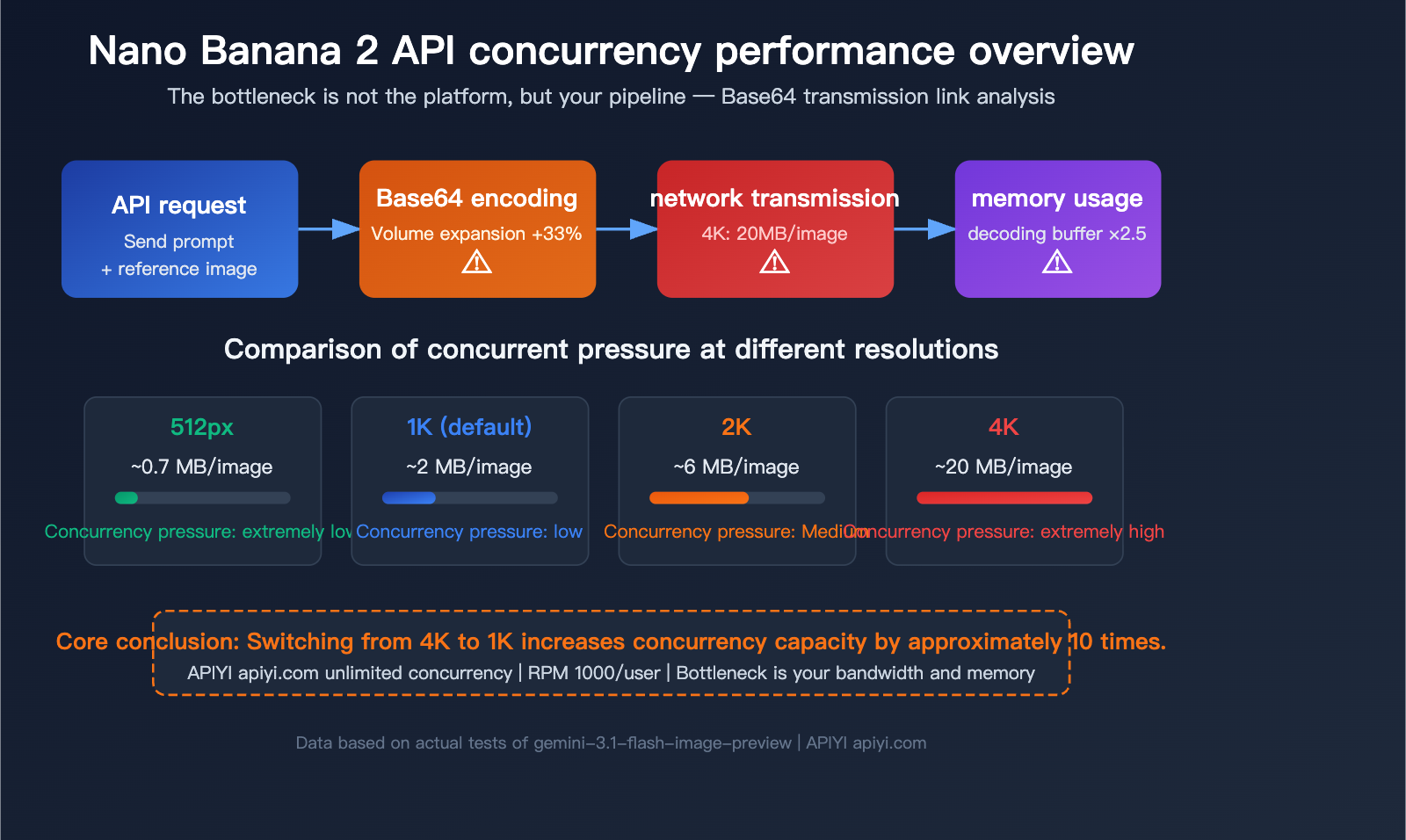
The real bottleneck is this: The Gemini image generation API uses Base64 encoding to transmit image data. This means every image upload and download is a massive JSON string rather than an efficient binary stream. This puts immense pressure on your bandwidth and memory.
Why Base64 is the Core Concurrency Bottleneck
The official Gemini API (including the gemini-3.1-flash-image-preview used by Nano Banana 2) only supports Base64 encoding for image transmission. Base64 encoding inflates binary data by approximately 33%, which means:
| Resolution | Original Image Size | After Base64 Encoding | Single API Response Size |
|---|---|---|---|
| 512px (0.5K) | ~400 KB | ~530 KB | ~600 KB – 1 MB |
| 1K (Default) | ~1.5 MB | ~2 MB | ~2 MB |
| 2K | ~4 MB | ~5.3 MB | ~5-8 MB |
| 4K | ~15 MB | ~20 MB | ~20 MB |
A 4K image API response is 20 MB. If you initiate 10 concurrent 4K requests simultaneously, you'll have 200 MB of response data flowing through your network and memory.
Nano Banana 2 API Parameter Quick Reference
| Parameter | Value |
|---|---|
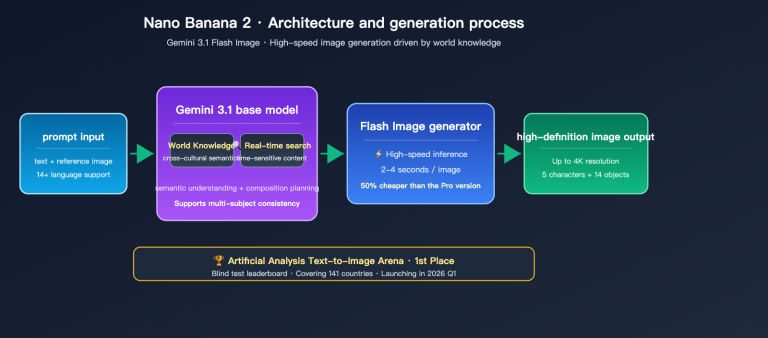
| Model ID | gemini-3.1-flash-image-preview |
| Input Context | 131,072 tokens |
| Output Limit | 32,768 tokens |
| Supported Resolutions | 512px / 1K / 2K / 4K |
| Supported Aspect Ratios | 14 types (1:1, 3:2, 4:3, 16:9, 9:16, 21:9, etc.) |
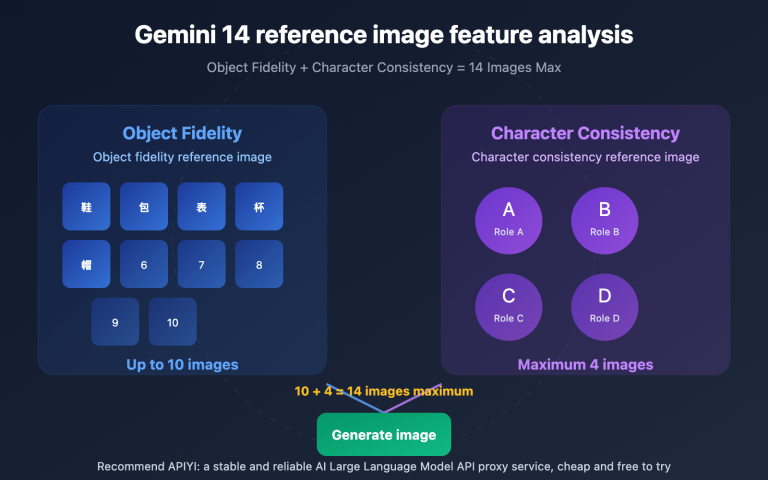
| Max Reference Images | 14 (10 objects + 4 characters) |
| Generation Speed | 3-5 seconds/image |
| APIYI RPM | 1000/user (quota can be increased) |
| APIYI Concurrency Limit | Unlimited |
🎯 Technical Advice: The APIYI (apiyi.com) platform places no limits on Nano Banana 2 concurrency, and the RPM supports 1,000 requests per user. The bottleneck lies in your local environment—your bandwidth and memory determine how much concurrency you can actually handle.
Calculating Nano Banana 2 API Concurrency: Choosing the Best Plan for Your Environment
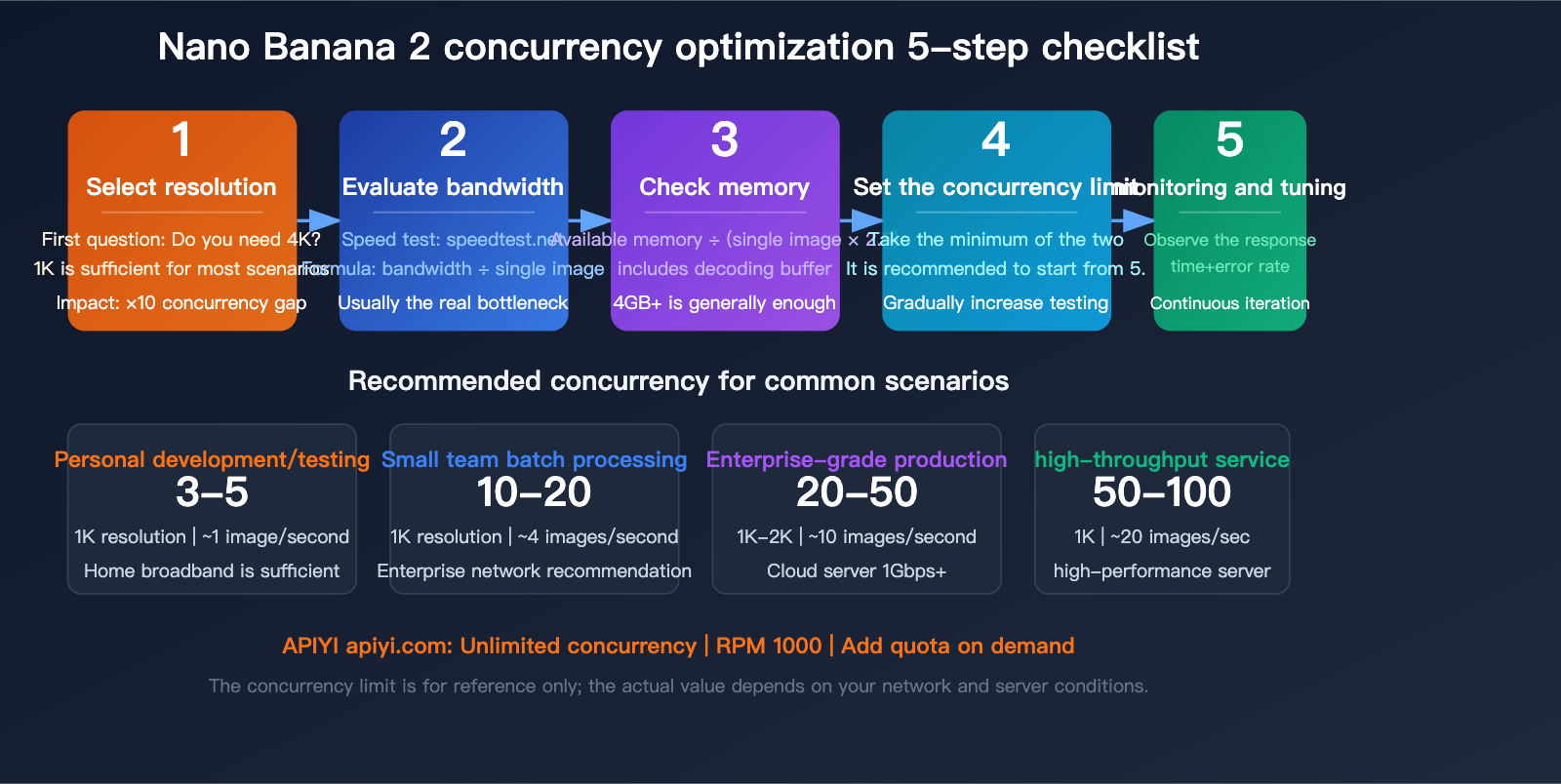
You shouldn't just guess your concurrency limit; it needs to be calculated based on your actual environment. There are three key metrics: bandwidth, memory, and target resolution.
Step 1: Confirm Your Bandwidth
Bandwidth determines how much data can be transmitted simultaneously. The formula is:
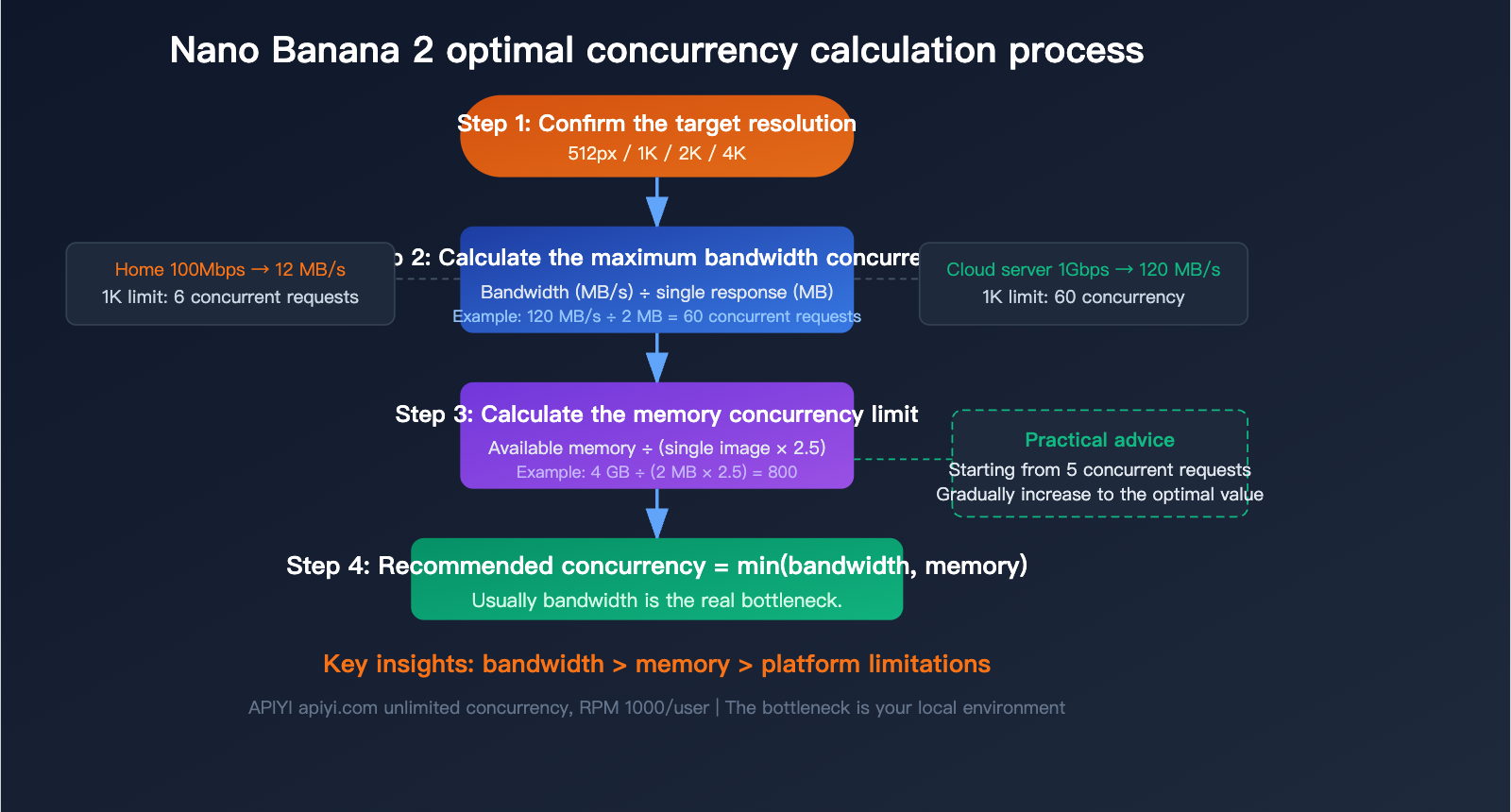
Max Concurrency (Bandwidth) = Available Bandwidth (MB/s) ÷ Single Response Size (MB)
| Network Environment | Available Bandwidth | 1K Concurrency Limit | 2K Concurrency Limit | 4K Concurrency Limit |
|---|---|---|---|---|
| Home Broadband (100Mbps) | ~12 MB/s | 6 | 2 | 0-1 |
| Enterprise Network (500Mbps) | ~60 MB/s | 30 | 10 | 3 |
| Cloud Server (1Gbps) | ~120 MB/s | 60 | 20 | 6 |
| High-Performance Server (10Gbps) | ~1200 MB/s | 600 | 200 | 60 |
Step 2: Confirm Your Available Memory
Each concurrent request must hold the full Base64 response data in memory until decoding and disk writing are complete. The memory formula is:
Required Memory = Concurrency × Single Response Size × 2.5 (Decoding Buffer Factor)
We multiply by 2.5 because during Base64 decoding, both the original string and the decoded binary data exist in memory simultaneously, plus the overhead of JSON parsing.
| Available Memory | 1K Concurrency Limit | 2K Concurrency Limit | 4K Concurrency Limit |
|---|---|---|---|
| 2 GB | 400 | 100 | 40 |
| 4 GB | 800 | 200 | 80 |
| 8 GB | 1600 | 400 | 160 |
Step 3: Take the Lower of the Two
Recommended Concurrency = min(Bandwidth Limit, Memory Limit)
In practice, for most scenarios, bandwidth is the true bottleneck, not memory.
Recommended Concurrency for Actual Scenarios
| Scenario | Recommended Resolution | Recommended Concurrency | Expected Throughput |
|---|---|---|---|
| Personal Dev/Testing | 1K | 3-5 | ~1 image/sec |
| Small Team Batch Generation | 1K | 10-20 | ~4 images/sec |
| Enterprise Production | 1K-2K | 20-50 | ~10 images/sec |
| High-Throughput Image Service | 1K | 50-100 | ~20 images/sec |
| Need 4K HD Images | 4K | 3-5 | ~1 image/sec |
💡 Practical Advice: If you're unsure about how much concurrency to set, start with 5, then gradually increase to 10 or 20 while monitoring response times and error rates. If response times rise significantly or you start seeing timeouts, you're approaching your bottleneck. When testing on the APIYI (apiyi.com) platform, don't worry about platform-side limits; just focus on your local performance.
Nano Banana 2 API Quick Start: 3 Steps to Integration
Step 1: Install Dependencies
pip install openai Pillow
Step 2: Minimal Invocation Example
import openai
import base64
from pathlib import Path

client = openai.OpenAI(
    api_key="YOUR_API_KEY",
    base_url="https://api.apiyi.com/v1"  # APIYI unified interface
)

response = client.chat.completions.create(
    model="gemini-3.1-flash-image-preview",
    messages=[
        {
            "role": "user",
            "content": "Generate a cute cat wearing sunglasses on a beach"
        }
    ]
)

# Extract Base64 image data and save
for part in response.choices[0].message.content:
    if hasattr(part, "image") and part.image:
        img_bytes = base64.b64decode(part.image.data)
        Path("output.png").write_bytes(img_bytes)
        print("Image saved: output.png")
View full code for concurrent batch generation
import openai
import base64
import asyncio
import aiohttp
import time
from pathlib import Path
from concurrent.futures import ThreadPoolExecutor

client = openai.OpenAI(
    api_key="YOUR_API_KEY",
    base_url="https://api.apiyi.com/v1"  # APIYI unified interface
)

# Configuration parameters
MAX_CONCURRENCY = 10       # Maximum concurrency, adjust based on your bandwidth
OUTPUT_DIR = Path("output")
OUTPUT_DIR.mkdir(exist_ok=True)

def generate_single_image(prompt: str, index: int) -> dict:
    """Generate a single image and save it immediately to free up memory"""
    start = time.time()
    try:
        response = client.chat.completions.create(
            model="gemini-3.1-flash-image-preview",
            messages=[{"role": "user", "content": prompt}]
        )

        for part in response.choices[0].message.content:
            if hasattr(part, "image") and part.image:
                # Decode and save immediately to prevent Base64 strings from occupying memory
                img_bytes = base64.b64decode(part.image.data)
                filepath = OUTPUT_DIR / f"image_{index:04d}.png"
                filepath.write_bytes(img_bytes)

                elapsed = time.time() - start
                size_mb = len(img_bytes) / (1024 * 1024)
                return {
                    "index": index,
                    "success": True,
                    "time": elapsed,
                    "size_mb": size_mb,
                    "path": str(filepath)
                }

    except Exception as e:
        return {
            "index": index,
            "success": False,
            "error": str(e),
            "time": time.time() - start
        }

def batch_generate(prompts: list[str]):
    """Use a thread pool for concurrent image generation"""
    results = []
    total = len(prompts)
    completed = 0

    with ThreadPoolExecutor(max_workers=MAX_CONCURRENCY) as executor:
        futures = {
            executor.submit(generate_single_image, p, i): i
            for i, p in enumerate(prompts)
        }

        for future in futures:
            result = future.result()
            completed += 1
            status = "OK" if result["success"] else "FAIL"
            print(f"[{completed}/{total}] {status} - {result['time']:.1f}s")
            results.append(result)

    # Statistics
    success = [r for r in results if r["success"]]
    print(f"\nFinished: {len(success)}/{total} successful")
    if success:
        avg_time = sum(r["time"] for r in success) / len(success)
        total_size = sum(r["size_mb"] for r in success)
        print(f"Average time: {avg_time:.1f}s | Total size: {total_size:.1f} MB")

# Usage example
prompts = [
    "A futuristic city at sunset",
    "A cozy coffee shop interior",
    "An underwater coral reef scene",
    "A mountain landscape with aurora",
    "A cute robot playing guitar",
]

batch_generate(prompts)
Step 3: Uploading a Reference Image (Image-to-Image)
Image-to-image scenarios require uploading a reference image, also using Base64 encoding:
import base64

# Read local image and convert to Base64
with open("reference.png", "rb") as f:
    img_base64 = base64.b64encode(f.read()).decode()

response = client.chat.completions.create(
    model="gemini-3.1-flash-image-preview",
    messages=[
        {
            "role": "user",
            "content": [
                {
                    "type": "text",
                    "text": "Convert this photo into a watercolor painting style"
                },
                {
                    "type": "image_url",
                    "image_url": {
                        "url": f"data:image/png;base64,{img_base64}"
                    }
                }
            ]
        }
    ]
)
Note: When uploading a reference image, the total request size must not exceed 20 MB. If the reference image is large, we recommend compressing it to below 1K resolution first.
5 Practical Tips for Nano Banana 2 API Concurrency Optimization
Tip 1: Choose Resolution on Demand, Avoid Default 4K
This is the simplest and most effective optimization. Many developers default to 4K requests, but 1K is sufficient for most scenarios:
| Use Case | Recommended Resolution | Single File Size | Concurrency Efficiency |
|---|---|---|---|
| Social Media | 1K | ~2 MB | High |
| E-commerce | 2K | ~6 MB | Medium |
| Print/Poster | 4K | ~20 MB | Low |
| Preview/Thumbnail | 512px | ~0.7 MB | Very High |
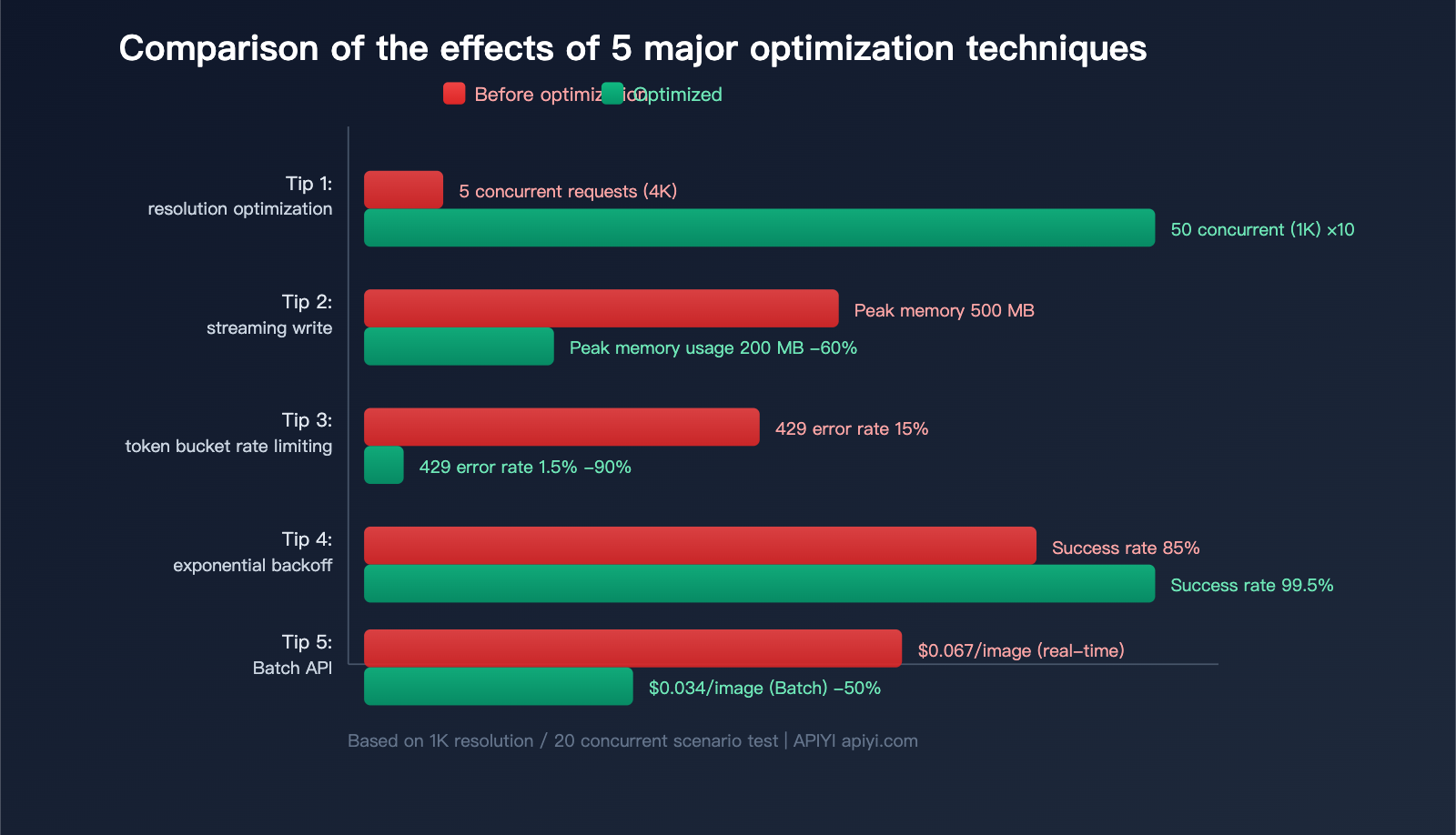
Switching from 4K to 1K increases concurrency capacity by about 10x under the same conditions.
Tip 2: Streaming Reception + Immediate Disk Writing
Don't wait for the entire JSON response to be received before processing. Use streaming to decode and write to disk as data arrives:
import gc

def generate_and_save(prompt, filepath):
    """Generate image and save immediately, actively releasing memory"""
    response = client.chat.completions.create(
        model="gemini-3.1-flash-image-preview",
        messages=[{"role": "user", "content": prompt}]
    )

    for part in response.choices[0].message.content:
        if hasattr(part, "image") and part.image:
            # Decode immediately
            img_bytes = base64.b64decode(part.image.data)
            # Clear Base64 string reference immediately
            del part.image.data
            # Write to disk immediately
            Path(filepath).write_bytes(img_bytes)
            del img_bytes
            gc.collect()  # Manually trigger garbage collection
Tip 3: Token Bucket Rate Limiter to Control Concurrency
Don't send all requests at once; use the token bucket algorithm to distribute requests evenly:
import threading
import time

class TokenBucket:
    """Token bucket rate limiter"""
    def __init__(self, rate: float, capacity: int):
        self.rate = rate          # Refill rate per second
        self.capacity = capacity  # Bucket capacity
        self.tokens = capacity
        self.lock = threading.Lock()
        self.last_refill = time.monotonic()

    def acquire(self):
        while True:
            with self.lock:
                now = time.monotonic()
                elapsed = now - self.last_refill
                self.tokens = min(
                    self.capacity,
                    self.tokens + elapsed * self.rate
                )
                self.last_refill = now
                if self.tokens >= 1:
                    self.tokens -= 1
                    return
            time.sleep(0.05)

# Usage: Max 10 requests per second, peak 20
limiter = TokenBucket(rate=10, capacity=20)

def rate_limited_generate(prompt, index):
    limiter.acquire()  # Wait for token
    return generate_single_image(prompt, index)
Tip 4: Exponential Backoff for 429 Errors
When encountering rate limits (HTTP 429), use an exponential backoff strategy:
import random

def generate_with_retry(prompt, index, max_retries=5):
    """Retry mechanism with exponential backoff"""
    for attempt in range(max_retries):
        try:
            return generate_single_image(prompt, index)
        except openai.RateLimitError:
            delay = min(60, (2 ** attempt)) + random.uniform(0, 0.5)
            print(f"Rate limited, retrying in {delay:.1f}s...")
            time.sleep(delay)
    return {"index": index, "success": False, "error": "max retries"}
Tip 5: Use Batch API for Bulk Tasks to Save 50%
For bulk tasks that don't require real-time results, Nano Banana 2 supports the Batch API, cutting costs in half:
| Mode | 1K Image Unit Price | 4K Image Unit Price | Latency | Suitable Scenario |
|---|---|---|---|---|
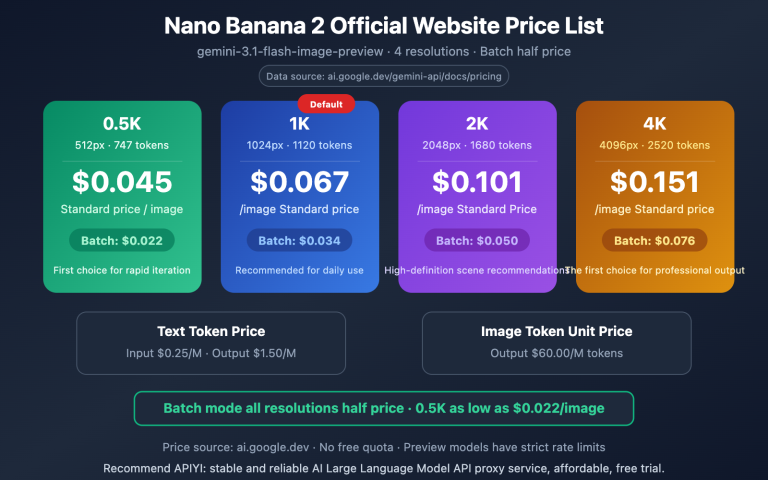
| Real-time API | $0.067 | $0.151 | 3-5s | Interactive apps |
| Batch API | $0.034 | $0.076 | Minutes-Hours | Bulk pre-generation |
💰 Cost Optimization: If your scenario allows for waiting, calling the Batch API via APIYI (apiyi.com) can save 50% on costs. This is especially suitable for bulk e-commerce product image generation, marketing material pre-production, etc.
Nano Banana 2 API: A Deep Dive into Resolution Costs and Token Consumption
Understanding token consumption is key to keeping your costs in check. Here’s the breakdown:
| Resolution | Output Token Consumption | Standard Price | Batch Price (50% off) | Cost per 100 Images |
|---|---|---|---|---|
| 512px | 747 tokens | $0.045 | $0.022 | $4.50 / $2.20 |
| 1K | 1,120 tokens | $0.067 | $0.034 | $6.70 / $3.40 |
| 2K | 1,680 tokens | $0.101 | $0.050 | $10.10 / $5.00 |
| 4K | 2,520 tokens | $0.151 | $0.076 | $15.10 / $7.60 |
🚀 Quick Start: You can call Nano Banana 2 via the APIYI (apiyi.com) platform. We offer the same pricing as the official source, with no concurrency limits and support for 1,000 RPM per user. Sign up now to get your testing credits.
Nano Banana 2 vs. Previous Generations
| Comparison Item | Nano Banana | Nano Banana Pro | Nano Banana 2 |
|---|---|---|---|
| Model ID | gemini-2.5-flash (Image) | gemini-3-pro-image-preview | gemini-3.1-flash-image-preview |
| Max Resolution | 1024×1024 | 4K | 4K |
| 1K Unit Price | $0.039 | $0.134 | $0.067 |
| 4K Unit Price | N/A | $0.240 | $0.151 |
| Generation Speed | 2-4 seconds | 5-8 seconds | 3-5 seconds |
| Batch API | No | No | Yes (50% off) |
| Max Reference Images | 5 | 10 | 14 |
| Available on APIYI | ✅ | ✅ | ✅ |
Compared to the Pro version, Nano Banana 2 offers a 37% reduction in 4K pricing and a 40% boost in speed, all while adding support for the Batch API.
Nano Banana 2 API Concurrency Performance Monitoring
When running concurrent tasks, it's recommended to monitor the following metrics:
import psutil
import time

class PerformanceMonitor:
    """Concurrency performance monitor"""
    def __init__(self):
        self.start_time = time.time()
        self.request_count = 0
        self.total_bytes = 0
        self.errors = 0

    def record(self, success: bool, size_bytes: int = 0):
        self.request_count += 1
        if success:
            self.total_bytes += size_bytes
        else:
            self.errors += 1

    def report(self):
        elapsed = time.time() - self.start_time
        mem = psutil.Process().memory_info().rss / (1024**2)

        print(f"--- Performance Report ---")
        print(f"Runtime: {elapsed:.1f}s")
        print(f"Completed requests: {self.request_count}")
        print(f"Success rate: {(self.request_count-self.errors)/max(1,self.request_count)*100:.1f}%")
        print(f"Throughput: {self.request_count/elapsed:.2f} req/s")
        print(f"Data volume: {self.total_bytes/(1024**2):.1f} MB")
        print(f"Bandwidth usage: {self.total_bytes/(1024**2)/elapsed:.1f} MB/s")
        print(f"Memory usage: {mem:.0f} MB")
FAQ
Q1: Does the APIYI platform impose concurrency limits on Nano Banana 2?
The APIYI platform does not limit the concurrency for Nano Banana 2. The default RPM (requests per minute) is 1,000 per user, and you can contact customer support if you need a higher quota. The actual concurrency bottleneck usually depends on your local bandwidth and memory. We recommend running tests via the APIYI apiyi.com platform to find the optimal concurrency for your specific environment.
Q2: Why does the Gemini image API only support Base64 transmission?
This is a current design choice for the Google Gemini API. Base64 encoding allows image data to be embedded directly into JSON responses without needing extra file storage or CDN distribution. The downside is that it increases data size by about 33%, which isn't ideal for bandwidth and memory. The developer community has provided feedback to Google requesting JPEG output and temporary download URLs, but these features haven't been implemented yet.
Q3: Is there a significant difference between 1K and 4K resolution?
It depends on your use case. For social media images, web displays, or app interfaces, 1K resolution is usually sufficient, and the difference is barely noticeable to the naked eye. 4K is primarily for printing, posters, high-definition wallpapers, or scenarios where you need to zoom in to see fine details. We suggest testing with 1K first and only switching to 4K if you confirm you need higher clarity. You can flexibly switch resolutions at any time via APIYI apiyi.com.
Q4: What should I do if I encounter frequent 429 errors?
A 429 error means you've hit a rate limit. Solutions include: (1) reducing the concurrency; (2) using a token bucket rate limiter to distribute requests evenly; (3) implementing exponential backoff retries; or (4) switching to the Batch API for bulk tasks. If you encounter rate limiting on the APIYI platform, feel free to contact customer support to increase your RPM quota.
Q5: How can I estimate the total cost of batch generation?
Use the formula: Total Cost = Number of Images × Unit Price. For example, generating 1,000 1K images: Standard mode costs 1,000 × $0.067 = $67, while Batch mode costs 1,000 × $0.034 = $34. Pricing on APIYI apiyi.com is consistent with official rates and supports flexible top-ups, making it perfect for pay-as-you-go needs.
Summary: Finding the Best Concurrency Strategy for Your Nano Banana 2 API
The key to optimizing concurrency for the Nano Banana 2 API isn't about "how much the platform allows," but rather "how much your pipeline can handle." Keep these 3 key points in mind:
- Resolution is Everything: Scaling down from 4K to 1K can boost your concurrency by 10x and cut costs by 56%.
- Bandwidth is the Real Bottleneck: Base64 encoding makes every image 33% larger than its actual size, putting far more pressure on your bandwidth than on your CPU.
- Scale Up Gradually: Start with 5 concurrent requests, monitor your response times and error rates, and then slowly dial it up to the sweet spot.
We recommend using the APIYI (apiyi.com) platform to call the Nano Banana 2 API. It offers unlimited concurrency, 1000 RPM per user, and pricing that matches the official rates—letting you focus on optimizing your pipeline performance without worrying about platform-side limitations.
References
-
Gemini 3.1 Flash Image Preview: Model specifications and API documentation
- Link:
ai.google.dev/gemini-api/docs/models/gemini-3.1-flash-image-preview
- Link:
-
Gemini Image Generation API: User guide for the image generation API
- Link:
ai.google.dev/gemini-api/docs/image-generation
- Link:
-
Gemini API Rate Limits: Official rate limit documentation
- Link:
ai.google.dev/gemini-api/docs/rate-limits
- Link:
-
APIYI Nano Banana 2 Integration Documentation: Unified API interface specifications
- Link:
api.apiyi.com
- Link:
📝 Author: APIYI Team | The technical team at APIYI specializes in the AI image generation API field. Through apiyi.com, we provide developers with Nano Banana 2 API access featuring unlimited concurrency and flexible billing.