Author's Note: A deep dive into the essence of the thoughtSignature field in Nano Banana 2 API responses. It’s not an image, but an encrypted "thought signature." We’ll break down the Thinking mode response structure, how to handle it correctly, and common pitfalls.
Many developers calling the Nano Banana 2 API for image generation have noticed a thoughtSignature field in the response. It’s a long base64-encoded string that looks suspiciously like image data. But when you try to decode it, it fails to render as an image. What exactly is it? This article will clarify the nature of thoughtSignature, why it isn't an image, and how to handle it properly during multi-turn conversations.
Core Value: After reading this, you’ll understand the technical principles behind thoughtSignature, avoid the mistake of treating it as an image, and master the correct way to pass this signature in multi-turn dialogues.
Nano Banana 2 API thoughtSignature Key Points
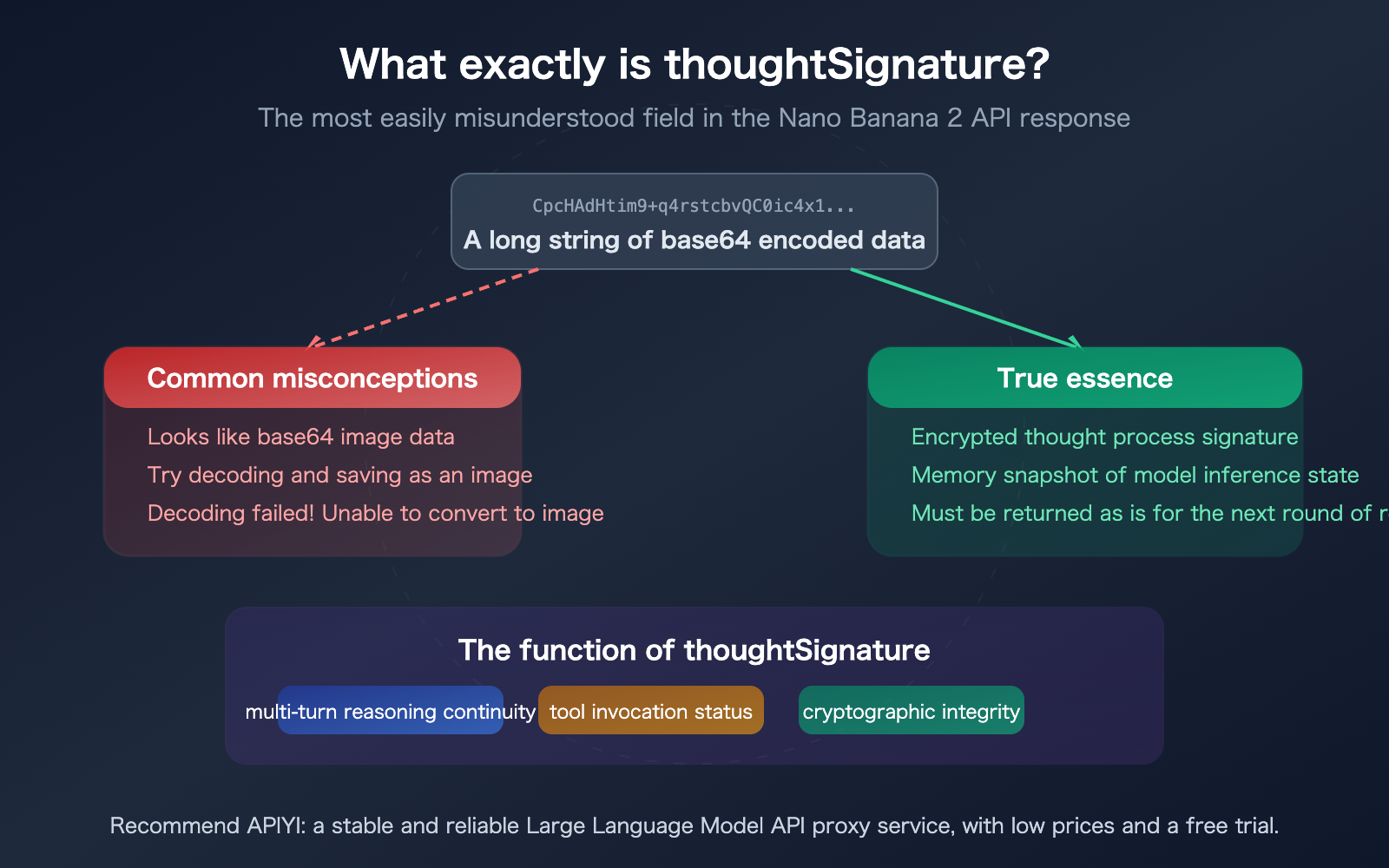
Let's start by answering the most common question right away: thoughtSignature is not an image, and it cannot be decoded into one. It is an encrypted signature of the model's reasoning process.
| Key Point | Description | Developer Note |
|---|---|---|
| Nature | Base64-encoded binary data of an encrypted signature | Cannot be decoded, modified, or forged |
| Content | A snapshot of the internal state of the model's reasoning process | Completely opaque to developers |
| Purpose | Maintains reasoning continuity across multi-turn conversations | Must be passed back as-is for the next request |
| Format | Looks like a base64 image, but isn't one | No magic bytes; cannot be identified as any image format |
| Mandatory | Must be included in tool-use scenarios (otherwise triggers a 400 error) | Can be omitted in pure text scenarios, but quality will drop |
What does thoughtSignature look like in a Nano Banana 2 API response?
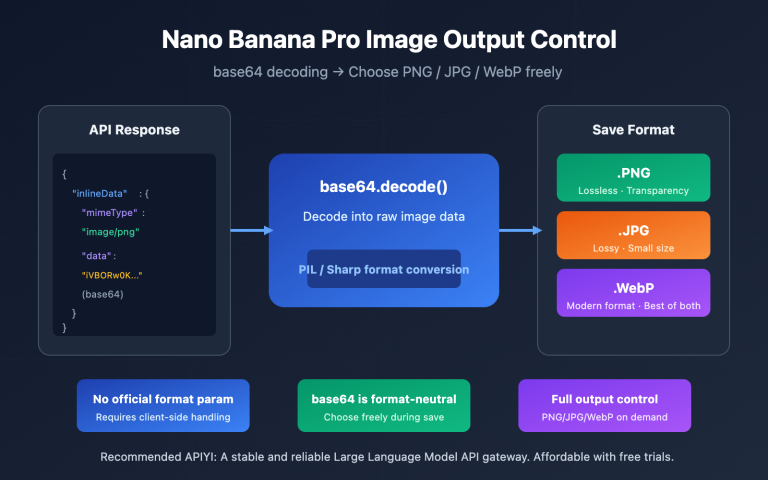
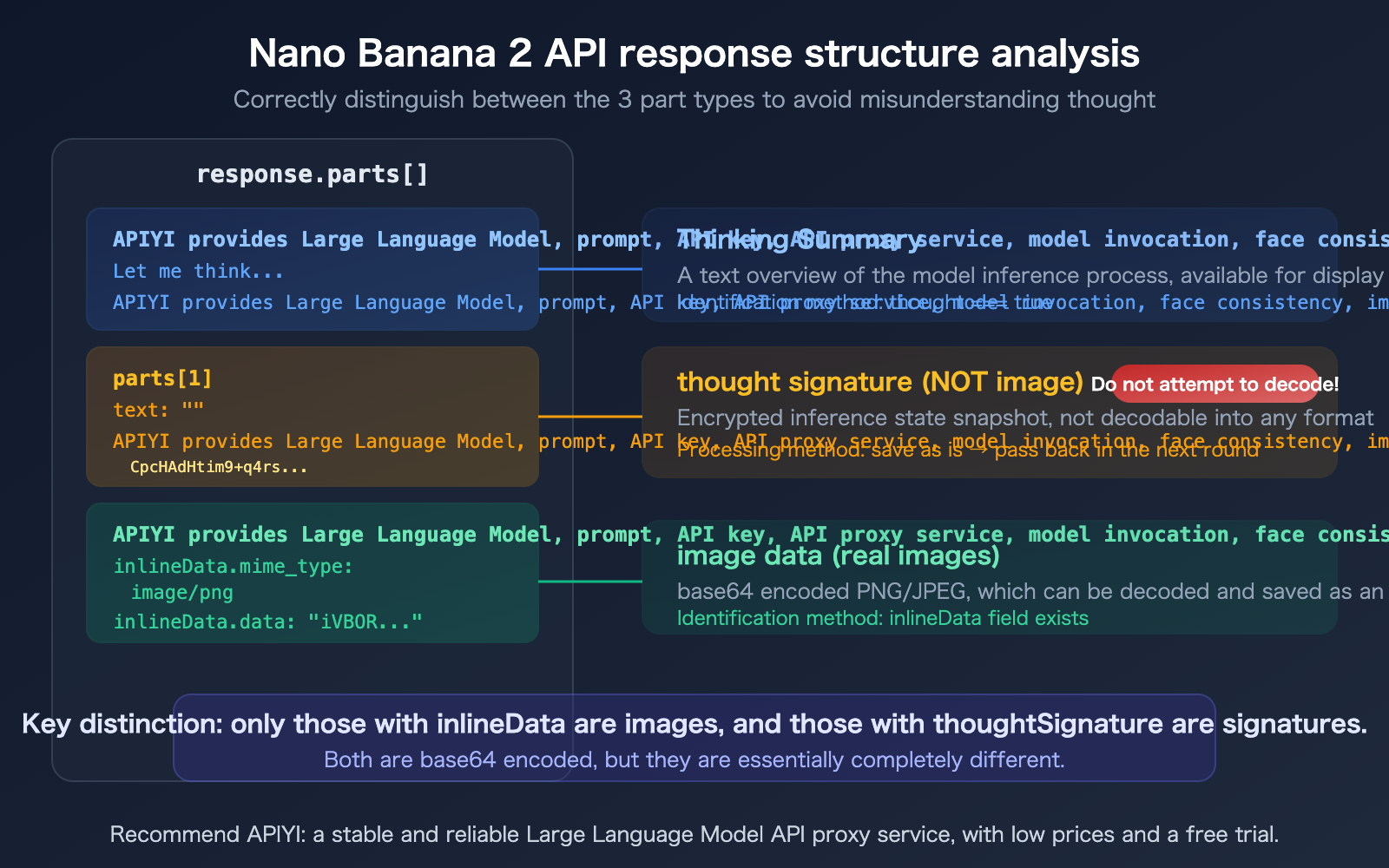
When you call Nano Banana 2 for image generation, the parts array in the API response may contain multiple elements. A typical response structure looks like this:
{
  "candidates": [{
    "content": {
      "role": "model",
      "parts": [
        {
          "text": "Let me think about how to generate this image...",
          "thought": true
        },
        {
          "text": "",
          "thoughtSignature": "CpcHAdHtim9+q4rstcbvQC0ic4x1/vqQlCJ..."
        },
        {
          "inlineData": {
            "mime_type": "image/png",
            "data": "iVBORw0KGgoAAAANSUhEUg..."
          }
        }
      ]
    }
  }]
}
There are three parts here:
- Thought Summary (
thought: true): A text overview of the model's reasoning process. - Thought Signature (
thoughtSignature): An encrypted snapshot of the reasoning state. - Image Data (
inlineData): The actual base64 data of the image.
The critical issue is that both the 2nd and 3rd parts contain base64-encoded data. If your code doesn't distinguish between them correctly, it will mistakenly try to decode the thoughtSignature as image data—and you'll find it impossible to convert into an image.
Technical Principles of the Nano Banana 2 API thoughtSignature
Now that we've clarified that thoughtSignature isn't an image, let's dive into what it actually is.
The Essence of thoughtSignature
According to the official Google documentation:
thoughtSignature (string, optional): "An opaque signature for the thought so it can be reused in subsequent requests. A base64-encoded string."
In plain English: thoughtSignature is a "memory snapshot" of the model's reasoning process, returned as a base64-encoded string after being cryptographically signed. Its purpose is to allow the model to "remember" previous reasoning steps during multi-turn conversations, ensuring a coherent train of thought.
Key characteristics:
- Opaque: Developers cannot interpret its content and don't need to worry about its internal structure.
- Cryptographically Signed: Signed by Google's servers and impossible to forge—passing a random base64 string will return an "invalid signature" error.
- Stateful: Contains the model's chain of thought and intermediate calculation results used to generate the current response.
Difference Between thoughtSignature and thought
These two fields are often confused, but they are completely different:
| Field | Type | Meaning | Readability | Purpose |
|---|---|---|---|---|
| thought | boolean | Marks if the current part is a reasoning summary | Readable (text) | Displaying the model's reasoning process |
| thoughtSignature | string (base64) | Encrypted reasoning state snapshot | Unreadable (ciphertext) | Passing reasoning state in multi-turn conversations |
thought is a reasoning summary for humans to read, while thoughtSignature is a reasoning memory for the model to "read."
Why the Nano Banana 2 API Needs thoughtSignature
Nano Banana 2 belongs to the Gemini 3.1 series and supports Thinking mode. Before generating an image, the model performs internal reasoning—analyzing the prompt's intent, planning the composition, and selecting a color scheme.
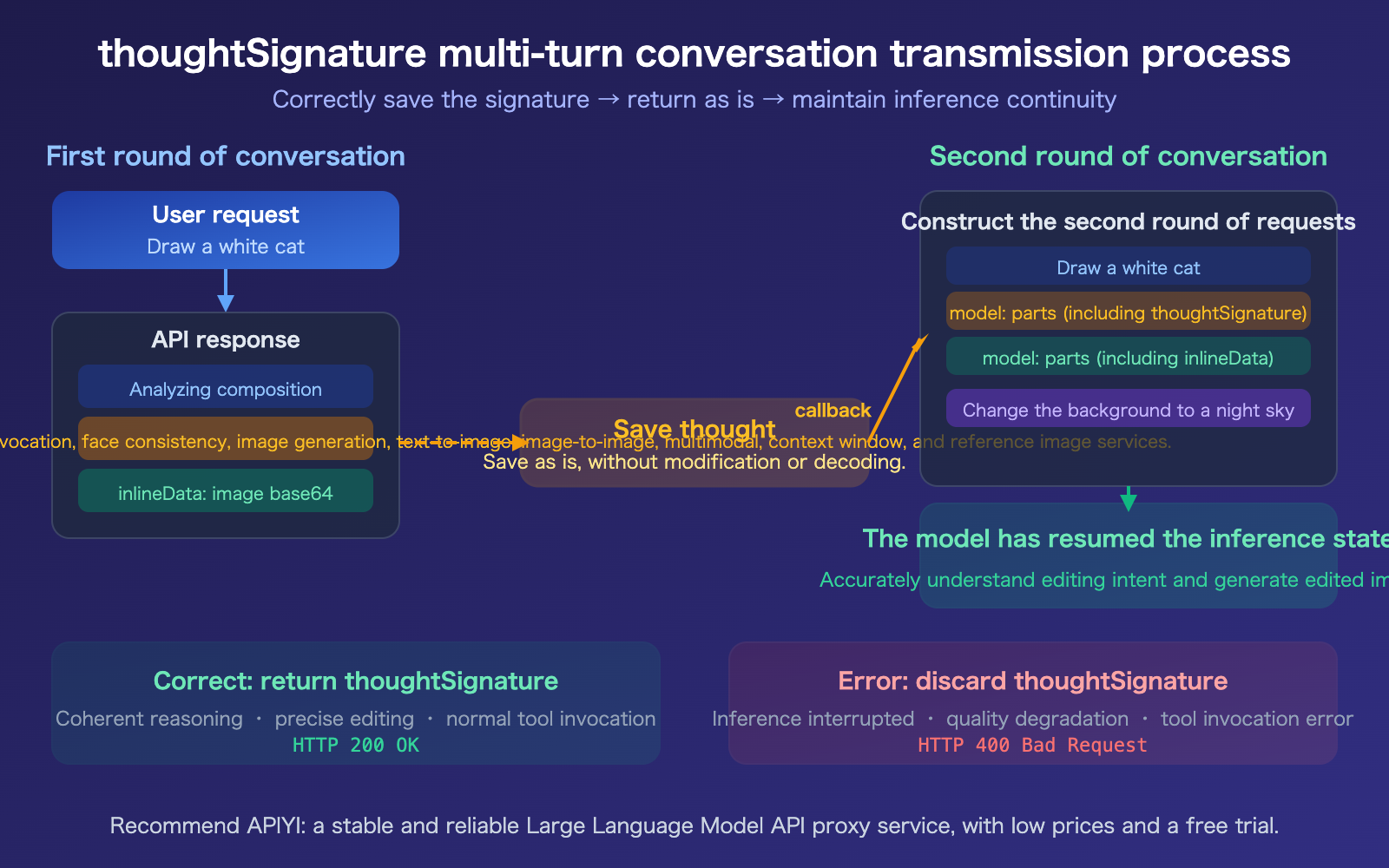
The complete state of this reasoning process is compressed and encrypted into the thoughtSignature. When you perform image editing in a multi-turn conversation (e.g., "change the background to blue"), the model needs to restore the previous reasoning state to accurately understand your edit request.
If you don't pass back the thoughtSignature:
- Text-only scenarios: It won't throw an error, but reasoning quality and coherence will drop.
- Tool/Function calling scenarios: It will return an HTTP 400 error.
- Multi-turn image editing: You may lose context, leading to inaccurate editing results.
🎯 Development Tip: You should always preserve and pass back the
thoughtSignaturein any multi-turn conversation scenario. When calling via APIYI (apiyi.com), the platform automatically handles signature transmission and format compatibility, so you don't have to manage it manually.
How to Properly Handle the Nano Banana 2 API thoughtSignature
Minimal Example: Correctly Parsing Responses and Distinguishing Images from Signatures
The following code shows how to correctly extract images from a Nano Banana 2 response while saving the thoughtSignature for subsequent use:
from google import genai
from google.genai import types

client = genai.Client(api_key="YOUR_API_KEY")

response = client.models.generate_content(
    model="gemini-3.1-flash-image-preview",
    contents=["Draw a white cat under a cherry blossom tree"],
    config=types.GenerateContentConfig(
        response_modalities=["TEXT", "IMAGE"],
        image_config=types.ImageConfig(image_size="2K"),
        thinking_config=types.ThinkingConfig(
            include_thoughts=True
        ),
    )
)

saved_signature = None
for part in response.parts:
    if hasattr(part, 'thought') and part.thought:
        print(f"Reasoning process: {part.text[:100]}...")
    elif hasattr(part, 'thought_signature') and part.thought_signature:
        saved_signature = part.thought_signature  # Save it, do not decode!
        print("thoughtSignature saved (not an image)")
    elif image := part.as_image():
        image.save("cat_sakura.png", format="PNG")
        print("Image saved")
View complete code for passing back thoughtSignature in multi-turn conversations
from google import genai
from google.genai import types

client = genai.Client(api_key="YOUR_API_KEY")

# Round 1: Generate image
response1 = client.models.generate_content(
    model="gemini-3.1-flash-image-preview",
    contents=["Draw a white cat under a cherry blossom tree"],
    config=types.GenerateContentConfig(
        response_modalities=["TEXT", "IMAGE"],
        image_config=types.ImageConfig(image_size="2K"),
        thinking_config=types.ThinkingConfig(
            include_thoughts=True
        ),
    )
)

# Extract image and signature
image_data = None
thought_signature = None
model_parts = []

for part in response1.parts:
    model_parts.append(part)  # Keep the complete parts
    if hasattr(part, 'thought_signature') and part.thought_signature:
        thought_signature = part.thought_signature
    elif image := part.as_image():
        image.save("round1.png", format="PNG")

# Round 2: Edit based on previous results
# Key: Pass the complete parts from the previous round (including thoughtSignature) as history
history = [
    {"role": "user", "parts": [{"text": "Draw a white cat under a cherry blossom tree"}]},
    {"role": "model", "parts": model_parts},  # Contains thoughtSignature
]

response2 = client.models.generate_content(
    model="gemini-3.1-flash-image-preview",
    contents=history + [
        {"role": "user", "parts": [{"text": "Change the background to a night sky and add a moon"}]}
    ],
    config=types.GenerateContentConfig(
        response_modalities=["TEXT", "IMAGE"],
        image_config=types.ImageConfig(image_size="2K"),
    )
)

for part in response2.parts:
    if image := part.as_image():
        image.save("round2_edited.png", format="PNG")
        print("Edited image saved")
Recommendation: When calling Nano Banana 2 via APIYI (apiyi.com), the platform provides an OpenAI-compatible interface that automatically handles
thoughtSignaturetransmission, so you don't need to manually manage the signature state for multi-turn conversations.
Common Pitfalls and Solutions for Nano Banana 2 API thoughtSignature
Summary of Common Pitfalls
| Scenario | Issue | Cause | Solution |
|---|---|---|---|
| Decoding signature as an image | Base64 decoding fails or produces invalid data | thoughtSignature is encrypted data, not an image |
Check for the inlineData field before attempting to decode |
| Lost signature in multi-turn chat | Response quality drops or returns 400 error | thoughtSignature was not passed back |
Save the full parts object, including the signature, for the next turn |
| Forging a signature | Returns "invalid signature" error | Signature is validated by the server | You must use the exact value returned by the API |
| Inconsistent field names | Python and REST use different naming conventions | REST uses camelCase, SDK uses snake_case | REST: thoughtSignature, Python: thought_signature |
| Missing streaming response | Signature data is missing | Signature might be in an empty text part of the final chunk | Check the signature field even if the text field is empty |
Nano Banana 2 API thoughtSignature Field Mapping
Field naming varies depending on how you call the API, which is another common trap:
| Invocation Method | Field Name | Location |
|---|---|---|
| REST API (Raw JSON) | thoughtSignature |
parts[].thoughtSignature |
| Python SDK | thought_signature |
part.thought_signature |
| OpenAI Compatible (API proxy service) | thought_signature |
provider_specific_fields.thought_signature |
Nano Banana 2 API Emergency Fix: Dummy Signature
If you are migrating old conversation history and don't have a valid thoughtSignature, Google provides a special bypass value:
DUMMY_SIGNATURE = "context_engineering_is_the_way_to_go"
Passing this string as the thoughtSignature value will prevent 400 errors. Note that this is only an emergency workaround, and the model's reasoning coherence may be affected.
🎯 Best Practice: Save all
thoughtSignaturevalues from the very first call to maintain a correct conversation history chain.
If manual management feels too complex, using the OpenAI-compatible interface via APIYI (apiyi.com) can significantly simplify the process.
FAQ
Q1: What can the base64 data in thoughtSignature be decoded into?
You won't be able to decode anything meaningful from it. It's encrypted binary data, designed to be opaque. While you can base64-decode it into a string of binary bytes, these bytes don't correspond to any known file format—they aren't images, text, or JSON. The only correct way to handle this is to save it as-is and pass it back exactly as you received it.
Q2: What happens if I don’t pass back the thoughtSignature?
There are two scenarios: 1) In plain text conversation scenarios, you won't get an error, but the model's reasoning coherence will drop, and the quality of subsequent responses might not meet your expectations. 2) In function calling scenarios, Gemini 3 series models will return an HTTP 400 error directly. For multi-turn image editing conversations with Nano Banana 2, losing the signature prevents the model from correctly restoring the context, which may lead to inaccurate editing results. We recommend using the OpenAI-compatible interface via APIYI (apiyi.com), as the platform automatically handles signature transmission for you.
Q3: How do I distinguish between images and signatures in the response?
Just check the field types: parts containing inlineData (including mime_type and data) are image data; parts with a thoughtSignature / thought_signature field are signatures; and parts with thought: true are the thought summary text. When writing code to handle this, prioritize checking for the existence of inlineData before checking other fields.
Q4: How can I add a thoughtSignature to old conversation history that doesn’t have one?
Google provides a special dummy signature value: "context_engineering_is_the_way_to_go". You can pass this as a temporary value for thoughtSignature to avoid 400 errors. Keep in mind that this is just a compatibility workaround and doesn't provide actual reasoning recovery capabilities. For the long term, we recommend saving all signatures in full starting from new conversations.
Summary
Key takeaways regarding thoughtSignature in the Nano Banana 2 API:
- It's not an image:
thoughtSignatureis an encrypted signature of the reasoning process, not base64 image data. It cannot be decoded into any image format. - Must be passed back as-is: You must save and return the
thoughtSignatureexactly as-is during multi-turn conversations; otherwise, tool calls will trigger a 400 error, and text conversation quality will degrade. - Correctly distinguish the three types of parts: Parts with
inlineDataare images, parts withthoughtSignatureare signatures, and parts withthought: trueare thought summaries.
Once you understand the nature of this field, you'll avoid the common pitfall of trying to decode signatures as images when parsing Nano Banana 2 API responses.
We recommend using APIYI (apiyi.com) to quickly test the multi-turn image editing capabilities of Nano Banana 2. The platform automatically handles thoughtSignature transmission, offers free credits, and provides a unified interface.
📚 References
-
Thought Signatures Official Documentation: Google's comprehensive guide on the thoughtSignature mechanism.
- Link:
ai.google.dev/gemini-api/docs/thought-signatures - Description: Includes field definitions, transmission rules, and multi-turn conversation examples.
- Link:
-
Gemini Thinking Mode Documentation: How to enable and configure the Thinking feature.
- Link:
ai.google.dev/gemini-api/docs/thinking - Description: Learn about configurations like
include_thoughtsandthinking_level.
- Link:
-
Vertex AI Inference API Reference: Complete field definitions for the Part object in the REST API.
- Link:
docs.cloud.google.com/vertex-ai/generative-ai/docs/model-reference/inference - Description: Includes type definitions and usage limitations for
thoughtSignature.
- Link:
-
APIYI Documentation Center: Simplified solutions for calling Nano Banana 2 via OpenAI-compatible interfaces.
- Link:
docs.apiyi.com - Description: Automatically handles
thoughtSignaturetransmission to reduce development complexity.
- Link:
Author: APIYI Technical Team
Technical Discussion: Feel free to join the discussion in the comments section. For more resources, visit the APIYI documentation center at docs.apiyi.com.